Apevia SPIRIT600W
4.3Editor score
600W continuous gaming capacity
Comprehensive electrical protections
Flexible 6+2-pin GPU connectors
Discover the best budget power supplies for gaming PCs, comparing wattage, efficiency, modularity, connectors, protections, fan design, and warranty coverage.
A gaming PC power supply delivers stable electricity to the motherboard, processor, graphics card, drives, and cooling equipment. A capable budget unit should provide adequate headroom, efficient power conversion, useful protections, compatible cables, and enough connectors without spending beyond what the system actually needs.
This guide compares ten budget-oriented ATX power supplies using the information supplied for each model. We look at continuous output, efficiency certification, modular cable design, PCIe connections, low-12V support, fan characteristics, safety protections, warranty duration, and practical capacity for common gaming configurations.
Each review identifies the strongest reason to consider a particular model while noting compromises such as fixed cables, a 500-watt capacity, or a shorter warranty. Ratings reflect the supplied customer feedback, and product availability and prices can change, so readers should confirm current details before purchasing.
A power supply is not a place where every extra watt or feature matters equally. The most useful choice is usually the least complicated unit that comfortably covers the build's peak demand and includes the right connectors for its graphics card.
4.3Editor score

4.5Editor score

4.6Editor score
The comparison below places all ten models side by side, highlighting the differences that matter most when selecting a gaming PC power supply: capacity, efficiency, cabling, high-power graphics support, cooling, protections, and warranty coverage.



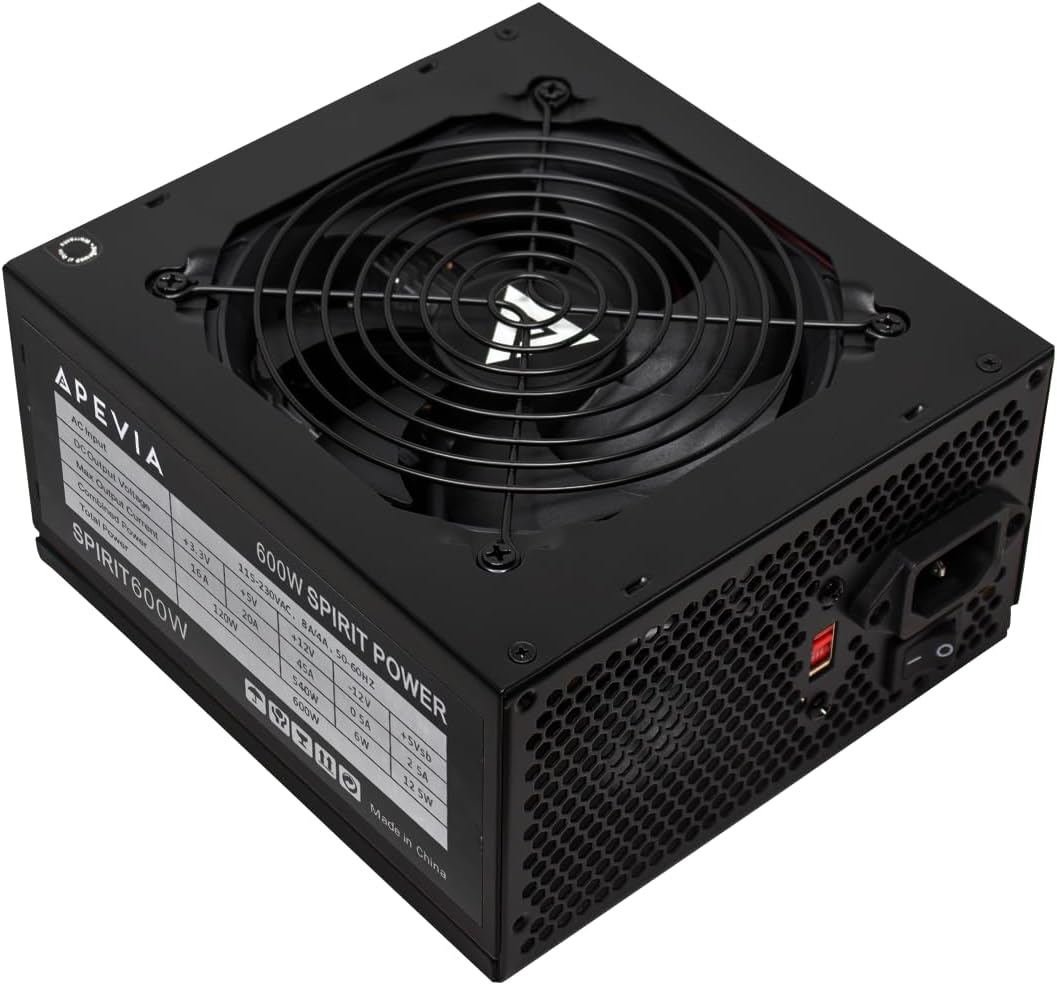
The Apevia SPIRIT600W is a straightforward 600-watt ATX option aimed at budget gaming builds that need more than the bare minimum. Its supplied rating is 4.3, and its most attractive feature is the unusually broad connector list for a budget-focused unit: a 20+4-pin motherboard connector, a splitable 4+4-pin CPU connector, two PCIe 6+2-pin connectors, four SATA connectors, and four Molex connectors.
We may earn a commission when you buy through this link, at no additional cost to you.
Power is concentrated on a single 12-volt output rated at 45 amps, while the remaining outputs provide 16 amps at 3.3 volts, 20 amps at 5 volts, 0.5 amp at negative 12 volts, and 2.5 amps for standby. That arrangement is appropriate for modern gaming hardware because processors and graphics cards draw most of their power through the 12-volt rail. The listed protections cover short circuits, over-current, over-voltage, over-power, under-voltage, and over-temperature conditions.
The trade-off is that the supplied information does not identify an 80 Plus efficiency certification. A modern gaming system also benefits from efficiency because less energy is wasted as heat, but efficiency certification should not be confused with power quality or reliability. The non-modular layout also means unused cables may need to be routed out of sight, and the included 120mm fan uses automatic thermal control rather than a specifically stated zero-speed mode.
This model makes the most sense for a builder who wants a broad set of connections and substantial 600-watt capacity without moving to a premium, fully modular design. It is especially useful for mainstream gaming configurations with one moderately demanding graphics card. Buyers should confirm their case can accommodate the unit and confirm the graphics card's connector requirements before ordering, since the two PCIe connectors are splitable 6+2-pin connectors rather than a modern native 12V-2×6 cable.
The mix of two PCIe 6+2-pin connectors, four SATA connectors, and multiple peripheral plugs gives this unit more flexibility than many entry-level alternatives. The 24-pin and CPU connectors can also be separated into smaller formats when a motherboard does not require the full configuration.
Protection against short circuit, over-current, over-voltage, over-power, under-voltage, and over-temperature events covers the major electrical fault categories identified in the product information. That breadth makes the unit more compelling for buyers who prioritize safeguards over cosmetic cable management.
We may earn a commission when you buy through this link, at no additional cost to you.
The Thermaltake SMART 600W combines useful efficiency, active power factor correction, solid protection features, and a five-year warranty in a conventional budget package. Its supplied rating is 4.5, placing it among the stronger-rated choices in this guide. For a mainstream gaming PC, its 600-watt maximum output should be assessed against the exact processor and graphics card combination rather than chosen solely by wattage.
We may earn a commission when you buy through this link, at no additional cost to you.
The unit is 80 Plus certified and uses active PFC to improve power factor. It complies with Intel ATX 12V 2.31 and EPS 12V 2.92 standards, includes two PCIe 6+2-pin connectors, and provides over-power, over-voltage, and short-circuit protection. The listed 16-millisecond hold-up time, 100-to-500-millisecond power-good signal, and 100,000-hour MTBF are additional specifications that may appeal to buyers who want more detail than a basic wattage figure.
Its limitations reflect the platform's age and budget position. The specifications reference ATX 12V 2.3 and EPS 12V 2.92 rather than the newer ATX 3.1 standard, and no native 12V-2×6 connector is listed. The fixed cable arrangement can also make cable management more involved than with a modular unit, particularly in a glass-sided or compact case.
This is a strong recommendation for a cost-conscious gaming build that does not require a native next-generation GPU cable. It balances efficiency certification, electrical safeguards, and a lengthy warranty more effectively than many similarly positioned options. Buyers should verify that their motherboard's EPS connector and graphics card's PCIe requirements are compatible before finalizing the purchase.
The 80 Plus certification reduces wasted energy at typical loads, while the listed five-year warranty provides a stronger ownership commitment than several alternatives. Together, these details make the SMART 600W a sensible starting point for a gaming system expected to remain in service for several years.
Active power factor correction is a meaningful part of the design because gaming components place a substantial load on the 12-volt output. The stated protections and hold-up behavior give this model a more technical feature set than its conventional exterior might suggest.
We may earn a commission when you buy through this link, at no additional cost to you.
The ARESGAME AGV 500W is aimed at budget gaming systems that can remain within a 500-watt envelope. It carries a supplied rating of 4.4 and stands out for an 80 Plus Bronze efficiency certification, a five-year warranty, and a thermally controlled 120mm fan described as ultra quiet. The listed protections cover over-voltage, under-voltage, over-power, and short-circuit faults.
We may earn a commission when you buy through this link, at no additional cost to you.
Its 500 watts of continuous output makes it most relevant to entry-level and mainstream builds rather than systems combining a high-power processor with a demanding graphics card. The unit is explicitly non-modular, so all supplied cables remain attached. The all-black wiring helps reduce the visual clutter associated with older budget power supplies, although unused leads still need to be managed carefully.
The main limitation is capacity. Even an efficient and well-protected unit cannot exceed the power envelope specified by its manufacturer. Buyers using power-hungry graphics cards should review the hardware's recommendations carefully, while those pairing a modest processor and mainstream GPU may find 500 watts sufficient. The supplied information does not list the precise connector inventory or a native 12V-2×6 option, so those details should also be confirmed.
For a compact, cost-conscious gaming build with clearly modest power requirements, the AGV 500W offers efficiency certification, useful protections, a quiet fan, and a strong warranty in one package. It is less flexible than the 600-, 650-, and 750-watt selections in this guide, but that focused capacity can make it a sensible match for a deliberately balanced build.
The stated 85-percent-or-higher efficiency under typical loads can reduce the amount of energy converted into heat. For a smaller gaming PC, a cooler and more efficient supply may be especially useful where every component has a tight thermal or clearance budget.
A 500-watt rating should be treated as a firm product specification, not an expandable limit. Matching the supply to the combined recommendations of the processor and graphics card prevents a build from exceeding the unit's intended output.
We may earn a commission when you buy through this link, at no additional cost to you.
The MSI MAG A750GL PCIE5 is the most feature-focused selection in this guide and earns the Best Premium distinction. Its supplied rating is 4.6, while its headline specifications include 750 watts of output, 80 Plus Gold efficiency, full modularity, ATX 3.1 and PCIe 5.1 readiness, and a native dual-color 12V-2×6 cable.
We may earn a commission when you buy through this link, at no additional cost to you.
The native graphics power connection is particularly useful for builds using a modern high-power graphics card because it avoids requiring an older adapter arrangement. Full modularity allows builders to leave only the cables needed by their components in the chassis, improving appearance and potentially helping airflow. The 10-year limited warranty is also substantially longer than the warranty periods listed for most of the budget-oriented alternatives.
Despite those advantages, this is not the smallest or simplest power supply in the comparison. Its 750-watt capacity exceeds what many entry-level gaming builds need, and the fully modular design comes with more connector-management options to understand. The provided product details emphasize certification, modularity, platform readiness, and warranty rather than listing the complete output table or connector inventory.
The A750GL PCIE5 is a compelling option for a new gaming PC expected to use a current or future high-power GPU and intended to remain in service for years. It is especially attractive when long warranty coverage and clean cabling matter. Buyers should still verify case dimensions, exact connector requirements, and the complete cable inventory before purchase.
The included dual-color 12V-2×6 connection is designed for modern high-power graphics cards and supports a cleaner installation than an older multi-piece adapter arrangement. It makes this unit particularly relevant for builds that prioritize current platform standards.
A fully modular design lets users connect only the leads their system requires, while the stated 10-year limited warranty offers notable long-term reassurance. These features distinguish the model from otherwise competent fixed-cable budget options.
We may earn a commission when you buy through this link, at no additional cost to you.
The Segotep GN-650 offers a generous 650 watts of output, 80 Plus Gold certification, and four PCIe 6+2-pin connectors. Its supplied rating is 4.6, placing it among the best-rated products in this comparison. The four graphics connectors make it especially appealing for builds involving a power-hungry graphics card or for a system that may include multiple expansion devices.
We may earn a commission when you buy through this link, at no additional cost to you.
A single 12-volt output is designed to concentrate power for modern processor and graphics-card loads. Global voltage adaptation adds another practical consideration for users who may travel or operate a system in different locations. The stated connector count is a clear advantage over the Apevia and Thermaltake 600-watt models, which each list two PCIe 6+2-pin connectors.
The product information contains a contradictory description of the cable design: it calls the unit non-modular but also states that wires can be separated. It is therefore safest not to rely on modularity as a selling point. Buyers should inspect the actual product listing and cable set. The supplied details also do not mention a native 12V-2×6 connector or a specific warranty period.
For a gaming build that needs several conventional PCIe power connections, the GN-650's connector count and 650-watt capacity are the main attractions. It may suit users who prefer established 6+2-pin connections over the newer native cable found on the MSI and ASRock selections. Confirming the actual cable configuration before ordering is especially important given the unclear wording in the product description.
Four PCIe 6+2-pin connectors provide more flexibility for a graphics card with several power inputs or for a system with additional PCI-powered equipment. This is a useful advantage in a high-wattage budget build where avoiding adapter limitations is important.
The combination of 80 Plus Gold certification and a 650-watt ceiling gives mainstream gaming builds useful capacity without moving to a 750-watt model. It occupies a practical middle position for components that need more than 600 watts.
We may earn a commission when you buy through this link, at no additional cost to you.
The ASRock PRO 750G brings modern GPU connectivity to a high-capacity budget-oriented design. Its supplied rating is 4.6, and the key features include 750 watts of output, 80 Plus Gold efficiency, ATX 3.1 and PCIe 5.1 readiness, a native dual-color 12V-2×6 connector, and a 120mm low-noise cooling fan.
We may earn a commission when you buy through this link, at no additional cost to you.
The native 12V-2×6 cable is listed as supporting up to 450 watts of graphics-card power. That makes the unit relevant for current high-performance GPUs that benefit from a direct modern connection. The stated 750-watt capacity also leaves room for a demanding processor and graphics card, while the Gold efficiency certification and large ventilation design support lower waste heat during typical loads.
Its principal disadvantage is the three-year warranty, which is shorter than the five years offered by several competitors and the ten years offered by the MSI MAG A750GL PCIE5. The supplied details do not provide a complete connector inventory, output rail table, modularity classification, or specific protection functions. A buyer should therefore confirm that the required motherboard, SATA, and peripheral connectors are included.
The PRO 750G is a good match for a modern gaming PC with a high-power graphics card that values native 12V-2×6 support and current ATX standards. Its capacity and efficiency are strong, while the low-noise fan and standard ATX format simplify physical planning. The shorter warranty and incomplete connector listing make careful listing review advisable.
The native 12V-2×6 connection can deliver substantial power to compatible graphics cards without relying on a legacy multi-wire adapter. The stated 450-watt delivery capability makes this connection especially relevant to modern high-performance graphics hardware.
Gold efficiency helps limit conversion losses, while the 120mm low-noise fan provides the listed cooling solution. The steel enclosure and ventilation-oriented design make this a sensible choice for users who want modern capacity without a large premium feature set.
We may earn a commission when you buy through this link, at no additional cost to you.
The MSI MAG A650BE has the highest supplied customer rating in the guide at 4.7. It also targets a particularly useful budget category: a compact 650-watt ATX power supply with 80 Plus Bronze efficiency, a semi-modular cable arrangement, active PFC, a low-noise 120mm fan, and a five-year warranty.
We may earn a commission when you buy through this link, at no additional cost to you.
Semi-modularity offers a middle ground between fixed and fully modular designs. The permanently attached cables can support the core components, while detachable leads can help reduce the number of unused cables in the chassis. Its 650-watt capacity is appropriate for many mainstream gaming systems and leaves more headroom than a 500-watt unit without carrying the full 750-watt rating of the premium alternatives.
The listed protections cover over-voltage, over-current, over-power, over-temperature, and short-circuit events. A DC-DC circuit design and active PFC are included, giving the product a more complete electrical feature set than a bare-bones budget unit. However, the supplied data does not mention a native 12V-2×6 connector, so modern graphics cards that specifically require that connection may need another arrangement.
This is a strong choice for a compact mainstream gaming build where 650 watts is appropriate, partial modularity is welcome, and a five-year warranty carries meaningful weight. Its 4.7 supplied rating is encouraging, although ratings should be considered alongside the connector list, efficiency level, and current listing details. Overall, it balances capacity, protection, cooling, and physical size particularly well.
A semi-modular design removes some unused wiring without requiring the user to understand a completely modular connector system. It is a practical middle ground for builders who want a cleaner case without the additional decisions associated with fully modular supplies.
The 650-watt rating and compact format target the space between entry-level and high-end power supplies. It is particularly useful when a build needs more than 500 watts but does not require the additional capacity and native next-generation connection of a 750-watt model.
We may earn a commission when you buy through this link, at no additional cost to you.
The MSI MAG A650BN shares the guide's highest supplied rating of 4.7 and offers a straightforward combination of 650 watts, 80 Plus Bronze efficiency, active PFC, a low-noise fan, and a five-year warranty. Its non-modular cable design makes it a more conventional option than the closely related A650BE.
We may earn a commission when you buy through this link, at no additional cost to you.
The product's strengths are direct and easy to understand. A 650-watt capacity covers a broad range of mainstream gaming combinations, while Bronze efficiency reduces wasted power under typical loads. Active PFC improves the power factor, and the DC-DC circuit design provides modern voltage regulation for the processor. Protection functions include over-voltage, over-current, over-power, over-temperature, and short-circuit handling.
Because every cable is permanently attached, builders cannot remove unused leads at the power supply. In a cramped chassis, this may make routing more difficult and require additional cable-management planning. The supplied information does not identify a native 12V-2×6 cable or provide a full list of peripheral connectors, so compatibility for the newest graphics cards should be confirmed before purchase.
The A650BN is well suited to a builder who values a compact unit, known MSI platform, active PFC, and a five-year warranty but does not need modular cabling. It may be the easier choice for first-time builders because every lead is permanently attached and the stated design focuses on core electrical functions. For users who want to remove unused wires, however, the semi-modular A650BE offers a more flexible approach.
The non-modular approach means the power supply arrives with its full cable set attached. That can simplify cable identification during a first build, although it offers less freedom when fitting the unit into a compact or visually open chassis.
Active PFC and DC-DC voltage regulation form the core of the design, alongside protections for the major listed electrical faults. These features make the model more relevant for modern gaming components than a minimal 500-watt design.
We may earn a commission when you buy through this link, at no additional cost to you.
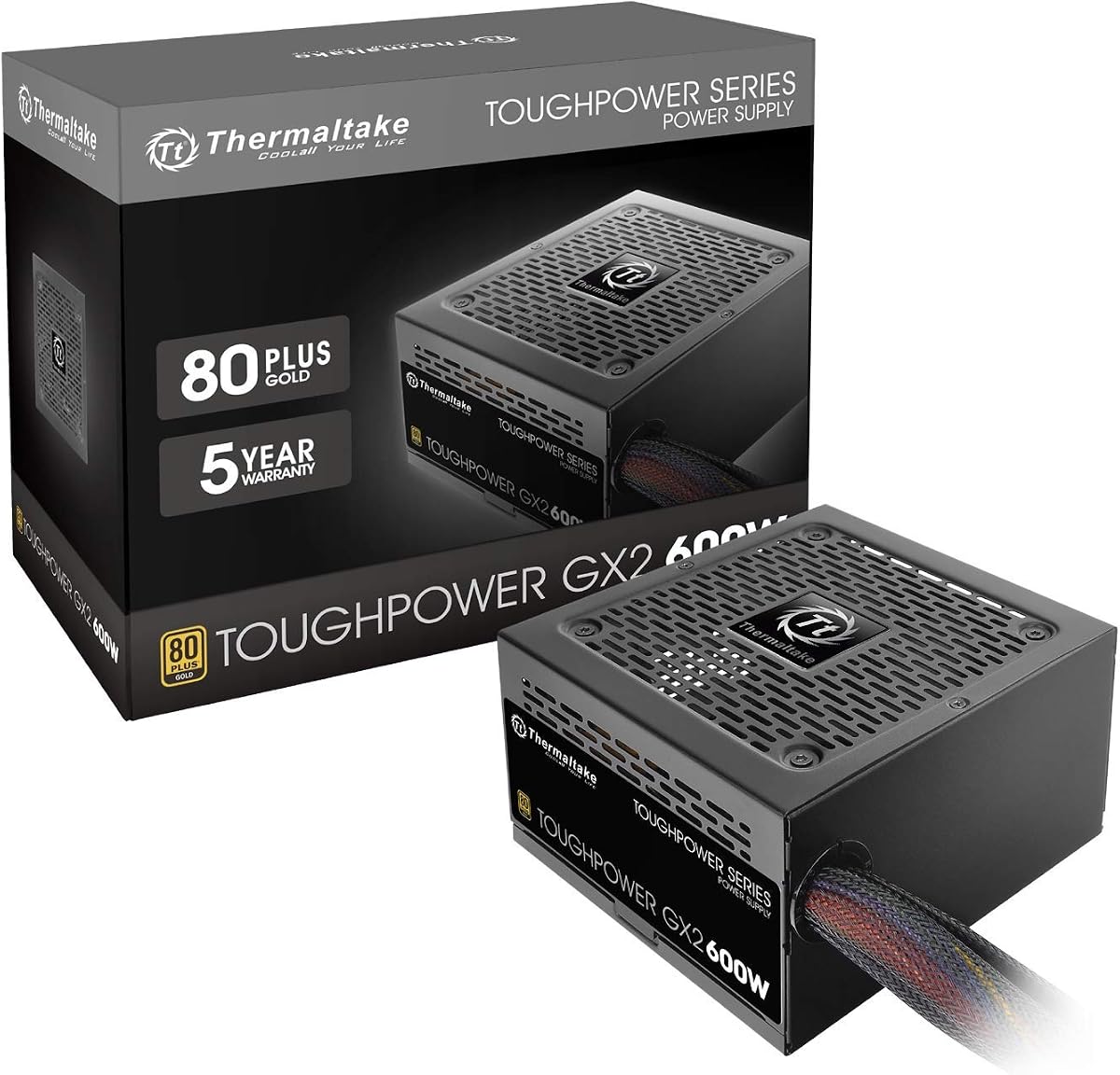
The Thermaltake Toughpower GX2 is a 600-watt continuous ATX 12V V2.4 and EPS V2.92 power supply with 80 Plus Gold certification and a supplied rating of 4.6. It is designed around a single 12-volt rail and is described as ready for SLI and Crossfire configurations, making its two PCIe 6+2-pin connectors particularly relevant for older multi-GPU platforms.
We may earn a commission when you buy through this link, at no additional cost to you.
The fixed cable set includes a 24-pin main connector, one 4+4-pin CPU connector, six SATA connectors, two PCIe 6+2-pin connectors, three peripheral connectors, and one floppy-drive connector. That mix is unusually generous for a 600-watt unit and gives older gaming builds practical support for multiple storage devices. The high-quality capacitor and low-ripple-noise design are intended to support stable operation in performance-sensitive components.
Its dynamic-bearing 120mm fan is described as ultra quiet, while the Gold certification targets efficiency up to 90 percent and compatibility with C6 and C7 power states. Protection functions cover over-power, over-voltage, under-voltage, and short-circuit events. The five-year warranty is another positive, although the fixed cable design and lack of a native 12V-2×6 connection make it less suitable for newer GPU platforms that explicitly require the modern connector.
The Toughpower GX2 is a good fit for a budget gaming PC built around conventional PCIe graphics connectors, especially one that needs numerous SATA or peripheral connections. It is less compelling for a brand-new high-end build centered on the newest graphics hardware. Its strongest advantages remain efficiency, broad connector coverage, low-noise cooling, and lengthy warranty support.
Six SATA connectors are a meaningful advantage for a gaming PC with several drives or expansion devices. Combined with three peripheral plugs, the cable inventory supports a broad range of conventional components without requiring extra adapters.
The stated low-ripple-noise design is intended to support reliable operation in components such as graphics cards. High-quality capacitors, a single 12-volt rail, and C6/C7 state support reinforce the model's focus on stable gaming-system behavior.
We may earn a commission when you buy through this link, at no additional cost to you.
The Rosewill VSB 650W is a compact ATX 3.0 and 3.1-compatible supply with a supplied rating of 4.5. It combines 650 watts of capacity, 80 Plus Bronze efficiency, semi-modular cabling, a native PCIe 5.1 12V-2×6 cable, and a five-year warranty. Its 140-by-150-by-86-millimeter chassis is listed as 35 percent smaller than a conventional full-size design.
We may earn a commission when you buy through this link, at no additional cost to you.
The native 12+4-pin 12V-2×6 cable delivers direct power to compatible modern graphics cards, with the product information stating support for up to 450 watts. The design also lists up to 235 percent power excursion and 300 percent GPU power excursion. A 105-degree Celsius Japanese capacitor and an ICB silent 120mm fan add to the technical feature set, while the steel shell and large vents support cooling.
The protection suite covers over-current, over-power, over-temperature, over-voltage, short-circuit, and under-current events. Semi-modularity offers some freedom to remove unused cables, although it is not as tidy as a fully modular design. The most practical caution involves cable routing: modern 12V-2×6 connectors need enough space to sit without being forced into a tight bend near the graphics card.
This model is an attractive option for a compact gaming build that wants a native modern GPU connection without moving to a 750-watt unit. Its 650-watt rating still requires appropriate component matching, while the 140mm length improves chassis flexibility. Users with a graphics card that permits a 12V-2×6 connection and enough routing space will find its combination of compactness and modern support especially useful.
The native 12V-2×6 connection allows compatible graphics cards to receive direct high-power delivery, while the compact chassis makes fitting the supply into smaller systems easier. These two details make the VSB 650W relevant to compact, modern gaming builds.
A native connector does not remove the need for proper cable routing. The graphics card and power supply should be positioned so the 12V-2×6 cable can connect without a sharp bend, protecting both the plug and the installed system.
We may earn a commission when you buy through this link, at no additional cost to you.
Choosing a gaming PC power supply requires balancing output capacity, efficiency, connector availability, electrical protections, physical size, and expected service life. The following factors help narrow the field before comparing models by wattage alone.
Start with the power recommendations supplied for the processor and graphics card, then add expected power for the motherboard, memory, storage devices, fans, and accessories. The power supply should comfortably cover that combined figure rather than sit at a theoretical maximum. A unit with more capacity than the current components need also provides room for future upgrades and can reduce the likelihood of operating constantly near its ceiling.
An 80 Plus certification indicates that a power supply converts more incoming energy into useful DC power under standardized load points. Bronze, Gold, and other certification levels differ in efficiency, and lower conversion losses mean less waste heat. Efficiency is especially relevant in a compact gaming PC with limited airflow, although it should be evaluated alongside protections, warranty, and connector quality rather than used as the only selection criterion.
Every gaming build should begin with the graphics card's required power connection. Traditional graphics cards commonly use PCIe 6+2-pin plugs, while newer high-power models may specify a native 12V-2×6 connection. Check the power supply's cable inventory, the graphics card's requirements, and whether an adapter is permitted. The count of connectors also matters: two 6+2-pin connectors may be enough for one card, while four provide more flexibility.
A non-modular power supply keeps every cable attached. This is simple and dependable, but unused leads can obstruct airflow or create visual clutter. Semi-modular units attach essential cables while allowing selected cables to be removed, and fully modular units let the user connect only what is needed. Whichever design is chosen, cable routing must not place sharp bends next to power plugs, and added modular adapters should not be used to create a native connection.
Short-circuit, over-current, over-voltage, under-voltage, over-power, over-temperature, and under-current protection can help prevent damage when a fault occurs. The level of coverage varies across the ten models, with the Apevia listing six protection types and the Rosewill listing six as well. A good choice should include protection for the major failure modes relevant to a high-load gaming system.
A thermally controlled 120mm fan is common across this category, but fan behavior is not identical in every design. Some models are described as ultra quiet, low noise, or silent, while others specify a dynamic-bearing or ICB fan. Evaluate these claims alongside the unit's efficiency and ventilation because a quiet label alone does not indicate cooling performance. Good airflow around the intake and exhaust openings remains important after installation.
Warranty length provides a useful indication of manufacturer support and can differentiate otherwise similar products. Listed coverage ranges from three years on the ASRock PRO 750G to ten years on the MSI MAG A750GL PCIE5, with several five-year options between them. Platform standards also matter: ATX 3.0, ATX 3.1, PCIe 5.1, EPS 12V versions, and native 12V-2×6 support can affect compatibility with newer components.
ATX describes the power supply form factor, but it does not guarantee clearance in every chassis. Check the dimensions, especially for the compact Rosewill VSB 650W, and consider the space needed for cable bends and connectors. Confirm that the motherboard uses a compatible 24-pin or 20+4-pin arrangement, the processor supports the available EPS connector, and every drive and cooling fan has a matching power lead.
Before installation, switch off the computer, disconnect the wall power cord, and allow adequate time for the system to discharge. Read the power supply's instructions, identify each connector, and compare the labels on the motherboard, processor, graphics card, drives, and cooling devices with the available leads. Never rely on shape alone when the same connector family can serve different voltages.
Install the unit in accordance with the case design, using the appropriate mounting screws or supplied hardware. Connect the motherboard and processor power leads with the cables fully seated, then attach the graphics card using its specified connection. Route cables away from fans and sharp case edges. If using a 12V-2×6 connection, leave enough room for the plug to enter without requiring a tight bend.
After connecting the power cord, verify that all required cables are attached because these units may not switch on with only the wall cord connected. Keep intake and exhaust paths clear, avoid placing the power supply beneath a cable pile, and periodically check for unusual noise, discoloration, loose plugs, or visible dust. Electrical components should be opened only by a qualified technician, and any fault should be investigated before the unit is used again.
The correct wattage depends on the processor and graphics card, not on the general label of the build. Add the recommendations for both major components to estimates for the motherboard, memory, drives, fans, and accessories. A 500-watt model may suit a modest system, while 600 or 650 watts provides more breathing room, and 750 watts is useful for a high-power CPU and GPU combination.
A 600-watt supply can be enough for many mainstream gaming builds when the graphics card and processor are appropriately matched. It becomes less suitable as the combined hardware demand rises, particularly with a high-power processor and demanding graphics card. Always compare the unit's continuous output and connectors with the hardware manufacturers' recommendations before choosing.
Modularity is useful when case space, airflow, or appearance is a priority. Non-modular units are simpler because every cable is attached, while semi-modular designs remove selected leads and fully modular units allow only the needed cables to be connected. Modularity does not increase wattage or determine efficiency, so it should be considered alongside compatibility and protections.
A native 12V-2×6 connection is most relevant when the graphics card explicitly uses or recommends that connector. Older and midrange cards commonly rely on PCIe 6+2-pin connections, so a suitable conventional lead may be all that is needed. Check the graphics card requirements before buying, and do not force a modular plug or adapter into an incompatible socket.
80 Plus certification primarily describes efficiency under standardized load conditions. It can reduce waste heat and operating costs, but it is not by itself a complete measure of reliability. Buyers should also consider protections, component quality, warranty coverage, electrical design, and the manufacturer's support for the model.
Useful headroom means the combined estimated system load remains comfortably below the unit's continuous maximum, leaving room for efficiency changes, transient demand, and future components. The amount of extra capacity required varies by hardware, so it is better to follow component guidance and preserve some margin than to target the absolute maximum stated for the power supply.
Only if its physical dimensions, mounting pattern, and connector requirements fit the chassis and components. Some compact units use standard ATX dimensions, while others may be shorter, and a smaller enclosure may still restrict access to plugs or cable bends. Measure the available space and account for the connections before installation.
A power supply generally will not start until the motherboard power connection is properly seated and the system is triggered by the case's power switch. Check the wall connection, the 24-pin motherboard lead, and the processor power lead, then confirm that the power switch and case front-panel wiring are connected correctly. Troubleshooting should continue with the manufacturer's instructions rather than repeatedly plugging and unplugging the unit.
The Apevia SPIRIT600W stands out as a flexible budget option with 600 watts, two PCIe 6+2-pin connectors, and a broad protection suite. The Thermaltake SMART 600W adds 80 Plus efficiency, active PFC, and a five-year warranty, while the MSI MAG A750GL PCIE5 represents the premium choice with full modularity, a native 12V-2×6 cable, current platform standards, and a 10-year warranty.
Prioritize capacity that comfortably covers the complete system, followed by the exact graphics-card connection and recognized efficiency certification. Cable modularity, fan behavior, protection coverage, case clearance, and warranty can then distinguish models that otherwise meet the core requirements. Avoid choosing by wattage alone, because connector compatibility and electrical safeguards are equally important in a gaming system.
Ratings, availability, and prices can change, so check the current Amazon listing and product documentation before ordering. Confirm the supplied connectors, output rating, case dimensions, and warranty terms against the build's requirements. With those details checked, one of these ten models can provide a practical foundation for a budget gaming PC without paying for unnecessary capacity.
