
DTECH DB9 to RJ45 Serial Adapter RS232 Female to RJ-45 Female
4.5Editor score
Passive RS232 signal extension
DB9 female to RJ45 female
Supports cables up to 65 feet
This RS232 to RJ45 Converter guide compares ten options for serial extension, Ethernet conversion, device compatibility, distance, installation, and network
RS232 to RJ45 converters make it easier to connect legacy serial equipment through familiar Ethernet cabling, but the right unit depends on whether you only need a passive extension or an active Ethernet gateway. Connector gender, signal type, supported distance, and network functions should be considered before making a choice.
The products in this guide were compared using their stated specifications, including interface gender, serial or network capabilities, supported cable types, device compatibility, distance claims, protection features, and installation requirements. The list covers passive couplers, powered protocol converters, USB-to-serial models, and dual-port industrial gateways.
Each review highlights the strongest application for the product and also explains important limitations. Ratings and technical details reflect the supplied product information, while pricing and availability can change, so readers should confirm current listings and verify their equipment's connector and wiring requirements before purchasing.
4.5Editor score
4.7Editor score

4.7Editor score
The table below compares all ten products by connector arrangement, conversion type, cable reach, and key installation features, making it easier to distinguish simple serial extenders from active Ethernet and protocol gateways.



The DTECH DB9 to RJ45 Serial Adapter is a straightforward passive coupler for extending RS232 signals over ordinary network cable. It carries a 4.5 rating and its most useful feature is the female DB9-to-female RJ45 arrangement, which allows a serial-equipped computer or controller to connect through an Ethernet cable to another compatible serial endpoint.
We may earn a commission when you buy through this link, at no additional cost to you.
The stated wiring runs one-to-one through the eight active conductors, while the ninth DB9 contact is not connected. A pair of compatible couplers can extend serial communications up to 65 feet, and the design supports bidirectional data transfer. Because it works with inexpensive Cat5 or Cat6 cable, it can replace a bulky dedicated serial extension cable when suitable network wiring is already available.
This is important to distinguish from a true Ethernet converter. The adapter carries RS232 serial signals and does not turn the RJ45 connection into a network link, nor does it provide IP connectivity. Users must have suitable equipment at both ends and should confirm the device's pin configuration before assuming every serial device will work.
It is a strong choice for a simple point-to-point serial extension involving printers, modems, routers, POS equipment, barcode scanners, or supported nine-pin D-sub devices. The thumbscrews help keep the DB9 connection secure, while the passive design avoids power and configuration requirements. It is best for users who need a reliable, inexpensive cable adapter rather than a network gateway.
The adapter can use installed Cat5 or Cat6 runs to carry RS232 signals across a room or installation area. This is useful when rerunning a dedicated serial cable would be inconvenient, provided the cable length and signal conditions remain within the stated limit.
The listing identifies standard nine-pin RS232 devices as compatible examples, including laptops, printers, modems, POS terminals, and barcode scanners. Connector shape alone does not guarantee compatibility, so software settings and the opposite-end wiring should also be verified.
We may earn a commission when you buy through this link, at no additional cost to you.
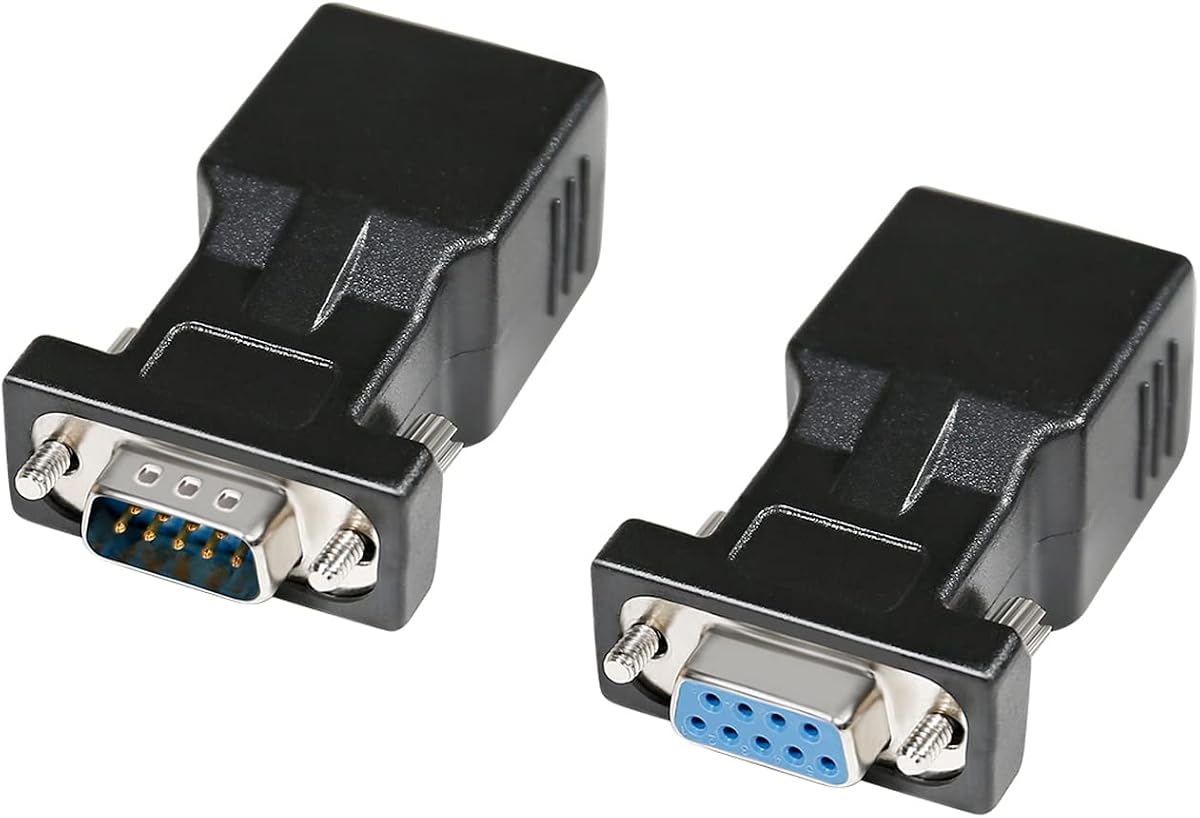
This DTECH set is the most complete passive option because it includes one DB9 male-to-RJ45 female adapter and one DB9 female-to-RJ45 female adapter. Its 4.7 rating reflects a well-received package that already contains both connector arrangements commonly needed for a point-to-point RS232 extension.
We may earn a commission when you buy through this link, at no additional cost to you.
The pair can carry bidirectional serial data over Cat5 or Cat6 cable for distances up to 65 feet, or 20 meters as stated in the product information. It is compatible with a broad selection of nine-pin serial equipment, including desktop computers, terminals, industrial CNC machines, PDAs, POS terminals, barcode scanners, printers, modems, scales, and routers.
The principal limitation is that this remains a serial-over-cable adapter, not an IP network converter. It does not assign an IP address, communicate through a router, or turn the RJ45 socket into a conventional Ethernet interface. Users should also note that it is designed for nine-pin RS232 connections and is not a DB15 VGA adapter.
This set is an excellent general recommendation for technicians who want a ready-made passive solution rather than separate couplers. The included male and female pieces reduce connector-matching uncertainty, the thumbscrews improve physical security, and no power supply or software configuration is required. It suits legacy equipment, industrial controls, and service installations where the goal is extending a serial link rather than networking it.
Including both DB9 genders removes the need to determine whether a male or female serial port must be accommodated. For a typical extension, one adapter sits at each end of the Ethernet cable and the included thumbscrews help maintain secure connections.
The stated device range includes industrial, retail, and office equipment. Compatibility still depends on correct RS232 levels, software configuration, and the availability of a nine-pin port on every device involved in the link.
We may earn a commission when you buy through this link, at no additional cost to you.
The DB9 RS232 to RJ45 Extender is a compact option for transporting serial signals over network-style cable, with a stated rating of 4.6. Its primary interface is DB9 male to RJ45 female, and the product information says it can be used alone or as part of a matched set for different gender arrangements.
We may earn a commission when you buy through this link, at no additional cost to you.
Its features include no required external power and support for bidirectional transparent transmission. The listing refers to serial and network data functions, but the product remains an adapter whose practical role depends on the equipment connected at each end. It can bridge a gap between legacy serial devices using Cat5 or Cat6 wiring.
The distance description is not perfectly consistent. One statement gives a maximum of approximately 66 feet, another recommends use within 1–15 meters, and a further line mentions runs up to 100 meters. Because the claims differ, the more conservative 66-foot range is the safer basis for planning, along with careful attention to cable quality and interference.
This extender is attractive when a powered gateway would be excessive and the goal is merely to move an RS232 connection. It may suit computer desktops, machine tools, PDAs, barcode equipment, and other compatible nine-pin devices. Users should confirm whether their installation requires a specific male-to-male, male-to-female, or female-to-female combination before ordering.
Because the adapter does not require external power, it can be installed quickly with a network cable and compatible serial endpoints. This reduces cable clutter compared with long dedicated serial leads, although it does not provide configuration controls.
The product can accommodate female-to-female, male-to-female, or male-to-male arrangements when used in appropriate pairs. This flexibility is valuable in service inventories, but each endpoint should be checked before installation to avoid mismatched wiring.
We may earn a commission when you buy through this link, at no additional cost to you.
The DTECH male-to-female adapter offers a simple passive way to connect a nine-pin male serial port through an RJ45 network cable. It has a 4.2 rating and mirrors the straightforward design of the female-to-female version in the same product family.
We may earn a commission when you buy through this link, at no additional cost to you.
Its straight-through mapping connects conductors one through eight, with the ninth DB9 pin unused. A suitable pair can extend RS232 signals up to 65 feet over Cat5 or Cat6 cable. The product is bi-directional and includes thumbscrews for a secure connection to compatible equipment.
As with the other passive adapters, the word Ethernet in the product title should not be taken to mean that the device becomes a network adapter. There is no IP address, Ethernet protocol support, or electrical conversion into a network interface. It simply places the serial signal conductors into a standard RJ45 cable format.
This model is best for installations that specifically need a DB9 male end and can pair it with a compatible female-to-female or other appropriate adapter at the other end. It suits users extending connections to supported printers, POS terminals, barcode scanners, modems, routers, and industrial equipment without wanting a powered unit.
The one-to-one conductor mapping makes the arrangement conceptually straightforward for installers familiar with RJ45 terminations. The cable is still carrying serial signals, so the RJ45 plug should be treated as part of a dedicated point-to-point run rather than connected to a network switch.
Thumbscrews help resist accidental disconnection of the DB9 connection, which can be useful in equipment rooms and industrial installations. They do not compensate for an incompatible gender or incorrect signal configuration at the far endpoint.
We may earn a commission when you buy through this link, at no additional cost to you.
This ten-piece set is a practical choice for installers, maintenance teams, or organizations that need several female DB9-to-female RJ45 adapters. It carries a 4.8 rating and stands out from single-adapter options because it provides a spare inventory for multiple RS232 extension points.
We may earn a commission when you buy through this link, at no additional cost to you.
The adapters transmit signals over CAT5, CAT5E, and CAT5 network cable, with a stated range of up to 100 feet. Their documentation identifies the RJ45 color assignments and all nine DB9 signals, including carrier detect, received data, transmitted data, data-terminal-ready, ground, data-set-ready, request-to-send, clear-to-send, and ring indicator.
The package is entirely female-to-female, so it will not directly match a DB9 male port without another suitable coupler. It is also a passive extension product rather than an Ethernet protocol converter. The stated 100-foot range is longer than the common 65-foot figure used by several competing products, but real results depend on cable quality, baud rate, grounding, and the surrounding installation.
For technicians who routinely service serial equipment, the multi-pack may offer better availability and convenience than ordering individual adapters. Its documented pinout is particularly useful for troubleshooting. It is less compelling for a single household link, where a mixed-gender set may be more convenient.
Keeping multiple identical couplers on hand helps when diagnosing a failed connection or installing additional serial runs. A technician can replace a suspect adapter without taking an operational system offline for long.
The clearly listed RJ45 conductor colors and DB9 signal names make it easier to compare a suspected adapter with a known-good cable. Documentation does not replace testing, but it can help identify reversed, open, or incorrectly terminated conductors.
We may earn a commission when you buy through this link, at no additional cost to you.
The USR-TCP232-302 is fundamentally different from the passive DB9 couplers. It is an active serial server that provides bidirectional transparent transmission between an RS232 device and Ethernet, with a listed rating of 4.0. Its compact format and integrated TCP/IP functionality suit applications that need remote or network-based access.
We may earn a commission when you buy through this link, at no additional cost to you.
The converter supports DHCP for automatic address assignment, DNS functionality, web-page parameter setup, and firmware upgrades over the network. Its RJ45 port operates at 10 or 100 Mbps, while the serial side supports rates from 600 bps to 230.4 Kbps with several parity settings. TCP Server, TCP Client, UDP Client, UDP Server, and HTTPD Client work modes broaden its usefulness.
A virtual serial port and the associated USR-VCOM software are also supported. The device can operate across local networks or, with suitable addressing and configuration, over external networks. That capability comes with added setup demands: administrators must consider firewalls, routing, addressing, operating mode, and connection behavior rather than merely plugging in a cable.
This is the right product when the goal is true Ethernet conversion instead of a serial extension. It is suited to remote monitoring, control, or collection from legacy serial equipment, but it is overkill for a simple printer cable or short point-to-point link. Its network features make it a better fit for administrators and integrators than for casual users.
Unlike a passive coupler, this module actually communicates over IP. The serial data can be transported through a LAN or, when configured and secured appropriately, across a wider network, making remote access possible without running a dedicated RS232 cable.
TCP and UDP client or server modes support different connection structures, while HTTPD Client mode serves specialized communication needs. A heartbeat mechanism helps identify dead links, and user-defined registration packets can provide custom connection headers.
We may earn a commission when you buy through this link, at no additional cost to you.
The DTECH active RS232 to RS485 and RS422 converter is the strongest premium selection for protected industrial protocol conversion. It has a 4.7 rating and offers more than a passive cable adapter by actively changing the electrical interface and adding protection features.
We may earn a commission when you buy through this link, at no additional cost to you.
The unit can drive either a terminal block or an RJ45-connected RS485 or RS422 link. It supports two-wire half-duplex RS485 and four-wire full-duplex RS422, including point-to-point and point-to-multipoint networks of up to 32 protocol devices. Automatic baud-rate detection is listed at speeds up to 115200 bps, simplifying setup when the source rate is automatically recognized.
Protection is a major differentiator. The RS485 and RS422 link is stated to include 600W lightning-surge protection, while the RS232 side has 15KV static protection. The converter also includes collision-control behavior, TX and RX indicators, and a 110/240V AC to 9V DC power supply. These qualities make it more appropriate for industrial environments than a bare passive coupler.
The terminology needs care: although RJ45 is used for the serial-side connection, this unit is not primarily an RS232-to-Ethernet gateway. It converts RS232 into RS485 or RS422. It is an excellent choice for extending or networking industrial equipment over longer serial infrastructure, particularly when surge resistance and active protocol conversion are priorities.
The stated 600W surge protection on the RS485 or RS422 side and 15KV static protection on RS232 add safeguards absent from most simple adapters. They reduce vulnerability to transient events, although proper grounding and cable routing remain essential parts of any reliable installation.
Two-wire half-duplex RS485 and four-wire full-duplex RS422 support different field-bus layouts. The listed capacity for up to 32 protocol devices makes the converter useful for distributed industrial systems, subject to device addressing, termination, and protocol requirements.
We may earn a commission when you buy through this link, at no additional cost to you.
The LINOVISION dual-port gateway is built for projects that connect existing serial devices to Ethernet while supporting Modbus communication. Its 4.1 rating reflects a specialized industrial feature set rather than the simplicity of a passive DB9 adapter.
We may earn a commission when you buy through this link, at no additional cost to you.
Both RS232 and RS485 can be integrated with Ethernet for remote monitoring and control. The gateway provides Modbus RTU-to-TCP conversion and supports multi-host polling for as many as 16 hosts. Its stated use cases include POS systems, agricultural sensors, PLCs, and medical devices, all of which benefit from remote visibility and centralized control.
The enclosure is wall or rail mountable, has IP30 protection, and is rated for a wide operating range from minus 40 to 185 degrees Fahrenheit. A free cloud service supports up to 30 managed devices on the Linovision AIoT RemoteMonit platform, with broader service requirements handled separately.
This gateway is best for installers who need more than serial extension and want Ethernet access without replacing legacy Modbus equipment. It is less appropriate for a direct DB9-to-DB9 connection, because it is an active dual-interface gateway requiring network configuration. Its strengths lie in industrial integration, remote management, and Modbus translation.
Existing RS232 or RS485 devices can communicate with Modbus TCP systems through the gateway, reducing the need to replace field equipment. The conversion is particularly relevant where supervisory software expects TCP while instruments continue using serial Modbus RTU.
Wall and rail mounting options simplify incorporation into control cabinets, while the wide stated temperature range supports varied operating conditions. IP30 indicates protection against solid objects larger than 2.5 millimeters but does not make the unit weatherproof.
We may earn a commission when you buy through this link, at no additional cost to you.
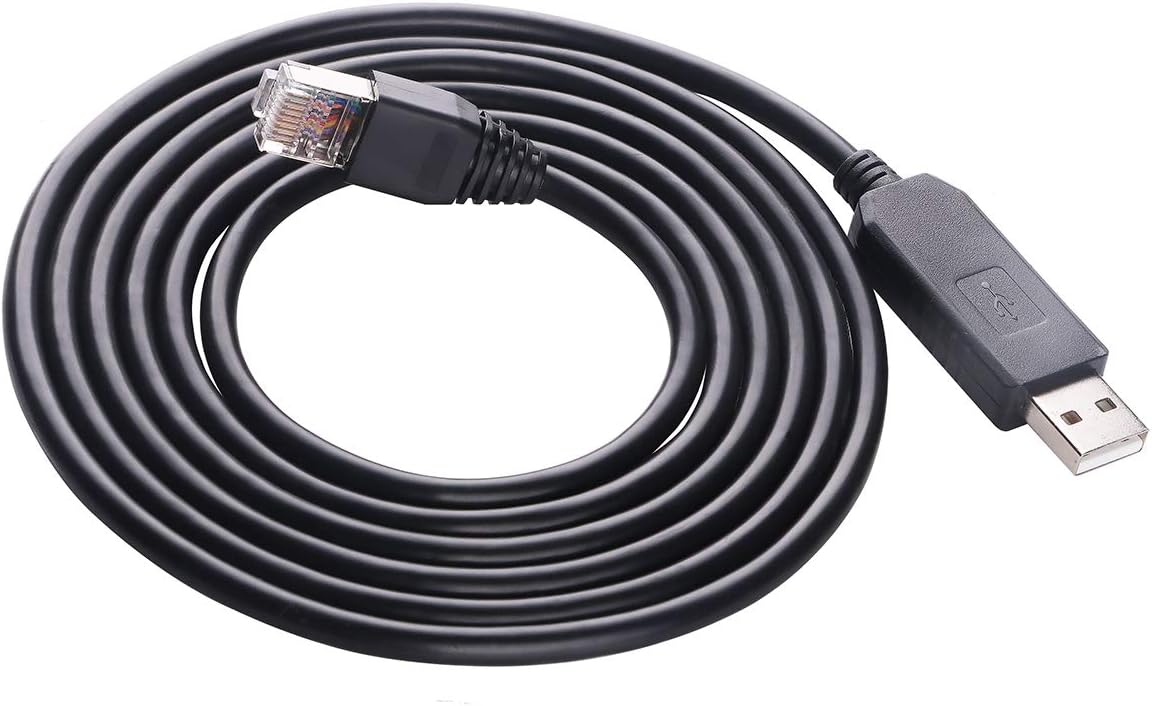
This FT231XS cable is a specialized USB-to-RJ45 RS232 solution for the Voltronic EG4 6000EX and 6500EX inverter families. It has a 4.6 rating and is not a general-purpose passive DB9 adapter; the computer connects through USB while the equipment side uses an RJ45-style RS232 interface.
We may earn a commission when you buy through this link, at no additional cost to you.
The six-foot, or 180-centimeter, integrated cable is designed to connect a PC's USB port to the compatible device. Its FT231XS basis provides compatibility with FTDI virtual COM port drivers, allowing supported software to recognize the connection as a serial port. The listing also names other compatible inverter models and applications.
A driver may need to be downloaded and installed from the FTDI official website. Users should also configure the appropriate COM port, baud rate, and parity settings in their monitoring or inverter software. The product is therefore convenient for a supported hardware combination but less versatile than a general DB9-to-RJ45 coupler.
It is best for technicians whose equipment is specifically listed as compatible and who want a direct cable rather than a separate USB adapter plus Ethernet patch lead. For other RS232 equipment, confirm the device's connector, voltage levels, and communication requirements before assuming this specialized cable will work.
The USB end connects to a computer, while the RJ45 end connects to a compatible inverter's RS232 port. This integrated arrangement reduces the number of separate adapters needed for the stated equipment combinations.
The FT231XS chip lets compatible applications use a virtual COM port rather than treating the connection as standard Ethernet. Installing the current FTDI VCP driver and selecting the correct serial settings allows monitoring software to communicate with the device.
We may earn a commission when you buy through this link, at no additional cost to you.
The two-piece DB9 male-and-female adapter kit is a convenient passive solution for extending RS232 signals over Cat5e or Cat6 cable. Its 5.0 is the highest listed rating in the group, and the package includes the two genders required for a common point-to-point extension arrangement.
We may earn a commission when you buy through this link, at no additional cost to you.
The adapters support bidirectional transmission, use screws for secure DB9 attachment, and feature molded strain relief for durability. Nickel-plated, oxygen-free copper contacts are used in the stated construction, with the intention of reducing crosstalk and suppressing noise. The maximum stated RS232 extension distance is 65 feet.
This product should not be confused with a console adapter or a true Ethernet converter. It extends serial data through RJ45 cable, and the listing explicitly says the male and female pieces need to be used together. The mention of TCP/IP interfaces describes the type of physical arrangement in some contexts, not an IP networking function supplied by the passive hardware.
The kit is well suited to users who want an immediate two-end solution without separately sourcing adapters. It works with compatible nine-pin devices such as laptops, PDAs, computers, projectors, routers, monitors, televisions, barcode printers, and POS equipment. Verify the actual port type, signal levels, and software settings before installation.
The included male and female adapters eliminate the need to match two unrelated coupler types. Install one at each end of the network cable and confirm that the serial equipment uses a compatible nine-pin connection and settings.
Molded strain relief helps protect the cable entry, while grip treads assist with repeated plugging and removal. Secure screws help maintain the DB9 connection, which is especially useful where vibration or frequent maintenance could loosen an unsecured plug.
We may earn a commission when you buy through this link, at no additional cost to you.
The correct converter depends first on the required function: extending a serial signal, converting RS232 to Ethernet, changing RS232 to RS485 or RS422, or presenting a USB connection. Connector gender, cable length, protocol details, power requirements, and environmental protection then narrow the field.
A passive DB9-to-RJ45 adapter does not convert RS232 into Ethernet or another serial electrical standard. It simply places RS232 signals onto the conductors of an RJ45 cable. If the goal is network access, select an active serial-to-Ethernet gateway such as the USR-TCP232-302 or the LINOVISION dual-port unit. If the goal is an industrial bus change, the DTECH RS232-to-RS485/RS422 converter is more relevant.
Choose a passive adapter only when both endpoints already communicate through RS232 and you simply need a different physical cable. Choose an active gateway when remote access, IP addressing, TCP, UDP, or Modbus translation is required.
DB9 ports may be male or female, and the correct adapter must physically match the connector on each piece of equipment. A female-to-female adapter works with two female DB9 ports, while male-to-female units are useful when one endpoint has a male port. Some extension needs also require a male-to-male arrangement.
Match every connector before ordering, and remember that both ends of a complete link must be accounted for. Buying the listed mixed-gender set is often easier than trying to determine which individual coupler combination an existing installation requires.
Most passive products in this list state a reach of approximately 65 feet, while one multi-pack claims up to 100 feet and the DB9 extender includes conflicting figures. Cable length is only one part of the equation: a high baud rate, noisy environment, poor grounding, or inferior cable can reduce practical reliability.
Use the shortest cable that meets the installation need and prefer the most conservative published distance. Confirm the equipment's baud rate and select an active converter that explicitly supports it, particularly for industrial or long-distance links.
Passive adapters require no external power and usually expose no configuration controls. They are inexpensive, compact, and suitable for dedicated point-to-point extensions. Active converters add power, signal conversion, status indicators, protection, or network intelligence, making them more versatile but more complex to configure.
Passive hardware is usually sufficient for a short extension between two compatible serial devices. Choose an active model when protocol translation, electrical protection, Ethernet connectivity, or remote management is needed.
The passive products generally identify Cat5, Cat5E, or Cat6 as suitable cabling, but that does not mean they should be plugged into a network switch. The RJ45 connection carries serial signals and may use a different pin arrangement or reduced eight-conductor mapping from standard Ethernet.
Check the adapter's documented pinout and confirm the opposite end uses the same wiring. If the device and cabling are already installed, test continuity and signal integrity before relying on a long run.
RS232, RS485, and RS422 differ in electrical behavior, topology, directionality, and distance characteristics. A converter that mentions RS485 may support two-wire half-duplex networks, while RS422 generally uses four-wire full-duplex arrangements. Modbus RTU devices may also require gateway functionality that a basic serial coupler cannot provide.
Confirm whether the equipment uses RS232, RS485, RS422, or Modbus and whether the application needs point-to-point, multidrop, or Ethernet-connected operation. Do not select a converter solely because it has an RJ45 socket.
Long cable runs and industrial installations are more exposed to surge events, static discharge, and electrical interference. The active DTECH RS232-to-RS485/RS422 model states 600W surge protection for its field-bus side and 15KV static protection for RS232. The LINOVISION gateway offers wall and rail mounting, IP30 protection, and a wide operating temperature range.
For office use, a simple passive adapter may be sufficient. For machinery, outdoor-adjacent cabinets, or electrically noisy sites, prioritize grounded installation, appropriate protection, and a suitable enclosure rating.
Active Ethernet converters may support DHCP, DNS, TCP Server, TCP Client, UDP Server, UDP Client, HTTPD Client, virtual serial ports, heartbeat packets, and browser-based configuration. The USR-TCP232-302 offers the broadest explicitly listed operating-mode set, while the LINOVISION model centers on Modbus RTU-to-TCP conversion and remote monitoring.
Select only the network capabilities the installation will actually use. Account for firewall rules, routing, operating mode, addressing, and remote-access security rather than assuming a gateway automatically makes a serial device safely reachable over the internet.
Before installation, identify the connector gender and signal type at both ends. For a passive extension, check the adapter's pin documentation, connect the appropriate DB9 coupler to each device, and route Cat5 or Cat6 cable through a suitable RJ45 female coupler. For an active gateway, complete the serial connection first and then configure its network, baud rate, parity, and operating mode before connecting it to a live network.
Secure all DB9 thumbscrews or screws and avoid placing unnecessary strain on the cable entry. Passive serial signals should not be routed through ordinary Ethernet switches, and an RS485 or RS422 field-bus installation may require correct grounding, termination, and separation from noisy power wiring. Active units should be connected to their specified power supply in accordance with the manufacturer's instructions.
For regular use, test the link with the intended equipment and a conservative cable length, then monitor data transfer and error reporting. Keep connectors dry, clean, and free from dust, avoid repeated twisting at the RJ45 plug, and replace adapters if the plug, contacts, or housing becomes damaged. Update gateway firmware and virtual COM drivers when appropriate, and do not change network settings without recording the current configuration.
No. Most products in this roundup are passive adapters that carry RS232 signals over RJ45-style cable without creating an IP network connection. Only active gateways such as the USR-TCP232-302 and the LINOVISION converter provide genuine serial-to-Ethernet functionality. Always check whether the product specifies a network address, TCP or UDP support, or protocol conversion.
Most passive adapters in the list state approximately 65 feet, while the ten-piece set claims up to 100 feet and the DB9 extender lists differing values. Actual performance also depends on baud rate, cable quality, interference, and grounding. For dependable results, use the shortest practical run and follow the more conservative limit stated for the specific product.
Generally, no. A passive DB9-to-RJ45 adapter carries serial signals and may use a wiring scheme that differs from standard Ethernet. It normally belongs in a point-to-point connection through a compatible coupler at the far end. An active serial server is the appropriate device when the serial equipment must communicate through an Ethernet network.
Choose the gender that physically matches the DB9 port on each endpoint. Two female serial ports require a female-to-female pair, while a male port and female port require a male-to-female arrangement. A mixed-gender set is often the easiest option because it includes both types and can cover more installation configurations.
Passive adapters in this guide do not require external power. Active converters do need an appropriate supply because they perform protocol conversion, electrical protection, or network communication. The DTECH active RS232-to-RS485/RS422 model includes a compatible power supply, while the serial servers and Modbus gateways have their own power requirements.
That depends on the product. A simple passive DB9-to-RJ45 coupler is designed only for compatible RS232 equipment. The DTECH active converter accepts RS232 on one side and converts it to RS485 or RS422, while the LINOVISION gateway includes both RS232 and RS485 Ethernet-facing options. Confirm the exact ports and supported direction before selecting either type.
The required software depends on the device. The USR-TCP232-302 supports browser-based configuration and includes virtual serial-port software, while the LINOVISION gateway supports Modbus and remote-monitoring services. The FT231XS cable also needs the FTDI VCP driver if it is not recognized automatically. Passive couplers generally require no additional software beyond the program controlling the serial equipment.
First verify that both devices use the expected connector, signal standard, baud rate, parity, and data bits. Check the adapter's pin mapping, inspect the cable for damaged contacts, and confirm that passive adapters are not connected to an Ethernet switch. Active gateways should be checked for a valid IP address, correct work mode, firewall permissions, and a matching virtual COM port.
The DTECH male-and-female adapter set is the most versatile passive choice for straightforward RS232 extension, while the female-to-female model offers a lower-cost single-coupler option. The ten-piece set stands out for multi-site maintenance, and the USR-TCP232-302 or LINOVISION gateway is the appropriate direction when genuine Ethernet connectivity or Modbus conversion is required.
Prioritize function before connector convenience. Confirm whether you need a passive extension, an active Ethernet gateway, an RS485 or RS422 converter, or a USB-to-serial cable for a specifically supported device. Then match gender, cable reach, pinout, baud rate, environmental conditions, and power requirements to the installation.
Current prices, ratings, and availability can change, so check the latest listing and product details before purchasing. Confirm the official pinout, installation instructions, and compatibility with your equipment, and retain a tested compatible coupler or gateway as a service backup for critical serial installations.