
HYTE Y70 Touch Infinite
4.7Editor score
Integrated 2.5K touchscreen
Dual-chamber panoramic design
Vertical GPU riser included
Discover the best modern PC case options by comparing airflow, cooling capacity, aesthetics, cable management, build quality, and expandability.
A modern PC case should do more than provide a dark enclosure for your components. It needs to support efficient cooling, make installation manageable, offer useful cable routing, and complement the appearance of your hardware. The right model can also accommodate future upgrades without forcing a complete rebuild.
The cases in this guide were compared using their stated specifications and listed customer ratings, with particular attention to airflow design, included fans, radiator support, motherboard compatibility, component clearance, exterior materials, and cable-management features. The list covers everything from streamlined mid-towers to expansive full towers.
Each review identifies the defining strength of its case and explains the compromises worth considering. The top selections showcase a balanced build, a feature-rich premium design, and a practical entry point. Product availability and pricing can change, so compare current listings and specifications before making a final decision.
4.7Editor score

4.7Editor score

4.7Editor score
This side-by-side overview highlights the major differences in case format, cooling provisions, included hardware, display features, and presentation so you can identify the model that best matches your build priorities.



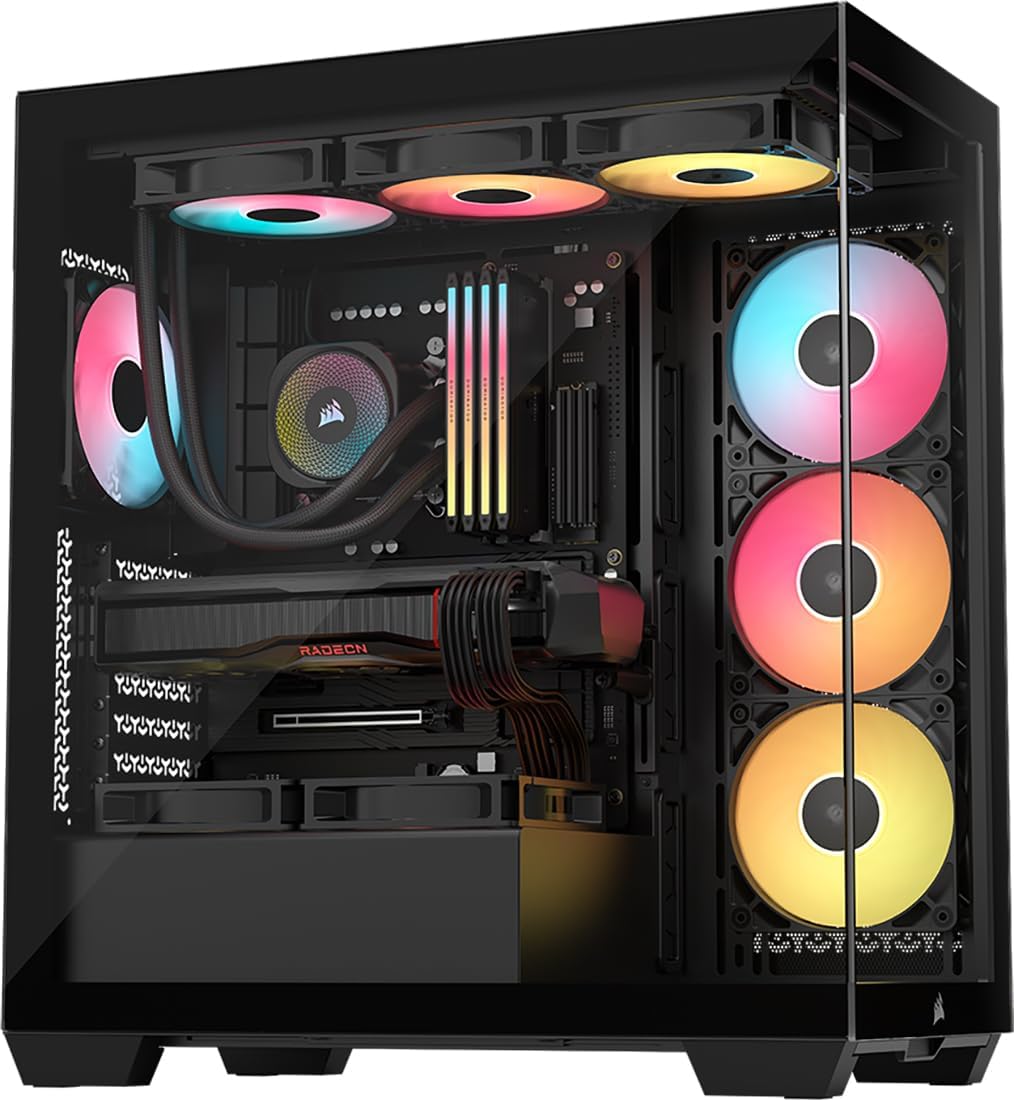


The CORSAIR 4000D RS ARGB is a mid-tower that combines restrained black styling, strong thermal provisions, and a modular FRAME system. Its listed rating of 4.7 reflects a broadly favorable customer impression. The most immediately attractive feature is the trio of preinstalled RS ARGB PWM fans, which give a new build useful airflow and coordinated lighting without requiring an immediate fan purchase.
We may earn a commission when you buy through this link, at no additional cost to you.
Cooling flexibility is one of the case's strongest qualities. The InfiniRail mounting system lets front fans slide into different positions, including sizes up to 200mm, while roof-mounted fans can reach 140mm. The perforated Y-pattern front panel supports a high-volume airflow path, and the removable internal side panel can serve as a cable cover or be removed to add side-mounted fans. This makes the chassis adaptable to air-cooled, liquid-cooled, and visually restrained configurations.
The FRAME system introduces some complexity, but it also creates room for customization. Instead of treating the motherboard tray and structural elements as fixed pieces, it allows options such as a billet-aluminum tray or a different front I/O configuration. Fans support four-pin PWM daisy chaining, ARGB lighting through the motherboard's five-volt ARGB connector, and Zero RPM behavior during low-load situations. The result is a case that feels suitably advanced without being defined solely by visual effects.
This is the strongest all-around recommendation for a modern gaming or enthusiast build because it balances cooling, appearance, expansion, and cable management. It is especially suitable for someone who wants visible ARGB hardware, appreciates a conventional mid-tower footprint, and wants enough flexibility to alter the layout later. Buyers who value simple, conventional access should carefully consider the modular panel arrangement, while those wanting a minimalist look may disable the lighting.
The sliding InfiniRail system is more than a decorative feature: it changes where incoming air can meet front-mounted fans. Combined with the perforated panel and optional side cooling position, it gives the chassis several paths for increasing airflow as hardware becomes more demanding.
The FRAME architecture allows structural and input-output elements to evolve with a build. That makes the 4000D RS ARGB a practical choice for owners who may replace a motherboard tray or want to change the front-panel arrangement later.
We may earn a commission when you buy through this link, at no additional cost to you.
The HYTE Y70 Touch Infinite turns the case itself into a centerpiece. Its integrated 14.9-inch touchscreen has a 682-by-2560, or 2.5K, resolution, a 60Hz refresh rate, and ten-point multitouch capability. The panel is also described as 43 percent brighter than earlier versions. With a 4.7 rating, it delivers a distinctive proposition that goes well beyond a standard tempered-glass viewing window.
We may earn a commission when you buy through this link, at no additional cost to you.
The display can be customized through HYTE Nexus software, while the three-piece panoramic glass and dual-chamber layout create a cohesive modern appearance. The Snow White finish shown here is especially suited to a carefully coordinated build. A color-matched PCIe 4.0 x16 riser supports four-slot vertical graphics placement, helping turn the GPU into a visual feature rather than simply another component hidden inside the chassis.
Thermal capability is equally ambitious. The case supports a side-mounted 360mm radiator that can be 125mm thick, an adjustable top position for a radiator up to 68mm thick, and lower cooling for either three 120mm fans or two 140mm fans up to 32mm thick. Taken together, these locations allow as many as ten fans. This is useful for builders combining a powerful processor, a substantial GPU, and a custom cooling loop.
The best buyer is an enthusiast who wants the case to contribute visually and technologically, not merely contain the PC. The touchscreen and vertical mounting arrangement require deliberate planning, and a simpler mid-tower may serve a conventional build more efficiently. Even so, for a showcase system with a dedicated desk, the Y70 Touch Infinite delivers one of the most complete modern-case experiences in this roundup.
The 2.5K touch panel can present system information, custom graphics, or other content in the same physical space as the computer. Its wide resolution and multitouch support make it more interactive than a conventional passive display.
Side, top, and floor cooling positions allow substantial radiator and fan arrangements. The ten-fan ceiling makes the chassis well suited to high-output components and enthusiasts who want visible cooling hardware.
We may earn a commission when you buy through this link, at no additional cost to you.
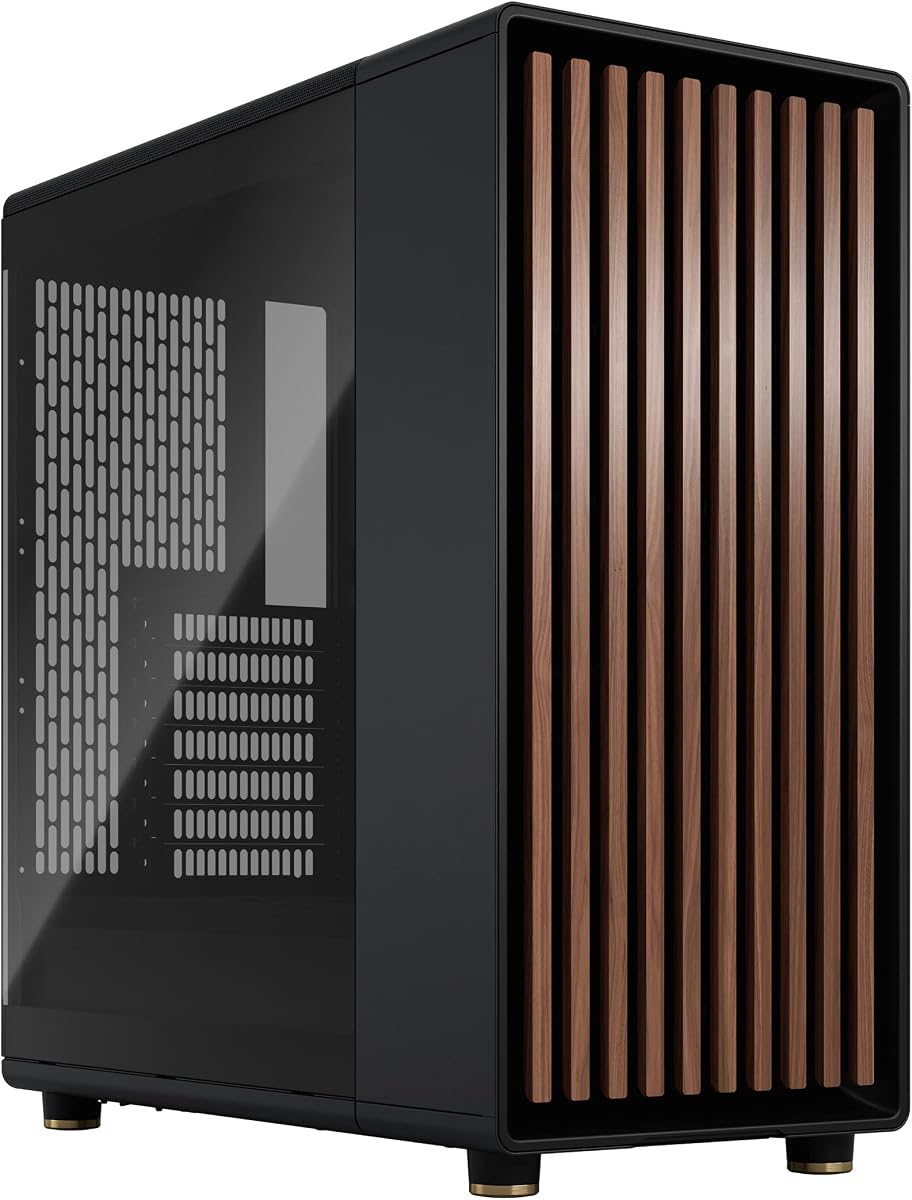
The Fractal Design North is a mid-tower for builders who want a PC to blend into a living room, office, or refined gaming setup rather than resemble an industrial machine. Genuine walnut wood across the front panel provides a warm contrast to the Charcoal Black metal and clear tempered glass. It carries a 4.7 rating, indicating that its distinctive styling and everyday functionality have been well received.
We may earn a commission when you buy through this link, at no additional cost to you.
The front combines natural ventilation with integrated mesh. Fractal includes two 140mm Aspect PWM fans, which provide a strong foundation for airflow without requiring the builder to source every fan immediately. The chassis accepts ATX, micro-ATX, and Mini-ITX motherboards, while seven bridgeless expansion slots offer flexibility for graphics cards and other add-in hardware.
Component clearance remains generous, including room for a GPU up to 355mm. Installing a 360mm front radiator reduces that GPU allowance to 300mm, a useful detail for anyone planning liquid cooling. Storage provisions include two combined 3.5-inch and 2.5-inch mounts along with two dedicated 2.5-inch positions, allowing several drives to be installed without relying entirely on an improvised arrangement.
The North is ideal for a build where visual character matters and the owner prefers restrained airflow hardware over a wall of illuminated fans. Panel access is convenient because the side panels can be removed, the front can be unclipped, and the top panel releases using an integrated tab. Its one conspicuous compromise is aesthetic: buyers who strongly prefer a conventional black metal or all-glass enclosure may find the walnut front less aligned with their preferences.
Real wood changes the emotional character of a PC enclosure. The North pairs that warmth with restrained metalwork and transparent glass, allowing it to work in settings where an aggressively angular gaming case might feel out of place.
The open front and mesh treatment promote airflow, while the two included 140mm Aspect PWM fans add meaningful intake and exhaust capability. That makes the chassis useful immediately after assembly.
We may earn a commission when you buy through this link, at no additional cost to you.
The Lian Li LANCOOL 217 is a conventional mid-tower upgraded for immediate performance. Its 4.8 rating is the highest among the ten products, and the feature list explains why: five PWM fans come preinstalled, including two 170x30mm front fans, two reverse-blade fans, and a 140mm rear fan. The result is one of the strongest stock cooling configurations in the guide.
We may earn a commission when you buy through this link, at no additional cost to you.
The toolless mounting system allows those large front fans to be raised toward the CPU for a CPU-focused arrangement or positioned to serve the graphics card. This flexibility is valuable because balanced builds often change as hardware or cooling priorities evolve. The five included fans also produce a more finished appearance immediately, although users who prefer a sparse interior can remove or reposition them.
Real wood accents provide a modern alternative to the all-black cases that dominate the category. At the same time, the LANCOOL 217 is designed around clean cable routing. It supports back-connect motherboards, provides two PSU mounting orientations, accommodates power supplies up to 220mm long, and includes power buttons in two locations for different chassis placements. These details make it practical for clean desk-mounted systems.
This is an excellent choice for a builder who prioritizes airflow and wants a complete set of fans without immediately shopping for extras. Its dense fan layout may feel visually busy, and the 170mm front fans can reduce compatibility with certain radiators or reservoirs. Even with those caveats, the combination of a 4.8 rating, generous cooling hardware, and tidy installation features makes the LANCOOL 217 one of the most complete conventional mid-towers here.
A large front pair, reversed-blade pair, and rear fan create an immediately functional cooling layout. This saves the builder from assembling an entire fan ecosystem before the first system test.
Adjustable front-fan positions allow airflow to be redirected toward either the processor or graphics card. Dual PSU mounting and two power buttons further adapt the chassis to different installation locations.
We may earn a commission when you buy through this link, at no additional cost to you.
The Pitch Black version of the HYTE Y70 Touch Infinite delivers the same ambitious feature set as the Snow White edition in a darker finish. Its integrated 14.9-inch 2.5K touchscreen, 60Hz refresh rate, and ten-point multitouch capability make it more than a conventional case. The 4.7 rating suggests that the overall execution has been well received.
We may earn a commission when you buy through this link, at no additional cost to you.
A three-piece panoramic glass design opens the visual field, while the dual-chamber interior separates the component display area from the cable and power-supply region. The included PCIe 4.0 x16 riser supports vertical graphics placement and carries a color-matched canopy. For builders who regard the GPU as the visual focus of a gaming PC, this arrangement creates a more deliberate presentation.
Cooling options are extensive. A side-mounted 360mm radiator can be up to 125mm thick, the adjustable top radiator position accepts a unit up to 68mm thick, and the floor can hold three 120mm or two 140mm fans up to 32mm thick. The overall maximum is ten fans. This flexibility supports elaborate air-cooled and custom liquid-cooled systems.
The black finish is ideal for a restrained showcase build, especially one in which the touchscreen serves as the main visual focal point. A buyer should think carefully about screen placement, viewing angle, and the need for software setup. Those considerations separate it from straightforward mid-towers, but for an enthusiast who wants the enclosure to function as an interactive centerpiece, the Pitch Black Y70 Touch Infinite is especially compelling.
The large touchscreen can be customized through HYTE Nexus software and supports ten-point multitouch. That creates opportunities for system monitoring, animated content, and desktop integration beyond standard component display.
Separating the display components from the rear cable area helps maintain a clean presentation. The panoramic glass then exposes the carefully arranged primary components without showing every power lead behind them.
We may earn a commission when you buy through this link, at no additional cost to you.
The NZXT H5 Flow is a compact ATX mid-tower focused on useful airflow and straightforward installation. It has a 4.7 rating and avoids unnecessary visual gimmicks, which makes it a sensible option for a first serious build or a system that needs to fit into a limited desk space. Two 120mm Quiet Airflow fans are installed in the front and rear positions.
We may earn a commission when you buy through this link, at no additional cost to you.
Ultra-fine mesh spans the top, front, and side panels, providing filtration and airflow paths while preserving the clean exterior. The side of the power-supply shroud is perforated and its bottom is also ventilated, allowing air to enter around the PSU. That attention to the shroud is useful because many compact cases restrict airflow in this area.
Despite its smaller form, the H5 Flow supports a 360mm radiator at the front and a 240mm radiator at the top. Cable management uses wide channels, hooks, and straps, while the overall design avoids the visual clutter that can accompany dense accessory packages. It is a modern case in a restrained sense: clean lines, compact proportions, and a focus on useful functionality.
This is the top pick for buyers who want a straightforward case without giving up radiator flexibility. The limited number of included fans means some builders will want to add more, and the design will not attract attention like a wood-front or touchscreen-equipped model. Nevertheless, the H5 Flow provides a balanced foundation for a powerful ATX system in a relatively compact and uncluttered enclosure.
The chassis supports both 360mm front and 240mm top radiators. That level of liquid-cooling flexibility is impressive for a compact mid-tower and allows builders to preserve the smaller footprint.
Perforations on the side and bottom of the PSU shroud encourage cooling air to move through an area often treated as a dead zone. The fine mesh panels elsewhere complement that focused ventilation design.
We may earn a commission when you buy through this link, at no additional cost to you.
The CORSAIR 3500X RS ARGB combines wraparound glass with the visual appeal of coordinated lighting. Its 4.6 rating is still strong, although it trails several cases in the list by a fraction. Three RS120-R ARGB fans are preinstalled and controlled through a motherboard five-volt ARGB header, giving the enclosure a finished appearance from the start.
We may earn a commission when you buy through this link, at no additional cost to you.
Motherboard support runs from Mini-ITX through EATX, making the case unusually flexible for a compact-looking chassis. Side, roof, and power-supply shroud mounting locations accommodate as many as ten 120mm fans. This means a compact exterior does not prevent a substantial cooling build, particularly for owners who want a nearly glass-enclosed system with visible air-cooling hardware.
Both the front and side glass panels are removable, easing component installation and later access. The chassis is also validated for ASUS BTF, MSI Project Zero, and Gigabyte Project Stealth motherboards with rear-facing connections. Compatibility with this rear-connect approach keeps the panoramic view cleaner by moving motherboard plugs out of sight.
The 3500X RS ARGB is well suited to a colorful, glass-forward gaming build in a moderate footprint. Buyers should note that the product listing specifies only the three preinstalled fans; other components shown in associated imagery are not necessarily included. Its removable glass is convenient but deserves careful handling during construction. Even with those cautions, the combination of lighting, motherboard compatibility, and broad fan support makes it an appealing modern mid-tower.
Wraparound glass creates a more immersive view than a traditional single side window. The removable panels allow builders to work safely around the glass while still displaying the finished components prominently.
Motherboards from Mini-ITX to EATX and fan locations for up to ten 120mm units make the 3500X RS ARGB more flexible than its compact appearance suggests.
We may earn a commission when you buy through this link, at no additional cost to you.
The original Hyte Y70 focuses on presentation without adding an integrated touchscreen. Its 4.7 rating indicates that the panoramic glass, dual-chamber structure, and vertical graphics support remain compelling. The Pitch Black colorway is intended for modern builds that emphasize the silhouette of the GPU, processor cooler, and coordinated fans.
We may earn a commission when you buy through this link, at no additional cost to you.
The supplied PCIe 4.0 x16 riser enables a four-slot vertical graphics arrangement and includes a color-matched canopy. The three-piece panoramic glass and dual-chamber interior reveal the primary components while moving cables and power-supply hardware into the rear section. Detailed touches such as helpful labels, reusable Velcro straps, floating storage sleds, and a blue power switch improve the installation experience.
Cooling capacity reaches ten fans. The side supports a 360mm radiator up to 125mm thick, the adjustable top position accepts a radiator up to 68mm thick, and the floor can contain three 120mm or two 140mm fans up to 32mm thick. Tool-less panels and extensive rear cable-management space contribute to an otherwise premium build process.
This Y70 makes the most sense for someone who values the vertical GPU view and spacious panoramic presentation but does not need a screen. It shares the visual drama of the Touch Infinite versions while avoiding their display-oriented complexity. Buyers should still expect a deliberate layout around the riser and dual chambers. For a showcase-oriented custom build, the original Y70 offers an especially polished foundation.
The included riser and matching canopy are designed to make a vertically mounted GPU look intentional and integrated. This gives the chassis more visual impact than a conventional horizontal installation.
Labels, reusable straps, and floating storage sleds reduce the uncertainty involved in arranging a complex interior. Tool-less panels also make it easier to reach components during assembly and maintenance.
We may earn a commission when you buy through this link, at no additional cost to you.
The Antec Flux Pro is the full-tower option in this roundup, offering the space required by E-ATX motherboards, large graphics cards, extensive storage, and complex cooling systems. It carries a 4.7 rating and distinguishes itself with six installed PWM fans: three Tranquil 140mm fans at the front, two P12R reverse fans on the power-supply shroud, and one Tranquil 140mm fan at the rear.
We may earn a commission when you buy through this link, at no additional cost to you.
Its multi-directional vent layout supports up to 12 fans, and the removable cooling brackets on the top, front, and shroud permit more flexible arrangements. The case can also carry a 420mm radiator and a 360mm radiator simultaneously. That makes it relevant to builders who want multiple custom cooling loops or an unusually robust thermal configuration.
A 90-degree iShift mounting option rotates the power supply, and a CPU/GPU dual temperature display places useful thermal information inside the chassis. The combination of metal, glass, and wood creates a layered exterior rather than a uniform black enclosure. These practical and decorative choices make the Flux Pro feel like a workstation-inspired gaming case.
The principal drawback is physical scale. A full tower can be difficult to position beside a compact desk and offers more internal volume than many builds need. The removable brackets and dense fan arrangement also require a deliberate installation plan. Even so, the Flux Pro is the best choice here for E-ATX systems, multiple radiators, numerous fans, and owners who value capacity over a small footprint.
The ability to install 420mm and 360mm radiators at the same time is a major advantage for custom-loop builders. Twelve possible fan positions provide additional flexibility when balancing intake and exhaust.
The iShift mount allows the power supply to rotate 90 degrees, giving builders another way to manage short modular cables and improve the appearance of the interior.
We may earn a commission when you buy through this link, at no additional cost to you.
The FOIFKIN F300 (2025) is a glass-heavy ATX mid-tower designed to expose the hardware from several directions. Its 270-degree panoramic tempered-glass curtain wall provides a broad field of view, while four non-RGB fans are preinstalled for immediate airflow. The 4.6 rating places it near the upper part of this group, with the visual design serving as its defining feature.
We may earn a commission when you buy through this link, at no additional cost to you.
Despite its display-oriented appearance, the chassis supports substantial components. It accepts ATX, micro-ATX, and Mini-ITX motherboards, a CPU cooler up to 170mm, GPUs up to 400mm, and ATX power supplies up to 220mm. Storage provisions consist of one hard-drive and two solid-state-drive mounts, or three solid-state drives in the alternative configuration. Seven expansion slots are also provided.
Cooling potential extends to ten 120mm fans and three 360mm liquid coolers according to the listed specifications. The tool-free tempered-glass side panel can be removed easily during installation, which reduces the risk associated with working around a large glass surface. A Type-C 3.0 port, USB 3.0, USB 2.0, microphone and audio connections, plus separate power and restart buttons cover the essential front-panel needs.
The F300 is a compelling option for a builder who wants a dramatic panoramic enclosure, generous clearances, and multiple cooling options without integrated lighting. Its four included fans deliberately omit RGB, so it suits a clean, understated setup rather than a color-coordinated gaming system. Buyers should also compare the case's physical dimensions with their available space and verify all component clearances against the final hardware configuration.
The 270-degree glass curtain wall exposes more of the interior than a conventional side panel. That makes the processor, graphics card, memory, and cooling hardware central elements of the room's appearance.
Support for GPUs up to 400mm, CPU coolers up to 170mm, and power supplies up to 220mm gives the F300 flexibility that can simplify planning a high-end build.
We may earn a commission when you buy through this link, at no additional cost to you.
A modern PC case should match your hardware, cooling strategy, workspace, and tolerance for visual complexity. These factors help narrow the options before you focus on styling or extra accessories.
ATX mid-towers are the most broadly useful format in this roundup because they accommodate standard motherboards while remaining manageable on a normal desk. Models such as the Fractal Design North, NZXT H5 Flow, and CORSAIR 3500X RS ARGB balance interior capacity with relatively restrained dimensions. Full towers such as the Antec Flux Pro offer more room for E-ATX boards, extra radiators, numerous drives, and elaborate cable routing, but they require substantially more desk and floor space.
Match the format to the motherboard and available room. A full tower is not automatically better, and a compact mid-tower may be easier to cool simply because it has less internal volume. Confirm the case dimensions and ensure that every panel can be removed in the intended setup.
Airflow depends on the path from intake to exhaust, not just the number of fan headers. Perforated front panels, mesh side panels, open intake areas, and ventilated power-supply shrouds all influence how effectively cool air reaches the processor and graphics card. The Fractal Design North uses an open wooden front, while the NZXT H5 Flow combines fine mesh with a perforated PSU shroud. The HYTE models add dedicated side, top, and floor cooling positions for more elaborate arrangements.
Prioritize a balanced layout with strong front intake and effective rear or top exhaust. Also check the direction of any included reverse-blade fans. A case with many fans is not automatically quiet, so larger and slower fans may be preferable when the design permits them.
Radiator support should be evaluated alongside the thickness limit for each mounting position. A case may accept a 360mm radiator only in the front, while a thicker unit in that position can reduce graphics-card clearance. The HYTE Y70 family supports a 360mm side radiator up to 125mm thick, and the Antec Flux Pro can carry both 420mm and 360mm radiators simultaneously. The Fractal Design North lists reduced GPU clearance when a 360mm front radiator is installed.
Account for fan thickness, radiator thickness, tubing, reservoirs, and component clearance together. Check the motherboard and graphics-card dimensions rather than relying on the case format alone. A spacious-looking case can still be incompatible with a large card or an oversized CPU cooler.
Panoramic glass is ideal when the goal is to display internal components and coordinated lighting. The FOIFKIN F300 uses a 270-degree glass curtain wall, the HYTE Y70 uses three-piece panoramic glass, and the CORSAIR 3500X RS ARGB uses a wraparound view. A wood-front design offers a more residential appearance, as shown by the Fractal Design North and Lian Li LANCOOL 217, while still revealing the build through a tempered-glass side panel.
Consider how much visual complexity fits your room. Screaming ARGB fans, a large touchscreen, vertical graphics, and natural wood each create a different center of attention. Choose the style you will still enjoy after the novelty fades rather than selecting solely for the most dramatic product imagery.
Good cable management improves airflow, simplifies maintenance, and keeps a display-oriented build visually clean. Look for dedicated routing channels, hooks, straps, hidden cable space, and a rear chamber that separates power wiring from the component display area. The HYTE Y70 has an extensive rear cable-management area and floating storage sleds, while the NZXT H5 Flow uses wide channels, hooks, and straps.
Also consider motherboard placement. The CORSAIR 3500X RS ARGB is validated for selected motherboards with rear-facing connections, and the Lian Li LANCOOL 217 supports back-connect motherboards. These features can reduce visible clutter, but they should not replace careful cable planning during assembly.
The included fan count can materially change the initial cost and appearance of a build. The Lian Li LANCOOL 217 arrives with five PWM fans, the Antec Flux Pro includes six, and the FOIFKIN F300 includes four non-RGB fans. At the other end, the NZXT H5 Flow includes two, while the Fractal Design North includes two 140mm fans. The HYTE touchscreen cases provide extensive mounting capacity but the supplied feature descriptions do not state a corresponding included-fan total.
Treat included fans as a starting configuration rather than the final cooling plan. Confirm their type, size, lighting, speed control, and orientation. The CORSAIR 3500X RS ARGB listing also clarifies that only the three preinstalled fans are included, so images should not be interpreted as a complete accessory bundle.
Some modern cases are designed around horizontal graphics cards, while others make vertical mounting a central feature. The HYTE Y70 and Y70 Touch Infinite include PCIe 4.0 x16 risers and color-matched canopies, creating a showcase-style presentation. The vertical arrangement can be visually appealing, but it affects chassis width, cooler clearance, and the overall footprint.
Check whether vertical mounting is optional or integral to the case design. Also verify board support, expansion-slot count, and rear-connect motherboard compatibility. A case should accommodate the components already owned and leave room for a future graphics-card upgrade rather than forcing a rearrangement immediately.
A modern case should remain pleasant to service, not merely attractive when first assembled. Removable side panels, tool-free access, labeled connections, reusable straps, and accessible storage sleds can save significant time. The Fractal Design North uses an integrated tab to release its top panel and permits the front to be unclipped, while the FOIFKIN F300 emphasizes quick, tool-free glass removal.
Look for removable dust filters or easy-to-clean mesh where possible, and consider how cables will be accessed after the system is complete. A display-heavy design should still provide practical pathways to fans, drives, and expansion cards.
Before installing components, lay the case on its side and remove every panel that must come off during assembly. Install the power supply and storage drives first, then connect the power-supply cables while the interior is still accessible. Fit the motherboard using the correct standoffs, route the front-panel wires through the designated channels, and confirm that the board does not sit against a cable or hard drive.
Install cooling hardware before the graphics card whenever the radiator, tubing, reservoir, or tall CPU cooler requires the extra working space. Mount fans in the direction recommended by their manufacturer, connect PWM and lighting headers to the correct motherboard headers, and avoid forcing cables through restricted fan mounts. After the graphics card and power connections are in place, install the remaining panels and verify that nothing blocks a vent.
For routine care, power down and disconnect the system before opening the case. Use a soft brush or compressed air to remove dust from mesh filters, fan blades, radiator fins, and dust-prone corners. Clean tempered glass with a lint-free microfiber cloth and a suitable cleaner, avoiding liquid near edges and ports. Inspect cable ties periodically so they remain secure without pinching cables, and confirm that filters and panels are correctly seated before closing the chassis.
An ATX mid-tower is the most versatile choice for most gaming systems. It supports standard ATX motherboards while remaining manageable on a desk, and models such as the Fractal Design North, NZXT H5 Flow, and CORSAIR 3500X RS ARGB provide useful space without the footprint of a full tower. Choose a larger case if you need E-ATX support, multiple radiators, extensive storage, or unusually long graphics cards.
No. More fans can improve cooling, but fan size, speed, noise, orientation, and the quality of the airflow path all matter. The Lian Li LANCOOL 217 includes five fans and the Antec Flux Pro includes six, while the NZXT H5 Flow includes two, yet each approach can produce a good result. Match the configuration to the components and intended cooling method rather than counting fans alone.
Usually not. Most modern ATX mid-towers support high-end graphics cards, large CPU coolers, and liquid-cooling radiators while remaining easier to position and carry. A full tower becomes more attractive when you plan to install an E-ATX motherboard, multiple radiators, many drives, or an extensive custom-loop arrangement. The Antec Flux Pro is the relevant option here because it is designed as a full-tower E-ATX case.
Tempered glass is generally durable and is used to provide scratch resistance and a clear view of the components. It should still be handled carefully during installation and removed if possible when working inside the chassis. Cases such as the FOIFKIN F300 and CORSAIR 3500X RS ARGB emphasize tool-free or removable panels, which can make assembly safer and easier.
A wood-front design can still provide strong airflow if the construction includes effective vents or mesh. The Fractal Design North uses an open front and integrated mesh, allowing natural ventilation while the wooden bars provide the appearance. The Lian Li LANCOOL 217 similarly combines wood accents with five preinstalled PWM fans. Ventilation design matters more than the exterior material alone.
A touchscreen makes sense if you want the case to display information, support customized visuals, or function as an interactive part of your desk. The HYTE Y70 Touch Infinite offers a 14.9-inch 2.5K panel with multitouch and software customization. For a traditional build where the case should remain visually passive, a conventional panoramic-glass model is usually simpler and less demanding to position.
No, because horizontal mounting remains the standard and often saves chassis width. Vertical mounting can improve presentation and shorten the overall depth of some builds, but it requires a suitable riser and sufficient space around the GPU. The HYTE Y70 family includes a color-matched PCIe 4.0 x16 riser for buyers who want that specific look.
Check the motherboard format, graphics-card length, CPU-cooler height, power-supply length, radiator positions, and radiator thickness. Include extra clearance for cables, tubing, and fans when checking limits. The listed specifications provide a strong starting point, but comparing every major component against the manufacturer's fitment chart before ordering can prevent an expensive mismatch.
The CORSAIR 4000D RS ARGB is the strongest all-around selection because it combines capable stock airflow, flexible fan placement, useful lighting, and a modular FRAME architecture. The HYTE Y70 Touch Infinite stands apart for buyers who want an integrated 2.5K touchscreen and a dramatic vertical GPU presentation, while the NZXT H5 Flow offers the most practical compact foundation with effective mesh airflow and broad radiator support.
Your own priorities should determine the final choice. Favor the Fractal Design North or Lian Li LANCOOL 217 for wood-accented styling, the CORSAIR 3500X RS ARGB for a wraparound glass enclosure, and the Antec Flux Pro for maximum expansion and multiple radiators. The FOIFKIN F300 and original HYTE Y70 also suit builders who prioritize panoramic visibility, while the HYTE Y70 Touch Infinite represents the most display-oriented option.
Before purchasing, verify current dimensions, included components, connector requirements, and component clearances against the manufacturer's latest listing. Product configurations and market conditions can change, so checking the current listing helps ensure that the selected modern PC case still matches your hardware, room, and installation plans.


