
Ethernet Adapter for Fire TV Stick, Firestick Micro USB to RJ45 Ethernet
4.7Editor score
Plug-and-play network connection
Aluminum alloy heat management
LED operating-status indicator
Our Fire TV Stick Ethernet Adapter guide compares 10 options for compatibility, wired speed, power setup, and reliable streaming across supported Fire TV
A Fire TV Stick Ethernet Adapter can replace an unreliable Wi-Fi connection with a stable wired network, helping reduce buffering and make streaming more consistent. The most important consideration is not speed alone, but matching the adapter to the connector on your specific Fire TV device, whether that means micro-USB or USB-C.
We compared all ten adapters by examining their stated compatibility, Ethernet speed, power requirements, installation process, status indicators, physical design, and support for related streaming devices. The list includes official-style micro-USB options, a USB-C adapter for the newest Fire TV Stick HD, and several multi-purpose models that also serve as powered network adapters.
Each review explains who the product suits, where its design is particularly useful, and which limitations deserve attention before purchase. Our top three selections emphasize broad Fire TV Stick support, straightforward setup, and useful device-specific features. Prices and availability can change, so readers should confirm the current listing and connector before ordering.
4.7Editor score

4.5Editor score

4.3Editor score
This side-by-side comparison focuses on connector type, stated Ethernet speed, power needs, and device compatibility so you can quickly identify the adapter that fits your Fire TV Stick and home network.


This Micro-USB Ethernet Adapter for Amazon Fire TV Devices earns a 4.5 rating and stands out for its unusually broad list of supported Amazon hardware. It is designed to give compatible Fire TV devices a direct wired connection, reduce reliance on Wi-Fi, and avoid consuming wireless bandwidth for high-definition or 4K streaming.
We may earn a commission when you buy through this link, at no additional cost to you.
Its strongest feature is compatibility. The stated support includes Fire TV Stick Lite, first- and second-generation Fire TV Stick, first-generation Fire TV Stick HD, Fire TV Stick 4K Select, Fire TV Stick 4K, Fire TV Stick 4K Plus, Fire TV Stick 4K Max, Fire TV Cube, and third-generation pendant-design Fire TV. Installation is direct: attach the micro-USB adapter to the Fire TV's USB port and connect an Ethernet cable to the router.
The trade-off is that this is a 10/100 Ethernet solution, so a gigabit connection or 1000Mbps label would be misleading. It also cannot be used with the second-generation Fire TV Stick HD, which uses USB-C. Despite those limitations, the broad model coverage and ability to use the Fire TV's existing power adapter make it a highly practical choice for many households.
Buy this adapter if you own one of the listed micro-USB Fire TV models and want the simplest route to a stable wired connection. It is our overall recommendation because compatibility, setup convenience, and power management are more important in this category than headline speed alone. Confirm the connector on your device before ordering.
The long compatibility list covers several generations of Fire TV Stick, Fire TV Cube, and pendant-design Fire TV hardware. That breadth makes this a sensible first option for anyone unsure which older or newer micro-USB streaming device they own.
The adapter can draw power from the Fire TV's power adapter, reducing the number of extra connections required behind the television. Once the Ethernet cable is connected to the router, no driver installation is needed.
We may earn a commission when you buy through this link, at no additional cost to you.
This Right Angle USB-C Ethernet Adapter carries a 4.3 rating and directly addresses a compatibility problem that many other options cannot solve. It is intended for the second-generation Fire TV Stick HD with USB-C connectivity, offering a direct Ethernet option for owners of that specific model.
We may earn a commission when you buy through this link, at no additional cost to you.
The right-angle form is a meaningful physical advantage when the television is close to a wall or entertainment unit. Instead of projecting straight outward, the connector turns the cable closer to the device, which can make the setup look tidier and reduce leverage on the port. Stated performance reaches up to 480Mbps when used with the supported Fire TV Stick HD.
This is a highly specialized product, not a universal solution. It cannot fit the first-generation Fire TV Stick HD because that device uses micro-USB, and its compatibility information does not extend to the wider Fire TV Stick range covered by several micro-USB alternatives. Its narrow support is understandable given the newer USB-C format.
This is the right choice if you own the second-generation Fire TV Stick HD and want a compact, purpose-built wired connection. Buyers with any older Fire TV Stick should choose a micro-USB model instead. Check the connector rather than relying only on the name of the device, since similarly named Fire TV Stick HD generations use different ports.
Unlike a universal-looking micro-USB adapter, this product is explicitly tailored to the second-generation Fire TV Stick HD. That focused design helps buyers avoid the costly mistake of selecting an adapter for the wrong connector.
The angled connector is especially useful when the Fire TV is mounted or positioned close to furniture. It keeps the connection neater and can reduce unnecessary bending pressure on the cable.
We may earn a commission when you buy through this link, at no additional cost to you.
The ELECTOP 1000 Mbps Ethernet Adapter has a 4.1 rating and targets users who want a feature-rich micro-USB adapter with a higher advertised network speed. Its stated capabilities include 1000Mbps Ethernet, an LED indicator, an aluminum alloy housing, and a plug-and-play connection process.
We may earn a commission when you buy through this link, at no additional cost to you.
Beyond speed, the design pays attention to practical installation details. Two self-adhesive pieces are included to help position the adapter and prevent poor contact caused by the Ethernet cable hanging in the air. The product description also lists over-voltage, over-current, over-power, and short-circuit protection, while the aluminum body is intended to dissipate heat during extended use.
There are important cautions. This is a micro-USB-to-RJ45 adapter, so it does not fit USB-C models such as the newer Fire TV Stick 4K Max configurations or USB-C Chromecast devices. An additional power cable is suggested for sufficient power, and the claimed zero-latency experience should be understood as marketing language rather than a guaranteed result. Actual performance also depends on the network and server.
Consider this adapter if you have a supported micro-USB streaming stick, want a gigabit-rated connection, and appreciate mounting accessories and visible status feedback. It is less suitable for newer USB-C hardware. Confirm the exact port on your device, read the power guidance, and make sure the included adhesive has a secure surface on which to sit.
The headline 1000Mbps specification separates this model from many 10/100Mbps options. A modern home connection may have enough bandwidth for that capability to be useful, although internet speed and streaming quality also depend on the router and service.
The supplied adhesive pieces can keep the adapter from dangling and may improve cable contact. An aluminum alloy enclosure is also useful for heat dissipation, although placement and ventilation should still allow the device to operate without obstruction.
We may earn a commission when you buy through this link, at no additional cost to you.
This Firestick Micro USB to RJ45 Ethernet adapter has the highest stated rating in the roundup at 4.7. It combines a simple plug-and-play design with an aluminum alloy housing, an LED status light, and a 10/100Mbps wired connection, making it an attractive option for users of compatible micro-USB streaming sticks.
We may earn a commission when you buy through this link, at no additional cost to you.
The setup process is refreshingly direct. Connect the adapter to the Fire TV Stick's micro-USB port, run an Ethernet cable to the router, and the network connection is activated without installing drivers. The stated compatible-device list includes Fire TV Stick 4K, Google Home Mini, Chromecast Ultra Audio, and Raspberry Pi Zero, giving the product some value beyond a single streaming device.
Its limitations are equally clear. It is a micro-USB adapter, not a USB-C model, and the description explicitly says it is not compatible with Chromecast with Google TV. The 10/100Mbps Ethernet rate is sufficient for many common streaming needs, but it is well below the advertised gigabit speed of some alternatives. A fixed adapter may also need the included adhesive to remain securely connected.
This is an excellent choice for a Fire TV Stick 4K or another supported micro-USB device when straightforward operation matters more than headline speed. Its high rating, modest feature set, and easy setup make it our budget recommendation, though buyers should still verify their connector and avoid choosing it for a USB-C television stick.
No software installation is required, so the adapter can be connected without navigating television settings first. The process is especially useful for users who want a wired network option without a complicated technical configuration.
The included self-adhesive tapes are intended to keep the adapter secure and reduce movement in the attached Ethernet cable. This is a practical feature for a TV positioned where the adapter might otherwise hang unsupported.
We may earn a commission when you buy through this link, at no additional cost to you.
The ZEXMTE Micro USB to RJ45 adapter carries a 4.5 rating and offers a balanced mix of compatibility, straightforward operation, and physical design. It is listed for Fire TV Stick Lite, second- and third-generation Fire TV Stick, Fire TV Stick 4K, and Fire TV Stick 4K Max, along with Chromecast Ultra.
We may earn a commission when you buy through this link, at no additional cost to you.
Its installation is about as simple as a wired Fire TV Stick connection can be. The adapter goes into the streaming stick's USB port, and an Ethernet cable connects directly to the router. A 10/100Mbps Ethernet rate is specified, while the aluminum casing and status lights add practical value for monitoring the connection during daily use.
The principal caveat is connector compatibility. The product is built for micro-USB rather than USB-C, and the listed compatibility does not include every Fire TV product. It also should not be expected to deliver gigabit throughput, even if the broader streaming experience feels smooth. A router with a standard RJ45 port and a compatible wired network are still required.
Choose this model if you use one of the supported Fire TV Stick generations and want a simple adapter with useful visual feedback. It offers fewer extra installation accessories than some competing models, but its core function is clear and well matched to the product category. Verify the port and current Fire TV generation before purchasing.
Support for Lite, second- and third-generation Fire TV Stick, 4K, and 4K Max models makes this a practical option for households with several compatible devices. Each unit should still be checked against its physical connector.
The status lights provide quick visual confirmation that the adapter is operating. This is useful during setup and can make diagnosing a loose cable or inactive network connection easier.
We may earn a commission when you buy through this link, at no additional cost to you.
UGREEN's Micro USB Ethernet Adapter has a 4.4 rating and distinguishes itself with a 3.3-foot integrated cable and a USB-A power lead. It is designed for micro-USB Fire TV devices, with stated support for Fire TV Stick Basic, second-generation Fire TV Stick, 4K, Lite, third-generation Fire TV, and several Google devices.
We may earn a commission when you buy through this link, at no additional cost to you.
The extended cable is particularly useful where there is little space behind the television. Instead of requiring the Fire TV to sit directly beside a short Ethernet lead, the adapter can reach across a wider gap. A separate USB-A power cord can power the network adapter and Fire TV Stick simultaneously, although the instructions specify a wall charger greater than 5W and advise against powering it from the television's USB port.
Compatibility requires care. The description says the adapter is not compatible with any Roku device, Fire TV Stick first generation, or Fire TV Stick 4K Max. Its 100Mbps maximum Ethernet rate is another boundary. Although the product is designed for a direct router connection and requires no drivers, the power arrangement adds another cable that must be managed.
This is a strong option for a compatible micro-USB Fire TV Stick located in a cramped entertainment area. The long cable gives more placement freedom, while the included power lead removes the need to purchase another one. Confirm that your device is neither first generation nor 4K Max, and plan where the USB-A power cable will reach.
The 3.3-foot integrated cable is one of the product's most useful physical features. It provides more room between the streaming stick and router, making the adapter less likely to pull the stick out of its port.
The supplied USB-A cable is intended to power both the Ethernet adapter and the connected Fire TV Stick. This reduces the need for a separate adapter, but a suitable wall charger over 5W is required for normal operation.
We may earn a commission when you buy through this link, at no additional cost to you.
The ZEXMTE 1000 Mbps Ethernet Adapter has a 3.7 rating, the lowest among the listed products, but it offers a compelling set of specifications for users who prioritize a fast wired interface. It supports up to 1000Mbps Ethernet and includes a reinforced aluminum alloy shell with multiple electrical protections.
We may earn a commission when you buy through this link, at no additional cost to you.
Two visual indicators help differentiate operating states. The product description identifies green as a successful connection and yellow as operational readiness, giving users a quick way to check the adapter's state. Compatibility includes Fire TV Stick 2, 3, 4K, and 4K Max, Google Home Mini, and several Chromecast models.
The exclusions are significant. It is not compatible with Fire TV Cube, Roku devices, tablets, cellphones, Fire HD 10, or VPN use. The listed 1000Mbps figure is an adapter capability, not guaranteed internet throughput, and the product itself acknowledges that actual speed varies with the broadband plan. The 3.7 rating also suggests that some customers may have encountered issues not explained in the supplied details.
This adapter makes sense for a compatible micro-USB Fire TV Stick user who wants a higher advertised Ethernet ceiling and clear status feedback. It is less suitable for Fire TV Cube owners or anyone using the excluded device categories. Check the connector and restrictions, and evaluate the current customer feedback carefully before choosing it over more highly rated alternatives.
A 1000Mbps interface can be useful on a properly configured local network, especially for transferring data or handling multiple services. The connection to the internet will still be limited by the router, broadband plan, and destination servers.
Separate green and yellow lights communicate connection status more precisely than a single indicator. Users can check the adapter without entering television menus, which is convenient during installation or troubleshooting.
We may earn a commission when you buy through this link, at no additional cost to you.
The Cable Matters Micro USB to Ethernet Adapter carries a 4.4 rating and offers a middle-ground Ethernet specification of up to 300+Mbps. It is intended to connect Fire TV Stick, Fire TV Cube, Google Chromecast, and Chromecast Ultra devices to a router for a stable wired network.
We may earn a commission when you buy through this link, at no additional cost to you.
A three-foot USB power cable makes it easier to supply power from a nearby wall charger, and the adapter supports both the streaming device and the Ethernet connection without additional software. Its claimed compatibility extends beyond Fire TV hardware to smart speakers such as Google Home Mini, which could be useful in a mixed-device household.
The product description does not provide an explicit model-by-model Fire TV Stick compatibility list. Since micro-USB and USB-C devices are physically different, buyers should confirm that their model has the expected connector. The separate power lead also means that cable management behind the television deserves attention. Advertised Ethernet speed is a maximum capability, not a promise that every service will deliver that rate.
This adapter is a good fit for a compatible Fire TV or Chromecast setup that benefits from a more elevated speed claim than 10/100Mbps offers. It is also appealing for users who want the adapter to support several types of streaming hardware. Verify connector compatibility, arrange power access, and connect it to a wired router port for the intended result.
The 300+Mbps specification provides more theoretical headroom than 10/100Mbps models. On a suitable local network, that can benefit transfers and simultaneous connected activity even though internet speed remains plan-dependent.
Support for Fire TV, Chromecast, and smart-speaker hardware broadens the product's usefulness. Because connector types differ, each intended device should still be checked against the adapter's physical interface.
We may earn a commission when you buy through this link, at no additional cost to you.
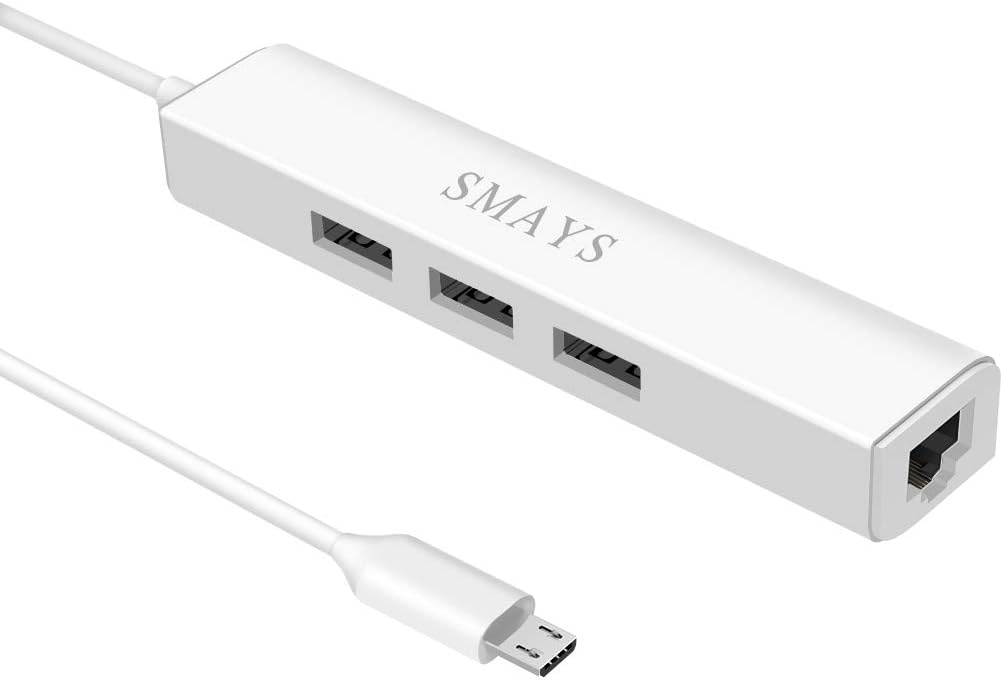
The Micro USB Hub with Ethernet Adapter provides a 4.3 rating and adds a useful twist to the category: it combines a 10/100Mbps Ethernet connection with a three-port OTG USB hub. It is compatible with Fire Stick Lite, third-generation Fire TV Stick, Fire TV Stick 4K Max, second-generation Fire TV Stick with Alexa Voice Remote, 2017 Fire TV, and Fire TV Cube.
We may earn a commission when you buy through this link, at no additional cost to you.
The USB hub can be used with a flash drive, mouse, keyboard, solid-state drive, or memory card reader, making it more versatile than a dedicated Ethernet block. A dedicated 5V DC input lets the hub connect to a 5V/2A wall charger, while a standard Ethernet cable links the network adapter to the router.
The tradeoff is size and complexity. A multi-port hub takes up more room behind the television and requires careful placement so that attached storage or peripherals do not pull the streaming stick sideways. The Ethernet side remains limited to 10/100Mbps, and compatibility varies among the many device categories listed. A suitable power adapter is also part of the required setup.
Choose this product if you need both a wired Fire TV connection and additional USB functionality, such as temporary storage access or peripheral support. If Ethernet alone is the goal, a smaller dedicated adapter will usually be easier to manage. For this hub, check the specific Fire TV model, confirm that the power source meets the stated requirements, and leave enough room for the hub and cables.
Three USB ports allow storage drives and input devices to be connected through the same hub. This is valuable for users with a more complex television setup who want one device to handle several peripheral requirements.
A 5V DC input supports more dependable operation when multiple USB functions are in use. Connecting to a suitable 5V/2A wall charger helps ensure the hub and Fire TV receive consistent power.
We may earn a commission when you buy through this link, at no additional cost to you.
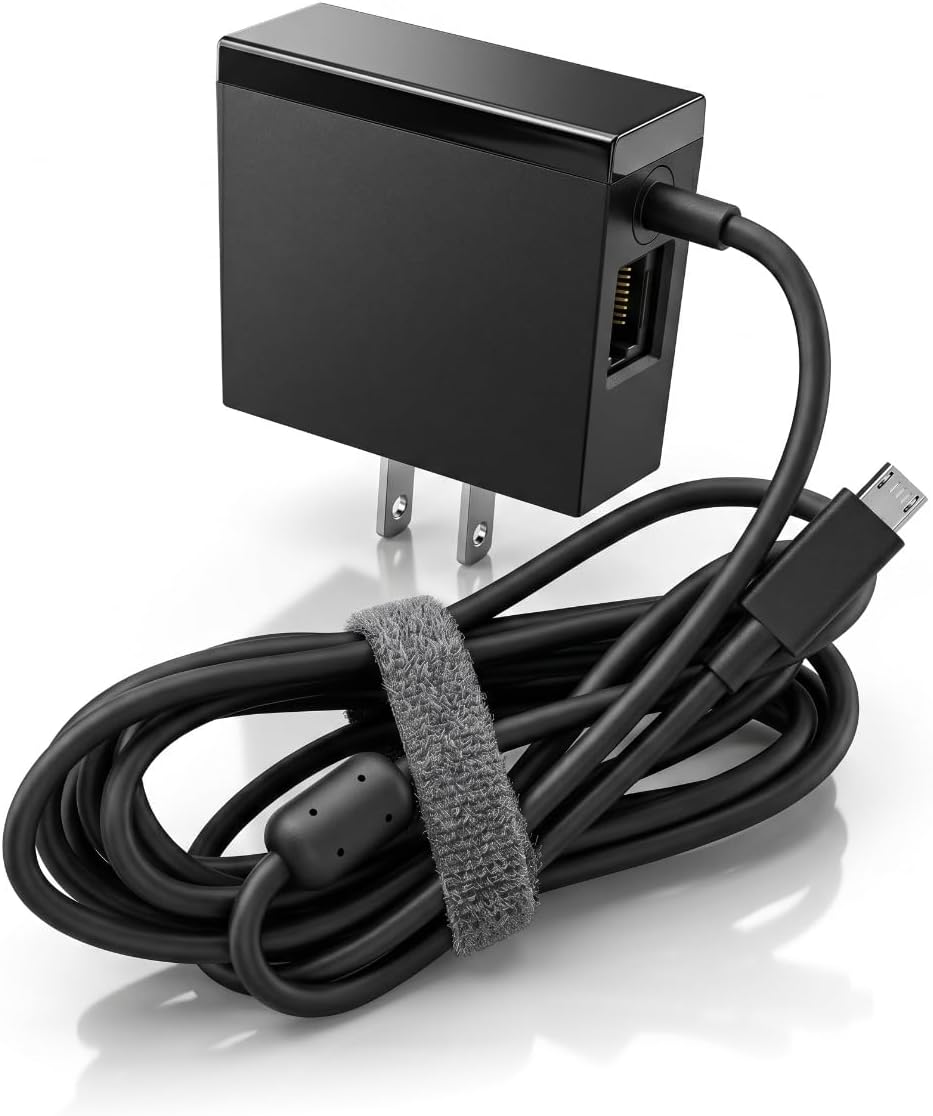
This Micro USB Port Fire Stick and Chromecast Ultra Ethernet Power Adapter has a 4.6 rating and combines two functions in one unit: a wall power adapter and a 100Mbps RJ45 Ethernet adapter. That integrated approach can reduce the number of separate power connections behind a television.
We may earn a commission when you buy through this link, at no additional cost to you.
The stated Fire TV support covers second- and third-generation Fire TV Stick, 2020 Fire TV Stick Lite, first-generation Fire TV Stick 4K, first-generation Fire TV Stick 4K Max, first- and second-generation Fire TV Cube models, and third-generation pendant-design Fire TV. It is also compatible with Google 4K Chromecast Ultra. The wall adapter accepts 100–240V input and provides a 5V 1A output.
This is a micro-USB power design, and the product description explicitly says it does not support Fire TV Stick models with USB-C or Chromecast with Google TV. Its Ethernet interface is 100Mbps, so buyers seeking a gigabit adapter should look elsewhere. Replacing an existing power supply can also mean giving up a familiar setup or using a different cable arrangement.
This product is a compelling choice when you want a single integrated power-and-network solution for a compatible micro-USB streaming device. It reduces cable clutter and removes the need to connect a separate Ethernet adapter to another power source. Confirm both the connector and model first, because compatibility is narrower than the headline product name may initially suggest.
Combining the power supply and Ethernet interface can make the arrangement behind the television simpler. Instead of managing a separate power block for the network adapter, the unit handles both connections together.
The stated model list includes several generations of Fire TV Stick, Fire TV Cube, pendant-design Fire TV, and Chromecast Ultra. It remains essential to verify the physical connector because USB-C models are excluded.
We may earn a commission when you buy through this link, at no additional cost to you.
The right Fire TV Stick Ethernet Adapter depends mainly on connector compatibility, available space, and the way your device receives power. Compare speed claims second, then consider installation details and the devices you expect to connect.
Start by identifying the port on your Fire TV Stick rather than relying only on the generation name. Most older Fire TV Stick models use micro-USB, while the second-generation Fire TV Stick HD uses USB-C. The Fire TV Stick 4K Max can also appear in configurations with different power connectors, so the physical shape of the port is the most reliable guide. A micro-USB-to-RJ45 adapter cannot be forced into a USB-C socket, and a USB-C adapter will not work with a micro-USB device. Selecting the wrong connector is one of the most common and avoidable purchasing errors in this category.
Ethernet speed labels describe the adapter's maximum theoretical capability, not the speed you will necessarily see while streaming. A 10/100Mbps adapter is often sufficient for ordinary high-definition viewing and can provide a more stable connection than crowded Wi-Fi. Gigabit-rated products offer additional headroom, but the result also depends on the router, local network, internet plan, and streaming servers. For most households, stability matters more than a large headline number. Choose a higher specification when the network can benefit from it, but do not expect advertised adapter speed to override service limitations.
Some adapters draw power directly from the Fire TV, some include a separate USB-A lead, and others integrate a wall charger with the Ethernet function. The Fire TV's original power adapter may have enough capacity to support a compatible adapter, but the manufacturer's guidance should always take priority. A dedicated wall charger is often easier to manage than powering the adapter from a television's USB port. If you select a design that includes its own power supply, check the output rating and connector. A stable power source is especially important for an adapter with multiple USB ports or a higher-performance network specification.
A product may fit physically yet still lack the correct support for a particular operating system, Fire TV generation, or streaming service. Review the full model list, including exclusions, rather than assuming every Fire TV product behaves the same. Some adapters specifically exclude Fire TV Cube, first-generation Fire TV Stick, Fire TV Stick 4K Max, or Chromecast with Google TV. Others mention VPN compatibility only to rule it out. These details matter because network adapters can require platform-level support in addition to a matching connector. The most reliable choice names your device or supported generation explicitly.
Fire TV Stick Ethernet adapters range from compact blocks to larger powered hubs. Consider the available depth behind the television, the direction of the television's ports, and the location of the nearest wall charger. A right-angle connector can reduce strain in a confined space, while a long integrated cable provides more routing flexibility. A multi-port hub may be useful for storage or peripherals but takes up additional room. Avoid mounting an adapter where its weight pulls directly on the Fire TV's plug, and use supplied adhesive or a suitable support to keep the connection stable.
An LED indicator can be a small but meaningful convenience. It confirms that the adapter is receiving power and may show whether a network connection has been established, saving users from repeatedly checking television menus. Some models use a single light, while others provide separate colors for different states. Adhesive mounting pieces are similarly useful because they keep a lightweight adapter from hanging and reduce stress on the Fire TV's connector. These features do not improve streaming quality directly, but they can make installation and troubleshooting more straightforward.
If you own more than one streaming device, examine the adapter's broader compatibility carefully. Some designs support Fire TV, Chromecast, Google Home Mini, Raspberry Pi Zero, and other micro-USB products, which can allow one adapter to serve several systems. However, each device must use the correct connector and platform support. A broadly worded product title should not override a more specific compatibility warning. The best choice for a multi-device household is one that explicitly lists the products you own while clearly identifying any exclusions.
Before installation, inspect the Fire TV Stick's connector, the adapter's plug, and the router's available Ethernet port. Disconnect the streaming stick from its normal power source, connect the adapter to the Fire TV, and attach the Ethernet cable to the adapter and router. If the adapter includes a separate power lead, connect that lead to the specified wall charger or other approved power source. Do not force a connector or use an adapter whose compatibility list does not include your exact device.
After connecting the hardware, restore power to the Fire TV and allow it to start. The television may recognize the wired network automatically, although checking its network settings is sensible if the connection does not appear. Use the status light, if present, to confirm that the adapter is active. After the network is recognized, run a speed test or begin streaming to verify that traffic is using the wired route. Restarting the Fire TV can help it refresh network detection when a newly connected adapter is not immediately shown.
For routine care, keep the adapter and cables away from moisture, excessive heat, and tight spaces where they may be crushed. Avoid hanging unsupported weight from the Fire TV's USB port; use the supplied adhesive or another suitable support when recommended. Periodically check that the Ethernet cable and power connections remain firm. If the network becomes unstable, reseat the connections, test another router port, and confirm that the device is still included in the adapter's compatibility guidance.
A wired Ethernet adapter can be more consistent than Wi-Fi because it avoids wireless congestion and signal fluctuations. It may also leave more wireless bandwidth available for phones, computers, and other devices. The improvement is most noticeable on busy or poorly positioned networks, although the internet speed still depends on the broadband plan, router, and streaming service. An adapter is not guaranteed to improve the quality of every stream.
Look at the power and data port on your Fire TV Stick rather than relying only on the product generation. Older Fire TV Stick models generally use the wider micro-USB connector, while the second-generation Fire TV Stick HD uses USB-C. If the connector is oval and relatively small, it is likely micro-USB; a symmetrical rounded connector is USB-C. Confirming the exact model and reviewing the adapter's compatibility notes prevents an incompatible purchase.
It depends on the design. Some adapters can use the Fire TV's existing power adapter, others include a USB-A power lead, and integrated models include their own wall supply. Follow the product instructions rather than assuming one arrangement applies to every adapter. A suitable wall charger is commonly more reliable than powering an adapter from a television's USB port, particularly for hubs or higher-speed models.
A 10/100Mbps Ethernet adapter can support many 4K streaming services because typical high-definition and ultra-high-definition streams do not continually require the full capacity of a gigabit connection. The more important benefit is a stable connection with fewer Wi-Fi interruptions. Actual quality still depends on the original content, internet plan, router performance, and whether the streaming service is receiving adequate bandwidth.
A single adapter may support several compatible devices over time, but the devices are not usually connected to it simultaneously in the same way. Each device needs the correct physical connector and compatible platform support. Some multi-port hubs can also support storage or peripherals, but a standard Ethernet adapter is normally intended for one streaming device at a time. Check the stated model list before relocating an adapter between devices.
Start by confirming that the adapter matches the Fire TV's connector and appears on the product's compatibility list. Reseat the adapter and Ethernet cable, try another router port, and ensure the correct power source is connected. Then restart the Fire TV and check its network settings. If the issue continues, test the adapter with a confirmed compatible micro-USB device to determine whether the problem lies with the adapter, television, or network configuration.
No. A higher theoretical speed cannot overcome a slow internet plan, overloaded router, or limited streaming server, and many households receive ample bandwidth from 10/100Mbps Ethernet. Faster ratings are most useful for local-network activity or future-oriented setups. For many users, dependable connection, correct power, and good physical placement have a greater effect than the largest advertised speed number.
Several adapters in this roundup explicitly support compatible Chromecast models, Google Home Mini, or Chromecast Ultra, while others do not. Compatibility still depends on the connector and platform version, and USB-C Chromecast with Google TV models are frequently excluded. Check the individual product's complete list of supported and unsupported devices before moving an adapter away from a Fire TV Stick.
The Micro-USB Ethernet Adapter for Amazon Fire TV Devices is the strongest all-around choice because it supports a wide range of listed Fire TV models and can use the Fire TV's power adapter. The Firestick Micro USB to RJ45 Ethernet is our budget pick, offering a high rating, no-driver setup, useful status feedback, and a straightforward 10/100Mbps connection. The Right Angle USB-C Ethernet Adapter is the specialized choice for the second-generation Fire TV Stick HD.
For everyone else, prioritize the connector before considering speed. The ELECTOP and 1000Mbps ZEXMTE adapters offer higher advertised Ethernet rates, but their micro-USB limitations and extra requirements deserve careful review. UGREEN stands out for its long cable and integrated power lead, while the multi-port hub is better suited to users who also need storage or peripheral support. The Cable Matters and combined power-adapter options provide useful alternatives for particular device arrangements.
Check the current product listing, compatibility notes, included components, and price before ordering. Product designs, supported models, and seller information can change over time, and the correct adapter for one Fire TV Stick may be entirely unsuitable for another. Confirm the physical port, power arrangement, and Ethernet requirement first to make the most confident choice.