
SUPVAN E11
4.5Editor score
Bluetooth app and keyboard
Rechargeable 1200 mAh battery
Minimal 0.2-inch margins
Continuous and die-cut labels
Discover the best Label Maker Machine with Tape options, comparing printing, compatibility, portability, features, and ideal uses for home or office.
A label maker machine with tape turns everyday organization into a quick, visual system for containers, files, cables, school supplies, pantry goods, and business inventory. The most useful models balance clear output, dependable tape compatibility, straightforward controls, and enough portability to move between a desk, kitchen, classroom, or workshop.
This guide compares ten label makers based on the features and specifications listed for each product. It considers keyboard versus app-based operation, supported tape formats, print width, display quality, power options, creative controls, and practical uses such as identification, organization, product information, and personalized tags.
Each review explains the product's strongest qualities, notable limitations, and the users most likely to benefit from it. Rankings reflect the supplied ratings and feature information, while the recommendations also distinguish among budget, general-purpose, portable, and feature-rich options. Prices and availability can change, so check the current listing before buying.
4.5Editor score

4.5Editor score

4.6Editor score
The comparison below highlights each label maker's operating approach, label capabilities, creative features, and strongest use cases so readers can quickly identify the model that fits their organization style.


The Brother PT-M95 is a straightforward monochrome label maker aimed at home users, students, and home-office organizers who want a portable way to create clear text labels. Its listed 4.5 rating reflects a well-balanced combination of ease of use, compact construction, and versatile formatting. The easy-view display helps users check text before committing tape, while the full QWERTY keyboard makes longer labels more practical than a limited alpha keypad.
We may earn a commission when you buy through this link, at no additional cost to you.
Its main strengths are portability and a short workflow from idea to finished label. The machine can print one or two lines and includes eight Deco Mode patterns, multiple type styles, frames, and symbols. It accepts genuine Brother M tapes in 9mm and 12mm widths, giving users two common size options for storage bins, files, school materials, gift bags, and other household items. The bundle includes one sample tape and three full-length black-on-white tapes, so it is ready for a range of immediate projects.
The trade-off is that the PT-M95 does not offer the extensive app-based design tools found on several newer competitors. It is focused on text, fonts, frames, and symbols rather than importing photographs, QR codes, or other rich content. It also lacks Bluetooth connectivity, which is a meaningful limitation for users accustomed to editing from a phone. Even so, the physical keyboard, clear display, and straightforward controls compensate for those omissions when the goal is fast, dependable labeling.
This is a strong recommendation for anyone who wants a portable label maker for drawers, pantry goods, files, school supplies, and travel organization without needing to manage an app or rechargeable charging system. Choose it when straightforward operation, compact size, and multiple tape widths matter more than advanced graphic design. It is especially well suited to a home user who wants useful formatting controls without a crowded screen or complicated setup.
The QWERTY keyboard and easy-view display make it practical to compose and inspect a label directly on the machine. This is helpful in rooms where pulling out a phone would add unnecessary steps, particularly during a quick pantry restock or school-project cleanup.
Support for both 9mm and 12mm genuine Brother M tapes lets the PT-M95 handle compact identifiers as well as more readable labels. The included black-on-white tapes provide an immediate starting point for building a consistent home labeling system.
We may earn a commission when you buy through this link, at no additional cost to you.
The Brother PT-D210 is the most feature-rich traditional label maker in this roundup, combining a compact body with a large preview display and a substantial library of formatting options. Its 4.6 rating is the highest among the listed products. It is designed for people who want more visual variety than a basic text printer while retaining one-touch access to fonts, symbols, frames, and templates.
We may earn a commission when you buy through this link, at no additional cost to you.
The display preview is the model's most useful quality-of-life feature. Users can see how a label will appear before printing, reducing wasted tape and reprints. The PT-D210 offers 10 styles, 14 fonts, 98 frames, more than 600 symbols, and 27 templates, giving it ample creative range for home, office, classroom, and small-business labeling. It supports 3.5mm, 6mm, 9mm, and 12mm TZe tapes, covering narrow identifiers through wider text labels.
Tape durability is another reason to consider the PT-D210. The listed information describes genuine Brother TZe laminated tapes as water-resistant and fade-resistant, with uses that extend from a freezer to a microwave or dishwasher. Although the printer itself is portable, it needs six AAA batteries, which are sold separately, and users who want a permanent desk setup may also need the optional AD-24 power adapter. Those are added costs, but the machine's formatting and tape flexibility make it adaptable to many labeling systems.
The PT-D210 best fits a home office, craft room, classroom, or small business that values a full display, polished label designs, and durable TZe tape. It is less appropriate for someone who wants phone-based editing or Bluetooth connectivity, yet its broad style library and preview screen cover many creative tasks without requiring a separate device. For those priorities, it is a particularly complete and versatile choice.
Seeing the finished layout on the screen helps users catch errors and judge spacing before using tape. That makes the PT-D210 suitable for detailed labels where a clean, professional appearance matters.
Fourteen fonts, 98 frames, more than 600 symbols, and 27 templates create a meaningful upgrade over minimal label makers. The options are especially useful for visually coordinating shelves, classroom materials, and business packaging.
We may earn a commission when you buy through this link, at no additional cost to you.
The SUPVAN E11 combines a compact physical keyboard with Bluetooth app support, making it a flexible budget option for home organization, office files, garage tools, pantry items, and school supplies. Its 4.5 rating places it among the strongest products here. At roughly 0.5 pound and 5.7 by 2.9 by 1.3 inches, it is designed to move easily between locations without becoming a desktop-only device.
We may earn a commission when you buy through this link, at no additional cost to you.
The E11 supports direct keyboard entry for frequent labeling and Bluetooth connection to an app for customized designs. The app provides more than 30 fonts, more than 50 frames, and more than 660 icons, while the built-in system includes 17 languages. It also supports local template saving, continuous labels, and die-cut labels, making it suitable for both long content and organized batches. A listed minimal print margin of 0.2 inches helps conserve material.
Its rechargeable 1,200 mAh battery is claimed to provide up to one month of use per charge, which is a meaningful convenience for a frequently portable tool. The trade-off is that advanced design depends on the app, and the listed features do not mention a physical screen for previewing. Users who prefer fully self-contained operation may find the Brother PT-M95 or PT-D210 more appealing, while those who want phone-based flexibility will find the E11 more capable.
This is an excellent recommendation for budget-conscious buyers who want Bluetooth editing and extensive creative options without moving to a large-format printer. It suits students, apartment dwellers, craft organizers, and small-business users who need flexible label lengths and a machine that is easy to carry. For basic text and elaborate app-based designs alike, the E11 provides an unusually capable feature set at an approachable tier.
Direct keyboard entry keeps short, repetitive labeling quick, while the Bluetooth app opens the door to more elaborate icons, frames, and saved templates. This dual approach suits both daily organization and occasional design projects.
The stated 0.2-inch margin reduces unused space around printed content. Combined with support for continuous and die-cut media, that makes the E11 adaptable to both efficient single labels and planned batches.
We may earn a commission when you buy through this link, at no additional cost to you.
The DYMO LabelManager 160 is a portable handheld label maker designed around a large display, full QWERTY keyboard, and one-touch smart keys. Its 4.4 rating reflects a practical combination of clear on-device operation and broad text-formatting support. The emphasis is not app-based design but creating labels quickly with physical controls, making it a natural fit for homes and offices that do not require wireless editing.
We may earn a commission when you buy through this link, at no additional cost to you.
The machine offers more than 20 text formats and over 200 symbols, providing adequate creative variation for names, categories, reminders, and shelf labels. Its one-touch smart keys speed up access to commonly used functions, while the large display helps users review text before printing. Three D1 cassettes in the bundle each measure 1/2 inch by 23 feet and use black print on white tape, giving new owners a useful stock of standard labels.
The principal limitation is media flexibility. The recommended authentic DYMO tape range covers 1/4-inch, 3/8-inch, and 1/2-inch widths, but the three included cassettes are all the same 1/2-inch size. It also lacks Bluetooth connectivity and the large symbol, font, and image libraries available from app-driven models. Automatic power-off helps conserve battery life, but buyers should still factor in the ongoing need for compatible D1 cassettes.
The LabelManager 160 is recommended for anyone who values a large display, familiar physical keyboard, and uncomplicated handheld workflow. It is well suited to household filing, supply rooms, classroom materials, and office labeling where a consistent 12mm format is acceptable. Choose it when direct label creation and quick access to smart keys matter more than wireless design tools.
The large display and one-touch smart keys reduce the need to memorize complicated menus. A user can enter text, call up formatting options, and confirm the result directly from the device.
Three included 12mm cassettes provide 23 feet of black-on-white tape each. That makes the bundle practical for immediately labeling a broad group of files, bins, household items, or office supplies.
We may earn a commission when you buy through this link, at no additional cost to you.
The SUPVAN E12 is a compact Bluetooth label maker distinguished from many entry-level competitors by its backlit LCD display. Its 4.4 rating reflects a versatile combination of direct keyboard entry, app editing, rechargeable operation, and a stated 0.2-inch minimal margin. It is built for people who want readable controls in bright or dim spaces without giving up phone-based creative tools.
We may earn a commission when you buy through this link, at no additional cost to you.
The backlit screen is the defining feature. It allows text to remain easy to check in poorly lit storage rooms, workshops, kitchens, and other spaces where an unlit display can be inconvenient. The E12 also offers 30-plus fonts, 50-plus frames, 660-plus icons, and 17 built-in languages through its app. Users can save templates locally, while direct keyboard entry supports quick labels without opening the app.
The built-in 1,200 mAh battery is claimed to last up to one month per charge, and the stated 0.2-inch margin helps reduce tape waste. The E12 works for routine labels and app-designed projects, but its supplied information does not indicate a physical-keyboard preview of the final graphic. That distinction matters for users who want to verify complex app layouts on the printer itself. It also remains more dependent on a phone for advanced work than the Brother PT-D210.
The E12 is a strong fit for users who want a rechargeable portable label maker with a readable screen and extensive creative options. It is particularly useful for evening organization projects, small-business packaging, school supplies, and home inventory. For those who prioritize screen visibility and flexible editing without needing a large-format printer, it is a compelling all-around choice.
The backlit LCD makes the E12 easier to use when entering text in closets, garages, or other dim areas. This is a practical benefit for organization sessions that continue beyond bright, well-lit rooms.
The internal battery removes the need for disposable batteries or a separate power adapter during ordinary use. Its claimed month-long charge cycle also makes the E12 convenient to keep ready for intermittent projects.
We may earn a commission when you buy through this link, at no additional cost to you.
The VolenGo D210S is a two-line label maker bundle centered on durable 12mm laminated tape. Its listed 4.2 rating is lower than those of the other products here, but the supplied specifications identify a practical model for users who value resilient labels, extensive character options, and flexible power. The included four-pack of 12mm by 8m white tapes is described as waterproof and resistant to oil, scratches, and heat.
We may earn a commission when you buy through this link, at no additional cost to you.
Creative control is unusually broad for a non-app-focused label maker. The machine includes more than 800 symbols, more than 100 frames, 16 fonts, and nine barcode options. It can print two lines even in tight spaces, while one-touch smart keys and friendly menus simplify operation. A built-in cutter removes the need for scissors, and rubber keys are designed to support comfortable, precise label creation.
Power can come through the included Type-C cable or six AAA batteries. This dual approach is useful because it allows desk-based use without disposable batteries while retaining cordless operation, although the charging adapter is not included. The primary concern is the durability claim's dependence on the branded laminated tapes; users who plan extensive outdoor, kitchen, or heavily handled labeling should understand the media requirements before purchasing.
The D210S is best recommended for labelers who need long-lasting, heat- and water-resistant tags, plus a broad library of characters and barcodes. It is suited to school items, files, storage bins, professional tags, and household surfaces that may be exposed to moisture or handling. It is not the top choice for advanced phone-based artwork, but it offers capable direct labeling with durable media.
The included laminated tapes are described as resistant to water, oil, scratches, and heat. That makes them better suited to demanding environments than ordinary lightweight thermal labels.
More than 800 symbols, 16 fonts, and nine barcode options support both text labeling and information-rich identifiers. The two-line capability is useful for pairing a category with a specific name or detail.
We may earn a commission when you buy through this link, at no additional cost to you.
The SUPVAN E10 is an app-driven Bluetooth label maker focused on approachable home, office, school, and device-identification tasks. Its 4.3 rating indicates a solid balance of ease of use and creative flexibility. The app requires no fees or registration, and the absence of ink or toner means users can create labels without replacing printer consumables beyond the label media itself.
We may earn a commission when you buy through this link, at no additional cost to you.
The editing app provides 40 fonts, 30 frames, and more than 450 icons, all described as free to use. That library is sufficient for names, categories, visual reminders, folder markers, and basic decorative identifiers. The E10 supports both continuous label tape and die-cut labels, allowing users to choose variable lengths for lengthy content or prepared sizes for batch work. A built-in cutter handles separation after printing.
The rechargeable battery is claimed to last a full month on one charge, improving the experience for occasional users who would rather not maintain a stock of batteries. Its laminated labels are described as waterproof, oil-proof, anti-scratch, and heat-resistant, which broadens their suitability for kitchen and bathroom use. The limitation is that there is no listed physical keyboard, so every design must be entered through a compatible device and app.
The E10 is a good recommendation for users who want app-assisted label creation without subscriptions and need flexibility in label length. It works well for storage boxes, spice containers, school folders, device IDs, and everyday home categories. Buyers who type large amounts of text frequently may prefer a keyboard-equipped model, but for shorter and more visual labels, the E10 offers a clean, approachable workflow.
The app can be used without registration or recurring fees, which supports the advertised cost-effective approach. A broad selection of fonts, frames, and icons remains available for decorative and organizational labels.
Continuous tape supports labels whose length changes with the content, while die-cut media suits consistent batch labeling. The built-in cutter then separates each finished label neatly.
We may earn a commission when you buy through this link, at no additional cost to you.
The SUPVAN T50M Pro stands apart from the compact models in this roundup by printing labels between 3/4 inch and 2 inches wide. Its 4.5 rating reflects a capable machine for home organization, small business, school, and office labeling. The wider format makes it appropriate for product information, address labels, QR codes, barcodes, and brand-logo applications that would feel cramped on a narrow tape.
We may earn a commission when you buy through this link, at no additional cost to you.
Its app works with images added from a phone, tablet, or computer and includes more than 30 fonts, 50-plus frames, and 660-plus icons. The app's image processing is described as producing precise, high-resolution output, while automatic label-size recognition simplifies setup. It requires no registration and uses no ink or toner, allowing users to move from template selection to printed labels with relatively little configuration.
The wide-label capability is also the main constraint for some users. If a project involves only small category tags, a smaller machine may be easier to store and less demanding of media. The T50M Pro also depends on the app for its advanced design functions, so users seeking a self-contained keyboard-and-display workflow should consider a traditional model. Its listed compatibility includes square, round, address, cable, jewelry, and file labels, broadening project flexibility.
This is the best recommendation for small businesses or serious organizers that need more visual space than a standard narrow label maker provides. It is particularly suitable for branded packaging, product identification, address information, and QR-code labels. The automatic size recognition and image import functions make it attractive to users who want polished results without advanced graphic-design experience.
A 3/4-inch to 2-inch print range gives product names, barcodes, and QR codes enough space to remain readable. This is the defining advantage over compact models focused on brief identifiers.
Image import from a phone, tablet, or computer provides flexibility when a project is created away from the printer. Automatic label-size recognition further reduces manual alignment and setup.
We may earn a commission when you buy through this link, at no additional cost to you.
The Brother PT-N10 is a compact, battery-operated label maker centered on colorful personal labels for dorm rooms, student life, travel, and everyday belongings. Its 4.3 rating reflects a focused design that prioritizes portability, easy application, and cheerful customization. It uses Brother P-touch Btag tape measuring 12mm wide and 13.1 feet long, available in 17 colorful options.
We may earn a commission when you buy through this link, at no additional cost to you.
The full QWERTY keyboard makes text entry convenient despite the small body, and the 12-character display previews the message and estimated tape length before printing. It includes three fonts in six styles, 10 frames, and 200 symbols, with up to two lines of text at a combined height of 7mm. Five memory slots can save frequently used or favorite labels for quick reprinting, reducing repeated typing.
The tradeoff is specialization. Btag tapes use split, easy-peel backings and are designed for damage-free removal, but the PT-N10 cannot use the broader tape range supported by models such as the PT-M95 or PT-D210. Its two-line text area is also relatively compact. For users seeking a portable travel accessory and expressive color choices, these limitations are reasonable; for broad office labeling with varying widths, they may be less convenient.
The PT-N10 is recommended for students, travelers, dorm residents, and families who want to identify and personalize belongings. It works especially well for luggage, storage containers, notebooks, gifts, and items that may need to be removed later. The preview display, saved labels, and simple cutter make it a focused personal-labeling tool with clear everyday value.
Seventeen Btag color options make the PT-N10 visually distinct from monochrome office labelers. This helps users differentiate rooms, categories, or owners at a glance.
Five saved-label memories let users reprint common messages without entering them again. That is especially useful for travel inventories, school supplies, and recurring household categories.
We may earn a commission when you buy through this link, at no additional cost to you.
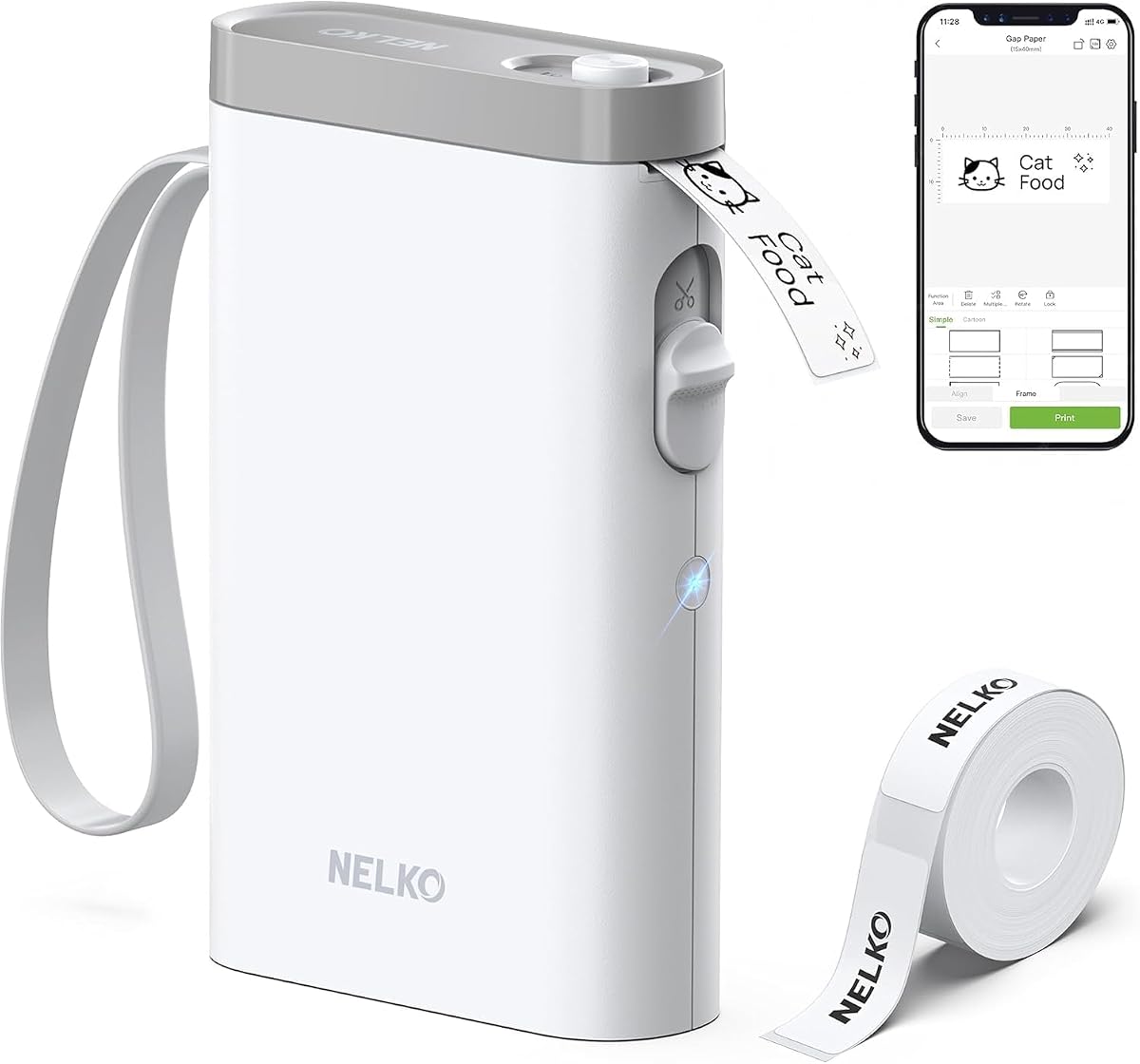
The Nelko P21 is a highly compact Bluetooth label printer designed to fit into a pocket and work through a phone app. Its 4.4 rating reflects a capable creative tool with a 203 DPI direct-thermal print resolution, a rechargeable battery, and an extensive template library. It is particularly useful for school supplies, name tags, folders, reminders, mailings, and decorative home organization.
We may earn a commission when you buy through this link, at no additional cost to you.
The app includes more than 3,600 icons, 700-plus borders, 5,500-plus materials, and 750-plus templates across 29 languages. Users can add text, QR codes, barcodes, images, time details, and borders. The printer produces black monochrome text, while color can be introduced through compatible color-pattern label tapes. That combination makes it possible to create visually rich stickers even though the underlying print technology is direct thermal.
There are important limitations. The P21 works with iOS and Android phones but not computers, and it is not compatible with Google Pixel phones running Android 14. Continuous label tapes are not supported; instead, the available formats use fixed lengths such as 14 by 40mm, 14 by 50mm, and 14 by 75mm. The green sticker on the back of the label strip must remain intact because damaging it can affect printing. A charging adapter is also not included.
The P21 is recommended for creative users who want a powerful app library in a pocket-sized format. It is a strong fit for students, teachers, and mobile organizers who regularly switch locations and prefer templates, icons, and graphics over a physical keyboard. Buyers should check device compatibility and confirm the fixed tape sizes before ordering, but for phone-first creative labeling, the P21 delivers a capable and distinctive experience.
Thousands of icons, borders, materials, and templates allow labels to look more decorative than a basic text printer permits. QR codes, barcodes, images, and time details support practical and personalized projects alike.
The P21 is described as half the weight and size of traditional label makers, making it easy to carry in a pocket or small bag. Its rechargeable battery supports extended use between charges.
We may earn a commission when you buy through this link, at no additional cost to you.
The right label maker depends on the labels you need, where you will use the machine, and how much creative control you want. These factors cover operating style, media compatibility, portability, durability, and intended applications.
A physical QWERTY keyboard is efficient for repeated text entry and allows a label maker to work without a phone. Models such as the Brother PT-M95, PT-D210, and PT-N10 are well suited to quick, self-contained projects. Bluetooth app control is preferable when users want imported images, QR codes, barcodes, extensive symbols, saved templates, or phone-based editing. App-driven models such as the SUPVAN E11 and Nelko P21 provide more creative flexibility, but require a compatible device and app.
For repeated office or school labels, prioritize keyboard speed. For decorative, image-rich, or information-heavy labels, prioritize app capabilities.
Tape width affects how much text and graphics can fit on a label. The Brother PT-D210 accepts 3.5mm, 6mm, 9mm, and 12mm TZe tapes, offering broad flexibility, while the PT-M95 supports 9mm and 12mm Brother M tapes. The SUPVAN E11 and E10 support continuous and die-cut formats, allowing variable or fixed lengths. The Nelko P21 supports several fixed sizes but not continuous tape. Larger labels are necessary for product details, QR codes, and prominent storage-bin identifiers.
Match the machine to the labels you already own or are likely to buy, not just its headline print width.
A display helps users catch errors, judge spacing, and reduce wasted tape before printing. The Brother PT-D210 offers a large preview screen, the DYMO LabelManager 160 includes a large display, and the SUPVAN E12 adds backlighting for low-light use. The Brother PT-N10 includes a 12-character preview. App-only machines may still be visually creative, but they do not necessarily provide a physical way to inspect the final design.
Choose a clear display if accuracy, fine editing, or frequent confirmation matters to your workflow.
Portable label makers should be easy to carry and ready to use in different rooms or locations. The SUPVAN E11, E12, and E10 use rechargeable 1,200 mAh batteries, with the supplied information claiming up to one month of use per charge. The Nelko P21 also has a built-in rechargeable battery and an especially pocketable body. The Brother PT-D210 can operate on six AAA batteries and may be paired with an optional power adapter for desk use. The VolenGo D210S supports both a Type-C cable and six AAA batteries.
Consider where you will print, how often, and whether charging or disposable batteries best suits your routine.
Font, frame, symbol, template, and image options determine how expressive a label maker can be. The Brother PT-D210 provides 14 fonts, 98 frames, more than 600 symbols, and 27 templates. The VolenGo D210S lists more than 800 symbols, over 100 frames, 16 fonts, and nine barcode options. Bluetooth models often add phone imports, QR codes, and graphic elements. A simple keyboard model is adequate for plain category markers but less suitable for branding and decorative designs.
Match the creative library to your actual projects rather than choosing a larger feature count than needed.
The environment determines which tape properties matter. Genuine Brother TZe laminated tapes are described as water-resistant and fade-resistant, making the PT-D210 a fit for demanding household and office locations. The SUPVAN E10 and VolenGo D210S bundles also emphasize waterproof or laminated media. For labels that will be washed, handled, exposed to heat, or removed later, review the tape's stated resistance and removal behavior before use.
Use durable laminated media for harsh conditions and verify compatibility before making a large batch.
Fine print resolution is important for small text, barcodes, and compact identifiers. The Nelko P21 specifies 203 DPI and high-speed direct-thermal technology. The SUPVAN T50M Pro supports wide labels and is described as having enhanced image-processing output. Traditional Brother models emphasize readable text, type styles, and previews. Users creating tiny technical labels should prioritize fine output, while those labeling drawers or boxes may need only clear, high-contrast text.
Check output specifications closely when your labels include small characters, codes, or dense information.
A home pantry, classroom, repair kit, and small business have different requirements. Food containers and bathroom shelves may need moisture-resistant labels. Classrooms often need name tags and color coding. Small businesses may require product information, logos, QR codes, or addresses. The SUPVAN T50M Pro is suited to wider information labels, the Brother PT-N10 to personal belongings, and traditional Brother models to general home and office text. Account for device compatibility and app restrictions as well as tape format.
List your most common projects first, then select the model whose media and features directly support them.
Begin by confirming that the installed tape is compatible with the exact model and that the machine is adequately charged or fitted with fresh batteries. For app-controlled labelers, install the current app, connect via Bluetooth, and check for any stated device or operating-system restrictions. Traditional models can be prepared by inserting the appropriate tape and powering the unit on before entering a short test label.
Compose a short sample first and inspect the text, spacing, tape length, and graphics. App users can adjust the layout in the editor, while keyboard users can use the display preview where available. Once the result looks correct, print the label and let the cutter finish its cut before pulling the tape away. Peel the backing slowly, clean the application surface, and press the label into place for full contact.
Store the machine with the tape compartment protected and avoid pulling unused tape out of the machine. Keep adhesive and residue away from the cutter and print area, and follow the instructions for the specific tape material. For rechargeable units, recharge before prolonged storage and use the specified charging method. Replace batteries in traditional models when output becomes weak, and always confirm compatibility before switching tape brands or formats.
A label maker commonly emphasizes text entry, built-in fonts, frames, symbols, and templates, often through a physical keyboard. A portable label printer usually relies more heavily on a phone app and is designed for graphics, images, QR codes, and custom layouts. The products in this guide include both approaches, so the best choice depends on how you prefer to design and what labels you need.
Tape compatibility is model-specific, and using media that is not supported can affect print quality or operation. Brother models have different tape ecosystems: the PT-D210 uses TZe tapes, the PT-M95 uses Brother M tapes, and the PT-N10 uses 12mm Btag tape. DYMO LabelManager models use D1 cassettes, while the SUPVAN models and the Nelko P21 support their own listed formats. Check the machine's compatibility list before ordering tape.
Bluetooth models are often better for decorative labels because the app provides fonts, icons, images, QR codes, and templates. Keyboard models are often faster for repeated words and short identifiers because you can type directly and preview the result on the device. The best choice depends on whether you value creative design or fast standalone text entry.
No. The products in this guide use direct thermal or heat-transfer printing, so they do not require conventional ink or toner cartridges. The printable label tape is the consumable, and some models are designed around laminated media for improved water, scratch, oil, or heat resistance.
A wider model generally provides more room for a QR code, barcode, logo, and adjacent product text. The SUPVAN T50M Pro prints between 3/4-inch and 2-inch labels and supports QR-code, barcode, and logo use cases. If a smaller format is sufficient, several compact models can still produce compact identifiers, but check the available label dimensions and output resolution.
You can, provided the label and the machine's supported tape are appropriate. Brother TZe laminated tape is described as water-resistant and fade-resistant, while the SUPVAN E10 and VolenGo D210S emphasize laminated or water-resistant media. For refrigerator, bathroom, or kitchen containers, select compatible durable tape, apply it to a clean and dry surface, and avoid pulling it off in a way that could damage the surface.
It depends on the model. The Nelko P21 connects to iOS and Android phones and is expressly not compatible with computers. The SUPVAN T50M Pro can add images from a phone, tablet, or computer, which is more flexible. For a computer-based workflow, confirm the app's operating-system requirements and whether the printer itself requires a mobile Bluetooth connection.
Preview the label before printing whenever the machine provides a display, and keep a short test label ready when changing tape types or app settings. The Brother PT-D210, DYMO LabelManager 160, and PT-N10 support on-screen review, while the SUPVAN E11 and E12 list minimal margins that can reduce unused material. Accurate length settings, clean tape paths, and regular cutter care also support efficient results.
The Brother PT-D210 stands out as the most complete traditional option, with a large preview display, extensive fonts and frames, broad TZe tape compatibility, and durable laminated media. The Brother PT-M95 is an excellent portable choice for straightforward home and office labels, while the SUPVAN E11 delivers app-based creativity, rechargeable power, and a compact body at a budget-friendly tier.
Prioritize the features your projects actually require. Choose a keyboard and display for fast text entry, Bluetooth for phone-based design, wide-format output for QR codes and product details, or durable laminated tape for demanding environments. Also consider whether you prefer fixed or variable label lengths and verify every model's media and device compatibility before purchasing.
Finally, check current pricing, availability, included accessories, and replacement tape options on the product listing before making a final decision. These machines differ most in operating style and compatible media, so the best value is the model that matches your labeling routine rather than simply the one with the largest feature count.
