
MACHINIST H61 LGA 1155
3.7Editor score
Supports 2nd and 3rd Gen CPUs
Dual-channel 16GB DDR3
Flexible NVMe or NGFF M.2
Our Lga 1155 Motherboard guide compares 10 models for processor support, memory, expansion, storage, networking, and overall build value in 2026.
Lga 1155 motherboards remain useful for affordable, repairable, and specialized older Intel builds, but the right model depends on processor generation, memory capacity, storage needs, and expansion plans. A good board should fit the case, provide the required ports, and support the CPU without requiring an unnecessary discrete graphics card.
The ten products in this guide were compared using their stated processor support, chipset, memory configuration, expansion slots, storage interfaces, display outputs, networking, and form factor. The list covers compact and full-size ATX boards, entry-level H61 models, and more highly equipped H77 and Z77 options for legacy systems.
Each review explains the strongest reason to consider the board while also noting practical limitations and compatibility concerns. The three leading choices are highlighted below, and the complete ranking follows in order. As with all hardware listings, prices and availability can change, so check the current listing before purchasing.
3.7Editor score

4.3Editor score
4.2Editor score
This side-by-side comparison highlights the processor, memory, expansion, and connectivity differences among all ten Lga 1155 motherboards, helping buyers match a legacy platform to a specific case, CPU, and upgrade plan.


The H61 DDR3 Motherboard is a straightforward Lga 1155 option aimed at builders who want broad processor choice, solid-state storage support, and the lowest-cost path into a second-generation or third-generation Intel system. Its listed rating is 5.0, and the specification sheet covers Core i3, i5, i7, Pentium, and Xeon E3 v2 processor families.
We may earn a commission when you buy through this link, at no additional cost to you.
Storage flexibility is the standout feature. The M.2 interface can be configured for NVMe or NGFF, while the main PCIe x16 slot supports PCIe 3.0 where the processor and platform permit it. Two DDR3 slots accept up to 16GB in dual-channel mode, with listed memory speeds extending from 1280MHz through 1866MHz. VGA and HDMI outputs can provide 1080p display output when the installed processor includes integrated graphics.
There are important constraints to accept. The package contains the motherboard, one SATA cable, and one I/O baffle, but it does not include a user manual or CR2032L battery. Only one full-length PCIe x16 slot is listed, so the board is less flexible for multiple graphics cards or other high-bandwidth expansion. The 16GB memory ceiling is modest by modern standards.
This is a compelling pick for an inexpensive everyday, office, media, or retro-gaming build using DDR3 memory. Buyers should first confirm the exact CPU has integrated graphics if they plan to use the motherboard's display outputs, and they should budget for the excluded battery and any needed manual or extra storage connection. For those priorities, it delivers a useful set of features without a premium feature set.
The board's support for both second- and third-generation Intel processors makes it useful when the processor is already owned or available from the legacy market. It is particularly relevant for a straightforward rebuild that needs conventional DDR3 and SATA hardware.
The convertible M.2 interface allows a builder to use an appropriate compact SSD instead of being limited entirely to SATA storage. That makes it easier to create a responsive system without replacing every other component in an older chassis.
We may earn a commission when you buy through this link, at no additional cost to you.
The MACHINIST H61 LGA 1155 combines a compact Flex-ATX design with support for second- and third-generation Intel Core processors. Its listed rating of 3.7 is lower than that of several established-brand boards, but the specification set covers many of the features sought in a value-oriented legacy build, including a convertible M.2 interface.
We may earn a commission when you buy through this link, at no additional cost to you.
Two DDR3 DIMM slots support dual-channel configurations up to 16GB, with effective frequencies of 1280, 1333, 1600, and 1866MHz. The M.2 interface can be adapted for NVMe or NGFF drives and supports common 2242, 2260, and 2280 M.2 SSD sizes. Display output is provided through VGA and HDMI, subject to the processor's integrated graphics capability.
The main compromises are its 100M LAN connection and the limited number of memory slots. The included troubleshooting advice is unusually detailed, covering power connections, memory seating, CPU compatibility, CMOS clearing, display cables, and graphics support. The package includes the board, SATA cable, and I/O baffle, but not the manual or coin-cell battery.
This motherboard makes sense for a compact system that needs NVMe support but not extensive networking, multiple graphics cards, or high memory capacity. Its guidance may also be valuable to first-time builders. Buyers should verify case clearance for Flex-ATX layouts, select an M.2 drive matching the required protocol, and ensure the chosen CPU provides the desired display output.
Flex-ATX can offer a more manageable footprint than full ATX while retaining several useful connectors and a conventional expansion layout. It is a sensible size for a dedicated office, media, or retro-computing system where every case dimension matters.
Supporting both NVMe and NGFF through a configurable M.2 interface gives builders more SSD choices than older motherboards designed solely for SATA. It is a meaningful upgrade path for systems that were originally limited to mechanical drives.
We may earn a commission when you buy through this link, at no additional cost to you.
The Gigabyte Z77-DS3H is a full-size ATX Lga 1155 motherboard built around the Intel Z77 chipset. Its listed rating of 4.3 places it among the stronger-rated products in this guide, and its stated processor coverage includes Core i3, Core i5, Core i7, Pentium, and Celeron families.
We may earn a commission when you buy through this link, at no additional cost to you.
The Z77 platform is a natural choice for builds that want to retain a full ATX layout and a more mature feature set. The listing specifically identifies the Intel Z77 Express chipset, RAID capability, and Gigabit LAN, making it relevant to buyers seeking network performance and storage flexibility rather than the smallest possible board.
The supplied product information is concise, so the listing should be consulted for the exact port count, memory configuration, expansion-slot arrangement, and included accessories. A buyer should also verify the processor's graphics capability, the case's ATX support, and any specific legacy hardware requirements before finalizing a purchase.
For an ATX rebuild, this board is a strong general recommendation because it combines a well-known chipset with a favorable rating and broad CPU support. It is especially suitable for buyers who want Gigabit LAN and a full-size platform, while understanding that the listing offers less detail than several competing products.
A full-size ATX board is convenient for users with standard cases and a preference for familiar component placement. It also provides a natural foundation when the system will eventually receive additional memory, storage, or expansion cards.
Gigabit LAN is more suitable for modern file transfers and connected use than basic 100M networking. The difference is particularly noticeable when moving large files between devices or maintaining a consistent home network connection.
We may earn a commission when you buy through this link, at no additional cost to you.
The ASUS P8Z77-V is an ATX Z77 motherboard for Lga 1155 processors, with support for DDR3 memory up to 2400MHz according to its title. Its listed rating is 4.0, and the board differentiates itself with management and convenience features including Wi-Fi GO!, Fan Xpert 2, SMART DIGI+ Power Control, USB BIOS Flashback, and a TPM header.
We may earn a commission when you buy through this link, at no additional cost to you.
Wi-Fi GO! is described as a home-environment feature for multimedia management, remote control, internet sharing, and quick data sharing. Fan Xpert 2 provides automatic tuning and separate settings for individual fans, while SMART DIGI+ Power Control adds flexible monitoring and adjustment for CPU and memory power behavior. These are management conveniences rather than raw performance claims.
USB BIOS Flashback is useful for firmware recovery because it allows a BIOS file to be flashed from a USB device. The TPM header supports enhanced data-security features, although the TPM module and operating-system requirements should be checked separately. As with all Lga 1155 boards, memory type, processor generation, and the presence of integrated graphics in the selected CPU remain essential compatibility points.
This is a good choice for a builder who wants more controls and utilities than a basic H61 board provides. It suits an established ATX case, a capable second- or third-generation processor, and an operating system that can install the necessary Wi-Fi and hardware-management drivers. Those who only need basic office functionality can find a less elaborate alternative.
Fan Xpert 2 and SMART DIGI+ Power Control give users more control over cooling and power delivery. These features are useful when tuning a system or balancing noise and thermal performance with a less common legacy platform.
USB BIOS Flashback can make firmware recovery easier than a process that depends entirely on a working operating system. It is a worthwhile convenience for a reused system whose settings may need to be reset or updated.
We may earn a commission when you buy through this link, at no additional cost to you.
The H61 Gaming ATX motherboard combines a Micro ATX layout with second-generation Intel Core support and a 4.1 listed rating. It is compatible with Lga 1155 Core i3, i5, and i7 processors as well as listed Pentium and Celeron examples, and it includes a full-length PCIe 3.0 x16 slot for a discrete graphics card.
We may earn a commission when you buy through this link, at no additional cost to you.
The board supports two 8GB DDR3 modules for up to 16GB of dual-channel memory at 1066, 1333, or 1600MHz. Its M.2 interface supports NVMe and NGFF modes and can be switched between high-speed PCIe and SATA 2.0 operation. Other listed connections include VGA, HDMI, six USB 2.0 ports, three SATA 2.0 ports, and a PCIe x1 slot.
A three-phase power design, solid-state capacitors, and a 24+4-pin power connector are highlighted for stability. The product description contains an apparent socket-label inconsistency by referring to Lga 1151 in one place, but the product title and primary specification identify the board as Lga 1155. Buyers should confirm the physical socket and processor list directly before ordering.
This motherboard is a reasonable middle ground for a compact gaming or general-purpose legacy PC that will use a discrete graphics card and benefit from NVMe storage. It is less attractive for intensive network transfers because its LAN is listed at 100Mbps, and its small size provides less room for expansion than full ATX.
The combination of a convertible M.2 interface and PCIe 3.0 x16 slot supports a modern storage and graphics configuration. It is useful for turning an older platform into a more capable dedicated gaming or general-purpose system.
Micro ATX reduces the board footprint while retaining six USB 2.0 ports, three SATA connectors, and display outputs. It can fit systems where a full ATX board would be unnecessarily large.
We may earn a commission when you buy through this link, at no additional cost to you.
The ASUS P8H77-V LE is an ATX Intel H77 board for Lga 1155 systems, with SATA 6Gb/s, USB 3.0, and HDMI named in its title. The listed rating of 4.3 is among the better results in this comparison, giving it a favorable position for buyers seeking a more established-brand alternative to newer budget models.
We may earn a commission when you buy through this link, at no additional cost to you.
DIGI+ VRM is presented as a digital power design focused on stability, efficiency, and performance scaling. The EPU utility supports system-level energy saving and real-time power management. USB 3.0 Boost offers Normal, Turbo, and UASP operating modes, while GPU Boost is described as providing a quick graphics upgrade from compatible integrated graphics.
Fan Xpert adjusts cooling according to system loading, which can help maintain a balance between temperature and noise. H77 is a practical platform for users who need modern SATA and USB capabilities but do not require every feature associated with Z77. Exact memory capacity, slot quantity, and port layout should be confirmed in the live listing because they are not included in the supplied description.
This board fits an ATX build that values established utilities, efficient power management, and fast external storage connectivity. It is well suited to a quiet desktop where adaptive fan control and energy-saving functions are useful. Buyers should confirm processor support, board dimensions, and accessory requirements before purchasing.
The EPU and DIGI+ VRM features focus on operating the platform efficiently while maintaining stable power delivery. They are particularly relevant for a home-office or all-purpose system expected to run for long periods.
Normal, Turbo, and UASP modes give users options for compatible USB 3.0 devices. The available performance can depend on the drive, enclosure, cable, and operating system, so the modes are most useful when tested with the intended hardware.
We may earn a commission when you buy through this link, at no additional cost to you.
The full-size ASUS P8H77-V is built for Lga 1155 processors and carries a 4.1 listed rating. Its most important distinction from the smaller H61 choices is the four-slot, dual-channel memory configuration supporting up to 32GB, along with a broad mix of PCI Express and legacy PCI expansion.
We may earn a commission when you buy through this link, at no additional cost to you.
Expansion consists of one PCI Express 3.0 x16 slot, one PCI Express 2.0 x16 slot operating at x4, two PCI Express 2.0 x1 slots, and three conventional PCI slots. Storage includes two SATA 3 ports and four SATA 2 ports, with RAID 0, 1, 5, and 10 listed as supported configurations. The board also supports Intel Turbo Boost 2.0 with compatible processors.
The older PCI slots and large ATX footprint make this board less attractive for compact, minimalist systems. The secondary PCI Express slot is electrically limited to x4, so it is not equivalent to a second full x16 graphics slot. Buyers should also verify which legacy cards and drivers are still supported by their chosen operating system.
This is a good recommendation for a legacy workstation-style or heavily expanded home PC where 32GB of memory, several drives, and multiple cards matter. It is less ideal for a simple office machine because those extra capabilities add physical size and may remain unused.
Four DIMM slots and a 32GB ceiling give this board more headroom than the two-slot H61 alternatives. That capacity is useful for memory-intensive legacy tasks, virtualized systems, and builds where avoiding a very old platform matters.
Six SATA connectors and multiple RAID modes make the board suitable for multi-drive configurations. Builders should understand the trade-offs of each RAID level and ensure their chosen operating system includes the required Intel storage drivers.
We may earn a commission when you buy through this link, at no additional cost to you.
The ASUS P8Z77-V LK is a full ATX Z77 motherboard designed for second- and third-generation Intel Core i3, i5, i7, Pentium, and Celeron processors. Its 4.1 listed rating reflects a generally favorable result, while the detailed specification supports up to 32GB of dual-channel DDR3 memory.
We may earn a commission when you buy through this link, at no additional cost to you.
Memory profiles extend to DDR3 2400MHz through overclocked settings, with listed rates of 2200, 2133, 2000, 1866, 1800, 1600, and 1333MHz. Expansion includes two PCI Express 3.0 x16 slots that can operate at x16 or dual x8, one PCI Express 2.0 x16 slot running at x4, two PCI Express 2.0 x1 slots, and two conventional PCI slots.
Storage support includes two SATA 3 and four SATA 2 ports, with RAID 0, 1, 5, and 10 listed. The second graphics-capable slot creates possibilities for multi-GPU arrangements, but actual compatibility depends on the processors, graphics cards, drivers, and intended workload. Overclocked memory speeds also require compatible modules and stable platform settings.
This motherboard is best suited to a legacy enthusiast build that wants multiple expansion cards, considerable memory, and multiple graphics options. It is less attractive for a compact or minimally equipped system, but the extensive slot arrangement gives it strong flexibility for specialized configurations.
Two PCI Express 3.0 x16 slots can run in x16 or dual x8 arrangements, offering more graphics-related flexibility than the H61 boards. Users should verify card dimensions, power requirements, and lane-sharing behavior for their exact hardware.
Four DIMM slots and support for 32GB make the board suitable for more demanding legacy use. The broad list of memory profiles also allows compatible kits to operate at higher listed rates when the CPU and memory can handle them.
We may earn a commission when you buy through this link, at no additional cost to you.
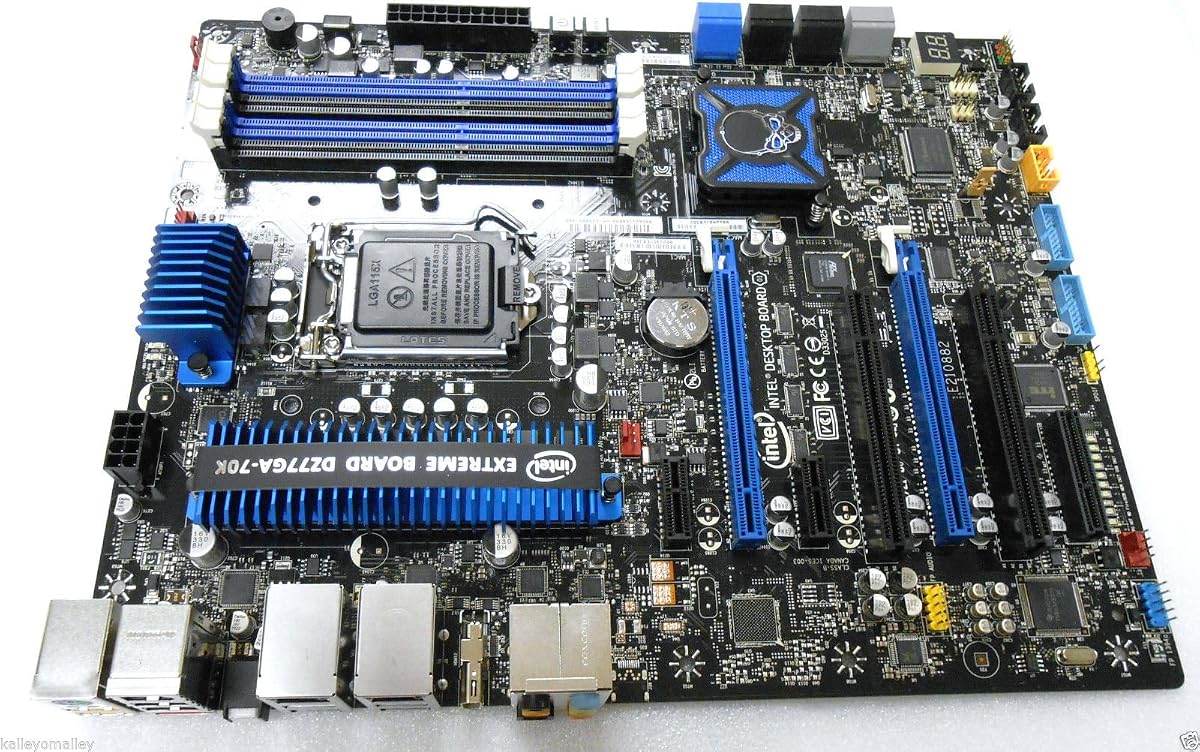
The Intel Z77 Extreme DZ77GA-70K is the feature-focused premium option in this guide, with a 4.2 listed rating. It combines the Lga 1155 socket with the Intel Z77 Extreme chipset, dual Gigabit LAN, PCI Express 3.0, SATA 6Gb/s, Realtek HD audio, HDMI, e-SATA, USB 3.0, and FireWire.
We may earn a commission when you buy through this link, at no additional cost to you.
Dual Gigabit LAN is a major distinction for compatible network equipment and specialized multi-interface networking tasks. e-SATA and FireWire also serve particular external-storage and legacy-device use cases, although they have limited relevance for a modern PC that only needs standard USB and internal SATA connectivity.
The listing contains the motherboard only, so the buyer must supply compatible processors, memory, storage, input devices, graphics hardware if needed, and a suitable operating system. Exact RAM, slot, and connector details should be verified in the product listing or manufacturer documentation before the purchase.
The DZ77GA-70K is a compelling choice for a specialized legacy workstation or enthusiast system that can use its unusual ports. It is not the logical selection for a simple modern office build because those features may add cost and complexity without delivering a practical advantage. For the right collector or professional use case, however, its connectivity is exceptional.
Two Gigabit Ethernet ports provide more connection choices than a single-network design. The feature is particularly relevant to network-attached storage, managed environments, and users who value redundant physical interfaces.
e-SATA and FireWire can be invaluable when preserving an existing device ecosystem. They are less useful for a fresh build, so buyers should verify that a real peripheral relies on those connections before choosing the board.
We may earn a commission when you buy through this link, at no additional cost to you.
The ASUS P8B75-M/CSM is a Micro ATX Lga 1155 motherboard with DDR3 2200 support and a 4.4 listed rating, the highest numerical rating in this comparison. Its feature set focuses on efficient operation, flexible USB 3.0 behavior, integrated graphics enhancement, and an accessible graphical UEFI interface.
We may earn a commission when you buy through this link, at no additional cost to you.
The EPU utility provides system-level energy saving and real-time power management. USB 3.0 Boost offers Normal, Turbo, and UASP modes, while GPU Boost can increase the performance of compatible integrated graphics. The UEFI BIOS includes F3 shortcuts and DRAM SPD features, according to the product information, which can help setup and troubleshooting.
The board's smaller Micro ATX format is useful for compact cases, while the Lga 1155 socket gives builders access to a large pool of compatible processors. Detailed memory capacity and expansion-slot information are not included in the supplied listing data, so those specifications should be checked before purchase, particularly if multiple cards or large memory modules are required.
This board is a strong choice for a compact, efficient legacy desktop or business-oriented system that can benefit from the CSM designation. It may be especially attractive to users who prefer a manageable UEFI interface over navigating a more basic BIOS. Verify memory, processor, and case compatibility, and confirm that the available operating system supports the board's management utilities.
EPU, GPU Boost, and USB 3.0 Boost give the board several tools for balancing power use and device performance. They are useful in a compact workstation-style PC where the system may remain connected and active for much of the day.
The graphical UEFI BIOS, F3 shortcuts, and DRAM SPD features can reduce the difficulty of initial configuration and troubleshooting. These conveniences matter when rebuilding an older system with reused components or less familiar hardware.
We may earn a commission when you buy through this link, at no additional cost to you.
Choosing an Lga 1155 motherboard requires matching the board to a specific processor, memory standard, case, storage plan, and operating system. The chipset, physical layout, and expansion capabilities should be evaluated together rather than treating socket compatibility as the only requirement.
Every board in this guide uses the Lga 1155 socket, but that does not mean every Lga 1155 processor is compatible with every board. The processor generation, supported list, and physical package must be checked. Integrated graphics also require special attention because processors with an F suffix generally lack integrated graphics, and many Xeon E3 chips are intended for server use rather than display output.
Memory capacity is one of the most important limits on a legacy platform. The smaller H61 boards in this guide support up to 16GB across two slots, while the ASUS H77 and Z77 models support up to 32GB across four slots. Builders should consider both the maximum capacity and the number of free slots, because a full configuration may be harder to expand later.
Motherboard size must match the chassis mounting pattern. Full ATX boards offer more expansion and connector space, while Micro ATX and Flex-ATX designs are easier to fit in compact cases. A buyer should also check clearance for tall graphics cards, large heatsinks, M.2 drives, and the position of the power connectors before finalizing a selection.
SATA remains essential for an Lga 1155 system, but M.2 support varies substantially. Several H61 choices offer a configurable NVMe or NGFF M.2 interface, which can provide a modern boot drive while SATA drives handle additional storage. The full-size ASUS boards provide multiple SATA connectors and RAID support. Check protocol, physical M.2 size, and whether the board supports booting from the selected drive.
Expansion requirements should be treated as a long-term plan. A basic office build may need only one full-length graphics slot, while an enthusiast system may use dual graphics, multiple capture cards, network hardware, or legacy PCI devices. The ASUS P8H77-V and P8Z77-V LK offer broad slot arrangements, whereas the compact H61 models are more limited.
Networking speed can materially affect a build intended for file transfers, network storage, or remote work. Gigabit LAN appears on the Gigabyte Z77-DS3H and Intel DZ77GA-70K, while two products are listed with 100M LAN. Display options include VGA, HDMI, or both, but integrated outputs work only with a processor that has integrated graphics. A dedicated graphics card removes that restriction.
H61 is appropriate for straightforward dual-channel legacy systems, H77 adds capabilities such as SATA 6Gb/s and USB 3.0, and Z77 provides a broader enthusiast platform with PCIe 3.0 and more advanced features. ASUS boards also include utilities for fan control, power management, BIOS recovery, USB performance modes, and integrated graphics optimization. The usefulness of those tools depends on the operating system and the user's priorities.
The package contents matter when a board is being assembled from used parts. Two H61 products exclude the user manual and CR2032L battery, and the Intel DZ77GA-70K listing specifies motherboard only. The operating system must also have suitable chipset, graphics, network, and storage drivers. Legacy hardware support is generally better in established operating systems, so this should be considered before selecting a board.
Before assembly, confirm the CPU model, memory type, operating system, case form factor, and graphics requirements against the board's specifications. Install the processor and memory according to the manual, use the correct Lga 1155 retention mechanism, and avoid forcing any socket latch or component. Anti-static precautions and a deliberate, well-lit workspace reduce the risk of damaged pins and short circuits.
Connect the 24-pin motherboard power connector, CPU power, storage power, SATA data cables, front-panel wiring, and fans before attempting to boot. When using M.2 storage, check the protocol, key, supported size, and any required jumper setting. A board's display outputs will remain inactive if the processor lacks integrated graphics, so connect a supported graphics card to its own video output in that case.
After the first successful boot, install the correct chipset, network, graphics, and storage drivers from trusted sources. Update the BIOS only after confirming the exact board model and following the manufacturer's procedure. Maintain airflow around the board and processor, keep connectors clean, use an uninterruptible power supply when practical, and periodically inspect storage connections and cooling hardware for heat, wear, or instability.
It depends on the operating system, processor, graphics configuration, and available drivers. Older and current desktop releases may provide basic support, but some of the newest releases can lack suitable platform or hardware drivers. Confirm the exact board and CPU against operating-system support information before buying, and retain a compatible installation medium in case a driver is needed.
Only if the newer motherboard explicitly uses the same Lga 1155 socket and supports that processor model. Most modern boards use other sockets and are not backward-compatible with Lga 1155 processors. CPU support is determined by the motherboard's chipset, BIOS, power delivery, and manufacturer specifications rather than by the processor's physical shape alone.
It can be suitable for light, retro, indie, and older-title gaming, particularly with a capable discrete graphics card. Performance depends heavily on the selected processor, memory configuration, storage, and software. For demanding modern games, a newer platform is generally more practical, while Lga 1155 can still provide a satisfying budget-oriented legacy gaming setup.
No. Many Core i3, i5, and i7 processors include integrated graphics, but models ending in F do not. Many Xeon E3 server processors also lack integrated graphics, and only certain listed variants include it. If the motherboard's VGA or HDMI output is required, choose a processor with integrated graphics or install a discrete graphics card.
No. Support depends on whether the board has an M.2 connector and whether that connector supports NVMe through the PCIe lane. Some listed M.2 interfaces are configurable for NVMe or NGFF, but others use a SATA lane for NGFF operation. Check the board's storage specification, M.2 size, protocol, and boot support before purchasing a drive.
H61 is the simplest option, generally focused on basic dual-channel legacy computing. H77 adds features such as SATA 6Gb/s and USB 3.0 while remaining practical for everyday builds. Z77 is the enthusiast-oriented chipset with broader PCI Express, storage, RAID, and utility support, making it preferable when multiple expansion devices or higher-end legacy configurations are wanted.
A four-slot board offers a higher maximum memory capacity and more upgrade flexibility, which is valuable for demanding work or virtualized systems. A two-slot board is smaller and may suit basic builds, but it reaches its 16GB limit sooner and gives less room to expand. The best choice depends on the case size and the amount of memory required.
I/O shields, SATA cables, manuals, and coin-cell batteries are the most common omissions. In this guide, the first H61 model and the MACHINIST H61 exclude the manual and battery, while the Intel DZ77GA-70K is listed as motherboard only. Inspect the listing and seller photographs carefully, and plan to purchase required accessories separately if they are not supplied.
The MACHINIST H61 LGA 1155 stands out as the budget-oriented choice because it combines a compact Flex-ATX layout, 16GB of dual-channel DDR3 support, and a convertible NVMe or NGFF M.2 interface. The Gigabyte Z77-DS3H is the balanced general recommendation with a favorable rating, full ATX layout, Z77 chipset, and Gigabit LAN.
The Intel Z77 Extreme DZ77GA-70K is the premium pick for buyers whose legacy project genuinely benefits from dual Gigabit networking, e-SATA, FireWire, and the broader connectivity of the Z77 Extreme platform. For most other systems, prioritize exact CPU compatibility, memory capacity, case size, storage protocol, graphics needs, and operating-system driver support before paying for advanced utilities.
Hardware listings and prices change over time, so review the current product page, package contents, seller condition, and availability immediately before purchasing. The right Lga 1155 motherboard is not simply the model with the most features; it is the one that supports the exact hardware already owned and the upgrades the build genuinely needs.