
VersaCheck M15 MXD MICR Check Printer
3.6Editor score
Dedicated check printer
USB and wireless connectivity
Nineteen pages per minute
Our Micr Printers guide compares 10 models for bank-compliant check printing, wireless use, speed, software bundles, portability, and paper handling in offices.
MICR printers are specialized devices designed to produce bank-compliant checks by adding a magnetic ink character recognition line to printed payment details. A good model should combine reliable check formatting, compatible MICR supplies, clear software integration, and a paper system that matches the volume and workflow of its owner.
This guide compares ten MICR printers across important considerations such as print speed, wireless connectivity, paper capacity, bundled check-printing software, physical size, and mobile capability. It covers compact consumer-oriented models, office all-in-ones, secure business printers, and portable systems for users who need to issue checks away from a fixed desk.
Each pick reveals what makes that model useful, including its strongest feature and the compromises buyers should consider. The highest-rated option earns an Editor's Choice designation, the lower-cost bundle receives Best Budget, and the more specialized premium system earns Best Premium. Prices and availability can change, so confirm current listings before purchasing.
3.6Editor score
3.7Editor score

3.2Editor score
The comparison below places all ten printers side by side, emphasizing the practical distinctions that matter most when selecting a system for secure check printing at home or in a business office.


The VersaCheck M15 MXD is a dedicated monochrome laser printer created specifically around bank-compliant check production. Its 3.6 rating reflects a generally practical package rather than an expansive all-in-one feature set. The machine supports up to 19 black pages per minute and can produce up to 4,800 three-up checks with each included VersaToner 125 MICR cartridge.
We may earn a commission when you buy through this link, at no additional cost to you.
One of its most useful features is the complete starter bundle. It includes a magnetic black toner cartridge, a Canon 125 starter black cartridge, VersaCheck X1 Platinum software, check paper, and a USB cable. That arrangement gives a new user both the hardware and foundational materials needed to begin creating checks, while wireless and USB connections offer flexibility in placement.
The main limitation is specialization. Unlike several nearby all-in-one choices, the M15 does not provide copy or scan functions, so buyers who need a multifunction office device may prefer a VersaCheck model based on an HP DeskJet or OfficeJet. Internet access is also required during installation, and its 150-sheet input tray offers less capacity than the TROY models with 250-sheet trays.
It is a sensible choice for a household, sole proprietor, or small organization that primarily prints checks and wants a dedicated machine instead of a multipurpose printer. Choose this model when bank compliance, straightforward software, and a contained printer are more important than scanning or color copying.
The included software, check paper, magnetic toner, and standard black cartridge reduce the number of separate purchases required for setup. That makes the bundle especially approachable for first-time MICR printer owners.
A rated speed of up to 19 black pages per minute is useful for regular batches of business checks, while the dedicated laser format avoids unnecessary color and scanning functions.
We may earn a commission when you buy through this link, at no additional cost to you.
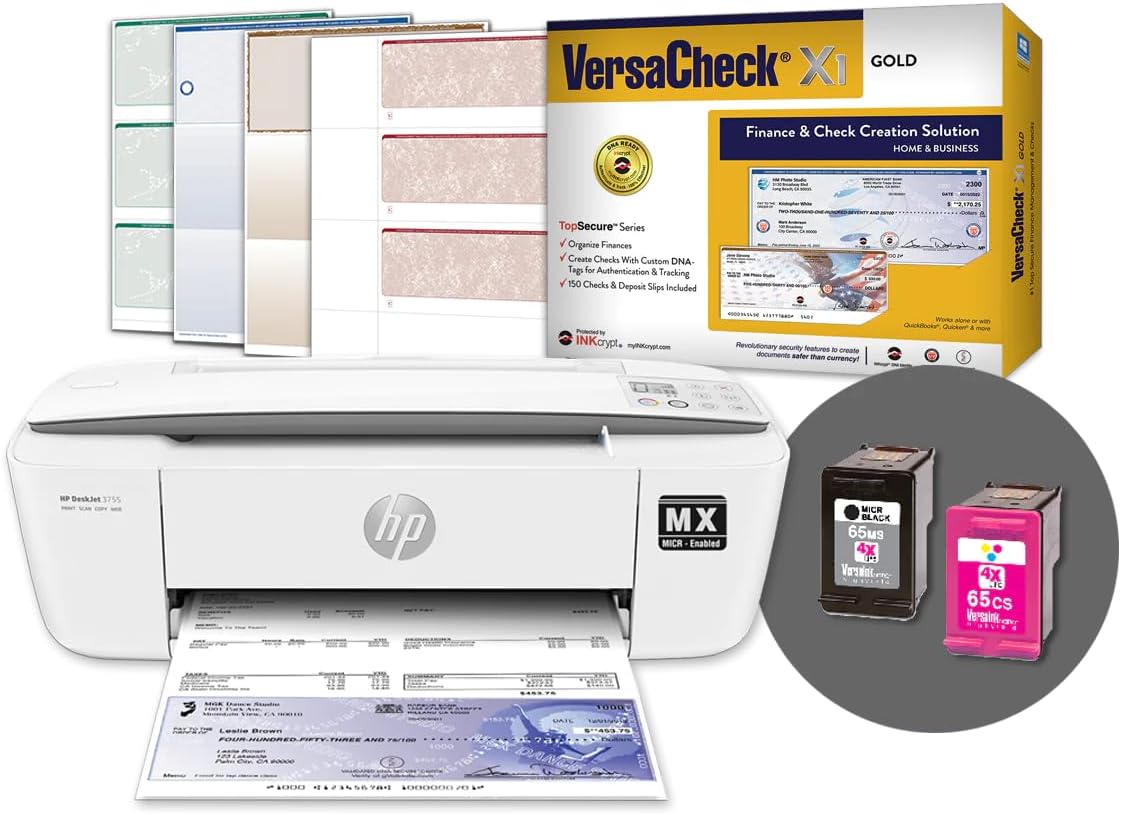
The VersaCheck HP DeskJet 3755 MX combines check printing with copying and scanning in a compact inkjet all-in-one. It carries a 3.6 rating and is built for buyers who want one small device to handle several office tasks. Its stated weight of 5.13 pounds makes it easier to position than a full-size laser system.
We may earn a commission when you buy through this link, at no additional cost to you.
Wireless 802.11b/g/n connectivity allows it to serve a home or small office without a permanent computer connection. The package includes a black VersaInk-nano HP 65MS MICR cartridge, a color HP 65CS cartridge, VersaCheck Presto software, a starter pack of check paper, and a USB printer cable. It also supports paper up to 8.5 by 14 inches.
Compared with the dedicated M15, this model adds copying and scanning but gives up some of the dedicated machine's print speed and specialized simplicity. Its Windows 11, 10, and 8.1 compatibility is stated for the included software, so buyers using other operating systems should verify requirements. A three-up check layout can also consume most of a sheet's usable area.
This printer works well for a home office, mobile professional, or small business that wants to print bank-compliant checks without dedicating an entire printer to payment documents. It is especially attractive when scanning and copying occasional paperwork would eliminate the need for another desktop device.
Print, copy, and scan functions give this model more everyday utility than a dedicated check printer. That makes it a practical choice for spaces where desk space is limited and occasional document handling is common.
Built-in wireless connectivity lets several compatible devices use the printer over the network. USB connectivity and a included cable provide a direct option during setup or in locations without wireless service.
We may earn a commission when you buy through this link, at no additional cost to you.
The VersaCheck 4155 MXQ is a color-capable all-in-one aimed at users who want MICR check printing alongside ordinary documents. Its 3.0 rating is the lowest among the rated VersaCheck consumer bundles, so prospective buyers should weigh the complete package carefully. It supports printing, copying, and scanning in one chassis.
We may earn a commission when you buy through this link, at no additional cost to you.
The included VersaCheck X1 Gold Windows software and check paper simplify initial setup. Built-in wireless connectivity allows printing from a network, tablet, or smartphone, while support for up to 8.5-by-14-inch paper helps accommodate legal documents and larger stock.
Its main advantage over monochrome-focused models is color output. The trade-off is that an inkjet all-in-one generally carries more moving components and a more complicated consumable arrangement than a dedicated laser printer. The lower rating may also indicate that some buyers were less satisfied with the overall package than users of the more highly rated options.
Choose the 4155 MXQ when color documents, check printing, copying, and scanning are all common tasks in a Windows-based home or office. Buyers who print checks only occasionally may prefer a dedicated or more compact model, while those who value the stated rating should investigate recent customer feedback.
The all-in-one design can handle color documents while still producing bank-compliant checks with MICR supplies. This broadens its usefulness beyond a dedicated payment-printing station.
Wireless access from computers, tablets, and smartphones is useful in a shared office. The printer can therefore handle routine documents without being tied to one workstation.
We may earn a commission when you buy through this link, at no additional cost to you.
The Troy 4001DN is a secure laser printer intended for small and medium-sized offices that print checks in-house. No customer rating is provided for this listing, making the technical specifications especially important during evaluation. Its headline strength is a print speed of up to 42 pages per minute.
We may earn a commission when you buy through this link, at no additional cost to you.
The printer prints the MICR line, payee, amount, and other payment information at the point of issue. TROY states that its patented toner provides high adhesion and a strong MICR signal, while its HP OEM authorization supports its position in secure document and check printing.
A standard 250-sheet tray and support for up to three trays give this model greater paper-handling flexibility than the compact all-in-ones. The listed package does not mention check-design software or paper, unlike most VersaCheck bundles, so buyers may need to account for those requirements separately.
This model is well suited to an office that values speed, secure check creation, and expandable paper handling. It is less attractive for a casual home user who wants a simple bundled setup, and the absence of a listing rating makes it especially important to confirm compatibility, included accessories, and software needs.
Printing checks at the point of issue can reduce the exposure associated with storing or transporting preprinted check stock. The printer applies payment details and the MICR line when the document is produced.
The 250-sheet capacity and support for as many as three trays accommodate more substantial workloads than a basic compact printer. That makes replenishment less frequent in a busy office.
We may earn a commission when you buy through this link, at no additional cost to you.
The VersaCheck HP Deskjet 2755 MX packages a color all-in-one with VersaCheck X1 Gold software and check paper. Its 3.0 rating suggests mixed experiences among users, but the feature set covers the core needs of a home office or small business. It can print, copy, and scan.
We may earn a commission when you buy through this link, at no additional cost to you.
Wireless connectivity allows use from computers, tablets, and smartphones on the same network, and legal-size paper up to 8.5 by 14 inches is supported. The included software and paper reduce the initial setup burden, although the listing notes that setup requires a wireless internet connection.
The design is most appropriate for buyers who want one device to handle both payment documents and ordinary color work. Compared with a dedicated laser printer, it offers broader document functions but less specialization and potentially more consumable complexity. The required wireless setup may also be inconvenient for a USB-only workspace.
This model makes sense when color output, scanning, and check printing are all desired in a relatively compact office device. Prospective buyers should verify their network configuration before installation and read current customer feedback to understand the aspects behind the listed rating.
The software and check paper are included with the printer, which helps new users move from unboxing to designing their first payment documents. Compatible MICR supplies are also required for compliant check output.
Copying and scanning add value for occasional office paperwork, while color printing broadens use beyond checks. It is a more general-purpose choice than a dedicated secure printer.
We may earn a commission when you buy through this link, at no additional cost to you.
The VersaCheck HP OfficeJet Pro 8210 MXE is a higher-capacity office all-in-one with print, copy, and scan functions. No rating is listed for this product, so its stated specifications and workflow fit should guide the decision. Black output reaches up to 22 pages per minute, while color output reaches up to 18 pages per minute.
We may earn a commission when you buy through this link, at no additional cost to you.
VersaCheck X1 Platinum software and check paper are included, and magnetic VersaInk black ink supports bank-compliant check production. Wireless connectivity lets compatible devices print over the network, while the OfficeJet Pro format positions the machine as a more substantial office tool than the DeskJet models.
The trade-off is size and complexity. A multipurpose office printer with color capability does not offer the simplicity of a dedicated check device, and it carries more features than a buyer printing only a modest number of checks may need. Because no customer rating is available, verifying included components and current software requirements is especially important.
This model fits a growing business that needs reasonably fast black printing, color documents, copying, scanning, and secure checks from one machine. It is a strong middle ground for offices that need more productivity than a compact printer but do not require the 42-page-per-minute speed or three-tray capacity of a TROY system.
Up to 22 black pages per minute supports routine document output, while 18 color pages per minute makes the device useful for presentations, forms, and mixed-color jobs alongside checks.
VersaCheck X1 Platinum and starter check paper are included. Buyers can use the bundled MICR ink for bank-compliant printing while retaining useful copy and scan functions.
We may earn a commission when you buy through this link, at no additional cost to you.
The VersaCheck HP DeskJet 3755 MXE is the most highly rated conventional all-in-one in this group, earning a 3.7 customer rating. It combines MICR check printing with copying and scanning in a compact wireless design. That balance makes it an especially logical choice for a home office or small business with limited space.
We may earn a commission when you buy through this link, at no additional cost to you.
The package includes a black VersaInk-nano HP 65 MS MICR cartridge, a color HP 65 CS cartridge, VersaCheck X1 Gold software, and a starter pack of check paper. The stated Windows compatibility covers versions 11, 10, and 8.1. The printer can be used over a network or from compatible tablets and smartphones.
Its limitations are modest but relevant. Setup requires wireless internet connectivity, which can complicate placement in a locked-down office. It also combines several functions and consumables in a relatively compact package, so users who print only checks may prefer the streamlined M15 rather than paying for broader all-in-one capability.
The 3755 MXE is recommended for buyers who want one compact device to handle payment documents and occasional office tasks. It offers the strongest combination of rating, included materials, wireless flexibility, and practical size among the nonportable choices in this guide.
A compatible MICR cartridge, color cartridge, check-design software, and check paper are included. That gives buyers the principal components needed for a functional check-printing setup.
The printer combines print, copy, and scan functions with built-in wireless connectivity. It can serve shared devices without occupying the space required by a larger office laser system.
We may earn a commission when you buy through this link, at no additional cost to you.
The locking-tray version of the Troy 4001DN adds physical control over paper stock to an already business-focused MICR printer. No customer rating is provided for this listing. Its core strengths are secure on-site payment printing, a 250-sheet locking tray, support for up to three trays, and a maximum speed of 42 pages per minute.
We may earn a commission when you buy through this link, at no additional cost to you.
Printing the MICR line, payee, and amount at the point of issue can reduce the need to transport preprinted checks. TROY emphasizes its toner's adhesion and MICR signal quality, and the printer is described as suitable for low-volume check printing in small and medium-sized offices.
The locking tray is the distinguishing feature, but it should be considered within a broader security workflow. Software compatibility, user controls, and physical access policies still matter. The listing also does not identify a bundled check-design program or paper, so office administrators may need separate software and supplies.
This model is best for a controlled business environment where secure paper storage matters alongside printing speed and expandable capacity. It is less convenient for home users or anyone seeking a complete plug-and-play software bundle, and buyers should confirm their specific installation and software requirements.
The locking tray helps restrict access to loaded paper, an important consideration when a business prints sensitive payment documents. It complements the point-of-issue security strategy described for this printer.
A speed of up to 42 pages per minute helps larger batches complete quickly. Expanding to as many as three trays further reduces the operational burden for offices with regular paper volume.
We may earn a commission when you buy through this link, at no additional cost to you.
The VersaCheck HP Officejet 200 MXE Portable is the highest-rated model here at 5.0 and offers the most distinctive feature set. It is built for users who must create bank-compliant checks away from a conventional office and includes a five-user version of VersaCheck X9 Platinum.
We may earn a commission when you buy through this link, at no additional cost to you.
Battery and plug-in options allow the printer to operate in mobile work environments. It includes a magnetic VersaInk black cartridge, paper forms, and a GoTest MICR and UV scanner for verifying payment documents. Wireless connectivity supports network use, although setup requires wireless internet access.
The bundle's strongest premium element is the combination of portable hardware, multiuser software, and document verification. Portable equipment naturally requires more attention to battery care, stable surfaces, and connectivity. Users printing high volumes or large paper loads may find a desktop laser or expandable office printer more appropriate.
This is the recommendation for a mobile business, field-based professional, or small team that needs checks in several locations. Its listed rating, multiuser license, and verification accessory create a more complete package than a standard compact printer, provided portability is a genuine requirement.
Battery operation allows the printer to issue payment documents away from a permanent desk. Plug-in power is available when the user is traveling but has access to an outlet.
The included GoTest MICR and UV scanner adds a checking function beyond document creation. It can help users verify magnetic features and ultraviolet security details in payment documents.
We may earn a commission when you buy through this link, at no additional cost to you.
The VersaCheck HP 200 Mobile MXE is a comprehensive portable check-printing kit with a 3.2 rating. Its list of included items is particularly extensive: a mobile MICR printer, black and color cartridges, five-user check software, check paper, and a GoTest MICR and UV scanner.
We may earn a commission when you buy through this link, at no additional cost to you.
Its portability is the defining benefit. The printer supports both battery and plug-in operation, allowing it to produce bank-compliant checks at different locations rather than remaining fixed in an office. Wireless internet access is required during setup, and the included software is stated as compatible with Windows 11, 10, and 8.1.
Compared with the nearly identical Officejet 200 MXE package, this listing provides similar core functionality but has a lower customer rating. That does not eliminate its strengths, but it makes recent user feedback particularly relevant. Portable inkjet hardware also may not provide the speed or paper capacity expected from a desktop business printer.
The product fits mobile entrepreneurs, consultants, field teams, and other users who value a complete kit over maximum printing volume. It is a strong candidate for secure payments on the go, provided the portable format aligns with the buyer's normal working environment.
The printer, two cartridges, software, paper, and verification scanner create a ready-to-configure mobile setup. Buyers can organize check creation and verification around one portable package.
The five-user X9 Platinum bundle supports several people working with check documents. That is useful for a mobile business whose staff may rotate between field and office work.
We may earn a commission when you buy through this link, at no additional cost to you.
The right MICR printer depends on check volume, mobility, security requirements, software needs, and the balance between a dedicated printer and a multifunction office device. Use the following factors to narrow the field before comparing listings.
A printer designed for occasional personal checks does not need the same output capability as an office that processes payment batches every day. The M15 is rated for up to 19 black pages per minute, while the TROY 4001DN reaches up to 42 pages per minute. The OfficeJet Pro 8210 MXE offers up to 22 black and 18 color pages per minute. Compare these figures with the number of checks and supporting documents you realistically print.
For a home user, speed is rarely the deciding factor. For a business, faster output can reduce interruptions during check runs. Always prioritize a speed rating that comfortably exceeds your normal workload rather than selecting on the highest number alone.
A dedicated MICR printer concentrates its capabilities on secure check production and may offer a simpler experience with fewer consumables. An all-in-one adds copying and scanning, along with color functions in several models. Dedicated machines suit users who primarily issue checks, while all-in-ones make more sense when ordinary documents also need to be handled.
Choose based on your full workflow rather than only on check requirements. If another device already handles scanning and copying, a dedicated model may be the cleaner choice. If desk space is limited and one machine must do everything, an all-in-one offers better overall utility.
Several bundles include VersaCheck software, but the editions vary. The M15 includes X1 Platinum, the 4155 MXQ and 2755 MX include X1 Gold, and the portable bundles include X9 Platinum with support for five users. TROY listings focus on the printer and secure MICR output without clearly identifying a software package.
Confirm the edition, operating-system requirements, download process, and user count before buying. The best bundle is the one that matches how many people will prepare checks and which computer systems they use.
A printer cannot produce compliant checks with ordinary supplies alone. Each listed VersaCheck bundle includes or references the appropriate magnetic black cartridge, while the TROY models use TROY's MICR toner approach. Review the exact cartridge or toner model and its page or check yield before ordering replacements.
Use only the compatible MICR supplies identified for the selected printer. Keeping the correct cartridge model in stock reduces interruptions and helps maintain the intended magnetic signal quality.
Capacity determines how often the printer needs refilling during a check run. The M15 has a 150-sheet input tray, while both TROY 4001DN configurations list 250-sheet capacity and support for as many as three trays. Compact all-in-ones are more appropriate for intermittent work and smaller workspaces.
Match capacity to batch size. A larger tray system is valuable for routine office printing, but it may add unnecessary size and complexity if you only print a few checks each week.
Wireless connectivity is common among the listed models, allowing placement away from a single computer and access from compatible tablets or smartphones. USB support is included in some packages, particularly the M15. Several listings state that setup requires wireless internet access, which should be confirmed before installation.
Consider both the network and the final location. A locked office, shared workspace, or mobile setup may require a particular connection method. Wireless convenience is valuable only if the network is stable and the printer can be positioned safely.
MICR output helps banks read checks, but safe operations also depend on how payment stock is stored and how the machine is accessed. The locking-tray TROY 4001DN variant provides physical control over loaded stock, while the point-of-issue printing approach avoids the need to move preprinted checks around.
Evaluate physical placement, user access, check stock handling, and internal procedures together. The best security model is one your organization can maintain consistently rather than one with an attractive feature that is difficult to operate correctly.
Portable Officejet 200 MXE packages support battery and plug-in operation, making them unusual among the mostly desktop options. They also include a GoTest MICR and UV scanner, which adds a verification function that ordinary printers do not offer. This can be valuable for users who work away from a central office.
Portability is worthwhile only when mobile check production is a regular requirement. For a fixed desk, a standard model with larger paper handling may be simpler and more economical over time.
Begin by confirming that your computer, wireless network, and operating system meet the software requirements listed for the chosen bundle. Install the included check-design software, complete the printer setup, and load the compatible magnetic black cartridge or toner. Use the supplied check paper for the first test so the software layout, print alignment, and MICR line can be evaluated together.
Create a test check before entering a live payment. Check the placement of the payee, amount, signature line, and magnetic line, and ensure that the document clears the printer without leaving marks or misaligned characters. Run a verification scan when the bundle includes the GoTest MICR and UV scanner, then confirm that the document reads correctly with the intended banking or payment process.
Store check stock in a secure, dry location and keep the printer away from heat, moisture, and direct sunlight. Use the correct MICR supplies, clean the print path according to the manufacturer's instructions, and address paper jams gently. For portable models, follow battery-care guidance, keep the battery dry, and recharge it with the appropriate power equipment.
A MICR printer produces checks with a magnetic ink character recognition line that banking systems can read. It also prints the payee, amount, and other check details. The printer must use compatible magnetic ink or toner so the completed document is suitable for the intended payment process.
Regular ink is generally not sufficient because the character recognition line must be encoded in magnetic ink. Each listed printer should be operated with the compatible cartridge or toner specified by the manufacturer or bundle. Always check the exact supply model before replacing a consumable.
No. The VersaCheck bundles explicitly include software, with different editions ranging from X1 Gold to X1 Platinum and the five-user X9 Platinum package. The TROY listings emphasize the printer, secure MICR output, and paper handling but do not clearly state that check-design software is included.
They can be, particularly for mobile professionals or teams that issue checks away from a fixed office. The Officejet 200 MXE bundles support battery and plug-in operation and include multiuser software plus a verification scanner. For high-volume or continuous office printing, a desktop model with greater paper capacity may be more practical.
Ordinary printing places visible characters on paper, while MICR printing adds a machine-readable magnetic line. Banking equipment can interpret that line to route and process checks. A normal printer cannot simply be assumed to create compliant checks without the correct magnetic supplies and configuration.
A laser model may suit high-volume offices that value speed and expandable paper trays. An inkjet all-in-one can be more appropriate for a home or small office that also wants color, copying, and scanning in a compact device. Your workload and need for multifunction features should guide the decision.
Several listed models explicitly require a wireless internet connection for setup, and many support wireless printing from compatible computers, tablets, and smartphones. The M15 also supports USB. Confirm the connection requirements in the current listing before arranging installation.
Print a sample on the included check paper and inspect the payee, amount, signature line, and MICR line for clarity and alignment. If a GoTest MICR and UV scanner is included, use it according to its instructions. Follow the check provider's or bank's process for confirming that the sample is accepted.
The VersaCheck HP DeskJet 3755 MXE is the strongest balanced all-in-one, combining a 3.7 rating with wireless printing, copying, scanning, MICR supplies, software, and starter paper. The VersaCheck M15 MXD is the focused budget-oriented choice for check-only workflows, while the portable Officejet 200 MXE bundles lead the premium category with five-user software, battery operation, and document verification.
Before choosing, prioritize the requirements that cannot easily change: secure MICR supply compatibility, correct software edition, adequate paper capacity, and a connection method suited to the installation site. Dedicated printers suit narrow check workflows, all-in-ones add flexibility, TROY models emphasize business speed and controlled paper handling, and portable systems solve a different mobility problem.
Finally, review the current listing for included accessories, operating-system compatibility, and setup requirements before ordering. Prices, ratings, bundles, and availability can change over time, and the most complete listing is not always the most appropriate choice for a particular household or office.