
Nulaxy Ergonomic Adjustable Laptop Stand
4.7Editor score
Dual-rod wobble control
Advanced ventilated panel
Supports laptops up to 16 inches
A swiveling laptop stand combines an elevated viewing position with the ability to redirect a screen without moving the entire workstation. The best models also deliver stable typing support, effective heat dissipation, useful height adjustment, and compatibility with the laptop size you use every day.
We compared all ten stands across rotation range, supported screen sizes, base stability, portability, ventilation, construction, and ergonomic positioning. The list includes true 360-degree swivel designs, telescopic sit-to-stand models, and adjustable risers that offer valuable ergonomics without a rotating base.
Each review identifies the stand that best fits a particular need, from budget-friendly everyday risers to large telescopic models for standing desks. Product details and customer ratings can change, and prices fluctuate frequently, so confirm the current listing before purchasing.
4.7Editor score
4.7Editor score

4.7Editor score
As an Amazon Associate we earn from qualifying purchases.
This side-by-side comparison highlights each stand's swivel capability, height range, supported device sizes, stability features, and portability so you can identify the right balance for your desk.



The LOXP Adjustable Laptop Stand is a compact all-metal riser built around a 360-degree rotating base, giving it a useful combination of screen redirection, height adjustment, and portability. It carries a 4.6 customer rating, and its open frame, adjustable platform, and broad device support make it a practical choice for shared workspaces, home offices, and frequent collaboration.
We may earn a commission when you buy through this link, at no additional cost to you.
Its rotating connection lets the laptop turn toward another person without relocating the complete stand. Height and viewing angle can also be adjusted so the display is closer to eye level, reducing the need to hunch over a laptop placed directly on the desk. The stand accommodates laptops from 10 to 16 inches, including MacBook Air and Pro models, Pixelbook, Dell XPS, HP, ASUS, Lenovo ThinkPad, Acer, Chromebook, and Microsoft Surface devices.
LOXP describes the construction as one-piece fiber metal rather than ordinary aluminum alloy, with an upgraded rotating base intended to remain stable during use. Silicone contact points help keep the computer from sliding. The frame folds for travel, which is useful for hybrid work, although a folded stand does not offer the same low center of gravity as a fully deployed model. The stated size limit also means users with larger workstation-class laptops should verify fit before ordering.
This stand is best for someone who wants genuine swiveling without committing to a large telescopic frame. It is particularly effective for video calls, quick screen sharing, and compact desks where a full-size standing platform would be excessive. For those needs, the LOXP is one of the most straightforward choices in the guide.
The rotating base makes it easy to turn a presentation, spreadsheet, or video call toward a nearby colleague. That flexibility is most valuable in shared offices and meeting spaces where frequently changing orientation would otherwise require moving the entire computer.
The folding frame and adjustable platform provide a useful middle ground between a minimal riser and a large standing desk. LOXP positions the stand for home, office, and outdoor use, although buyers should still consider ventilation and wind when taking a computer outdoors.
We may earn a commission when you buy through this link, at no additional cost to you.
The MOALLIA N86 is a 360-degree rotating laptop stand distinguished by locking knobs that allow the platform and base to be secured at a chosen position. With a 4.6 customer rating, it targets users who want more controlled movement than a freely swiveling lightweight riser, especially when sharing a screen across a desk or during collaborative calls.
We may earn a commission when you buy through this link, at no additional cost to you.
Its low-center-of-gravity X-base is designed to remain balanced while the screen turns. The laptop platform adjusts in height and angle by hand, and the locking knobs are intended to improve stability and load-bearing performance. The aluminum alloy body and open X-shaped structure encourage airflow around the underside of the computer, while anti-slip silicone pads protect the finish and improve grip.
Compatibility covers laptops from 11 to 16 inches, including MacBook, Microsoft Surface, Dell, HP, and Chromebook models. The manufacturer warns that vertical placement should be limited to devices no more than 0.8 inches thick and that heavy gaming laptops may sag slightly even when the knobs are tightened. The stand weighs 790 grams and folds to 11.4 by 1.7 inches, so it is portable enough for occasional carrying but not an ultralight travel solution.
MOALLIA is best for users who value the ability to lock the orientation after swiveling. It also suits desks where a broad X-base has enough room to remain stable. Anyone with a very large or heavy gaming laptop should consider a stronger platform and use an external keyboard to avoid applying excessive force to the elevated computer.
The rotating axis can turn the display toward a collaborator while the wide X-base resists tipping. Locking knobs add useful control once the preferred angle has been selected.
The open aluminum frame promotes airflow, and the X-shaped footprint lowers the visual and physical center of gravity. It is especially useful during long sessions because the raised computer has more space beneath it for ventilation.
We may earn a commission when you buy through this link, at no additional cost to you.
The JOYEKY Aluminum Laptop Stand combines a 360-degree dual-axis swivel with a large, weighted aluminum base, earning it a 4.7 customer rating. It is a strong all-around recommendation for users who need screen sharing, a raised viewing position, and a stable surface for laptop typing.
We may earn a commission when you buy through this link, at no additional cost to you.
The larger base and 11-pound load capacity are designed to reduce shaking and sliding during normal typing. Height reaches up to 11.81 inches, allowing the screen to be positioned nearer eye level, while the open suspended structure promotes airflow and leaves the keyboard elevated. Anti-skid silicone and rounded edges help protect the laptop from movement and scratches.
The stand folds into a compact 9.45 by 9.45 by 1.25 inches, making it suitable for a backpack or office bag. It supports 10-16-inch laptops, including MacBook Air and Pro, Dell XPS, HP, Lenovo, Acer, and Chromebook models, and the product information also indicates possible tablet support. Even with a stable platform, an external keyboard and mouse remain a more natural way to type when the laptop is raised.
JOYEKY is a good match for hybrid workers who carry a computer between locations but also want a substantial desktop stand. It is less attractive for users seeking the smallest possible accessory, yet the broad base and high rating justify its larger footprint. For a dependable swivel stand without a telescoping column, it is among the strongest choices available.
A large base gives the rotating assembly more resistance to accidental movement. The stated 11-pound capacity also makes the stand suitable for many mainstream business and creative laptops.
Its square folded size is practical for sliding into a backpack alongside a computer. This makes it easier to keep one stand at home and another at the office without buying separate models for each location.
We may earn a commission when you buy through this link, at no additional cost to you.
The Nulaxy Ergonomic Adjustable Laptop Stand is not a swiveling model, but it earns a place in this guide as a strong budget alternative for shoppers whose priority is stability and cooling. Its dual-rod support structure, 22-pound load capacity, and 4.7 rating make it especially appealing for larger laptops that can challenge smaller risers.
We may earn a commission when you buy through this link, at no additional cost to you.
Rather than a rotating axis, the stand uses two support rods to distribute the computer's weight and limit wobble while typing. The upper panel incorporates a geometric vent pattern intended to improve airflow compared with a solid surface, helping the laptop release heat during extended work. The raised screen can be adjusted to reduce neck and shoulder strain, making the design useful for typing, calls, and gaming.
It fits 10-16-inch laptops, including MacBook Pro and Air, Dell XPS, HP, Lenovo, ASUS, Chromebook, and large gaming notebooks. Anti-slip silicone pads secure the device and reduce the risk of scratches. The dual-foldable construction collapses completely flat for transport, which is helpful for business trips, cafe work, and hybrid schedules.
This Nulaxy model is best for buyers who want dependable ergonomics and cooling on a constrained budget but do not need to redirect the display frequently. Its limitations are straightforward: there is no swivel base, and typing directly on a raised platform may still encourage shoulder elevation. An external keyboard can resolve the latter issue while preserving the improved screen position.
The dual-support mechanism is designed to distribute weight more evenly than a single hinge. That makes this stand useful for larger computers and users who type forcefully while working.
A patterned upper panel and open lower structure create more potential airflow than a closed slab. The extra space beneath the laptop is beneficial during extended computing or intensive tasks.
We may earn a commission when you buy through this link, at no additional cost to you.
The Metal Adjustable Laptop Riser is a straightforward, foldable stand for users who want a higher screen and better airflow without a complex swivel mechanism. It has a 4.6 customer rating, supports laptops from 10 to 15.6 inches, and can carry up to 17.6 pounds.
We may earn a commission when you buy through this link, at no additional cost to you.
Its metal platform includes multiple ventilation holes that allow air to move around the underside of the computer. The open construction gives the laptop more breathing room than placing it directly on a desk. Height and angle can be adjusted by hand, while rubber mats at the hook and anti-skid silicone pads on the top and bottom help keep both the stand and the computer secure.
The larger load rating makes it suitable for many mainstream and performance laptops, though the absence of a swivel base means the entire device must be moved to redirect the screen. Smooth edges are another practical detail, reducing uncomfortable contact points around the hands and wrists. The foldable frame also slips into a backpack, making it useful for business travel.
This model is best for someone building a straightforward home or office workstation where ventilation, adjustability, and portability matter more than collaborative screen sharing. Its 10-15.6-inch range covers popular laptop sizes, while users with larger 16- or 17-inch devices should look elsewhere. As a budget-oriented ergonomic riser, it delivers the essential functions without unnecessary moving parts.
Multiple holes in the platform allow warm air to escape rather than trapping the laptop against the desk. The open frame also makes the product lighter and less complicated than a motorized or telescopic model.
Rubber and silicone surfaces reduce sliding and help protect the computer's finish. Rounded metal edges make the frame more comfortable to handle during daily adjustments.
We may earn a commission when you buy through this link, at no additional cost to you.
The JCZT 360-degree Rotating Laptop Stand is a foldable metal riser designed to combine a broad swivel range with compact storage. Its 4.6 rating reflects a generally favorable balance of rotation, stability, portability, and device compatibility.
We may earn a commission when you buy through this link, at no additional cost to you.
A dual-axis base lets the laptop rotate through 360 degrees, making the stand useful for presentations, screen sharing, and collaborative video calls. Height and angle are independently adjustable so the display can be raised closer to eye level. The open suspended design leaves room for airflow, while anti-skid silicone protects the laptop from sliding and smooth edges help avoid scratches.
JCZT uses a one-piece fiber metal construction and describes the upgraded rotating base as more stable than that of ordinary aluminum-alloy stands. It accommodates 10-16-inch laptops, including MacBook Air and Pro models, Dell XPS, HP, Lenovo, Acer, and Chromebook devices, with possible tablet support. The folded size is 9.84 by 8.66 by 1.77 inches, which is compatible with many laptop bags.
The JCZT is best for users who need a true swivel but do not require a tall telescopic column. It can be packed for commuting and used quickly in a shared workspace. Since the product information does not mention a swivel lock, users sharing sensitive information may want to angle the screen away when it is not needed. An external keyboard also makes raised typing more comfortable.
The frame folds down to dimensions that fit many laptop bags, allowing the stand to travel with the computer. The one-piece metal design is intended to combine durability with a reduced number of loose components.
The rotating platform can turn toward a colleague or reposition a screen for a presentation. This saves the user from repeatedly moving a larger desk setup to change viewing direction.
We may earn a commission when you buy through this link, at no additional cost to you.
The tounee Telescopic Laptop Stand is the most complete swiveling option in the guide because it combines a 360-degree base with a 2.1- to 21-inch height range. Its 4.7 customer rating reflects a well-rounded design for people who alternate between sitting and standing, share screens, or work in several rooms.
We may earn a commission when you buy through this link, at no additional cost to you.
The telescoping column allows a laptop to rise from a near-desktop position to standing height, while the rotating turntable redirects the display with light force. That combination is unusually versatile: the user can adjust the height first and then turn the screen toward another person for a meeting or demonstration. A large aluminum-alloy base and two pivot joints provide the foundation for a stated 22-pound capacity.
The stand fits laptops from 10 to 17 inches, including MacBook Pro and other common computer sizes. It can fold for storage, which is helpful for shared workspaces, although its telescoping structure is fundamentally more substantial than a flat portable riser. An external keyboard and mouse are advisable whenever the laptop is raised substantially, because the computer's own keyboard will no longer be at a comfortable typing level.
The tounee is best for users who want one stand to handle seated work, standing work, and screen sharing. Its height range exceeds that of conventional desktop risers, and its swivel makes collaboration more convenient. It is the strongest all-around choice here for users willing to give it enough desk space and pair it with an external keyboard.
A 2.1- to 21-inch adjustment range lets the same stand move between compact desktop use and a substantially higher standing position. This flexibility is particularly useful for changing work habits throughout the day.
The smooth turntable makes it easy to move the display toward a person across the desk. Combined with the telescoping height, it supports presentations, calls, and shared brainstorming without moving the computer itself.
We may earn a commission when you buy through this link, at no additional cost to you.
The Amazon Basics Ergonomic Laptop Stand offers a familiar, no-nonsense alternative for shoppers who prioritize portability, ventilation, and straightforward adjustment. It has a 4.6 customer rating, fits devices from 10 to 15.6 inches, and provides up to 7 inches of height adjustment.
We may earn a commission when you buy through this link, at no additional cost to you.
Its lightweight, rust-resistant aluminum construction is designed for routine use at home, in an office, or while traveling. The open hollow structure promotes airflow beneath the laptop, helping heat move away from the device during extended or intensive tasks. Silicone pads and protective hooks hold the computer in place and reduce the likelihood of sliding or scratching.
The stand folds flat to 10 by 8.7 by 1.8 inches and weighs 1.7 pounds, making storage in a laptop bag straightforward. A larger or heavier device may affect overall balance, so the manufacturer recommends using the stand on a flat, solid surface and avoiding excessive downward pressure during typing. It also has no swiveling base, making it less suitable for users who frequently need to redirect the screen.
The Amazon Basics model is best for everyday productivity, travel, and users who want a recognizable simple design. It offers fewer specialized features than the rotating and telescopic stands, but the combination of cooling, adjustment, and portability is effective. Anyone who mainly works alone and does not need to share a screen will find that a sensible approach.
The hollow aluminum design leaves space under the computer for moving air. This simple approach can help maintain performance during long sessions without adding powered fans or other mechanisms.
The stand folds into a flat package that is easy to place beside a laptop in a bag. At 1.7 pounds, it adds manageable weight for a portable workstation.
We may earn a commission when you buy through this link, at no additional cost to you.
The Lamicall Aluminum Laptop Stand is a broad compatibility riser with a 4.7 rating and a large weighted base. It supports computers from 10 to 17.3 inches, making it one of the broadest size ranges in the guide and a sensible option for users who own larger laptops or need one stand for several devices.
We may earn a commission when you buy through this link, at no additional cost to you.
Height and angle can be adjusted to bring the display closer to eye level, while the large aluminum base is intended to resist shaking and sliding during typing. Multiple ventilation holes create airflow around the laptop, and anti-skid silicone helps prevent movement and protect the surface from scratches. Smooth edges improve comfort when the stand is handled.
The riser folds for travel and storage, so it can move between a home office and a shared workplace. It is also marketed for larger office deployments because one design can accommodate many common computer brands and sizes. However, it does not rotate, which may limit its usefulness for quick screen sharing or changing presentation angles.
The Lamicall model is best for users with varied device sizes who prioritize a stable, ventilated desktop riser. It is especially attractive for broad corporate or educational setups where different employees may use the same workstation. The main compromise is the lack of a swiveling axis and the naturally awkward typing position when the laptop is elevated.
Support extending to 17.3 inches covers many large-screen notebooks and tablets. This broad fit makes the stand useful for offices where workstations are shared by people with different computers.
The larger base helps keep the computer from moving when the user types. Combined with silicone contact points, it creates a more settled surface than a lightweight folding riser.
We may earn a commission when you buy through this link, at no additional cost to you.
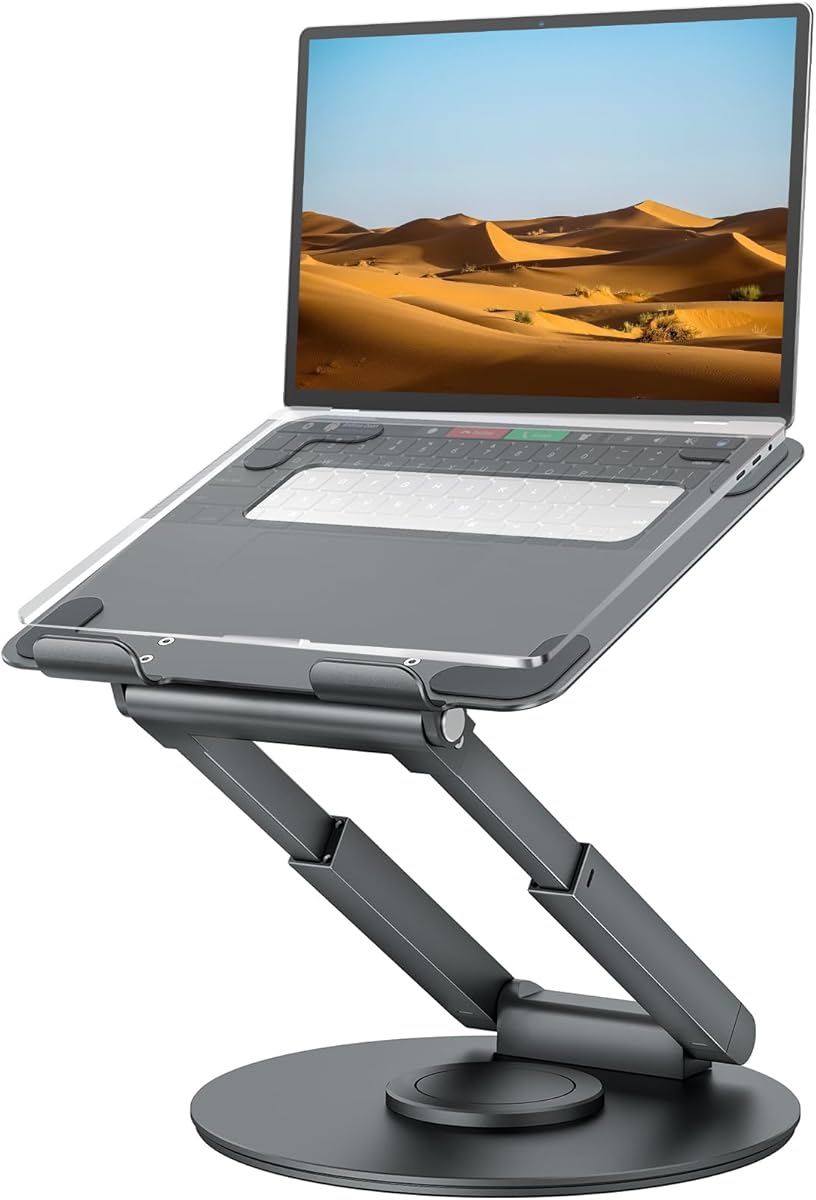
The Nulaxy 18-inch Height Telescopic 360 Rotating Aluminum Laptop Stand is the premium choice in the guide, combining a substantial 18-inch maximum height with a rotating base. Its 4.7 customer rating and 22-pound capacity position it as a serious workstation accessory for people who alternate between sitting and standing.
We may earn a commission when you buy through this link, at no additional cost to you.
Height adjustment allows the computer to reach a comfortable standing position, and the tilt can be changed to bring the display toward eye level. The 360-degree rotation lets the user turn the screen toward a colleague in an open office or use the stand during collaborative video calls. A solid base is intended to prevent tipping while the user types or draws on the raised computer.
The platform supports laptops and tablets up to 17 inches, including MacBook Air and Pro, Dell, HP, and Chromebook models. Nulaxy recommends using an external keyboard and mouse so typing remains efficient without pressing on a potentially unstable elevated laptop. As with the other telescopic options, the stand should be placed on a firm, level surface, and the computer should be removed before changing height or angle.
This is the best premium option for users who want a standing-height swiveling station and have enough room for a substantial frame. It suits creative work, presentations, standing meetings, and shared desks. Users who only need a small screen redirection should choose a shorter rotating riser instead, while those who type frequently will get the best experience by adding a separate keyboard and mouse.
The telescoping structure reaches up to 18 inches, allowing a more natural standing setup. That additional range can improve screen placement when the user alternates between chair height and an upright workstation.
A rotating base and adjustable tilt provide more control over screen direction than a standard riser. The high bearing capacity also makes the stand suitable for demanding devices, provided it is used on a stable desk.
We may earn a commission when you buy through this link, at no additional cost to you.
The best swiveling laptop stand depends on how you work, where you use it, and which computer you need to support. Consider rotation, height, stability, cooling, portability, and compatibility before making a final choice.
A true swiveling stand uses a rotating axis or turntable that lets the computer turn through a full 360-degree circle. This is more useful than a basic fixed-angle riser when presenting information, sharing a screen with someone across the desk, or participating in a call where another person needs to see the display. Models with locking controls, such as the MOALLIA N86, can be especially useful because the user can secure a chosen orientation rather than leaving the screen free to move.
A useful laptop stand should bring the upper edge of the screen closer to eye level without forcing the keyboard into an awkward angle. Compact risers adjust the platform through a limited arc, while telescopic models can move from a low desktop position to standing height. The tounee model spans 2.1 to 21 inches, and the Nulaxy telescopic model reaches 18 inches, making both stronger choices for users who alternate between sitting and standing.
A broad, weighted base helps prevent the elevated computer from shifting while you type, tap, or use an external pointing device. Stability becomes especially important when the stand swivels, because sideways movement can affect the screen position. Stated load capacities range from 11 pounds on the JOYEKY and Amazon Basics models to 22 pounds on several Nulaxy and tounee models. Check both the capacity and the shape of the base rather than relying on capacity alone.
The advertised screen-size range is a useful starting point, but it does not describe every possible limitation. Most stands support 10-16-inch laptops, while the Lamicall model extends to 17.3 inches and the tounee model supports devices up to 17 inches. The MOALLIA stand also specifies that vertical placement should be limited to a device thickness of 0.8 inches. Check the upper platform, retaining hooks, and any thickness guidance before placing a larger notebook on the stand.
Raising a laptop creates space beneath its underside, but the platform must also allow air to move through that area. Open X-frames, hollow aluminum structures, perforated platforms, and dedicated vent patterns all support passive cooling. The Nulaxy dual-foldable model uses a geometric heat-vent panel, while the MOALLIA, LOXP, and JCZT stands use open suspended designs. These features are particularly useful for long work sessions, demanding applications, and computers that generate substantial heat.
Portable laptop stands should fold into a size that fits alongside a computer in a backpack or briefcase. The JOYEKY model folds to 9.45 by 9.45 by 1.25 inches, the JCZT to 9.84 by 8.66 by 1.77 inches, and the Amazon Basics model to 10 by 8.7 by 1.8 inches. Telescopic standing stands are generally bulkier, though the tounee and Nulaxy models still fold for storage. Consider not only the folded dimensions but also the added weight.
Raising the display can improve neck and shoulder posture, but it also raises the keyboard. Typing directly on a high platform may cause the shoulders to lift, especially during long sessions. An external keyboard and mouse allow the screen to remain at an appropriate height while the hands return to desk level. This is why the tounee and 18-inch Nulaxy models are better interpreted as screen stands for a complete desk setup rather than laptop-only typing platforms.
The physical footprint should match the available desk and the way the computer is used. A rotating X-base may be ideal for sharing a screen, while a simple folding riser occupies less room and serves a solitary workstation well. Users working outdoors should consider heat, wind, surface stability, and glare rather than relying on indoor assumptions. For a shared office, rotation and sturdy locking are useful; for a quiet home office, ordinary height adjustment may be sufficient.
Begin by placing the stand on a flat, firm, level surface. Check the underside for silicone feet or pads and make sure the base is fully supported rather than extending beyond the desk edge. Remove the laptop before folding a telescopic stand or loosening a locking mechanism, and consult the product instructions before rotating or substantially changing its angle.
Set the stand to a comfortable height before placing the computer on top. Adjust the viewing angle so the display faces the user without requiring a tilted neck. If the stand raises the keyboard considerably, add an external keyboard and mouse. When swiveling, turn the platform slowly and avoid applying sudden force, particularly to lightweight frames or models that do not have locking knobs.
For care, wipe the metal and silicone surfaces with a soft, dry or lightly dampened cloth. Avoid abrasive cleaners, strong solvents, and excess liquid around joints or locking hardware. Keep ventilation openings clear, inspect the silicone pads periodically, and let the laptop cool before folding or packing the stand. Store a folded unit in a dry place with no heavy objects resting on the rotating connection.
A swiveling stand includes a rotating connection that can redirect the laptop screen through a full 360-degree circle. A regular riser adjusts height and tilt but keeps the platform in a fixed direction. Swiveling is especially useful for screen sharing, presentations, and collaborative calls.
You can type on many stands, but a high position may lift the shoulders and strain the neck over time. An external keyboard and mouse allow you to keep the screen near eye level while placing your hands at desk height. Low-profile risers are generally more suitable for direct laptop typing.
A well-ventilated stand can improve passive airflow by creating space beneath the computer and allowing heat to dissipate. It does not replace internal laptop fans, and it cannot prevent overheating caused by blocked vents, excessive processing loads, or damaged cooling hardware. Open frames and perforated platforms are preferable to fully enclosed surfaces.
Compare the laptop's screen diagonal with the stand's stated compatibility range, then check any maximum thickness or weight guidance. The MOALLIA model, for example, specifies a thickness limit of 0.8 inches for vertical placement. Also consider whether retaining hooks or raised edges can interfere with a thicker computer.
Stability depends on the base, frame, device weight, and adjustment position. Wide or weighted bases and dual pivot joints generally feel more secure than narrow lightweight frames. For heavy gaming laptops, check the load rating and consider using an external keyboard to avoid pushing down on an elevated platform.
A standing setup benefits from a telescoping stand with a generous height range and a rotating base. The tounee model adjusts from 2.1 to 21 inches, while the 18-inch Nulaxy model reaches a tall standing position. Make sure the base is stable and plan to use an external keyboard and mouse.
A lock is useful in shared offices or meeting spaces where a freely moving screen could be bumped or accidentally exposed. Models such as the MOALLIA N86 include locking knobs for this reason. If the stand is primarily for a private workspace, a smooth swivel may be sufficient.
Many folding models can fit in a backpack or laptop bag, but rotating and telescopic stands vary considerably in size and weight. Check the stated folded dimensions before packing. The MOALLIA model is intended primarily for desktop use, while flatter risers are generally easier to carry on frequent trips.
The tounee Telescopic Laptop Stand is the most versatile overall choice because it combines 360-degree rotation, a broad height range, and a strong aluminum base. The Nulaxy Ergonomic Adjustable Stand is the best budget selection for buyers prioritizing dual-rod stability and cooling, while the Nulaxy 18-inch telescopic model is the premium option for standing work and large shared screens.
Before choosing, decide whether your priority is compact everyday elevation, frequent screen sharing, a full sit-to-stand range, or support for a particularly large or heavy laptop. Check the size and thickness requirements carefully, use a stable surface, and remember that an external keyboard and mouse will usually create a better standing or raised-screen workstation.
Ratings, product configurations, and prices can change, so review the current Amazon listing before buying. Comparing the stand with your actual laptop dimensions and daily workflow is the most reliable way to select a model that remains comfortable, stable, and useful over time.