
Adjustable Laptop Stand, Portable Laptop Riser for Desk
4.5Editor score
Six adjustable height levels
Folds to 9.96 inches
Open ventilated construction
A laptop riser can transform a crowded desk into a more comfortable, organized workspace by raising the screen, improving airflow, and creating room for accessories. The best model depends on your laptop size, preferred viewing height, need for portability, and whether you work while seated, standing, or sharing your screen.
This guide compares ten laptop risers using the specifications and customer ratings supplied for each product. It covers aluminum, metal, and adjustable designs across laptop sizes from 10 to 17.3 inches, with particular attention to stability, cooling, adjustability, portability, storage, and practical desk use.
Each review identifies the stand that best suits a particular need, including fixed-height, adjustable, rotating, folding, and sit-to-stand designs. Ratings reflect the supplied product data, while product details and availability can change over time, so readers should confirm dimensions and current pricing before purchasing.
4.5Editor score

4.7Editor score
4.7Editor score
As an Amazon Associate we earn from qualifying purchases.
The table below provides a quick comparison of all ten stands, highlighting laptop-size support, height options, portability, and the physical design most relevant to each product.





The BESIGN LS03 combines a clean aluminum profile with a useful elevation of up to 5.7 inches, and its supplied 4.8 rating is the highest among these ten products. It is designed for laptops from 10 to 15.6 inches, making it a strong general-purpose choice for office, school, and everyday home setups.
We may earn a commission when you buy through this link, at no additional cost to you.
Its detachable construction is one of the most appealing details. The stand assembles in three steps, so it avoids complicated hinges and allows the user to raise the laptop without permanently dedicating the entire device to a fixed position. The aluminum alloy frame supports up to 8.8 pounds, while the open structure encourages airflow around the underside of the computer.
The main limitation is that the LS03 offers a fixed elevated position rather than height and angle adjustment. It also stops at 15.6 inches, so owners of larger 16- or 17-inch systems may need to look elsewhere. Those compromises are reasonable for buyers who want a simple, stable riser without controls or moving mechanisms.
This is a strong all-around recommendation for students, office workers, and anyone setting up a second screen who values a low rating? no, a high rating, quick assembly, and clean storage. It is particularly useful when the main goal is to raise a compatible laptop, release desk space, and improve airflow without spending time adjusting the stand.
The three-step detachable design lets the BESIGN stand move between home, work, and shared spaces without complicated setup. It also folds flat when the raised position is not needed, making it easier to reclaim desk space or place the stand in a drawer.
The aluminum construction and rubber contact points are intended to resist wobbling and scratching while preserving airflow. Support of up to 8.8 pounds is sufficient for many mainstream laptops, although the product is not designed for unusually heavy workstation systems.
We may earn a commission when you buy through this link, at no additional cost to you.
The Lamicall Aluminum Stand is a versatile desk riser with a supplied 4.7 rating. Its compatibility extends from 10-inch laptops to 17.3-inch models, while adjustable height and angle let users bring the display closer to a comfortable viewing position.
We may earn a commission when you buy through this link, at no additional cost to you.
A larger, heavier aluminum base is one of the design's strongest features. It is intended to remain stable while typing, reducing the shifting or sliding that can make a stand feel distracting. Ventilation holes improve airflow, and anti-skid silicone plus smooth edges help protect the laptop and nearby surfaces.
The trade-off is that the adjustable, folding construction is more involved than a simple fixed-frame stand. It may also occupy more room than a minimal aluminum model when set up. Nevertheless, the broad 10-to-17.3-inch range and adjustable posture make it particularly useful for people who want one stand to cover several laptop sizes.
This stand is well suited to home offices, shared workspaces, and frequent travelers who carry different computers. It is a sensible choice when screen positioning matters more than minimalism. Users who only need a fixed lift for a lightweight 13-inch laptop may find simpler alternatives, but this model offers greater flexibility for varied setups.
The ability to change both height and angle is valuable in a multi-user environment. A taller student seated at a conventional desk, a standing worker, and a person using an external keyboard can each find a more suitable laptop position without replacing the entire stand.
The upper size limit of 17.3 inches separates this model from many compact laptop stands. That range covers popular MacBook, Surface, Dell XPS, HP, ASUS, Acer, Chromebook, and Alienware models listed in the supplied specifications.
We may earn a commission when you buy through this link, at no additional cost to you.
The LOXP Adjustable Laptop Stand brings together a 360-degree rotating base, adjustable viewing position, and a 4.6 supplied rating. It is especially relevant for presentations, video calls, and collaborative work where the screen must sometimes face different people.
We may earn a commission when you buy through this link, at no additional cost to you.
Rotation is handled at the base rather than requiring the entire computer to be repositioned by hand. The stand also allows height and angle changes, helping users bring the display closer to eye level. A one-piece fiber metal construction is specified for durability, while non-slip silicone is intended to keep the laptop secure.
Its compatibility ends at 16 inches, so buyers with a 17-inch notebook will need a larger model. The rotating mechanism and adjustable joints also make it larger and more mechanically complex than a basic fixed stand. As a result, it is most valuable for users who actively share screens or change viewing direction.
For conference rooms, shared desks, dorm rooms, and home offices, the LOXP stand offers a clear functional advantage. It is a strong choice for students working on group projects and professionals giving demonstrations, provided their laptop falls within the supported 10-to-16-inch range.
The 360-degree base allows the display to turn toward a colleague, client, or group without relocating the entire stand. This makes the product particularly useful for collaborative routines that would otherwise require repeatedly picking up or pivoting the laptop.
The one-piece fiber metal frame and upgraded rotating base are designed to provide steady support as the angle changes. Non-slip silicone at the contact point adds grip and helps protect the laptop from sliding or scratching.
We may earn a commission when you buy through this link, at no additional cost to you.
The Nulaxy Ergonomic Adjustable Stand is built around stability, with a supplied 4.7 rating and support for devices weighing up to 22 pounds. Its dual-support rod mechanism distinguishes it from simpler single-hinge designs and aims to reduce wobbling during heavier typing sessions.
We may earn a commission when you buy through this link, at no additional cost to you.
The upper panel uses a geometric ventilation pattern intended to move more air than a solid surface. Its support capacity also makes it suitable for larger mainstream laptops and many gaming systems within the stated 10-to-16-inch size range. Anti-skid silicone pads grip the computer and help guard its surface.
The product's dual-foldable construction allows it to collapse completely flat, but it is not as compact in operation as a simple fixed frame. It also cannot accommodate laptops larger than 16 inches. Buyers primarily seeking the lightest travel accessory may prefer a thinner, single-height stand.
This Nulaxy model is a compelling recommendation for people who type heavily, use larger computers, or want a single riser for work, travel, and study. Its emphasis on load capacity, cooling, and reduced movement makes it particularly practical for long sessions in a permanent or frequently changing workspace.
Two support rods distribute the laptop's weight more evenly than a basic single hinge. That configuration is particularly helpful with larger machines because it reduces visible movement while typing, improving the sense of control and steadiness.
The vented panel promotes airflow while the fold-flat frame makes the stand easier to carry. That combination suits users who need active cooling at a fixed desk but also want a dependable option for business trips, cafés, and changing workspaces.
We may earn a commission when you buy through this link, at no additional cost to you.
The Amazon Basics Ergonomic Stand offers an effective mix of adjustment, stability, and portability. Its 4.6 rating is supported by a frame that raises the laptop by as much as seven inches, making it a versatile option for both seated and elevated desk arrangements.
We may earn a commission when you buy through this link, at no additional cost to you.
Rust-resistant aluminum keeps the overall weight at 1.7 pounds, while the stated load capacity is 11 pounds. Non-slip silicone pads and protective hooks help hold the device in position. The open hollow design improves airflow, and a folded size of 10 by 8.7 by 1.8 inches allows the stand to fit into many laptop bags.
The main compromises are its larger folded package compared with a slim single-height riser and its 15.6-inch maximum laptop size. The product information also advises using a flat, solid surface and avoiding excessive downward pressure while typing, which is sensible for any adjustable stand.
This is a strong general recommendation for commuters, students, and office workers who want meaningful height control without moving to a large telescoping frame. It is especially useful for users who alternate between a bag and a desk and need a stand that folds flat but still offers a wide adjustment range.
Seven inches of adjustment gives the stand more flexibility than a fixed model. The laptop can be raised to a more suitable viewing level, while the aluminum frame and silicone contact points help it remain steady during normal use.
The fold-flat frame and lightweight aluminum construction balance portability with support. Its listed folded dimensions make it easy to compare against the interior of a laptop bag, particularly for users who regularly work from different locations.
We may earn a commission when you buy through this link, at no additional cost to you.
The WALI Computer Monitor Stand is a broader desk-management solution rather than a narrowly designed laptop accessory. With a 4.7 rating, a 14.6-by-9.3-inch metal platform, and support up to 44 pounds, it can accommodate a laptop, printer, or flat-screen display.
We may earn a commission when you buy through this link, at no additional cost to you.
Three height settings raise supported equipment by 3.9, 4.7, or 5.5 inches. The open area beneath the platform creates storage for a keyboard, notebooks, and other accessories, helping reduce clutter. Rubber pads protect the desk, while vented holes help prevent the supported device from overheating.
Because the platform is large and intended for multiple equipment categories, this stand is less compact than most dedicated laptop risers. Frequent travelers may find it awkward to carry, and people who want continuous height adjustment have only three preset positions to choose from.
The WALI is a good fit for a home office that also includes a printer or a second display, especially where reclaiming vertical and under-platform space matters. It is less appropriate for a minimalist travel setup, but for a permanent workstation its capacity and storage features provide unusual versatility.
The 44-pound capacity and broad platform allow the stand to serve equipment beyond a typical notebook. That makes it useful in mixed workspaces where a printer or monitor could share the same support system, provided each item fits safely.
Raising the supported equipment creates storage space below the shelf. Keeping a keyboard, papers, or accessories in that area can counter the visual and physical clutter that normally accumulates beneath a laptop.
We may earn a commission when you buy through this link, at no additional cost to you.
The Lamicall Rotating Aluminum Stand combines 360-degree screen sharing with adjustable height and angle. Its supplied 4.7 rating reflects a polished, versatile design intended for office, presentation, collaboration, and college use.
We may earn a commission when you buy through this link, at no additional cost to you.
The large aluminum base is designed to resist shaking and sliding while the laptop is typed on. Multiple ventilation holes promote airflow, and the all-aluminum material is also presented as an effective way to dissipate heat. Compatibility extends from 10 inches to 17.3 inches, giving it one of the broadest ranges in the list.
Its extra-wide base and several adjustment mechanisms make it larger and more complex than simpler portable stands. The 360-degree function may also add little value for someone who always works alone. Buyers seeking the smallest travel accessory should look to a lighter, single-frame option instead.
This model is a strong premium choice for collaborative workspaces, conference rooms, dorm rooms, and dual-screen offices. It is especially appropriate when one person may need to turn the display toward colleagues or clients, and when a large laptop must remain stable at several heights.
The rotating base makes it easy to direct the display toward people nearby during presentations or group discussions. Users can share a view without picking up the computer or dragging the complete stand across the desk.
Supporting laptops up to 17.3 inches while retaining folding portability is a useful compromise. It gives larger notebooks a stable platform without permanently dedicating substantial desk space to a rigid frame.
We may earn a commission when you buy through this link, at no additional cost to you.
The Adjustable Laptop Stand, Portable Laptop Riser for Desk offers six height levels in a frame weighing only 0.49 pounds. That makes it one of the most travel-focused options in the group, with a supplied rating of 4.5.
We may earn a commission when you buy through this link, at no additional cost to you.
Height can be set between 4.34 and 6.59 inches, allowing the screen to be brought nearer eye level. A forward-tilt angle and open frame promote airflow beneath the laptop. The triangular support design, large anti-slip silicone pad, and smooth edges are intended to improve stability and protect the device.
The fold-down size of 9.96 by 1.98 by 0.68 inches is particularly useful for fitting into a laptop bag. One important operating detail is that both support bars must be inserted at matching levels to maintain balance. The stand also does not rotate, so screen sharing requires repositioning the laptop itself.
This is a strong recommendation for travelers, students, and commuters who need a genuinely portable riser. It is less suitable for collaborative presentations that require frequent rotation, but it offers a useful balance of adjustability, cooling, protection, and low carrying weight.
At 0.49 pounds and less than two inches across in its widest folded dimension, the stand is easy to carry alongside a notebook. It is a practical choice for people who work from cafés, hotels, co-working spaces, or temporary offices.
The six settings cover a useful vertical range for different seating positions. To preserve balance, the two support bars should be inserted into slots on the same level, an operating step worth checking whenever the stand is unfolded.
We may earn a commission when you buy through this link, at no additional cost to you.
The Metal Adjustable Laptop Riser is a sturdy mid-size option with a 4.6 supplied rating. It accommodates laptops from 10 to 15.6 inches and supports as much as 17.6 pounds, giving it more load capacity than many conventional aluminum risers.
We may earn a commission when you buy through this link, at no additional cost to you.
Height and angle can be adjusted to suit the user's position, and the upper surface includes multiple ventilation holes. Two rubber mats on the hooks and anti-skid silicone pads on the top and bottom help keep the laptop secure while protecting the device and desk.
Its foldable construction makes it more portable than a rigid stand, but the absence of a rotating or telescoping base limits it in collaborative and sit-to-stand arrangements. The 15.6-inch maximum also excludes larger computers. Nevertheless, the product delivers a useful combination of adjustment, cooling, and support.
This riser is well matched to home and office users with mainstream notebooks who want metal durability without a complex mechanism. It is particularly attractive for people who type vigorously, travel occasionally, and need a stand that adjusts to more than one screen position.
The stated capacity of 17.6 pounds makes the stand suitable for many larger notebooks and gaming laptops within the size limit. Metal construction and multiple contact pads are intended to limit movement and protect both the computer and work surface.
Users can tailor the viewing angle and elevation instead of accepting one fixed position. When work moves to another location, the folding design can be collapsed and slipped into a backpack for travel.
We may earn a commission when you buy through this link, at no additional cost to you.
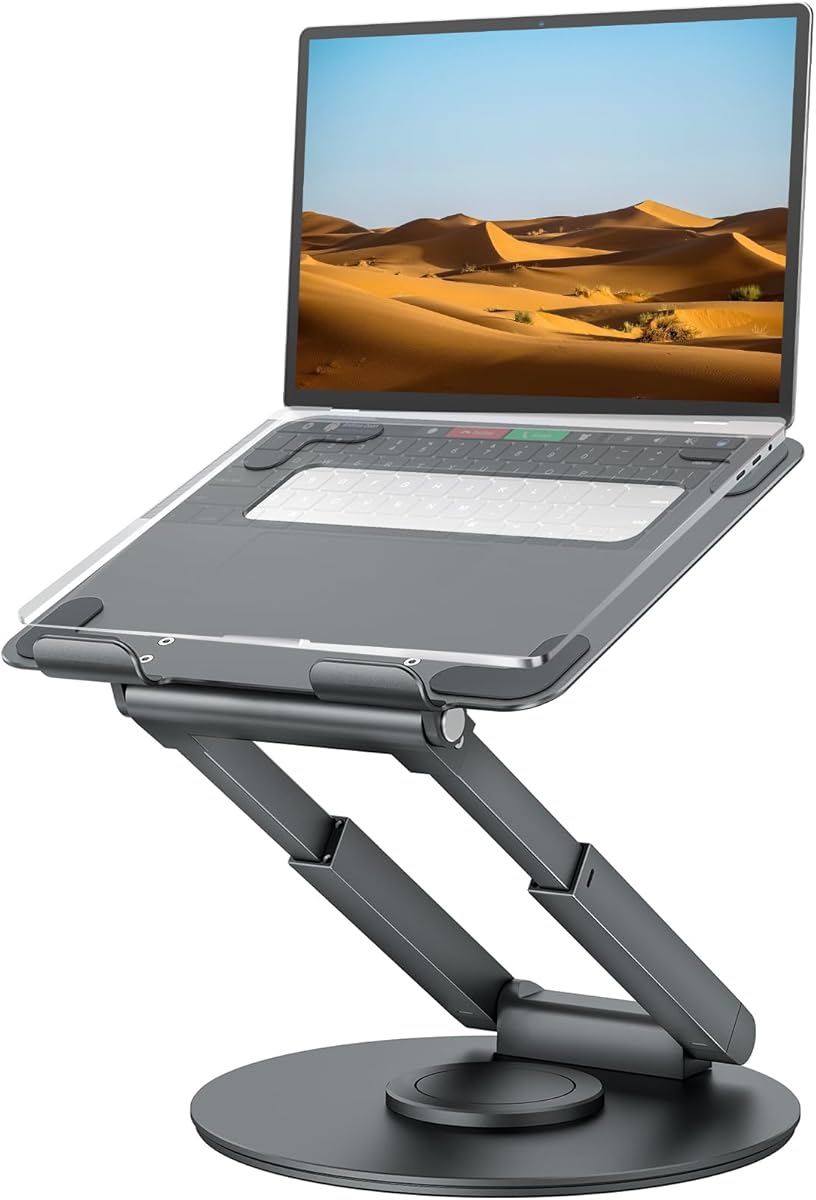
The tounee Telescopic Laptop Stand is the most specialized model in the guide, built to raise a laptop from 2.1 to 21 inches. Its supplied 4.7 rating and 360-degree swivel base make it especially compelling for users who alternate between sitting and standing.
We may earn a commission when you buy through this link, at no additional cost to you.
A telescoping button allows the computer to move through a much greater height range than a conventional desktop riser. The rotating turntable lets the screen move toward colleagues during chats or conversations, and the large aluminum base is supported by two pivot joints. Its stated capacity reaches 22 pounds.
The complexity and size are the primary trade-offs. A telescoping mechanism, rotating base, and tall platform occupy more space and involve more moving parts than a simple folding stand. Buyers who work at one fixed desk and require only a modest lift may find a smaller model more convenient.
The tounee stand is a premium recommendation for professionals who want an instant standing workstation, hybrid workers, and users of large laptops up to 17 inches. Its combination of height, rotation, stability, and compact folding makes it a capable central hub for an active, changing workspace.
The telescoping column changes the laptop from a seated desktop position to a standing workstation without requiring a separate riser. That makes it useful for users who want to alternate postures throughout the workday or who share a desk with both seated and standing coworkers.
The 360-degree base allows the display to turn toward a nearby person with light pressure. This is useful for quick conversations, remote presentations, and collaborative tasks where direct eye contact and screen sharing are more convenient.
We may earn a commission when you buy through this link, at no additional cost to you.
The right laptop riser should match your device size, preferred working posture, cooling needs, and mobility. These factors help separate a simple fixed stand from an adjustable, rotating, or telescoping workstation accessory.
Begin with the dimensions of the computer and its accessories. Most stands in this guide support 10- to 15.6-inch laptops, while several extend to 16, 17, or 17.3 inches. A device that exceeds the stated limit may sit unevenly, place more force on the retaining edges, or lose stability. Also consider the laptop's depth and any ports, feet, or removable accessories that could affect how it rests on the platform.
A fixed riser is simplest, but adjustable models can accommodate different chairs, desks, and working styles more effectively. Look for a useful range of height settings and confirm whether the angle changes independently. Users with external keyboards and mice benefit from a higher platform because they can keep the screen closer to eye level while their hands remain on a separate input surface.
Stability is essential whenever the laptop is used for typing. Compare the support mechanism, base weight, number of contact points, and stated load limit. Models in this guide range from 8.8 pounds to 44 pounds. A higher rating does not guarantee zero movement, so the stand should also be placed on a flat, solid surface and used without excessive downward force on the laptop.
Raising a laptop creates space for air to move beneath its underside. Open aluminum frames, hollow structures, and perforated panels can improve passive ventilation compared with laying the device directly on a desk. Cooling benefits are particularly relevant during long work sessions or demanding computing, although a riser cannot replace a laptop's internal cooling system or its prescribed intake areas.
Frequent travelers benefit from a light, foldable design and a profile that fits inside a laptop bag. The lightest option here weighs 0.49 pounds, while some adjustable and telescoping models occupy more space even when folded. Compare folded dimensions with the space available in your bag, and note that a large base may still be inconvenient to carry between desks.
A rotating base allows the screen to face different people without lifting the computer or moving the entire riser. This is useful for presentations, group study, client meetings, and shared workstations. If screen direction rarely changes, rotation adds size and mechanical complexity that may not deliver meaningful value. Fixed stands are usually quieter in operation and simpler to position.
A telescopic riser can move between seated and standing positions, making it attractive for active work routines. This category offers far more vertical travel than conventional folding models. The trade-off is greater desk footprint, more complex mechanisms, and a generally bulkier design. Users who change posture infrequently can get similar benefits from a standard adjustable stand with a lower, more compact frame.
Some risers create usable space beneath the elevated platform, while broad shelves can support a printer, monitor, or other equipment. This is valuable in a permanent office but may add unnecessary size to a compact or travel setup. If the goal is only to raise one laptop, prioritize laptop-specific adjustment and stability over broad equipment storage.
Begin by placing the stand on a flat, hard, and stable desk surface. Unfold or assemble the frame according to its instructions, then make sure any paired support bars or locking mechanisms are positioned symmetrically. A tilted or partially engaged joint can create an uneven platform, so the laptop should be added only after the stand is fully secure.
Set the height and angle to bring the top of the display near eye level while allowing a relaxed viewing position. If using an external keyboard and mouse, position the stand farther back and center the laptop screen with the external display if one is present. For rotating models, turn the base gently rather than twisting the laptop itself, and avoid pushing beyond the intended movement range.
Clean the contact surfaces with a soft, lint-free cloth and mild cleaning solution suitable for aluminum or coated metal. Do not allow liquid to enter joints, hinge points, or the rotating mechanism. Keep silicone pads free of dust and debris, inspect the stand for looseness during periodic use, and avoid placing a heavier device on a model whose size or weight limit has been exceeded.
A laptop riser can raise the display closer to eye level, which may reduce the need to look downward for long periods. It works best when paired with an external keyboard and mouse, allowing the screen and input devices to be positioned independently. It is an ergonomic accessory rather than a substitute for movement, varied work positions, or a properly adjusted chair and desk.
An open or ventilated riser can improve airflow around the underside of a laptop by keeping it from lying directly on a solid surface. The benefit varies with the stand's openings, the computer's intake design, room temperature, and workload. A riser should support proper cooling, but it cannot guarantee that a thermally demanding system will never throttle or overheat.
Aim for a position where you can look at most of the display with a relatively neutral neck rather than bending downward. External-monitor users often benefit from matching laptop and monitor height, while external-keyboard users may prefer more elevation. Personal comfort, desk height, chair position, and viewing distance matter more than matching one universal number.
Compatibility depends on the size and weight limits stated for the specific stand. Several options support laptops up to 15.6 or 16 inches, while models with 22- or 44-pound capacities may accommodate heavier systems within their dimensional limits. Check both screen size and device weight, and also consider whether aggressive typing pressure could affect balance.
A rotating base can be convenient when you need to turn the display toward a person in the room or share content during a group discussion. For ordinary one-on-one calls, a stable adjustable stand may be sufficient. Rotation adds mechanical complexity, so its value depends on how often you share your screen with people sitting nearby.
Yes, and an external keyboard often makes a riser more comfortable because it allows the laptop to sit higher without forcing your wrists upward to type. Place the keyboard and mouse in front of the elevated screen, and choose a viewing position that keeps your neck and shoulders relaxed. Cable management may also be necessary with a raised laptop.
A fixed stand works well for one desk, one chair height, and one primary user. Adjustable models are more versatile when you alternate between sitting and standing, travel with the stand, or share a workspace with people of different sizes. They generally require more attention to setup and take up more room than a simple fixed frame.
Place it on a level, solid surface and make sure all joints, paired bars, and locks are fully engaged. Anti-skid pads can help, but they cannot compensate for an uneven desk or an improperly configured frame. Avoid leaning on the laptop heavily while typing, and check the stand periodically for looseness or accumulated debris around the contact points.
The BESIGN LS03 stands out as the best overall option because it pairs the highest supplied rating with simple detachable construction, broad mainstream laptop compatibility, open cooling, and flat storage. The Nulaxy model is the strongest support-focused choice, while the lightweight adjustable stand is the most convenient for travel and the tounee telescopic model is the clear premium sit-to-stand solution.
Prioritize the features that affect your daily routine: choose a fixed frame for simplicity, an adjustable model for a changing desk, a rotating base for collaboration, and a telescoping column for frequent standing work. Laptop size, load capacity, base stability, and folded dimensions should be confirmed before checkout, while ventilation should be considered for long or intensive work sessions.
Product specifications, ratings, design details, and availability may change, and current prices vary by seller and time. Review the latest listing information, compare the stand with your exact laptop, and confirm its dimensions and load limit before making a final purchase decision.