
MINISFORUM NAB9S
4.5Editor score
14-core 13900HK processor
Dual 2.5G Ethernet
Four independent displays
Tool-free storage access
Our Intel Core i9 Mini PC guide compares 10 powerful compact systems for performance, connectivity, displays, storage, upgradeability, and value today.
An Intel Core i9 Mini PC combines flagship-class processing with a chassis small enough for a compact workspace, yet it is not automatically the right choice for every user. The best model balances processor power, memory, storage, networking, display support, thermals, and expandability while fitting neatly beside a monitor or behind one.
We compared ten systems using their published specifications, focusing on Core i9 processor generations, core and thread counts, installed memory and storage, networking, video outputs, upgrade paths, and specialized workstation features. The list covers complete mini PCs, compact workstations, gaming-oriented models, AI-focused systems, and one barebone platform.
Each review identifies the role that model is best suited to, whether that means everyday high-end productivity, multi-screen work, local AI, network-heavy applications, or a compact workstation. Product availability and pricing can change, so check the current listing and configuration before purchasing, particularly for barebone systems and optional graphics.
4.5Editor score

4.5Editor score

4.4Editor score
The table below compares all ten systems by processor, memory, storage, networking, and display capabilities so buyers can distinguish conventional desktop replacements from expandable mini workstations and newer AI-oriented platforms.


The MINISFORUM M1-1390 earns a 4.5 rating and stands out for its 24-core, 32-thread Intel Core i9-13900HX processor, which brings substantial parallel-processing capability to a very small enclosure. Its compact design makes it appealing for developers, analysts, editors, and power users who need more CPU headroom than a typical office mini PC provides.
We may earn a commission when you buy through this link, at no additional cost to you.
The included 32GB of DDR4 memory and 1TB PCIe 4.0 NVMe SSD form a strong baseline. Memory can be expanded to 96GB, while the storage arrangement supports an additional 4TB drive, potentially creating a two-drive total of up to 8TB. This is useful for large project files, virtual machines, media libraries, and applications that do not fit comfortably within a single modest storage budget.
The M1-1390 also provides HDMI 2.1, DisplayPort 1.4, and USB-C with DisplayPort output for up to three 4K displays. Connectivity includes 2.5G Ethernet, WiFi 6E, Bluetooth 5.2, and five USB ports. Its main compromises are the use of DDR4 rather than DDR5 and only one wired 2.5G network interface, but neither prevents it from serving as a capable high-end compact workstation.
Choose this model when processor core count, storage flexibility, and a small footprint matter more than the newest memory standard or multiple high-speed Ethernet ports. It is particularly well suited to code compilation, video work, heavy multitasking, and content creation. For buyers who need a broadly balanced Intel Core i9 mini PC without moving into a barebone workstation, it remains an excellent fit.
The 24-core architecture gives demanding applications more parallel throughput than typical dual-core or quad-core mini PCs. It is a sensible foundation for software development, rendering, complex spreadsheets, and running several demanding applications without immediately moving to a full-size tower.
A PCIe 4.0 drive provides quick access to applications and large files, while dual storage support makes it practical to separate operating-system data from projects. The 96GB memory ceiling also gives long-term owners room to expand as workflows become more demanding.
We may earn a commission when you buy through this link, at no additional cost to you.
The Beelink GTi13 is a high-rated 4.6 compact system built around the 14-core, 20-thread Intel Core i9-13900HK processor. It reaches up to 5.4GHz and uses a hybrid architecture, making it well suited to live production, programming, gaming, 3D modeling, and multitasking without occupying a full desktop footprint.
We may earn a commission when you buy through this link, at no additional cost to you.
Its 32GB DDR5 configuration is joined by a 1TB SSD, and the listed memory capacity can reach 96GB. Storage can be expanded through two slots, with combined support for much larger libraries. The inclusion of Thunderbolt 4, a PCIe x8 expansion slot, dual 2.5G Ethernet, WiFi 6, and Bluetooth 5.2 gives the system a more advanced platform foundation than a basic office PC.
Triple-display support covers a three-monitor arrangement, and the five 10Gbps USB ports make it easier to connect high-speed external drives, docks, and other peripherals. A built-in fingerprint sensor provides a convenient login method, while the AI voice feature set adds a specialized option for smart-home and meeting applications. Those extras are most useful when supported by the software and peripherals you actually use.
The GTi13 is a strong choice for creators and developers who want DDR5 memory, fast networking, and expansion options in a compact chassis. Its PCIe x8 slot and compatibility with the Beelink EX dock distinguish it from simpler mini PCs, although buyers should confirm the exact graphics, storage, and accessory requirements before ordering.
Dual 2.5G Ethernet ports offer flexibility for high-speed LAN access, network storage, or aggregation. Thunderbolt 4 can carry data, display signals, and power, reducing reliance on separate adapters when the system is used in a compact workstation setup.
The fingerprint sensor improves login convenience, and the built-in speakers and voice features can be helpful in meeting spaces. These are practical refinements rather than substitutes for processor, memory, and cooling quality.
We may earn a commission when you buy through this link, at no additional cost to you.
The KAMRUI Hyper H2 is our Editor's Choice because it combines a 4.5 rating with a particularly strong balance of processing power, memory, display support, cooling, and physical compactness. Its 14th-generation Intel Core i9-14900HX offers 24 cores, 32 threads, up to 5.8GHz, 36MB cache, and a 55W power target in a chassis only 5.04 by 5.04 by 1.63 inches.
We may earn a commission when you buy through this link, at no additional cost to you.
The installed 32GB of dual-channel DDR4 is expandable to 64GB, while dual M.2 2280 PCIe 4.0 storage slots can accommodate up to 4TB. This makes the Hyper H2 suitable for creative software, gaming, development, and high-load multitasking while providing sensible future expansion. The supplied VESA mount can place the system behind a compatible display, preserving desk space.
Display connectivity is one of its major strengths. HDMI 2.0, DisplayPort 1.4, and a 10Gbps USB-C port support three 4K displays. Cooling combines a centrifugal fan, dual copper heat pipes, a dual-fin module, and an aluminum heatsink, while the 1Gbps Ethernet port, WiFi 6E, and Bluetooth 5.2 cover conventional networking needs.
Its limitations are clear: DDR4 offers less bandwidth than DDR5, and a single 1Gbps Ethernet port is less compelling for network-heavy offices. Even so, the Hyper H2 is a compelling choice for buyers who want a current-generation Core i9, high core count, triple-display productivity, and exceptional desk-space efficiency in one package.
The 14900HX combines eight performance-oriented cores with 16 efficiency cores, allowing demanding work to make use of up to 32 threads. The 5.8GHz maximum clock is particularly attractive for burst-sensitive tasks such as compiling, launching applications, and processing interactive workloads.
Dual heat pipes, a centrifugal fan, and a larger aluminum module are intended to move heat away from both the processor and storage. That matters in a mini PC because sustained performance depends on maintaining a sensible thermal balance inside a small chassis.
We may earn a commission when you buy through this link, at no additional cost to you.
The MINISFORUM NAB9S provides a 4.5-rated Intel Core i9-13900HK with 14 cores and 20 threads, making it an appealing value choice for buyers who need flagship-class CPU performance without selecting the most elaborate workstation specification. It handles office work, programming, content creation, and general multitasking effectively.
We may earn a commission when you buy through this link, at no additional cost to you.
It includes 16GB of DDR4 memory and a 500GB PCIe 4.0 NVMe SSD. Two SO-DIMM slots support up to 32GB of memory, while storage can be expanded with a 2.5-inch SATA SSD or hard drive. A tool-free removable top cover simplifies upgrades, making it more approachable for users who want to improve the system later.
Networking is unusually capable for this class, with two 2.5G Ethernet ports, dual-band WiFi 6, and Bluetooth 5.2. Dual HDMI and dual USB-C video outputs support up to four independent 4K displays. The redesigned cooling system uses dual heat pipes, dual airflow channels, active SSD cooling, and two-sided ventilation for sustained workloads.
The NAB9S is a strong recommendation for budget-conscious buyers who need networking and multi-monitor flexibility. Its 16GB memory and 500GB drive are the main constraints, but both are expandable. That makes it a practical platform for schools, offices, and home users who want more than an entry-level mini PC without paying for every premium feature.
Two HDMI and two USB-C video outputs can drive four independent displays. This is useful for analysis dashboards, creative applications, trading layouts, or a multi-window office setup where constantly switching applications would be inconvenient.
The removable top cover exposes the memory and storage areas, and the system can accept both a PCIe 4.0 NVMe drive and a 2.5-inch SATA device. Starting with 16GB means an upgrade is likely to be part of the ownership plan for demanding users.
We may earn a commission when you buy through this link, at no additional cost to you.
The MINISFORUM MS-01 is a compact workstation with a 4.5 rating, built around the 14-core, 20-thread Intel Core i9-13900H and 32GB of DDR5 memory. Unlike a simple desktop replacement, it is designed for users who need high-speed networking, multiple fast storage devices, and the option to add a dedicated graphics card.
We may earn a commission when you buy through this link, at no additional cost to you.
Networking is the defining feature. Two 10Gbps SFP+ ports support high-speed LAN, network storage, and server connections, while two 2.5G RJ45 interfaces add flexible wired access. Two USB4 ports with Thunderbolt Ethernet support round out a platform that is unusually focused on moving data efficiently between computers, NAS devices, and peripherals.
Storage expands through three M.2 positions, including a PCIe 4.0 interface, plus support for U.2 NVMe SSD configurations and RAID 0 or RAID 1 arrangements. The full-length PCIe 4.0 x16 slot can accept a discrete GPU, network card, or storage controller. That flexibility makes the MS-01 relevant to homelab operators, engineers, and professional users with specialized hardware needs.
This is not the simplest mini PC, and its feature set goes beyond ordinary office use. It is best recommended for buyers who understand PCIe, SFP+, RAID, and workstation workflows, or for teams that need a small form factor without giving up high-speed expansion. For those needs, it is a remarkably capable platform.
The combination of SFP+ and RJ45 interfaces makes the MS-01 especially useful for fast NAS access, firewalls, link aggregation, and server workflows. It can serve as a compact network appliance while retaining the processor and display capabilities of a conventional workstation.
Multiple NVMe slots, U.2 support, RAID options, and a PCIe 4.0 x16 slot allow storage and graphics to be tailored to the workload. Buyers should plan component compatibility and thermal clearance before configuring a high-power expansion card.
We may earn a commission when you buy through this link, at no additional cost to you.
The GEEKOM IT13 MAX has a 4.6 rating and targets users who want local AI capabilities in a quiet compact computer. Its Intel Core Ultra 9 185H processor operates at a 65W power target and adds neural acceleration for compatible inference, image processing, and other AI-assisted tasks.
We may earn a commission when you buy through this link, at no additional cost to you.
The product is positioned for developers, engineers, scientists, and creators who want sensitive files to remain on the device rather than being uploaded to a cloud service. The included 16GB DDR5 and 1TB SSD are suitable for ordinary professional applications, 4K editing, and compatible local AI workflows, although larger model workloads may call for more memory.
Its IceBlast 3.0 cooling is designed for quiet sustained operation, making the system suitable for classrooms, hospitals, studios, and shared offices. Dual Ethernet interfaces and support for up to four displays—including 8K over USB-C and 4K over HDMI—make it adaptable to trading, development, and multi-screen creative workflows.
The IT13 MAX is a strong choice for users prioritizing newer AI features, quiet operation, and operating-system flexibility. Windows and major Linux distributions are supported, while a three-year warranty adds confidence for daily professional use. It is less compelling for buyers who only need conventional office performance, but its specialized features are meaningful for local AI experimentation.
Local neural acceleration can reduce dependence on cloud services for compatible tasks and keep documents closer to the machine. The practical benefit depends on model size, software support, and available memory, so buyers should verify that their preferred tools support the platform.
A large fan, refined airflow, and sustained 65W operation are intended to keep noise low without abandoning desktop-class performance. That makes the system practical for offices, studios, and educational environments where a full tower or conspicuous workstation would be inconvenient.
We may earn a commission when you buy through this link, at no additional cost to you.
The MINISFORUM MS-01 Workstation barebone provides a 4.5-rated Intel Core i9-13900H platform for buyers who want to choose their own memory, storage, and operating system. It is an unusually expandable mini workstation, particularly relevant to homelab users, system builders, and professionals adding specialized expansion hardware.
We may earn a commission when you buy through this link, at no additional cost to you.
The barebone format means RAM, SSD, and the operating system are not included. Buyers must supply DDR5 memory and compatible storage, then install their preferred operating system. That adds work to the setup, but it also prevents paying for bundled components that may not match the intended workload and allows a more deliberate configuration.
Networking includes two 10G SFP+ and two 2.5G RJ45 ports, while two USB4 ports support Thunderbolt Ethernet. Storage uses multiple M.2 slots with RAID support, and a standard PCIe expansion slot can accept a discrete graphics card. The product information specifically references compatibility with an RTX 3050, though buyers should validate fit, power, and thermal requirements themselves.
This version is best for experienced builders who value control. It can become an excellent compact server, engineering workstation, or graphics-capable system when paired with suitable components. For a first-time PC buyer or someone who wants a ready-to-use system, the fully configured MS-01 is the more practical choice.
Choosing memory and storage separately allows the system to be matched to existing components or a future budget. Owners can begin with a modest configuration and expand later, provided the motherboard and chassis support the intended capacity and drive format.
SFP+ networking, RAID-capable NVMe storage, and a full-length PCIe slot allow the chassis to serve as more than a conventional office PC. These features are particularly useful for homelab, network appliance, and compact server projects.
We may earn a commission when you buy through this link, at no additional cost to you.
The GEEKOM XT13 Pro has a 4.1 rating and differentiates itself with 32GB of memory, a generous 2TB PCIe 4.0 SSD, and the 14-core Intel Core i9-13900H processor. It is a practical choice for creators and multitaskers who want substantial included storage without immediately expanding the system.
We may earn a commission when you buy through this link, at no additional cost to you.
Memory can be expanded to 96GB, while storage is listed as expandable to 4TB. That gives the XT13 Pro a good foundation for virtual machines, 4K multi-track editing, 3D rendering, and large game collections. Intel Iris Xe Graphics includes AV1 encoding and decoding support, adding useful media capabilities for modern video workflows.
WiFi 6E operates across 2.4, 5, and 6GHz bands, while Bluetooth 5.3 supports modern wireless peripherals. A three-year hardware warranty and local repair support are stronger after-sales features than the one-year support listed for some competitors, although buyers should review the warranty terms for their region.
The XT13 Pro makes the most sense for buyers who value capacity and support over having the newest platform features. Its rating is lower than those of the other products in this guide, so potential owners should examine customer feedback carefully. Even so, the generous memory and storage combination is attractive for demanding creative and development workflows.
The included 2TB drive reduces the need for immediate storage expansion. It can hold operating systems, applications, project media, and game libraries while still leaving room for an additional high-speed drive when the system is upgraded.
Three-year hardware coverage can add useful protection for a business machine intended to remain in service for years. Warranty terms and service availability vary by region, so buyers should confirm local coverage before making a final decision.
We may earn a commission when you buy through this link, at no additional cost to you.
The GEEKOM GT13 MAX combines an Intel Core Ultra 9 185H with 16 cores, 22 threads, Intel Arc graphics, and an AI Boost NPU rated up to 11 TOPS. Its 4.4 rating reflects a modern platform that blends conventional desktop performance with dedicated acceleration for compatible local AI workloads.
We may earn a commission when you buy through this link, at no additional cost to you.
The system is positioned for private document question-and-answer, retrieval-augmented search, optical character recognition, transcription, subtitles, image processing, noise reduction, and coding assistance. Keeping certain tasks on the device can reduce unnecessary cloud uploads, although model requirements and software support remain important compatibility considerations.
Display support is extensive. Dual USB4, dual HDMI 2.0, and Mini DisplayPort 1.4 enable up to four displays. WiFi 7, Bluetooth 5.4, and dual 2.5G Ethernet make it suitable for modern connected workspaces, while 16GB of DDR5 can expand to 96GB. Storage can grow to 6TB according to the listed upgrade capacity.
As our premium pick, the GT13 MAX offers the most forward-looking balance of local AI, modern connectivity, integrated graphics, and multi-screen capability. It is best for developers, engineers, analysts, and creative professionals who can use the NPU and who want a compact system with a full warranty. For standard office work, some of its specialized capabilities will remain unused.
The NPU adds a hardware path for supported inference and media tasks without relying entirely on the CPU or integrated graphics. Buyers should test their intended models and applications, since usable performance depends on software optimization, memory capacity, and model format.
Four outputs create flexibility for control rooms, financial dashboards, engineering views, and video timelines. WiFi 7 and dual 2.5G LAN also provide multiple high-speed network options for transfers, development environments, and connected workspaces.
We may earn a commission when you buy through this link, at no additional cost to you.
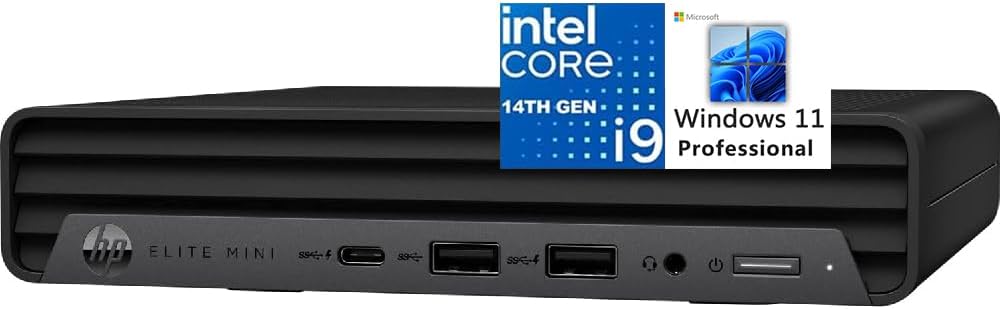
The HP Elite Mini 800 G9 is a complete business desktop with a 4.6 rating, Windows 11 Pro, a full-size wired keyboard, and a mouse. Its Intel Core i9-14900T provides 24 cores, 32 threads, up to 5.5GHz, and 32MB cache, combining strong parallel performance with a more efficiency-oriented processor profile.
We may earn a commission when you buy through this link, at no additional cost to you.
The system includes 16GB of DDR5 memory and a 1TB PCIe NVMe M.2 SSD, giving buyers a ready-to-use foundation for office productivity, development, professional applications, and virtualization. Four display connectors—two DisplayPort 1.4 ports, HDMI 2.1, and a 20Gbps USB Type-C port—support multi-monitor arrangements at up to 4K resolution.
Connectivity includes five USB-A ports, one USB-C port, RJ45 Ethernet, WiFi 6 with RealTek RTL8852BE, Bluetooth, and a 3.5mm headset or microphone jack. The listed quiet design is useful in offices and professional environments, while the included peripherals reduce the need for immediate additional purchases.
The Elite Mini 800 G9 is best for organizations and home users seeking a polished, ready-to-use mini desktop with business software and peripherals included. Its 16GB memory is the main limitation for heavier virtualization, and some buyers may prefer a discrete graphics option. Otherwise, it is an approachable and complete high-performance package.
Windows 11 Pro, a wired keyboard, and a mouse provide everything needed for a straightforward setup. This makes the Elite Mini attractive to buyers who want a complete office system without researching and assembling separate accessories.
The Core i9-14900T combines 24 cores with a relatively restrained power profile, which can be advantageous in offices where fan noise and energy use matter. Its display connections also make it straightforward to create a three-monitor workstation.
We may earn a commission when you buy through this link, at no additional cost to you.
A useful Intel Core i9 mini PC should fit the workload, display arrangement, network, and upgrade path you need. Processor generation is only the beginning; memory, cooling, connectivity, and included components can materially change day-to-day experience.
Core count and thread count indicate how much work a processor can handle in parallel. The models here range from 14 cores and 20 threads in the 13900H and 13900HK to 24 cores and 32 threads in the 13900HX, 14900HX, 14900, and 14900T processors. More cores can benefit video rendering, software compilation, running virtual machines, scientific workloads, and heavily threaded creative applications, but short, burst-sensitive tasks also benefit from high clock speed.
Memory determines how many applications and datasets can remain active at once. Sixteen gigabytes is workable for office tasks and moderate development, while 32GB is more appropriate for professional editing, large project files, virtual machines, and local AI. DDR5 offers higher bandwidth than DDR4, but both standards are common in this category. Check the maximum supported capacity, number of memory slots, and whether memory is included.
A PCIe 4.0 NVMe SSD offers much faster application loading and file transfers than a basic SATA drive, making it the preferable storage choice for a performance-oriented system. Capacity matters as well: 500GB can fill quickly, 1TB is a practical starting point, and 2TB suits larger media and game libraries. Look for multiple M.2 slots, 2.5-inch drive support, RAID capability, or a PCIe slot when storage may grow.
The number of display outputs determines how many monitors can be connected, while the connector types affect which displays and docks are easiest to use. HDMI and DisplayPort are common, and USB-C with DisplayPort Alt Mode can support high-resolution output and data in one cable. Pay attention to maximum resolution and refresh rate, especially if you plan to use 4K, 8K, high-refresh displays, or several screens simultaneously.
A single gigabit Ethernet connection is adequate for many homes and offices, but 2.5G Ethernet is better for large file transfers, network storage, and high-speed local networks. Models with dual 2.5G ports or 10G SFP+ interfaces are intended for network-heavy professional and homelab use. WiFi 6E, WiFi 7, and Bluetooth versions also matter for wireless peripherals, but a stable wired connection remains preferable for sustained transfers.
A compact processor can produce substantial heat, so cooling directly affects sustained performance and acoustic output. Look for multiple heat pipes, active airflow, ventilation on more than one side, SSD cooling, and a chassis designed to move air efficiently. Systems marketed for quiet operation may be preferable in offices, studios, and shared rooms. Also compare processor power targets, because a 65W chip can create more heat and noise than a lower-watt alternative.
Some compact PCs include a PCIe x16 slot, allowing a discrete graphics card, high-speed network controller, or storage card to be installed. This can make a mini PC viable for gaming, 3D rendering, and professional visualization, but case dimensions, power limits, slot spacing, and cooling must be checked. The MS-01 barebone is particularly relevant to this category, while most other models rely on integrated graphics.
Some systems arrive with Windows and accessories, while others are barebones that require memory, storage, and an operating system. A complete configuration is easier for first-time buyers and business deployments. Barebone systems can be more economical for builders or for reusing compatible components, but they add setup work. Also examine included cables, mounts, adapters, warranty length, and local support before deciding.
Begin by confirming the hardware configuration, updating the operating system and chipset drivers, and installing the applications required for your work. Connect the display, keyboard, mouse, and network before moving the computer to its final position. If the model includes a VESA mount, attach it to a compatible monitor and leave enough space around the chassis for airflow.
Place the mini PC on a hard, level surface rather than a soft cushion or enclosed shelf. Keep vents clear, avoid stacking equipment directly over the intake areas, and periodically check for dust accumulation. If the system runs hotter or noisier than expected under a familiar workload, allow it to cool naturally and confirm that the room contains adequate ventilation.
For memory or storage upgrades, power down the system, disconnect it, and follow the manufacturer's instructions. Match RAM modules appropriately, use compatible NVMe or SATA devices, and secure each drive before restarting. Create regular backups of important files, particularly when using RAID or a barebone system configured by the owner, because expansion options do not replace a sound backup strategy.
It depends on the graphics and memory configuration. Systems with recent Intel integrated graphics can handle many mainstream games, while demanding titles may require a discrete GPU, more system memory, and careful cooling. The MS-01 platform offers PCIe expansion for a discrete card, but buyers should verify power, physical fit, and driver compatibility before upgrading.
A mini PC can offer flagship-class processor performance in a smaller, easier-to-place enclosure, and several models include SSD storage and an operating system. A desktop may still be preferable when you need multiple full-length expansion slots, extensive internal storage, replaceable parts, or high-end graphics. The best choice depends on mobility, expansion, and workspace requirements.
Yes, but the maximum number depends on the model and output configuration. The NAB9S supports up to four independent displays, while several other products support three. The GT13 MAX and IT13 MAX also list four-display capability. You should also verify maximum resolution, refresh rate, and whether the USB-C port supports DisplayPort Alt Mode.
DDR5 generally offers higher data-transfer bandwidth and can support larger memory capacities, while DDR4 is usually less demanding and widely compatible. Performance depends on the processor and system implementation, not memory generation alone. Ensure the module type, capacity, speed, and number of slots are compatible with the chosen mini PC.
Not for light office use, but 32GB is advisable for large creative projects, software development, extensive browser use, virtual machines, and local AI workflows. The models in this guide offer several memory options, including 16GB configurations that can be expanded. A fast SSD and adequate memory often contribute more to daily responsiveness than a higher processor clock alone.
For some modern games and lighter workloads, a current Core i9 mini PC can be sufficient, especially with 32GB of memory. Traditional gaming desktops still offer more graphics-card choice, cooling capacity, storage flexibility, and upgrade room. Buyers who want the widest gaming upgrade path should prioritize a model with a suitable PCIe slot and verify power limitations.
A barebone system normally includes the chassis, processor, and some essential components, but not memory, storage, or the operating system. The owner must install compatible components and configure the software. This approach offers customization and can be economical for builders, but it is less convenient for first-time computer users.
Thermal output and noise depend on the processor power target, chassis, fan design, and workload. Models such as the KAMRUI Hyper H2 use multiple heat pipes and enhanced airflow, while the GEEKOM IT13 MAX emphasizes quiet 65W operation. Good placement, clean vents, and a suitable thermal design help maintain both performance and acceptable noise.
The KAMRUI Hyper H2 is the strongest all-around recommendation, combining 24 cores and 32 threads with a 5.8GHz maximum clock, 32GB of memory, triple 4K output, and a highly compact body. The MINISFORUM NAB9S offers the most approachable configuration, while the GEEKOM GT13 MAX is the leading premium option for local AI, modern wireless connectivity, and four-display work.
Prioritize the components that directly affect your workload: more memory for heavy multitasking, multiple NVMe slots for large files, faster Ethernet for network storage, a full-length PCIe slot for specialized expansion, or a quieter cooling system for shared offices. Processor generation alone should not determine the purchase, because a system with inadequate memory or storage may feel less capable than a well-balanced alternative.
Finally, check the current product listing before buying. Configurations, included components, operating systems, warranty coverage, and marketplace pricing can change. Confirm compatibility with your monitors and peripherals, and ensure any required memory, storage, graphics card, or operating system is added to the purchase where necessary.