
GEEKOM A9 Mega
4.6Editor score
128GB unified LPDDR5X
Up to 128B quantized models
Dual 10GbE networking
2TB PCIe Gen4 storage
Mini Pcs for Local Llm guide comparing ten compact AI desktops for model capacity, memory, graphics, cooling, expansion, and privacy.
Running large language models on a desk-sized computer is increasingly practical, but the best Mini PC for local LLM work must balance more than processor speed. Unified memory, GPU capability, cooling, storage, networking, and operating-system flexibility all influence how smoothly models load and generate responses.
This guide compares ten Mini PCs designed for local AI workloads using their published processor, memory, graphics, AI-acceleration, expansion, connectivity, and support specifications. It covers systems aimed at small models, demanding quantized models, private knowledge bases, image generation, development, and hybrid cloud-and-local workflows.
Each review explains where a particular system fits best and where its compromises may matter. Product ratings and specifications can change, while prices and configurations vary over time, so readers should verify the current listing and configuration before purchasing.
4.6Editor score

5.0Editor score

4.2Editor score
The comparison below highlights the processors, memory, graphics, storage, networking, and expansion features that matter most when selecting a compact system for local language models and related AI tasks.
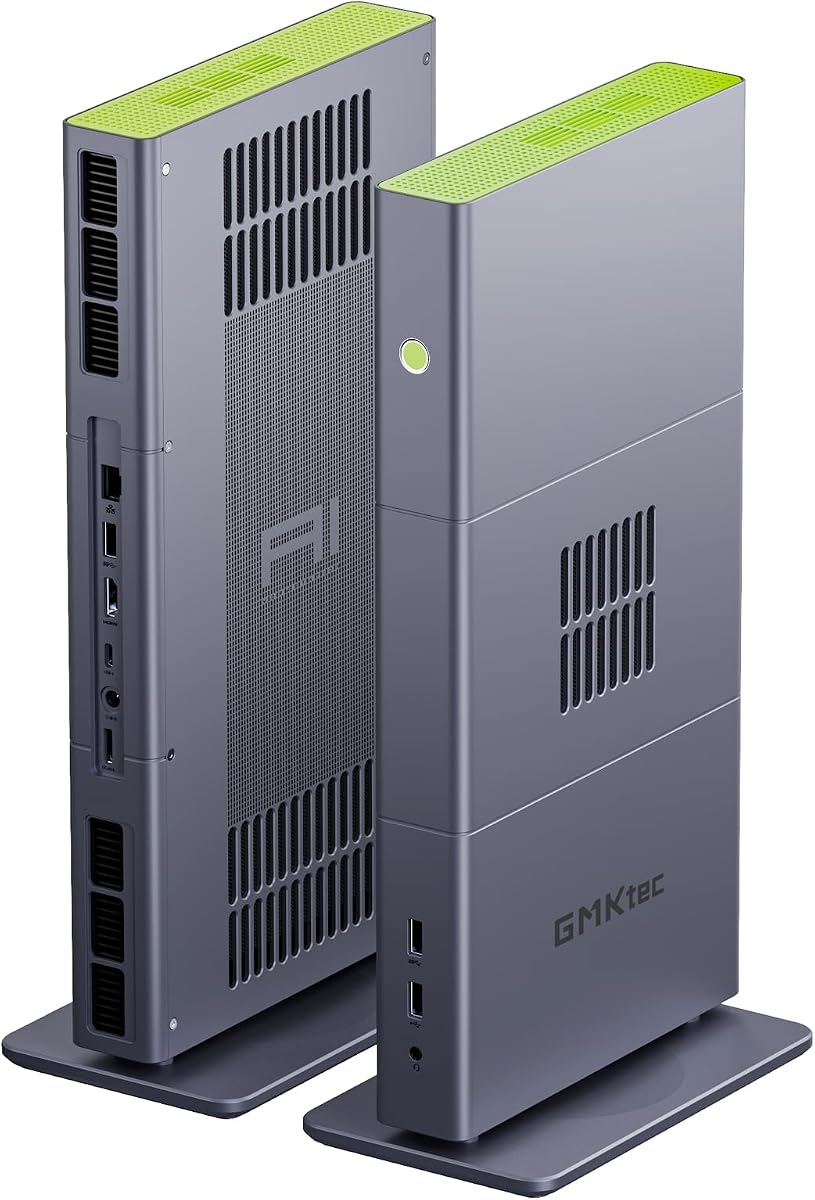


The GMKtec X3 AI is built around the Ryzen AI Max+ 395, combining 16 Zen 5 cores, 32 threads, integrated Radeon 8060S graphics, and up to 126 TOPS of total AI performance. Its 128GB LPDDR5X memory is the defining feature for local LLM users because it gives large models and the GPU access to one unusually generous unified memory pool.
We may earn a commission when you buy through this link, at no additional cost to you.
The practical strength of this machine is flexibility. Its Radeon 8060S has 40 RDNA 3.5 compute units, while the XDNA 2 NPU contributes up to 50 TOPS. The listed specifications also support comfortable use of quantized 70B-class models such as DeepSeek 70B Q8, subject to the selected runtime, model format, context length, and application configuration. OCuLink adds a route to a more powerful external GPU when rendering or inference requires it.
Storage and networking are equally serious. A 2TB PCIe 4.0 SSD provides a useful starting point for model files, while 2.5GbE, Wi-Fi 7, and Bluetooth 5.4 cover local and wireless needs. The main compromises are financial and practical: this is an expensive platform, the memory is soldered to the board, and external GPU docks add another layer of cost, power, and setup complexity.
This is an excellent choice for a developer, researcher, studio, or technically confident enthusiast who wants to experiment with large quantized models without building a full-size desktop. It is less appropriate for a first local LLM system or a user who needs easily replaceable memory. For those seeking maximum practical model capacity in a compact enclosure, the X3 AI ranks first.
The 128GB LPDDR5X configuration can hold substantially more model weights than conventional 32GB mini PCs. Its 8000 MT/s memory also supplies the bandwidth needed when the integrated GPU handles accelerated inference, making the platform much more compelling for large quantized models.
OCuLink provides a practical upgrade path beyond the Radeon 8060S. Users can add a compatible external graphics dock for heavier AI workloads, 3D rendering, or gaming, although the dock must be powered and connected according to its own requirements.
We may earn a commission when you buy through this link, at no additional cost to you.
The BOSGAME VTA-439 combines the Ryzen AI 9 HX 470 with 32GB of DDR5-5600 memory and a 1TB PCIe 4.0 NVMe drive. It earns a 4.6 rating and stands out as a balanced AI development platform with 12 cores, 24 threads, Radeon 890M graphics, and up to 86 TOPS of combined AI performance.
We may earn a commission when you buy through this link, at no additional cost to you.
Its upgradeability makes it more adaptable than many compact AI PCs. The memory is installed as two 16GB modules and can be expanded to 256GB, while three PCIe Gen4 M.2 slots allow storage expansion to as much as 12TB. OCuLink PCIe 4.0 x4 connectivity adds external graphics potential without requiring the system to rely entirely on its integrated Radeon 890M.
The VTA-439 is also well connected. Dual 2.5GbE ports, Wi-Fi 7, Bluetooth 5.4, and support for four displays suit development desks, local servers, and multi-monitor workspaces. Windows 11 Pro is preinstalled, Ubuntu compatibility is stated, and the system is backed by a one-year machine warranty, three years of parts coverage, and lifetime technical support.
For local LLM developers who need room to grow but do not require the extreme memory capacity of a 128GB system, the VTA-439 is a persuasive general-purpose choice. It is particularly useful for smaller and medium-sized models, coding assistants, retrieval systems, and development environments. Users targeting very large quantized models should carefully assess whether their future memory needs exceed the base configuration.
Replaceable DDR5 modules and three Gen4 storage positions allow the VTA-439 to grow with the user's workloads. That makes it a stronger long-term platform for experimenting with larger models, virtual machines, datasets, and development containers than a fixed-memory machine.
Dual 2.5GbE connections are especially useful for NAS access, virtualization, and separating traffic across networks. The four-display support also makes it practical to keep code, monitoring dashboards, model interfaces, and documentation visible simultaneously.
We may earn a commission when you buy through this link, at no additional cost to you.
The ACEMAGIC FOCUX is a compact AI desktop built around the Intel Core Ultra X7 358H. It offers 16 cores and 16 threads, up to a 4.8GHz boost clock, 32GB of 7467 MT/s LPDDR5X memory, and a claimed 180 TOPS of total AI throughput across the CPU, GPU, and NPU.
We may earn a commission when you buy through this link, at no additional cost to you.
The FOCUX's strongest differentiator is its combination of local AI capability and display flexibility. The Intel Arc B390 Xe3 graphics and four-display configuration support professional workflows involving code, live charts, and reference material. Its cooling design is intended to sustain 65W operation quietly, using a high-static-pressure fan, dual heat pipes, and segmented fins.
Networking is well suited to AI development. Dual 2.5GbE LAN ports can support wired redundancy and rapid NAS access, while Wi-Fi 7 and Bluetooth 5.4 add wireless flexibility. The included 1TB PCIe 4.0 SSD can be supplemented through one Gen5 and one Gen4 M.2 position, with stated expansion up to 8TB.
This mini PC is best for users who want a compact, quiet system for 7B-14B local models, local coding, summarization, content generation, and multi-monitor productivity. Its 32GB memory is less generous for very large models, and no OCuLink connection is listed. Still, the FOCUX delivers a compelling balance of AI hardware, connectivity, and desk-friendly operation.
The stated 65W sustained cooling design targets the kind of extended workload that occurs during model testing, rendering, and document processing. Quiet thermal behavior is especially valuable in an office or home office where a loud full-size workstation would be disruptive.
USB4, DisplayPort 2.1, and HDMI allow a developer to maintain multiple working views. A practical arrangement could place code in one window, a local model interface in another, and monitoring or documentation in the remaining displays.
We may earn a commission when you buy through this link, at no additional cost to you.
The GEEKOM IT13 MAX is a compact general-purpose mini PC aimed at users who want local AI features alongside ordinary productivity and creative work. Its Core Ultra 9 185H, 24GB LPDDR5-5600 memory, Intel Arc Graphics, and built-in NPU support a hybrid workflow in which AI services assist with editing, research, coding, and document tasks.
We may earn a commission when you buy through this link, at no additional cost to you.
The machine is also designed for easy maintenance. Four accessible Phillips screws provide access to internal components without removing adhesive feet or disconnecting wireless antennas. Storage can be expanded through M.2 2242, SATA, or HDD options up to 4TB, while the SD card reader accepts up to 2TB. That flexibility makes the base 500GB drive less of a long-term limitation.
Networking and display support are unusually practical. Dual 2.5GbE ports suit NAS, server, or separated network connections, while quad-display support helps with trading, monitoring, design, and general multitasking. The IceBlast 3.0 cooling system uses enhanced airflow, an efficient fan, and dual copper heat pipes to support longer coding, editing, and AI sessions.
The IT13 MAX makes sense for local AI experimentation that does not require large model weights, alongside regular office tasks. Its 24GB memory and 500GB storage are meaningful limits for serious model hosting, so buyers should account for immediate storage expansion and avoid choosing it for very large quantized models.
Accessible screws and flexible drive options make maintenance less intimidating. This is useful for users who want to add storage, replace components, or keep the system useful beyond a fixed configuration as their software and model requirements evolve.
The IT13 MAX is less centered on maximum model capacity and more on everyday usability. It can serve as an office computer, creative workstation, lightweight development node, and local AI assistant without requiring a separate machine for each role.
We may earn a commission when you buy through this link, at no additional cost to you.
The GEEKOM A9 Mega is a premium local AI workstation built around the Ryzen AI Max+ 395 and a 128GB LPDDR5X unified-memory configuration. Its 4.6 rating reflects a combination of strong hardware and a clearly defined high-end audience: developers, studios, businesses, and researchers seeking capable offline AI in a compact enclosure.
We may earn a commission when you buy through this link, at no additional cost to you.
The system supports select four-bit quantized models with up to 128 billion parameters when compatible drivers and inference software are used. Up to 96GB of the unified pool can be allocated to the Radeon 8060S GPU, which is the essential detail for large-model workloads. The remaining memory can serve the operating system and other applications, allowing a model to remain loaded without tying up the entire platform.
Its networking and cooling specifications reflect workstation ambitions. Dual 10GbE ports accelerate model and dataset transfers to a NAS, while Wi-Fi 7 provides wireless access. IceBlast 5.0 combines a vapor chamber and dual turbo fans to support up to 120W sustained operation, with a stated 140W maximum power dissipation.
The A9 Mega is the premium recommendation for users who want the fewest compromises when running very large quantized models. It is overkill for basic assistants and small models, and its acquisition cost, fixed memory, and processor scarcity make careful planning advisable. For serious offline AI development, however, its capacity and connectivity are exceptional.
After setup and model downloads, compatible workflows can run without cloud API access. That reduces recurring service costs and keeps sensitive material on the local system, although actual performance depends on model architecture, quantization, runtime, and prompt length.
Dual 10GbE networking is valuable when model files, datasets, or creative assets must move repeatedly between the workstation and a NAS. The speed advantage becomes meaningful with large files that would be cumbersome over a conventional gigabit connection.
We may earn a commission when you buy through this link, at no additional cost to you.
The BOSGAME M5 AI uses the same high-end Ryzen AI Max+ 395 platform as several more expensive competitors, paired with 128GB of 8000 MT/s LPDDR5X and a 2TB PCIe 4.0 SSD. Its 4.3 rating and specifications position it as a capable platform for 70B-plus quantized language models and mixed AI workloads.
We may earn a commission when you buy through this link, at no additional cost to you.
The Radeon 8060S integrated GPU contains 40 RDNA 3.5 compute units and can access as much as 96GB of the shared memory. This large allocation is what makes the M5 AI relevant to local LLM use rather than merely AI-assisted desktop computing. The 16-core, 32-thread processor also provides ample headroom for token generation, retrieval, background services, and creative tasks.
Display and peripheral options are extensive. The system supports four 8K at 60Hz monitors through HDMI 2.1, DisplayPort 1.4, and dual USB4 connections, while the USB4 ports support data, video, and charging. A second M.2 position allows storage expansion or RAID, depending on configuration and support.
This is a compelling choice for users who specifically want large-model capability in a compact, quiet-style enclosure. The tradeoff is that it sits in an expensive hardware class and does not offer replaceable memory. It makes more sense for a dedicated local AI node than for a general-purpose family computer.
The unified design allows the Radeon 8060S to use a substantial portion of the 128GB pool. That avoids the severe memory limitation associated with many integrated GPUs with only a small reserved VRAM allocation.
Four 8K outputs are useful for a dedicated model workstation. Users can keep an interface, terminal, documentation, and monitoring view visible without relying on a large desktop tower.
We may earn a commission when you buy through this link, at no additional cost to you.
The Reatan X8 occupies a useful middle ground between ordinary 32GB mini PCs and 128GB specialized workstations. Its Ryzen AI 9 HX 470 provides 12 cores, 24 threads, Radeon 890M graphics, and up to 86 TOPS of AI performance, while 48GB of Crucial DDR5-5600 memory gives local models more room than the common 32GB configuration.
We may earn a commission when you buy through this link, at no additional cost to you.
Both memory and storage are removable. Two DDR5 SODIMM positions support up to 96GB RAM, and dual M.2 slots support up to 8TB of storage. This makes the X8 easier to tailor over time, particularly for users who expect to move from smaller quantized models to larger ones as their needs develop.
OCuLink PCIe 4.0 x4 provides a substantial external graphics pathway and can support desktop-class GPUs for AI, rendering, or gaming. The all-metal chassis includes dual copper heat pipes and dedicated cooling for memory and SSDs, with adjustable fan modes for balancing acoustics and sustained output.
The Reatan X8 is a strong recommendation for developers who want more than 32GB but do not need a 128GB unified-memory platform. It is especially attractive when replaceability and an external GPU path matter more than having the absolute largest model capacity available.
Starting with 48GB reduces the chance that medium-sized models will immediately exhaust system memory. The two-SODIMM design also makes it possible to add capacity later without replacing a soldered unified-memory board.
OCuLink lets the compact chassis borrow the performance of a desktop graphics card for specialized tasks. This makes the X8 relevant not only to LLM developers but also to creators who need rendering or video acceleration.
We may earn a commission when you buy through this link, at no additional cost to you.
The GMKtec EVO-X3 is another Ryzen AI Max+ 395 configuration, combining 16 Zen 5 cores, 32 threads, Radeon 8060S graphics, and 128GB LPDDR5X memory. It is positioned as a compact AI workstation for generative AI, professional creation, development, gaming, and heavy multitasking.
We may earn a commission when you buy through this link, at no additional cost to you.
Its performance controls distinguish it from simpler mini PCs. Silent, Balanced, and Performance modes are listed at 54W, 85W, and up to 140W respectively, supported by a three-fan cooling system and three copper heat pipes. The OCuLink PCIe Gen4 x4 interface permits an external GPU, while USB4 supplies 40Gbps data transfer, display output, and power input.
The hardware is well matched to large quantized models because 128GB of unified memory can be divided between the CPU and Radeon 8060S. A 2TB PCIe 4.0 drive offers enough starting room for substantial model collections. Dual 8K display output, 2.5GbE, and Wi-Fi 7 round out the workstation feature set.
The EVO-X3 is attractive for users who want tunable performance and a high power ceiling in a small chassis. It is less straightforward for beginners because maximum mode can produce more heat and noise, and it currently has no customer rating. Buyers seeking the same processor family but a more established rating may prefer the closely related GMKtec X3 AI listing.
Silent and Balanced modes are useful during routine inference and office tasks, while Performance mode can extract more sustained compute from the processor and GPU. This flexibility helps users decide how aggressively the machine should run.
OCuLink and full-function USB4 provide two different kinds of expansion. OCuLink targets high-bandwidth graphics devices, while USB4 handles peripherals, storage, displays, and power delivery.
We may earn a commission when you buy through this link, at no additional cost to you.
The GMKtec M6 Ultra is the most approachable entry point in this roundup. Its Ryzen 5 7640HS provides six Zen 4 cores, 12 threads, a 4.3GHz base clock, and boost capability up to 5.0GHz, while 32GB of dual-channel DDR5 is more practical for local AI than many smaller configurations.
We may earn a commission when you buy through this link, at no additional cost to you.
The Radeon 760M integrated GPU is not intended to compete with Radeon 8060S or 890M systems for large-model acceleration, but it provides enough graphics capability for ordinary visual workloads, hardware encoding, decoding, and a general-purpose mini PC experience. The system can also support three displays, including 8K output through USB4.
Storage and networking are sensible for the segment. A 1TB M.2 PCIe SSD is included, dual storage positions provide expansion up to 8TB, and RAM can grow to 128GB. The 2.5GbE port supports fast transfers, while Wi-Fi 6 and Bluetooth 5.2 cover wireless peripherals and internet access.
This is the budget recommendation for learning LM Studio, llama.cpp, and smaller local models, especially 7B-class and carefully quantized configurations. It is not the right choice for 70B-class models or heavy concurrent workloads. Within its segment, though, the memory, storage, and networking provide a capable foundation.
A user can begin with compact instruction-tuned models, coding assistants, summarization tools, and retrieval applications without paying for a large-memory workstation. The 32GB configuration also leaves room for the operating system and background applications.
The M6 Ultra supports substantial memory and storage expansion, so the initial system need not remain static. This makes it easier to begin modestly and increase capacity as model requirements become clearer.
We may earn a commission when you buy through this link, at no additional cost to you.
The ASUS NUC 14 Pro AI combines a Core Ultra 7 155H processor with 32GB DDR5 memory, a 1TB PCIe 4.0 SSD, and Windows 11 Pro. Its 5.0 rating makes it a strong all-around recommendation for users who want a refined operating experience, conventional memory expandability, and dependable connectivity for local AI and productivity.
We may earn a commission when you buy through this link, at no additional cost to you.
The 16-core, 22-thread processor provides enough parallel capability for smaller language models, coding assistants, transcription, document summarization, and simultaneous background applications. ASUS states that local models supporting up to 20 billion parameters can run without a network connection. The integrated NPU, Intel Arc graphics, AI Ready, and AI Boost features expand the system's AI appeal beyond one particular application.
This NUC is expandable to 96GB DDR5 memory, with configuration options ranging up to 64GB from the factory and additional M.2 storage support. Connectivity includes Thunderbolt 4, USB 3.2 Gen2 Type-A and Type-C, HDMI 2.1, and 2.5GbE Ethernet. It supports up to four 4K displays or 8K output and includes a VESA bracket for a tidy installation.
For most local LLM users, the NUC 14 Pro AI is the best overall balance of local AI capability, familiar software support, expandability, and everyday usability. It is not ideal for very large quantized models because the base memory is much lower than 128GB platforms. For developers, students, and small teams wanting a polished general-purpose AI mini PC, however, it is an especially attractive recommendation.
Windows 11 Pro is preinstalled, reducing setup friction for users who want to move directly into local applications, development tools, or productivity software. This makes the NUC particularly approachable compared with systems that may require operating-system installation.
Replaceable DDR5 and M.2 storage make upgrades more familiar, while Thunderbolt 4 and 2.5GbE provide flexible peripheral and network options. The NUC can therefore serve as a local AI workstation, a compact office computer, or a development node.
We may earn a commission when you buy through this link, at no additional cost to you.
Choosing a Mini PC for local language models means balancing memory capacity, processor efficiency, graphics support, cooling, storage, networking, software compatibility, and the size of the models you expect to run.
Memory is often the first hard limit for a local LLM. Quantized models can reduce the space required for each parameter, but the model, runtime, operating system, context, and temporary working data still need memory. Systems with 32GB are generally appropriate for 7B-class models and many quantized 14B-class models, while 48GB or 64GB provides more headroom for coding tools, retrieval systems, and larger models. The 128GB configurations in this guide are aimed at demanding 70B-class and even select 128B-class four-bit models.
Local inference can involve the CPU, integrated GPU, and dedicated NPU. A strong CPU supports prompt preparation, token generation, and general application work, while a capable integrated GPU can accelerate matrix operations and reduce dependence on the CPU. The Ryzen AI Max+ 395 systems pair 16 cores with Radeon 8060S graphics and a large shared memory pool, while the HX 470 systems use Radeon 890M graphics. Intel-based systems emphasize the NPU and Arc graphics for supported application workflows.
Hardware specifications alone do not guarantee a smooth experience. The operating system, device drivers, inference engine, model format, and quantization method must work together. Popular ecosystems include llama.cpp-based tools, LM Studio, and other applications that can call CPU or GPU acceleration. Before buying, check whether the product is supported by the runtime you intend to use, especially when relying on NPU acceleration or a particular GPU architecture.
Language model files can occupy tens or hundreds of gigabytes, especially when several quantizations are kept for testing. A 1TB SSD is a sensible starting point, but two or more M.2 positions provide valuable flexibility. Consider whether the system supports Gen4 or Gen5 storage, RAID, SATA, or external enclosures, and whether fast wired networking will be used to move models from a NAS. Large creative projects and datasets can consume space quickly even when the operating system and applications are lightweight.
Local language model generation is not always a short burst. A larger model, a long context, or concurrent applications can keep the CPU and GPU busy for many minutes or hours. Advanced vapor chambers, multiple heat pipes, high-static-pressure fans, and selectable performance modes help maintain consistent behavior under sustained load. Cooling is also part of the acoustic experience: a workstation intended to sit in an office or bedroom should have sufficient thermal headroom without running at maximum fan speed constantly.
OCuLink is important for users who may eventually need more graphics performance than an integrated GPU can provide. It offers a higher-bandwidth path for external graphics than ordinary USB4 in many scenarios, making it useful for rendering, gaming, and accelerated inference. USB4 remains valuable for general peripherals, storage, displays, and power delivery. Replaceable SODIMM memory and multiple M.2 slots offer a different kind of expansion and may be preferable for long-term ownership.
Fast networking reduces waiting when downloading model files or copying datasets. A 2.5GbE connection is useful for many homes and offices, while dual 10GbE is relevant to shared NAS systems and professional studios. Wi-Fi 7 adds flexibility but should not automatically be assumed to replace Ethernet for sustained large transfers. Multi-display support also matters for AI development because code, terminals, model interfaces, documentation, and monitoring tools often need separate screens.
Windows 11 Pro is convenient for general productivity and broad application support, while Linux can be attractive to developers working directly with command-line tools and open-source runtimes. Check the included operating system, available BIOS options, driver support, and compatibility with the inference software you plan to use. Warranty coverage and technical support are also relevant because mini PCs are compact systems with densely integrated components and limited serviceability compared with many full-size desktops.
Begin by installing the current operating-system updates, chipset and graphics drivers, and the inference software you plan to use. Create separate storage for model files when possible, and confirm that the application recognizes the CPU, integrated GPU, or NPU acceleration path. Run a small test model before downloading a large one, then monitor system memory, storage activity, temperatures, and generation speed.
Give the mini PC adequate clearance around its vents and avoid placing it inside a closed cabinet during long inference runs. Respect any OCuLink connection procedure, power the system down before attaching or removing an external graphics device unless the manufacturer explicitly permits otherwise, and use the enclosure or dock's recommended power supply. Clean dust from vents periodically and keep the system within recommended temperature and humidity conditions.
Back up important model configurations, prompts, application settings, and custom system files. For models and datasets stored on a NAS, maintain separate backups and avoid deleting the only copy when changing storage layouts. When upgrading memory or drives, power down completely, follow the manufacturer's instructions, and confirm that the operating system and inference runtime recognize the new configuration.
A 32GB Mini PC is generally suitable for 7B-class models and many quantized 14B-class models, provided the operating system has enough memory remaining for normal applications. A 48GB or 64GB system provides more room for coding assistants, retrieval databases, larger contexts, and concurrent tasks. Models in the 70B class often require 96GB or more when fully quantized, making 128GB unified-memory systems the relevant choice for that category.
An NPU is useful when your inference software and model are optimized for it, but it is not the only route to local AI. Many general-purpose LLM tools rely primarily on the CPU and GPU, where the processor's memory bandwidth and graphics capability often have a larger effect. Buyers should check application and driver support rather than choosing solely from the advertised NPU TOPS figure.
A standard 32GB configuration is generally insufficient for a 70B-class model, even at low-bit quantization, because the operating system and application also need memory. Extremely aggressive quantization and unusual runtime techniques may alter the result, but 128GB-class systems are much more practical for serious 70B use. A 48GB system may offer limited headroom, while 96GB or 128GB is preferable.
OCuLink can help by allowing a compatible external GPU to perform AI and graphics workloads beyond the capabilities of the built-in graphics. It is especially useful for rendering, gaming, and inference configurations optimized for a supported discrete GPU. The gain depends on the application, external GPU, dock, and power delivery, and OCuLink normally requires the system to be powered off during connection changes.
Yes, because model files, datasets, application caches, and creative projects can quickly fill a smaller drive. A 1TB SSD is a reasonable starting point for experimentation, but users who maintain multiple quantizations or larger models benefit from additional M.2 storage, RAID, or a network drive. Fast Ethernet is also useful when transferring model files to and from a NAS.
Windows is convenient for general productivity and works well with many desktop applications, while Linux can provide a more direct environment for command-line tools and open-source runtimes. Both can be suitable, provided the chosen inference software, GPU driver, and model format are supported. Check community or official software documentation before changing operating systems if local AI is your primary purpose.
Not necessarily. Soldered unified memory is often the reason a compact system can offer 128GB and share that capacity with the GPU, which is a major advantage for large models. The trade-off is that the capacity cannot be upgraded later. Buyers should decide between high fixed capacity and replaceable lower-capacity memory based on their likely model sizes and long-term plans.
Sustained inference benefits from a cooling system that can move heat away from the processor and graphics while maintaining reasonable noise. Systems with multiple heat pipes, a substantial fan or vapor chamber, and selectable performance modes offer useful control. Users running large models for long periods should leave adequate ventilation and select a balanced mode when maximum noise is undesirable.
The ASUS NUC 14 Pro AI is the strongest overall choice for buyers who want a polished Windows-based mini PC with expandable memory, modern connectivity, and enough performance for smaller local models and AI-assisted productivity. The GEEKOM A9 Mega is the premium option for very large quantized models, unified 128GB memory, high-speed networking, and a high sustained-power envelope. The GMKtec M6 Ultra is the budget starting point for learning local AI with 7B-class models.
For most serious experimentation, prioritize memory capacity first, then confirm that your inference runtime supports the processor and GPU architecture. A 32GB system is sensible for smaller models, 48GB to 64GB provides useful flexibility, and 128GB is the appropriate direction for 70B-class quantized workloads. Replaceable memory, multiple SSD positions, OCuLink, and fast networking matter when you want the system to evolve rather than remain a fixed experiment.
Ratings, driver support, model optimization, and prices can change, so check the current Amazon listing and seller-provided configuration immediately before ordering. Confirm the exact memory and storage options, included operating system, warranty terms, and accessories. Most importantly, compare the hardware against the largest model and application you realistically expect to run rather than choosing solely by advertised AI TOPS.

