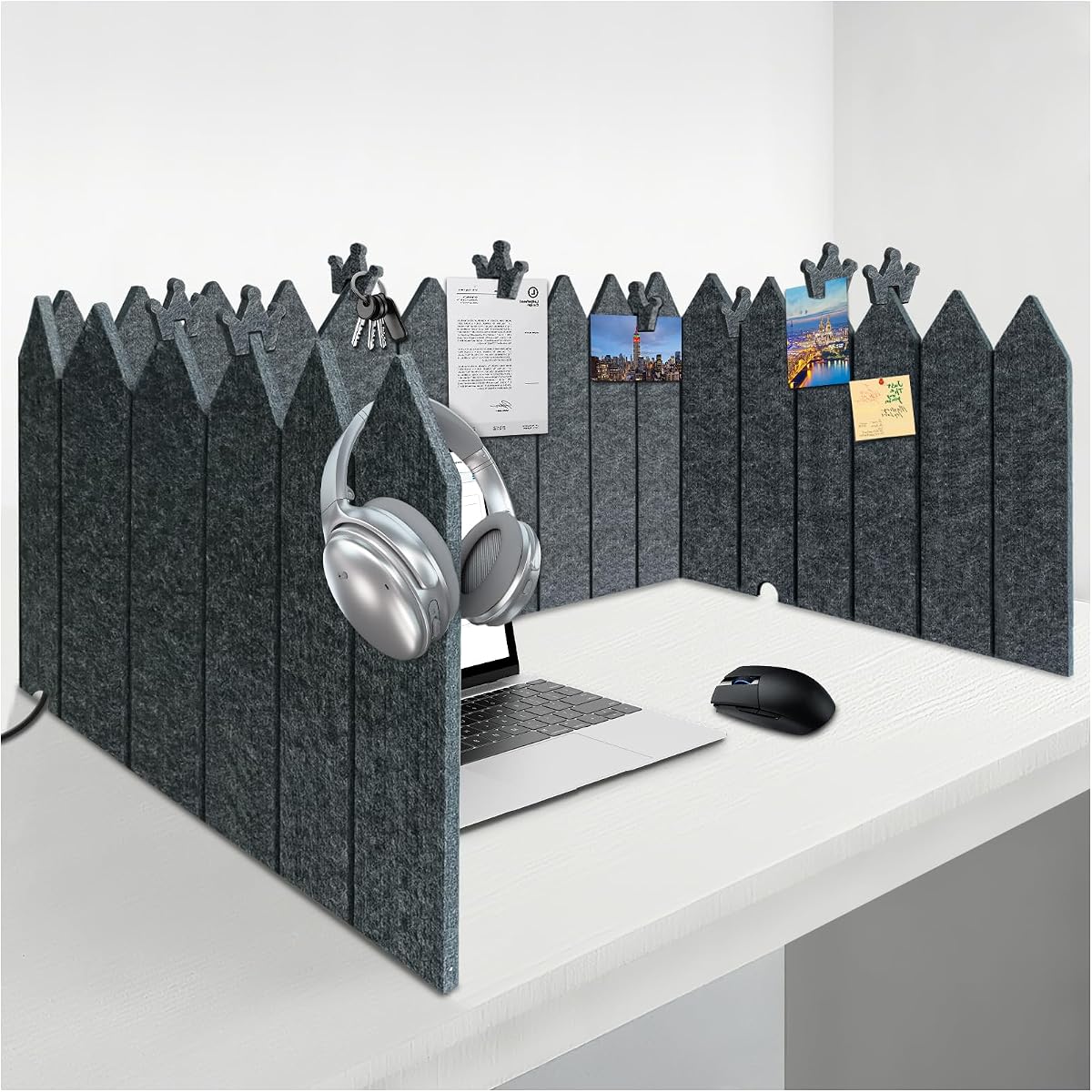
BXI Foldable Felt Desk Divider
4.8Editor score
Adjustable felt privacy panel
Eight note-holding clips
Portable folding storage design
A desk divider privacy shield can transform a crowded, distracting workspace into a more focused and visually private area. The best options combine useful height, dependable support, sound-dampening materials, and an installation method suited to your desk, whether that means permanent clamping, freestanding placement, or simple folding panels.
We compared all ten products by examining their dimensions, mounting systems, materials, portability, organization features, and intended settings. The list covers large felt office screens, compact clamp-on panels, freestanding cubicle walls, acrylic partitions, and foldable student carrels so you can find a solution for a shared office, crowded home desk, classroom, library, or testing area.
Each review explains the product's strongest features, practical limitations, and ideal buyer, helping you match the divider to your space rather than judging only by its rating. Product availability, seller details, and prices can change over time, so confirm the current listing and fit before placing an order.
4.8Editor score

4.5Editor score

4.6Editor score
As an Amazon Associate we earn from qualifying purchases.
This side-by-side comparison evaluates every divider by its dimensions, privacy coverage, installation method, portability, and most useful feature, making it easier to identify the right model for your workspace.


The BXI Foldable Felt Desk Divider combines a large 16.5-inch-high privacy surface with an expandable 86-inch width, making it one of the most versatile shields in this guide. Its 4.8 rating reflects a strong combination of visual separation, organization, and portability. The thick, high-density felt offers meaningful protection from eye contact while helping soften ambient sound.
We may earn a commission when you buy through this link, at no additional cost to you.
The fence-style construction can be arranged along a wide desk or shaped to cover a smaller work area, and pre-cut grooves allow the panel to be trimmed without tools. Eight crown-shaped clips hold notes, keys, and small items, while three bottom cutouts provide routes for cables. These details turn a simple screen into a multi-purpose workstation boundary without adding complicated hardware.
The main compromise is size: not every desk is wide enough to use the full 86-inch span, and users may need to trim the divider along its provided grooves. Felt does not create a soundproof enclosure, and the flexible design may not look as substantial as a rigid panel. Even so, its balance of coverage, useful features, simple setup, and easy folding makes the trade-offs easy to justify.
This is the strongest general recommendation for open-plan employees, remote workers, students, and homeschoolers who want more privacy plus an organization surface. Choose it when flexibility and value matter more than a rigid, permanently fixed cubicle wall. For most users, it provides the most versatile combination of privacy, utility, and storage at a relatively accessible tier.
The expandable fence-style structure can follow a broad rectangular desk or be gently bent to fit a tighter setup. Pre-cut grooves make trimming straightforward, while the non-tip design helps maintain a stable boundary without a complicated frame.
Eight clips provide convenient homes for notes, reminders, and small accessories. The bottom cable cutouts also keep charging leads and monitor wiring from being pinched between the divider and the work surface.
We may earn a commission when you buy through this link, at no additional cost to you.
The VIVO Gray Clamp-on Privacy Panel is a rigid 60-by-24-inch partition designed for dependable attachment to an existing desk. Its 4.5 rating reflects a practical balance of privacy, sound-reducing material, and installation flexibility. Unlike a loose tabletop screen, it remains positioned when the workspace is active.
We may earn a commission when you buy through this link, at no additional cost to you.
The included clamps accommodate desk thicknesses from 0.4 to 1.4 inches, making the setup appropriate for many standard office desks. Spacers create room for cable routing and monitor mounts, while the tackable surface accepts photos, task lists, and motivational notes. The panel can be mounted above or below the desktop, offering a way to shield a screen or conceal items at foot level.
Its fixed mounting is also the chief limitation. Thick, curved, unusual, or heavily beveled desks may not clamp correctly, and a lower-mounted panel can interfere with storage or legroom. Because the material is rigid, it cannot be rolled into a smaller bundle as easily as a foldable felt screen. The included hardware and instructions nevertheless make installation straightforward for compatible desks.
This panel is ideal for a fixed workstation in a busy office or a home desk used for daily computer work. Select it when secure placement, monitor clearance, and a pin-ready surface are priorities. It is less suitable for people who need to move between desks frequently or carry their privacy screen between locations.
The clamp system secures the panel without relying on a bulky freestanding base. Spacers also preserve room around cables and monitor hardware, two details that make a substantial difference in a frequently used desk.
The tackable gray face adds function beyond separation from coworkers. It can display a daily task list, project notes, photographs, or reminders without requiring separate desk organizers.
We may earn a commission when you buy through this link, at no additional cost to you.
The VIVO Gray Freestanding Privacy Panel is a substantial 59.1-by-23.8-inch cubicle wall that does not need to be clamped or screwed to a desk. Its 4.6 rating indicates a strong performance for people who want a substantial visual barrier and the freedom to move it. Reinforced steel feet provide a durable base and a more finished appearance than a lightweight folding screen.
We may earn a commission when you buy through this link, at no additional cost to you.
The panel is designed to limit visual distractions and soften noise while its tackable face can hold photos, task lists, and quotes. Installation is intentionally simple: attach the feet, position the partition, and begin working. Because it stands independently, it can be used in situations where drilling is undesirable or where a fixed clamp would be inconvenient.
A freestanding unit does require enough surface area for the feet, and careless placement near a desk edge could make it less stable. The rigid panel also takes up more room when stored than a rolled or fully folded alternative. The 23.8-inch height is useful for seated visual separation, although it does not create a complete enclosed office.
Choose this model for a flexible corporate cubicle, shared home office, reception area, or hot-desking arrangement where a rigid wall with a professional profile is desired. It is particularly attractive to users who want to move a divider between workstations without repeatedly attaching and removing clamps.
The reinforced feet make it possible to establish a clear work zone on an open desk without modifying the surface. This is especially useful in leased offices and shared spaces where permanent installation is undesirable.
When a meeting ends or a quieter location becomes available, the freestanding structure can be relocated. Its rigid panel and neutral finish suit offices, studios, libraries, and other professional settings.
We may earn a commission when you buy through this link, at no additional cost to you.
The 48-Inch Desktop Privacy Screen is a compact clamp-on felt divider that can be bent into several shapes rather than kept in a rigid rectangle. Its 4.4 rating reflects solid performance for home offices and smaller shared workspaces. The high-density felt helps absorb ambient noise and reduce echo around the desktop.
We may earn a commission when you buy through this link, at no additional cost to you.
Included metal clamps attach to desk edges up to two inches thick without tools, drilling, or adhesive. Users can configure the panel in a straight, curved, or S-shaped line to place privacy exactly where it is needed. That flexibility is useful around L-shaped desks, curved desktops, and hot-desking arrangements where a straight wall would waste space.
At 48 inches wide, it offers less coverage than the larger felt and VIVO panels. It may not provide complete visual separation for a wide monitor setup, and users should avoid attaching heavy items because the product data does not specify a substantial load rating. The foldable design also creates bulk when the screen is not compressed for storage.
This screen is a good fit for a home office, small business reception desk, shared study table, or hot desk where a compact acoustic boundary is more important than maximum width. Its easy installation, flexible shaping, and ability to move between top and foot-level positions make it a versatile alternative to a rigid panel.
The flexible panel can curve around a monitor or bend around an L-shaped workstation. This allows users to direct coverage toward distracting activity without occupying a wide rectangular footprint.
The same clamp-on design can create a foot-level barrier that conceals personal belongings. Removing and relocating the panel remains simple when the workspace changes.
We may earn a commission when you buy through this link, at no additional cost to you.
The DECOLAB Desk Divider pairs a 48-by-18-inch privacy profile with a taupe anti-scratch fabric sleeve and reinforced steel frame. Its 4.5 rating makes it a well-rounded option for offices, classrooms, studios, counters, and coworking areas. The neutral fabric gives the partition a finished appearance that can blend into professional interiors.
We may earn a commission when you buy through this link, at no additional cost to you.
Beyond privacy, the panel is designed to reduce harsh sunlight and screen glare. The frame edge provides a convenient place to pin notes or attach magnets, turning the screen into a lightweight planning board. A gap beneath the desktop accommodates cords, while stable bases help the unit perform in high-traffic locations. The product data also lists flame retardancy, air permeability, thermal insulation, lightfastness, anti-pilling performance, and a three-year warranty.
Its 18-inch height is lower than many competing office dividers, so it may not block all sightlines for taller monitors or create complete visual separation. It remains a freestanding desktop partition rather than a clamp-on model, and its bases require enough stable surface area. Users should follow the supplied assembly instructions and avoid placing it where the feet could protrude dangerously.
This divider is best for buyers who value a polished appearance, durable fabric, glare control, and a cable-friendly base over maximum height. It works well in customer-facing environments, hot-desking areas, and team offices where a neat freestanding screen complements the surroundings.
The taupe fabric sleeve, reinforced steel frame, and stable bases create a more finished look than exposed felt or lightweight plastic. The neutral color suits a broad range of office and study environments.
Glare reduction can make a monitor easier to view, while the frame edge supports notes and magnets. The open lower area also allows charging cables and other leads to pass without major obstruction.
We may earn a commission when you buy through this link, at no additional cost to you.
The Three-Panel Acoustic Privacy Screen is built around a three-sided layout, offering more complete separation than a single flat panel. With a 4.7 rating, it stands out for users who want greater visual coverage in offices, schools, homes, or libraries. The listed 47.2-by-23.6-inch panel and 19.7-inch overall depth create a defined cubicle-like area around the desktop.
We may earn a commission when you buy through this link, at no additional cost to you.
Its freestanding construction means it can be positioned without clamps, permanent fasteners, or tabletop attachment. The three connected panels can screen a monitor from front and side approaches, which is useful when a workstation is exposed to more than one direction. The dark grey finish is understated and appropriate for institutional or professional interiors.
The deeper shape naturally occupies more desk space than a flat 48-inch screen. Depending on how the panels are oriented, access to the keyboard, drawers, or seating may also be more restricted. As with any freestanding divider, stable placement on a broad, level surface is important to reduce the chance of tipping.
This model makes the most sense for users with a wide desk who regularly face visual distractions from multiple directions. It is a good candidate for shared study tables, school study areas, office hotspots, and library workspaces where a small enclosed workstation is more valuable than a slim vertical partition.
Three connected panels create a more convincing boundary than a single straight screen. This design is particularly effective when a desk is exposed to foot traffic or neighboring workstations.
The freestanding structure can define the user's area without modifying the desk. It is especially useful in shared rooms where creating a personal study or work zone is necessary.
We may earn a commission when you buy through this link, at no additional cost to you.
The OBEX Acrylic Freestanding Screen brings a modern, lightweight look to a desktop privacy setup. Its 12-by-30-inch size is smaller than most fabric panels, but the frosted quarter-inch acrylic creates an attractive translucent boundary. The 4.4 rating reflects its suitability for home offices, professional workspaces, countertops, and classroom testing stations.
We may earn a commission when you buy through this link, at no additional cost to you.
Anodized aluminum brackets hold the acrylic securely, while rubber pads on the feet help prevent sliding and avoid the need to mount or screw the unit to a work surface. That makes setup and repositioning simple. The frosted finish softens the view through the panel and can give a workspace a cleaner appearance than an opaque fabric partition.
This product is primarily a visual screen, not a serious acoustic solution. Acrylic can reflect sound, and the listed product information does not claim meaningful sound absorption. Its narrow width also means it cannot shield a wide dual-monitor arrangement or block an entire side of a desk. Surface scratches may be more visible on glossy acrylic, so careful handling is advisable.
Choose the OBEX screen for a small desk, reception counter, home studio, or testing area where a contemporary appearance and simple freestanding setup are the main goals. It is a better fit for visual organization and light separation than for complete sound control in a busy shared office.
The narrow frosted panel adds separation without the visual bulk of a wide fabric partition. It works well on smaller surfaces where a full cubicle wall would be impractical.
Rubber pads beneath the aluminum feet help limit sliding and protect the placement surface. The screen can be moved as the user's work location changes.
We may earn a commission when you buy through this link, at no additional cost to you.
The Two-Pack Trifold Student Dividers are compact, waterproof screens designed primarily for testing, studying, and temporary privacy. Each unit folds into a three-sided form and collapses completely flat for storage. The package includes two dividers, multicolor labels, and a paper clip, making it convenient for organizing a small study or testing station.
We may earn a commission when you buy through this link, at no additional cost to you.
The durable plastic construction is easy to clean and suitable for daily use in homes, offices, libraries, and classrooms. The trifold shape stands steadily on a table and provides enough visual separation for short-term tasks. Included labels allow students or staff to name and number each station, which is useful for seating plans, exam organization, or shared work areas.
These dividers are too small to shield an adult office monitor or provide substantial acoustic isolation. Plastic does little to absorb sound, and the screen is intended to block sightlines rather than create a quiet booth. Although the flat-folding format saves space, users should keep the hinges away from excessive bending to maintain their shape.
This pack is a practical choice for families supporting individual study sessions, teachers needing a few testing shields, or remote workers who only require a small paper-and-writing boundary. It is less appropriate for users seeking a full-height office partition, noise control, or screen privacy for electronics.
The trifold design stands without permanent supports and helps hide nearby papers, hands, or other visual distractions. Included labels make assigning stations simple.
Each divider folds flat for storage between uses. Waterproof plastic can be wiped clean, making it practical for shared spaces and busy study schedules.
We may earn a commission when you buy through this link, at no additional cost to you.
The 24-Pack Black Student Dividers is designed for schools, testing centers, libraries, and home learning environments that need multiple privacy screens. Its 4.5 rating reflects a dependable classroom format, and the 24-piece quantity makes it easier to equip an entire group rather than assembling individual units over time.
We may earn a commission when you buy through this link, at no additional cost to you.
Each divider measures approximately 17 by 13.5 inches when folded and extends to 45 inches wide. The three-sided profile provides meaningful visual separation for papers and written work, while rounded corners make the units safer around student activity. The material is described as recyclable, tough, and long-lasting, with a waterproof surface that wipes clean easily.
The screens are not tall enough to hide a desktop monitor, and their rigid plastic construction offers no meaningful acoustic benefit. They are best suited to written exams, worksheets, and small-group activities where visual isolation matters. A large number of units also requires suitable storage between sessions, even though each folds flat.
This set is an excellent choice for teachers, tutors, homeschool families, and study-group organizers who need consistent student carrels. The included multicolored name labels and easy-clean construction reduce setup and administration, while the broad pack makes it convenient to establish multiple stations at once.
Twenty-four matching dividers provide a consistent setup for a full class or several study groups. Their folding construction also simplifies stacking and storage when the room changes activities.
Waterproof plastic handles routine cleaning, while rounded edges improve suitability around children. The recyclable material and reusable format also make it more practical than disposable paper shields.
We may earn a commission when you buy through this link, at no additional cost to you.
The 24-Pack Black Privacy Folders is a high-rated classroom solution built to create private study spaces around written work. Its 4.7 rating is the highest among the bulk student sets in this guide. The three-panel construction provides more complete visual coverage than a flat folder while remaining easy to unfold and position.
We may earn a commission when you buy through this link, at no additional cost to you.
Each divider measures 17 by 14 inches with a 13.5-inch standing depth, creating enough enclosure for papers, books, and small writing tasks. Color-coded labels help teachers organize seating or identify owners. The smooth, waterproof plastic wipes clean easily, and rounded corners reduce the likelihood of bumps during everyday student use.
These folders are not tall enough to protect a monitor and provide little noise reduction because rigid plastic reflects sound. Their three-panel shape also occupies more desk space than a single flat shield, which should be considered in crowded classrooms. The screen is best understood as a study carrel rather than a comprehensive office privacy system.
This set is well suited to teachers, classroom managers, homeschool educators, and library program organizers. It is also useful for small-scale product photography because the panels can isolate a subject and help control ambient light. For students working only with paper and writing materials, it offers a quick, tidy, and easy-to-clean focused zone.
The single-piece trifold form opens into a three-sided workspace without separate supports. Students can begin working quickly, while teachers can add or remove shields as the activity changes.
The enclosed panels can serve as a compact backdrop for photographing small products. The smooth surface is also easy to wipe down after repeated use in homes, offices, and libraries.
We may earn a commission when you buy through this link, at no additional cost to you.
The right desk divider depends on where it will be used, how much privacy you need, and whether portability, sound control, surface organization, or classroom capacity matters most. Review these factors before choosing a model.
Measure the desk width, usable depth, and the height of your monitor before selecting a partition. Large felt and rigid panels may provide superior coverage but require enough room to open without interfering with chairs, drawers, monitor arms, or neighboring workers. Freestanding three-sided models need even more surface area, while compact student folders are designed to fit on smaller school desks.
Choose a divider whose stated dimensions fit your workspace without forcing you to bend awkwardly around it. If adjustable grooves or foldable sections are available, they can make an oversized model more practical for a narrower desk.
Clamp-on panels provide a secure fixed boundary and work well at a permanent workstation, but they require compatible desk edges and thickness. Freestanding models need no attachments and can move more easily, yet they demand careful placement and a stable surface. Trifold plastic screens are exceptionally portable but generally offer less coverage and sound control.
Consider whether you share a desk, hot-desk, rent your workspace, or expect to rearrange it frequently. Rental situations and shared spaces usually favor freestanding or folding designs, while dedicated desks can benefit from secure clamps.
Visual privacy means blocking sightlines to a screen, papers, or nearby people. Acoustic privacy is a separate issue: felt and fabric panels can absorb some ambient sound, while plastic and acrylic primarily provide visual separation. A desk divider does not create a soundproof room, and its ability to reduce distraction depends on height, position, and the surrounding environment.
Choose felt for a soft, sound-dampening surface; acrylic for a modern translucent appearance; and three-sided designs for better coverage from multiple angles. For studying and written exams, compact plastic shields may be sufficient.
A panel that sits below the monitor may hide papers and small distractions but leave the screen visible. Taller dividers offer more complete separation from standing coworkers and passing foot traffic. Deep or multi-panel structures protect several sides, although they can restrict access to the workstation and consume more desk area.
Think about whether you work seated, whether colleagues stand beside you, and whether confidential information may be visible. Higher coverage is valuable in open offices, while low profiles may be enough for elementary testing or a private homework station.
Tackable surfaces, clips, magnetic frames, and note areas can turn a divider into an active planning tool. BXI includes clips for notes and small objects, VIVO's panels accept pinned materials, and the DECOLAB frame supports notes and magnets. These features are especially useful when desk space is limited and every surface must serve more than one purpose.
Avoid loading fabric or flexible felt with heavy objects unless the manufacturer states that it is supported. Lightweight notes, reminders, photographs, and small supplies are generally better suited to a tackable divider.
Portable dividers should be easy to unfold, fold, or move without complicated disassembly. The BXI screen can be trimmed along grooves and rolled for storage, the 48-inch felt screen folds flat, and the classroom folders collapse completely. Rigid VIVO panels stay more substantial but can be relocated as complete units.
Measure your storage area before buying, particularly if you use hot desks or share a room. A panel that is easy to carry but difficult to store may be inconvenient every time it is not in use.
Felt and fabric offer a softer appearance and some sound absorption, while plastic is waterproof, lightweight, and easy to wipe clean. Acrylic provides a sleek modern look but may show scratches and offers little acoustic benefit. Metal frames and reinforced feet can improve durability in high-traffic environments.
Consider cleaning requirements, pets, sharp objects, and daily handling. Follow the manufacturer's care guidance, including the recommended vacuuming, damp-cloth cleaning, and low-temperature ironing listed for the DECOLAB divider.
A single office user may need only one large screen, while a classroom or testing center needs enough units for every station. The two-pack is convenient for a household or small tutoring group, while the 24-packs are designed for full classrooms. Bulk sets commonly include labels for assigning students or identifying testing spaces.
Choose quantity based on the actual seating plan, not merely the number of people who might occasionally use the area. Also allow room to fold and store the dividers between sessions.
Before installation, measure the desk and decide where the screen will sit. Clamp-on models should be centered on a compatible edge, freestanding panels should be placed fully on the surface with all feet supported, and folding student shields should rest on a flat tabletop. Position the divider between the user and the main source of visual distraction without blocking the monitor, ventilation, or natural light.
For maximum privacy, place the panel close enough to interrupt sightlines and angle flexible or connected sections toward nearby foot traffic. Use clips, pins, or magnets only for lightweight materials, and route monitor, charging, and peripheral cables through the provided gaps or cutouts. For felt and fabric surfaces, avoid pulling sharply when removing pinned notes; for acrylic, lift items carefully to reduce scratching.
Clean according to the material. Wipe plastic dividers with a damp cloth, vacuum fabric or felt gently, and use only the approved care method for the specific product. Allow wet surfaces to dry before folding or clamping, store flexible panels flat or rolled rather than under heavy objects, and check clamps and feet periodically for looseness.
A panel around 60 inches wide and 24 inches high is a practical starting point for many standard office desks because it covers a substantial portion of the work area without requiring an oversized structure. Wider felt screens can offer more privacy, while a three-sided model may be better when distractions come from multiple directions. Measure the desk and monitor first.
Felt and fabric panels can absorb some ambient noise and reduce echo, helping a desk feel quieter. Plastic and acrylic dividers mainly block sightlines and may reflect sound rather than absorb it. No tabletop screen in this guide should be considered a soundproof enclosure, so additional acoustic treatments may still be needed in a very noisy room.
That depends on the installation method. Clamp-on products require a compatible edge and thickness, while freestanding and trifold screens need a broad, level surface. Check the listed clamp range and ensure that the panel will not interfere with drawers, monitor arms, cables, or the user's legs.
They can be when placed correctly on a level surface with all feet or bases fully supported. Models with reinforced steel feet, such as the VIVO freestanding panel and the three-panel acoustic screen, are designed for stability. Avoid positioning a freestanding divider near a desk edge where it could be bumped or tipped.
Plastic trifold folders are generally the most practical for classrooms, testing centers, and homework because they are lightweight, waterproof, easy to clean, and easy to label. A larger felt or fabric model makes more sense for a home study area where visual separation from a busy room is important and a single student is using it.
It depends on the surface. The BXI divider includes clips, the VIVO panels have tackable material, and the DECOLAB frame edge supports notes and magnets. Check the manufacturer's instructions before adding items, and avoid placing heavy objects on felt, flexible panels, or surfaces that are not designed to support them.
A tall divider can help reduce glare if it is positioned between the screen and a nearby light source, such as a window or bright overhead fixture. The DECOLAB divider specifically lists glare reduction as a feature. However, no panel can correct every lighting problem, and the divider must be placed carefully to avoid casting new shadows.
Use gentle vacuuming or a soft brush to remove dust, and follow the manufacturer's care instructions for stains. Do not saturate the felt unless the product specifically allows wet cleaning. Let any cleaned area dry fully before folding, rolling, or reattaching clips to prevent trapped moisture and deformation.
The BXI Foldable Felt Desk Divider is the most versatile overall choice because it combines broad adjustable coverage, sound-dampening felt, clips, cable cutouts, and easy folding. The VIVO clamp-on panel is the strongest dedicated-workstation option, while the VIVO freestanding model delivers a professional, movable cubicle-style boundary without desk modification.
Prioritize the feature your setting demands most: secure attachment for a permanent desk, felt for softer acoustic treatment, a three-panel shape for coverage from multiple directions, acrylic for a contemporary appearance, or a bulk trifold set for students. Verify desk dimensions, material care, mounting requirements, and storage space before ordering so the divider fits both the task and the available workspace.
Ratings, availability, seller information, and prices can change over time, so check the current Amazon listing before making a final decision. The most effective privacy shield is not simply the largest one; it is the model that provides the right coverage, support, and convenience for your specific desk and daily routine.