
ewnol Dockable Case for Nintendo Switch 2
4.4Editor score
Direct console docking without removal
Shock-absorbing TPU and PC build
Two screen protectors included
Our Dockable Switch 2 Case guide compares ten protective grips for docking, portability, screen coverage, stand use, comfort, and everyday console protection.
A dockable Switch 2 case should protect the console without turning routine transitions between handheld, tabletop, and television play into a frustrating process. The most useful designs combine a secure fit, accessible controls, reliable Joy-Con removal, and a shape that fits the official dock while still feeling comfortable in the hands.
The ten products in this guide were compared using the supplied specifications to evaluate docking support, protection materials, screen coverage, stand compatibility, grip design, included accessories, and everyday portability. The list covers slim hard shells, ergonomic grip cases, bundled screen protectors, travel-oriented designs with card storage, and premium protective cases with a front cover.
Each review explains the product's strongest features, practical trade-offs, and ideal use case so readers can choose according to their habits rather than appearance alone. Product ratings reflect the listed customer feedback, while prices and promotions can change, so confirm current availability and terms before purchasing.
4.4Editor score

4.6Editor score

5.0Editor score
This side-by-side comparison highlights each case's protection, docking approach, grip system, stand support, and included extras, helping you identify the most practical option for your preferred play style.



The SUPCASE for Nintendo Switch 2 Case 2025 is our Editor's Choice because it combines a 4.6 rating with a particularly clear focus on the two features that define this category: docking without removing the shell and detaching the Joy-Con controllers when players need to share them. Its rigid Bayer polycarbonate construction also gives it a refined, modern feel that goes beyond a generic flexible sleeve.
We may earn a commission when you buy through this link, at no additional cost to you.
The case is designed specifically for uninterrupted docking with the official Switch 2 dock. That is an important distinction for buyers who alternate frequently between handheld and television gaming, because the console can remain protected instead of being exposed during every transition. A foldable hinge mechanism permits quick Joy-Con assembly and removal, while the rubberized texture and balanced 139-gram construction are intended to preserve a secure, natural handheld feel.
Protection is another meaningful strength. The listed military-grade design is based on MIL-STD-810G 516.6, and the raised 2.5-millimeter bezel helps shield the display from surface contact. The German-made polycarbonate is described as resistant to yellowing, fingerprints, and dust, addressing several common cosmetic concerns in a hard shell. The primary limitation is the lack of compatibility with the Switch 2's built-in kickstand, which matters to tabletop players.
This is the strongest general recommendation for someone who prioritizes a polished protective shell, reliable docking, and easy Joy-Con removal without carrying a large collection of separate parts. It is less suitable for players who depend on the console's kickstand or need a front cover and integrated game-card storage. Even with that caveat, its combination of fit, protection, and practical mechanics makes it the most balanced model in the guide.
The uninterrupted dock fit is this case's defining convenience. It reduces the need to strip off protection whenever the console moves to television play, helping preserve the complete protective setup across different play locations.
A rigid polycarbonate shell, reinforced bezel, and military-grade impact engineering create useful protection against drops, impacts, scratches, fingerprints, and accumulated dust without relying on a bulky outer frame.
We may earn a commission when you buy through this link, at no additional cost to you.
The Dockable Blue Case for Nintendo Switch 2 stands out for its exclusive pop-up release mechanism, which lets users detach the Joy-Con controllers in approximately one second by pressing the plus or minus buttons on the back. Its 4.3 rating reflects a solid overall reception, while the combination of docking support, kickstand access, and an anti-fingerprint grip gives it broad everyday appeal.
We may earn a commission when you buy through this link, at no additional cost to you.
Unlike a conventional hard shell that may require the entire cover to come off, this design uses a hidden spring latch. That makes it especially appealing for local multiplayer, motion-oriented play, or anyone who regularly changes between solo and social sessions. The case also uses a slim polycarbonate build with a carbon-fiber-textured surface intended to improve grip, resist fingerprints, and reduce the visibility of wear.
Docking is designed around a precise fit with aligned ports, while a separate cutout allows the console's built-in kickstand to open. Those are useful details for players who want one case to cover handheld, tabletop, and television use. The product description also claims military-grade protection, thickened corner reinforcement, and scratch resistance, although the precise certification details are less detailed than those provided for the leading pick.
This case is best for buyers who value quick controller separation most and want a grippy surface that can stay on during docking. The main trade-off is that its release system depends on a specific button-and-latch action, so users should practice the movement before playing in a competitive session. It is also a relatively new option with less customer history than some alternatives, making careful attention to fit and compatibility important.
The spring-latch release is the feature that distinguishes this shell. It targets the common frustration of needing to remove an entire case merely to detach a controller, making multiplayer transitions much more direct.
The carbon-fiber-textured grip adds visual character while addressing slippery handling. Its anti-fingerprint treatment should also help the exterior remain presentable during commuting, social play, and longer sessions.
We may earn a commission when you buy through this link, at no additional cost to you.
The SUPCASE for Nintendo Switch 2 Protective Case with Aluminum Stand earns a 4.5 rating and is the guide's strongest dedicated tabletop option. It combines a dock-compatible shell with a foldable aluminum-alloy stand that adjusts from 30 to 90 degrees, offering a more refined alternative to a thin plastic kickstand for travel, bedside play, and shared sessions.
We may earn a commission when you buy through this link, at no additional cost to you.
Unlike a case that merely provides a rear opening, this model includes a substantial built-in stand. The hollow aluminum-alloy construction can be opened to a preferred angle and folded flush against the back when the console is carried. Its design is intended to address heat and stability concerns commonly associated with lightweight plastic stands, while the ergergomic grips provide a textured, anti-slip hold during handheld play.
Protection comes from a multi-layer hard shell, a 2.5-millimeter raised screen bezel, and a one-millimeter buffer around the ZR and ZL buttons. The dock-compatible fit is intended to allow smooth insertion while the raised screen edge reduces contact with the dock interior. Flip-out hinge covers help keep the Joy-Con controllers connected, although the instructions advise users to release them by gently flipping the hinge rather than pulling directly.
This is an excellent recommendation for tabletop gamers, travelers, and households where the Switch 2 is used both on a large display and on a desk. Its tradeoff is additional bulk from the stand and hinge hardware compared with an ultra-slim shell. Players who need a compact case for a small bag may prefer a simpler model, but those who regularly use tabletop mode will find the adjustable stand unusually practical.
The 30-to-90-degree aluminum stand gives users more control than a fixed kickstand. That flexibility is useful on desks, tables, and other surfaces where the console is viewed at different heights or seating angles.
The case is engineered to remain on during docking, while a raised edge helps protect the screen inside the dock. Precise cutouts preserve access to buttons, ports, controls, and ventilation areas.
We may earn a commission when you buy through this link, at no additional cost to you.
The Belkin Nintendo Switch 2 Grip Case is designed around comfort, recognizable accessory design, and simple mode switching. It carries a 4.1 rating and is made exclusively for the Switch 2, with a textured non-slip surface intended to reduce hand fatigue during long handheld sessions.
We may earn a commission when you buy through this link, at no additional cost to you.
The grip keeps the console protected while it is docked, avoiding the need to remove the accessory for television play. Its quick-release Joy-Con system allows controllers to be removed without taking off the grip, while support for kickstand mode expands its usefulness to tabletop play. The ergonomic shape is relatively understated compared with cases built around colorful shells, stands, or decorative accessories.
Sustainability is part of Belkin's product message. The grip is made with a minimum of 75% recycled plastic, and it comes with two-year coverage. Those details may matter to buyers who prioritize a known accessory ecosystem and want the case to coordinate with other Belkin travel products, such as a compatible travel bag.
The main limitation is that this product looks more like an ergonomic grip than a comprehensive full-shell protective case. Its 4.1 rating is also the lowest among the dockable options listed here, although that does not mean it lacks utility. It is a sensible choice for comfortable, dock-friendly handling, particularly for players who value Belkin's design, quick-release convenience, and coverage rather than elaborate bundled accessories.
The textured, non-slip grip gives the hands more support than a bare console. Its shape is intended to remain comfortable over extended play while preserving access to normal handheld controls.
Quick-release Joy-Con handling and built-in kickstand support let users move between handheld, shared, and tabletop play without repeatedly changing accessories.
We may earn a commission when you buy through this link, at no additional cost to you.
The FASTSNAIL Switch 2 Grip Charging Case is the most travel-oriented product in the guide. Its 4.2 rating reflects a distinctive package that combines protection, a 10,000mAh power bank, an ergonomic grip, and a front cover with twelve silicone game-card storage slots in one coordinated system.
We may earn a commission when you buy through this link, at no additional cost to you.
The power bank is attached through a magnetic ring, allowing the user to carry the charging solution with the case. It is designed for travel and longer sessions away from an outlet. The console and power bank require a data cable for charging because they do not support wireless charging, so buyers should consider the included Type-C cable and their own cable preferences when planning a trip.
Protection comes from a flexible, shock-absorbing TPU inner frame and a scratch-resistant PC outer shell. The controller frame can be removed without stripping off the middle section, and a large rear opening preserves access to the built-in kickstand. The thickened, non-slip grips and soft TPU construction are designed to reduce fatigue and avoid scratching the Joy-Con controllers during installation or removal.
The key compromise is docking. The front cover and power bank must be removed before placing the console in the official dock, and the product is not compatible with third-party docks. This is still an excellent choice for travelers and marathon players who value battery capacity, game-card organization, and a comfortable grip more than completely uninterrupted docking.
A magnetic 10,000mAh power bank and twelve game-card slots solve two common travel problems. The system keeps essential power and physical media organized in one package instead of scattering accessories across a bag.
The TPU inner frame absorbs everyday bumps while the rigid PC shell resists scratches. Its removable design provides a controlled way to separate the controller grips without pulling on the hardware.
We may earn a commission when you buy through this link, at no additional cost to you.
The PlayVital Hard Case for Nintendo Switch 2 in Antique Yellow provides a straightforward, slim PC shell with a 4.4 rating. It is tailored for buyers who want full-body protection, uncomplicated installation, and the ability to dock without removing the entire protective setup.
We may earn a commission when you buy through this link, at no additional cost to you.
Its split design separates the console cover from the Joy-Con grip covers, making installation and removal faster. Raised support along the bottom of the controller grips improves handheld comfort, while the hard PC material is intended to resist scratches, drops, and daily wear. Precision cutouts maintain access to ports, triggers, and vents across handheld, tabletop, and docked modes.
The bundle is unusually practical. It includes two Joy-Con grip covers, two thumbstick caps, a foldable stand that replaces the need for the built-in kickstand, and a card-slot cover. This gives buyers several useful accessories without requiring separate purchases. The case is also slim and lightweight enough for travel bags and everyday storage.
One important limitation is that it does not work with the Joy-Con 2 Charging Grip. That restriction makes sense for a design centered on custom-fit controller covers, but it narrows the audience. Overall, this is a strong choice for straightforward full-body protection, particularly for owners who want a traditional hard shell, separate grips, and a few useful additions in the box.
Separate console and controller pieces make the system easy to understand. That simplicity is valuable for players who want reliable protection without learning a complicated latch or hinge mechanism.
The included foldable stand, thumb caps, and card-slot cover create a more complete kit. Each addition supports a specific use case, particularly tabletop play and travel organization.
We may earn a commission when you buy through this link, at no additional cost to you.
The FYOUNG Upgrade Switch 2 Protective Case and Screen Protector Set is aimed at new owners who want console and display protection in one purchase. Its 4.4 rating reflects a useful all-in-one package containing a dockable hard shell, a separate hard case for the controllers, two tempered-glass screen protectors, and silicone thumb grip caps.
We may earn a commission when you buy through this link, at no additional cost to you.
The main console cover is designed to stay on during docking while keeping buttons, ports, vents, and the kickstand accessible. Its ultra-slim separable construction adds relatively little bulk, making it suitable for carrying cases, travel pouches, and backpacks. The PC shell has a matte finish and is described as shock absorbing for bumps, shocks, and falls.
The screen protectors add a layer of scratch resistance, while eight soft silicone thumb caps protect the analog sticks from wear and improve the feel of the controls. The separate controller case provides additional coverage for the Joy-Con controllers, making the set more comprehensive than a simple console shell.
The tradeoff is that this is a larger bundle with several removable pieces. Some buyers may prefer a single unified case, while others may not need separate controller covers or extra thumb caps. Even so, the package is a convenient option for a first Switch 2 setup, and its slim dockable shell remains the central feature rather than a secondary add-on.
The two tempered-glass protectors complete a setup that would otherwise require separate accessories. This makes the bundle particularly attractive for a new console arriving without a screen protector.
Separating the console and controller covers makes the system easier to pack and inspect. The slim dockable shell helps preserve portability despite the number of included pieces.
We may earn a commission when you buy through this link, at no additional cost to you.
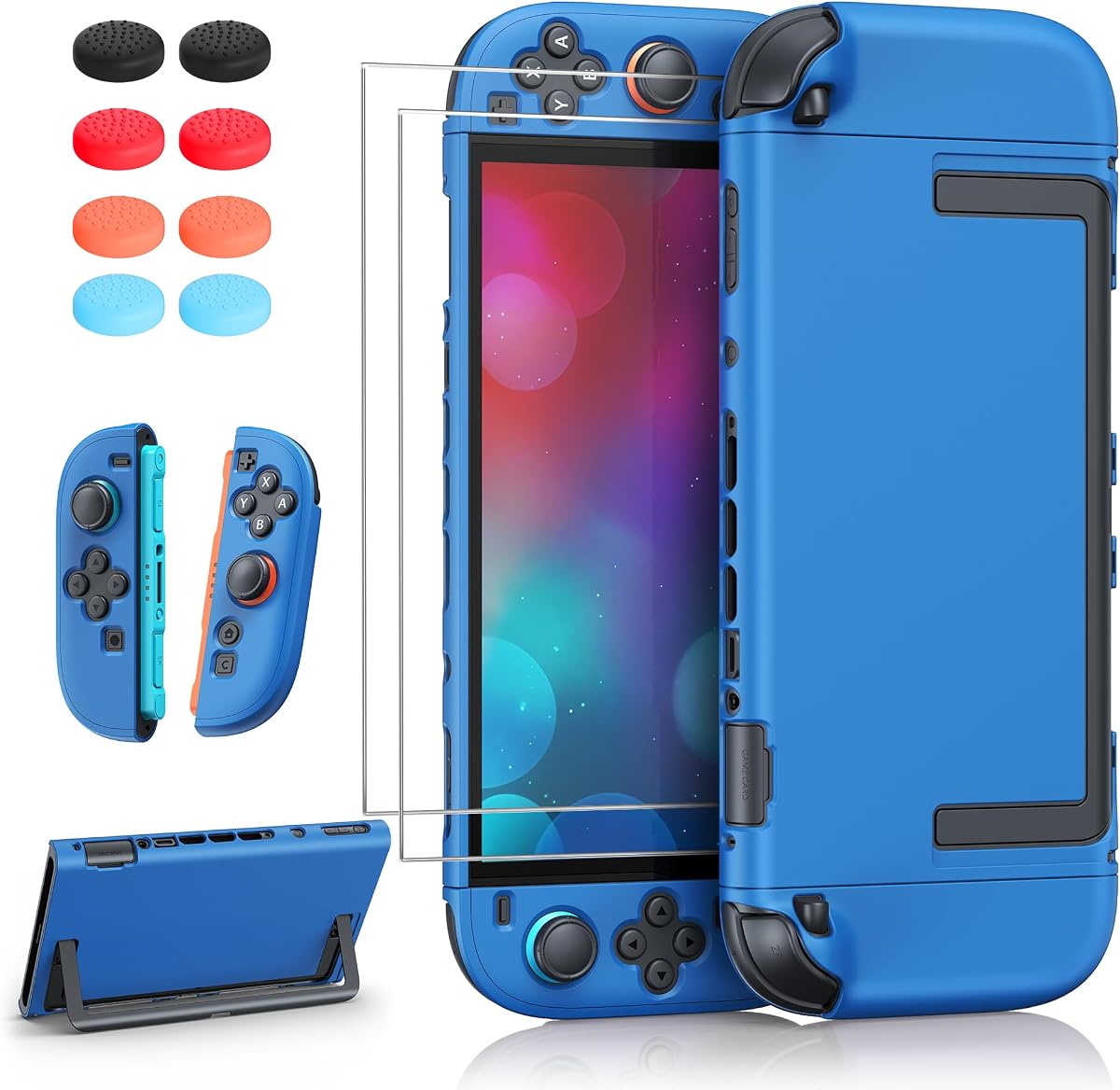
The ewnol Dockable Case for Nintendo Switch 2 delivers the guide's best value-oriented combination of protection, accessories, and everyday usability. It has a 4.4 rating, a dual-material shell, two tempered-glass screen protectors, a positioning frame, and four joystick caps in the package.
We may earn a commission when you buy through this link, at no additional cost to you.
Its principal strength is direct docking without removing the case. The product is precisely fitted to the console, and the supplied information notes that the dock may feel slightly tight. That snugness is intentional because it is intended to prevent wobbling and maintain a secure hold once the console is seated.
A large U-shaped rear opening lets the built-in kickstand open fully, while precise cutouts keep ports, buttons, and other functions accessible. The case combines shock-absorbing TPU with a scratch-resistant hard-PC outer layer, offering reliable protection without an excessively bulky profile. Both Joy-Con controllers can also be removed without taking off the entire grip.
The lack of a full front cover means this is not the strongest choice for maximum 360-degree screen protection, and the snug dock fit may require a little practice. Even so, it offers a rare amount of utility for a compact purchase: protection, two screen protectors, four thumb caps, a fitting aid, full stand access, and a clean docking experience in one set.
The close-fitting shell is designed to minimize movement after docking. Although initial insertion can feel tight, that secure geometry helps avoid the loose or wobbling behavior some generic cases develop.
Two tempered-glass screen protectors and four thumb caps make this package more complete than a basic grip. The positioning frame also helps simplify application of the display protectors.
We may earn a commission when you buy through this link, at no additional cost to you.
The PlayVital Protective Case for Nintendo Switch 2 in Matcha Green offers a cheerful, coordinated take on dockable protection. Its 4.6 rating places it among the strongest-reviewed products in the guide, and the matched accessories make it particularly appealing for buyers who care about a consistent visual design.
We may earn a commission when you buy through this link, at no additional cost to you.
The three-piece split system includes a console back shell, a pair of grip covers, two thumb caps, a kickstand sticker, and two silicone button toppers. Matching colors tie the set together, while the PC shell resists bumps and scratches. Soft color-matched pads inside the grips are intended to improve button feel and reduce wear during longer sessions.
The design supports charging, television mode, and game-card changes without removing the shell. A precision fit preserves access to the kickstand, buttons, triggers, and ports. Raised arc grips align with the palms, and the controller structure is designed to keep the Joy-Con controllers snug without shifting during active play.
The main trade-off is that it protects the console from the rear rather than covering the entire front and rear surface. It also has more components to keep track of than a one-piece shell. Still, for a buyer who wants bright, coordinated accessories, convenient cleaning, and straightforward mode changes, the Matcha Green set is both attractive and practical.
The matching grip covers, caps, button toppers, and kickstand sticker create a unified appearance. Each piece supports handling, protection, or tabletop use rather than functioning as decoration alone.
Raised palm-aligned curves support a steadier hold, while the washable silicone components make routine cleaning more convenient. The split structure can also be disassembled without complicated tools.
We may earn a commission when you buy through this link, at no additional cost to you.
The Mumba Fortress Case for Nintendo Switch 2 is the premium choice because it offers the most complete protection system in the guide. It has a perfect 5.0 rating and goes beyond a conventional back shell with a detachable front cover, integrated game-card storage, a metal stand, and a rigid one-piece Joy-Con structure.
We may earn a commission when you buy through this link, at no additional cost to you.
The front cover is made from high-strength PC and shields the display, Joy-Con buttons, Z-triggers, and thumbsticks from drops, scratches, and dust. It can be detached before docking, allowing the rear shell to remain on during television play and charging. This is not entirely uninterrupted docking, but it preserves more coverage than removing the entire case.
The front cover doubles as a travel organizer with six individual game-card slots. Each slot uses a locking clip, helping prevent physical media from slipping out during travel. An aluminum-alloy stand provides stepless adjustment from zero to 120 degrees, offering a wide range of viewing positions and a more stable alternative to a small plastic kickstand.
This is a substantial case, and the need to remove its front cover before docking is the main trade-off. It also includes more moving parts than a slim shell. Even so, it is the best recommendation for frequent travelers, collectors concerned about physical media, and players who prioritize full-surface protection and a premium adjustable stand.
The detachable front cover protects the display and controls while the rear shell maintains a secure grip around the console. This layered approach offers broader protection than a standard back-only design.
Six locking card slots keep game cards organized and reduce the chance that they will escape into a bag. The cover transforms the case into a more complete travel accessory.
The aluminum-alloy support adjusts continuously from zero to 120 degrees. Its stable construction makes it useful for dining tables, desks, bedsides, and shared play areas.
We may earn a commission when you buy through this link, at no additional cost to you.
The right dockable case depends on how and where you play, how much protection you need, and whether you value portability, accessories, or the simplest possible transition into the official dock.
A dockable case should be explicitly designed for the Nintendo Switch 2 and its official dock rather than merely claiming a generic fit. Look for a slim profile, aligned port openings, and a shell that can remain on during insertion. Some designs are genuinely seamless, while others use a detachable front cover or require an attached power bank to be removed first. The distinction matters because every additional removal step creates more opportunities to drop the console, lose small components, or damage an edge during handling.
Prioritize products that state exactly which parts must be removed before docking. For frequent television play, a case that stays fully attached is the most convenient. For travel cases with screens and batteries, a removable front section can be a sensible compromise if the remaining shell still protects the console.
Joy-Con accessibility is one of the most important practical details in a modern Switch 2 case. A quick-release latch, foldable hinge, or split grip can make multiplayer sessions much easier because users can detach controllers without removing the entire console shell. The product should clearly explain how release works and whether the procedure requires pressing a button, flipping a hinge, or pulling gently from a specific edge.
Avoid designs that encourage users to pry or pull forcefully against attached controllers. A well-designed mechanism should release predictably without scratching the console or stressing the rail connections. Quick removal is especially useful for motion games, local multiplayer, and any session where several people want to use individual controllers.
Protection options range from slim back shells to full front-and-rear systems with rigid PC, flexible TPU, raised bezels, and reinforced corners. Hard PC provides structure and scratch resistance, while flexible TPU can absorb minor shocks around edges and grips. A raised screen bezel is useful whenever the console rests face down or sits inside a dock, since it prevents direct screen-to-surface contact.
Match the case to the environment rather than selecting automatically for the highest level. A commuter may need a front cover and card storage, while a cautious home user may prefer a slimmer shell. Always check the stated compatibility limitations, especially exclusions involving charging grips, kickstands, third-party docks, or wireless charging.
A case can make the Switch 2 feel more secure or less pleasant to hold, so ergonomics deserve attention. Look for a non-slip texture, raised palm support, contoured edges, and a weight that does not cause unnecessary strain. Rigid shells often feel precise but can be slippery, while TPU sections provide a softer, more flexible grip. A built-in stand or front cover will naturally add bulk compared with a minimalist back shell.
For long handheld sessions, prioritize a comfortable grip and balanced weight. For travel, consider whether the case can fit inside the carrying bag you already own. The best dockable design is not necessarily the smallest one, but the one whose added features serve your actual routines.
Tabletop players need either a large opening for the Switch 2's built-in kickstand or a case that includes its own adjustable stand. A cutout is essential when the manufacturer states that the built-in kickstand is incompatible. A dedicated metal stand can provide greater stability and a wider viewing range, but it increases weight and usually makes the case more noticeable in a bag.
Confirm the supported angles and whether the stand folds flush. Stable support is valuable for menus, streaming, cooperative games, and longer sessions in which nobody wants to hold the console. Buyers who regularly use television mode may prioritize docking and ignore stand features, while portable players should give tabletop stability equal consideration.
Screen protectors, thumb caps, grip covers, card-slot covers, charging cables, and power banks can turn a basic shell into a complete setup. These extras may be useful for a new owner, but they should not obscure the core fit. A bundle is most valuable when the included pieces serve different functions and do not force the console to become unnecessarily bulky.
Check how many screen protectors are supplied, whether a fitting frame is included, and whether controller accessories match the Switch 2 design. If a case includes a power bank, verify cable-based charging requirements, magnetic attachment behavior, and which parts must be removed before docking. A thoughtful accessory set can be convenient, but separate essentials may serve more users well.
Travel-oriented cases should protect the screen, organize game cards, and remain easy to pack. A full front cover prevents the display from contacting keys or other objects, while locking card slots reduce the risk of losing physical media. A slim back shell may pack more easily but offers less complete coverage inside a crowded bag.
Pay attention to how many pieces must be detached. A case with a detachable front cover and separate controller shells can be more complicated to reinstall, whereas a unified shell is quicker to pack. Consider whether you need a built-in battery, secure card storage, or simply a low-profile grip that fits an existing organizer.
Customer ratings provide a useful indication of satisfaction, but they should be considered alongside the physical design and stated compatibility. A highly rated case may not fit a particular dock, stand, charging grip, or travel setup. Review the supplied details for explicit exclusions and compare them with the accessories already in your possession.
Ratings also become more meaningful when the product description is specific. Precise measurements, material information, and clear installation guidance provide more confidence than broad marketing phrases. Choose the case whose complete specification list addresses your equipment and play style, then confirm current product details before making the final decision.
Install the case in a clear, dry space with the console powered off. Follow the manufacturer's orientation cues, align each Joy-Con rail carefully, and avoid pulling directly on the controllers. For cases with separate controller covers, support the rail and edge rather than applying force to the release tabs. If a hinge or latch is present, learn its movement before the first gaming session.
Before docking, remove any front cover, power bank, or other attachment that the manufacturer explicitly says must be detached. Align the console with the official dock and insert it slowly while supporting the lower edge. Never force a tight fit. For tabletop play, open the built-in kickstand through the provided opening or unfold the case's separate stand and select a stable angle.
Clean removable silicone parts with mild soap and water, then allow them to dry completely before reassembly. Use a soft, lint-free cloth for the console screen and avoid abrasive cleaners on coated surfaces. Check the rails, ports, vents, and latches for debris regularly, and store the console in a dry environment when it is not being used.
A dockable case is designed to fit into the official Nintendo Switch 2 dock without the console being completely exposed. Some designs remain fully attached during docking, while others require only a detachable front cover or power bank to be removed. Always read the product instructions because docking procedures are not identical across every case.
It depends on the case design. Products with a large rear opening or a dedicated external stand can support tabletop play, but the SUPCASE 2025 model is explicitly not compatible with the built-in kickstand. Check for a precise kickstand cutout or an included foldable stand before purchasing.
A close-fitting case can reduce movement once the console is properly seated. The ewnol model, for example, is designed to feel deliberately tight during insertion to reduce wobble. The fit should still be inserted without force, and users should confirm compatibility with the official dock rather than assuming every Switch 2 shell will fit.
Separate covers make installation and Joy-Con removal straightforward and can make the console easier to place in a pocket. A full shell may provide broader impact protection but can be more involved to remove. The right choice depends on whether quick access, maximum coverage, or a lightweight handheld profile matters more to you.
No. The FASTSNAIL charging case explicitly states that neither its console setup nor its 10,000mAh power bank supports wireless charging, so a data cable is required. Other cases may not include charging features at all. Confirm the charging method and any required cable before purchasing a case with a built-in battery.
Look for front-screen coverage, secure game-card storage, a comfortable grip, and a manageable number of removable pieces. The Mumba Fortress includes six locking card slots and a detachable front cover, while the FASTSNAIL model offers twelve card slots and a power bank. Both are more travel-focused than a simple slim back shell.
Screen protectors are designed for the display rather than the outer case, but installation is easier when the case has a broad rear opening or permits the console to lie safely face up. Use the supplied positioning frame when one is provided, and follow the screen-protector instructions to avoid bubbles or misalignment.
Install and remove the case over a clean surface, hold the console by its edges, and never pull a Joy-Con straight away from the rail when the instructions specify a hinge or latch release. Clean both the case and controller rails with a soft lint-free cloth before reassembly, and avoid trapping grit between the shell and console.
The SUPCASE 2025 model is the strongest overall recommendation because it combines uninterrupted official-dock compatibility, quick Joy-Con removal, and robust rigid-shell protection. The ewnol grip is the best value pick, offering useful screen protectors and thumb caps alongside a snug, protective, dockable design. For full coverage and travel organization, the Mumba Fortress stands apart with its detachable front cover, locking card slots, and adjustable metal stand.
Prioritize the details that match your routine. Frequent television players should focus on uninterrupted docking and aligned ports, while travelers may favor front protection, card retention, and organized storage. Tabletop users should check kickstand access or included stand adjustment, and multiplayer players should look for a reliable quick-release mechanism. Comfort, weight, and cleaning also influence long-term satisfaction more than decorative extras.
Ratings and specifications provide a strong starting point, but product availability, included accessories, and promotions can change. Before buying, confirm the latest compatibility notes, review the dock and accessory requirements, and verify that the case supports the modes you use most. Those checks will help you select a dockable Switch 2 case that remains convenient long after the initial purchase.