
Logitech K400 Plus
4.4Editor score
Integrated touchpad navigation
Plug-and-play Unifying receiver
Up to 18-month battery life
Discover the best mini keyboard for couch PC gaming by comparing connectivity, touchpads, backlighting, key layouts, portability, and gaming features.
A mini keyboard for couch PC gaming should make long gaming sessions more comfortable without forcing you to sit at a desk. The best models combine compact dimensions, dependable wireless connectivity, useful navigation controls, and keys that remain easy to press from a relaxed position.
This guide compares ten compact keyboards across connection methods, touchpad behavior, backlighting, battery design, platform compatibility, gaming features, and portability. It includes touch keyboard remotes, 35-key gamepads, a 65% mechanical keyboard, and hybrid models intended to control PCs, smart TVs, tablets, and streaming devices.
Each review explains who benefits most from the relevant design, along with its practical compromises. Ratings and product details reflect the supplied marketplace information, while availability and pricing can change, so readers should confirm current specifications, compatibility, and offers before purchasing.
4.4Editor score

4.8Editor score

4.2Editor score
The comparison below highlights each keyboard's connection style, navigation method, lighting, and gaming relevance so readers can quickly identify the best match for their couch setup.




The Fosmon Mini Keyboard with Touchpad Mouse is a versatile 2.4GHz and Bluetooth controller rated 4.0. It stands out for supporting a wide range of entertainment devices, from PCs and laptops to smartphones, streaming boxes, televisions, and selected game consoles, all in a compact body suitable for couch use.
We may earn a commission when you buy through this link, at no additional cost to you.
Its defining feature is the integrated touchpad, which lets a player navigate menus or move a cursor without reaching for a separate mouse. The keyboard also offers backlighting for dim rooms and a rechargeable lithium-ion battery that the manufacturer rates for up to 10 days of continuous use or 50 days of standby. A working wireless range of approximately 33 feet adds practical flexibility around a living room.
There are limitations. It is not compatible with Xbox series consoles, and the manufacturer warns that Bluetooth compatibility varies among smart televisions. It also uses a 2.4GHz nano receiver or Bluetooth rather than a modern high-polling gaming connection, so it should be viewed as a general-purpose media and casual gaming controller rather than a competitive keyboard.
Choose the Fosmon when one compact controller must handle couch gaming, streaming, television navigation, and occasional text entry. It offers more flexibility than single-purpose TV remotes, although dedicated gamers with latency-sensitive controls may prefer a wired mechanical model.
Switching between the included 2.4GHz receiver and Bluetooth makes this keyboard useful across PCs, mobile devices, streaming hardware, and compatible televisions. That versatility is particularly handy when a shared couch setup includes several systems.
Backlighting helps in dark rooms, while the rechargeable design avoids disposable batteries during regular use. LED indicators provide visual feedback for charging and remaining power.
We may earn a commission when you buy through this link, at no additional cost to you.
The Logitech K400 Plus is a proven PC-connected TV keyboard rated 4.4, offering a straightforward way to control a gaming PC from the couch. Its integrated touchpad replaces the need for a separate mouse, while the full-size key arrangement is more familiar and versatile than an entertainment-only remote.
We may earn a commission when you buy through this link, at no additional cost to you.
Setup is refreshingly simple: plug the Unifying receiver into an available USB port, then use the keyboard with the connected system. The stated wireless range reaches 33 feet, and quiet keys reduce distractions in a shared room. A large touchpad supports menu navigation, and Logitech Options software can preserve preferred control settings.
The main compromise is its focus on relaxed media control rather than competitive gaming. It is designed around Windows 7, Windows 8, Windows 10 and later, Android 7 or later, and Chrome OS, and it lacks features commonly sought in a modern gaming board, such as mechanical switches, RGB controls, or a high-polling connection.
It remains a compelling choice for casual couch players, HTPC users, and anyone who values uncomplicated setup. Its long stated battery life of up to 18 months also reduces maintenance, making the K400 Plus an economical bridge between a television remote and a full gaming keyboard.
The large touchpad is large enough to make couch navigation less fiddly than a tiny directional pad. It works well for launching games, adjusting settings, and navigating streaming interfaces.
Quiet keys, a spill-resistant layout, and an automatic off control make this keyboard practical for a shared living room. Its familiar key layout also reduces the learning curve.
We may earn a commission when you buy through this link, at no additional cost to you.
The Rii i4 Mini is a compact dual-mode keyboard rated 4.4 for travelers and couch users who want more typing capability than a standard remote. It combines a QWERTY layout, touchpad, backlighting, and rechargeable battery in a pocket-sized design intended for home theater control, travel, and light gaming.
We may earn a commission when you buy through this link, at no additional cost to you.
The included 2.4GHz USB dongle offers a familiar plug-in route for PCs and compatible devices, while Bluetooth 4.0 eliminates the need for a receiver on supported smartphones and tablets. Switching modes uses the Fn plus Tab shortcut, and the product supports a broad collection of Windows, Mac, Android, iOS, Fire TV, and TV-box environments.
Its gaming credentials are modest because it lacks mechanical switches, gaming macros, RGB customization, and a high-polling wired mode. The abbreviated layout may also take adjustment compared with a standard keyboard, particularly when entering chat messages, passwords, or longer commands.
The Rii i4 Mini is best for casual couch gaming, media-center use, and travelers who need a single compact input device. Buyers who play fast action games regularly may find a dedicated game keypad or 65% mechanical keyboard more responsive.
Bluetooth is useful for mobile travel, while the supplied 2.4GHz receiver provides a straightforward connection to PCs and other USB-equipped entertainment hardware.
Its small body and rechargeable construction make it easy to move between a coffee table, bedside setup, and travel bag. Backlighting adds comfort in darker viewing environments.
We may earn a commission when you buy through this link, at no additional cost to you.
The Razer Reclusa X Mini 65% is the strongest dedicated gaming option in this roundup, carrying a 4.8 rating. Unlike most miniature couch controllers, it provides a recognizable 65% mechanical layout, wired USB-C connectivity, advanced gaming functions, and performance-oriented polling and rollover specifications.
We may earn a commission when you buy through this link, at no additional cost to you.
Its hot-swappable PCB accepts three-pin and five-pin mechanical switches, allowing owners to change the feel of the keyboard without soldering. Razer Orange Tactile Gen-3 switches provide quieter actuation and tangible feedback, while a PPS plate, custom stabilizers, and dual-layer silicone dampening help control resonance and produce a cleaner sound profile.
Gaming features include Razer Snap Tap, Snap Flex, Dual-Keypress Priority, 1000Hz polling, N-key rollover, and anti-ghosting. Per-key Chroma RGB provides extensive lighting customization, and south-facing LEDs improve compatibility with aftermarket keycap sets. The trade-off is its wired design, which is less tidy than Bluetooth but more consistent for latency-conscious play.
This is the pick for a player who wants couch gaming without settling for a toy-like remote. The 65% layout still saves desk space, and the mechanical construction feels substantially more game-focused. Cable management and a reachable USB-C port are the main setup considerations.
The included tactile switches balance feedback and relative quietness, making the board suitable for shared rooms. Hot-swap sockets let users explore quieter or more linear switch options later.
N-key rollover, anti-ghosting, 1000Hz polling, and programmable action priorities support precise commands during demanding sessions. Chroma RGB also makes key groups easier to identify in a dim room.
We may earn a commission when you buy through this link, at no additional cost to you.
The K808 Mini Bluetooth Keyboard with Touchpad is rated 4.3 and focuses on flexible navigation for PCs, smart TVs, projectors, and Android TV boxes. Its distinguishing feature is a touchpad that rotates 90 degrees through the Fn plus Alt shortcut, allowing users to choose an orientation suited to the screen they are controlling.
We may earn a commission when you buy through this link, at no additional cost to you.
The included USB receiver auto-pairs in 2.4GHz mode, which is useful when a PC or television requires a dongle. Bluetooth mode frees USB ports and works with compatible laptops, tablets, and phones. Dedicated left and right buttons supplement the touchpad, and the seven-color backlight improves visibility in a dim room.
The keyboard is built around media and smart-TV control rather than competitive gaming. Its small keys, abbreviated layout, and touchpad-based cursor movement may feel less direct than a mouse or full gaming keyboard. It also lacks the mechanical switch feel, high polling rate, and advanced rollover features found in the Razer.
The K808 is most useful when couch gaming is casual and the same setup also controls a smart television, projector, or streaming box. Buyers who want a more premium finish and longer stated battery capacity may find the K809 family more appealing.
Rotating the touchpad changes how it is used for vertical phone content or wider desktop navigation. Dedicated click controls make selection more precise than relying entirely on taps.
A USB-C rechargeable 600mAh battery, automatic sleep, and a compact size make the K808 easy to maintain and carry. The built-in laser pointer also adds value during presentations.
We may earn a commission when you buy through this link, at no additional cost to you.
The Ultra-Thin Dual-Mode Mini is rated 4.3 and designed for people who want a pocketable controller for couches, travel, offices, and shared media systems. Its slim proportions and dual connectivity make it easy to carry while still offering more control options than a standard television remote.
We may earn a commission when you buy through this link, at no additional cost to you.
The rotating touchpad supports gesture navigation and includes dedicated mouse buttons. Users can also adjust cursor sensitivity across three levels with Fn plus Space, which is helpful when moving between a large television display and a compact tablet screen. A seven-color backlight, built-in laser pointer, and auto sleep-and-wake function round out the feature set.
Connection options include Bluetooth and a stored 2.4GHz USB receiver, supporting systems such as Windows, macOS, Android, Linux, and smart TVs. The receiver should be re-paired by holding Fn plus RF until the yellow light flashes, a process worth understanding before moving the keyboard between computers.
The K808-style design language and broad platform support make this a solid travel and entertainment accessory, but it should not be mistaken for a performance gaming board. It is best for casual games, launcher navigation, and couch control where portability matters more than tactile feedback.
The receiver stores in the keyboard, and the thin profile slips into a pocket or small bag. Bluetooth adds another connection route for devices that lack an open USB port.
Three touchpad DPI levels help balance precision and cursor speed. Gesture support and adjustable orientation also make the controller more versatile than a basic remote.
We may earn a commission when you buy through this link, at no additional cost to you.
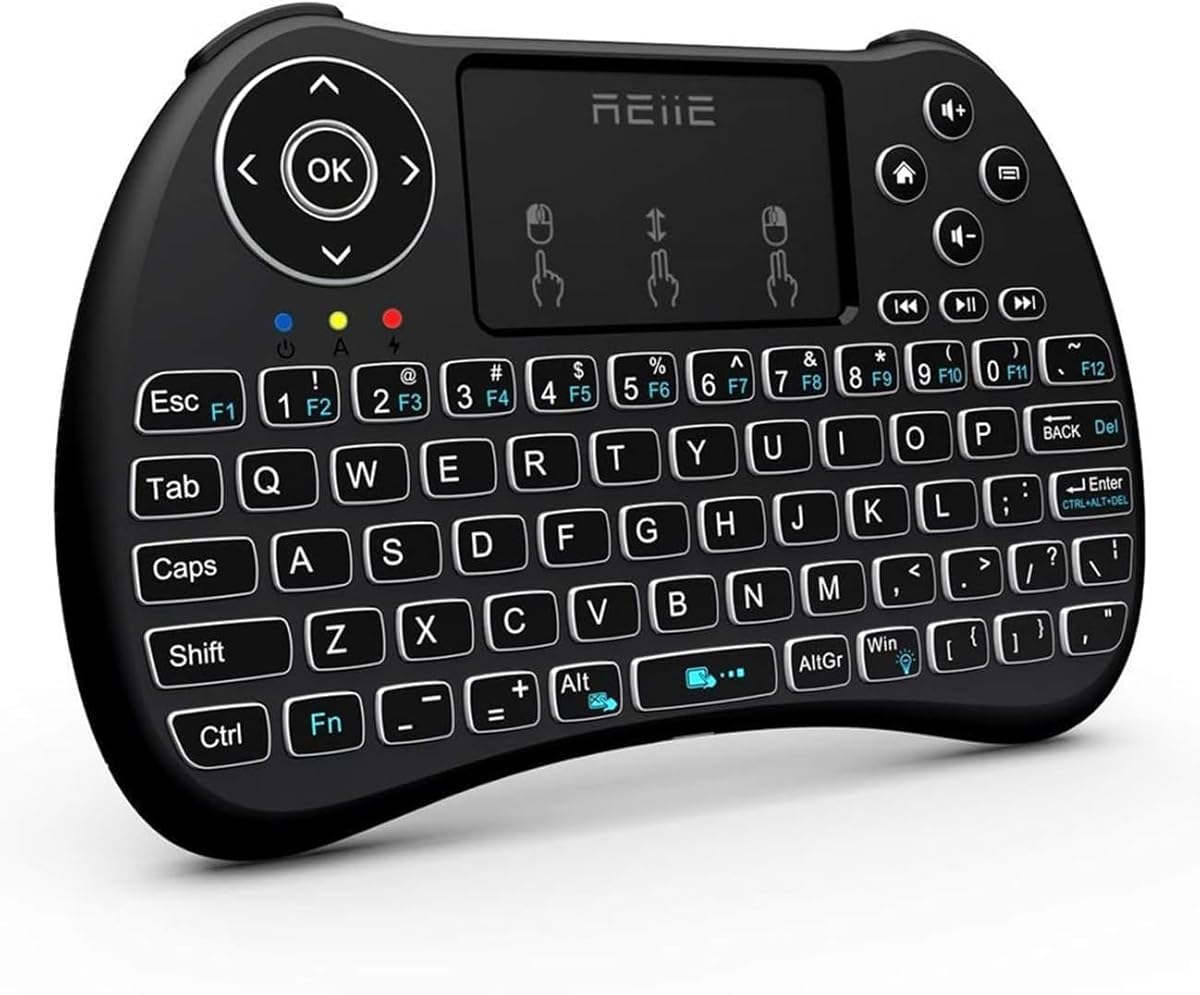
The REIIE H9+ Mini is a 4.3-rated 2.4GHz keyboard and touchpad aimed at PCs, Raspberry Pi systems, tablets, smart televisions, and Android TV boxes. It combines 73 QWERTY keys with a multi-finger touchpad in a handheld body that can sit near a couch or function as a compact remote.
We may earn a commission when you buy through this link, at no additional cost to you.
The USB receiver provides a straightforward plug-and-play connection, while the white soft backlight improves visibility in a dark viewing area. The touchpad supports single-finger left clicks, two-finger right clicks, and two-finger scrolling, reducing the need to switch to a separate pointing device.
Its most significant limitation is the absence of Bluetooth. A target device must therefore have an available USB port for the receiver. The product also lacks RGB customization, mechanical switches, gaming macros, and high-polling specifications, making it better suited to menus and casual games than competitive play.
The REIIE H9+ remains a practical choice for users with a USB-equipped PC or streaming box who values familiar typing and gesture navigation over portability across Bluetooth-only devices. Fully charge the battery before initial use, as the manufacturer notes that an insufficient charge can affect pairing and connection stability.
The touchpad combines conventional clicking with two-finger right-click and scroll functions. Those shortcuts simplify desktop and media navigation from across a room.
With 73 keys, the H9+ offers a more useful typing experience than a minimal remote. Backlighting supports text entry and menu navigation in dim rooms.
We may earn a commission when you buy through this link, at no additional cost to you.
The K809 Mini Wireless Keyboard with Touchpad in black is rated 4.2 and offers a more refined take on the portable couch controller. Its aluminum frame, restrained dimensions, RGB illumination, and modern wireless options make it an attractive companion for a living-room gaming PC or HTPC.
We may earn a commission when you buy through this link, at no additional cost to you.
Bluetooth 5.2 and 2.4GHz connectivity cover both modern portable devices and USB-only systems. The touchpad includes three selectable sensitivity levels, while RGB lighting cycles through colors with one-touch controls. A 1000mAh rechargeable battery, automatic sleep and wake, and USB-C charging support convenient extended use.
Despite the media-oriented design, the compact layout can be used for light gaming and Windows, macOS, Linux, iOS, Android, smart-TV, and HTPC environments. It does not include mechanical switches, advanced anti-ghosting claims, or a high-polling gaming connection, so competitive players should look elsewhere.
The K809 is best for style-conscious users who want a portable keyboard with a more substantial frame and contemporary wireless capabilities. Its touchpad handles menus and casual games, while the approximately phone-sized footprint makes it easy to move around the home.
The aluminum frame gives the keyboard a more premium appearance and a sturdier feel than many plastic entertainment remotes. Its low profile remains suitable for storage beside a television.
Bluetooth 5.2 works well with compatible tablets, Macs, and phones, while the included USB receiver offers an instant option for gaming devices and USB-only PCs.
We may earn a commission when you buy through this link, at no additional cost to you.
The RedThunder One Handed Gaming Keyboard is a 4.4-rated 35-key keypad created for PC players who want gaming-focused controls in a very small footprint. It is particularly relevant to couch setups because it can sit on a cushion, lap desk, or small table without occupying the space required by a conventional keyboard.
We may earn a commission when you buy through this link, at no additional cost to you.
Its gaming orientation is clearer than that of the touchpad-based remotes. The board includes anti-ghosting across all 35 keys, a built-in gaming chip with a stated 3ms response time, RGB lighting with static and breathing modes, and two macro-recording keys assigned to Fn plus F1 and Fn plus F2.
The trade-off is specialization. With only 35 keys, it cannot replace a conventional keyboard for extended chat, document editing, or password entry. It also requires a wired connection, which avoids wireless latency and battery management but keeps a cable running from the sofa to the gaming PC.
This keypad is best for games whose controls fit within its compact layout and for players who deliberately use separate mouse and keyboard equipment. Its large wrist rest and portable shape make it a practical auxiliary gaming controller rather than a general-purpose computer keyboard.
The Fn plus F1 and Fn plus F2 keys record and replay command sequences. This driver-free approach makes repeatable actions easier to set up.
Thirty-five keys can cover common game commands while remaining far smaller than a desktop board. The supporting wrist rest helps maintain a relaxed hand position.
We may earn a commission when you buy through this link, at no additional cost to you.
The white K809 Mini Wireless Keyboard with Touchpad shares the core functionality of the black edition, earning the same 4.2 rating. It combines an aluminum frame, compact form, sensitive touchpad, and RGB backlighting in a design intended for home entertainment, travel, and casual couch gaming.
We may earn a commission when you buy through this link, at no additional cost to you.
The keyboard supports Bluetooth 5.2 and a 2.4GHz USB receiver, making it suitable for PCs, Macs, Linux systems, tablets, phones, smart TVs, and HTPCs. The touchpad's sensitivity can be adjusted with Ctrl plus Space, and a 1000mAh battery recharges through USB-C. Auto sleep and wake help conserve power between sessions.
Compared with a mechanical gaming keyboard, the K809 has limited tactile feedback and no advanced polling or rollover specifications. Its tiny key arrangement also takes practice for chat, account setup, and other typing-heavy tasks. Those limitations make it more appropriate for menus, launchers, and casual games.
The white version is a good choice for users who prefer a light visual style or want one controller that travels between a couch, desk, and travel setup. It offers modern connectivity and polished construction without pretending to be a competitive mechanical board.
Bluetooth 5.2 and the included receiver offer flexible pairing options. The compact form makes moving between a home PC, laptop, and tablet practical.
RGB keys improve visibility in a dim room, and the touchpad's adjustable sensitivity supports different display sizes. Automatic power management reduces unnecessary charging.
We may earn a commission when you buy through this link, at no additional cost to you.
The right couch gaming keyboard depends on how you play, where the computer sits, and whether you also control streaming devices. Connection reliability, input speed, layout, lighting, and battery management deserve careful attention before purchase.
Wired keyboards generally provide the most direct and consistent connection because they avoid radio interference and do not require charging. That makes a wired gaming keypad or compact mechanical board attractive for competitive play, although cable routing from a sofa can be inconvenient.
Summary: Choose wired for lowest-latency consistency; choose wireless for a cleaner, more flexible couch setup.
Bluetooth 5.2 is useful for modern PCs, laptops, tablets, and phones because it avoids occupying a USB port. A 2.4GHz receiver can be more convenient with gaming PCs, smart TVs, and streaming boxes, particularly when a system lacks convenient Bluetooth. Models that store the receiver in the keyboard are easier to transport.
Summary: Prefer dual-mode models when your gaming setup includes both modern mobile devices and USB-focused media hardware.
Mini keyboards range from a 35-key gaming pad to a familiar 65% mechanical layout. Touchpad remotes provide cursor control in a tiny body, while full mini keyboards make chat and system setup easier. Check for function keys, navigation keys, arrow controls, and a dedicated escape key before buying.
Summary: Match key count to your games, and avoid a remote if you frequently type chat messages or account details.
A useful touchpad should be large enough for accurate selection, support the click behavior you expect, and offer scroll or gesture functions. Adjustable sensitivity can make one cursor speed work across a television and a laptop. Rotating designs add flexibility for phones, tablets, and wide desktop screens.
Summary: Look for multi-finger gestures, dedicated click buttons, and adjustable sensitivity if the touchpad will be your primary pointer.
Competitive players should consider polling rate, anti-ghosting, N-key rollover, switch type, and programmable functions. The Razer Reclusa X Mini provides 1000Hz polling, N-key rollover, and advanced gaming commands, whereas touchpad remotes prioritize media navigation over competitive input performance.
Summary: For fast action games, prioritize mechanical switches, anti-ghosting, rollover, and a dependable wired connection.
Backlighting makes keys easier to locate in a dark room and can help players distinguish control groups. Single-color illumination is usually sufficient, while RGB adds visual customization. Consider brightness controls, light leakage, and battery impact before choosing a brightly lit model.
Summary: Use backlighting for low-light comfort, but prioritize readable key legends and adjustable lighting over decorative effects.
Rechargeable models are convenient for regular use because they avoid continual battery replacement, while replaceable batteries can be practical for occasional users. Check the stated runtime, charging connector, auto-sleep behavior, and low-battery warnings. Fully charging a new keyboard before first use can also help avoid initial pairing issues.
Summary: For frequent gaming, favor a rechargeable model with clear power indicators; for occasional use, simple disposable batteries may be sufficient.
A couch keyboard should be easy to move, store, and place on a cushion or side table. Very small models suit travel and shared living rooms, while a 65% board offers a more natural gaming layout. Consider weight, key spacing, wrist support, and whether the finish will suit the rest of your setup.
Summary: Prioritize a size and weight you can comfortably reposition, especially if the controller doubles as a travel accessory.
Begin by fully charging a rechargeable keyboard and installing its receiver if using 2.4GHz mode. Place the device where you can reach it without stretching and position the computer or display so text and game elements are easy to see. For a wireless model, connect the receiver directly to the gaming PC when possible to reduce radio interference and simplify reconnection.
Pair Bluetooth devices through the keyboard's documented shortcut, then test the touchpad, mouse buttons, modifiers, and arrow controls before launching a game. Touchpad-based remotes often use function-key combinations for mode changes, backlighting, or sensitivity, so consult the included guide rather than assuming a key behaves like a desktop keyboard. A short practice session can reveal whether the layout feels comfortable.
For care, keep the keyboard away from drinks, direct heat, dust, and excessive sunlight. Clean the keycaps and touchpad with a soft, lightly damp cloth, avoiding liquid directly on the surface. Recharge periodically rather than waiting for complete depletion, and use the automatic sleep mode between sessions. Follow the manufacturer's battery guidance and avoid opening or modifying a keyboard with built-in batteries.
Yes, but it is best for casual games, menus, emulated titles, and other relaxed couch gaming. It can also work for strategy or adventure games that require occasional keyboard input. Fast competitive games generally benefit more from a mechanical gaming keyboard or a dedicated keypad with anti-ghosting, rollover, and a reliable wired connection.
It depends on the setup. Bluetooth avoids a USB receiver and works well with modern laptops, tablets, and phones, while 2.4GHz is often easier for gaming PCs, smart TVs, and streaming boxes. Some gaming computers have convenient front USB ports, making a stored receiver practical and uncomplicated.
Not necessarily. A touchpad is useful when you want one device to handle both typing and menu navigation or when reaching for a separate mouse is inconvenient. Competitive players who already have a comfortable mouse may prefer a full mini keyboard or 35-key gaming keypad with dedicated macro controls instead.
Usually not as the only input method. Thirty-five keys leave little room for text entry, system shortcuts, and general productivity. They work best as an auxiliary controller for games whose important commands fit the compact layout, particularly when a full-size keyboard remains available.
A 65% layout generally offers the most familiar gaming experience because it retains more standard key spacing and navigation controls than a tiny remote. A 73-key board is another balanced option, while compact touchpad models prioritize portability and on-screen control over long typing sessions.
RGB is useful for identifying controls and adding visual personalization, but it is not essential for performance. Backlighting of any color can improve visibility in a dark room. Consider adjustable brightness, battery consumption, and whether a simpler illuminated keyboard would better suit your preferences.
Connect the receiver directly to the PC, keep it within a reasonable line of sight, and avoid placing it behind large metal objects. Update the keyboard's software if a dedicated program is provided, close unused wireless peripherals, and use a wired gaming keyboard when consistent low latency is essential.
Many can, but compatibility depends on the device's operating system and connection method. Check the listed platform support and confirm whether the television or box accepts the relevant Bluetooth keyboard, USB receiver, or standard input device before purchasing.
The Razer Reclusa X Mini 65% is the strongest choice for players who want genuine gaming hardware, while the Logitech K400 Plus provides an uncomplicated and economical way to control a PC from the couch. The K809 Mini Black stands out for its aluminum construction, modern connectivity, adjustable touchpad, and RGB illumination.
Your priorities should determine the winner. Choose a touchpad-equipped dual-mode remote for media control and casual gaming, a 35-key wired keypad for compact MMO-style commands, or a 65% mechanical keyboard for fast input and extensive customization. Also consider whether the computer is across the room, whether a cable can reach the sofa, and whether you need to enter text regularly.
Ratings, specifications, and market availability can change, so verify the current listing and platform requirements before ordering. Review the connection method, included accessories, battery arrangement, and return terms carefully, then select the keyboard that best matches your games and your physical couch setup.