
ASUS TUF Gaming BE6500
4.1Editor score
Dual-band WiFi 7
Up to 6.5 Gbps
Quad 2.5G Ethernet ports
Gaming Port prioritization
Subscription-free security
This ASUS Gaming Router guide compares 10 models for gaming speed, low latency, wired connectivity, wireless coverage, security, and value.
An ASUS gaming router is more than a conventional router with a gaming label. The strongest models combine low-latency traffic prioritization, high-capacity WiFi, flexible multi-gigabit Ethernet, broad wireless coverage, and easy management for busy networks. This guide covers ten ASUS options ranging from an affordable dual-band model to a quad-band WiFi 7 flagship and several tri-band gaming systems.
The routers were compared using their stated wireless standards, aggregate speed classes, port configurations, gaming features, mesh support, security capabilities, coverage technology, and suitability for different home sizes. The list also distinguishes new WiFi 7 hardware from WiFi 6, WiFi 6E, and older WiFi 5 equipment, because compatibility and real-world performance depend heavily on the clients connected to each router.
Each review explains the strongest reasons to consider the model, along with its practical limitations and the users most likely to benefit. Rankings reflect the supplied product information and feature fit rather than a claim of hands-on testing. Prices and availability can change at any time, so check the current listing and confirm that your internet service, devices, and wired equipment support the router's headline capabilities.
4.1Editor score
4.3Editor score

4.4Editor score
This side-by-side comparison highlights each ASUS router's wireless generation, headline speed class, gaming-focused hardware, and principal connectivity options, helping shoppers match the right model to their internet service, devices, and home layout.


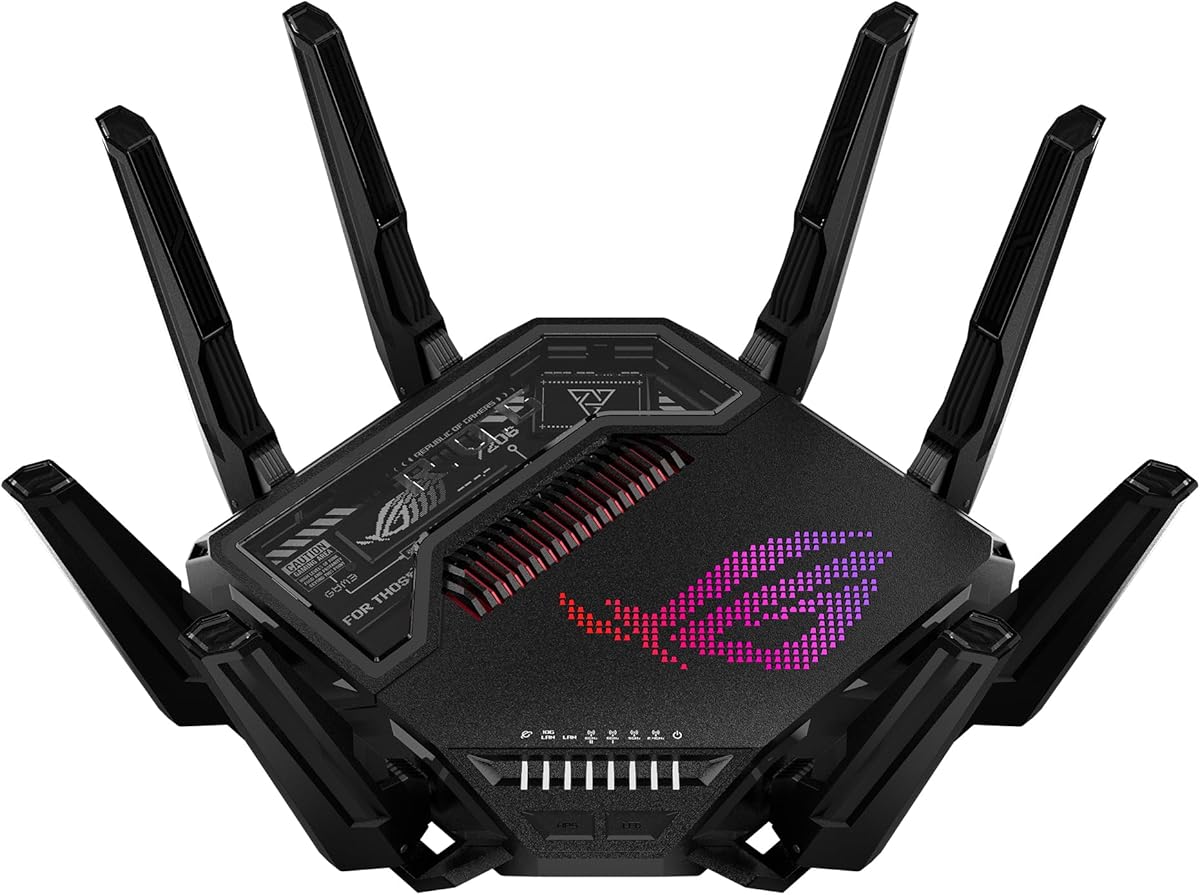
The ASUS ROG Rapture GT-BE98 Pro represents the most advanced option in this roundup, combining quad-band WiFi 7, a headline aggregate speed of up to 30 Gbps, and an unusually generous collection of multi-gigabit Ethernet ports. Its 4.3 rating reflects a router built for demanding networks rather than basic household connectivity, with the hardware to support high-speed internet, local transfers, and latency-sensitive gaming.
We may earn a commission when you buy through this link, at no additional cost to you.
The router's most notable features are its 320MHz channels in the 6GHz band, 4096-QAM, and Multi-Link Operation. Those technologies are designed to increase capacity, improve efficiency, and let compatible devices use multiple bands at once. External dual-feeding antennas support stronger, more even signal distribution, while the dual 10G and quad 2.5G ports give a desktop setup considerable wired flexibility.
Triple-Level Game Acceleration is the defining gaming-oriented feature. ASUS describes it as prioritizing gaming traffic from the PC's gaming port through the route to the game server, which can be useful in congested homes. The trade-off is that many benefits require WiFi 7 clients, suitable switches, and a broadband plan capable of using the available bandwidth; faster specifications do not guarantee faster internet service by themselves.
This is the strongest recommendation for a new high-end gaming network, especially when a PC, console, television, and other modern devices all compete for capacity. Choose the GT-BE98 Pro if multi-gigabit wired connections, current wireless standards, and a broad device upgrade path matter more than simplicity or a modest budget.
Dual 10G ports and four 2.5G ports create one of the strongest wired specifications in the list. They are well suited to high-speed NAS equipment, a gaming PC, a fast switch, and demanding smart-home or media connections without forcing every device onto one-gigabit Ethernet.
Triple-Level Game Acceleration gives gaming devices a dedicated path through the network. Its practical effect will vary with the game, ISP, server distance, and competition on the connection, but it adds prioritization tools that ordinary routers generally do not provide.
We may earn a commission when you buy through this link, at no additional cost to you.
The ASUS TUF Gaming BE6500 is the most compelling budget-focused gaming router in this guide. It delivers dual-band WiFi 7 with speeds up to 6,500 Mbps, Multi-Link Operation, a dedicated Gaming Port, one-tap mobile game prioritization, and four 2.5GbE ports. Its 4.1 rating makes it a practical entry point to current ASUS gaming features without moving to flagship hardware.
We may earn a commission when you buy through this link, at no additional cost to you.
Multi-Link Operation allows compatible devices to link across multiple bands, supporting more stable connections and improved efficiency. The port layout includes one WAN and three LAN 2.5GbE connections, which is unusually useful for a midrange router: a gaming PC can use one directly while a fast switch handles additional wired devices. Open NAT and a three-step port-forwarding process also simplify multiplayer configuration.
The principal limitation is that a dual-band WiFi 7 router cannot offer the same channel capacity or wireless flexibility as the GT-BE98 Pro's quad-band design. It also lacks 10G Ethernet, and the full benefits of features such as MLO depend on compatible clients. Users whose internet service is well below multi-gigabit speed may appreciate the robust port selection without using every advertised capability.
The TUF Gaming BE6500 is best for gamers who want current wireless technology, multi-gigabit wired connections, and focused traffic management without flagship complexity. It is especially well matched to a modern gaming PC or console on a fast internet plan, while mesh and VPN compatibility give buyers room to expand or secure their setup later.
Four 2.5GbE ports can remove gigabit Ethernet bottlenecks for PCs, consoles, and network switches. This is a major advantage over entry-level WiFi 7 routers that provide only one multi-gigabit port or rely entirely on wireless connections for local traffic.
A dedicated Gaming Port, one-tap mobile game prioritization, and Open NAT target different gaming scenarios. Console players can benefit from wired prioritization, while mobile players receive a quick way to reduce competition for available bandwidth.
We may earn a commission when you buy through this link, at no additional cost to you.
The renewed ASUS ROG Rapture GT-BE98 PRO combines the same high-end platform as the flagship with a particularly strong 4.9 rating. It supports quad-band WiFi 7, 320MHz channels in the 6GHz band, 4096-QAM, Multi-Link Operation, and a stated aggregate speed of up to 30 Gbps, making it one of the most capable routers in the guide.
We may earn a commission when you buy through this link, at no additional cost to you.
Its wired connectivity is equally notable. Dual 10G ports and four 2.5G ports support a wide range of network arrangements, including a fast WAN connection, local high-speed storage, a gaming PC, and a multi-gigabit switch. Triple-Level Game Acceleration prioritizes PC gaming traffic across the route, while external dual-feeding antennas are designed to enhance signal strength and coverage.
Renewed status is the key consideration. Buyers should review the listing's condition description, included accessories, warranty information, and return terms carefully. The hardware specifications are impressive, but the 4.9 rating should not substitute for checking exactly what condition and support accompany the particular unit.
This renewed model makes sense for a knowledgeable buyer who wants flagship ASUS gaming hardware at a different acquisition point than the new version. It is best for users with compatible WiFi 7 devices, multi-gigabit service, and a need for extensive Ethernet options, provided the renewed listing offers acceptable condition and protections.
The renewed listing retains quad-band WiFi 7 and the router's full multi-gigabit port selection. For buyers comfortable assessing refurbished equipment, that combination makes it a potentially compelling way to access flagship features without purchasing the new version.
A 4.9 rating indicates exceptionally strong customer feedback, but it cannot reveal the condition of every returned unit. Reviewing current seller details and return protections remains essential for any renewed networking hardware.
We may earn a commission when you buy through this link, at no additional cost to you.
The renewed ASUS ROG Rapture GT-AX11000 Pro offers a balanced mix of tri-band WiFi 6 performance, multi-gigabit networking, and gaming optimization. Its stated wireless speed reaches up to 11,000 Mbps, and the 10G and 2.5G ports provide useful pathways for demanding PCs, storage, and network switches. The 4.4 rating suggests a generally well-received product.
We may earn a commission when you buy through this link, at no additional cost to you.
RangeBoost Plus is designed to improve signal range and overall coverage, making this router relevant to medium and large homes. Triple-Level Game Acceleration prioritizes online gaming traffic from PC to server. Together, these features distinguish it from ordinary WiFi 6 routers and support households where latency, coverage, and large local transfers are all priorities.
Its renewed status introduces the usual need to examine condition and seller details. It also uses WiFi 6 rather than WiFi 7, so buyers who already own several WiFi 7 clients may eventually outgrow its wireless standard. The tri-band arrangement and strong processor still make it relevant for existing WiFi 6 ecosystems, particularly when multi-gigabit wired performance matters.
This is a solid recommendation for a renewed high-performance ROG setup, especially when gaming and wired network capacity are priorities but WiFi 7 is not essential. Choose it over a newer budget model if you value RangeBoost Plus, a 10G port, tri-band throughput, and dedicated game traffic handling.
RangeBoost Plus and Triple-Level Game Acceleration address two separate priorities: reliable signal distribution and responsive game traffic. Their combination makes the GT-AX11000 Pro attractive for gamers who do not want to trade away coverage for gaming features.
The hardware remains capable of high-speed networking, but cosmetic wear, prior configuration, included accessories, and warranty coverage can vary. The listing should be evaluated as a hardware platform rather than assuming every renewed unit is identical.
We may earn a commission when you buy through this link, at no additional cost to you.
The ASUS RT-AX1800S is a value-focused dual-band WiFi 6 router that brings useful ASUS features to a smaller network. It supports 1024-QAM, MU-MIMO, and OFDMA, includes one Gigabit WAN port and four Gigabit LAN ports, and carries a 4.3 rating. Although it is not as aggressively gaming-focused as the ROG models, it is a practical option for basic gaming, streaming, and smart-home use.
We may earn a commission when you buy through this link, at no additional cost to you.
AiProtection Classic, parental controls, and ASUS Instant Guard provide a subscription-free security foundation. Instant Guard creates a secure VPN-style connection for accessing the home network while away, while AiMesh compatibility allows the router to become part of a larger ASUS mesh system. Built-in VPN support is useful for users who want more control over remote access.
The clearest limitation is Ethernet speed. Every wired port is limited to Gigabit Ethernet, so a multi-gigabit internet plan, fast NAS, or advanced gaming LAN would be limited by the router's physical ports. The dual-band radio arrangement also offers less capacity than the tri-band and quad-band alternatives in this guide.
The RT-AX1800S is best for a modest home, secondary gaming location, or budget-conscious network where stable WiFi 6 and familiar ASUS management are more important than extreme speed. Buyers should select it when gigabit service is the ceiling and the main goal is reliable gaming, streaming, and everyday connectivity without expensive flagship hardware.
Five Gigabit ports provide enough wired connections for a basic home network. The design keeps costs down, although it cannot exploit faster fiber, cable, or local storage connections that require multi-gigabit Ethernet.
Subscription-free security, parental controls, Instant Guard, and AiMesh support make this model more versatile than a bare-budget router. The ability to expand into a mesh system is particularly useful for homes where coverage matters.
We may earn a commission when you buy through this link, at no additional cost to you.
The ASUS RT-AX82U AX5400 is a renewed dual-band WiFi 6 gaming router with an emphasis on accessible features rather than extreme networking capacity. It supports speeds up to 5,400 Mbps through 160MHz channels, includes a dedicated gaming port, and provides one-tap Mobile Game Mode for reducing latency when gaming on a phone. Its 4.4 rating reflects strong user reception.
We may earn a commission when you buy through this link, at no additional cost to you.
The dedicated port provides a simple way to prioritize a gaming device, while Mobile Game Mode extends that focus to handheld and mobile use. Aura RGB adds customizable lighting effects, which is not a performance feature but can make the router more suitable for a visible entertainment setup. AiMesh support also allows compatible ASUS routers to form a larger mesh network.
Like other renewed models, its condition and included components should be reviewed carefully. It also has no multi-gigabit Ethernet, and its dual-band design is less capable than the ROG tri-band or quad-band options. That makes it more appropriate for gigabit internet and smaller homes than for users with high-speed fiber or extensive local networks.
The RT-AX82U is a compelling choice for buyers who prioritize straightforward game prioritization and a distinctive design at a lower tier. It is especially fitting for a bedroom gaming setup, apartment, or main router serving a modest number of devices, provided the current renewed listing offers satisfactory condition and support.
Mobile Game Mode can be activated from the ASUS Router app, reducing the need to adjust advanced settings before play. It is a useful feature for users who alternate between console, desktop, and mobile gaming.
Aura RGB lighting effects allow the router's appearance to complement a gaming desk or entertainment setup. The feature adds visual personality, though coverage and latency controls remain the more important buying considerations.
We may earn a commission when you buy through this link, at no additional cost to you.
The ASUS ROG Rapture GT6 two-pack is built for gamers who need more than one access point. This tri-band WiFi 6 mesh system supports speeds up to 10,000 Mbps, nine internal antennas, RangeBoost Plus, and coverage of up to 5,800 square feet. Its 4.0 rating reflects a broader design that prioritizes whole-home coverage over the extreme port selection of a single flagship router.
We may earn a commission when you buy through this link, at no additional cost to you.
A dedicated high-performance backhaul is particularly important in a gaming mesh because it helps carry traffic between nodes without relying entirely on the same crowded air interface used for client traffic. A 2.5G WAN port and LAN aggregation support fast wired connections, while Triple-Level Game Acceleration prioritizes gaming traffic throughout the route.
Mesh performance depends heavily on placement. Walls, floors, appliances, and the distance between nodes can reduce practical throughput, and the advertised coverage is not a guarantee for every building. Buyers should position the two units thoughtfully and use Ethernet backhaul where practical, particularly in homes with thick walls or several floors.
The GT6 is the top choice in this guide for a large home that needs dedicated gaming mesh coverage. It is less appropriate for a small apartment where one compact router would suffice, but for broad spaces and multi-node gaming coverage, the two-pack provides a clear functional advantage.
The tri-band design includes dedicated high-performance backhaul, helping preserve throughput when a client communicates with a game server through another node. Correct placement and possible Ethernet backhaul can make the biggest difference in the final experience.
Up to 5,800 square feet of stated coverage and nine internal antennas make the two-pack more suitable for expansive homes. Actual range remains dependent on construction, layout, interference, and the number of connected devices.
We may earn a commission when you buy through this link, at no additional cost to you.
The new ASUS ROG Rapture GT-AX11000 Pro is a high-performance tri-band WiFi 6 router with a stated speed of up to 11,000 Mbps. It combines a 64-bit 2.0GHz quad-core processor, RangeBoost Plus, configurable 10G and 2.5G ports, and Triple-Level Game Acceleration. The 4.4 rating places it among the strongest well-reviewed models in this guide.
We may earn a commission when you buy through this link, at no additional cost to you.
Its 160MHz channels support greater efficiency and throughput across three bands, while the processor provides substantial capacity for wireless signal processing. The 10G and 2.5G ports can be configured for WAN or LAN operation, making the router adaptable to a high-speed ISP, a local server, or a gaming switch. AiMesh compatibility also provides a route to expanded coverage.
The principal downside is that WiFi 6, even at this high aggregate speed, is no longer the newest standard. It can serve current WiFi 6 clients extremely well, but consumers planning to replace several devices over the next several years may receive more longevity from WiFi 7. The need to purchase multi-gigabit clients and networking equipment also adds cost.
The GT-AX11000 Pro is best for gamers with high-speed wired devices who value processing power, port flexibility, and coverage without needing the absolute channel capacity of a quad-band WiFi 7 flagship. It is a particularly strong choice for an established WiFi 6 network that is being upgraded at the router rather than across every client device.
A 64-bit 2.0GHz quad-core CPU supports demanding signal processing across a busy tri-band network. This matters when many devices, streaming services, downloads, and games are active at the same time.
The ability to assign the 10G and 2.5G ports to WAN or LAN tasks makes the router easier to adapt as an internet plan or local network changes. A fast switch can then extend those connections to more devices.
We may earn a commission when you buy through this link, at no additional cost to you.
The ASUS ROG Rapture GT-AXE16000 is a premium quad-band WiFi 6E router that combines a stated 16,000 Mbps speed class with the less crowded 6GHz band. It also includes dual 10G ports, a 2.5G WAN port, RangeBoost Plus, Triple-Level Game Acceleration, AiMesh support, lifetime internet security, and Instant Guard. Its 4.4 rating reflects a strong feature set and broad appeal.
We may earn a commission when you buy through this link, at no additional cost to you.
The 6GHz band provides wider channels and greater capacity, which can reduce interference and improve performance for compatible devices in a crowded environment. Its four radio bands provide more flexibility than a dual- or tri-band system, while the 2.5G WAN port is positioned to unlock the potential of faster broadband plans.
Although WiFi 6E remains capable, it has been overtaken by WiFi 7 in the newest WiFi 7 models in this guide. The difference matters most when buying new WiFi 7 client devices, while existing WiFi 6E hardware can still benefit from the router's high port speeds and band capacity. The design also assumes a home with enough devices and traffic to use several bands meaningfully.
The GT-AXE16000 remains an excellent premium option for gamers with compatible 6GHz clients, a high-speed internet connection, and demanding local traffic. It is a particularly attractive choice for a powerful single-router home that may later expand through AiMesh, though buyers starting completely from scratch should also weigh the newer WiFi 7 alternatives.
The 6GHz spectrum offers wider channels and additional capacity that can improve throughput and reduce contention. Compatible clients can benefit from a cleaner, higher-capacity connection, particularly in homes where 2.4GHz and 5GHz are crowded.
Two 10G ports and a 2.5G WAN port support fast internet access, local servers, and high-bandwidth workflows. These connections are especially useful for gaming PCs, network storage, and switches that can make use of multi-gigabit throughput.
We may earn a commission when you buy through this link, at no additional cost to you.
The ASUS ROG Rapture GT-AC5300 is an older tri-band WiFi 5 gaming router that still offers a substantial wired feature set. It supports aggregate speeds up to 5,334 Mbps, includes eight Gigabit ports, uses a 1.8GHz 64-bit quad-core processor, and carries a 4.4 rating. It is more of a legacy-platform option than a current WiFi 6 or WiFi 7 recommendation.
We may earn a commission when you buy through this link, at no additional cost to you.
WTFast provides route-optimized access to gaming servers through the ASUS Gamers Private Network, while Game Boost, Game IPS, and VPN Fusion offer additional traffic and security controls. VPN Fusion can run a VPN and ordinary internet connection simultaneously, a useful feature for gamers who also need protected general browsing.
Its main weakness is age. WiFi 5 lacks the efficiency improvements and broader capacity of WiFi 6, WiFi 6E, and WiFi 7, and every Ethernet port is limited to one gigabit. New high-end phones, laptops, and routers increasingly emphasize faster standards, so this model may offer less long-term value unless it is acquired at a notably lower cost.
The GT-AC5300 can still suit a smaller home with mostly older or inexpensive wireless clients and a need for numerous wired connections. It is also worth checking for AiMesh compatibility with a newer ASUS unit, allowing the older router to contribute Ethernet coverage while a current model handles modern wireless traffic.
Eight Gigabit Ethernet ports are unusual even among gaming routers. They can serve multiple consoles, PCs, televisions, and switches without requiring an immediate network upgrade, provided Gigabit throughput is sufficient.
WiFi 5 can remain usable on older client devices, but it lacks the capacity and efficiency of newer standards. Buyers should compare the current cost and condition against a modern ASUS WiFi 6 or WiFi 7 model.
We may earn a commission when you buy through this link, at no additional cost to you.
The right ASUS gaming router depends on internet speed, device standards, home size, wired requirements, and the value placed on dedicated gaming controls. Reviewing these factors before comparing models helps prevent spending on capacity that cannot be used or choosing a router that lacks the connections your setup needs.
Wireless standards matter because a router can only deliver the capabilities supported by its clients. WiFi 7 models in this guide add 320MHz channel support, 4096-QAM, and Multi-Link Operation, while WiFi 6E introduces the 6GHz band and WiFi 6 models use 160MHz channels with MU-MIMO and OFDMA. The GT-AC5300 uses the older WiFi 5 standard. If most connected devices support only WiFi 6, a capable WiFi 6 router may deliver more practical value than an expensive WiFi 7 model, while users replacing all devices soon gain more longevity from WiFi 7.
Aggregate router speed figures describe the maximum combined capacity of all bands under ideal conditions. They are not the same as internet speed or guaranteed throughput for one client. The GT-BE98 Pro reaches a stated 30 Gbps, the GT-AXE16000 reaches 16 Gbps, and the TUF BE6500 reaches 6.5 Gbps. Faster classes help when many devices access the network simultaneously or when wireless clients exchange large local files. For most users, the actual internet plan, number of devices, and quality of client hardware will have a greater effect on daily experience than the largest headline number.
Multi-gigabit Ethernet can be the decisive feature for a gaming PC, fast NAS, or high-speed fiber connection. The two GT-BE98 Pro versions offer dual 10G and quad 2.5G ports, the TUF BE6500 provides four 2.5GbE ports, and the GT-AXE16000 combines dual 10G ports with a 2.5G WAN port. By comparison, the RT-AX1800S, RT-AX82U, and GT-AC5300 are limited to Gigabit wired connections. Match port speed to both the WAN connection and local devices, remembering that a single multi-gigabit port can usually be shared through a suitably capable switch.
Gaming features can improve traffic handling, but they cannot remove ISP latency or compensate for a distant game server. Dedicated Gaming Ports, Triple-Level Game Acceleration, WTFast, Mobile Game Mode, and Open NAT all attempt to identify or prioritize gaming traffic. The best choice depends on how you play: console and desktop users may value a wired dedicated port, while mobile users may prefer a quick game mode. Open NAT can also reduce the complexity of multiplayer host configuration, although manual port forwarding remains necessary for some games and services.
A powerful radio does not guarantee uniform coverage through concrete, brick, metal, or multiple floors. RangeBoost Plus, external antennas, tri-band layouts, and dedicated backhaul can all improve results, but placement remains critical. The ROG GT6 two-pack is purpose-built for larger homes, while single high-end routers may be sufficient for apartments and modest houses. For expansion, confirm AiMesh compatibility and understand that a compatible system works best with a thoughtful node layout. Where possible, Ethernet backhaul offers consistency that wireless mesh cannot always match.
Gaming routers handle every connected device, so security features deserve consideration alongside performance. ASUS options include AiProtection, parental controls, built-in VPN support, and Instant Guard, with several models offering subscription-free protection or lifetime internet security. VPN Fusion on the GT-AC5300 is notable for allowing a VPN and ordinary connection to operate simultaneously. Check whether a model offers the security functions you need without a recurring subscription, and update the router's firmware regularly because networking security depends on current software as well as hardware.
Two GT-BE98 PRO entries and the RT-AX82U are listed as renewed, while the GT-AX11000 Pro also has both new and renewed options. Renewed hardware can provide strong specifications at a different acquisition cost, but condition, cosmetic wear, included accessories, warranty coverage, and prior configuration may vary. Read the current listing carefully, use available return protections, and avoid assuming that the published rating describes the precise unit for sale. A new model offers the most predictable condition and may be preferable when warranty support is important.
A router should be evaluated as the center of a network rather than as an isolated appliance. Count consoles, PCs, phones, televisions, smart-home devices, cameras, and remote workers, then identify which require wired connections. Consider whether a fast switch, access point, or mesh node is needed alongside the router. ASUS Router app support, AiMesh expandability, and multi-gigabit switching can make future growth easier. Spending on the correct ports and expansion system is often more valuable than choosing a router with a higher aggregate speed that no current client can use.
Begin by placing the router in a central, open location rather than inside a cabinet, behind a television, or at the end of a hallway. Connect the internet source to the appropriate WAN port and use the ASUS Router app or a wired browser session to complete the initial setup. Update the firmware before making detailed changes, set a strong administrative password, and label each wired device so the gaming, smart-home, and guest roles remain easy to manage.
For a gaming setup, connect the primary PC or console to a Gaming Port or multi-gigabit LAN port when possible. Test the connection before and after enabling game prioritization, record the results, and adjust based on actual performance rather than interface labels. Multi-gigabit ports should be paired with a compatible switch, cable, and client devices. If using mesh, position nodes with clear line-of-sight communication, and use Ethernet backhaul where the home layout permits it.
Care for the router by keeping vents unobstructed, avoiding placement near heat sources, and periodically checking for firmware and security updates. Reboot it when performance becomes unstable, review connected devices for unfamiliar entries, and keep guest networks separate from trusted equipment. Remember that advertised wireless speeds and coverage are influenced by building materials, interference, traffic volume, client limits, and network overhead, so periodic placement and performance checks are more useful than expecting one setup to remain ideal forever.
A WiFi 7 router is worth buying when several connected devices support WiFi 7 or when you are planning a long-term hardware refresh. It can offer wider channels, higher efficiency, Multi-Link Operation, and faster local networking than older standards. However, a recent WiFi 6 or WiFi 6E router may offer better value when existing clients cannot use the newest features. The most important additional consideration is whether your internet service and local devices can make use of the router's multi-gigabit ports.
Gigabit Ethernet supports up to 1 Gbps, 2.5G supports up to 2.5 Gbps, and 10G supports up to 10 Gbps. The faster options can accommodate high-speed fiber, local file transfers, gaming PCs, NAS systems, and networks with several simultaneous data-heavy users. They require compatible devices, switches, and cables. A router with multiple 2.5G ports may also be more versatile than one with a single 10G port because several ordinary network devices can connect without forcing everything through an expensive switch.
Gaming features can reduce delays caused by local network congestion by prioritizing game traffic, but they cannot eliminate latency imposed by the ISP, route to the server, or distant game host. Dedicated ports, Game Boost, Mobile Game Mode, Triple-Level Game Acceleration, and WTFast are most useful when other devices are using the connection heavily. The most effective setup still uses a low-latency internet plan, Ethernet where possible, current firmware, and sensible traffic management.
The GT6 two-pack is generally better suited to large homes with several floors, thick walls, or areas that a single router cannot cover consistently. Its dedicated backhaul and mesh architecture are designed to maintain connectivity as clients move between nodes. In a small apartment, one high-end router may provide a simpler setup and avoid the placement challenges of a wireless mesh system. Ethernet backhaul can further improve consistency if the home has suitable cabling.
A renewed router can be a good choice when its hardware remains current and the listing provides clear condition details, adequate accessories, warranty coverage, and reliable return terms. Refurbished units may show cosmetic wear, and the published customer rating applies across the listing rather than to one exact unit. Compare the renewed cost with a new model and inspect seller information carefully. Avoid a renewed purchase if reliable warranty support or a completely predictable condition is essential.
Multi-Link Operation allows compatible devices to use multiple frequency bands at the same time rather than relying on a single link. This can improve efficiency, resilience, and the use of available wireless capacity. The benefit depends on compatible client hardware, network conditions, and implementation support. Devices that lack MLO continue to connect normally, but they will not experience all of the same connection-management benefits.
Most online games do not require 10G Ethernet, and a capable 2.5G connection is more than sufficient for typical play. A 10G port becomes valuable for local gaming traffic involving a NAS, a high-end gaming PC, multiple streaming devices, or fast file transfers. It can also support a future high-speed internet plan. Avoid paying primarily for 10G if the rest of the network consists of Gigabit devices and the internet service is much slower.
The correct number depends on the building's construction, floor plan, and the desired coverage. A powerful single router may cover a modest home, while a multi-node mesh can better serve several floors and remote rooms. Start with one unit, test signal and latency in important gaming locations, and add nodes only where coverage is weak. Use Ethernet backhaul when possible and avoid placing nodes too far apart to maintain a reliable connection between them.
The ASUS ROG Rapture GT-BE98 Pro stands out as the most capable overall choice, with quad-band WiFi 7, 320MHz channels, Multi-Link Operation, extensive multi-gigabit ports, and Triple-Level Game Acceleration. The ASUS TUF Gaming BE6500 delivers the most approachable way to enter WiFi 7 gaming networking, while the GT-AXE16000 offers premium quad-band WiFi 6E performance for homes with compatible 6GHz clients and a need for fast 10G connections.
Prioritize the features your network can actually use. Match the wireless standard to current clients, ensure the WAN port can handle your internet plan, and choose multi-gigabit Ethernet if a gaming PC, NAS, or fast switch needs it. Large homes should consider mesh and backhaul, smaller spaces may be better served by a single router, and dedicated gaming controls should complement rather than replace sensible network administration.
Finally, check current prices and availability before purchasing because they can change, and compare the new and renewed versions of similar ASUS models carefully. For renewals, review condition, included accessories, warranty, and return terms. The right choice is the model that matches your devices, home, internet service, and gaming habits without paying for capacity the network will never use.