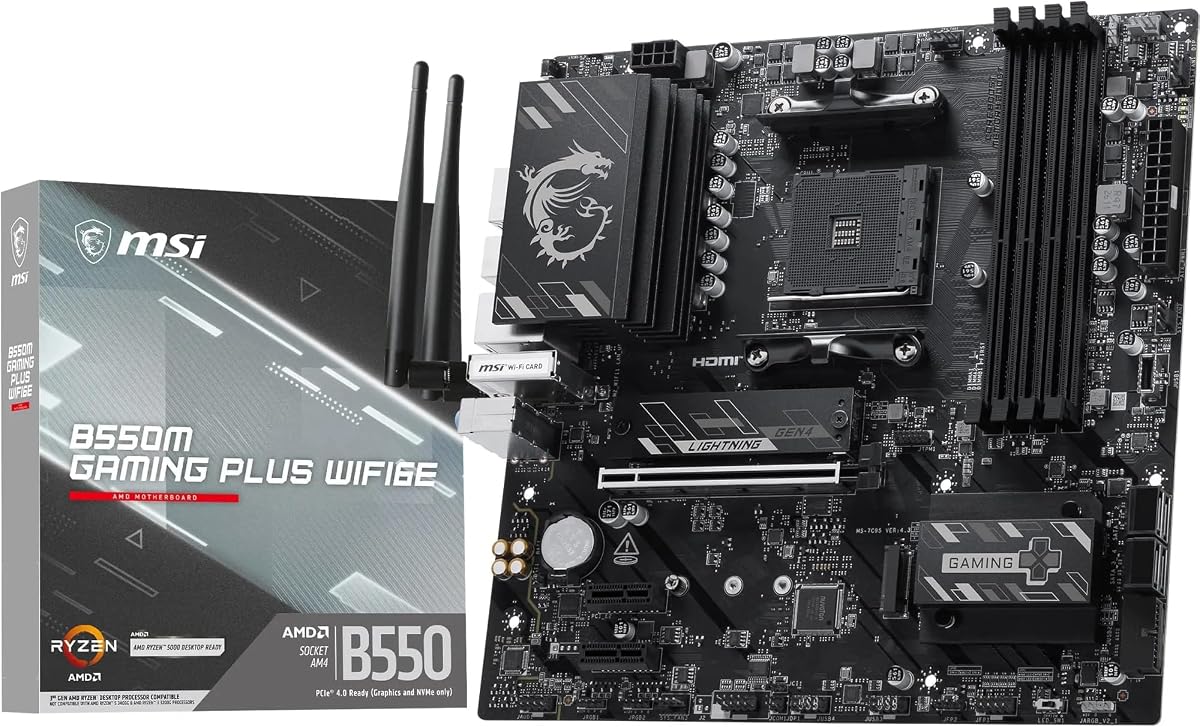
MSI B550M Gaming Plus WIFI6E
4.8Editor score
Dual NVMe M.2 slots
PCIe 4.0 graphics support
WiFi 6E connectivity
Discover the 10 best motherboard for video editing in 2026, comparing AM4 and AM5 performance, storage, networking, thermals, features, and expandability.
A motherboard for video editing should provide a stable foundation for demanding CPUs, fast NVMe storage, capable networking, and enough connectivity for demanding production workflows. Beyond raw specifications, thermals, memory support, expansion options, and the ability to move footage efficiently can have a greater effect on the editing experience.
This guide compares ten motherboards across the AM4, AM5, and sTR5 ecosystems, balancing processor support, power delivery, PCIe capabilities, M.2 storage, networking, and practical features. The list includes full-size ATX boards, compact micro-ATX alternatives, and one specialized Threadripper platform for highly demanding professional workloads.
Each selection highlights the reasons it earns consideration for content creation, from dual high-speed storage and multi-gigabit networking to robust power stages and flexible memory profiles. Product ratings and specifications can change, so readers should verify the latest listing details and current prices before making a final purchase.
4.8Editor score

4.4Editor score

4.4Editor score
The comparison below places the ten boards by socket, form factor, processor support, storage capabilities, and networking, making it easier to identify the right platform for a particular editing workstation.


The ASUS ROG Strix B550-F Gaming WiFi II is a well-balanced AM4 motherboard for editors who want strong expandability without moving to the latest platform. It carries a 4.6 rating and supports Ryzen 3000 and 5000 series desktop processors, along with Ryzen 5000 and 4000 G-series desktop processors. Its ATX layout provides room for a powerful graphics card, multiple expansion cards, and two M.2 storage devices.
We may earn a commission when you buy through this link, at no additional cost to you.
Storage and networking are particularly appropriate for a modern editing workstation. Dual M.2 slots allow a fast scratch drive and high-capacity project drive to coexist, while the USB 3.2 Gen 2 Type-C interface supports modern peripherals. Onboard WiFi 6E and Intel 2.5Gb Ethernet provide convenient wireless access and faster wired transfers when working with large source files.
The 12+2 teamed power stages, ProCool power connector, alloy chokes, and durable capacitors create a sound foundation for sustained multicore workloads. A mature DDR4 platform also tends to make system building more approachable, although it lacks the forward-looking memory and processor options available on AM5. The included AIDA64 Extreme subscription and UEFI BIOS dashboard are useful additions for system tuning and monitoring.
This board is a sensible choice for a high-core-count Ryzen 5000-series editing build using an ATX case. It is especially attractive to creators who want fast networking, flexible storage, BIOS Flashback, and integrated display outputs without stepping into an enthusiast platform. Buyers building a new system with no need to reuse DDR4 memory should still compare it with the latest AM5 options.
The combination of USB 3.2 Gen 2 Type-C, WiFi 6E, and 2.5Gb Ethernet helps reduce friction when importing media, connecting high-resolution displays, or transferring large project files. The Ethernet option is especially valuable for shared studios and homes using network-attached storage.
A 12+2 teamed power solution and ProCool connector give Ryzen 5000-series processors dependable power delivery. This makes the board appropriate for long rendering sessions, although the platform's future upgrade path is less generous than AM5.
We may earn a commission when you buy through this link, at no additional cost to you.
The GIGABYTE B850 AORUS Elite WIFI7 combines a current-generation AM5 platform with three M.2 slots and modern wireless networking. It supports Ryzen 9000, 8000, and 7000 series processors, giving editors access to several generations of upgrade options. The board's 4.4 rating reflects a broadly capable design rather than a specialized entry-level model.
We may earn a commission when you buy through this link, at no additional cost to you.
Storage is a major strength for video production. Three M.2 positions make it possible to separate the operating system, a high-speed cache drive, and a large media library, or to mirror important project files. PCIe 5.0 connectivity and USB-C expand the range of compatible high-speed devices, while the 2.5Gb Ethernet connection supports fast transfers over a wired network.
Its 14+2+2 power phase and dedicated VRM and M.2 Thermal Guard provide a sensible foundation for high-core-count Ryzen processors. Four DDR5 DIMM slots offer room for substantial memory, although DDR5 kits can cost more than equivalent DDR4 configurations. The EZ-Latch design is also helpful during assembly because it reduces the need to secure expansion and storage screws manually.
This motherboard is well suited to creators who want current AM5 compatibility, multiple fast drives, and wireless connectivity without moving to a flagship board. It is a particularly good match for a new workstation that will need more than one high-speed SSD. Buyers who already own compatible DDR5 memory can also reduce the total cost of building around it.
Three M.2 slots simplify the organization of an editing system. One drive can hold applications and the operating system, another can act as a cache or scratch disk, and a third can provide dedicated project storage.
Support for Ryzen 7000, 8000, and 9000 series processors gives this board more longevity than an entry platform tied to a single generation. The modern chipset also makes PCIe 5.0 and USB-C easier to incorporate into a new workstation.
We may earn a commission when you buy through this link, at no additional cost to you.
The GIGABYTE B650 AORUS Elite AX is an accomplished AM5 motherboard that offers an effective mix of processor support, power delivery, and storage speed. Its 4.4 rating reflects solid overall performance, and the platform supports Ryzen 9000, 8000, and 7000 series processors. That broad compatibility makes it a practical choice for a workstation intended to last beyond the current processor generation.
We may earn a commission when you buy through this link, at no additional cost to you.
The board uses a twin 14+2+1 phase design with 70A power stages and an eight-layer, two-ounce copper PCB. A six-millimeter heatpipe, fully covered MOSFET heatsinks, M.2 Thermal Guard, and PCIe Ultra Durable Armor reinforce its suitability for sustained creative workloads. Editors will also appreciate front and rear USB-C connectivity and the EZ-Latch and Q-Flash features that simplify installation and maintenance.
This is not a minimalist board: its power design, thermal components, and ATX layout make it more ambitious than a basic home-office solution. On the other hand, it avoids the specialized complexity of the X870E and Threadripper options in the list. It also lacks the three-drive storage flexibility of the B850 AORUS Elite, so buyers planning extensive project libraries should think carefully about expansion needs.
The B650 AORUS Elite AX is our Editor's Choice because it balances modern AM5 support, robust power delivery, PCIe 5.0 storage, and fast networking without moving into the flagship tier. It suits editors seeking a dependable full-size motherboard for a Ryzen 7000-series or newer system, particularly when that system will use one or two NVMe drives and a dedicated graphics card.
Twin 14+2+1 power phases with 70A power stages provide substantial current delivery for demanding Ryzen processors. The reinforced PCB and covered thermal hardware help maintain stability during prolonged rendering, compiling, and multitrack editing tasks.
Front and rear USB-C ports simplify the connection of compatible drives, displays, and accessories. WiFi 6E and 2.5Gb Ethernet also make it easier to choose between flexible wireless access and faster wired file transfers.
We may earn a commission when you buy through this link, at no additional cost to you.
The ASUS Prime B550M-A WiFi II is a compact, practical motherboard for an editing system that needs good core features without a full-size ATX layout. It has a 4.5 rating and pairs the AM4 socket with DDR4 memory, making it especially relevant to builders who already own compatible components. The board is positioned around third-generation Ryzen processors, although platform capabilities can depend on BIOS support.
We may earn a commission when you buy through this link, at no additional cost to you.
The full-length PCIe 4.0 x16 slot can carry a modern graphics card, while dual M.2 slots provide room for a boot drive and a separate project or media drive. One M.2 position uses PCIe 4.0 x4 connectivity. Integrated HDMI 2.1, D-Sub, and DVI outputs may also be useful for basic display tasks or a troubleshooting setup, although a dedicated graphics card remains essential for most serious editing work.
Its VRM and chipset heatsinks, hybrid fan headers, and Fan Xpert 2 utility help manage thermals within a smaller chassis. ASUS OptiMem is intended to improve memory signal quality, while 5X Protection III adds safeguards for components, memory, and the expansion slot. The main limitation for media-heavy workflows is the one-gigabit Ethernet interface, which is much slower than the multi-gigabit networking found on several competing boards.
The Prime B550M-A WiFi II works best for a compact editing system focused on local storage and typical productivity applications. It may suit a smaller office workstation, a secondary editing machine, or a builder who values a familiar DDR4 platform. Video editors who routinely move large files across a network should prioritize a faster Ethernet solution or supplement this board with appropriate network hardware.
The micro-ATX format can make it easier to build a compact workstation with good component airflow and fewer unnecessary expansion slots. It also offers a more approachable route to a dedicated AM4 editing system.
Dual M.2 sockets, USB 3.2 Gen 2 Type-A, HDMI 2.1, and WiFi 6 cover common needs for local media storage and accessories. The one-gigabit LAN connection is the main constraint for very large network transfers.
We may earn a commission when you buy through this link, at no additional cost to you.
The GIGABYTE B550M K is a straightforward micro-ATX motherboard for creators who need a capable AM4 editing platform without premium networking or elaborate enthusiast features. Its 4.4 rating indicates that it has become a well-regarded option, and it supports Ryzen 5000, 4000, and 3000 series processors. DDR4 compatibility and the established socket make it useful for builds using existing components.
We may earn a commission when you buy through this link, at no additional cost to you.
The board includes a full-length PCIe 4.0 x16 slot, one PCIe 4.0 M.2 connector, and one PCIe 3.0 M.2 connector. That combination is enough for an operating system drive and a project drive, although the faster slot should be prioritized for the drive handling active timelines and temporary media. Four USB 3.2 Gen 1 ports and Q-Flash cover standard connectivity and firmware management.
A digital 3+3 VRM design, premium chokes and capacitors, and chipset heatsinks provide the basic power and thermal foundation. This is less elaborate than the power systems found on larger AORUS, ROG, and TUF boards, so buyers should pair it with a processor and cooler that operate within a sensible thermal envelope. It is still appropriate for mainstream and midrange editing processors.
The B550M K is a sensible selection for a compact or budget-conscious AM4 workstation, especially when the builder already owns DDR4 memory and a compatible case. It offers fewer bells and whistles than the MSI B550M Gaming Plus WIFI6E, but the comparison ultimately depends on component reuse, networking needs, and the graphics and processor chosen for the system.
Using an established socket and DDR4 memory can reduce the cost of building a capable editing workstation. Compatibility across several Ryzen generations also gives creators room to change processors without changing the motherboard.
One PCIe 4.0 M.2 slot and one PCIe 3.0 M.2 slot allow a balanced basic storage arrangement. The newer slot can host a high-speed active-project drive while the other handles bulk media or backups.
We may earn a commission when you buy through this link, at no additional cost to you.
The GIGABYTE TRX50 AERO D is the most specialized board in this guide. Built for AMD Ryzen Threadripper PRO 7000 series processors on the sTR5 socket, it targets professional workflows that can justify many CPU cores, enormous memory capacity, and specialized platform costs. Its 4.0 rating should be interpreted in the context of a high-end enthusiast and professional product rather than a mainstream editing board.
We may earn a commission when you buy through this link, at no additional cost to you.
The 16+8+4 digital VRM solution, VRM Thermal Armor, and M.2 Thermal Guard are designed to sustain demanding workstation loads. Four DDR5 R-DIMM slots allow high-capacity, registered memory configurations, while PCIe 5.0 expansion and storage support prepare the system for high-speed graphics cards, capture hardware, and NVMe arrays. EZ-Latch connectors reduce the physical effort involved in installing cards and drives.
Networking is exceptional for this category. Dual USB4 Type-C ports provide high-bandwidth peripheral connectivity, while the combination of 10GbE, 2.5GbE, and WiFi 7 supports local editing, NAS access, remote collaboration, and high-volume media movement. For a professional facility, the 10-gigabit option can materially improve the experience of transferring large camera files or accessing shared storage.
This board makes most sense for studios that already use Threadripper PRO and can justify the platform's cost and E-ATX footprint. It is not a sensible step-up for a creator moving from a mainstream Ryzen system. Its purpose is specialization: enormous processing capacity, memory scalability, and professional connectivity for workflows where the cost of the complete platform is secondary to productivity.
Threadripper PRO support opens access to processor configurations built for demanding parallel workloads. That capacity can be valuable for complex compositing, simulation, rendering, and simultaneous background tasks, provided the software is optimized for many cores.
The 10GbE connection is a defining feature for facilities handling large media libraries. Combined with 2.5GbE and WiFi 7, it supports a flexible hierarchy of wired and wireless studio connectivity.
We may earn a commission when you buy through this link, at no additional cost to you.
The ASUS ROG Strix X870E-E Gaming WiFi is the feature-rich premium selection in this roundup. It carries a 4.4 rating, uses the modern X870 chipset, and supports Ryzen 9000, 8000, and 7000 series desktop processors. For editors building a high-end workstation, its biggest attraction is the ability to install up to five M.2 SSDs without immediately requiring an add-in storage controller.
We may earn a commission when you buy through this link, at no additional cost to you.
Three onboard PCIe 5.0 M.2 slots and two PCIe 4.0 M.2 slots provide a flexible storage hierarchy. The system can separate the operating system, source media, caches, proxies, and backups, all on local NVMe devices. This is valuable for projects that generate many temporary files or require fast access to large media libraries while avoiding the bottlenecks associated with slower external media.
Power and thermal specifications are aimed at flagship Ryzen processors. The 18+2+2 solution is rated at 110A per stage and uses dual ProCool II connectors, alloy chokes, and durable capacitors. Massive heatsinks, high-conductivity pads, and an L-shaped heatpipe support stable operation. A large graphics card and high-performance CPU may require a spacious chassis and careful airflow planning.
Connectivity is equally ambitious, with dual USB4 Type-C ports, a 20Gbps front-panel USB-C connector, USB 10Gbps with up to 30W power delivery, numerous 10Gbps ports, HDMI, WiFi 7, and Realtek 5Gb Ethernet. Q-Release Slim, M.2 Q-Latch, Q-Release, and Q-Slide tools improve maintenance, while a pre-mounted I/O shield simplifies assembly. This is the premium pick for users who prioritize storage, connectivity, and future-facing features.
Five M.2 positions are unusual at this motherboard tier and give creators a powerful way to organize an active editing system. Multiple high-speed PCIe 5.0 drives can also serve as scratch media, proxy caches, and separate project volumes.
The 18+2+2 power stages and substantial cooling are designed for high-core-count Ryzen chips. That makes the board suitable for heavy timelines and rendering, though the entire system should be designed around sustained thermal and electrical loads.
Dual USB4 Type-C, WiFi 7, 5Gb Ethernet, and extensive USB 10Gbps connectivity support demanding peripherals. The faster network interface is a meaningful advantage over one-gigabit alternatives for shared studios and large transfers.
We may earn a commission when you buy through this link, at no additional cost to you.
The ASUS TUF Gaming B550-PLUS WiFi II is a dependable AM4 motherboard for video editors who value networking and practical features over platform novelty. It has a 4.5 rating and combines a PCIe 4.0 graphics slot with DDR4 memory support. The result is a familiar platform that can be attractive when an existing Ryzen and DDR4 collection already forms the basis of a workstation.
We may earn a commission when you buy through this link, at no additional cost to you.
A major advantage for media work is the Intel 2.5Gb LAN connection, which is considerably more useful for large project transfers than one-gigabit Ethernet. WiFi 6 and Bluetooth 5.2 provide wireless flexibility, while dual M.2 slots allow two NVMe drives. One of those slots supports PCIe 4.0 x4 bandwidth, making it the logical location for a high-speed active-media drive.
The board's 8+2 DrMOS power stages, alloy chokes, and durable capacitors are designed to support processors with high core counts. Fanless VRM and chipset heatsinks, multiple hybrid fan headers, and Fan Xpert 4 or Q-Fan Control support deliberate cooling management. The ATX layout also leaves practical room for a full-size graphics card and additional expansion equipment.
The TUF B550-PLUS WiFi II is a strong all-around option for an ATX AM4 editing build. Its integrated HDMI 2.1 and DisplayPort 1.2 outputs, USB 3.2 Gen 2 Type-C and Type-A ports, front-panel USB 3.2 Gen 1 connector, and Thunderbolt 3 header make peripheral planning easier. It is a sensible mature platform, but new builders should compare its upgrade potential against current AM5 motherboards.
The 2.5Gb Ethernet port provides a useful middle ground between basic one-gigabit connections and much more expensive 10GbE options. It is well suited to large footage transfers between a workstation and nearby shared storage.
VRM and chipset heatsinks help control temperatures, while hybrid fan headers allow precise curve management. Fan Xpert 4 and UEFI Q-Fan Control make it easier to balance quiet operation with the sustained heat generated by video rendering.
We may earn a commission when you buy through this link, at no additional cost to you.
The MSI B550M Gaming Plus WIFI6E is our Best Budget selection because it combines a strong 4.8 rating with the core features needed for a capable AM4 editing system. It supports Ryzen 5000, 5000 G-series, 4000 G-series, and 3000 series processors, while its four DDR4 DIMM slots support memory overclocking speeds listed as 4400+ MT/s in OC configurations.
We may earn a commission when you buy through this link, at no additional cost to you.
Storage performance is a key strength. One M.2 Gen4 x4 slot provides 64Gbps bandwidth and includes M.2 Shield Frozr, while a second M.2 Gen3 x4 slot offers 32Gbps. A full PCIe 4.0 x16 slot with Steel Armor handles the graphics card. This arrangement is well suited to a basic professional layout with a fast working drive and a secondary drive for media, cache, or backups.
Cooling provisions include thermal pads, extra choke thermal pads, an extended heatsink, a chipset heatsink, the M.2 Shield Frozr, and a dedicated pump-sys fan header. The VRM uses MSI Core Boost technology for stability and performance, while WiFi 6E and Bluetooth 5.3 are included. The one-gigabit LAN port is the primary compromise, particularly for editors who move very large files over a wired network.
This motherboard is a compelling option for a compact or budget-conscious editing workstation, especially when a builder can reuse DDR4 memory. It handles the main structural requirements of a modern creator PC—solid processor support, a PCIe 4.0 graphics slot, and two NVMe positions—without the cost of premium networking. For creators needing faster transfers, it is worth budgeting for a network adapter.
Separate Gen4 and Gen3 M.2 connectors provide a sensible division between active project storage and secondary media. The active Gen4 drive benefits from higher bandwidth and the Shield Frozr cooling cover.
The micro-ATX design fits a smaller chassis and still supports a strong discrete GPU, two NVMe drives, DDR4 memory, WiFi 6E, and cooling control. That makes it a practical foundation for a dedicated editing machine built around existing components.
We may earn a commission when you buy through this link, at no additional cost to you.
The ASUS TUF Gaming B850-PLUS WiFi is a polished modern motherboard for creators who want AM5 features without selecting a flagship gaming board. Its 4.4 rating and support for Ryzen 9000, 8000, and 7000 series desktop processors make it an appealing long-term platform. The B850 chipset provides current connectivity while retaining a more focused ATX layout.
We may earn a commission when you buy through this link, at no additional cost to you.
Three M.2 slots offer a useful editing storage arrangement, with one PCIe 5.0 M.2 slot and two PCIe 4.0 M.2 slots. All three positions have heatsinks, which is valuable because sustained file transfers can produce meaningful drive temperatures. The board also includes a PCIe 5.0 x16 graphics slot, allowing a modern high-end GPU to take advantage of the available bandwidth.
Power delivery comes from 14+2+1 80A DrMOS stages, an eight-layer PCB, 8+8 pin ProCool connectors, alloy chokes, and durable capacitors. This foundation is suitable for demanding Ryzen processors. Fast networking comes from 2.5Gb Ethernet and WiFi 7, while a rear USB 20Gbps Type-C port, front USB 10Gbps Type-C connector, and Thunderbolt or USB4 header support high-speed accessories.
This motherboard fits an ATX workstation that benefits from a modern CPU, three fast SSDs, and strong connectivity but does not require five onboard M.2 slots or 5Gb Ethernet. It is also a sensible alternative to the ROG X870E-E for builders who prefer a more restrained feature set. The processor, graphics card, memory, and cooling configuration should be selected together to keep the system's power and thermal requirements realistic.
One PCIe 5.0 and two PCIe 4.0 positions provide room for a boot drive, working cache, and media library. Heatsinks on every M.2 slot help maintain transfer performance during long editing and rendering sessions.
WiFi 7, 2.5Gb Ethernet, USB 20Gbps Type-C, a front USB 10Gbps Type-C connector, and USB4 header support a broad range of modern equipment. These interfaces are particularly useful for high-resolution storage devices and displays.
The 14+2+1 80A power stages and reinforced eight-layer PCB provide a strong base for multi-core Ryzen processors. The board is positioned for demanding editing and rendering while preserving a straightforward ATX footprint.
We may earn a commission when you buy through this link, at no additional cost to you.
The right editing motherboard is one that supports the processor, graphics card, memory, storage, and networking you actually need. Rather than chasing the largest specification list, prioritize compatibility, sustained performance, and room for future expansion.
The socket determines which processors and memory the system can use. AM4 supports Ryzen 3000 and 5000 series processors with DDR4, making it cost-effective when compatible components are already owned. AM5 supports Ryzen 7000, 8000, and 9000 series processors with DDR5 and offers a broader current upgrade path. The sTR5 platform for Threadripper PRO is reserved for specialized professional workloads that can exploit many CPU cores and very high memory capacity.
Choose AM4 for reuse and lower entry costs, or AM5 for a new system with current expansion options.
Editing applications benefit from enough memory to keep active timelines, preview media, and background tasks responsive. Four DIMM slots are standard across the selected ATX and micro-ATX boards, while the Threadripper model uses registered DDR5 R-DIMMs. DDR4 is often less expensive and easier to reuse, while DDR5 supports newer platforms and can be preferable for a clean build.
Confirm both the memory standard and supported module type before purchasing the board.
Fast local storage reduces delays when opening projects, generating proxies, and rendering footage. A PCIe 4.0 M.2 drive is already highly useful, while PCIe 5.0 provides additional headroom for demanding workflows. The number of M.2 slots also determines how easily an operating system, working drive, cache, and media library can be separated. Heat management matters because sustained transfers can make bare SSDs throttle.
Prioritize at least two M.2 positions and adequate cooling for the drives used in active timelines.
A primary PCIe x16 slot is essential for the discrete graphics card used by demanding editing and color-grading applications. Most selected boards provide PCIe 4.0 x16, while premium models also include PCIe 5.0 x16. The physical spacing and slot count determine whether capture cards, audio interfaces, and other accelerators can be added without compromising GPU clearance or airflow.
Verify the x16 slot, case clearance, and physical room for multi-slot graphics hardware before buying.
Rendering and exports can sustain high multicore power loads, so the VRM should be appropriate for the selected Ryzen or Threadripper processor. Designs such as 12+2, 14+2+2, 18+2+2, and 16+8+4 phases provide increasingly robust power delivery. Heatsinks, thermal pads, heatpipes, and M.2 cooling are equally important because good electrical capacity cannot compensate for excessive heat.
Match the power system to the CPU rather than selecting by chipset or marketing tier alone.
Editing footage involves large files, and network speed can shape the workflow when projects are stored on a NAS or transferred between machines. One-gigabit Ethernet is adequate for light office use, 2.5Gb Ethernet is a practical middle ground, and 10GbE suits professional facilities with shared storage. WiFi 6E or WiFi 7 adds flexibility, though a wired connection usually offers more consistent throughput for sustained transfers.
For frequent file movement, favor 2.5GbE or 10GbE over a basic one-gigabit connection.
External SSDs, high-resolution displays, calibrated monitors, control surfaces, and capture devices can place substantial demands on USB ports. Look for USB-C, especially 10Gbps or 20Gbps variants, and check whether the connector is on the rear panel or available through a front-panel header. Thunderbolt or USB4 support can be valuable for compatible displays and docks, though accessory support varies by application.
Map every essential peripheral to a port before buying so no adapter or hub becomes permanently necessary.
ATX boards offer the broadest selection and easier access to M.2 sockets, memory, and power connectors. Micro-ATX boards can produce smaller, more affordable workstations without sacrificing the important PCIe and storage features found in this roundup. Features such as EZ-Latch, Q-Latch, Q-Release, BIOS Flashback, and Q-Flash reduce installation and maintenance friction, particularly for first-time builders.
Choose a larger board for effortless expansion or a compact model when enclosure space matters most.
Before assembly, read the motherboard manual, identify the CPU socket, memory slots, M.2 positions, and CPU power connectors, and confirm that the case supports the board's form factor. Install the processor and cooler correctly, mount the board, connect the power supply, and then add memory, storage, and the graphics card. BIOS Flashback and Q-Flash features can simplify firmware recovery, but the correct board-specific procedure should still be followed.
After the first boot, update the motherboard firmware when appropriate and enable the intended memory profile, such as AMD EXPO or XMP, only after confirming that the memory kit is supported. Configure storage for the operating system, active project drive, media, and backups. Use motherboard monitoring and fan-control tools to create a sensible cooling curve, especially when long renders raise CPU and drive temperatures.
For routine care, keep the chassis dust-free and make sure intake and exhaust airflow are unobstructed. Back up active project files and avoid operating large editing caches on the only drive containing irreplaceable work. Periodically check temperatures, update essential applications and system software, and verify that the power supply and cabling remain secure.
AM5 offers a newer CPU and memory platform with a wider future upgrade path, while AM4 can be more economical when compatible Ryzen and DDR4 components are already available. For a new high-end workstation, AM5 generally offers the longer runway. For a practical build reusing older components, a well-equipped AM4 board can still deliver excellent editing performance.
Multiple M.2 slots make it easier to separate the operating system, project files, cache, proxies, and media. Even two slots can provide a cleaner and faster workflow than a single large drive. Consider the board's supported PCIe generation and M.2 heat coverage, since the most active drive should be both fast and properly cooled.
For most creators, 2.5Gb Ethernet is a strong balance between transfer speed, hardware cost, and network complexity. It is substantially faster than one-gigabit networking for large media libraries and local storage access. Studios routinely moving multi-terabyte libraries or sharing storage among several users may benefit more from 10GbE.
A motherboard marketed for gaming can still be excellent for editing, but the label itself is not what matters. Look for processor compatibility, adequate VRM power, fast storage slots, sufficient memory, and the required display and network connections. Some creator workloads benefit more from multiple M.2 slots and fast networking than from gaming-oriented features.
Most 4K editing systems do not require Threadripper. A suitable Ryzen processor, discrete graphics card, adequate memory, and fast NVMe storage can handle demanding mainstream editing workflows. Threadripper becomes more relevant for very complex projects, extensive simulations, heavy rendering, many simultaneous applications, or professional memory and expansion requirements.
Yes, provided it includes the features your specific build requires. The selected micro-ATX boards support PCIe 4.0 graphics slots, dual M.2 storage, DDR4 memory, and modern wireless networking. A compact board can be especially useful in a smaller editing room, although it generally offers fewer physical expansion slots and less internal access than ATX.
The requirement depends on resolution, codec, timeline complexity, and whether the system creates proxies. A mainstream creator can begin with 32GB, while 64GB is more comfortable for complex 4K or 6K work, heavy effects, and multitasking. High-end systems may need considerably more, especially when using Threadripper and registered memory.
WiFi is useful for setup, browsing, cloud services, and backup workflows, but it does not replace a reliable wired network for active editing. Systems moving large media files should prioritize Ethernet, while WiFi adds valuable flexibility when a cable is inconvenient. The motherboard's Ethernet speed remains a separate consideration.
The MSI B550M Gaming Plus WIFI6E stands out as the Best Budget option because it combines a high rating, compact construction, dual NVMe storage, and modern wireless connectivity. The GIGABYTE B650 AORUS Elite AX earns the Editor's Choice designation for its balanced AM5 power delivery, modern processor support, PCIe 5.0 storage, and refined thermals. For creators who need the most onboard storage and connectivity, the ASUS ROG Strix X870E-E is the Best Premium pick.
Most editors should prioritize processor compatibility, a full-length graphics slot, sufficient VRM and cooling, and the number of M.2 positions they genuinely need. Existing DDR4 components can make AM4 exceptionally practical, while a new system may benefit from AM5's broader processor roadmap. Faster networking becomes more important as project libraries and shared-storage traffic increase.
Before purchasing, verify the current processor list, memory support, M.2 specifications, rear and front-panel ports, and case compatibility. Prices and product configurations can change, and manufacturer revisions may also affect details. Checking the latest listing and current motherboard manual will help ensure that the selected board remains the right fit for the intended editing workstation.