
Anker HDMI Switch
4.4Editor score
Two HDMI inputs
4K at 60Hz
Manual button switching
Cheap HDMI Switch buying guide comparing 10 affordable models for console, home theater, office, and multi-device HDMI setups.
A cheap HDMI switch can make a crowded entertainment setup much easier to manage by connecting several consoles, streaming devices, laptops, or disc players to one display. The right model balances port count, video specifications, switching convenience, power requirements, and dependable signal transmission.
We compared ten affordable HDMI switches across their input counts, maximum resolutions, control options, compatibility, and practical limitations. The list covers models suited to gaming stations, living rooms, conference rooms, and other setups that need a convenient way to share one display.
Each pick below highlights the most useful benefits and trade-offs, helping you identify the right switch for your devices. Product prices and availability can change, so compare the current listings and included accessories before making a final purchase.
4.4Editor score
4.4Editor score

4.3Editor score
This side-by-side comparison organizes each model by input count, maximum resolution, switching method, and power requirements, making it easier to compare switches for different displays and source devices.




The UGREEN 5-in-1 HDMI Switch is the most flexible model in this guide for homes with several consoles, streaming boxes, laptops, and disc players. Its 4.3 rating reflects a generally favorable reception, while its five inputs reduce the need to reconnect cables every time you want to watch or play something different.
We may earn a commission when you buy through this link, at no additional cost to you.
It supports 4K at 60Hz through HDMI 2.0 or HDMI 1.4 and works with HDCP 2.2 and HDCP 1.4 protected content. The stated 18Gbps bandwidth accommodates high-resolution video, while listed support for HDR, VRR, 3D, and dynamic HDR formats broadens its appeal for modern displays and gaming equipment.
Remote and manual switching give you two convenient ways to select a source, and five LEDs make the active input easy to identify. The remote has a stated control range of up to 33 feet. It is also powered through USB, which can encourage a more stable connection when several demanding sources are connected.
The trade-offs are important but reasonable for a five-port model. Automatic source detection is not supported, and the device does not support ARC or eARC. You will also need to provide an appropriate power source, and neither an HDMI cable nor a remote battery is included. For a busy entertainment center, it remains the most capable premium choice here.
With five source ports, you can keep a PS5, Xbox, Nintendo Switch, streaming stick, and laptop connected at once. A remote or front-button control makes moving between them faster and less disruptive than repeatedly disconnecting and reconnecting HDMI plugs.
VRR and HDR support make this more than a basic selector for a modern gaming display. Backward-compatible resolution options and 18Gbps bandwidth also help it serve mixed entertainment and gaming setups.
We may earn a commission when you buy through this link, at no additional cost to you.
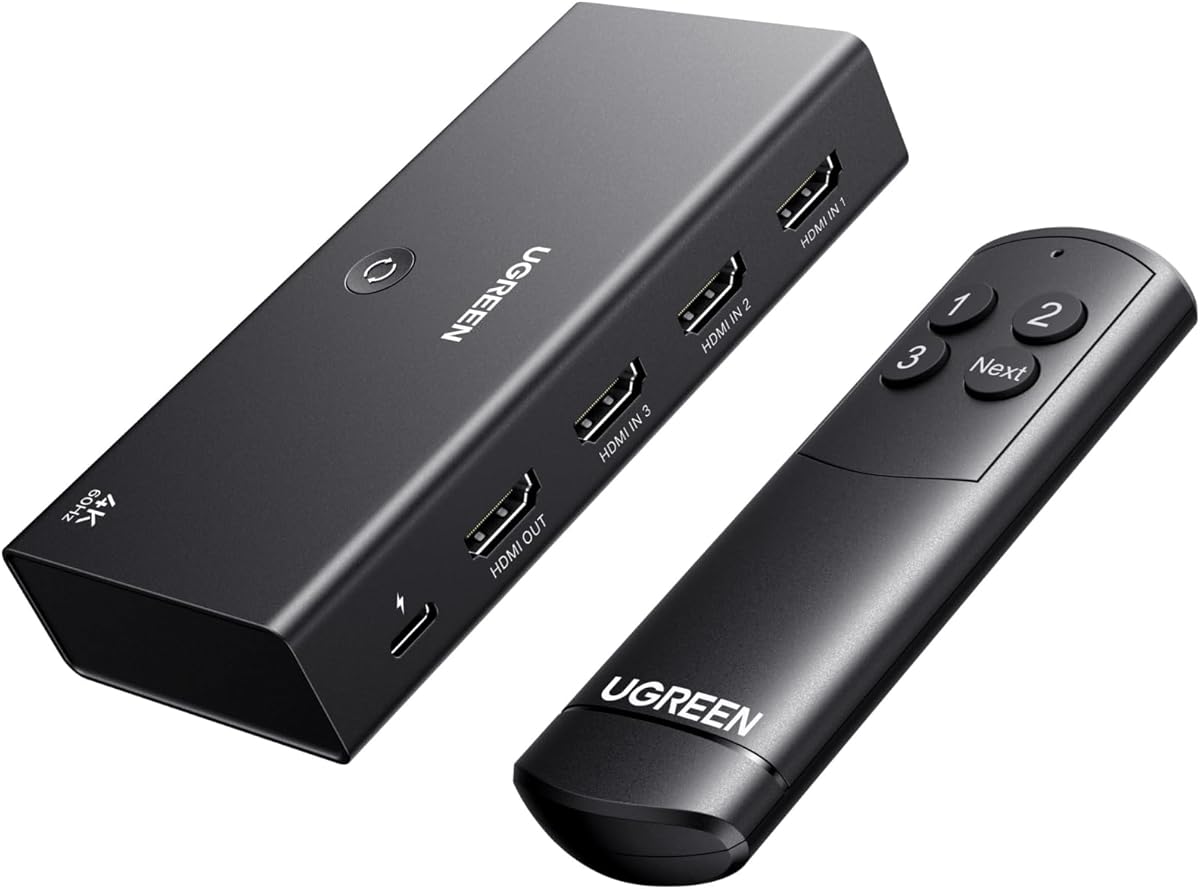
The UGREEN 3-in-1 HDMI Switch combines three inputs, a remote, 4K at 60Hz support, and broad compatibility in a particularly balanced package. Its 4.4 rating is among the highest in the guide, making it an attractive general-purpose choice for a television with several active source devices.
We may earn a commission when you buy through this link, at no additional cost to you.
Three HDMI inputs are enough to keep a game console, streaming device, and laptop connected simultaneously. The included remote provides couch-side switching with a stated range of 33 feet, while a manual control offers a direct alternative when the remote is not convenient or its infrared signal is obstructed.
The switch supports HDMI 2.0 and HDMI 1.4, HDCP 2.2 and HDCP 1.4, 18Gbps bandwidth, and 4K at 60Hz. Its listed format support includes HDR10, HDR10+, 3D, RGB at 8, 10, and 12-bit, Dolby Atmos, and DTS, giving it useful features for both cinema and gaming.
You must remember that only one monitor can operate at a time, and automatic switching is unavailable. A suitable 5V 1A-or-higher power adapter and HDMI cables are not included. Even so, the combination of three inputs, remote control, strong resolution support, and a favorable rating makes this an excellent middle-ground recommendation.
The included remote lets you change sources without leaving the couch. Keep the included power and connection cables installed, then face the remote toward the infrared receiver with a clear line of sight.
Support for HDR10+, 3D, Dolby Atmos, and DTS means the switch is suitable for more than basic console play. Its 18Gbps bandwidth aligns well with the 4K at 60Hz target.
We may earn a commission when you buy through this link, at no additional cost to you.
The GANA Bidirectional HDMI Switch is a practical choice when you only need to alternate between two sources or move one source between two displays. It carries a 4.3 rating and distinguishes itself from ordinary multi-input selectors with its two-way switching design.
We may earn a commission when you buy through this link, at no additional cost to you.
Its three physical ports allow two HDMI sources to feed one display, or one HDMI source to feed either of two displays. Only one display operates at a time. Two LEDs reveal the active path, and the simple button on the housing makes switching direct and easy to understand.
The switch supports 4K at 60Hz and backward-compatible 2K and 1080p output, along with 3D. It uses an aluminum housing and does not require external power, making it convenient to deploy near a television, projector, or monitor without adding another cable to the setup.
The listed 3.4Gbps bandwidth is lower than that of several competitors, and an HDMI cable is not included. Standard HDMI 2.0 cables and a total cable length of no more than three meters are advised for vivid 4K output. Despite those limits, it is a straightforward, affordable answer to a simple switching need.
The bidirectional feature lets you arrange sources and displays according to your room rather than committing permanently. It is particularly helpful when a laptop sometimes feeds one monitor and sometimes another.
Because no external power is required, setup is limited to connecting the HDMI cables and pressing the button. LEDs then show whether the switch is routing between the two input or output ports.
We may earn a commission when you buy through this link, at no additional cost to you.
The Anker HDMI Switch is a clean, uncomplicated option for someone who needs to alternate between two HDMI sources. Its 4.4 rating matches the highest-rated product in the guide, while the single-button design keeps daily operation straightforward.
We may earn a commission when you buy through this link, at no additional cost to you.
It supports resolutions up to 4K at 60Hz and is compatible with laptops, game consoles, televisions, and VR headsets. Rather than adding remote complexity or extra status displays, it focuses on the essential function of moving one active display connection between two source devices.
There is a meaningful cable-length caveat for 4K at 60Hz. The instructions call for 30AWG input and output cables shorter than 3.3 feet each, with their combined length no more than 6.5 feet. Longer runs may require equipment with different signal characteristics, so this compact switch works best close to the display.
Automatic signal detection and simultaneous dual-display output are not supported, and HDMI CEC is also unavailable. The package includes the switch, a safety guide, an 18-month warranty, and customer support. For a nearby monitor with only two competing sources, it remains an appealing minimalist option.
A single physical button handles source changes without menu navigation or remote aiming. That makes the switch intuitive for workstations, dorm rooms, and compact entertainment centers.
The strict 4K cable guidance suggests keeping the switch near the display and using short, appropriate cables. In that arrangement, it can provide a straightforward path to 4K at 60Hz.
We may earn a commission when you buy through this link, at no additional cost to you.
The acer 5-in-1 HDMI Switch is a feature-rich alternative for users who want more than five source connections and a remote. Its 4.1 rating is slightly lower than several alternatives, but the physical design and control options make it worth considering for a busy home theater or gaming area.
We may earn a commission when you buy through this link, at no additional cost to you.
It supports 4K at 60Hz, HDMI 2.0 and 1.4, HDCP 2.3, and 18Gbps transmission. Listed compatibility with HDR, 3D, Dolby Atmos, and DTS broadens its use beyond simple console switching. The gold-plated ports and bottom heat-dissipation vents are intended to support stable operation and signal quality.
Control is available through a wide-range fisheye infrared receiver, a remote, or physical buttons on the switch. Five LEDs identify the active port. The box has a metallic-like appearance and places all ports on the same side, which can simplify cable routing behind a television or entertainment cabinet.
Automatic switching is unsupported, and full performance requires a power connection. The package includes a USB-A to USB-C cable, remote, manual, and quick guide, but does not include a power adapter, remote battery, or HDMI cables. Buyers should therefore treat the switch as the center of a planned installation rather than an instant all-in-one solution.
Same-side port placement can reduce the tangle of cables behind a display. The cooling vents and metallic-style enclosure also give the unit a purpose-built appearance suited to an entertainment center.
The fisheye infrared receiver is intended to make remote operation easier from different angles. Physical buttons provide a useful fallback when the remote is unavailable or blocked.
We may earn a commission when you buy through this link, at no additional cost to you.
The GANA 3-in-1 HDMI Switch is a straightforward selector for users who need three sources and do not require 4K at 60Hz. Its 4.2 rating indicates generally positive feedback, and the fixed HDMI pigtail simplifies one part of installation.
We may earn a commission when you buy through this link, at no additional cost to you.
Three inputs can serve devices such as an Xbox, PlayStation, Blu-ray player, laptop, receiver, or television box. A button on the unit changes the selected source in a second, avoiding repeated cable handling. Two HDMI sources cannot be viewed at the same time because there is only one active display output.
The stated maximum video mode is 4K at 30Hz, with HDMI 1.4 compatibility, 3D support, HD audio, and HDCP compliance. For PS5 or Xbox systems, the source console must be manually adjusted to output 4K at 30Hz. This is an important limitation for gamers who expect the latest consoles to run at higher refresh rates.
A fixed 1.8-foot HDMI pigtail is included, along with a USB-C cable and manual. The switch requires a USB-C power connection for stable transmission. Its limited 4K refresh rate makes it more suitable for standard viewing, older gaming hardware, and secondary displays than for a premium high-refresh gaming setup.
The built-in pigtail provides one connection without requiring another loose cable. It can make the unit easier to position near the display, although the fixed lead also limits cable routing flexibility.
At 4K at 30Hz, the switch can handle many everyday entertainment sources. It is most appropriate when 60Hz gaming or high-refresh computer use is not the main priority.
We may earn a commission when you buy through this link, at no additional cost to you.
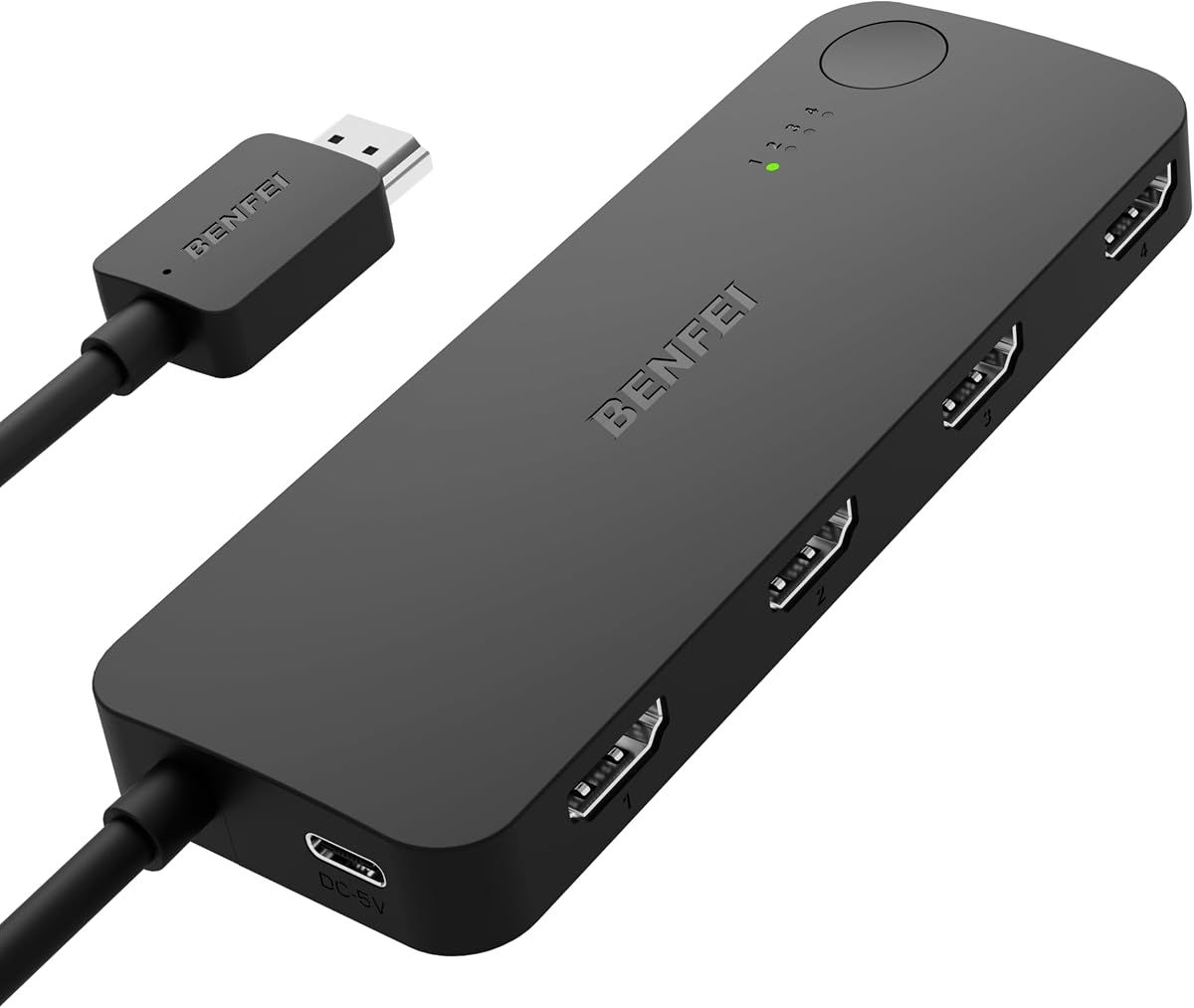
The BENFEI 4-in-1 HDMI Switch stands out for its adaptive equalization technology and stated support for HDMI transmission over distances of up to 30 feet. Its 4.1 rating reflects a practical feature set that is especially relevant when the switch cannot sit directly beside the television.
We may earn a commission when you buy through this link, at no additional cost to you.
Four HDMI inputs accommodate common combinations such as a console, streaming stick, Blu-ray player, and laptop. It supports 4K at 60Hz and 2K at 144Hz, along with HDMI 2.0b, HDMI 1.4, HDCP 2.3, HDCP 2.2, and 8-, 10-, and 12-bit color depth.
Audio pass-through is listed for uncompressed digital 7.1, 5.1, and 2-channel formats, including Dolby Atmos and DTS compliance. A fixed four-foot HDMI pigtail is included, and the USB-C power cable must be connected during use. Manual button switching is used instead of automatic source detection.
This is not a one-to-four output splitter, despite some product terminology that may be confusing. Its intended configuration is multiple inputs feeding one display. The long-distance capability is the main attraction for larger rooms, provided the required power connection and compatible source equipment are in place.
Adaptive equalization helps maintain a stable signal across longer cable runs. This can reduce the need to place the switch immediately beside the display or to add other signal equipment.
The listed 2K at 144Hz mode gives competitive gamers an option above 60Hz. Four inputs are also enough for a typical console, streaming, and PC arrangement.
We may earn a commission when you buy through this link, at no additional cost to you.
The NEWCARE 3-in-1 HDMI Switch combines three inputs, 4K at 60Hz support, and an included HDMI cable in a simple manual design. It holds a 4.1 rating and is suited to users who want a compact three-source solution without relying on a remote.
We may earn a commission when you buy through this link, at no additional cost to you.
The input side supports PCs, laptops, Xbox and PlayStation systems, streaming devices, Blu-ray players, and game consoles. Its output can feed a television, projector, or monitor. Only one display is active at a time, and the button on the unit determines which of the three sources is sent to that display.
The switch supports 4K at 60Hz, 2K modes, 3D, 1080p and lower formats, 12-bit deep color, RGB 8:8:8, and HDCP 2.2. Its stated 18Gbps bandwidth and gold-plated connectors are designed to support stable audio and video transmission over suitable cables.
For 4K at 60Hz, both the input and output cables should be no more than 1.5 meters long. A 5V 1A external power connection is required, automatic switching is unavailable, and no remote is included. The package includes a 2.6-foot HDMI cable and manual, which helps reduce the initial setup burden.
For a console, streamer, and laptop, three inputs cover a common home setup. The single button provides a dependable way to change sources even when the switch is placed out of view.
The stated 4K at 60Hz guidance favors short input and output leads. Plan cable placement carefully if the sources and display are separated by several feet.
We may earn a commission when you buy through this link, at no additional cost to you.
The GANA 5-in-1 HDMI Switch provides the same broad source capacity as several premium competitors but with a distinct remote-controlled aluminum design. Its 4.2 rating reflects a solid balance of functionality, making it a viable alternative for home theaters and gaming rooms.
We may earn a commission when you buy through this link, at no additional cost to you.
Five HDMI inputs support consoles, television boxes, disc players, computers, and similar sources feeding one display. The listed maximum output is 4K at 60Hz, with backward compatibility for 4K at 30Hz, 2560 by 1440 at 120Hz, and 1920 by 1080 at 240Hz. It also supports 3D, UHD, and HDCP 2.2.
Both an infrared remote and manual switching are offered. The remote has a stated range of 33 feet, and LEDs indicate the selected port. All ports are positioned on the same side, which can make the switch easier to connect in a narrow entertainment cabinet.
The switch uses an 18Gbps-bandwidth chip and a USB-powered design. The included USB cable does not include a power adapter, and HDMI cables must be supplied separately. The switch is designed to remain connected to power for stable transmission. Automatic switching is not offered, so remote or manual control is required.
Keeping all ports on one side reduces the need to reach behind the device or route cables in opposite directions. This is useful in entertainment units with constrained clearance.
The switch supports several high-speed modes while maintaining 4K at 60Hz as its headline standard. That makes it suitable for mixed source devices with different output preferences.
We may earn a commission when you buy through this link, at no additional cost to you.
The Generic 3-in-1 HDMI Switch is an entry-level option for someone who wants remote convenience without paying for a higher-bandwidth model. Its 4.2 rating suggests a generally satisfactory product, while the straightforward setup makes it approachable for non-technical users.
We may earn a commission when you buy through this link, at no additional cost to you.
Three source devices can be connected to one display, and either the included remote or a physical button can change the active source. LED indicators show which input is selected, removing the need to memorize button positions or diagnose the current connection by sight alone.
Video support reaches 4K at 30Hz with a stated 10.2Gbps transmission rate. The switch is compatible with common source categories including PS5 and PS4 systems, Xbox devices, Blu-ray players, PCs, laptops, televisions, projectors, and monitors. Its intended roles include home theaters, presentations, classrooms, and gaming areas.
The main limitation is the 30Hz maximum at 4K resolution, which is lower than what current consoles and many 4K televisions can provide. The 10.2Gbps bandwidth also trails higher-specification alternatives. The ABS housing and anti-corrosion construction are simple, but this model is best for general media use where high-refresh 4K is not required.
The remote gives users a convenient way to change sources, while the button offers a direct fallback. This combination is useful in rooms where reaching the switch would be inconvenient.
The active-port LEDs make it easy to see which device is connected. This is especially helpful when several sources look similar or are hidden inside a cabinet.
We may earn a commission when you buy through this link, at no additional cost to you.
The right inexpensive HDMI switch depends on how many devices you own, the resolution and refresh rate you need, your tolerance for manual switching, and the physical distance between your sources and display.
Choose enough inputs for the devices you expect to keep connected, not merely the number you use occasionally. Two inputs suit a console and laptop, while three cover a typical gaming and streaming combination. Four- and five-port models offer room for a Blu-ray player, streaming stick, game console, and desktop without constant reconnection.
A switch advertised for 4K at 30Hz can show 4K imagery, but it may limit newer consoles and demanding computer applications. 4K at 60Hz is the more versatile target, while some models also list 2K at 120Hz or 144Hz and 1080p at 240Hz. Match the mode to your display and source rather than assuming every HDMI device uses its maximum capability.
Bandwidth figures help indicate whether a switch can carry high-resolution, high-refresh signals. Models rated at 18Gbps generally align closely with the requirements of HDMI 2.0 workloads, while 10.2Gbps devices are more likely to cap 4K at 30Hz. Compatibility with the relevant HDMI and HDCP standards also matters for protected streaming services and modern source equipment.
Manual buttons are the most common and dependable method, but they require reaching the switch. A remote adds comfort when the device sits near a television or inside a cabinet. Automatic switching is convenient in theory but is not supported by many affordable models, including several featured here. Decide whether manual operation is acceptable before buying.
The switch cannot correct every limitation caused by long or poor-quality HDMI cables. Many 4K at 60Hz models specify maximum input and output cable lengths, while some include adaptive equalization for longer runs. Use high-speed cables that meet the stated requirements, keep the total run within guidance, and avoid unnecessary extensions.
Some compact switches work without external power, while others require USB or USB-C power for stable transmission. Powered models often include a power cable but not an adapter, so verify what you already own. A connected power source can reduce signal instability when several high-bandwidth sources or long cables are involved.
Most models in this guide are multiple-input, one-output switches, meaning only one display is active at a time. Bidirectional models can also route one source toward either of two displays. These products are not automatically video splitters that duplicate one input across several simultaneous screens, so confirm the direction before buying.
Some switches include a remote, a fixed HDMI pigtail, or a separate HDMI cable, while others require you to supply all display connections. Check the package contents for power adapters, batteries, and cables. Also confirm that your sources use standard HDMI ports and verify any restrictions involving CEC, ARC, eARC, HDR, or high refresh modes.
Begin by identifying the source devices and the single display that will receive their signal. Connect the chosen sources to the switch inputs, connect its output to the television, projector, or monitor, and fit the cables without forcing them into the ports. Before selecting a source, make sure the intended device is powered on and set to a resolution the display supports.
Connect the required power supply if the model uses USB or USB-C power. For models with a remote, install the specified battery, point the controller toward the infrared receiver, and avoid placing objects in front of the receiver. Press the physical button to select the first source, then use the remote or button for later changes. Automatic switching is not available on most models in this guide, so plan to make each change deliberately.
To care for the setup, route cables away from sharp bends and heavy pressure, especially around the fixed pigtails found on some models. Keep the switch ventilated and avoid placing it inside a sealed, poorly ventilated compartment. If the picture becomes unstable, reconnect the power lead, test shorter cables, and confirm the source and display are using compatible modes. Never open the housing, as doing so can expose the user to electrical components and may affect the warranty.
Yes, if the switch has at least two HDMI inputs. Connect each console to an input and the TV to the output, then select the console you want using the manual button or included remote. Only one source is normally visible at a time. A three-port model also gives you room to keep a streaming device connected.
Not all of them do. Most affordable models in this guide require manual selection, including the UGREEN, acer, BENFEI, and GANA models with remotes. The Anker and GANA bidirectional unit also uses a button. Always check the specifications if automatic switching is important to your setup.
An HDMI switch selects one of several source devices for a display, while a splitter sends one source to multiple displays at the same time. Most products here are multiple-input, one-output switches. The GANA bidirectional model can also route one source toward one of two displays, but only one display works at a time.
It is important when your television or monitor supports 4K at 60Hz and your console can output that mode. Switches limited to 4K at 30Hz may still provide sharp images but can reduce motion smoothness and limit high-refresh gaming. Check both the source and display settings as well as the switch specification.
It depends on the model. The NEWCARE includes an HDMI cable, while the GANA and BENFEI products include fixed pigtails. Several other switches, including both UGREEN models and the acer model, do not include HDMI cables, and most do not include a power adapter. Count the connections you need before ordering.
Long cables, underspecified HDMI leads, inadequate power, or an unsupported source mode can all affect stability. Follow the stated maximum input and output cable lengths, use reliable high-speed cables, and connect the required USB power. Confirm that the source is not trying to output a resolution or refresh rate the switch cannot carry.
Yes, provided the projector or monitor accepts the switch's HDMI output and supports the selected resolution. The listed compatible outputs for these products include televisions, projectors, computer monitors, and HDTVs. Match the display's native resolution and refresh rate, and use the manual switch to change sources.
Support varies by model. The UGREEN 5-in-1 model explicitly does not support ARC or eARC, while the Anker model does not support HDMI CEC. If you rely on a soundbar, television, or receiver connection for audio return, check the individual product details and use a separate audio route when necessary.
The UGREEN 3-in-1 model offers the strongest overall balance of input capacity, 4K at 60Hz support, remote control, format support, and a favorable rating. The Anker 2-in-1 model is a particularly clean budget selection for two nearby sources, while the UGREEN 5-in-1 model is the strongest option when preserving five simultaneous connections matters most.
Prioritize the number of devices you will actually keep connected, then confirm the resolution and refresh rate required by your display. Cable length, power requirements, remote availability, and one-output limitations are just as important as the headline 4K specification. A simpler switch with suitable ports and reliable power can serve you better than a more advanced model with features you do not need.
Before purchasing, verify the current listing, package contents, supported modes, and power accessories. Prices and product availability can change over time, so the final choice should reflect both today's offer and the hardware you already own. With that check complete, you can select an inexpensive HDMI switch that fits your setup without overspending on unused features.