
Jadebones HDMI Adapter
4.4Editor score
Xbox component conversion
External power not required
Compact plug-and-play design
Our Original Xbox Upscaler guide compares ten adapters and scan converters for original Xbox compatibility, signal quality, setup, resolution, and display.
An Original Xbox upscaler connects the console’s component output to a modern television, projector, or computer monitor. The right adapter should preserve the signal, provide synchronized audio, and work reliably with the equipment already in your setup.
This guide compares ten adapters and scan converters based on the supplied compatibility information, supported resolutions, connection requirements, signal conversion method, display flexibility, and ease of setup. It includes dedicated Xbox products and broader converters designed for multiple retro consoles.
Each review explains the product’s strongest benefits and practical limitations, helping you distinguish simple signal adapters from more flexible scalers. Product listings and prices can change, so confirm the current specifications, accessories, and display requirements before buying.
4.4Editor score
4.1Editor score

4.1Editor score
The table below compares all ten products by signal type, supported output, setup requirements, and major limitations, making it easier to identify an adapter suited to an original Xbox and modern display.


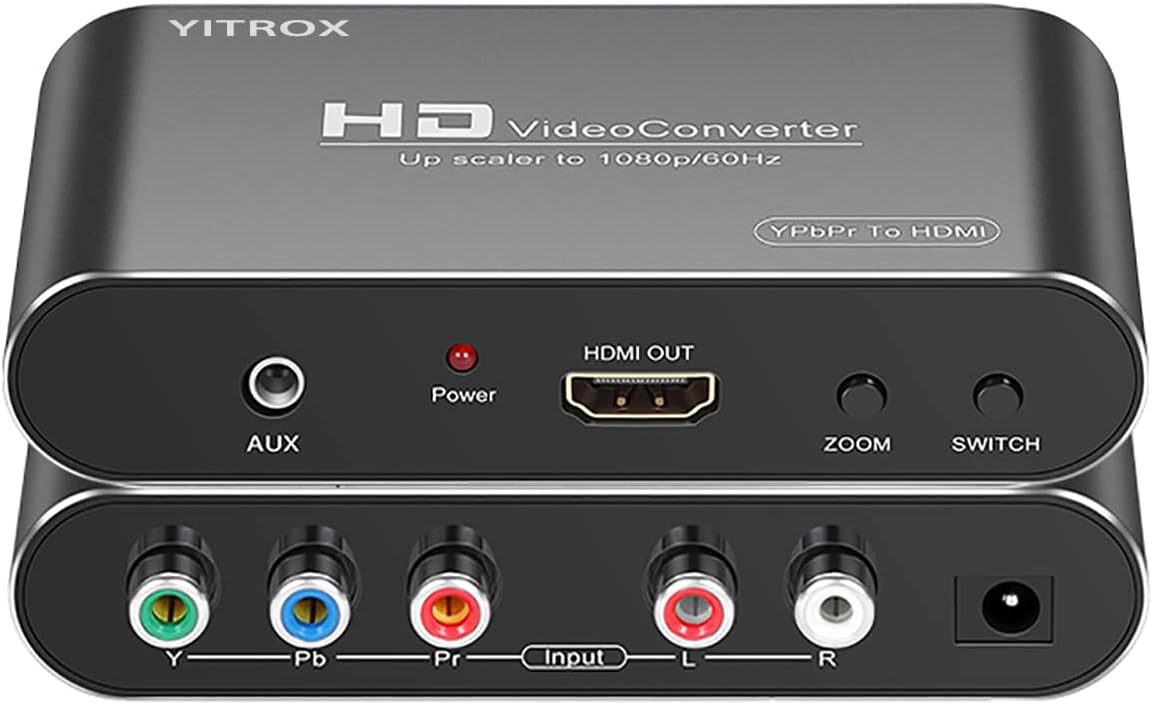
The Component to HDMI Converter is the strongest all-around option in this guide because it combines signal conversion with genuine scaling and picture-control features. Its supplied 4.1 rating reflects a generally capable product, while its five selectable output resolutions and seven zoom modes distinguish it from simple pass-through-style adapters. It is designed to accept analog YPbPr video and R/L audio and deliver an HDMI signal suitable for contemporary televisions and projectors.
We may earn a commission when you buy through this link, at no additional cost to you.
Its most useful feature is the range of output choices, which includes 800×600, 1024×768, 1280×720, 1280×1024, and 1920×1080. The converter can accept common component modes and output progressive 480p, 576p, 720p, or 1080p at 50Hz or 60Hz. Picture-quality controls include gradual enlargement, gradual reduction, and automatic adaptation, giving users more opportunity to fit the console’s image to unusual television dimensions or overscan settings.
The converter also includes image compensation intended to reduce jitter, trailing, and visible noise while improving motion, color, and contrast. These claims should be understood as processing features rather than a promise that the original Xbox can generate detail beyond its native capabilities. An AUX audio port offers an additional way to route sound, and the listed synchronization helps keep converted audio aligned with the picture.
This is a practical recommendation for owners of an original Xbox who already use component video or want broader support for older consoles. You will need a suitable component connection and an HDMI cable, and the product cannot operate in reverse. Despite those requirements, it offers the most adjustable and versatile conversion package among the Xbox-focused options reviewed here.
Resolution switching and seven zoom modes are valuable when a modern display crops the image, stretches it unexpectedly, or leaves large borders. These controls provide practical room to tune the picture after installation without replacing the converter.
The same component-to-HDMI architecture can serve compatible older gaming devices and playback equipment. That makes the converter more useful for a multi-console entertainment setup than a narrowly tailored Xbox cable.
We may earn a commission when you buy through this link, at no additional cost to you.
The Jadebones HDMI Adapter is the simplest recommendation for an original Xbox owner who wants a direct connection to a modern HDTV or monitor. Its 4.4 rating is the highest numerical customer rating among the products with published scores in this list. Rather than trying to act as a general-purpose image processor, the adapter performs a focused job: converting the original Xbox’s YPbPr component signal into HDMI.
We may earn a commission when you buy through this link, at no additional cost to you.
Its plug-and-play approach is one of the biggest advantages. The adapter does not require an external power supply, so setup involves connecting it to the console and linking the adapter and television with an HDMI cable. The listing specifically notes that an HDMI cable is not included, making it important to confirm whether you already have a suitable cable or need to obtain one.
The product description says the conversion is intended to preserve image colors and details while avoiding delay. It also clarifies that the adapter transfers the console’s signal rather than improving the underlying source. That distinction matters when evaluating image quality: the original Xbox’s graphics and the selected display mode determine the source quality, while the adapter provides the route to a compatible screen.
This adapter is best for users who value a short setup, minimal external accessories, and a product made specifically for the original Xbox. It is less suitable for buyers who need selectable output resolutions, manual scaling controls, or a device intended for several different consoles. For that straightforward use case, however, it offers a focused and well-rated solution.
The lack of a separate power supply reduces cable clutter and makes the adapter convenient to install. It is particularly suitable for a straightforward console-to-display arrangement where minimal setup is the main priority.
A dedicated original Xbox design can be easier to recommend than a highly general converter with many settings. The tradeoff is that the product focuses on transfer and compatibility rather than offering broad resolution or zoom controls.
We may earn a commission when you buy through this link, at no additional cost to you.
The 4K Gaming Upscaler is the option to examine when a 4K television or monitor is the main goal and the source can provide a 1080p signal. It is marketed as a converter and enhancer that produces 4K at 60Hz, using image sharpening, color tuning, and depth-of-field enhancement to create a more refined presentation. Unlike the other Xbox-specific adapters, its stated compatibility covers a broad collection of game systems and specialized legacy adapters.
We may earn a commission when you buy through this link, at no additional cost to you.
The original Xbox appears among the supported systems, although users still need to ensure that the console is producing a 1080p signal. The product is not a universal component converter: its setup instructions refer to HDMI-capable 1080p output devices. This distinction is important because a simple original Xbox-to-HDMI adapter may accept component video, whereas this unit expects an appropriate 1080p input signal.
The requirements are exacting. It supports 4K at 60Hz displays rather than 4K at 30Hz, 1440p monitors, or unspecified refresh rates. The instructions also call for HDMI 2.0a or later cables and warn against the original HDMI 1.4 cable. A display with unsupported characteristics may produce a black screen, so model compatibility should be checked before installation.
This upscaler is appealing for enthusiasts who want a modern 4K presentation and own compatible equipment, but it is not the safest recommendation for a simple original Xbox setup. There is no published numerical rating in the supplied data, and the strict input, cable, and display requirements add complexity. The right buyer is informed about HDMI standards and willing to verify the entire signal chain.
The product is aimed at a specific high-bandwidth display target. Confirming that your television or monitor accepts 4K at 60Hz can prevent the black-screen problems described in the instructions.
Support for numerous classic consoles makes this device attractive to collectors. The original Xbox fits within that broader ecosystem, provided its source output and connected cable meet the stated requirements.
We may earn a commission when you buy through this link, at no additional cost to you.
The Retro Video Game Console Converter Adapter is a straightforward component-to-HDMI solution centered on the original Xbox. Its listing identifies compatibility with the console’s native 480i, 480p, 720p, and 1080i modes, providing a useful summary of the image formats the adapter is intended to carry from the console to a modern television.
We may earn a commission when you buy through this link, at no additional cost to you.
Its installation requirements are minimal. The product requires no additional power and is designed to transmit audio and video without separate converters or additional signal cables. It also connects with the original Xbox component cable, allowing the existing console connection to serve as the source for the adapter. This arrangement can create a tidier setup than a loose collection of legacy plugs and low-resolution composite connections.
The claim of vivid colors and digital transmission should be considered in context. Component output preserves more detail than composite video, while the adapter changes the connection format for a modern display. It cannot recreate images that the source and game did not contain, but it avoids the limitations of an analog composite-only route when paired with the appropriate original Xbox component cable.
This adapter is a sensible option for buyers who prioritize a simple, powered-free connection and do not require 1080p output. The lack of a published rating in the supplied information means there is no numerical customer feedback to weigh, so installation compatibility and the stated native modes should guide the decision.
Because no additional power is required, the adapter avoids an additional wall adapter and keeps the installation uncomplicated. The console’s component connection remains the primary source.
Supporting 480i, 480p, 720p, and 1080i covers the principal original Xbox display modes. It is a strong fit for displays that do not require or accept 1080p from a converter.
We may earn a commission when you buy through this link, at no additional cost to you.
The HD Link Cable for Original Xbox System is designed for buyers who prefer a console-specific cable over a general-purpose converter box. It carries a 4.1 rating, providing some basis for comparison with the other products that have published scores. Its primary appeal is simplicity: the product is presented as the direct link between an original Xbox and an HDMI-equipped display.
We may earn a commission when you buy through this link, at no additional cost to you.
Compared with an adapter that requires a separate component cable and HDMI lead, a dedicated HD Link design can make the console area look cleaner and reduce the number of connections that need to be managed. It is also a more focused purchase: rather than carrying settings and input options for several different legacy devices, it is intended specifically for the original Xbox.
The limitation is that the supplied product information offers almost no technical detail. It does not list the supported output resolution, whether a separate HDMI cable is required, whether audio is included, whether external power is needed, or which original Xbox models are supported. Those details can materially affect whether a cable works with a particular television, projector, or monitor.
The HD Link Cable is therefore best considered when you want a dedicated solution and can verify the current package contents and technical requirements from the seller. Its 4.1 rating makes it a credible option, but the limited documentation means the installation should be checked before disconnecting an existing working setup. For buyers who require published resolution details, one of the more thoroughly specified adapters may be easier to evaluate.
A purpose-built link reduces the visual complexity of connecting the original Xbox to a modern screen. It can be a convenient option for a permanent console installation with limited cable space.
The limited listing information leaves important questions about power, resolution, and included cables. Confirming those details with the current seller prevents an otherwise simple purchase from becoming a troubleshooting exercise.
We may earn a commission when you buy through this link, at no additional cost to you.
The Hyperkin Panorama HD Cable stands apart through its official Xbox licensing, a distinction that can matter to collectors who value recognizable accessories designed for the original console. It is compatible with all original Xbox models and HDTVs, and the product listing states that it supports up to 1080i depending on game compatibility.
We may earn a commission when you buy through this link, at no additional cost to you.
Its seven-foot length provides more placement flexibility than a short fixed adapter lead. This is useful when the console sits on a shelf away from the television or when the display has side- or rear-mounted HDMI ports. The listing also describes clear picture quality and crisp audio, indicating that the cable is intended to carry both presentation quality and sound through a modern connection.
The principal limitation is that 1080i is the highest stated output. The original Xbox can support multiple signal modes, but game-specific compatibility and the cable’s capabilities may limit which mode appears. Owners seeking a scaler with selectable 1080p output, zoom controls, or processing features should look beyond this dedicated licensed cable.
The Hyperkin is a compelling pick for authenticity-focused collectors and for straightforward original Xbox installations. Its 3.8 rating is lower than those of several alternatives, but official licensing, broad console compatibility, and a practical cable length provide a distinct benefit. It is best for users who prioritize a trusted accessory ecosystem and HDTV convenience over advanced scaling controls.
An officially licensed accessory can offer reassurance for collectors building an original Xbox setup. The product is explicitly designed around original Xbox models and modern HDTV use.
The seven-foot lead gives users more freedom when routing the console and television. That flexibility can reduce the need for additional extension adapters in a permanent installation.
We may earn a commission when you buy through this link, at no additional cost to you.
The Y.D.F Cable is built specifically for the original Xbox and converts its YPbPr audio and video output for use with an HDTV, monitor, or projector. Its 3.9 rating places it near the middle of the available published ratings. The adapter supports 480i, 576i, 480p, 720p, and 1080i, giving it a clear list of the console modes it is designed to carry.
We may earn a commission when you buy through this link, at no additional cost to you.
A notable feature is the physical ON and OFF switch. When the console is not in use, the adapter can be switched off directly rather than remaining powered. This provides simple control over the converter and can reduce unnecessary standby power use. The plug-and-play format also means the setup does not require a complicated configuration process once the console is configured correctly.
The product is explicit about its purpose: it is compatible only with the original Xbox and does not improve video quality. It transfers the highest picture quality the console can provide for the selected game and display mode, but it cannot add missing detail or turn unsupported game output into a higher-resolution source. That honesty makes it easier to set expectations before installation.
This cable is a good fit for a focused original Xbox setup, especially when an on-off control is valued. It is less versatile than the multi-console scalers in the list and tops out at 1080i. Buyers seeking one converter for several retro systems should choose a broader option, while original Xbox enthusiasts can appreciate the dedicated format.
The built-in on-off switch makes it easy to deactivate the adapter when the console is idle. It adds a level of control that many compact converters do not provide.
The product converts the console’s native output without claiming to create new source detail. This makes it suitable for owners who want a reliable path to a modern display rather than artificial upscaling.
We may earn a commission when you buy through this link, at no additional cost to you.
The COMeap Xbox AV Cable is a complete connection kit for an original Microsoft Xbox moving to a modern display. Unlike products that accept the console’s component signal, this package uses the familiar red, yellow, and white RCA connectors. Its converter is specified for PAL and NTSC sources and can output 720p or 1080p to an HDMI television, monitor, or similar device.
We may earn a commission when you buy through this link, at no additional cost to you.
The package includes the Xbox AV cable, an AV-to-HDMI converter, a USB power cable, and a six-foot HDMI cable. Including the required display cable makes the kit more complete for buyers who are starting without a modern connection. The included HDMI lead supports 4K at 60Hz and 18Gbps bandwidth, although the converter’s source remains limited by the Xbox’s composite signal.
Setup is described as a straightforward three-step process: connect the console to the converter, connect the converter to the television with the HDMI cable, and provide USB power. The converter is also compatible with other devices that have suitable RCA output, including older set-top boxes, players, and other legacy equipment, according to the listing.
This is the most accessible package for a user who has only the original Xbox’s basic AV connection or who wants everything in one box. The 3.8 rating is modest, and a composite source will not provide the detail available through a component connection. Even so, the included converter and HDMI cable reduce shopping complexity and make the system a practical entry point for casual retro gaming.
The supplied AV lead, converter, USB power cable, and HDMI cable cover the major parts of a new installation. This reduces the chance of discovering that an essential cable or power connection is missing.
The converter’s broader support for PAL and NTSC devices can extend its life beyond the Xbox. A common legacy-to-HDMI pathway may be useful in a mixed retro entertainment area.
We may earn a commission when you buy through this link, at no additional cost to you.
The Mcbazel OSSC is the premium and most technically specialized product in the guide. It is an open-source scan converter designed for RGB-equipped retro gaming hardware, with support listed for platforms such as Spectrum, Amiga, SNES, PAL GameCube, Saturn, Mega Drive, and PlayStation. Its 4.1 rating reflects a generally positive reception among the products with published feedback.
We may earn a commission when you buy through this link, at no additional cost to you.
The OSSC is not a plug-in original Xbox solution. It requires a suitable high-quality SCART cable with RGB connections, and the listing explicitly warns that it will not work with converted or split cable arrangements. An original Xbox owner would normally need to modify the console or use an appropriate component-to-RGB pathway so that the console can provide the RGB signal the device expects.
For collectors who have already invested in RGB-modded consoles or high-quality SCART cabling, the reward is a purpose-built scan-conversion device rather than a general component adapter. The package includes the converter, remote control, US-plug power supply, and manual. Two AAA batteries for the remote are not included, and the SCART cable must be sourced separately.
This recommendation is best for an enthusiast willing to handle the console modification and cable requirements. It is not the logical first choice for a plug-and-play original Xbox setup, but among the ten products it offers the most deliberate retro display architecture. Those who value RGB signal paths, remote control, and support for a wide classic console library will find the premium positioning justified.
The OSSC is engineered around native RGB signals from suitably equipped retro systems. That focus is different from adapting the original Xbox’s component output, and it rewards collectors who understand the distinction.
Support for a broad range of RGB-capable systems makes the device a central component in a serious retro setup. One specialized converter can serve several consoles when the necessary cables and signal outputs are present.
We may earn a commission when you buy through this link, at no additional cost to you.
The HD Link HDMI Cable is a compact converter for the original Xbox with selectable 720p and 1080p output. Its 3.6 rating is the lowest published customer score among the rated products in this guide, so it requires careful consideration. The design combines the Xbox-side converter and an HDMI connection into a one-meter cable intended to keep the setup relatively tidy.
We may earn a commission when you buy through this link, at no additional cost to you.
A button on the converter allows the user to choose between 720p and 1080p. The listing describes HDMI output without delay and states that the cable can connect the console to an HDMI television or monitor. Because the HDMI lead is integrated, users do not have to buy a separate male-to-male HDMI cable for the display side of the setup.
External power is required through the supplied micro USB cable before use. The package contains the Xbox-to-HDMI cable and a micro USB power cable, but it does not include a USB wall adapter. This is an important distinction for setup planning: a nearby USB power source or a compatible USB power adapter must be available.
This adapter is most suitable for buyers who want direct 1080p or 720p selection, an integrated display cable, and a compact original Xbox arrangement. Its lower rating may reflect variability that cannot be diagnosed from the supplied information, so the seller’s current warranty and support details deserve attention. A higher-rated dedicated option may offer greater peace of mind, but this remains a functional choice for the right setup.
The built-in HDMI connection reduces the number of separate leads at the television. It can be particularly convenient for a compact or temporary console arrangement.
The converter must be powered through its included micro USB cable before use. Since a wall adapter is not included, have a suitable five-volt USB source ready or confirm the necessary adapter with the seller.
We may earn a commission when you buy through this link, at no additional cost to you.
Choosing an original Xbox upscaler requires matching the console’s signal format to the converter, display, and available cables. Resolution claims, latency, audio support, power requirements, and installation complexity deserve attention before purchase.
The original Xbox can provide different video signals depending on the console configuration, cables, and display settings. The most useful dedicated adapters accept YPbPr component video because it carries substantially more image detail than the red-yellow-white composite connection. The COMeap kit instead takes composite RCA video and converts it to HDMI, which makes setup easier but places a lower ceiling on source quality. Do not assume that an adapter accepting a particular plug will accept the original Xbox’s signal; verify the input connectors on both the converter and console.
Choose component input when picture quality matters and you already own or can obtain the correct Xbox component cable. Choose composite input when simplicity, a complete cable kit, or compatibility with other RCA devices is the priority.
An upscaler should be judged partly by the output modes it actually supports. Several products list 1080i, while the most flexible converter in the guide offers selectable output up to 1080p. The dedicated 4K product targets 4K at 60Hz but accepts only a 1080p input and has strict display and cable requirements. Resolution marketing should not be interpreted as original Xbox graphics being rendered natively at that resolution.
List every mode you need and verify the television’s supported formats. If a converter offers several output resolutions, switching options can also help with overscan, aspect-ratio problems, or displays that do not accept the console’s preferred mode.
Dedicated Xbox adapters usually convert YPbPr component output to HDMI, allowing the console to remain on a modern digital connection. A composite converter uses the older RCA video path, which is more universal but less detailed. The Mcbazel OSSC follows a different route entirely: it is a scan converter built for RGB signals and requires compatible hardware or modification. These are not interchangeable approaches.
Match the method to the signal you can actually deliver. Component-to-HDMI is the most conventional original Xbox choice, composite-to-HDMI prioritizes accessibility, and RGB scan conversion is intended for advanced retro setups.
Power needs vary across the list. The Component to HDMI Converter, Jadebones adapter, and Retro Video Game Console Converter Adapter do not require external power. The Y.D.F product includes a physical on-off switch, while the COMeap converter and the compact HD Link adapter require USB power. The Mcbazel includes a US-plug power supply but not the SCART cable needed to connect compatible RGB hardware.
Inventory the cables and power connections in your setup before ordering. Confirm whether an HDMI cable, component cable, USB power adapter, SCART cable, or console modification is required and whether it is included.
A converter cannot display anything unless its output matches the television, projector, or monitor it is connected to. The 4K Gaming Upscaler supports only 4K at 60Hz according to its instructions and may show a black screen with a 4K at 30Hz display or a 1440p monitor. It also requires HDMI 2.0a or later instead of the original HDMI 1.4 cable. Other products are less explicit, so check the manual or seller information for supported refresh rates and resolution formats.
A simple 1080p-capable screen may be easier to pair with a basic adapter. A modern 4K display gives more room to use a dedicated scaler, but only when every cable and source in the chain meets the device’s requirements.
The best setup carries game sound and picture through one reliable connection. The Component to HDMI Converter accepts R/L audio and includes an auxiliary audio port, while the dedicated adapters generally describe video and audio transmission together. The COMeap package includes both yellow and white RCA audio connectors. Check whether your chosen adapter includes the console-side audio lead and whether any separate optical or analog connection remains necessary.
A converter that provides synchronized audio is preferable to routing game sound through a different device with added delay. When using separate audio, verify that the television’s latency does not create a noticeable mismatch.
A scaler can do more than translate a connector. The leading general converter offers five output resolutions, seven zoom modes, gradual enlargement and reduction, and automatic adaptation. Those controls help when a television crops the image or stretches it to fill the panel. Simple cable adapters generally focus on signal transfer and may provide no adjustment beyond the console’s own display settings.
Picture processing is not the same as recovering original Xbox detail. A dedicated converter can sharpen, resize, and optimize an image, but the underlying game output remains the source. Prioritize accurate color and clean presentation rather than expecting a converter to reproduce modern console graphics.
Official licensing, included remote controls, physical switches, and complete accessory bundles can improve the ownership experience, but they do not guarantee better signal quality. The Hyperkin cable is officially licensed, the Mcbazel includes a remote and power supply, and the COMeap includes the essential leads. Some simpler products offer only the converter itself. Ratings and documented specifications provide a better basis for comparison than packaging alone.
Check the current package contents, warranty information, and seller support. A product with a clearer manual and accessible troubleshooting guidance may be more valuable than one with an attractive feature list but incomplete documentation.
Begin by identifying the original Xbox’s current video output. If the console is connected through the red-yellow-white composite plugs, decide whether to retain that route or use a compatible component cable for better source detail. For component-based adapters, connect the red, green, and blue video plugs plus the red and white audio plugs, then use the appropriate HDMI output and display input.
Power the converter according to its instructions. Products that require USB power should be connected to a suitable five-volt source before the television is switched to that HDMI input. If the screen remains black, verify the source mode, selected output resolution, cable specification, and television input. The 4K model also requires a 4K at 60Hz display, HDMI 2.0a or later cabling, and a 1080p source.
For best results, change the resolution and picture-size options from the television or converter menus, then adjust the console’s display mode as needed. Keep the converter ventilated, avoid placing it beneath a closed entertainment cabinet, and inspect cables for pinching or damage. Disconnect power before changing connections, and do not use an RGB scan converter with a standard composite or split original Xbox cable.
Usually, no. Most dedicated original Xbox HDMI adapters accept the console’s YPbPr component output, so a compatible component cable is the normal connection. The Mcbazel OSSC is different because it expects an RGB signal and may require console modification. Confirm the converter’s input type before assuming any adapter is directly compatible.
An upscaler can resize, sharpen, and optimize the transferred image, but it cannot recreate artwork, textures, or polygons that the original Xbox never produced. A component connection begins with a better source signal than composite video, while the converter makes that signal available to a modern display. Real improvements come from using a stronger source signal and a suitable display rather than expecting processing to transform the game.
The Component to HDMI Converter, Jadebones HDMI Adapter, and Retro Video Game Console Converter Adapter are described as requiring no external power supply. The Y.D.F product has an on-off switch, while the COMeap and compact HD Link models require USB power. Confirm the current manufacturer information before installation because connector designs and bundled accessories can change.
Begin by checking that the television is on the correct HDMI input and that the console is producing a supported resolution. Then verify that the component cable is fully seated, the converter has power if required, and the selected output matches the display. The 4K model also requires a 1080p input, a 4K at 60Hz display, and HDMI 2.0a or later rather than an HDMI 1.4 cable.
Yes. Component video separates the picture into red, green, and blue channels and carries more detail than the combined yellow composite connector. The COMeap composite-to-HDMI kit is convenient because it includes the required leads, but a component-capable converter is generally the better starting point when the goal is the cleanest original Xbox image.
No. The specific 4K Gaming Upscaler requires HDMI 2.0a or later because it targets 4K at 60Hz, while the other products have different and sometimes less clearly stated requirements. For most basic 1080p adapters, a standard compatible HDMI cable is sufficient. Always check the resolution and refresh rate supported by the converter, the display, and the cable as a complete system.
Some can. The Component to HDMI Converter lists support for several legacy consoles, the 4K Gaming Upscaler covers numerous gaming platforms, and the COMeap converter accepts compatible RCA sources. Dedicated Xbox products are more focused. If you own multiple systems, verify connector types, signal standards, power requirements, and compatible output modes before making a multipurpose purchase.
Choose the highest mode that both your converter and display support reliably, while understanding that the original Xbox source remains limited. A 1080p-capable display is well suited to most dedicated adapters, but there is little reason to choose a demanding 4K converter unless your setup meets its 1080p-input, 4K-at-60Hz, and HDMI 2.0a requirements.
The Component to HDMI Converter is the leading recommendation for most original Xbox owners because it combines component conversion, selectable output resolutions, multiple zoom modes, audio support, and compatibility with other legacy devices. The Jadebones HDMI Adapter is the streamlined alternative for buyers who want a dedicated Xbox product, a 4.4 rating, and no external power.
Prioritize the signal path before any headline feature. Component-to-HDMI generally offers a better source than composite, while the Mcbazel OSSC serves a different, more advanced RGB-based retro ecosystem. Check cables, power, supported output modes, and television compatibility before purchasing any converter, and favor a product whose documentation clearly matches your equipment.
Product specifications, package contents, ratings, and prices can change, so review the current listing before making a final decision. The right original Xbox upscaler is not necessarily the one with the most advanced conversion; it is the one that connects cleanly, produces a supported image, and fits your display and cable setup with minimal troubleshooting.

