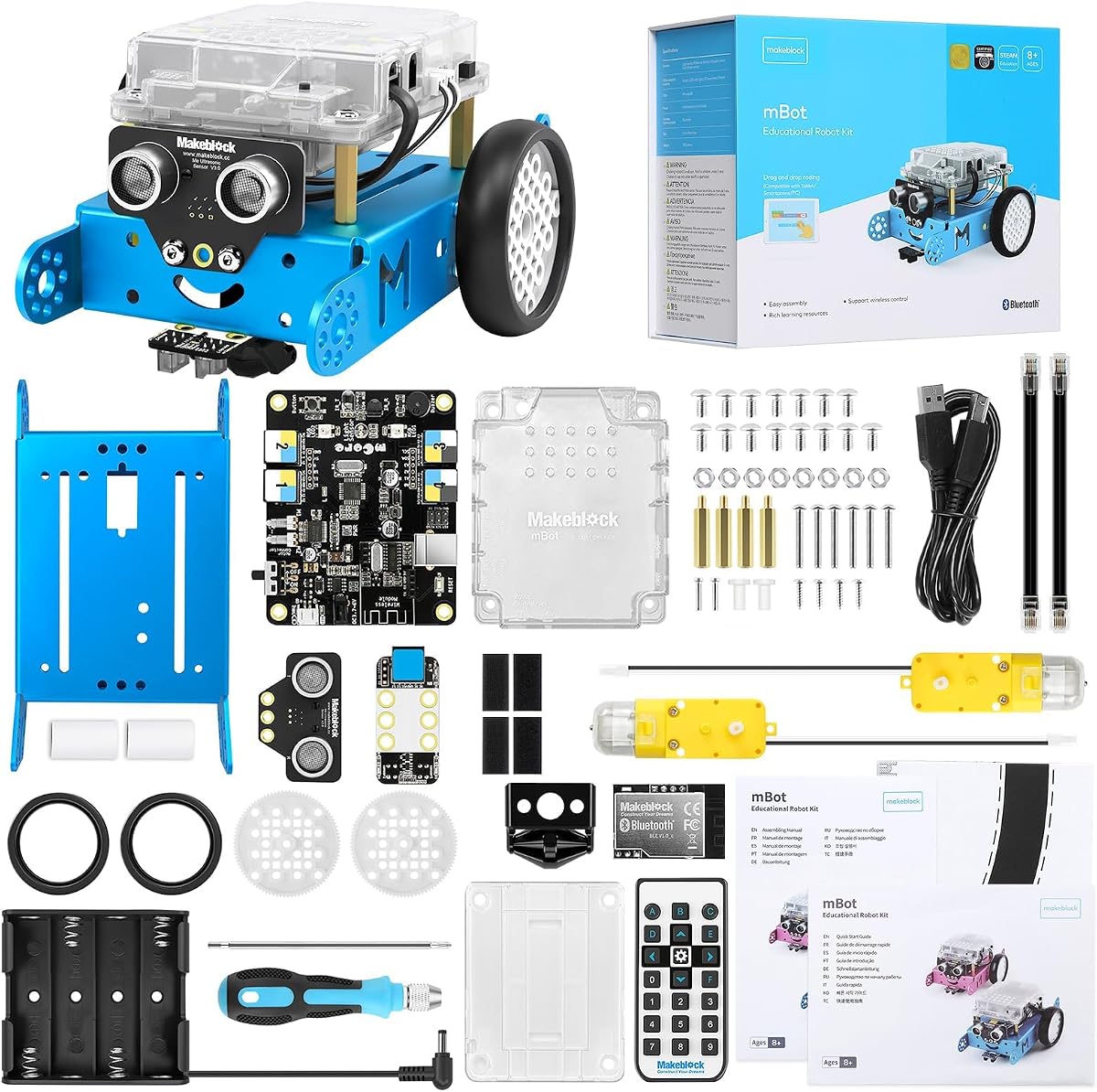
Makeblock mBot STEM Coding Toys Robotics for Kids Ages 8-12
4.6Editor score
Quick fifteen-minute assembly
Scratch and Arduino pathways
Broad add-on compatibility
Explore the best Arduino robot kits for beginners, students, and makers, comparing features, compatibility, learning resources, build options, and robot types.
Arduino robot kits combine hands-on electronics, mechanical construction, and programmable control into projects that can move, sense, react, and evolve with a builder's skills. The strongest options offer clear instructions, accessible software, meaningful sensors, and enough flexibility to remain engaging beyond the first successful run.
This guide compares ten Arduino robot kits by examining controller compatibility, assembly difficulty, autonomous behaviors, camera support, control methods, expansion potential, and educational resources. It covers beginner-friendly cars and tanks as well as balancing robots, robotic arms, multipurpose starters, and advanced hexapods.
Each review explains what the kit does best, where its trade-offs appear, and which learner it suits best. Ratings and specifications reflect the supplied product information, while product availability and pricing can change, so readers should confirm current details before purchasing.
4.6Editor score

4.5Editor score

4.3Editor score
The table below highlights the main differences in robot form, control board, autonomous functions, programming approach, and build complexity, making it easier to match a kit with a learner's experience and interests.


The ELEGOO UNO R3 Smart Robot Car Kit V4 combines an approachable UNO R3 platform with a camera-equipped ESP32-WROVER module, producing one of the most versatile all-around Arduino robot experiences in this guide. Its 4.5 rating reflects a balanced package that supports driving, observation, autonomous navigation, and increasingly advanced coding rather than limiting builders to a single demonstration.
We may earn a commission when you buy through this link, at no additional cost to you.
Its standout feature is the combination of first-person video with line tracking and ultrasonic obstacle avoidance. Builders can maneuver with the ELEGOO app or IR remote, watch the onboard camera, and then study code for movement and sensor logic in Arduino IDE. Keyed XH2.54 connectors, illustrated instructions, and example programs reduce the chance that wiring mistakes will interrupt the learning process.
The included ELEGOO UNO R3, camera and Wi-Fi module, line-tracking and ultrasonic sensors, motors, remote, and rechargeable battery create a comparatively complete project. The trade-off is complexity: younger children will likely need adult help connecting modules, aligning sensors, and completing the first chassis build. The assembly is more involved than a simple line-following kit.
This is the strongest general recommendation for a family, classroom, or maker who wants one Arduino robot that can begin with guided operation and progress into custom code. Choose it when live video, meaningful autonomous behavior, and a familiar Arduino programming environment matter more than the shortest possible assembly time.
The FPV camera and Wi-Fi module let builders connect visual observation to programming. That makes it possible to create navigation challenges, inspect paths, and understand why a sensor-triggered action succeeds or fails instead of treating autonomous driving as a black box.
Guided wiring and example programs support the first build, while Arduino IDE access allows modification of routes, reactions, speed settings, and control logic. This creates a natural progression from operating the finished car to understanding the code that drives it.
We may earn a commission when you buy through this link, at no additional cost to you.
The Makeblock mBot is designed to make the transition from toys to real robotics approachable for children ages 8 to 12. With a 4.6 rating, it is the highest-rated product in this comparison and stands out for its quick build, approachable controls, and unusually broad expansion platform.
We may earn a commission when you buy through this link, at no additional cost to you.
The mBot supports line following, obstacle avoidance, remote-control operation, and programming through mBlock, three Makeblock apps, and coding cards. The same platform can also lead into Arduino, giving younger children a visual starting point while older learners explore text-based control. Its compatibility with more than 100 electronic modules, 500-plus parts, and LEGO components gives projects room to expand.
Its most significant practical limitation is battery handling: the robot needs four AA batteries, and the remote requires a CR2025 battery, neither of which is included. Users must also accept a less mechanically advanced experience than a tracked tank, balancing car, or modular arm. These are meaningful considerations when comparing capability rather than simply initial cost.
For a child beginning STEM study, the mBot is an exceptionally balanced entry point. It is easy to assemble, visually approachable, and connected to a large support ecosystem. It also works for adults who want a simple platform for learning Scratch, electronics, and introductory Arduino programming.
The stated goal is to complete the build within 15 minutes, which reduces the time between opening the package and operating the robot. Clear instructions also let a child take ownership of assembly instead of simply receiving a finished device.
mBlock and the included learning resources make visual programming approachable, while Arduino support provides a route toward more formal code. The add-on ecosystem means a learner can keep the same core robot while moving into new mechanisms, sensors, and challenges.
We may earn a commission when you buy through this link, at no additional cost to you.
The ELEGOO Conqueror Robot Tank Kit turns the familiar UNO R3 into a tracked, camera-equipped robot intended for navigation experiments, patrols, maze challenges, and black-line courses. Its 4.4 rating reflects a capable platform that combines durable mechanical construction with a generous feature set.
We may earn a commission when you buy through this link, at no additional cost to you.
Five operating modes cover FPV driving, infrared remote control, obstacle avoidance, line tracking, and auto-follow. The OV2640 camera sits on an adjustable servo mount and streams through an ESP32-WROVER Wi-Fi module, while ultrasonic and line-tracking modules provide the autonomous sensing foundation. Builders can start with visual programming in the ElegooKit app and progress to Arduino IDE.
The stainless-steel chassis, tracks, suspension, UNO R3, camera, sensors, motors, servos, remote, battery, tools, and illustrated instructions make this a comprehensive package. The same scope also creates a steeper learning curve. Mechanical assembly, track alignment, camera installation, and multiple module connections require more time and patience than the mBot or a basic car.
Choose the Conqueror for a learner who wants a substantial, visually interesting tank rather than a simple coding toy. It is particularly suitable for older students, dedicated robotics clubs, and builders ready to handle a multistage assembly. The combination of tracks, camera, autonomous navigation, and Arduino customization offers considerable long-term educational value.
A metal tracked platform is visually distinctive and mechanically different from the Mecanum wheels and conventional wheels found elsewhere in the guide. It creates an appealing foundation for crawler-themed projects, obstacle courses, and navigation experiments.
The ElegooKit app gives beginners a visual route into behavior, while Arduino IDE exposes motor speeds, sensor thresholds, servo movement, and navigation logic. Infrared and live camera control add immediate ways to test the completed machine.
We may earn a commission when you buy through this link, at no additional cost to you.
The ELEGOO Tumbller is an unusual Arduino project because its defining goal is not simply driving across a floor but remaining upright on two wheels. Its 4.5 rating and six-mode feature set make it a compelling choice for builders interested in feedback control, motion sensing, and real-time motor adjustment.
We may earn a commission when you buy through this link, at no additional cost to you.
Operating choices include IR remote control, mobile app control, auto-follow, obstacle avoidance, bounce mode, and six LED effects. The illustrated tutorial guides builders from chassis assembly and wiring to startup, while example code and reserved I/O pins offer ways to adjust movement, distance rules, lighting, and control logic in Arduino IDE.
A self-balancing mechanism can be less forgiving than a standard three- or four-wheel car during early testing. Builders may need patience while learning how sensor readings, timing, and motor corrections affect stability. It also offers fewer obvious expansion paths than a modular kit whose chassis can be converted into several different forms.
The Tumbller is ideal for a curious learner who wants to understand why a robot stays upright. It also makes an engaging demonstration for a classroom, maker event, or science-fair project. Rather than treating it as a general-purpose expansion platform, buyers should select it for the specific appeal of balance, feedback, and a visibly unconventional robot.
Keeping the two-wheel robot upright requires the control system to interpret motion and respond quickly. That makes the project valuable for learners who want to see a direct relationship between sensor data, motor commands, and physical behavior.
Auto-follow, obstacle avoidance, remote control, bounce mode, and LED effects make the robot useful for repeated demonstrations. The included rechargeable system also supports convenient ongoing testing without designing around disposable battery changes.
We may earn a commission when you buy through this link, at no additional cost to you.
The ACEBOTT Smart Robot Car uses 6 cm omnidirectional Mecanum wheels to move forward, sideways, diagonally, rotate, drift, and negotiate confined spaces. Its 4.2 rating reflects a mechanically versatile platform with a broad expansion system, even if it sits below the highest-rated kits in this comparison.
We may earn a commission when you buy through this link, at no additional cost to you.
An ESP32 controller and 16 story-rich tutorials introduce programming and electronic hardware in stages. The robot supports infrared remote and app control, multi-way cruising, multi-direction obstacle avoidance, and a follow mode. Optional camera, robotic-arm, tank, and solar expansion packs can introduce image capture, image or voice recognition, extra mechanisms, and a different chassis style.
The package does not include batteries, which means new owners must select suitable power cells and confirm the tutorial's requirements before beginning. Its large number of possible configurations may also feel more complicated than the guided experience offered by a simpler starter set. These factors should be weighed against the exceptional directional control.
The ACEBOTT car is a strong fit for older children, teens, and makers interested in movement geometry or a modular robotics path. It gives learners access to interesting omnidirectional driving while preserving a clear progression from basic operation to more advanced ESP32 programming.
Four omnidirectional wheels allow the chassis to travel in several directions without turning toward the target. This creates opportunities for precise maneuvering challenges and helps builders understand how wheel arrangement affects a robot's movement.
Camera, arm, tank, and solar options let the base robot evolve into substantially different machines. The range is particularly valuable for classrooms or families seeking one ecosystem that can support multiple project phases.
We may earn a commission when you buy through this link, at no additional cost to you.
The LAFVIN R3 is a camera-equipped smart car built around the ESP32-S3 and designed for both Wi-Fi video and remote movement. Its 4.5 rating places it among the stronger options here, particularly for builders who want an open-source learning environment and a relatively compact FPV platform.
We may earn a commission when you buy through this link, at no additional cost to you.
Real-time video can be received on mobile devices, which also serve as a controller for the car and its pan-tilt unit. Five intelligent modes cover obstacle avoidance, infrared remote control, line following, object following, and FPV transmission. Free learning resources, project tutorials, and open-source code provide material beyond the initial build.
Full self-assembly is required, so buyers looking for a nearly ready-to-run robot may find the process demanding. Easy-to-connect sensor interfaces lessen wiring difficulty, but the open-source ecosystem may not provide the same tightly guided learning sequence as a kit structured around video courses and prescribed projects. That makes independent motivation important.
The R3 works well for a learner who is comfortable moving between tutorials, code examples, and hardware experiments. It is especially attractive for FPV experimentation, remote observation, and projects involving object or line tracking. Users should also confirm their preferred devices and software are compatible before committing to it.
Live video and wireless movement make the robot feel more like a small exploratory vehicle than a standard coding car. The controllable pan-tilt camera adds another programming target and helps builders reason about camera position relative to navigation.
Free tutorials and source code give learners material to examine and modify. This is valuable for self-directed students, although beginners who prefer tightly sequenced assignments may find a course-based kit easier to follow.
We may earn a commission when you buy through this link, at no additional cost to you.
The ACEBOTT 4 in 1 Smart Robot Arm combines a wheeled base, a tank-track expansion, and a five-degree-of-freedom robotic arm in one modular system. Its 3.9 rating is the lowest among the selected kits, but the product still targets a clear and worthwhile goal: letting builders create several robot styles while learning manipulation as well as movement.
We may earn a commission when you buy through this link, at no additional cost to you.
The arm can grab, lift, and place objects, while rubber tank tracks are intended for grass, gravel, slopes, and carpet. Builders can assemble a robotic-arm car, a tank, or a combination of both. An ESP32 controller, 16 story-based tutorials, HD assembly videos, and compatibility with Arduino and Scratch support different learning preferences.
This is the most mechanically expansive kit in the guide, but that breadth creates complexity. The product information uses overlapping age references, and the assembly videos must be located through ACEBOTT's official website rather than being included directly. The 3.9 rating also suggests that buyers should examine recent customer feedback carefully for fit, finish, and support issues.
The kit makes most sense for motivated older students, makers, and adults who want a substantial multi-format robotics project. It is less suitable for a child seeking a quick first build. When the arm and interchangeable tracked configuration are central to the learner's interests, the additional complexity becomes part of the educational value.
A five-DOF arm introduces coordinated joint movement and object handling. That gives learners a different kind of coding challenge from simple wheel commands, especially when they need to coordinate arm position, gripper action, and vehicle movement.
The ability to rebuild the platform in several configurations supports comparison between drivetrains and body styles. For a teen or adult, that can provide a more sustained project sequence than operating one permanently assembled robot.
We may earn a commission when you buy through this link, at no additional cost to you.
The SunFounder Ultimate Starter Kit is designed as a broad learning system rather than one predetermined robot. Its 4.5 rating reflects a generous 192-item component set, an Arduino-compatible UNO, online tutorials, video courses, and 87 projects spanning basic electronics, IoT, sensor integration, and smart cars.
We may earn a commission when you buy through this link, at no additional cost to you.
The three-in-one structure divides learning into a basic path, an IoT route, and a smart-car route. Builders can begin with simple LED blinking and progressively reach connected devices, autonomous behavior, and more advanced applications. Expert-designed courses and a community forum support learners who want structure without being restricted to a single chassis.
The breadth is both its main benefit and primary trade-off. A buyer who specifically wants to assemble and drive a robot may find the abundance of parts less focused than a dedicated kit. Sorting, identifying, and storing 192 components can also create overhead for a young child working without adult organization.
Choose SunFounder when the goal is broad electronics literacy and a carefully paced curriculum. It is especially useful for families beginning with Arduino, homeschoolers, and classrooms that want multiple project directions. Once a learner discovers an interest in a particular robot or IoT application, the included foundation should provide a useful place to develop it.
Online video courses and 87 projects give the parts a purpose. A learner can follow a sequence instead of experimenting randomly, which is especially useful when the large component selection would otherwise make the kit feel overwhelming.
Basic electronics, connected projects, and smart-car construction provide distinct directions. The structure lets children explore widely while still moving through progressively more demanding material and combining sensors with actuators.
We may earn a commission when you buy through this link, at no additional cost to you.
The Makeblock mBot Ultimate 10 in 1 is the most advanced platform in this guide, designed for teenagers, adults, and makers who want to move from simple block coding into sophisticated robotics. Its 4.3 rating reflects a powerful and durable system, although the platform demands more time and technical commitment than entry-level kits.
We may earn a commission when you buy through this link, at no additional cost to you.
Ten buildable models include a robotic arm and a remote-controlled tank, all using a MegaPi controller. Builders can begin with drag-and-drop mBlock programming, progress to text-based Arduino IDE work, and extend the platform with Python through Raspberry Pi. The MegaPi board can drive multiple motors and servos in coordination, while sensors support autonomous obstacle avoidance and other machine behaviors.
High-strength aluminum alloy components add a more substantial feel than typical plastic classroom kits. The trade-offs are the scale of the undertaking, the need to source six AA batteries, and the greater complexity of advanced control work. A younger child may need substantial help, while an adult learner can treat the kit as a long-term maker platform.
This is the premium selection for a household that wants one substantial robotics system rather than a small introductory toy. It suits ambitious teens, adult hobbyists, makerspaces, and multi-week classroom programs. Buyers should be comfortable with assembly and willing to work through documentation, wiring, and code as the robot becomes more capable.
The large number of configurations turns the kit into a collection of projects. Builders can compare different mechanisms, solve different tasks, and develop familiarity with the shared control platform instead of completing a single fixed demonstration.
mBlock, Arduino IDE, and Raspberry Pi with Python form a coherent progression from visual blocks to text and connected computing. That makes the kit attractive for learners ready to explore motor coordination, sensors, autonomy, and machine vision.
We may earn a commission when you buy through this link, at no additional cost to you.
The Freenove Hexapod Robot Kit offers a dramatically different experience from wheeled cars and tracked vehicles. Its 4.1 rating reflects a distinctive six-legged design in which each leg uses three motors and every motor is controlled independently, creating rich opportunities for studying coordinated walking mechanics.
We may earn a commission when you buy through this link, at no additional cost to you.
A prewritten code library lets builders produce sophisticated movement with only a few lines of code, and a complete assembly guide and code are provided through a downloadable tutorial linked from the product box. The included remote provides wireless control, while the Freenove app supports Android phones and tablets, iPhones, and computers running Windows, macOS, or Raspberry Pi OS.
Assembly is mandatory and substantial because the builder must construct and align the multi-jointed legs and servo system. The battery is not included, and there is no paper tutorial; buyers must locate the download and choose a compatible power source. These points add preparation before learning can begin, but they are understandable for a specialized hexapod project.
The kit is best for older robotics enthusiasts who want to explore biomechanics, servo coordination, and walking algorithms rather than a straightforward classroom car. It is visually memorable and unusually interactive, but the dedicated construction effort should be considered part of the experience rather than an unexpected inconvenience.
Three motors on each of six legs allow the robot to walk, crawl, and twist through coordinated joint positioning. It provides a more advanced control challenge than a standard differential-drive car and opens the door to experimenting with gait patterns.
Prewritten functions and example code make it possible to focus on coordinating movement instead of recreating every servo command from scratch. Builders can first master basic control, then study or modify the underlying logic as their skills improve.
We may earn a commission when you buy through this link, at no additional cost to you.
The right Arduino robot kit depends on the learner's age, preferred programming environment, available assembly support, and interest in cameras, autonomous behavior, manipulation, or mechanical movement. These factors are more important than the number of parts advertised by a kit.
A first robot should be approachable enough to produce a working build without excessive frustration. Younger children generally benefit from guided block coding, simple assembly, and clearly organized components, while teens and adults may prefer Arduino IDE, more complex mechanisms, and instructions that reward independent troubleshooting. The Makeblock mBot and SunFounder Ultimate Starter Kit are especially relevant for beginner learning, whereas the mBot Ultimate and Freenove Hexapod suit more ambitious projects.
Confirm that the controller is genuinely compatible with Arduino and determine whether it uses the UNO R3, an ESP32, an ESP32-S3, or a more specialized board. ESP32 boards add integrated Wi-Fi for cameras and app connectivity, while UNO-based systems offer a familiar Arduino path. Also inspect the available programming options: visual blocks, Scratch, Arduino IDE, Python, or a combination of these is a better long-term choice than a closed application.
A standard smart car is versatile for line tracking, obstacle avoidance, and introductory coding. Mecanum wheels add sideways movement and precise maneuvering, tracked chassis handle varied surfaces, a robotic arm introduces object manipulation, and a hexapod focuses on coordinated walking. A self-balancing robot is best for learners interested in feedback control. The robot type should match the desired challenge rather than simply following the most elaborate appearance.
Ultrasonic sensors support basic distance measurement and obstacle avoidance, while line-tracking modules enable route following. Cameras add visual information, FPV streaming, object tracking, or image-related experiments, but they also increase setup and programming complexity. A kit with several autonomous modes is useful for immediate testing, while a kit emphasizing code modification may be better for learners who want to write their own behavior logic.
Good instructions include diagrams, assembly sequences, connection guidance, example code, and troubleshooting information. Printed manuals, downloadable guides, video courses, apps, and community support each have strengths. A structured course is helpful for younger learners, while downloadable documentation can be more flexible for experienced makers. Kits that require assembly videos to be found online should have those resources downloaded before the first build begins.
Expansion options determine whether a kit can become multiple projects. Look for open connector systems, additional sensor ports, modular chassis pieces, and compatibility with established robotics ecosystems. The Makeblock mBot and mBot Ultimate offer broad module and model ranges, while ACEBOTT provides camera, arm, tank, and solar expansion paths. Expansion potential is valuable, but it should not substitute for a clear first-build experience.
Complex camera modules, tracked suspensions, arms, and multi-jointed legs require more assembly time and careful alignment. Keyed connectors and numbered parts make wiring easier, while included tools can prevent delays. Review battery requirements as well: some kits include rechargeable systems, some require AA cells, and others leave the power supply entirely to the buyer. Downloading tutorials and preparing compatible batteries before opening the chassis avoids unnecessary interruptions.
A feature-heavy robot is not automatically the best educational purchase. An ESP32-S3 camera car may offer more immediate visual fun, but a simpler mBot may be easier for a child to understand and rebuild. Conversely, a learner committed to walking algorithms, manipulation, or Raspberry Pi may find a simpler kit less rewarding. A strong purchase balances an engaging first experience with enough depth for the second, third, and fourth project.
Before assembly, download the current manual, example programs, resource links, and assembly videos listed for the exact kit. Lay out components by category, read the complete build sequence, confirm the controller orientation, and identify the required power source. Test the electronics in small sections where the guide permits, beginning with the board and sensors before attaching the full chassis.
Work on a clear, dry surface and use the included tools as intended. Connect modules with the system powered down, check wire polarity, and avoid pulling cables tightly around moving wheels, tracks, arms, or servo joints. After the first successful run, change one variable at a time—such as a sensor threshold, motor speed, route, or LED setting—and save working versions of the code so experiments do not erase earlier progress.
Store the kit in a dry environment with batteries removed for long periods, and keep the controller and sensors away from moisture, dust, and conductive debris. Clean wheels and tracks with a dry or lightly damp cloth rather than immersing electronics. Inspect servo links and connectors after rough use, recharge only compatible batteries under the supplied instructions, and revisit the tutorial whenever a new expansion module changes power or wiring requirements.
The Makeblock mBot is generally the most approachable entry point because its assembly target is approximately 15 minutes and it supports approachable visual programming alongside Arduino. The SunFounder Ultimate Starter Kit is another strong option when a structured course and a wide range of electronics projects are priorities. A young beginner will still need an adult nearby for wiring and battery setup.
No. The ELEGOO Smart Robot Car V4 includes a rechargeable battery and an UNO R3 controller, but the mBot requires AA batteries that are not included, and its remote requires a CR2025 battery. The ACEBOTT Smart Robot Car also excludes batteries, while the Freenove Hexapod requires the buyer to choose a suitable battery. Check the complete component list before purchasing.
It can be, provided the learning environment and assembly demands match the child's age and abilities. ESP32-based kits such as the ACEBOTT Smart Robot Car and LAFVIN R3 offer Wi-Fi, app connectivity, cameras, and flexible programming, but those features add wiring and setup work. Younger users benefit most from visual interfaces, adult guidance, and a staged tutorial sequence.
Line tracking uses a sensor to follow a contrasting path on the floor, such as a black line on a light surface. Obstacle avoidance uses distance sensing, commonly through an ultrasonic module, to detect objects and alter the robot's movement. Both teach sensor interpretation and conditional logic, but line tracking follows a route while avoidance responds to nearby barriers.
They usually require more assembly, Wi-Fi configuration, and additional code for streaming, pan-tilt movement, or image-related behavior. They can still be beginner-friendly because apps and tutorials often handle setup step by step. Builders should ensure their phone, tablet, or computer is compatible and avoid installing camera modules until the base chassis and motor controls work correctly.
Many kits in this guide are designed for no-solder assembly and use keyed connectors, header pins, or labeled modules. The ELEGOO Conqueror explicitly includes a no-solder project kit, while other cars use simplified interfaces. Construction methods can vary, so buyers should verify the instructions and included tools rather than assuming every connection is tool-free.
The Makeblock mBot Ultimate 10 in 1 offers the broadest development path, with ten models, a MegaPi controller, Arduino IDE support, and a Raspberry Pi and Python option. The Freenove Hexapod is more specialized for learning walking mechanics and multi-servo coordination. Advanced ability is less important than having time, documentation, and a specific project goal.
Choose a car for introductory coding, line tracking, and camera projects; a tank for tracked movement and outdoor-style navigation; an arm for object manipulation; and a hexapod for walking mechanics and coordinated servo control. Consider assembly time, the learner's age, and the type of programming challenge you want before choosing the chassis.
The ELEGOO UNO R3 Smart Robot Car V4 is the strongest all-around choice because it combines a familiar Arduino controller, live camera functions, autonomous behavior, app and infrared control, and a path into custom code. The Makeblock mBot is the clearest budget-friendly starting point for children, while the mBot Ultimate 10 in 1 represents the most advanced and premium platform in the guide.
Prioritize the learning experience rather than the longest feature list. Check age guidance, assembly requirements, power needs, software compatibility, and available documentation. A smaller kit with a coherent curriculum can be more educational than a complex machine that a learner cannot comfortably build or troubleshoot, whereas a motivated teen may benefit from an arm, tank, or six-legged platform.
Product details, ratings, availability, and pricing can change, so verify the current listing and included components before making a final purchase. Checking recent customer questions, the seller's support resources, and the exact downloadable tutorials can reveal compatibility or setup details that are especially important for Wi-Fi, camera, and expansion-equipped kits.