
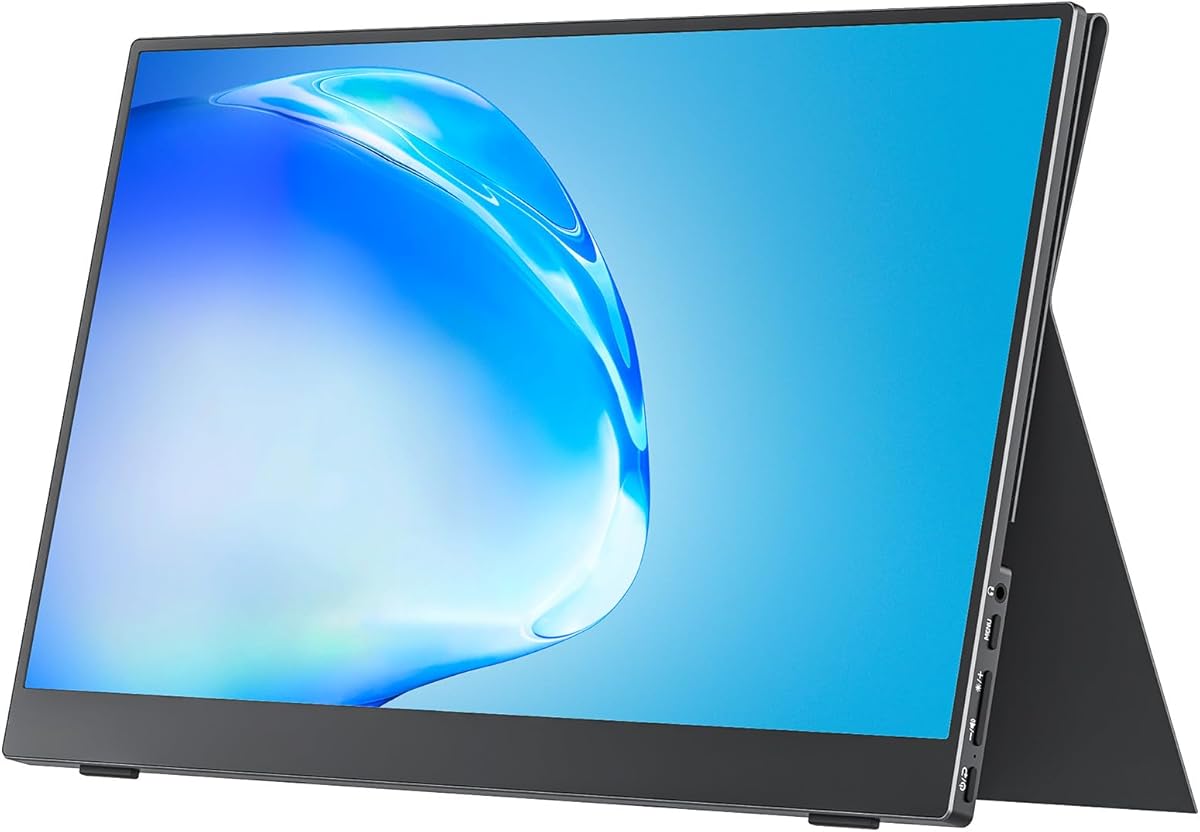
MNN 15.6-inch FHD Portable Monitor
4.3Editor score
Full HD IPS viewing panel
Dual USB-C port design
Protective cover and stand
A portable monitor can transform a Microsoft Surface into a more capable workstation, especially when you travel, work in a compact office, or need room for documents beside communication apps. The best model should pair a sharp display with dependable USB-C video support, a stable stand, manageable dimensions, and enough flexibility for both focused work and presentations.
We compared ten highly rated 15.6-inch portable monitors using the supplied specifications, customer ratings, connectivity options, viewing features, physical design, and included accessories. The list covers budget models, slim ASUS and Lenovo options, VESA-compatible screens, protective-cover designs, and monitors equipped with speakers or flexible stands for different mobile workflows.
Each selection reveals what makes it a practical fit for a Surface user rather than simply repeating its specification sheet. The top recommendations balance screen quality, portability, and dependable one-cable operation where possible. Prices and availability can change, so confirm the current listing, Surface port compatibility, included cables, and return terms before purchasing.
4.3Editor score
4.8Editor score

4.2Editor score
As an Amazon Associate we earn from qualifying purchases.
The comparison below places all ten options by core display size, resolution, port selection, stand or mounting design, and practical travel features, making it easier to identify the right portable monitor for a Microsoft Surface setup.




The cocopar Portable Monitor earns the top position because it combines a 4.8 customer rating with a remarkably complete feature set for Microsoft Surface users. Its 15.6-inch Full HD IPS panel delivers 1920 by 1080 resolution at 60Hz, while an 85% sRGB gamut and 178-degree viewing angle make it well suited to documents, web pages, spreadsheets, presentations, and general communication tasks.
We may earn a commission when you buy through this link, at no additional cost to you.
Connection options are among the strongest reasons to consider this model. Two full-featured USB-C ports and an HDMI input allow use with compatible Surface laptops, traditional PCs, game consoles, and other displays. A single USB-C cable can handle both display data and power when the Surface supports Thunderbolt 3, Thunderbolt 4, or USB 3.1 Type-C DisplayPort Alternate Mode, and reverse charging can keep the computer powered while the monitor is connected.
Portability is another major strength. The panel is only four millimeters at its slimmest point and weighs 1.5 pounds without the magnetic cover. The cover protects the display during transport and provides a flexible stand, while two VESA holes expand the placement options beyond a folding folio. These features make it possible to use the screen in landscape or portrait orientation at a hotel, in a café, or at a shared office desk.
The trade-offs are modest. Its 85% sRGB coverage is adequate for ordinary productivity but less appropriate for demanding color-critical editing, and the cleanest one-cable experience still depends on DisplayPort Alternate Mode support. Even so, the exceptional rating, thin aluminum-like construction, speakers, broad port selection, and mounting flexibility make cocopar the most balanced recommendation in this guide for the widest range of Surface users.
The combination of a thin 1.5-pound body, magnetic protective cover, and flexible folding stand reduces the friction of carrying a second display. It is particularly useful for Surface users who regularly move between temporary workspaces and need more usable screen area than the built-in touchscreen provides.
Dual full-featured USB-C ports, HDMI, power pass-through, and reverse charging allow the monitor to adapt to different desks and device arrangements. Verify that the specific Surface model supports DisplayPort Alternate Mode before planning to rely exclusively on USB-C.
We may earn a commission when you buy through this link, at no additional cost to you.
The MNN 15.6-inch FHD Portable Monitor is a budget-conscious choice for extending a Microsoft Surface without committing to a large desktop monitor. Its 4.3 customer rating reflects a generally favorable reception, while the 1920 by 1080 IPS panel, 60Hz refresh rate, and 178-degree viewing angle provide a useful balance for productivity, video, and casual gaming.
We may earn a commission when you buy through this link, at no additional cost to you.
The monitor includes two full-featured Type-C ports and an HDMI connection. As with the other USB-C options in this guide, one Type-C cable can carry both power and display data when the connected computer supports Thunderbolt 3 or USB 3.1 Type-C DisplayPort Alternate Mode. Compatibility is listed across laptops, PCs, phones, MacBooks, PlayStation consoles, Xbox systems, and Nintendo Switch, giving it broader potential uses than a typical office display.
MNN pays particular attention to flexible working arrangements. Copy, extended, second-screen, and portrait modes allow users to duplicate content for a meeting, expand the Windows desktop, or rotate the panel for reading and scrolling. The scratch-resistant PU leather smart cover protects the panel and folds into a stand, making it a more complete travel package than a bare display with a separate accessory.
The glossy IPS finish may create reflections in brightly lit rooms, and the supplied information does not provide detailed speaker specifications. These are reasonable compromises for a value-focused model. Surface owners who prioritize portability, flexible orientation, and broad connection options will find that the MNN offers more capability than a simple basic monitor.
Extended and second-screen modes are the main productivity attractions. They allow a Surface user to keep a document, spreadsheet, or reference page visible while chatting, joining a meeting, or working in a browser-based application.
The PU leather cover is more than packaging: it protects the screen in a bag and becomes a stand in both landscape and portrait positions. That combination is especially useful for students and frequent travelers.
We may earn a commission when you buy through this link, at no additional cost to you.
The InnoView Portable Monitor offers one of the strongest balances of travel design, useful connectivity, and everyday functionality. It carries a 4.4 customer rating and uses a 15.6-inch A-grade IPS panel at 1920 by 1080 resolution. The stated 178-degree viewing angle, HDR support, low-blue-light features, and flicker-free operation make it appropriate for extended document work and communication.
We may earn a commission when you buy through this link, at no additional cost to you.
Its two full-featured Type-C ports and one HDMI port provide several ways to connect a Surface. When the laptop supports Thunderbolt 3 or 4, or USB 3.1 Type-C with DisplayPort Alternate Mode, a single USB-C cable can deliver both video and power, with power pass-through and reverse charging. Systems lacking that capability can use HDMI, although the power cable is not included according to the supplied product details.
The protective PU leather cover is designed to work as a stand, with grooves that adjust the angle and hold the screen more securely. Landscape and portrait configurations are available, and the cover adds meaningful protection during transport. A built-in speaker also reduces the need to carry a separate small speaker when watching demonstrations, joining calls, or sharing light media at a temporary desk.
InnoView provides a 30-day return policy and an 18-month warranty, which adds reassurance for a portable accessory. The main drawback is that some non-USB-C configurations may require an extra power lead. Otherwise, the clear app-free operation, protective stand, speakers, and strong rating make this an attractive option for Surface users who want a complete travel kit.
The integrated speaker is a meaningful convenience for demonstrations, brief video playback, and calls in places where carrying another speaker would be inconvenient. It should not be confused with a dedicated audio system, but it can cover lightweight needs.
Grooves in the smart cover allow the angle to be adjusted and fixed. That gives the monitor more positioning freedom than a simple flat folio while preserving a compact package for travel.
We may earn a commission when you buy through this link, at no additional cost to you.
The ASUS ZenScreen MB169CK is designed for users who value a refined, low-friction mobile workstation. Its 4.2 customer rating places it among the well-regarded options in the group, while the 15.6-inch Full HD IPS anti-glare panel is especially appropriate for offices, cafés, and other places where reflections could distract from a smaller display.
We may earn a commission when you buy through this link, at no additional cost to you.
The major standout is the 360-degree kickstand. It can be folded into a compact shape and adjusted to suit different desks, reducing the need for a separate monitor arm. A standard tripod socket adds another mounting option, making the screen flexible enough to shift between a conventional landscape setup and a more upright arrangement.
USB-C connectivity carries both power and video through one cable, which creates a particularly tidy setup around a Microsoft Surface. ASUS DisplayWidget software supports automatic switching between portrait and landscape orientations, useful for long documents, web articles, and vertically oriented applications. The monitor also includes flicker-free and low-blue-light technologies intended to improve comfort during extended sessions.
A three-year warranty with advanced replacement and repair coverage strengthens the ownership proposition, and a free three-month Adobe Creative Cloud subscription is included under the stated offer terms. The main limitation is that there is only one USB-C connection rather than the dual-port arrangement found on several competitors. Even so, the adjustable stand and polished anti-glare design make the MB169CK a strong fit for Surface professionals who value placement control.
The rotating kickstand adapts to more desk heights and viewing positions than a fixed cover. It is particularly useful when a Surface user alternates between typing on the built-in keyboard and looking across at the external display.
Delivering power and video through USB-C reduces cable clutter around a Surface. A compatible DisplayPort Alternate Mode connection is still necessary, so current model specifications should be checked before setup.
We may earn a commission when you buy through this link, at no additional cost to you.
The Upperizon Portable Monitor shares the highest customer rating in this roundup and stands out for the completeness of its specifications. Its 15.6-inch Full HD Super Clear HDR IPS panel operates at 60Hz, covers 87% of sRGB, offers a 1200:1 contrast ratio, and reaches 300 nits of brightness. Those figures make it a credible all-purpose display for both productive office tasks and media viewing.
We may earn a commission when you buy through this link, at no additional cost to you.
The monitor includes two full-featured USB-C ports and one HDMI port, allowing it to serve compatible laptops, PCs, and several game consoles. Power pass-through is supported, and no driver or software is required for standard use. As with the other USB-C designs, the Surface must support DisplayPort Alternate Mode or Thunderbolt 3, 4, or 5 to transmit display information through the Type-C connection.
Its slim aluminum construction weighs 1.54 pounds and supports both landscape and portrait use, along with duplicate and extended display modes. Two VESA holes make it possible to mount the display on a compatible stand, a significant advantage for users creating a semi-permanent desk arrangement with a Surface.
The accessory package is notably complete, with an HDMI cable, USB-C to USB-C display cable, USB-C to USB-A power cable, power adapter, and sleeve case. Built-in speakers add convenience, although no detailed audio specification is supplied. Overall, the strong 4.8 rating, bright panel, flexible ports, and mounting support make Upperizon an excellent choice for mobile productivity.
Full HD resolution, 300-nit brightness, an 87% sRGB gamut, and a 1200:1 contrast ratio provide a versatile visual foundation. They are well matched to office documents, web browsing, presentations, and general media consumption.
The sleeve, included cables, slim aluminum body, and light weight support travel, while VESA holes provide a path to a more permanent setup. That makes the monitor useful across both short trips and regular mobile work.
We may earn a commission when you buy through this link, at no additional cost to you.
The ASUS ZenScreen MB16AHV brings together a 4.4 customer rating, slim construction, and a particularly distinctive surface treatment. Its 15.6-inch Full HD IPS anti-glare display is designed for mobile work and avoids distracting reflections, while the embedded ionic silver coating is stated to inhibit 99.9% of bacteria on the treated surface.
We may earn a commission when you buy through this link, at no additional cost to you.
That treatment may be particularly relevant in shared coworking spaces, cafés, airports, and busy offices. It should be understood as a built-in hygienic surface feature, not a replacement for sensible cleaning, but it adds a point of differentiation for users who regularly handle their display in public environments.
The monitor has a 10-millimeter profile and weighs 0.9 kilograms, making it easy to slide into a standard travel bag. Connectivity is handled through USB-C and Mini-HDMI, with 15W power delivery. USB-C can handle power and video through one cable when the Surface supports the required video protocol, while the fold-out kickstand and tripod socket provide flexible placement.
ASUS DisplayWidget adds automatic rotation between portrait and landscape modes, and TV-certified flicker-free and low-blue-light features support comfortable viewing. A three-year warranty with advanced replacement and repair provides a strong ownership benefit. The smaller Mini-HDMI port and 15W charging level are modest limitations, but the MB16AHV remains a refined, highly portable choice.
The anti-glare finish reduces distracting reflections, while the bacteria-inhibiting treatment adds a layer of hygiene-oriented design. These features are especially relevant for display surfaces that are handled and used in busy shared locations.
USB-C offers the cleanest one-cable experience, while Mini-HDMI supplies a secondary video option. The folding kickstand and tripod socket keep the overall package slim without giving up basic positioning flexibility.
We may earn a commission when you buy through this link, at no additional cost to you.
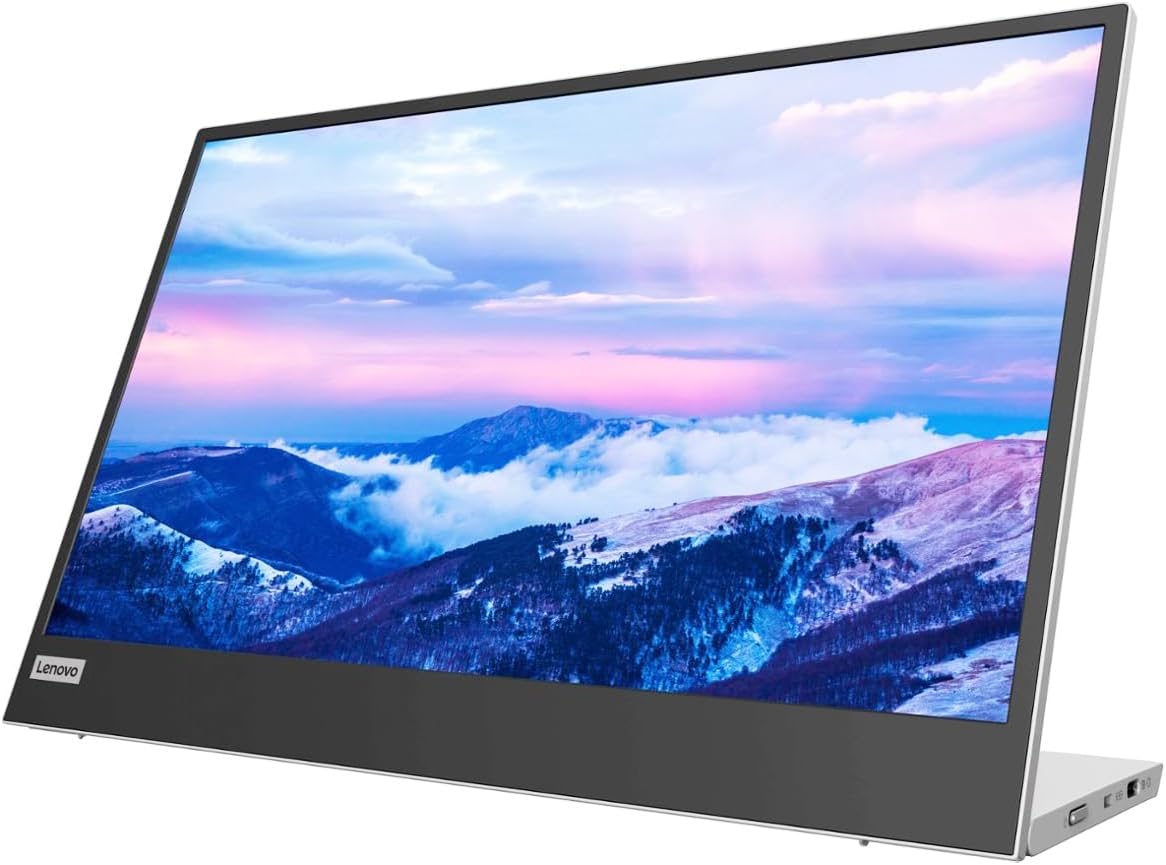
The Lenovo L15 Portable Monitor distinguishes itself with a height-adjustable stand, a feature not offered by most folding-cover portable displays. It carries a 4.2 customer rating and provides a 15.6-inch Full HD IPS panel with 250 nits of brightness and a 60Hz refresh rate, covering the core requirements of a useful Surface companion.
We may earn a commission when you buy through this link, at no additional cost to you.
Height adjustment is the central advantage. Rather than relying on a fixed folding panel or a cover that serves as a basic prop, the L15 lets the user raise or lower the screen to align it more comfortably with a Surface display. That can reduce neck strain during long sessions and make the monitor more practical for shared or varying-height desks.
Two USB-C ports provide convenient connectivity, and the under-two-pound weight keeps the product manageable in a travel bag. Flicker-free technology is designed to support comfortable viewing, while the IPS panel delivers clear Full HD content for office applications, web browsing, and communication.
The 250-nit rating is adequate for indoor use but may appear modest beside a very bright window or in a brightly lit outdoor workspace. The 4.2 customer rating is respectable, though not the highest in the group. For users who prioritize adjustability and ergonomic placement over maximum brightness, the Lenovo L15 is a thoughtful and distinctive option.
The height-adjustable stand is useful when a Surface sits on a laptop stand, raised desk, or elevated docking arrangement. Aligning the two displays can reduce awkward neck movement and make side-by-side work feel more natural.
Flicker-free operation, an IPS panel, and Full HD resolution support a comfortable productivity display. Bright environments remain the main limitation because the specified brightness is not especially high.
We may earn a commission when you buy through this link, at no additional cost to you.
The ASUS ZenScreen MB16ACE offers an established portable-display design with a 4.6 customer rating. Its 15.6-inch Full HD IPS panel and anti-glare surface suit everyday mobile productivity, client meetings, and use around a Microsoft Surface when more workspace is needed than the built-in screen provides.
We may earn a commission when you buy through this link, at no additional cost to you.
Its hybrid-signal solution supports both USB Type-C and Type-A sources, which broadens compatibility with older laptops and systems that lack modern USB-C video output. The included feature set also emphasizes automatic rotation, allowing the display to switch between landscape and portrait orientation according to its physical position.
The foldable Lite Smart Case serves two purposes: it protects the monitor during transport and converts into a stand for either orientation. This dual function keeps the package simple for people who want a second screen that can be packed quickly without assembling a separate support.
ASUS Eye Care technology includes TÜV Rheinland-certified flicker-free and low-blue-light features intended to make long viewing sessions more comfortable. A three-year warranty further supports the value of the purchase. The hybrid connection arrangement is less contemporary than the dual-USB-C approaches on newer models, but it can be advantageous for users who need broader source compatibility.
Automatic rotation makes the display particularly useful for reading long articles, reviewing vertical documents, or working with a tall application window. The smart case supports the same portrait or landscape orientation, keeping the screen stable.
USB-C remains the simplest connection for compatible Surface models, while Type-A support broadens the pool of devices that can serve as a source. Users should verify which cable and adapter are required for their particular computer.
We may earn a commission when you buy through this link, at no additional cost to you.
The Anyuse 15.6-inch Portable Monitor combines a 4.2 customer rating with an exceptionally thin, lightweight format. At 1.37 pounds and approximately 0.04 inch thick, it is one of the easiest choices in the group to carry between a home office, classroom, hotel room, or shared meeting space.
We may earn a commission when you buy through this link, at no additional cost to you.
The 1920 by 1080 IPS panel includes HDR, a stated 178-degree viewing angle, and low-blue-light features. That makes it suitable for general office work, video viewing, and presentations. Two full-featured Type-C ports and one Mini-HDMI input offer several connection paths for a Surface, laptop, PC, or compatible game console.
Unlike some highly compact portable displays, this model includes two built-in speakers. That makes it more suitable for casual media playback, demonstrations, and group viewing when a separate speaker is inconvenient. Copy, extension, and second-screen modes support presentations, communication, and expanded Windows workspaces.
The primary limitation is that no numeric refresh rate is included in the supplied specifications, so buyers should not assume the same smoothness as a panel explicitly rated at 60Hz. Mini-HDMI may also restrict bandwidth compared with full-size HDMI. Even so, the thin profile, speakers, broad connection options, and low weight make Anyuse a compelling value choice for users who want portability and entertainment capability in one package.
The integrated speakers are useful for casual video, demonstrations, and presentations where carrying separate audio equipment would be inconvenient. They add value to a portable display intended for both work and entertainment.
The very low profile and 1.37-pound weight reduce bulk in a bag. For a Surface owner who regularly travels light, that physical simplicity may be more valuable than additional stand adjustment or mounting features.
We may earn a commission when you buy through this link, at no additional cost to you.
The ASUS ZenScreen MB16AC remains a well-regarded classic portable monitor, reflected in its 4.6 customer rating. Its 15.6-inch Full HD IPS display provides 1920 by 1080 resolution and wide 178-degree viewing angles in both directions, making it a practical extension for a Microsoft Surface used at a desk or in transit.
We may earn a commission when you buy through this link, at no additional cost to you.
The monitor weighs 1.7 pounds and is only 0.3 inches thick, giving it a portable profile designed to pair naturally with compact laptops. The smart cover protects the panel and supports landscape or portrait placement, while a smart pen hole adds a small convenience for stylus users who want to keep a pen accessible.
Its hybrid-signal solution supports USB Type-C and Type-A sources. Type-A connections require the DisplayLink driver, while compatible USB-C systems can benefit from a simpler cable arrangement. Automatic rotation and the ASUS DisplayWidget application help the screen adapt when its physical orientation changes.
TÜV Rheinland-certified flicker-free backlighting and blue-light filtering target viewing comfort during extended use. A three-year warranty with advanced replacement and repair service is a meaningful advantage over many portable-monitor warranties. Although the design is less current than newer dual-port USB-C models, its strong rating, clear viewing angles, and classic lightweight construction remain persuasive.
At 1.7 pounds and 0.3 inches thick, the MB16AC offers a conventional portable footprint that is easy to compare with a full-size monitor. The smart cover protects the screen and creates a straightforward support for either orientation.
Three years of warranty coverage with advanced replacement and repair adds reassurance to an electronics purchase. DisplayWidget and automatic rotation also improve the day-to-day experience with a Surface.
We may earn a commission when you buy through this link, at no additional cost to you.
The best portable monitor for a Microsoft Surface balances USB-C compatibility, Full HD clarity, low weight, and a stand that suits your work style. The following factors help narrow the options without overlooking practical travel, viewing, and connection details.
Most modern portable monitors use USB-C because one compatible cable can carry both display data and power, producing a cleaner setup around a Surface. The critical requirement is not merely a USB-C shape; the computer and monitor must support the appropriate video protocol, such as Thunderbolt 3 or 4, or USB 3.1 Type-C with DisplayPort Alternate Mode. Some older Surface systems may not send video over USB-C, while newer models generally have an advantage. If a product includes HDMI, that can provide a fallback, but it may require a separate power connection and the right cable. Check the exact Surface model before purchase, especially if you expect to use a one-cable arrangement every day.
A 15.6-inch 1920 by 1080 Full HD panel is the most common format in this category and provides a useful balance of readable text, software windows, and physical portability. An IPS panel is preferable for consistent color and broad viewing angles, particularly when the screen is viewed at an angle across a desk. HDR can make supported content appear punchier, although it is not the deciding factor for document-heavy work. For color-critical editing, check the sRGB coverage; an 85% or 87% gamut is useful for general productivity but not a substitute for a calibrated wide-gamut reference display. For most Surface users, Full HD resolution, an IPS panel, and comfortable viewing angles provide the right foundation.
A portable monitor is only useful if you are willing to carry it. The models in this guide range from an especially thin 0.04-inch design to conventional slim profiles, with listed weights around 0.9 to 1.7 pounds for the leading models. Consider the dimensions of the protective cover as well as the display itself, because a larger folio can consume more backpack space. A weight near one pound is attractive for frequent travel, while a slightly heavier unit may feel more stable on a desk. If the monitor will mostly remain at home, stand quality and image quality may matter more than shaving off a fraction of an inch. If it is packed for every trip, both weight and thickness deserve careful attention.
A weak stand can make an otherwise excellent portable screen frustrating to use. Folding smart covers are compact and protect the display, but some provide only one or two fixed angles. Adjustable grooves allow more precise positioning, rotating kickstands offer a greater range, and height-adjustable stands can better align the external panel with a raised Surface screen. VESA compatibility adds another level of flexibility because it allows use with a compatible arm or stand for a semi-permanent workspace. The best choice depends on mobility. Frequent travelers may prefer a folio, while hybrid workers who alternate between hotel desks and home offices may value an adjustable kickstand or mounting holes more than a minimal package.
Portable displays are often used in locations with uncontrolled lighting, so brightness and surface treatment matter. The models here list brightness figures between 250 and 300 nits, with Upperizon specifying 300 nits. Higher brightness can make text and media easier to see near a window, although no portable screen completely eliminates the need to position the display away from direct glare. Anti-glare finishes are particularly valuable in offices, cafés, and airports. Some products use a glossy panel that may look vivid but reflect surrounding light. A matte or anti-glare surface usually creates a more comfortable working experience for long sessions. Consider where you will use the monitor most often and prioritize a finish that suits that environment.
A complete package can make setup much easier. Look for a USB-C to USB-C display cable, HDMI cable, power adapter, and protective sleeve or stand. Some monitors rely on the computer to supply power through USB-C, while others include a separate power adapter for setups where the source cannot provide enough power. Mini-HDMI ports may require a specific cable that is not included, and USB-A workflows may need an adapter or driver. The Upperizon includes a particularly broad set of cables and a sleeve, while the cover-equipped models protect the display during transport. Match the included accessories to the devices you already own and the connection method you expect to use most often.
Built-in speakers can be useful for presentations, brief video viewing, or meetings in locations where another speaker would be inconvenient. They do not automatically make a portable monitor better for productivity, and detailed audio specifications are often limited. VESA holes, automatic rotation, tripod sockets, and a smart pen hole are other features that may improve usability more than modest onboard audio. Orientation switching is particularly useful for long documents and vertically oriented applications. A screen with a smart cover and adjustable grooves may be more important to a frequent traveler than extra speakers. Prioritize features that solve a problem in your actual workflow rather than treating every added function as equally valuable.
Customer ratings offer a useful snapshot of the experience many buyers have had, although they should be considered alongside the specifications and expected use. The highest-rated products in this group are cocopar and Upperizon, both at 4.8, followed by the ASUS MB16ACE and MB16AC at 4.6. Warranty coverage varies significantly. ASUS offers three-year coverage on several models, InnoView states an 18-month warranty and 30-day return policy, and other coverage terms may differ. A longer warranty is reassuring because portable screens are exposed to movement, pressure, and repeated connection changes. Review the current listing, seller information, return window, and warranty exclusions before making a final decision, especially for travel-oriented use.
Before connecting the monitor, confirm that your Surface supports the required video connection and select the matching cable. With a compatible USB-C port, connect the display and let the computer recognize it as a second screen. In Windows display settings, choose Extend if you want additional desktop space, Duplicate for presentations, or the appropriate orientation when using the panel vertically. Adjust scaling so that text remains comfortably readable rather than simply enlarging everything. If the picture is unstable or the screen flickers, try a different cable, port, or power arrangement, and verify that the source is actually delivering video through the selected connection.
Position the portable monitor at roughly eye level and align it with the Surface display to reduce neck and eye strain. Use the kickstand, cover, or VESA mount to stabilize the panel, and leave enough ventilation around the screen. Avoid placing the display where it may be knocked over, pressed against another item in a bag, or exposed to direct sunlight. When connecting through HDMI, follow the manufacturer's power instructions; some configurations require the monitor to be powered independently. The built-in speakers can be selected as the output device in Windows, but headphones or a conference microphone may still be necessary for better calls.
Care for the monitor by cleaning it with a soft, lint-free cloth and avoiding abrasive or liquid cleaners directly on the panel. Keep the smart cover fastened during transport, and do not place heavy objects against the display surface. When changing orientation, support the monitor with both hands if the cover or stand requires repositioning. Periodically inspect the cable connectors for debris and avoid sharply bending the cable near the plug. Storing the unit in its sleeve or case reduces scratches, while careful use of the adjustable stand and mounting holes helps preserve alignment over time.
A portable monitor can connect to a compatible Surface through USB-C or HDMI, depending on the ports and video protocols available on the specific model. For USB-C, the Surface must support DisplayPort Alternate Mode or an appropriate Thunderbolt version, while the monitor must also support video over USB-C. Check the computer specifications before purchasing, especially for older Surface models. HDMI is a useful alternative when direct USB-C video is unavailable.
Often, no. A compatible USB-C connection can carry display data and power while also supporting reverse or pass-through charging on many models. Some displays, cables, or source devices may require the included power adapter, particularly when using HDMI or a computer that cannot supply enough power. The product listings identify several full-featured USB-C ports, but the exact behavior can depend on the selected cable and connected Surface.
A 15.6-inch display is large enough to provide a meaningful second workspace while remaining easy to carry. It pairs especially well with compact Surface models because it offers more room for documents and side-by-side application work without taking up the space of a full desktop display. Smaller panels are easier to carry, while larger ones are better for detailed editing or entertainment. A 15.6-inch Full HD model remains the most balanced choice in this category.
A connected external display can increase overall power consumption, although many portable monitors can pass power through the USB-C connection and charge the Surface while the screen is attached. The actual effect depends on brightness, workload, display mode, and the power-delivery behavior of the particular monitor and charger. Using a compatible power adapter and keeping a moderate brightness level can help maintain a balanced setup.
Yes, most of the models reviewed support landscape and portrait orientations. Some include auto-rotation software, while others require changing the display orientation in Windows or the monitor's own settings. The included cover, stand, or kickstand should also support the chosen orientation. Portrait mode is particularly useful for reading long articles, reviewing vertical documents, scrolling, and displaying narrow application panels.
Built-in speakers are usually most useful for brief video playback, presentations, and casual group viewing. They can reduce the need to carry a separate speaker, but their limited size may not provide strong bass, high volume, or clear microphone coverage. For serious calls, use a headset or dedicated conference microphone and select the appropriate audio device in Windows.
VESA compatibility is valuable if you want the option to use a monitor arm, clamp, or stand for a semi-permanent workspace. It offers more control over height and angle than a folding cover alone. If the monitor will stay in a bag and move every day, a lightweight folio may be more convenient. The cocopar and Upperizon models reviewed here include VESA holes, giving them greater placement flexibility.
Flickering can result from an incompatible connection, inadequate power, a faulty cable, or a source device that cannot drive the selected port. Begin by confirming that the Surface and monitor support the same video standard, then try the supplied cable or another known-good USB-C or HDMI cable. If the monitor has a separate power adapter, connect it as directed. Changing the source port or using HDMI can also help identify whether the issue is tied to USB-C power delivery.
The cocopar Portable Monitor is the strongest all-around choice because it combines a 4.8 rating, a thin 15.6-inch Full HD IPS panel, USB-C and HDMI connectivity, VESA support, speakers, and a protective cover that doubles as a stand. The MNN provides a cost-conscious alternative with flexible display modes and a smart cover, while the InnoView balances app-free operation, built-in audio, and an adjustable stand.
Prioritize the feature that removes friction from your actual workflow. Frequent travelers may want the thinnest and lightest option, while hybrid workers may benefit more from an adjustable kickstand, height control, or VESA mounting. A Surface user focused on a tidy one-cable setup should confirm DisplayPort Alternate Mode support before buying, and anyone working in bright spaces should consider brightness and anti-glare treatment.
Prices, availability, and included accessories can change over time, so review the current product listing before ordering. Confirm the connection requirements for the exact Surface model, inspect the cable and power package, and check the return policy and warranty. With those details verified, a 15.6-inch Full HD portable monitor can provide a noticeably more capable and adaptable workspace at home, at work, or while traveling.