
Frameo 10.1 Inch WiFi Digital Picture Frame
4.7Editor score
10.1-inch HD touch display
32GB built-in photo storage
Invited family photo sharing
Calendar and collage features
AI art and photo digital frames combine rotating displays, wireless sharing, and generative or motion-based creative tools in a single home display. A good model should make artwork easy to create, keep family photos accessible from a distance, and look natural in the room where it will be used. Screen technology, storage, battery design, and app convenience all shape that experience.
This guide compares ten frames according to their most useful documented features rather than treating every AI function as equivalent. It covers generative artwork, photo animation, video support, remote sharing, cloud and local storage, display size, installation options, and cordless operation. E-ink models are noted separately from illuminated IPS screens because their color, contrast, viewing experience, and refresh behavior differ substantially.
Each review identifies the product's strongest use case and its practical compromises, helping you match the frame to a particular space, recipient, and creative routine. Some products are designed primarily for AI art, some emphasize bringing still photographs to life, and others focus on dependable family sharing. Product listings, availability, ratings, and pricing can change, so confirm current details before purchasing.
4.7Editor score

4.6Editor score

5.0Editor score
As an Amazon Associate we earn from qualifying purchases.
This side-by-side comparison highlights each frame's display type, creative tools, sharing method, and storage approach, making it easier to separate true AI art displays from conventional Wi-Fi photo frames and photo-to-video models.
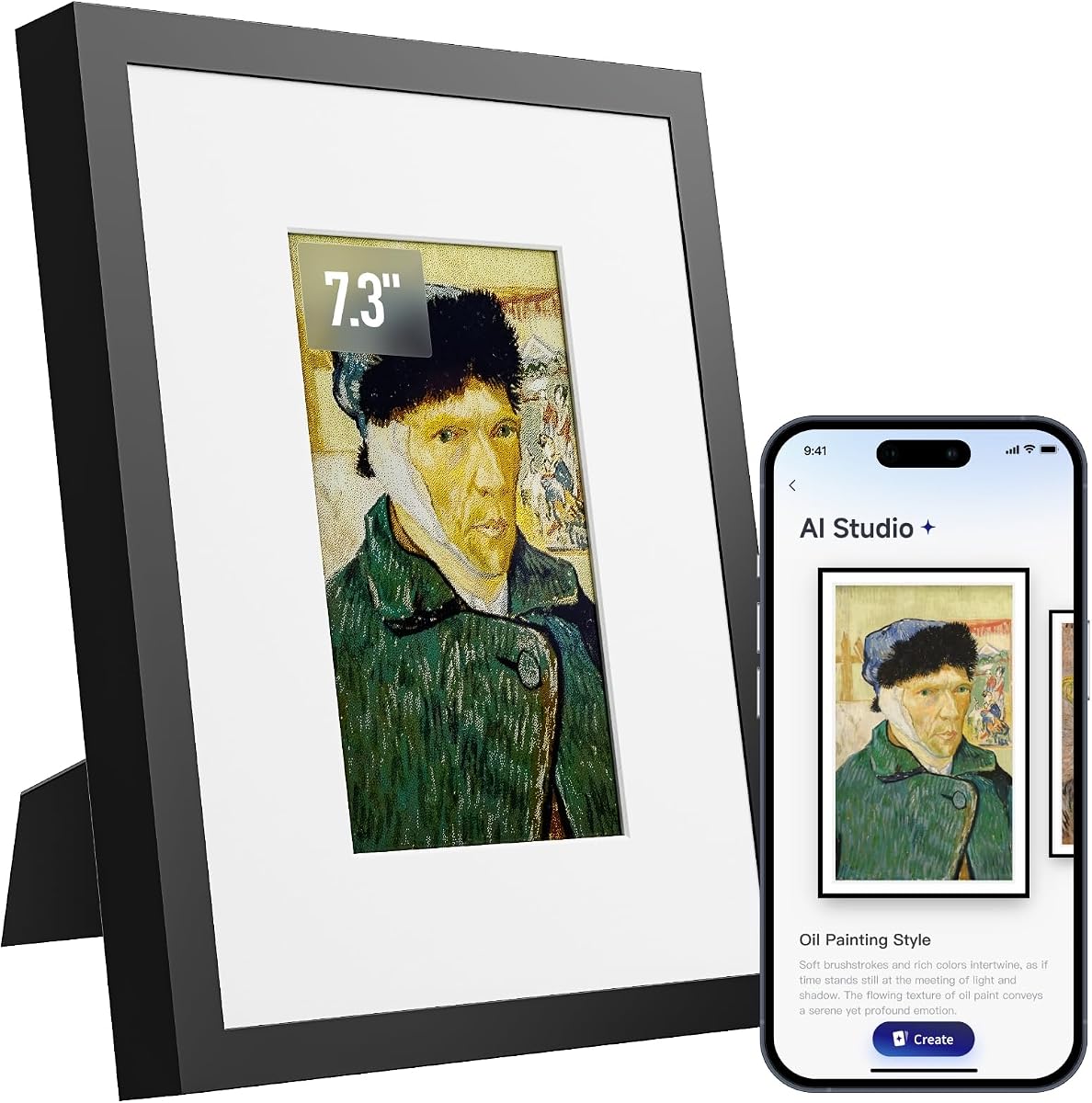


The SwitchBot AI Art Frame is built primarily as an art display rather than a conventional family photo frame. It pairs a 7.3-inch six-color electronic ink screen with a rechargeable 2000mAh battery and app-based AI generation. Its 3.8 rating reflects the compromises inherent in this approach, particularly the visual limitations of color electronic ink and the added service requirement for creating new AI art.
We may earn a commission when you buy through this link, at no additional cost to you.
The most impressive feature is its ability to turn prompts into a changing personal gallery. Users can generate artwork, upload family photos, schedule changes by time of day, holiday, or event, and control the display through the SwitchBot app. Voice control through Alexa adds another convenient option, while Bluetooth is reserved for initial pairing and Wi-Fi handles more stable uploads. The frame stores up to ten images locally and remains visible when the battery is depleted because electronic ink retains a static image without power.
The 7.3-inch size is also practical for viewing from a distance. SwitchBot itself notes that electronic ink produces larger pixels, muted contrast, and lower resolution than a backlit screen, recommending a viewing distance of roughly one meter or more. That makes the device most convincing as a small gallery canvas and less suitable for people who expect vivid, photographic color or fine detail at close range.
This is the right choice for someone who wants uncluttered AI-generated art that can move between walls, desks, and bedside tables without a visible power cable. It is also appealing for Alexa users who want scheduled or voice-assisted art changes. Buyers should choose it for its paper-like presentation, cordless flexibility, and genuine generative function rather than for family video playback or vivid IPS colors.
The rechargeable design and retained-image behavior let the frame move more freely than a permanently connected display. It is particularly useful for rotating seasonal art between a living room, hallway, desk, or bedside table.
Prompt-based generation and schedule-based updates create a more ambitious experience than uploading finished artwork. However, new AI generation requires a subscription, so the frame's long-term creative cost should be considered before purchase.
We may earn a commission when you buy through this link, at no additional cost to you.
The KoKonna AI E Ink Digital Picture Frame stands out as the most art-focused option in this roundup. It has a 7.3-inch color electronic ink canvas, a 5000mAh rechargeable battery, Wi-Fi sharing, and a 5.0 rating. Rather than limiting creativity to a single prompt style, the KoKonna app supports text prompts, voice prompts, and the user's own drawings.
We may earn a commission when you buy through this link, at no additional cost to you.
Its AI toolkit can turn doodles into finished artwork and transform ordinary photographs into creative styles. Those results can be sent directly to the frame, making KoKonna useful for children, casual artists, and gift recipients who may not enjoy typing detailed prompts. Remote photo sharing, automatic rotation, configurable slideshow timing, and unlimited cloud storage add practical value beyond the AI tools.
The cordless design is a major strength. Under low refresh frequency, the 5000mAh battery can last for up to three years, depending on usage and display settings. This makes the frame convenient for shelves, nightstands, walls, and areas where a cable would be inconvenient. As with other electronic ink products, however, its color range and contrast are more muted than those of an illuminated LCD or OLED display.
KoKonna is best for users who value a broad range of creative inputs and generous included storage over maximum screen brightness or full-motion entertainment. Its five-star rating, unlimited cloud allowance, and potentially long battery life make it a compelling premium art frame. It is particularly well suited to parents, grandparents, artists, and creative households that want both personal imagery and generated art in one display.
Text, speech, and uploaded sketches give the frame a more accessible creative workflow. Family members can generate an image without learning complicated editing software, making the device feel more like a shared activity than a specialist tool.
Unlimited included cloud storage removes a common restriction on digitally shared frames. Users can keep a broad family gallery remotely while using the cordless design to place the frame wherever it is most visually appealing.
We may earn a commission when you buy through this link, at no additional cost to you.
The Magic Frame Old Photo Alive specializes in turning still family photographs into moving images. Its 10.1-inch 1920 by 1200 IPS touch screen provides a bright, interactive canvas for AI colorization, restoration, photo-to-video effects, and family sharing. The frame carries a 4.4 rating and offers 2,000 included AI credits, enough for the listed equivalent of up to 20 restorations.
We may earn a commission when you buy through this link, at no additional cost to you.
Old photographs can be restored in Full HD and given motion effects that make people appear to wave, while single and group portraits are supported. Curated templates cover solo and duo portraits, pets, and scenery. These effects are more animated than a standard slideshow, which can make family history feel particularly immediate on a larger illuminated display.
The Homture app allows an unlimited number of friends and family members to share photos and videos. A preloaded personal message and gift-ready packaging help it work as a birthday, holiday, or family-history gift. The main limitation is the credit system. Each listed AI video uses 100 credits, and further credits are available through an AI plan, so regular experimentation may eventually require an additional purchase.
This frame is best for people who already have an archive of still images that deserves more movement. It is less focused on producing entirely new artwork than the SwitchBot and KoKonna options, but it offers a clear emotional advantage: familiar images become short animated memories. Choose it when the goal is to make old family photographs and everyday moments feel more immediate.
Colorization and motion effects provide a stronger sense of reunion than static restoration alone. The support for individual portraits, groups, pets, and landscapes broadens the creative results beyond a single template.
Preloading favorite images and a personal message turns setup into part of the gift. Family members can then contribute new photos and videos through the app after the frame is in its new home.
We may earn a commission when you buy through this link, at no additional cost to you.
The Frameo 10.1 Inch WiFi Digital Picture Frame is the strongest value pick for households that want dependable photo sharing without paying for a dedicated AI subscription. It combines a 10.1-inch 1280 by 800 IPS touch screen with 32GB of internal memory, remote Frameo sharing, auto-rotation, and a 4.7 rating.
We may earn a commission when you buy through this link, at no additional cost to you.
Invited family members and friends can send photos and videos of up to 15 seconds from the iOS or Android app. The interface is designed to be approachable, with direct touch controls that should also suit older adults. Internal storage can hold more than 80,000 photos, and a microSD slot provides a route for transfers and backups. Larger cards may not work properly, so the manufacturer recommends FAT32 formatting and cards up to 32GB.
Beyond photographs, the frame can display a calendar, event reminders, clock, weather, brightness and volume controls, and custom sleep mode. It can also arrange up to six photos in a collage. These utilities make it more versatile than a bare photo slideshow, while the included wall mount and automatic orientation improve placement flexibility.
It does not generate art or animate still photographs, so it is not the right selection for someone whose main interest is AI creativity. Even so, its generous storage, approachable controls, and invitation-based sharing model make it an excellent everyday frame for parents, grandparents, and relatives who want to receive new pictures without complicated administration.
Only invited contacts can contribute content, creating a controlled family network without requiring every person to create or manage a separate account. The straightforward touch interface helps keep the experience approachable for older recipients.
Calendar synchronization, collages, greetings, sleep scheduling, and weather information add practical value. These features allow the frame to serve as an information display as well as a family album.
We may earn a commission when you buy through this link, at no additional cost to you.
The 64GB 15.6 Inch Frameo is a large-display photo frame aimed at people who want a prominent wall or tabletop gallery with broad local storage. Its 1920 by 1080 IPS touchscreen, 64GB internal memory, built-in speaker, and 4.5 rating make it a solid choice for homes, offices, and event spaces where a smaller frame could feel inconspicuous.
We may earn a commission when you buy through this link, at no additional cost to you.
Frameo app sharing supports photos and videos up to 15 seconds over 2.4GHz Wi-Fi. The built-in storage can hold approximately 100,000 photos, while SD cards and USB flash drives allow imports, exports, backups, and offline playback. Video with sound is possible through local media or the app, which adds variety beyond a silent photo slideshow.
The IPS panel offers a stated 178-degree viewing angle, and the touchscreen makes changing settings or browsing images straightforward. Auto-rotation allows the same frame to work in landscape or portrait orientation, and the wall mount supports display as decor. A reply function lets recipients send emoji reactions to the person who shared a photo.
This is not an AI art or photo-animation device. Its attraction comes from size, storage, and flexible media playback. People with extensive photo archives or larger viewing distances will get more from it than buyers focused on generative art. Its broad format support and offline import paths also make it useful when Wi-Fi sharing is inconvenient.
The built-in speaker and support for MP4 playback create a more dynamic slideshow than most photo-only frames. Local imports also allow longer videos than the app-based 15-second sharing limit.
Sixty-four gigabytes of internal memory and support for removable media give the frame more flexibility than many similarly sized competitors. The recommended FAT32 format and 32GB media guidance should be followed for the best compatibility.
We may earn a commission when you buy through this link, at no additional cost to you.
The Pastigio 15.6 Inch Frameo provides a large FHD display, several transfer routes, and an unrestricted family-sharing model. It has a 4.5 rating and uses the familiar Frameo app, allowing remote relatives to send photos and videos of up to 15 seconds without distance limits or a stated cap on the number of members.
We may earn a commission when you buy through this link, at no additional cost to you.
The 1920 by 1080 IPS touch panel makes the frame suitable for larger rooms and viewing distances. Its 32GB internal memory can hold more than 50,000 photos, and a full-sized SD card can provide additional storage. Users can also transfer files through a Windows computer with a USB-C cable, making the frame less dependent on cloud connectivity if the recipient finds app setup challenging.
Image controls include selecting the main subject and adjusting how a photo fills the screen. Auto-rotation supports portrait and landscape presentation, while brightness, volume, and sleep mode can be adjusted. A react feature allows the person viewing the frame to return an emoji to someone who contributed a photo, creating a light form of two-way communication.
Pastigio does not offer AI artwork generation or photo animation, but it is a capable all-purpose family display. It is especially useful when a household wants a large photo frame, offline import options, and remote sharing without needing a premium creative subscription. Its media and computer-transfer limitations should be considered, but the basic experience is flexible and approachable.
Remote app sharing is convenient for families, SD cards support direct transfers, and computer import provides an offline alternative. This makes the frame adaptable to different levels of technical confidence.
The 15.6-inch FHD screen is easier to appreciate across a living room, office, or gathering area. A touchscreen, auto-rotation, and subject adjustment reduce the work required to prepare photos for display.
We may earn a commission when you buy through this link, at no additional cost to you.
The 7.09 Inch AI-Powered E-Paper Digital Photo Frame focuses on displaying photos with a natural, paper-like appearance. Its reflective electronic ink display has no backlight, and the surrounding wooden frame gives it the look of a conventional keepsake. Product information does not provide a customer rating, so its appeal should be judged primarily from its documented design and functions.
We may earn a commission when you buy through this link, at no additional cost to you.
Unlike generative AI frames, this product's AI capability is used to optimize uploaded images. Its algorithm adjusts color and contrast to enhance both black-and-white photographs and colorful travel snapshots. That makes the technology practical and unobtrusive, although it does not create new artwork or animate still images.
Photos can be transferred in bulk through a dedicated mobile app, removing the need for a wired connection during everyday use. The electronic ink screen consumes very little power while showing a static image and uses more only when switching photographs, allowing battery life to reach several weeks after a full charge. A desktop stand and traceless adhesive support flexible placement.
This frame is best for someone who values decor and calm, paper-like photo viewing more than bright color or moving media. It is especially suitable for a bedside table, desk, or living space where reflective glare would be distracting. Buyers should not expect generative art, video, or the vivid saturation of a traditional illuminated display.
The wooden surround and reflective screen make the frame feel more like framed printed art than consumer electronics. Its restrained appearance can suit traditional interiors, creative studios, and quiet bedside environments.
Automatic color and contrast tuning helps uploaded images look clearer without requiring manual editing. It is a modest use of AI, but one that directly supports the frame's primary purpose.
We may earn a commission when you buy through this link, at no additional cost to you.
The Magic AI Frame combines a 10.1-inch 1920 by 1200 IPS touch display with four cinematic AI templates. It has a 4.8 rating, the highest numerical score in this group, along with 64GB of local storage and unlimited cloud storage. It is designed to transform ordinary photographs into animated scenes with a more polished sense of motion.
We may earn a commission when you buy through this link, at no additional cost to you.
Its four listed styles—Spellcasting, Sky Riding, Moving Magic Poster, and Living Oil Painting—each reinterpret a source image in a different visual register. Old photographs can be restored in Full HD, colorized, and given motion for individual or group portraits. This makes the frame appealing for family history, seasonal displays, and personalized creative gifts.
The Homture app supports family sharing without a stated member limit. Free unlimited cloud storage keeps shared images available, while the 64GB local capacity provides room for favorite photos and videos directly on the device. Touch controls make browsing and slideshow management feel familiar to smartphone users.
AI creation is credit-based. Eligible credits may be returned when a result does not meet expectations, which reduces some of the risk, but extensive experimentation can still lead to added credit purchases. The best choice is for someone who wants polished, template-driven movement from selected photographs and values a high rating alongside generous storage.
Each template gives a familiar photograph a different narrative effect, from fantasy action to a shifting painted portrait. The variety is more useful than having one generic animation because it lets users match the effect to the source image.
Combining unlimited cloud sharing with 64GB local storage separates remote access from offline availability. The frame can serve as a connected family album while retaining a substantial local collection.
We may earn a commission when you buy through this link, at no additional cost to you.
The AiMOR 10.1 Inch Frame is a straightforward Wi-Fi picture frame designed around accessible family sharing. It combines a 1280 by 800 IPS touchscreen, 32GB of built-in memory, automatic rotation, and adaptive brightness. Its 4.5 rating reflects a capable and approachable product even though it does not include generative art or photo-animation tools.
We may earn a commission when you buy through this link, at no additional cost to you.
Relatives can send up to nine photos or one video of up to 15 seconds at a time through the AiMOR app for iOS and Android. Captions can accompany shared memories, adding context that a silent slideshow might not convey. The sharing controls are designed to preserve privacy, with the owner controlling who can view the frame's content.
Built-in memory holds more than 40,000 photos, and support for an SD card up to 128GB provides additional capacity. Automatic rotation adapts portrait and landscape images to the frame's orientation, while automatic brightness adjusts the display to ambient light. These are subtle features that can reduce daily maintenance and improve comfort in a living room or bedroom.
The large fonts, sensitive touch response, and uncomplicated interface are especially appropriate for grandparents, older adults, or anyone who may not enjoy configuring complicated electronics. The limited sharing batch and lack of AI creation narrow its appeal for creative experimentation, but make it a reliable choice for a straightforward digital family album.
Large fonts, responsive touch controls, auto-rotation, and adaptive brightness reduce both physical and operational friction. These details can be more valuable to an older recipient than a long list of advanced features.
The owner controls which friends and relatives can contribute or view content. This makes the frame more suitable for private family imagery than an open public display.
We may earn a commission when you buy through this link, at no additional cost to you.
The 10.1 Inch AI Magic Frame offers the most balanced combination of AI creativity, conventional photo sharing, and thoughtful gifting features in this group. It has a 10.1-inch 1920 by 1200 IPS touch screen, a motion sensor, 64GB local storage, unlimited cloud storage, and a 4.6 rating.
We may earn a commission when you buy through this link, at no additional cost to you.
Its AI Magic tools transform still images into dynamic memories, while a 2,000-point starter card is described as allowing up to 20 high-quality AI videos. The motion sensor automatically lights the screen when a person approaches and presents a selected photo. This creates a more engaging interaction than a conventional frame that remains in the same state whether someone is nearby or not.
The Homture app supports invitation-based connections, photo and video sharing, and iOS and Android compatibility. Cloud storage is unlimited, while the 64GB local drive keeps a substantial collection on the device. The listed privacy features reference a secure family network, GDPR and CCPA compliance, and AWS-based cloud storage.
Gift Mode adds a six-digit code that unlocks preloaded photos, videos, and messages. That makes the frame especially useful for surprises involving parents, grandparents, partners, or family members. It is wired rather than battery-powered, and continued AI video use may require more credits. Even so, it balances practical family functions with polished AI effects better than most alternatives.
The approach sensor makes the frame feel more alive without requiring a constant animation loop. It is a useful middle ground between a still print and a video-heavy entertainment display.
Preloading photos, videos, and a message lets the giver stage an intentional reveal. The six-digit unlock keeps the surprise private until the recipient opens it.
We may earn a commission when you buy through this link, at no additional cost to you.
The right digital frame depends on whether you prioritize generative art, animated photographs, large vivid screens, paper-like visuals, or effortless family sharing. Reviewing these factors before purchase helps prevent an attractive AI label from distracting from display quality, storage limits, and long-term convenience.
For prompt-based creation, prioritize the number of creative input methods, image-scaling controls, and scheduling features. For photo animation, look closely at supported subjects, template variety, included credits, and whether additional generations require payment.
Choose E-ink for a gallery-like, low-glare display viewed from a distance. Choose IPS for saturated photos, touch interaction, video, and a brighter focal point in a social room.
Match the frame to the room and usual viewing distance rather than choosing only by screen size. A compact E-ink canvas can feel more elegant than a much larger illuminated screen.
Unlimited cloud space is useful for active family sharing, while generous local storage matters for large archives and offline playback. Verify removable-media compatibility before relying on it.
Prioritize cordless operation for rotating displays, galleries, and bedside placement. Use a wired frame when it will stay in one fixed position and uninterrupted video is more important.
Favor invitation-based sharing and private account structures for sensitive family photos. Review permissions before adding guests, and avoid sharing credentials unnecessarily.
Check the ongoing creative cost, not just the included trial allowance. A frame that is excellent for occasional use may be less attractive for daily generation.
For older adults or less technical relatives, prioritize simple navigation, remote sharing, and straightforward controls. For creative users, voice, prompt, and drawing tools may justify a steeper learning curve.
Begin by choosing a permanent Wi-Fi network and placing the frame where it will be seen most often. Download the manufacturer's app on the phone used to manage the display, create the frame's account, and complete the documented pairing process. Bluetooth may be used for initial setup on some models, while Wi-Fi is generally needed for routine uploads, remote sharing, scheduling, and firmware updates. Confirm that the network uses a compatible band; some 15.6-inch Frameo models specifically require 2.4GHz Wi-Fi.
Build a small test library before committing the frame to a display. Upload several images with different orientations, test AI prompts or animations on a limited number of photos, and adjust slideshow timing, brightness, rotation, and sleep settings. For art frames, scale generated images when necessary to avoid blank areas caused by size differences. For family frames, invite only the people who should contribute and set the sharing permissions that match your privacy requirements.
Care for the display according to its technology. Keep electronic ink frames away from excessive heat, direct prolonged sunlight, moisture, and sharp contact with dusty surfaces, and clean them with a soft dry or lightly damp cloth after disconnecting power. IPS frames can be wiped more routinely, but liquids should never be sprayed directly onto the screen. Use FAT32-formatted media when required, avoid pushing removable cards or USB connectors into incorrect ports, and check that inserted media is formatted exactly as the manufacturer recommends.
AI art frames generate new images from prompts, drawings, or voice commands, while AI photo-animation frames transform existing photographs into moving or stylized videos. The SwitchBot and KoKonna models lean toward generative artwork, whereas the Homture Magic products focus more heavily on photo restoration and motion effects. The best choice depends on whether you want to create something original or make a family archive more dynamic.
Electronic ink frames are often more comfortable in bedrooms because they do not emit a constant backlight and can retain an image without power. Their muted colors and coarse pixel structure can make them less convincing for close-up photo viewing, however. For a bedside display, prioritize a paper-like appearance and gentle lighting; for a bright living room, an IPS screen may offer sharper and more vivid results.
Some can display locally stored images and import files through SD cards, USB drives, or a computer even when Wi-Fi is unavailable. Remote app sharing, cloud storage, schedules, and firmware updates generally require a network connection. Features vary by model, so users who need offline operation should verify the specific transfer and playback methods before setting up the frame.
A 32GB frame can hold tens of thousands of photos according to the manufacturers listed here, making it sufficient for many casual users. Larger collections, videos, and long-term offline archives benefit from 64GB or more, expandable media, or unlimited cloud access. It is also important to distinguish cloud storage from internal memory because one supports remote sharing while the other keeps content locally available.
Some do, while others include a generous allowance or provide certain creative features without one. SwitchBot's AI art generation requires a monthly subscription. Magic Frame Old Photo Alive and the two 10.1-inch Homture products include starter AI credits, but additional videos may require more credits. KoKonna advertises unlimited cloud storage without a subscription, so compare the current service terms for the specific creative function you plan to use.
The Frameo 10.1-inch and AiMOR models are designed with approachable touch controls, large fonts, and invited sharing in mind. The KoKonna frame's voice-prompt support can also reduce the need for typing. Ease of use still depends on the recipient, so setting up the frame, selecting the Wi-Fi network, and loading favorite content before gifting can prevent frustration.
Yes, but the ability to mix both depends on the app and its playlist controls. SwitchBot and KoKonna explicitly support AI art alongside uploaded photographs, while the Homture and Frameo products focus on family photos, videos, and AI-enhanced versions of existing images. Check whether the frame offers manual playlists or scheduled changes if you want artwork and personal memories to rotate automatically.
For the models that support SD cards or USB flash drives, the supplied guidance generally calls for FAT32 formatting. Pastigio and the 15.6-inch Frameo specifically recommend using 32GB media for better compatibility, even though some devices advertise support for larger cards. Format the media before use, copy only compatible image or video files, and remove it safely rather than pulling it out while the frame is writing data.
The Frameo 10.1 Inch WiFi Digital Picture Frame is the best value for straightforward family use, combining a high 4.7 rating, generous storage, invited sharing, and a clear touchscreen interface. The 10.1 Inch AI Magic Frame is the most balanced creative option, pairing photo-to-motion effects, a motion sensor, gift mode, and substantial local and cloud storage. For a dedicated art display, KoKonna offers the richest combination of prompt methods, unlimited included cloud storage, and cordless placement.
Prioritize the kind of AI experience you actually want. Choose generative tools and paper-like E-ink for a personal art gallery, photo-animation systems for bringing old images to life, and conventional Frameo or AiMOR models when dependable remote sharing is more important. Then consider display size, brightness, viewing distance, storage, battery needs, and any recurring AI charges before settling on a frame.
Ratings, features, service terms, and product availability can change, and prices vary between sellers. Review the current Amazon listing carefully, verify network and media requirements, and confirm the cost of any AI credits or subscriptions. The right frame should not merely look impressive in a product gallery; it should fit the space, suit the recipient, and support the kind of memories or artwork you want to display.