
UGREEN 2K@30Hz 1080P 60FPS Video Capture Card 4K Input HDMI to USB 3.0
4.5Editor score
4K HDMI input
2K30 or 1080p60 capture
USB-A and USB-C
Driver-free operation
Compare the best capture card for Nintendo Switch 2 options, comparing 1080p60 recording, 4K input, loop-out, latency, charging, and compatibility.
A capture card for Nintendo Switch 2 can turn handheld gameplay into a polished recording or live stream, but the right model depends on how you connect, capture, and play. Important distinctions include USB-C video input versus HDMI input, native capture resolution, passthrough support, microphone connectivity, and whether the device also charges the console during play.
This guide compares ten capture cards using the supplied specifications, compatibility claims, resolution limits, port layouts, and user ratings. It covers conventional HDMI-to-USB devices, USB-C capture solutions made for the Switch 2, and two combined dock-and-capture designs so readers can choose for desktop streaming, travel, or a compact all-in-one setup.
The entries reveal which products emphasize different priorities, from high-resolution input and zero-latency monitoring to affordability, portability, commentary audio, and simultaneous charging. Featured selections identify the strongest choices for different needs, while the full comparison and buying guide explain the trade-offs. Prices and availability can change, so verify current listings before purchasing.
4.5Editor score

4.4Editor score

4.2Editor score
This side-by-side comparison highlights each card's input method, maximum capture quality, passthrough capability, portability features, and device compatibility.




The JSAUX Video Capture Card is a two-in-one portable dock and capture device with a 4.2 rating. Its standout feature is the combination of USB-C source input, HDMI passthrough, USB capture output, and independent USB-C power delivery, making it particularly relevant to Switch 2 owners who want to play and stream without assembling several separate accessories.
We may earn a commission when you buy through this link, at no additional cost to you.
The card supports source input as high as 4K at 60Hz or 1440p at 120Hz through USB-C, while its HDMI passthrough can mirror that signal to a television or monitor. Recording and streaming output is listed at 4K30 or 1080p60 through USB-A. A separate USB-C 3.1 connection offers 5Gbps data transfer for storage, peripherals, or a compatible headset, and the USB-C PD input can charge the handheld at up to 100W.
There are important limitations. The USB-C connection must be full-featured, and the instructions specifically direct Switch 2 owners to use the console's bottom USB-C port for video output and capture. The 4K30 recording figure should also not be confused with native 4K60 capture, and users will still need compatible streaming or recording software. Despite those qualifications, the combination of dock, charger, and capture function is unusually versatile.
This is a strong choice for portable streaming, dorm-room setups, travel, and creators who want fewer cables. It may be unnecessary for someone who already owns a capable dock and wants the absolute simplest HDMI capture setup, but for a Switch 2-first system it offers excellent functional density. It is our most versatile pick for recording and simultaneously playing on a larger display.
Combining these functions reduces desk clutter and makes temporary setups easier to assemble. The aluminum housing also supports heat dissipation during extended sessions.
Independent 100W PD charging helps preserve battery life during long play sessions, while the 5Gbps USB-C data port expands the range of supported accessories.
We may earn a commission when you buy through this link, at no additional cost to you.
The Rybozen 4K HDMI Video Capture Card has a 4.3 rating and focuses on a familiar, uncomplicated workflow. It accepts HDMI sources, identifies itself as a webcam after connection, and works without drivers or external power, making it approachable for streamers who want to avoid complicated installation procedures.
We may earn a commission when you buy through this link, at no additional cost to you.
Input formats include 4K at 30Hz or 60Hz and 1080p at 120Hz or 144Hz, although output is limited to as much as 2K30 and capture resolution to 1080p. The product includes HDMI loop-out with no stated delay during play, allowing the source image to remain visible on a television or monitor while the computer receives a separate feed. A 3.5mm TRS microphone input is also included for commentary.
The main limitation is that this is a conventional capture card rather than a Switch 2-specific USB-C solution. A compatible capture connection and source arrangement would be required if the Switch 2's native USB-C output is central to the desired workflow. It also does not provide charging, making it less suitable for long handheld sessions that need continuous power management.
Buyers who want a broadly compatible HDMI capture device with automatic detection, loop-out, and microphone support will find this model easy to use. It is a practical option for a permanent desk setup, although it is less specialized than the USB-C-focused entries elsewhere in the guide.
The device is automatically recognized as a webcam and adjusts its output, reducing the setup burden for first-time users. No driver installation or external supply is needed.
The dedicated 3.5mm microphone connection allows players to add spoken commentary without routing a separate audio mixer into the capture chain.
We may earn a commission when you buy through this link, at no additional cost to you.
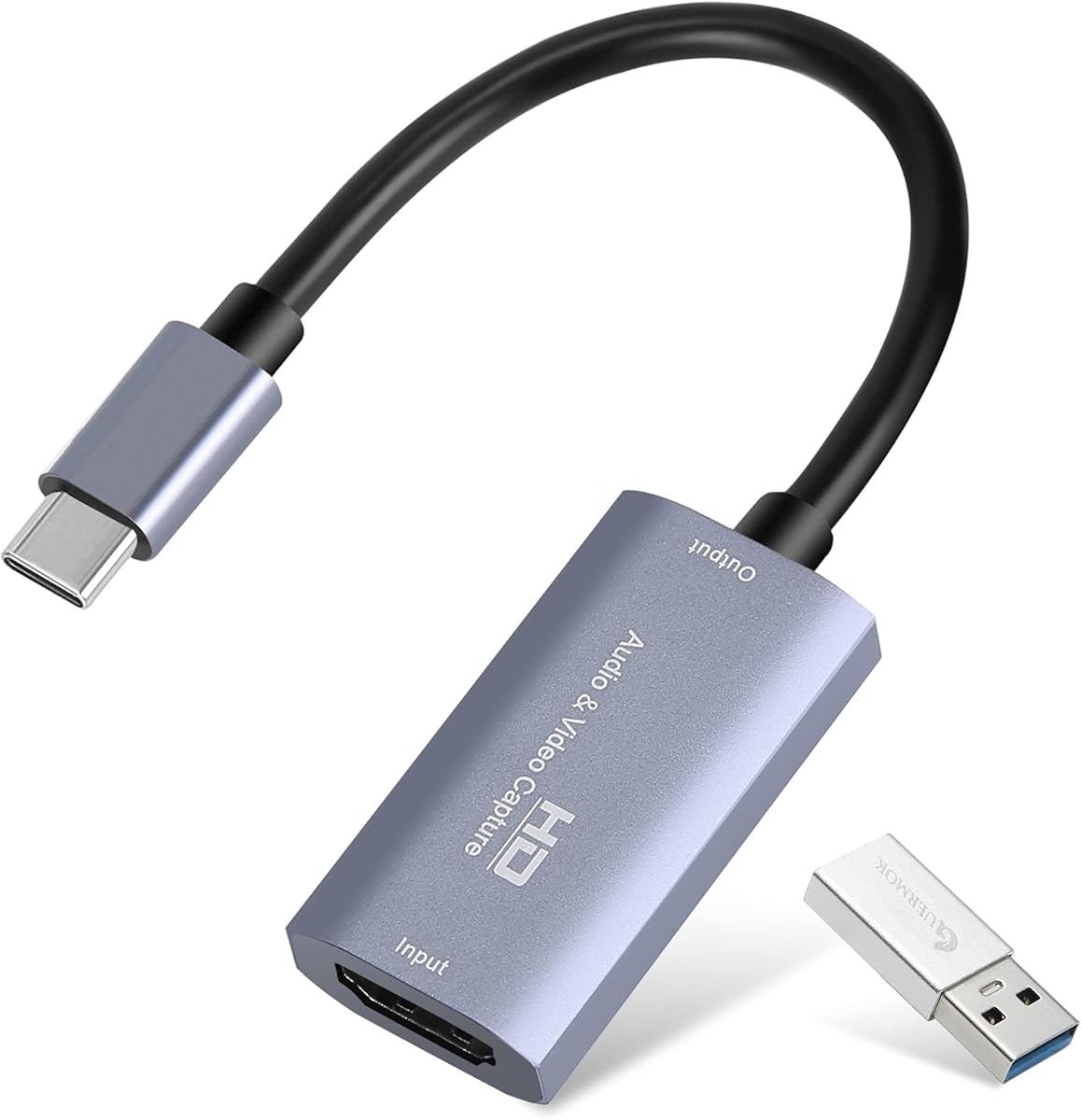
The UGREEN 2K@30Hz 1080P 60FPS Video Capture Card combines a 4.5 rating with versatile USB connectivity. It accepts 4K30 HDMI input and offers two practical capture choices: 2K at 30fps for sharper source-based workflows and 1080p at 60fps for smooth gameplay recording.
We may earn a commission when you buy through this link, at no additional cost to you.
Both USB-A and USB-C interfaces are included, allowing the card to work with desktop computers, laptops, tablets, and compatible phones. Its high-speed USB 3.0 path is listed at 5Gbps and remains backward compatible with USB 2.0. The product is driver-free and supports major streaming and media applications, including OBS Studio, XSplit, PotPlayer, and QuickTime Player.
The principal compromise is its one-way signal architecture. It accepts HDMI at the input and sends the captured feed through USB, but it does not provide HDMI loop-out for a second display. Protected console content can also affect capture, and the product notes that HDCP should be disabled on relevant Switch, Xbox, PlayStation, and PS4 sources. USB-C iPad use requires iPadOS 17 or later.
Despite that limitation, this is the strongest value-oriented choice in the list. It offers flexible recording rates, broad operating-system support, a 4.5 rating, and a durable aluminum shell without requiring dock hardware. It is our best budget pick for users whose main need is dependable Switch 2 capture into OBS or another editing and streaming application.
Choose 2K30 when detail and editing headroom matter, or 1080p60 when smooth motion and familiar streaming formats are the priority.
The included USB-A and USB-C interfaces make the same card useful across desktop, laptop, tablet, and selected mobile workflows without relying on a single connector type.
We may earn a commission when you buy through this link, at no additional cost to you.
The Guermok Video Capture Card offers a portable, driver-free solution with a 4.4 rating. It uses a USB 3.0 high-speed connection, accepts HDMI input up to 4K30, and supports output or capture at 2K30 or 1920 by 1080 at 60Hz.
We may earn a commission when you buy through this link, at no additional cost to you.
The aluminum alloy shell is designed for heat dissipation, and the unit can handle live gaming, recording, meetings, teaching, and streaming without external power. Compatibility extends across Windows, macOS, Linux, Android, and common source devices, with Switch and Switch 2 explicitly listed. The package includes the capture card, a USB 3.0-to-USB-C adapter, and a manual.
This is a capture-only device and not a direct screen-casting adapter. Signal movement is one way, from HDMI to USB-C, so video cannot be sent backward through USB-C to HDMI. Video decoding introduces millisecond-level latency, and compatibility with resolution and frame rate also depends on the source format and chosen capture format. The instructions also advise restarting OBS after changing audio settings.
This card works well for mobile creators, students, and travelers who need a small capture device for temporary sessions. It is particularly attractive when 1080p60 capture and broad software support matter more than HDMI loop-out. Users should connect through a genuine USB 3.0 port whenever possible to preserve bandwidth and minimize signal loss.
The small, lightweight body fits into a bag without adding the complexity of a full dock. Driver-free operation also makes it convenient for field recording.
The card captures HDMI input and transfers it to a computer through USB. It cannot reverse that path, and it is not intended to send a USB-C signal to a television.
We may earn a commission when you buy through this link, at no additional cost to you.
The acer USB 3.0 HDMI Capture Card is our overall recommendation because it delivers the most balanced set of everyday features. Its 4.4 rating, 4K input support, 1080p60 output, HDMI loop-out, microphone input, and driver-free operation cover the core needs of a Switch 2 recording setup.
We may earn a commission when you buy through this link, at no additional cost to you.
Using YUY2 can provide richer color than MJPEG, which is useful for footage that will be edited or published. The loop-out allows gameplay to remain visible on a separate television or monitor while the capture feed travels to the computer. A 3.5mm headset or microphone connection adds commentary and is positioned as a straightforward way to keep voice synchronized with the captured video.
The card does not charge a console and does not extend capture output beyond 1080p60. It is therefore less convenient for all-day handheld play than the integrated docking models, and a protected source may still need its HDCP setting changed. The listed compatibility with Switch 2, Switch, PS5, PS4, Xbox, cameras, PCs, macOS, and Android makes it a broader tool beyond gaming.
This is the easiest recommendation for a buyer who wants a dependable conventional capture workflow without specialized setup software. Connect the source to HDMI, send the card to the computer over USB 3.0, and use loop-out for local viewing. The small enclosure and no-driver design suit both permanent desks and temporary creator stations.
YUY2 support favors image quality, while the loop-out provides a convenient local display. Together they serve both recording and live-play needs.
The 3.5mm microphone input makes it easy to add a headset or microphone for real-time narration without adding a separate digital mixer.
We may earn a commission when you buy through this link, at no additional cost to you.
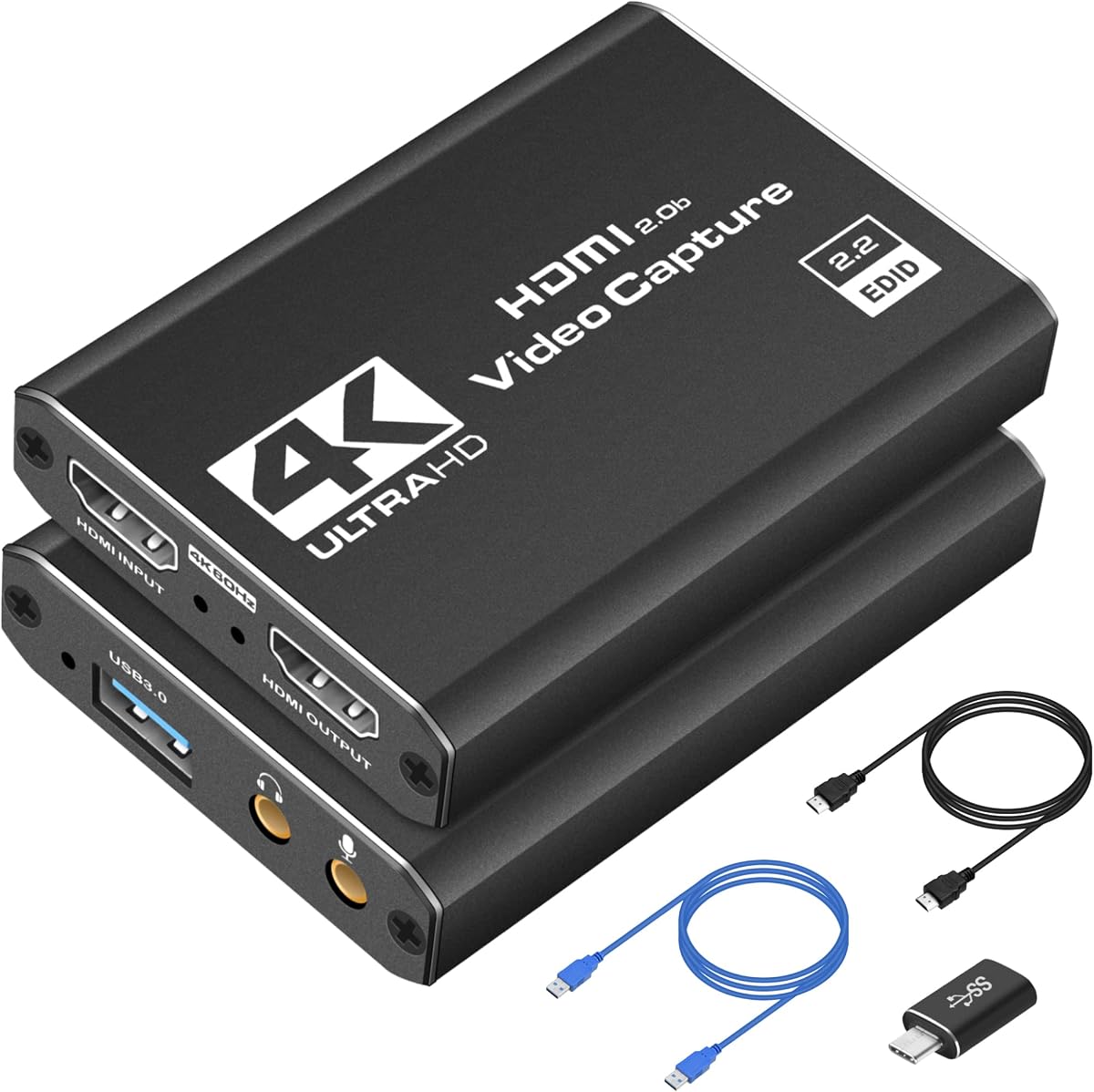
The USB 3.0 HDMI Video Capture Card for Switch 2 is aimed at streamers who want a complete desk-oriented package. It records at up to 1080p60 while passing a 4K30 signal to a monitor, and its box includes a USB 3.0 cable, USB-A-to-USB-C adapter, and guide.
We may earn a commission when you buy through this link, at no additional cost to you.
The card uses an aluminum alloy housing intended to dissipate heat and reduce the chance of thermal throttling or disconnections during extended recording. It works with the Switch 2, original Switch, Switch OLED, several PlayStation and Xbox systems, Steam Deck, cameras, and camcorders. A USB-C adapter enables direct capture connections to compatible MacBooks, iPads, and Android devices.
The HDMI cable is not included, so buyers must account for that when planning a complete setup. It also lacks a charging function and dedicated microphone input, making it less versatile than the JSAUX or C8 dock-style products. Mobile devices used as sources require a separate USB-C-to-HDMI converter, which is also not included.
This product is a strong fit for creators who prioritize stable 1080p60 capture, local high-resolution monitoring, and broad console compatibility. The included cables reduce setup friction, and the compact enclosure can sit behind a display. It is less suitable for users who want the Switch 2 to remain powered by the same compact device.
The supplied USB cable and USB-C adapter cover common computer connections. Users only need to account separately for an HDMI cable between the source and capture card.
The aluminum enclosure is designed to move heat away from the internal electronics, supporting stable recording behavior during lengthy gaming or broadcast sessions.
We may earn a commission when you buy through this link, at no additional cost to you.
The UGREEN 4K@30Hz Loop Out HDMI Capture Card is built for creators who want high-resolution local monitoring alongside 2K recording. Its 4.4 rating reflects a well-rounded design with 4K30 loop-out, 2K30 capture, 1080p60 support, and both USB-A and USB-C connections.
We may earn a commission when you buy through this link, at no additional cost to you.
The HDMI loop-out supports real-time preview and zero-latency monitoring, which is valuable when playing on a television while recording to a computer. Users can select MJPEG for efficient compression or YUY2 for greater clarity. The aluminum casing supports heat dissipation and durability, while driver-free operation and the lack of an external power requirement simplify use on Windows, macOS, Linux, and Android.
It is important to note that 4K capture itself is not supported; the card captures up to 2K30. PS4 and PS5 use requires HDCP to be turned off, and iPhones cannot serve as acquisition targets because they do not support the required UVC protocol. The product is also not compatible with Fire TV Stick. These limitations narrow its appeal for certain smart-home or mobile workflows.
For a Switch 2 owner who values low-latency monitoring and flexible compression, this UGREEN is a strong option. The choice is particularly attractive for 2K editing workflows, while players who require true 4K recording should select a product with different stated capture limits.
The loop-out keeps the console image visible on a nearby screen with no stated delay, preserving responsive play while the computer receives the capture feed.
MJPEG can reduce the computational or storage burden, while YUY2 is positioned as the clearer option. The best choice depends on the recording computer and editing workflow.
We may earn a commission when you buy through this link, at no additional cost to you.
The UGREEN Full HD 2K 30Hz 1080P 60FPS Video Capture Card offers extensive input and passthrough specifications alongside a useful microphone connection. Its rating is 4, and its strongest features include 4K60 input, 4K30 loop-out, 1080p60 capture, and a 5Gbps USB 3.0 path.
We may earn a commission when you buy through this link, at no additional cost to you.
The capture card can record at 2K30 or 1080p60 and works with OBS, XSplit, PotPlayer, QuickTime Player, and other common software. Its microphone input supports 48kHz, 16-bit audio for commentary, while the ABS and PC casing is designed to provide durability and passive heat dissipation. Compatibility extends across Windows, macOS, Linux, iOS 17, and Android.
The 4K60 input is listed in 4:2:0 chroma format, which may not provide the same color detail as 4:4:4 input. The device also does not capture 4K footage; its practical recording ceiling is 2K30 or 1080p60. As with several alternatives, protected content may require HDCP to be disabled, and iPad USB-C operation requires iPadOS 17 or later.
This model suits a creator who wants an expansive specification sheet, smooth 1080p recording, high-resolution passthrough, and direct commentary input without a docking design. It is less compelling for buyers whose only goal is the lowest-cost basic capture, but the broad port and software support make it versatile for regular streaming and recording.
The 48kHz, 16-bit microphone path is designed for game narration and adds useful audio flexibility without requiring digital audio equipment.
A high-resolution HDMI source can be accepted and passed through, while recordings remain focused on broadly practical 2K30 or 1080p60 formats.
We may earn a commission when you buy through this link, at no additional cost to you.
The Capture Card 4K HDMI Video Streaming to USB 3.0 is a portable 1080p60 option with a 4.4 rating. It is designed for gamers and content creators who want crisp standard-definition streaming output without a complicated installation process.
We may earn a commission when you buy through this link, at no additional cost to you.
The device connects an HDMI source to a computer through USB 3.0 and supports popular tools such as OBS Studio, Streamlabs, and XSplit. It can capture or stream gameplay from the Nintendo Switch, PS5, Xbox Series X, DSLR cameras, and PCs. Its passthrough function is intended to keep the source visible while the computer receives the feed, and the product description emphasizes low-latency performance.
Compared with the more technical entries, this card supplies fewer details about chroma formats, microphone support, included accessories, and maximum loop-out resolution. It also offers no charging function, so it is better suited to a console already connected to power. Protected content and source-specific HDCP behavior remain important considerations for any capture device.
For a creator who values portability, no-driver setup, and smooth 1080p60 recording, the card remains a practical choice. It is especially attractive for traveling streamers or users who want one uncomplicated HDMI-to-USB device for several consoles and cameras. Buyers wanting more precise I/O information should verify the latest package contents and product details.
No-driver operation and compatibility with common streaming applications reduce setup time for users who want a straightforward capture workflow.
The lightweight enclosure supports travel, events, LAN parties, and temporary recording stations without requiring a full docking setup.
We may earn a commission when you buy through this link, at no additional cost to you.
The C8 2-in-1 Switch 2 Dock & Capture Card is our premium recommendation for a clean, portable, Switch 2-focused setup. It combines a compact USB-C dock with 1080p60 capture, 4K30 HDMI output, a USB 3.0 hub, and 100W power delivery in one aluminum enclosure.
We may earn a commission when you buy through this link, at no additional cost to you.
Three modes make the device adaptable. Dock Mode sends the console image to a television, monitor, or projector. Capture Mode routes the USB-C source to a laptop, desktop, or compatible USB-C device for recording. Dock + Capture Mode performs both tasks at once, allowing the player to use a larger display while the computer records or streams the gameplay.
The C8 does not have an HDMI input port, so it is not a general-purpose HDMI capture card. It captures USB-C video output from the Switch 2, Switch OLED, original Switch, Steam Deck, iPad Pro, and compatible phones or tablets. It also cannot perform PC-to-PC capture. An HDMI cable and power adapter are not included, and the supplied full-featured USB-C cable is important because the source port must support video and data.
This premium pick is ideal for a Switch 2 owner who wants to play on a TV while recording, charge the console, and connect peripherals with minimal cable clutter. The labeled ports and 60-second setup claim make it approachable for beginners. Those wanting a general HDMI capture solution should choose one of the conventional HDMI models instead.
Separate dock, capture, and combined modes let the same compact device serve casual gaming, recording, streaming, and display setups.
The 100W PD input charges the handheld, while the separate USB 3.0 hub can support controllers, keyboards, mice, microphones, or removable storage.
We may earn a commission when you buy through this link, at no additional cost to you.
The right capture card depends on your source connection, desired recording format, viewing arrangement, audio needs, and whether the device must also charge the Switch 2.
A conventional HDMI capture card receives video through an HDMI port and sends it to a computer through USB. These products are versatile for consoles, cameras, and other HDMI sources, but connecting the Switch 2 may require a compatible dock or adapter that exposes video output. A USB-C capture card takes video directly from a compatible USB-C source, which is more natural for the Switch 2's built-in video output. Check the exact port and cable requirements, because a USB-C cable that carries only power or data will not work as a video connection.
Choose HDMI input for a broad desktop capture system. Choose USB-C input when direct Switch 2 portability and fewer adapters are the priority.
The distinction between input resolution and capture resolution is critical. A card may accept 4K30 or even 4K60 while recording only 2K30 or 1080p60. For smooth gameplay, 1080p60 is the most broadly practical target. 2K30 can provide more spatial detail for editing, while 4K recording demands a source, capture device, computer, software, and storage workflow that all support it.
Do not judge a card only by its highest input number. Confirm the actual recording ceiling and the color format before buying.
HDMI loop-out lets the source signal continue to a television or monitor while the capture card sends another copy to the computer. It is especially useful because a capture card normally presents only as a webcam or recording device and cannot replace a display connection. Zero-latency loop-out is desirable for fast games. A capture-only card may still work, but the player could be forced to rely on a small handheld screen, making the viewing experience less comfortable.
Prioritize a clear loop-out specification if you intend to play on a larger screen while recording.
A card with USB-C power delivery can charge the Switch 2 while it is connected for video, and integrated dock models may also provide a USB hub. This is valuable for long sessions, travel, dorm rooms, and small desks. It is less important when the console is connected to its official dock and a stable power source. Remember that a USB-C port used for video and a separate power input may both be necessary, depending on the product.
Integrated charging is most useful for portable all-in-one setups. Separate dock and capture functions can be simpler for permanent installations.
Some capture cards include a 3.5mm microphone input, allowing a headset or microphone to add spoken commentary directly. This is useful for tutorials, livestreams, and videos where narration is essential. Other products rely on audio embedded in the HDMI or USB-C source, or require separate software routing. The C8 provides a USB hub that can accommodate a microphone, while the conventional cards with dedicated 3.5mm inputs provide the most direct commentary path.
Choose a dedicated microphone input when narration matters, and confirm the supported connector type before assembling your audio setup.
Capture quality depends not only on the advertised resolution but also on the USB path between the card and computer. USB 3.0 provides the bandwidth needed for higher frame rates and formats, while a USB 2.0 connection can reduce recognition or available resolution. Some cards offer both USB-A and USB-C, which improves compatibility with older desktops and modern laptops. For iPad capture, the product information for several models requires iPadOS 17 or later, and mobile devices may need compatible adapters.
Use a full-featured USB 3.0 connection whenever possible and verify that the destination computer has a matching port.
High-bandwidth Digital Content Protection can block a capture feed or produce a black screen. The supplied information for multiple UGREEN models states that compatible Switch, Xbox, PS5, and PS4 systems work when HDCP is turned off where applicable. This is relevant when recording private console menus, some streaming content, or protected broadcasts. Gameplay that is intended for public streaming generally follows different rights considerations, but technical compatibility should always be verified.
Check the current source-device settings and the capture card's HDCP guidance before an important recording session.
Traveling creators benefit from a compact, lightweight enclosure, while stationary users may prioritize aluminum construction, a full cable kit, or integrated hub ports. Aluminum can improve heat dissipation, and the ABS-plus-PC enclosure used by one UGREEN model also provides a cooling function. Long recording sessions benefit from stable thermal behavior because overheating can lead to frame drops, reduced performance, or disconnections. Leave enough space around the device and avoid enclosing it in a tight, poorly ventilated area.
For travel, favor compactness and included essentials. For long sessions, favor cooling claims and a housing that manages heat effectively.
Begin by deciding whether your card uses HDMI or USB-C source input. For an HDMI model, connect the Switch 2 through a suitable dock or video-output adapter, route the display output into the card's HDMI input, and connect the card's USB 3.0 output to the recording computer. For a USB-C model, use a full-featured cable that carries video and data between the console's video-output port and the card. Follow the product's stated Switch 2 port instructions exactly.
Open OBS Studio, Streamlabs, XSplit, vMix, or another compatible recording application, select the capture card as the video source, and confirm that the image and audio appear in a preview. If the device is not detected, reconnect it, try the other USB-C orientation when the instructions recommend it, and confirm that the computer recognizes USB 3.0 rather than USB 2.0. After changing audio settings, restart the relevant software when required. Test a short recording before beginning a full session.
For care, keep the capture card and connectors dry, avoid pulling on attached cables, and provide ventilation around the housing during long recordings. Store the device in a small protective pouch to prevent scratches and dust. Check the latest package contents, firmware or software requirements, and compatibility notes before every event, particularly if the unit includes adapters that may not cover the connection you need.
No. Some capture cards accept video through HDMI, while others use the Switch 2's USB-C video output. An HDMI card usually requires a dock or compatible adapter that exposes the console's display signal. A USB-C capture card needs a full-featured cable capable of carrying video and data. Always confirm that the exact card lists Switch 2 compatibility and that the required output mode is supported.
Only certain integrated products can do so. The JSAUX and C8 models combine a portable dock, charging, display output, and capture functions. Conventional HDMI capture cards only move video into a computer and may require a separate dock. If you want one compact device to play on a television and record simultaneously, choose a model explicitly designed as a two-in-one dock and capture solution.
No. Input and capture limits are separate. Several cards accept 4K30 or 4K60 sources but record at 2K30 or 1080p60. The maximum capture resolution also depends on the source output, the recording computer, the selected video format, and the software. Check both figures and avoid judging a device by its highest input specification alone.
1080p60 is a practical target for smooth gameplay and broad streaming compatibility. 2K30 can provide additional detail for editing, but 30fps motion is less fluid than a 60fps capture. If local play and recording happen together, verify that the selected format, USB bandwidth, and computer can sustain the intended settings without dropped frames.
A black screen can result from HDCP protection, an inactive source, an unsuitable connection, insufficient USB bandwidth, or incorrect software settings. The relevant product guidance says to disable HDCP on compatible Switch, Xbox, PlayStation, and PS4 modes where applicable. Also confirm that the console is sending video, the card is connected through a genuine USB 3.0 path, and OBS or other software recognizes the correct source.
A capture card provides a consistent video and audio path into recording or broadcasting software, usually at 1080p60. Direct streaming can be simpler when the platform officially supports the console and the required broadcast functions. A capture card is generally more useful for editing, overlays, commentary, and working with a broader range of software, provided the extra setup is worthwhile.
Yes, if the capture card has HDMI loop-out or provides a combined dock-and-capture mode. The source sends an image to the local display while the computer receives a separate feed for recording. Capture-only cards can still record, but they may not let the console appear on a second screen unless a separate display path is available.
Only models with a dedicated USB-C PD power input can do so, and the charger must meet the required power-delivery profile. The JSAUX and C8 products list support for charging up to 100W. Other cards are capture-only and need the console connected to a separate power source. A USB-C data connection alone does not necessarily charge the console.
The UGREEN 2K HDMI Capture Card stands out as the best budget option because it combines a 4.5 rating, 4K30 input, flexible USB-A and USB-C connectivity, and practical 2K30 or 1080p60 capture. The acer card is the strongest all-around conventional choice, with 1080p60 output, 4K input, loop-out, YUY2 support, and a microphone input. For a premium portable system, the C8 leads through its integrated dock, 100W charging, hub, and three operating modes.
Prioritize the connection method first, because a card that cannot receive the Switch 2's video output will not suit the intended setup. Next, confirm the actual capture resolution, frame rate, loop-out behavior, and USB bandwidth. Consider microphone input for commentary, charging for long handheld sessions, and cooling for extended recordings. Portable users should also verify that every required full-featured cable and adapter is included.
Current prices, package contents, and compatibility details can change, so review the latest listing before ordering. The best unit is the one that matches the recording computer, software, display arrangement, and power needs without forcing unnecessary adapters or workflow compromises.