
Motoeagle DDR2-667 Desktop Kit
4.4Editor score
4GB dual-module desktop kit
DDR2-667 PC2-5300U speed
240-pin unbuffered UDIMMs
Discover the best DDR2 Laptop and Desktop RAM for older systems, comparing capacity, speed, form factor, compatibility, and installation ease for buyers.
DDR2 Laptop and Desktop RAM can restore useful capacity to aging notebooks and desktop computers, but the right module depends on form factor, speed, voltage, rank, and system compatibility. A module that looks interchangeable may still be rejected by a machine with narrower support, making careful specification matching essential before purchase.
This guide compares ten DDR2 memory kits and modules across laptops, all-in-one systems, and desktops. We examined the supplied capacities, data rates, pin counts, voltage, ECC and buffering characteristics, compatibility claims, ratings, warranties, and intended computer models, separating broadly useful upgrades from highly specialized options.
The selections include 2GB, 4GB, and 8GB solutions in 200-pin SODIMM or 240-pin UDIMM form factors, with an emphasis on matching the right physical and electrical design to the target computer. Product ratings and specifications can change over time, and prices fluctuate, so shoppers should confirm current details before buying.
4.4Editor score

4.7Editor score
4.8Editor score
The table below compares all ten products by capacity, module format, speed, and intended use, making it easier to identify the upgrade that matches a particular laptop or desktop.




The Rasalas PC2-6400 DDR2 800 kit is a 4GB laptop memory upgrade consisting of two 2GB DDR2-800 modules. It carries a 4.6 rating and is designed for 200-pin, 1.8V SODIMM systems using PC2-6400S or compatible DDR2 configurations. Its stated support for Intel, AMD, and Mac systems gives it broader appeal than a model-specific module.
We may earn a commission when you buy through this link, at no additional cost to you.
Two matching 2GB modules are especially useful for a laptop that accepts two SODIMM slots and can operate in a dual-channel arrangement. The listed 2Rx8 dual-rank organization may also suit older controllers better than modules using a different rank structure, provided the target system accepts that organization. CL6 timing and standard 1.8V laptop voltage align with conventional DDR2-800 SODIMM requirements.
The product description emphasizes component screening, motherboard compatibility, and long-term stability, while also stating that installation can take as little as five minutes. Those are useful benefits for an inexpensive memory upgrade, although the broad platform language does not guarantee that every DDR2 laptop will accept the kit. Memory maximums, supported ranks, and module organization still need verification.
This Rasalas option is a strong general-purpose choice for a compatible DDR2-800 notebook that needs more memory than a single 2GB stick can provide. It is less appropriate for a desktop because its physical connector and electrical design are specifically for laptops. Confirm the laptop manual, maximum supported capacity, available slot layout, and existing memory before ordering.
Using two 2GB modules gives compatible notebook owners a straightforward path to 4GB of memory. That can be more meaningful for multitasking than adding capacity to a system already constrained by a lone 2GB module.
The 200-pin SODIMM format and 1.8V operating requirement are essential identifiers. A desktop UDIMM may look similar but is longer and physically incompatible with a notebook slot.
We may earn a commission when you buy through this link, at no additional cost to you.
The MemoryMasters 8GB kit provides two 4GB DDR2-800 PC2-6400 modules for compatible notebook computers. Its 3.6 rating is the lowest among the ten products here, but the specification still makes it a potentially valuable option for owners whose laptops support enough memory. The modules use the standard 200-pin, 1.8V SODIMM form factor.
We may earn a commission when you buy through this link, at no additional cost to you.
Its primary advantage is capacity. An 8GB total configuration can give an aging business notebook or portable computer more room for browser tabs, office applications, background utilities, and security software. Because the kit contains two modules rather than one, it may be appropriate for systems with two accessible SODIMM slots and a supported maximum of at least 8GB.
The trade-off is that higher-capacity DDR2 modules are not accepted by every older notebook. Some machines cap supported memory at 4GB, while others restrict module size or rank even when they accept DDR2 generally. The 3.6 rating also warrants more attention to recent customer feedback, especially when the target computer has limited support for 4GB modules.
Buy this kit only after checking the notebook manufacturer's maximum capacity and module requirements. It is a strong capacity-focused option for a compatible DDR2 laptop that needs 8GB, but a smaller matched kit is safer for older models with strict 2GB-per-slot limitations or less generous overall memory ceilings.
Eight gigabytes can make lightweight productivity workflows feel more responsive when a notebook is simultaneously running several applications. The benefit depends on software demands and whether the operating system itself was designed for a DDR2 platform.
Two 4GB modules do not guarantee an 8GB configuration in every laptop. Check whether the machine accepts 4GB modules in each slot and whether its firmware or motherboard enforces a lower maximum.
We may earn a commission when you buy through this link, at no additional cost to you.
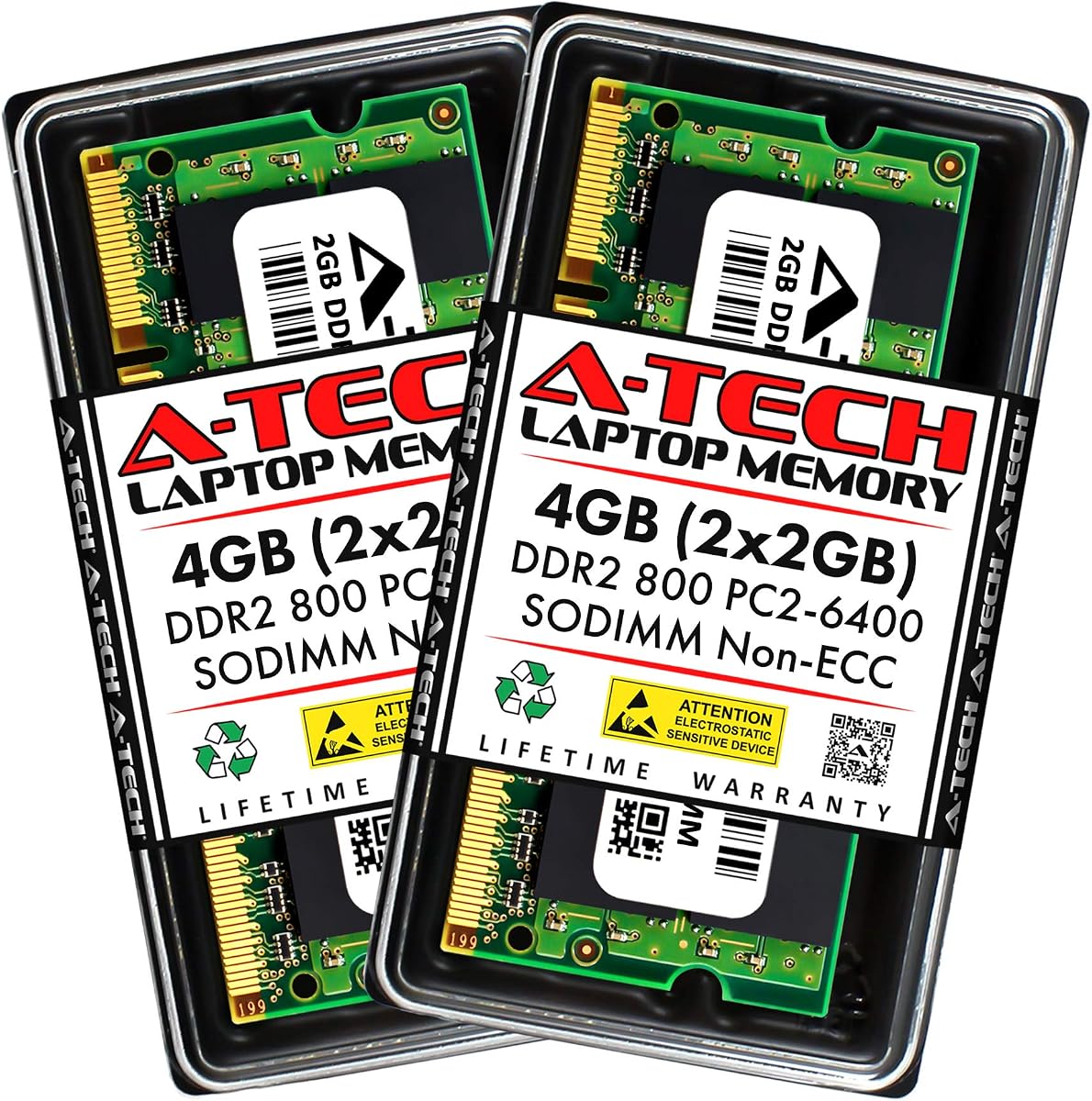
The A-Tech 4GB DDR2-800 SODIMM kit contains two 2GB modules designed for laptops, notebooks, and certain all-in-one computers. It has a 4.6 rating and specifies 200-pin, 1.8V, CL6, non-ECC, unbuffered memory. The unusually long list of supported brands makes it useful for shoppers trying to upgrade an older notebook from a major manufacturer.
We may earn a commission when you buy through this link, at no additional cost to you.
The compatibility list includes Acer, Apple, Dell, Fujitsu, Gateway, HP, Lenovo, Panasonic, Samsung, Sony, Toshiba, and numerous other brands, along with several desktop component makers. That breadth should be treated as a starting point rather than an unconditional promise, because DDR2 notebooks vary in maximum capacity, slot configuration, and supported module organization even within one product family.
Its strongest selling points are a well-documented specification, strict quality assurance testing, a lifetime warranty, and United States-based technical support. The four listed features are also concise: 4GB total capacity, DDR2-800 speed, 200-pin laptop format, and standard 1.8V power. The non-ECC, unbuffered specification also makes it unsuitable for systems requiring server-grade error correction or registered memory.
This is a well-rounded choice for a compatible DDR2-800 notebook, particularly one that already uses matching 2GB modules. It offers a clearer compatibility roadmap and stronger rating than many alternatives. Still, verify the exact service model and maximum memory, because the presence of a brand on the list does not guarantee that every model from that brand supports this kit.
The extensive brand list makes this a practical starting point for many common laptop systems. It narrows the initial search, though the exact model and its memory specification remain essential.
Two identical 2GB modules can be especially convenient for a notebook designed for dual-channel operation. The kit also provides a straightforward 4GB total when both slots are populated.
We may earn a commission when you buy through this link, at no additional cost to you.
This A-Tech 8GB kit is designed for Dell Inspiron 519, 530a/c, 545, 545s, 546, and 546s desktop models. It comprises four 2GB DDR2-800 PC2-6400 non-ECC modules, giving it a distinct four-slot configuration. The 4.5 rating reflects generally favorable customer feedback for a tightly targeted upgrade.
We may earn a commission when you buy through this link, at no additional cost to you.
A model-specific kit can be more reassuring than a generic desktop memory listing because the seller has already identified the intended computer families. The eight-module? No: four 2GB modules, for a total of 8GB, may provide a meaningful capacity increase for supported Inspiron desktops used in offices, classrooms, or other basic computing environments.
Its limitation is equally clear. This package is not a universal desktop upgrade and should not be purchased for a laptop, a different desktop, or a listed Inspiron with fewer than four usable memory slots. The kit must also be compatible with the system's non-ECC requirement and supported memory organization. Checking the service tag and the original motherboard documentation is advisable.
For an owner of one of the named Dell Inspiron systems, this is a focused way to reach 8GB with a recognized brand and a lifetime warranty. For anyone outside that list, a smaller universal 240-pin DDR2 kit will usually be easier to use. The strongest recommendation depends on finding the exact model under the broad Inspiron family.
The model list is the defining advantage. Buyers can compare a known desktop family rather than interpret general DIMM compatibility, reducing the chance of choosing the wrong physical or electrical configuration.
The package contains four modules, so all four positions must be available and usable. A supported computer with only two slots needs a different two-module kit.
We may earn a commission when you buy through this link, at no additional cost to you.
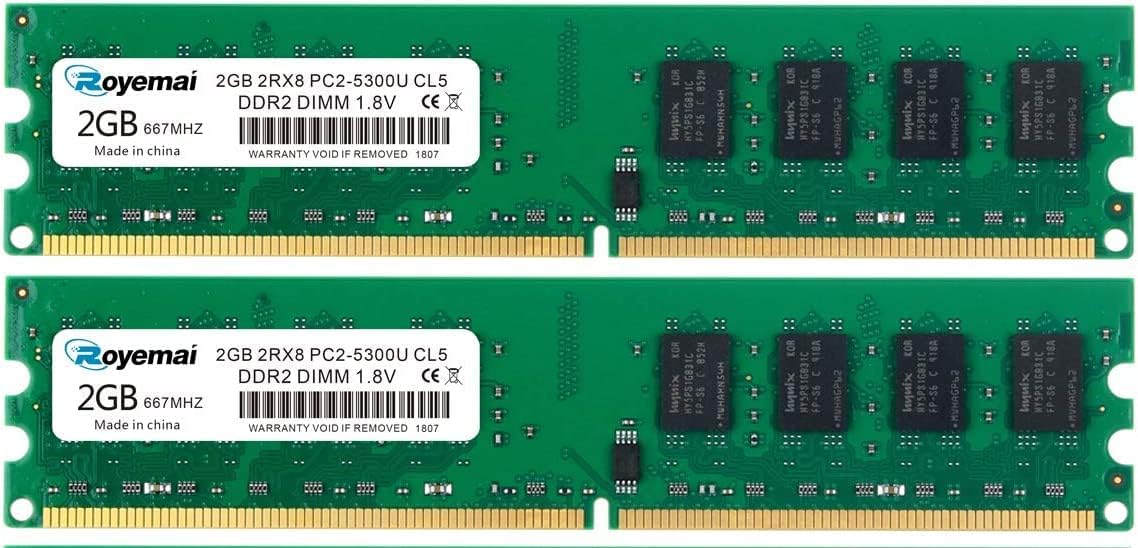
The Motoeagle 4GB kit is a budget-oriented desktop upgrade made up of two 2GB DDR2-667 PC2-5300U modules. It carries a 4.4 rating and uses 240-pin, 1.8V, unbuffered, non-ECC UDIMMs with 2Rx8 dual-rank organization. That makes it more appropriate for compatible desktop motherboards than for notebook systems.
We may earn a commission when you buy through this link, at no additional cost to you.
The most attractive feature is the combination of 4GB total capacity and a two-module arrangement. Dual-channel-capable desktop controllers may benefit from matched modules, while the additional capacity can help with several applications running at once. The product description says all chips are tested and emphasizes compatibility with motherboards from multiple brands.
DDR2-667 is slower on paper than DDR2-800, but a compatible system may run both ratings at the same effective speed, depending on its memory controller. A system that specifically requires PC2-5300 may not support the faster alternative. Dual-rank modules can also be restricted by some older controllers, so the motherboard manual should be consulted.
This is a sensible value choice for a desktop that supports DDR2-667 2Rx8 unbuffered memory. It is not the right pick for a laptop or a machine requiring PC2-6400, and it should not be forced into a system that rejects dual-rank modules. Check the required speed, capacity ceiling, and rank support before installation.
The matched pair raises a typical older desktop from a very limited memory configuration to a more workable level. That can reduce pressure from background processes without requiring a more complex upgrade.
A faster DDR2 module is not automatically better. The controller, chipset, and stated system requirements determine whether DDR2-667 or DDR2-800 is the safer choice.
We may earn a commission when you buy through this link, at no additional cost to you.
The Crucial CT2KIT25664AA800 is a 4GB desktop memory kit made from two 2GB DDR2-800 PC2-6400 CL6 modules. It is a 240-pin unbuffered UDIMM package with a 4.7 rating, making it one of the strongest all-around desktop choices in this guide. The listing also identifies the CT2CP25664AA800 as an identical designation.
We may earn a commission when you buy through this link, at no additional cost to you.
Crucial is a recognized memory brand, and the product description emphasizes premium quality, testing, straightforward installation, and the goal of increasing system performance. A matched pair of 2GB modules provides 4GB total and can suit dual-channel-capable desktop boards. The standard CL6 timing and 1.8V DDR2-800 profile are widely associated with conventional desktop DDR2 upgrades.
The package is unbuffered, so it is designed for ordinary desktop motherboards rather than systems that require registered server memory. It also cannot be inserted into a 200-pin laptop SODIMM slot. Although many desktop boards can use DDR2-800, some early DDR2 platforms perform best with PC2-5300 modules, so checking the motherboard manual is still important.
This kit is an excellent recommendation for a compatible desktop seeking 4GB without moving to a specialized four-module or model-specific package. Its strong rating, established branding, and clearly stated specifications make it easier to shortlist. Confirm the system supports DDR2-800 and 2GB modules, then ensure all existing memory is compatible before mixing capacities.
The combination of a familiar brand, clear 240-pin specification, and matched modules makes this a low-ambiguity choice. It provides a practical 4GB configuration for many older desktops.
Capacity, speed, timing, voltage, and buffering are all stated clearly. Those details let buyers compare the kit directly with the motherboard's memory specification before ordering.
We may earn a commission when you buy through this link, at no additional cost to you.
This 4GB DDR2 desktop kit pairs two 2GB PC2-5300 modules and carries the highest customer rating in the selection at 4.8. Its detailed specification includes DDR2-667, 1.8V, CL5, 240-pin, non-ECC, unbuffered, and 2Rx8 organization. The result is a technically specific option for compatible desktop boards.
We may earn a commission when you buy through this link, at no additional cost to you.
Dual-rank memory is the distinguishing feature. By using two 2Rx8 modules, the kit provides 4GB while retaining a rank structure that can be useful with compatible older controllers. The listing also states that the modules use Samsung ICs, describes the chips as original or high quality, and says every RAM module is tested for stability, durability, and compatibility before shipment.
Those claims should be evaluated as seller-provided information rather than independent laboratory findings. Buyers should also confirm that the target motherboard supports dual-rank 2Rx8 PC2-5300 modules. Some early DDR2 controllers do not accept every rank combination, and the listed CL5 timing is not necessarily the lowest latency available within the DDR2-667 class.
This is the premium pick for a desktop that explicitly supports 2Rx8 modules and wants a 4GB matched set. It combines a strong rating with unusually thorough technical information and a broad list of desktop brands. For a system with different rank requirements, choose a less specialized kit rather than assuming all DDR2-667 UDIMMs are interchangeable.
The 2Rx8 designation is valuable when a motherboard requires or specifically supports dual-rank memory. It also distinguishes this kit from simpler single-rank alternatives.
Speed, timing, voltage, pin count, buffering, ECC status, and rank are all disclosed. A buyer can therefore validate compatibility with unusually little ambiguity.
We may earn a commission when you buy through this link, at no additional cost to you.
The Crucial CT25664AC667 is a single 2GB DDR2-667 PC2-5300 CL5 module for notebook computers. It uses the 200-pin SODIMM form factor and has a 4.5 rating. For a laptop with one free slot, that simplicity can be more useful than a larger two-module kit that the machine cannot accommodate.
We may earn a commission when you buy through this link, at no additional cost to you.
A single module minimizes installation complexity because the buyer does not need to populate multiple slots. Its CL5 timing and 667MHz data rate are conventional for DDR2-667 notebooks, and the product listing identifies the module as SODIMM memory intended for laptop systems. The recognized brand and precise part number also make it straightforward to compare with service documentation.
The major limitation is total capacity. Two gigabytes can improve a very lean system, but it is modest by modern standards and may not support demanding multitasking. The listing describes memory channels as dual, but because this is a single module, buyers should not assume dual-channel performance without checking the laptop architecture and available module arrangement.
This is best for a compatible notebook that needs a straightforward 2GB replacement or a single additional module, especially if it lacks space for a matched kit. Buyers seeking more capacity should consider a two-module 4GB option, while those with two matching slots may prefer matched modules for potentially better dual-channel behavior.
Not every laptop has two accessible memory positions. A single 2GB module can upgrade a compatible one-slot design without requiring a matched pair.
This module improves a lean configuration but does not offer the breathing room of a 4GB or 8GB kit. Consider the target laptop's intended workload as well as its slot count.
We may earn a commission when you buy through this link, at no additional cost to you.
This 2GB DDR2 kit is made for Dell OptiPlex 330, 740, 745, 745c, and 755 desktop computers. It contains two 1GB PC2-5300 667MHz 240-pin DIMMs and carries a 4.7 rating. The package also includes a lifetime warranty, adding reassurance to this narrowly targeted legacy-computer upgrade.
We may earn a commission when you buy through this link, at no additional cost to you.
A matched pair of 1GB modules may be useful for a compatible OptiPlex that was originally configured with similar memory. The specification is easy to interpret: two 1GB desktop DIMMs operating at the DDR2-667 class. The listing's model targeting reduces the risk of confusing this kit with a laptop module or a system requiring a different form factor.
Capacity is the decisive limitation. Two gigabytes can be better than an extremely small configuration, but it remains modest for modern browsing, multiple office applications, and background software. The exact OptiPlex model must also be confirmed, and buyers should check whether the system expects 1.8V DDR2 and whether both modules may be installed together.
This kit is a sensible targeted choice for one of the listed Dell OptiPlex systems whose memory has reached the limit of the installed configuration. It is less attractive for general buyers or users seeking more than 2GB. Its high rating and model-specific focus make it worth checking first when servicing one of the named desktops.
The explicit list of OptiPlex models is useful for maintenance buyers and refurbishers. It provides a more focused alternative to choosing among dozens of generic DDR2 DIMMs.
Both modules have the same 1GB capacity and DDR2-667 speed. Installing the pair in a compatible dual-slot system can also be preferable to adding a mismatched module.
We may earn a commission when you buy through this link, at no additional cost to you.
The Hynix 2GB module is a 200-pin laptop SODIMM operating at DDR2-800, also identified as PC2-6400. It has a 4.3 rating and is described as suitable for Major and 3rd generation laptop systems. Its RoHS approval provides an additional regulatory detail for buyers seeking a recognized memory component.
We may earn a commission when you buy through this link, at no additional cost to you.
Because it is a single module, it offers a straightforward way to add or replace 2GB in a compatible notebook with one available slot. The DDR2-800 speed is the common upper speed class for PC2-6400 laptop memory. Hynix is a recognizable semiconductor and memory brand, which can provide additional confidence when compared with less clearly identified modules.
Its 2GB capacity is the main limitation, and the laptop must support that amount per module as well as the module's organization. The title's references to Major and 3rd generation systems are not a complete compatibility list. A notebook's chipset, maximum memory, and slot layout are better sources of truth than a general generation label.
This module is a practical choice for a compatible DDR2-800 laptop that needs a single 2GB stick, either as an additional module or a replacement. It is less appropriate for modern workloads or systems that can accept a larger matched kit. Confirm the voltage, physical size, and supported capacity before purchase.
The Hynix branding and standard PC2-6400 specification make the module easy to compare with laptop service documentation. It is a focused alternative to buying a two-module kit.
A single 2GB stick can be ideal for a notebook with limited memory access. The tradeoff is a lower final capacity than the two-module kits in this guide.
We may earn a commission when you buy through this link, at no additional cost to you.
Choosing DDR2 memory requires matching a module's physical design, voltage, speed, capacity, rank, and system requirements. The most important first step is identifying the target computer and its documented memory specification before comparing kits.
A laptop memory upgrade uses a 200-pin SODIMM, while a desktop typically uses a longer 240-pin UDIMM. These formats differ in size, notch placement, electrical design, and sometimes supported voltage. A desktop DIMM cannot fit in a notebook, and a notebook SODIMM cannot fit in a desktop board. The product type should therefore be selected from the computer's physical form factor before considering capacity or speed.
The target computer's maximum memory is a hard limit, and some systems also cap the amount accepted in each slot. A desktop might support 8GB only with a particular module organization, while an old laptop may stop at 4GB even though it accepts two 2GB sticks. Check the service manual, manufacturer specifications, or a reliable system inventory report for total capacity, per-slot capacity, and the number of accessible slots.
DDR2 modules are commonly described as DDR2-667 or DDR2-800, with corresponding PC2-5300 and PC2-6400 names. The number indicates a theoretical data rate, not the same thing as CPU speed. A DDR2-800 module can usually operate at a lower supported rate in a compatible DDR2-667 system, but the module's timing, rank, and the motherboard controller still need to be acceptable. Buy the speed explicitly required or recommended for the computer.
Most consumer laptops and desktops in this guide use non-ECC unbuffered memory at 1.8V. Registered or buffered server memory has different electrical characteristics and should not be substituted in an ordinary desktop. ECC memory may function in some boards that support it, but it is not interchangeable with a non-ECC module. The listing's ECC status, buffered status, and voltage should be compared directly with the system's requirements.
Single-rank and dual-rank modules are not universally interchangeable. A 2Rx8 module contains two ranks, and some older controllers restrict the ranks or capacities they permit in each slot. A matched pair of identical modules can suit a system designed for dual-channel operation, but matching alone does not guarantee it. Read the memory support list carefully and prefer the exact organization approved for the motherboard or notebook.
The ten options range from 2GB to 8GB, and larger is not always necessary. A 2GB single module may be ideal for a lightweight notebook with one slot, a 4GB matched kit suits many general-purpose upgrades, and an 8GB package can help a compatible system handle more concurrent applications. Consider the operating system, intended software, available slots, and whether the computer will need memory for other hardware functions.
Established memory brands and documented warranties can make an otherwise technical purchase easier. A-Tech, Crucial, Hynix, and Motoeagle are among the brands represented, while the Rasalas and MemoryMasters entries provide their own compatibility and support claims. Warranty coverage is useful, but it should complement rather than replace technical compatibility. Read the stated terms and confirm the physical and electrical specifications before ordering.
A model-specific kit names the computers it is designed to support, which is helpful for proprietary or legacy systems. A universal kit offers broader flexibility but places more responsibility on the buyer to verify specifications. The Dell OptiPlex and Inspiron kits are targeted examples, while general desktop and laptop kits are more versatile. Choose the level of specificity that matches the confidence available from the system's documentation.
Before installing memory, shut down the computer completely, disconnect its power source, and allow internal components to cool. For a laptop, remove the battery if the design permits it. For a desktop, unplug the power cord and use appropriate tools to open the case. Static discharge can damage sensitive memory components, so work on a clean surface and avoid touching exposed circuitry.
Install the module according to the system manual. Laptop SODIMMs are usually installed at an angle and pressed flat beneath retaining clips. Desktop UDIMMs are commonly inserted vertically into a keyed slot, with the module's notch aligned correctly. Apply steady pressure to the ends until the clips lock, and never force a module that does not seat easily. Desktop systems should also use matched modules in the channel arrangement specified by the motherboard guide.
After installation, close the case, restore power, and enter the BIOS or firmware setup to confirm the detected capacity. The operating system should then recognize the full amount. If it does not, reseat the memory and check that the chosen capacity, rank, and speed appear in the system support list. Keep the old modules, packaging, and purchase records, and do not repeatedly insert or remove the memory unless it is fully powered off.
No. Desktop DDR2 generally uses a 240-pin UDIMM, while laptops use a smaller 200-pin SODIMM. The dimensions and notch positions differ, so a desktop module cannot be inserted safely into a laptop. Use only the 200-pin laptop module specified by the notebook manufacturer.
DDR2-800 has a higher theoretical data rate than DDR2-667. However, a compatible computer may run both at the same speed because the memory controller is limited by the chipset or system configuration. Choose the faster option only when the target system explicitly supports DDR2-800 and the required module organization.
The answer depends on the exact model, motherboard, number of slots, and maximum capacity per slot. Some systems top out at 2GB or 4GB, while others support 8GB. Check the service manual or manufacturer support page for both total capacity and per-module limits before buying a multi-module kit.
Not always. A single module is sufficient for many basic upgrades, and a laptop with only one slot must use a single module. Two matching modules can be preferable for systems designed for dual-channel memory and for a clean matched configuration, but the computer must support the total capacity and module organization.
The R designation indicates the number of ranks on a module, while x8 describes the chip organization used for each rank. A 2Rx8 module can provide different controller behavior and capacity characteristics from a 1Rx8 module. Some older systems support only specific rank configurations, so the motherboard or laptop support list is essential.
It may be possible, but the safest approach is to use modules with matching speed, voltage, timing, rank, and capacity. The system will normally operate the memory at a common supported setting, though mixed kits can reduce the benefit of dual-channel operation. Consult the computer manual when mixing modules.
Common causes include an incorrect form factor, exceeding the computer's maximum capacity, unsupported rank organization, incomplete seating, or a module placed in a slot that does not match the intended channel arrangement. Check the manual, reseat the memory with power disconnected, and confirm the specifications before replacing any hardware.
Usually, yes. Most consumer laptops and desktops designed for DDR2 use non-ECC unbuffered memory rather than server modules. The exact system requirement remains controlling, so confirm that the computer calls for non-ECC, unbuffered modules at the expected voltage.
The standout picks are the Motoeagle DDR2-667 Desktop Kit for value-focused buyers, the Crucial DDR2-800 Desktop Kit for a well-established general-purpose upgrade, and the DDR2-667 2Rx8 Desktop Kit for systems that specifically support dual-rank modules. For notebooks, the Rasalas and A-Tech 4GB SODIMM kits offer matched capacity, while the Crucial and Hynix single modules suit simpler slot layouts.
Compatibility should always take priority over capacity or headline speed. Confirm 200-pin SODIMM versus 240-pin UDIMM, supported voltage, total and per-slot memory limits, ECC and buffering requirements, and the expected rank configuration. A matched two-module kit is often preferable when the system has two suitable slots, while a single module can be the only practical choice for a one-slot laptop.
Product details, customer ratings, availability, and prices can change, so review the current listing before purchasing. Compare the module specification with the computer's official memory documentation and use the product links in this guide to check the latest information. This careful matching process is the surest route to a successful DDR2 upgrade.