
WEELIAO MAXSUN Intel Arc Pro B60 48G
Dual 24GB Arc GPUs
48GB combined VRAM
394 TOPS INT8 compute
PCIe 5.0 x8 lanes
Explore the best Dual GPU AI Setup options for local AI inference, model training, rendering, and enterprise workloads, with key hardware specifications
A Dual GPU AI Setup can accelerate local inference, model fine-tuning, rendering, data science, and other memory-intensive workloads by distributing graphics processing across multiple accelerators. The right configuration depends on VRAM capacity, GPU architecture, CPU throughput, cooling, power delivery, storage, and whether the system must operate quietly at a desk or as a rack-mounted server.
This guide compares ten systems and graphics products that use dual-GPU architectures, unified-memory platforms, or expandable multi-accelerator designs for serious AI workloads. We evaluated the supplied specifications for processor cores, accelerator memory, bandwidth, networking, storage, power, expansion, and software support. The list includes compact workstations, full towers, rack servers, and standalone accelerator cards.
Each pick demonstrates a different route to local AI performance, from the dual Intel Arc Pro B60 card to systems based on RTX PRO 6000, RTX 5090, or enterprise EPYC platforms. Ratings are shown only when supplied, and unrated products are identified accordingly in the review text. Prices and configurations can change, so readers should verify current listing details before purchasing.


The comparison below covers accelerator capacity, processor resources, memory, and storage across ten AI-focused systems. It shows why a compact unified-memory computer, a dual professional GPU tower, and a multi-GPU rack server can suit very different users despite solving related AI-computing problems.


The WEELIAO MAXSUN Intel Arc Pro B60 48G is a dual-GPU graphics card designed to give local AI builders 48GB of combined GDDR6 memory without assembling two separate cards. It is an unusual accelerator in this roundup because it combines two Arc Pro B60 GPUs behind a single product. The supplied listing does not include a customer rating, so its value rests on the stated hardware and software specifications rather than a measured score.
We may earn a commission when you buy through this link, at no additional cost to you.
Each GPU provides 20 Xe cores operating at 2400 MHz, yielding a listed combined INT8 performance of 394 TOPS. The larger 48GB memory pool is especially relevant for quantized models such as DeepSeek-R1:70B and QwQ-32B. Memory bandwidth is specified at 456 GB/s, while native support is listed for PyTorch, IPEX-LLM, vLLM, and widely used open-source model families.
The main limitation is platform preparation. The card uses two PCIe 5.0 x8 connections and reaches full bandwidth when paired with a motherboard that supports x16 lane bifurcation. Buyers need to verify physical clearance, slot spacing, chassis depth, cooling, and power requirements before ordering. Software compatibility with a particular framework, model, driver, and operating system also deserves confirmation because the Arc ecosystem may differ from CUDA-based workflows.
This is a compelling option for a technically informed buyer who wants substantial memory in one relatively compact accelerator and already knows how to configure PCIe bifurcation. It is less suitable for a plug-and-play user or someone whose applications only support NVIDIA CUDA. For the right enclosure and software stack, it can offer a distinctive route to private, local AI inference without a full multi-GPU workstation.
Combining two 24GB Arc Pro B60 GPUs creates a 48GB graphics-memory solution that can host sizable quantized models. This capacity is the card's defining benefit for local inference, experimentation, and memory-bound generative AI workloads.
The x16 interface is divided into two PCIe 5.0 x8 links. A compatible motherboard with lane bifurcation, adequate slot spacing, and sufficient power delivery is essential for achieving the advertised configuration.
We may earn a commission when you buy through this link, at no additional cost to you.
The APC MES2X is a full dual-GPU AI workstation built around two NVIDIA RTX PRO 6000 Blackwell cards. Its headline advantage is the combination of 96GB of memory per professional accelerator with a high-core-count Ryzen 9 9950X and 256GB of DDR5 memory. The listing describes the workstation as custom built, fully tested, preloaded with Windows 11 Pro, and equipped with current drivers.
We may earn a commission when you buy through this link, at no additional cost to you.
Professional RTX PRO cards are intended for demanding visualization, simulation, and AI workloads where memory capacity and reliability matter. A paired configuration can give developers access to two independent 96GB memory pools, subject to the software framework and task scheduler used. The 8TB RAID NVMe boot drive also provides ample room for models, datasets, checkpoints, and virtual environments.
This is not a modest office PC. Dual 600-class professional accelerators generate substantial heat, and the included 1600W power supply reflects the electrical demands of the platform. Buyers must confirm that their room has suitable electrical capacity and ventilation, while administrators should verify operating-system, driver, application, and workload compatibility before relying on multi-GPU behavior.
The MES2X is best suited to professionals who value capacity, CUDA-oriented software access, and a turnkey operating-system setup more than compactness or minimal energy use. It is a strong candidate for local model development, large-model inference, rendering, simulation, and enterprise prototyping. Among the listed dual-GPU systems, its balance of professional graphics memory and mainstream desktop platform components makes it especially noteworthy.
Each RTX PRO 6000 provides 96GB of dedicated graphics memory, making this configuration suitable for large models, complex scenes, and professional rendering. Multi-GPU applications can distribute work when the relevant framework supports it.
Windows 11 Pro and current drivers are specified as preinstalled. That reduces the initial setup burden for teams that need a conventional workstation environment for AI development, visualization, and productivity software.
We may earn a commission when you buy through this link, at no additional cost to you.
The APC ES620 pairs two GeForce RTX 5090 graphics cards with a Ryzen 9 9950X, 256GB of DDR5 memory, and an 8TB RAID NVMe boot drive. It is positioned as a liquid-cooled AI, machine-learning, and workstation system. The supplied specifications emphasize connectivity, including five-gigabit Ethernet, 15 USB ports, Wi-Fi 7, and Bluetooth 5.4.
We may earn a commission when you buy through this link, at no additional cost to you.
RTX 5090 provides 32GB of GDDR7 memory per card according to the listing, and each accelerator uses a PCIe 5.0 x16 connection. The system therefore offers two powerful, high-bandwidth graphics devices with ample host memory for model loading and data processing. Its Windows 11 Pro installation is activated, and the listing says current drivers are included without unnecessary third-party software.
The main trade-off is memory density. Two RTX 5090 cards do not provide the same combined accelerator-memory capacity as a pair of 96GB RTX PRO 6000 cards. That can matter when a model must remain resident in graphics memory. The 1600W power supply, liquid cooling, and full-tower design also make this a substantial workstation rather than a quiet desktop.
The ES620 is most attractive to builders seeking high graphics throughput, conventional NVIDIA software support, and plenty of system memory without moving to a rack server. It is well suited to multi-GPU experimentation, rendering, and workloads that benefit from two fast consumer GPUs. Buyers should verify application-level VRAM requirements, physical GPU clearance, and driver compatibility before finalizing the purchase.
The dual RTX 5090 arrangement provides two independent high-performance accelerators. Suitable frameworks can split supported workloads across the cards for greater throughput.
Five-gigabit Ethernet, abundant USB ports, Wi-Fi 7, and Bluetooth make the system adaptable to studios, labs, and offices that need more than a single display connection.
We may earn a commission when you buy through this link, at no additional cost to you.
This bundle includes two NVIDIA DGX Spark desktop AI supercomputers with a cable bundle, making it an intriguing alternative to a conventional dual-GPU tower. Each unit uses the desktop GB10 Grace Blackwell chip and provides 128GB of unified memory. The supplied rating is 5.0, although no additional detail about who assigned that rating is provided.
We may earn a commission when you buy through this link, at no additional cost to you.
NVIDIA states that each DGX Spark can deliver up to 1 petaFLOP of AI performance and experiment with large models up to 200 billion parameters at FP4. The two-unit arrangement can help users prototype distributed workflows before scaling them to a data center, while the integrated NVIDIA AI software environment simplifies movement between local development and deployment elsewhere.
Unlike a tower with two conventional graphics cards, DGX Spark uses unified memory shared across the compute architecture. That changes the expansion model and the way software distributes work. Users must confirm that their models, frameworks, and orchestration tools support the relevant multi-unit arrangement. The exact performance of the cable bundle also depends on the intended workload and networking configuration.
This product is best for developers who value a compact, purpose-built NVIDIA AI environment and want to explore distributed inference or local large-model workflows. It is less appropriate for someone seeking easy display upgrades, multiple standard PCIe graphics cards, or the freedom of a large custom workstation. Its strongest appeal is the combination of desktop size, unified memory, and a two-node development path.
With 128GB of unified memory per unit, the GB10 platform is designed to accommodate large models without the memory partitioning associated with separate consumer graphics cards.
Two connected systems let teams test the operational behavior of distributed AI workloads close to the point of eventual production.
We may earn a commission when you buy through this link, at no additional cost to you.
The ASUS 4U system represents the enterprise end of this roundup. It is configured around dual AMD EPYC 9005 processors, up to eight NVIDIA RTX PRO 6000 Blackwell or H200 NVL GPUs, 2.3TB of DDR5 ECC RDIMM memory, and a high-capacity Titanium power system. The listing also describes support for as many as ten high-bandwidth 200GbE network interfaces with DPUs.
We may earn a commission when you buy through this link, at no additional cost to you.
With two 192-core-class processors, the platform can feed multiple accelerators with data and manage demanding parallel workflows. Storage can include ten PCIe 5.0 x4 NVMe SSDs, including eight hot-swappable M.2 or U.2 positions, while the ASUS Control Center and hardware Root-of-Trust provide management and security features associated with infrastructure systems.
This level of density introduces significant operational demands. A 4U rack enclosure, redundant high-wattage power, possible high-speed networking, and enterprise memory all increase deployment complexity. The listed GPU options and capacities should be confirmed for the exact configuration, and multi-GPU software must support the chosen topology. Buyers also need to budget for rack space, cooling, and qualified infrastructure support.
The system is aimed at organizations that need room to scale rather than a single desktop experiment. It suits large-model inference, HPC, enterprise analytics, and centralized GPU services when the workload justifies eight professional accelerators. For individual developers, it is excessive; for research groups and data centers moving beyond a two-GPU workstation, it provides a much larger and more serviceable platform.
The eight-GPU capacity gives teams room to segment larger workloads, assign services to individual accelerators, and expand as organizational AI requirements mature.
High-speed networking, hot-swappable storage, management software, and root-of-trust capabilities make the system more appropriate for centralized operations than a desk-based workstation.
We may earn a commission when you buy through this link, at no additional cost to you.
The Cloud Ninjas Iron Bull combines a Ryzen Threadripper 9970X with one RTX 5090, 128GB of ECC registered DDR5 memory, and a 4TB NVMe drive. Although it is not a conventional two-GPU system, it is relevant to the broader topic because Threadripper platforms can support specialized multi-accelerator expansions in appropriately designed cases and boards.
We may earn a commission when you buy through this link, at no additional cost to you.
The processor contributes 32 cores with a listed base clock of 4.0 GHz and boost capability up to 5.4 GHz. That CPU strength is useful for data preparation, feature engineering, model orchestration, and workloads that do not fit entirely within the GPU. Onboard 10GbE and 2.5GbE networking, Wi-Fi 7, a 1600W Platinum power supply, and a 360mm liquid cooler support a serious workstation configuration.
The key caveat is that the supplied specifications identify only one RTX 5090. Adding another accelerator would require motherboard lanes, physical slots, cooling, power headers, and driver support, none of which can be assumed from the listing. As supplied, it should therefore be considered a powerful single-GPU AI workstation rather than a complete dual-GPU solution.
Iron Bull is well suited to AI-assisted geospatial work, large data processing, and technical workloads that benefit from both high GPU speed and many CPU cores. A buyer seeking immediate dual-GPU capability should choose a system explicitly sold with two graphics cards. For someone who wants a high-end platform with substantial memory and networking, however, this configuration may deliver a more balanced general-purpose foundation.
The 32-core Threadripper processor gives AI applications substantial host-side parallelism for ingestion, transformation, orchestration, and preprocessing tasks.
The included 10GbE interface supports faster transfers than typical desk networking and can improve access to large datasets on a local network.
We may earn a commission when you buy through this link, at no additional cost to you.
The Empowered PC EPYC 9965 workstation expands beyond the dual-GPU concept with three RTX PRO 6000 Blackwell GPUs, each listed with 96GB of memory. It is packaged in a 4U-SP5-style server chassis with 768GB of DDR5-5600 ECC RDIMM memory, two 4TB Gen5 NVMe SSDs, and Windows 11 Pro.
We may earn a commission when you buy through this link, at no additional cost to you.
The primary AMD EPYC 9965 contributes up to 192 cores, providing a large host-compute foundation for large datasets, parallel preprocessing, simulation, and AI-assisted engineering. The three professional accelerators provide a stated aggregate of 288GB graphics memory, which can make a difference for workflows that need to hold large models, scenes, or batches within GPU-accessible memory.
A 2800W Titanium power supply is specified, along with a note that maximum capabilities require a 240V, 20A circuit while 120V, 15A operation reduces available compute. This is an important deployment consideration for home offices and studios. The product is also a server-class system in a large chassis, with the noise, heat, and maintenance demands that accompany that format.
This configuration is attractive to organizations running local AI, CAD, rendering, digital twins, or deep-learning workloads that benefit from three high-memory accelerators. It is less suitable for a quiet office or a standard home circuit. Users should confirm that every intended application supports three-way GPU distribution and that the final chassis, cooling, and electrical plans are appropriate for continuous operation.
Three 96GB RTX PRO 6000 cards create an advertised 288GB graphics-memory pool. That capacity supports demanding local AI and visualization tasks that exceed the limits of typical consumer graphics hardware.
The supplied guidance recommends 240V, 20A for full utilization. High-load operation should therefore be planned with an electrician or facilities team rather than assumed on a standard outlet.
We may earn a commission when you buy through this link, at no additional cost to you.
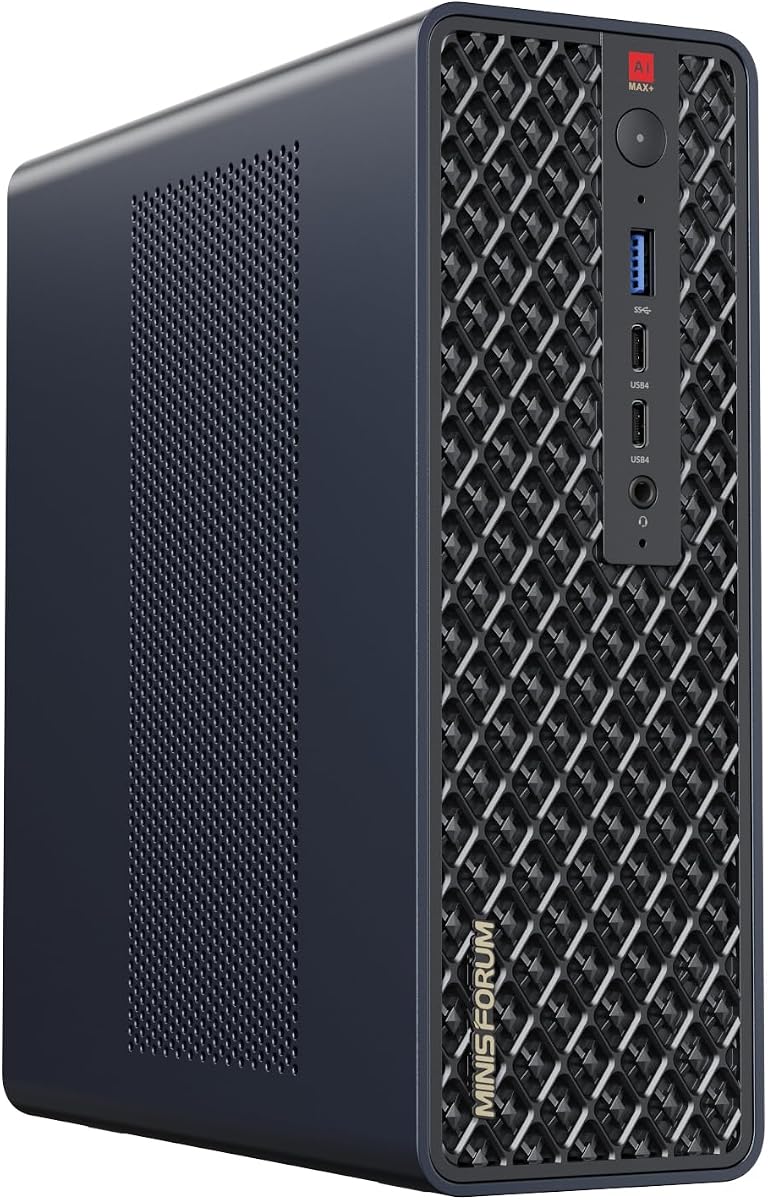
The MINISFORUM MS-S1 MAX is a compact AI workstation built around the Ryzen AI Max+ 395 and 128GB of LPDDR5x unified memory. Its supplied rating is 4.5. Rather than using two discrete graphics cards, it gives the CPU and integrated RDNA 3.5 GPU access to one large, high-bandwidth memory pool. A full-length PCIe x16 slot offers a path toward an external accelerator.
We may earn a commission when you buy through this link, at no additional cost to you.
The processor provides 16 cores and 32 threads, up to a 5.1GHz boost clock, a 50-TOPS NPU, and 126 TOPS of total system output. The unified-memory approach is particularly useful when working data does not fit comfortably within a typical discrete GPU's dedicated VRAM. Dual 10GbE, USB4 V2 at up to 80 Gbps, Wi-Fi 7, and dual M.2 storage expand its usefulness as an edge AI system.
The product also documents a cluster design in which two units can run a 235B Q4 model and four units reportedly ran a DeepSeek-R1 671B Q4 model. Those configurations depend on software support, network behavior, and the specific orchestration method. Users should distinguish the integrated GPU's 126 TOPS output from NVIDIA's much higher discrete-accelerator figures, as they represent different architectures and workload types.
MS-S1 MAX is an attractive option for a developer who needs large unified memory, quiet local inference, and flexible expansion in a small enclosure. It is not a conventional dual-GPU product, and buyers should not expect the plug-and-play behavior of two installed graphics cards. It fits the broader search for multi-GPU and distributed AI setups because it can serve as a node in a multi-unit cluster or gain additional acceleration through PCIe.
CPU and GPU access the same high-bandwidth memory pool, reducing some data-copying constraints associated with separate system RAM and graphics VRAM.
The documented multi-unit cluster approach lets small-form-factor systems cooperate on models too large for a single node when the required software stack is used.
We may earn a commission when you buy through this link, at no additional cost to you.
The NVIDIA RTX PRO 6000 Blackwell Max-Q is a standalone professional graphics card offering 96GB of GDDR7 ECC memory. It is designed for local generative AI, data science, high-performance computing, rendering, and multi-GPU desktop scaling. The listing specifies up to 3,511 TOPS of AI performance while capping maximum power consumption at 300 watts.
We may earn a commission when you buy through this link, at no additional cost to you.
Its 512-bit memory bus provides a listed bandwidth of 1,792 GB/s, while 24,064 CUDA cores and 188 fourth-generation ray-tracing cores support a broad range of parallel and visual workloads. Four DisplayPort 2.1 outputs and a PCI Express 5.0 x16 interface make it a conventional high-end card for a suitably equipped workstation.
Because this is a component rather than a complete workstation, it provides no processor, memory, storage, chassis, or power supply by itself. The host system must have adequate lanes, slot spacing, cooling, firmware support, and power. Users should also consider that the listing says OEM or bulk packaging is supplied without retail packaging. No customer rating is included in the supplied information.
The Max-Q card is a strong building block for a custom dual-GPU system when power efficiency, professional features, and 96GB of memory per card are priorities. Its stated 300-watt ceiling can make two-card installations more manageable than configurations built around unrestricted high-end accelerators, provided the rest of the system is designed accordingly. Confirm model, connector, warranty, and packaging details before ordering.
The Max-Q design combines 96GB of ECC GDDR7 memory with a 300-watt maximum, providing professional capacity for dense AI and visualization workloads in multi-GPU workstations.
A complete system needs a compatible motherboard, sufficient PCIe lanes, adequate power, cooling, and system memory. The card itself does not solve those chassis-level requirements.
We may earn a commission when you buy through this link, at no additional cost to you.
The MINISFORUM MS-S1 Max is a small AI workstation with an AMD Ryzen AI Max+ 395, 128GB of LPDDR5-8000 memory, a 2TB PCIe 4.0 SSD, and Radeon 8060S integrated graphics. It has a supplied rating of 4.5. The platform emphasizes a large shared-memory pool, quiet operation, multi-display support, and flexible networking.
We may earn a commission when you buy through this link, at no additional cost to you.
The processor supplies 16 Zen 5 cores and 32 threads with boost capability up to 5.1GHz. It also includes a 50-TOPS NPU and is stated to reach 126 TOPS overall. The five video outputs include one HDMI connection capable of 8K at 60Hz, two 40 Gbps USB4 ports, and two 80 Gbps USB4 V2 ports with DisplayPort alternate mode and power delivery.
Two 10GbE RJ45 ports make the machine useful for local network services, virtual routers, firewalls, and high-speed data movement. A second PCIe 4.0 M.2 slot supports additional storage and RAID 0 or 1, while an internal PCIe x4 slot provides limited expansion. Cooling uses a copper substrate, six heat pipes, and two dual-centrifugal turbine fans, with 130W continuous and 160W peak operation.
This MS-S1 Max is best for compact inference, multimodal workloads, technical computing, multi-monitor use, and as the foundation of a multi-machine AI cluster. It does not provide two discrete GPUs, and its internal expansion is more limited than a full tower. Buyers should verify the particular ROCm-supported applications, frameworks, and model pipelines they need before choosing the integrated RDNA platform.
The 128GB shared-memory configuration enables large working sets while retaining a compact enclosure suitable for an office, studio, or edge-computing location.
Dual 10GbE ports provide a strong foundation for model distribution, data ingestion, remote access, and cluster communication across a local network.
We may earn a commission when you buy through this link, at no additional cost to you.
Choosing a multi-GPU AI platform requires balancing accelerator memory, software compatibility, host resources, power, cooling, and intended deployment. The most capable card does not always produce the best system, and a multi-GPU design is useful only when the application can distribute or partition its workload effectively.
Model size, context length, batch size, and precision can determine how much graphics memory a workload needs. A configuration with two 32GB cards offers 64GB of separate memory pools when the framework supports peer-to-peer allocation, while two 96GB professional cards provide far more capacity for large models, scenes, and research workloads. Users should distinguish total VRAM from usable VRAM and account for overhead from the operating system, display output, and inference engine.
Choose enough memory for the largest realistic workload, not merely the model name. More memory often enables larger batches and longer contexts while reducing the need for aggressive quantization.
Framework support is one of the most important factors in an AI build. NVIDIA systems benefit from a broad CUDA and professional-driver ecosystem, while AMD systems may require specific ROCm-compatible applications, kernels, and operating-system versions. Intel Arc hardware has its own acceleration path and compatibility profile. Buyers should check the exact model, framework version, quantization method, and inference engine before relying on advertised TOPS figures.
Prioritize hardware that your validated software stack explicitly supports. Raw compute specifications cannot compensate for an unsupported operation or unavailable kernel.
The host processor manages operating-system tasks, data loading, orchestration, and pipelines that do not run efficiently on the GPU. High-core-count EPYC and Threadripper processors are valuable for large datasets and concurrent services, while desktop Ryzen processors offer a more compact and accessible foundation. System RAM should be large enough to stage datasets and models without forcing excessive swapping, especially when GPU memory is shared with the CPU.
Match host resources to the accelerator count. A high-end GPU configuration limited by a weak CPU, insufficient RAM, or slow storage may fail to keep the accelerators supplied with work.
Each accelerator needs sufficient PCIe bandwidth, and a multi-GPU system also needs compatible slot spacing and lane bifurcation. The MAXSUN Arc Pro B60 uses two PCIe 5.0 x8 links, while dual RTX 5090 and professional accelerator systems generally rely on more conventional x16 configurations. The motherboard must expose the required lanes, support the intended cards, and provide appropriate spacing for cooler and power connectors.
Check the complete board and case combination rather than counting slots. Lane sharing, bifurcation settings, and physical clearance can determine whether both GPUs can operate as intended.
Multiple accelerators, high-end CPUs, liquid coolers, NVMe drives, and memory can push a workstation well beyond ordinary desktop power requirements. The systems listed range from a compact 320W mini-PC architecture to rack servers with 2800W or 3200W-class power systems. Continuous maximum operation also depends on outlet voltage, circuit capacity, heat rejection, and the workstation's load-management settings.
Plan the circuit, cables, and cooling before choosing a high-power system. A lower-power accelerator can be a better fit when workspace power is constrained.
Memory capacity determines whether a model fits, while memory bandwidth influences token generation, rendering, and data-processing speed. The listed products range from the MAXSUN card's 456 GB/s combined bandwidth to the RTX PRO 6000's 1,792 GB/s. Unified-memory designs reduce some transfers between CPU and GPU, while multi-GPU systems need fast peer communication or high-speed host networking for effective scaling.
Match bandwidth to the workload. Large-model inference is often sensitive to sustained memory performance, so a fast interconnect and efficient accelerator pairing matter as much as peak compute.
AI systems repeatedly read model files, datasets, and validation corpora. NVMe storage reduces transfer delays, while RAID can provide redundancy or performance depending on its configuration. For distributed systems, dual 10GbE, 200GbE, and other high-bandwidth networking options materially affect how effectively multiple accelerators or nodes cooperate. Local deployment also reduces recurring cloud dependency.
Choose storage and networking for the data movement pattern. A fast GPU cannot compensate for a model library that repeatedly waits on slow storage or a cluster connected by inadequate bandwidth.
Sustained AI inference and training place continuous heat into compact accelerator assemblies. Blower coolers, vapor chambers, liquid cooling, large heatsinks, and server airflow can improve stability under long workloads. Fan noise, dust accumulation, rack clearance, and room temperature all matter, particularly for 24-hour operation. The listed products use different cooling strategies appropriate to their form factors.
Match cooling capacity to expected duty cycle and ambient conditions. Validate the enclosure's thermal design before running extended workloads at maximum power.
Begin by confirming that every hardware component, driver, framework, and model format is supported by the operating system you intend to use. Install the current accelerator drivers, update the motherboard firmware when appropriate, and create a clean software environment for the exact inference, training, rendering, or analytics stack you need. For multi-GPU software, use a topology-aware tool and confirm that both accelerators are detected before launching an expensive workload.
Treat the first full workload as a validation run. Monitor accelerator memory, system memory, temperatures, power consumption, storage activity, and network traffic. Start with a smaller model or batch, verify results against a known reference, and then increase concurrency or context length gradually. Preserve a clear configuration record showing driver, firmware, library, precision, and inference-engine versions so that performance or output changes can be investigated.
Maintain adequate airflow, keep expansion cards and dust filters clean, and use surge protection or approved power infrastructure for valuable systems. For rack systems, follow the manufacturer's rack, circuit, and environmental requirements. Back up model checkpoints, datasets, configuration files, and licenses regularly. Before cleaning or changing hardware, shut down the system, disconnect power, and follow the manufacturer guidance for electrostatic-discharge protection and component handling.
No. A second accelerator helps only when the software can divide the workload, such as supported model parallelism, data parallelism, independent jobs, or multi-view rendering. Some applications cannot use two GPUs together, while poorly optimized multi-GPU communication can reduce efficiency. A single GPU with enough memory may also be simpler and more appropriate for smaller projects.
The required amount depends on model architecture, parameter count, quantization, context length, and batch size. Large-model inference often benefits from 96GB-class accelerators, while smaller quantized models may run comfortably with less. Consider both the size of the model and the headroom needed by the runtime, display outputs, and concurrent workloads.
No. The motherboard must provide sufficient PCIe lanes, the case must physically accommodate both cards, and cooling and power delivery must be adequate. Lane bifurcation may be required for certain dual-card designs. Check the motherboard manual, case dimensions, power-supply capacity, and graphics-card spacing before buying components.
They can be highly effective for inference and other workloads that benefit from a large shared memory pool. AMD Ryzen AI Max platforms can also participate in multi-unit clusters, while PCIe expansion may provide a route to a discrete accelerator. Software and kernel support must still be validated for the specific model and framework.
NVIDIA's CUDA ecosystem generally offers the broadest support for popular AI frameworks, professional drivers, and optimized libraries. AMD and Intel systems can provide strong alternatives, especially with unified or high-capacity memory, but buyers should verify application-level support, kernel availability, and multi-GPU behavior before committing to a platform.
A capable CPU is important for feeding data, loading models, coordinating jobs, and supporting the operating system. High-core-count EPYC and Threadripper processors help with concurrent workloads and large datasets, but the best choice depends on whether the system is a desktop, workstation, or server. A GPU configuration should not be paired with host resources that routinely starve it of data.
It depends on the components. Compact unified-memory systems and power-limited professional cards may be quieter, while dual high-end GPUs or rack servers can generate substantial airflow noise under load. The room itself will also become warm. Consider noise, heat, dust, and available electrical capacity before deploying a sustained workstation in a shared office.
A desktop workstation is usually easier to acquire, service, and operate in an office or studio, although it normally offers less expansion. A rack server provides greater GPU density, enterprise memory, high-speed networking, and centralized management, but demands rack space, facilities support, and stronger electrical and cooling infrastructure. Choose based on workload scale and operational environment rather than form factor alone.
The WEELIAO MAXSUN dual Arc Pro B60 card offers the most distinctive entry for a technically confident builder seeking 48GB of combined graphics memory in one accelerator. The APC MES2X stands out for its pair of professional 96GB RTX PRO 6000 cards and a complete Windows workstation, while the ASUS EPYC rack server represents the premium path for organizations needing expansion to eight GPUs and enterprise networking.
For most buyers, the deciding factors should be software support and available memory rather than a headline TOPS number. Choose enough VRAM for the intended model or scene, ensure the host CPU and RAM can keep both accelerators supplied with work, and confirm that the motherboard and case support the required topology. Power, cooling, and electrical planning are equally important for sustained operation.
Finally, check the current listing before purchasing. Component configurations, bundled cables, operating-system setup, warranty details, and pricing can change, and custom workstations may offer different options than the configuration shown in the product data. Verify compatibility, included parts, return terms, and support coverage so the selected Dual GPU AI Setup matches both the workload and the intended installation environment.