
G.Skill Flare X5 32GB
4.7Editor score
32GB matched dual-channel kit
Up to 6000MT/s transfer speed
CL36-36-36-96 timings
EXPO and XMP 3.0 support
Our Gskill DDR5 RAM guide compares ten 32GB and 64GB kits for speed, latency, RGB, capacity, platform profiles, and compatibility.
G.Skill DDR5 RAM kits combine high transfer speeds, low-latency configurations, generous capacity, and options for both understated and illuminated builds. A strong memory upgrade should fit the processor, motherboard, and planned workload while delivering a useful balance of responsiveness, gaming performance, and memory-intensive capacity.
This guide compares ten G.Skill DDR5 desktop memory kits based on capacity, advertised speed, CAS latency, voltage, EXPO or XMP support, RGB styling, platform guidance, and customer rating. It covers 32GB and 64GB two-module kits centered on the widely supported 6000MT/s class, including AMD-focused, Intel-focused, and dual-platform configurations.
Each review explains who the kit suits, which trade-offs matter, and why its specifications are relevant to a new build or upgrade. Rankings reflect the supplied product information rather than personal testing, and availability, ratings, and prices can change, so buyers should verify current details before ordering.
4.7Editor score

4.8Editor score

4.7Editor score
The comparison below places all ten G.Skill DDR5 kits side by side, showing their memory capacity, advertised transfer speed, primary timing configuration, supported overclocking profiles, and key design differences.


The G.Skill Flare X5 32GB kit ranks first because it combines a practical capacity, a 6000MT/s advertised data rate, relatively tight CL36 timings, and support for both AMD EXPO and Intel XMP 3.0. Its 4.7 customer rating reflects a strong reception without requiring buyers to choose between AMD and Intel platforms based only on the listed memory profile.
We may earn a commission when you buy through this link, at no additional cost to you.
The kit contains two matched 16GB non-ECC DDR5 unbuffered desktop modules, giving a new gaming or productivity system 32GB in a conventional two-DIMM arrangement. Operating at 1.35V for its advertised profile, it includes a JEDEC default profile alongside EXPO and XMP 3.0. This makes the kit particularly useful for buyers who want one product family that can serve several compatible desktop platforms.
Its principal trade-off is that reaching the advertised 6000MT/s requires the appropriate BIOS setting and compatible hardware. The memory will boot from its JEDEC profile when supported hardware is used with default settings, but memory controllers, CPUs, BIOS versions, and motherboard layouts can all affect whether the highest advertised profile operates as intended. The kit also lacks RGB, which is a drawback for builders wanting illuminated memory.
This is the strongest general recommendation for a new DDR5 system, particularly for a gamer or general-purpose user who values easy platform coverage and balanced specifications. Confirm the motherboard model in G.Skill's qualified vendor list or configurator before purchase, enable the proper profile after installation, and run a memory stability test before transferring important work.
Supporting both AMD EXPO and Intel XMP 3.0 makes this kit a practical choice when the processor brand is still undecided. It also gives an existing system a familiar way to select the intended timings after installation, provided the motherboard and CPU support the selected profile.
The 6000MT/s class offers a compelling combination of transfer bandwidth and accessible timings for a modern desktop. The CL36-36-36-96 profile is particularly interesting because its primary latency is tighter than that of several other 6000MT/s kits in this comparison, benefiting latency-sensitive use when the platform is configured correctly.
We may earn a commission when you buy through this link, at no additional cost to you.
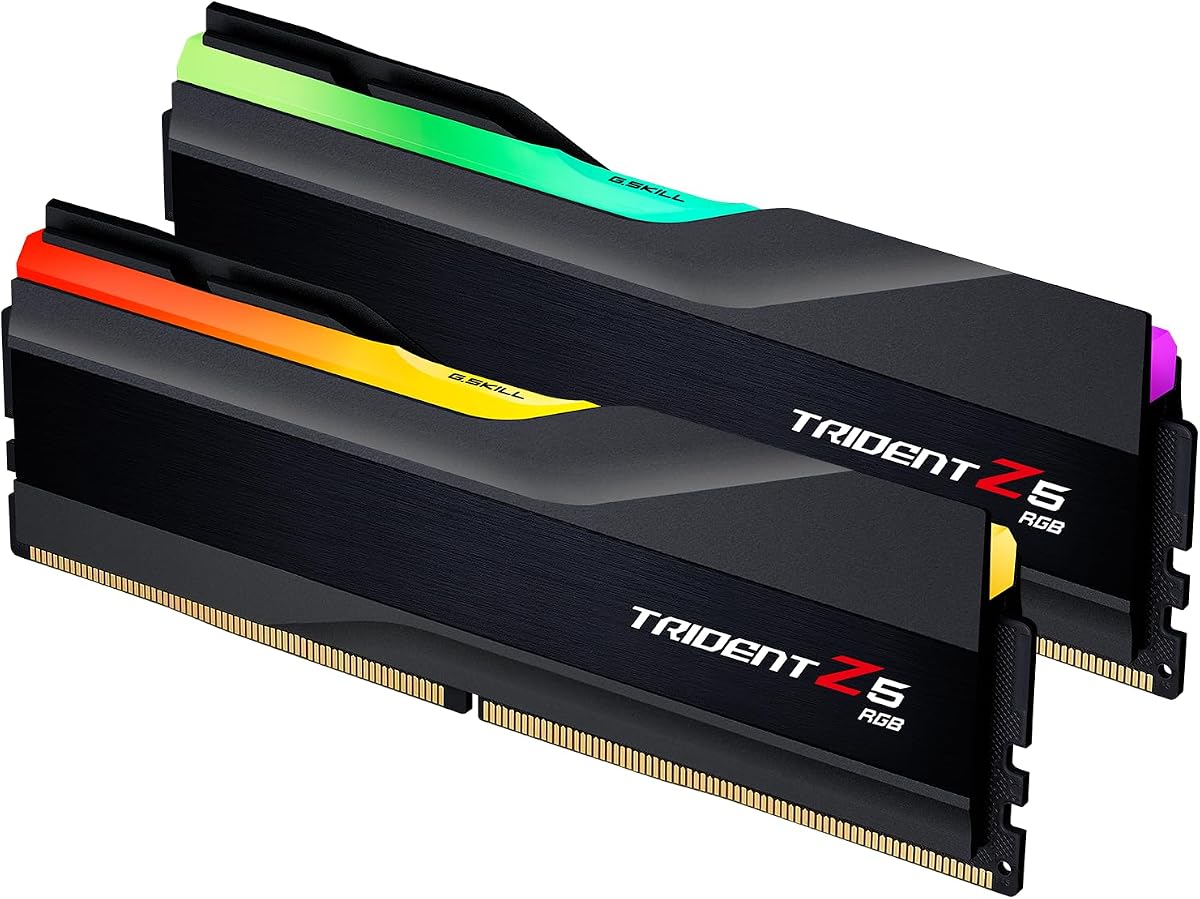
The G.Skill Trident Z5 RGB 32GB is a well-rounded option for builders who want the performance characteristics of a modern 6000MT/s kit without giving up coordinated lighting. It shares the top pick's 32GB two-module capacity, 1.35V advertised operating voltage, CL36 primary latency, and support for both AMD EXPO and Intel XMP 3.0, while adding an RGB-focused design.
We may earn a commission when you buy through this link, at no additional cost to you.
Its full timing configuration is listed as CL36-36-36-96, and the kit includes a JEDEC default profile alongside both major platform profiles. The listed motherboard support includes current Intel Z890, Z790, Z690, B860, B760, and B660 platforms as well as AMD X870, X670, X850, B850, B840, B650, and A620 platforms. Buyers should still use the G.Skill QVL or RAM Configurator because individual board revisions and CPU memory controllers can affect qualification.
Compared with the non-RGB Flare X5, this kit's main added benefit is visual rather than computational. It may fit a gaming system with a glass-sided case, a matching motherboard, and other illuminated components better than a low-profile or traditional memory design. That aesthetic advantage is not universal, however, and buyers who do not use RGB should compare the physical design and specifications rather than assuming the lighting adds performance.
Choose the Trident Z5 RGB when coordinated appearance, 32GB capacity, and broad EXPO/XMP support are all priorities. It is especially compelling for a gaming build with a visible interior. As with every overclocked memory kit in this guide, the advertised maximum speed requires BIOS configuration and compatible hardware, so stability testing remains essential.
RGB illumination gives this kit a clear advantage in a showcase build where the memory is visible through the case panel. The design allows a buyer to coordinate the modules with other illuminated components rather than adding memory that looks disconnected from the rest of the system.
The combination of 6000MT/s, CL36 primary latency, and both EXPO and XMP 3.0 profiles closely tracks the specifications of the leading Flare X5 option. That makes the Trident Z5 RGB a useful choice for buyers whose main distinction is the visual design rather than a major difference in fundamental memory specifications.
We may earn a commission when you buy through this link, at no additional cost to you.
The G.Skill Trident Z5 Neo RGB 32GB stands out with a 4.8 customer rating, the highest rating among the products supplied, and a competitive CL30 primary latency. Its 6000MT/s advertised speed, 32GB capacity, and RGB design make it a particularly attractive fit for a modern AMD gaming desktop built around an EXPO-capable motherboard.
We may earn a commission when you buy through this link, at no additional cost to you.
This two-module kit uses 16GB DDR5 non-ECC unbuffered modules and lists a CL30-38-38-96 timing profile at 1.35V. The tighter primary CAS latency differentiates it from the CL36 kits in the guide, potentially improving latency-sensitive performance when all other conditions are equal. The included AMD EXPO profile is intended to simplify configuration on the listed X870, X670, X850, B850, B840, B650, and A620 platforms.
Its limitation is its deliberately AMD-oriented profile support. There is no listed Intel XMP 3.0 option, so a buyer intending to use the kit on an Intel platform should choose a dual-profile model instead. Even within AMD hardware, the advertised speed depends on the CPU's integrated memory controller, the motherboard, and the selected BIOS. The RGB lighting also needs software and a compatible motherboard or system control utility.
For an AMD owner who wants responsive memory, coordinated lighting, and a strong 4.8 customer rating, this is a particularly persuasive option. It is best suited to users who have already selected a compatible AM5 or current AMD platform and can check the exact motherboard against G.Skill's qualified vendor list. It is less flexible than the dual-profile kits, but stronger in timing and rating for its intended platform.
The CL30 primary latency gives this kit a specification advantage over CL36 alternatives. That can matter in processor-limited games and responsive daily use, although the overall benefit depends on the platform, the achieved transfer speed, and how well the memory controller works with the selected kit.
The AMD EXPO profile is the main reason to favor this model over a dual-profile kit in an AMD-only build. Once the motherboard and CPU combination is validated, the profile provides a straightforward route toward the kit's advertised speed and timings rather than requiring buyers to discover all settings manually.
We may earn a commission when you buy through this link, at no additional cost to you.
The G.Skill Flare X5 32GB provides the same attractive core specifications as the Trident Z5 Neo RGB 32GB while omitting illuminated lighting. It reaches an advertised 6000MT/s, uses CL30-38-38-96 timings, operates at 1.35V, and includes an AMD EXPO profile. That makes it a compelling option for a clean-looking AMD gaming system where tight latency matters more than decorative lighting.
We may earn a commission when you buy through this link, at no additional cost to you.
Two matched 16GB modules provide 32GB of DDR5 desktop memory in a conventional dual-channel configuration. The product is intended for non-ECC, 288-pin unbuffered desktop systems and includes a JEDEC default profile along with EXPO. The listed platform guidance covers AMD X870, X670, X850, B850, B840, B650, and A620 platforms, though the exact motherboard and CPU should be checked in the QVL.
The absence of RGB is the most visible distinction from the similarly timed Trident Z5 Neo RGB. For some users that is an advantage because there is no lighting software to configure and the understated appearance may blend more easily with a wider range of components. The trade-off is that buyers creating a deliberately illuminated system may find the plain design less expressive.
This Flare X5 configuration is an excellent match for an AMD user who wants CL30 latency without paying for an RGB-equipped memory kit. It also works well as an upgrade in a compatible DDR5 desktop, provided the buyer replaces an existing matched kit rather than combining it with unrelated modules. Activate EXPO only after confirming hardware support, then validate stability with an appropriate memory test.
This kit focuses on the specifications that affect workloads rather than appearance. The CL30-38-38-96 profile and 6000MT/s class place it among the stronger technical options in the guide, while the lack of lighting keeps the design simple and avoids dependence on RGB-control software.
The two matched 16GB modules suit a standard dual-channel desktop layout and make this a sensible way to move from a smaller memory configuration to 32GB. As with all memory kits here, the safest approach is to use the complete matched set and verify the target board in G.Skill's compatibility resources.
We may earn a commission when you buy through this link, at no additional cost to you.
The G.Skill Flare X5 64GB is the capacity-focused member of this guide, providing two matched 32GB DDR5 modules for demanding desktop workloads. It retains an advertised 6000MT/s speed and tight CL30 primary latency, making it more compelling for creators, developers, and power users than for a typical gaming-only upgrade where 32GB may be sufficient.
We may earn a commission when you buy through this link, at no additional cost to you.
The full timing specification is CL30-40-40-96 at 1.40V. The memory includes a JEDEC default profile and an AMD EXPO overclocking profile, with listed support for AMD X870, X670, X850, B850, B840, and B650 platforms. The larger capacity can help when many applications, browser tabs, virtual machines, high-resolution media, or large project files need to remain active simultaneously.
Higher capacity does introduce trade-offs. The advertised 1.40V voltage is greater than the 1.35V used by the 32GB CL36 kits, and the 6000MT/s speed still depends on the CPU and motherboard. More capacity can also be unnecessary for ordinary office work or lighter gaming, making this kit less efficient from a cost perspective for those use cases.
Choose this kit when memory capacity is the defining requirement rather than RGB lighting or cross-platform support. It is particularly appropriate for an AMD workstation-style build that handles large datasets, editing timelines, software compilation, or other memory-intensive activity. Check platform qualification, enable EXPO only when supported, and test stability before using the system for demanding workloads.
Sixty-four gigabytes gives applications much more room to hold data than a standard 32GB configuration. The benefit is most visible in workflows that keep multiple large programs open, use virtual machines, or process assets that do not fit comfortably within the lower-capacity kit.
The understated Flare X5 presentation may be preferable in a professional workspace where a restrained appearance and uncomplicated setup matter. There is no RGB lighting to synchronize, so the focus remains on capacity, transfer speed, and the benefits of a matched two-module kit.
We may earn a commission when you buy through this link, at no additional cost to you.
This dual-profile 64GB Flare X5 kit is aimed at buyers who need substantial memory capacity without committing to one processor brand. It combines two matched 32GB modules, an advertised 6000MT/s data rate, CL36-36-36-96 timings, and 1.35V operating voltage with support for both AMD EXPO and Intel XMP 3.0.
We may earn a commission when you buy through this link, at no additional cost to you.
The listed platform coverage is broad, including current Intel Z890, Z790, Z690, B860, B760, and B660 platforms alongside AMD X870, X670, X850, B850, B840, and B650 platforms. As always, that list does not guarantee every combination can reach 6000MT/s, so buyers should check the exact motherboard and use G.Skill's qualified vendor list or configurator.
The 4.6 customer rating is the lowest among the supplied products, although it remains positive and does not indicate a fundamental specification problem. Compared with the 64GB CL30 Flare X5, this version trades some primary latency and uses the lower 1.35V voltage while adding Intel XMP support. That combination may appeal to a user who values efficiency and flexibility over obtaining the tightest CAS latency.
This is a strong choice for a high-capacity workstation that may move between Intel and AMD builds, or for a creator who needs 64GB and a clean appearance. It may be less compelling for a gaming-only system that can be served by 32GB, but it is well suited to virtualization, content creation, and heavy multitasking. Verify compatibility, update the motherboard BIOS, and run a full stability test after enabling the intended profile.
Dual-profile support expands the kit's practical audience beyond a single ecosystem. A buyer can use AMD EXPO on a supported AMD board or Intel XMP 3.0 on a supported Intel board, which is useful when building across different systems or when the processor decision remains flexible.
The listed 1.35V operating voltage is notable because the other 64GB CL30 kit uses 1.40V. Although voltage alone does not determine efficiency, the lower specified operating point can complement systems designed around 6000MT/s memory while retaining enough capacity for demanding applications.
We may earn a commission when you buy through this link, at no additional cost to you.
The G.Skill Trident Z5 Neo RGB 32GB merges an illuminated gaming design with support for both AMD EXPO and Intel XMP 3.0. Its technical specification is attractive for a general gaming upgrade: 32GB across two matched modules, an advertised 6000MT/s transfer speed, CL36 primary latency, and a 1.35V operating voltage.
We may earn a commission when you buy through this link, at no additional cost to you.
The kit includes a JEDEC default profile and both overclocking profiles. Its listed motherboard guidance includes Intel Z890, Z790, Z690, B860, B760, and B660 platforms as well as AMD X870, X670, X850, B850, B840, B650, and A620 platforms. That makes it more flexible than the AMD-only Trident Z5 Neo option, although buyers should still verify the exact board and CPU combination.
Compared with the standard Trident Z5 RGB, this model's key distinction is its AMD EXPO support alongside Intel XMP. The specifications otherwise align closely: both use 32GB, a 6000MT/s advertised rate, CL36 primary timing, 1.35V voltage, and an RGB-equipped design. The visual and technical similarity means the final decision should consider availability, current pricing, and the exact motherboard involved.
This kit is well suited to a colorful gaming desktop whose owner may upgrade either an AMD or Intel platform later. It is also appropriate for a new build where coordinated memory and motherboard lighting are priorities. Confirm that the case and motherboard provide suitable lighting control, check the qualified vendor list, and validate the selected XMP or EXPO profile under load.
Many RGB memory kits are optimized for one platform family, but this model includes both EXPO and XMP 3.0. That makes it easier to pair the same specification with either supported Intel or AMD hardware while retaining the visual design of the Trident Z5 Neo line.
A CL36 primary latency is a useful middle ground in the 6000MT/s class. It is tighter than the CL40 configurations offered by the 64GB CL30 kits, giving this 32GB option a specification profile suited to both gaming and general performance-oriented builds.
We may earn a commission when you buy through this link, at no additional cost to you.
The G.Skill Flare X5 32GB represented by this listing offers the same key specifications as the first-ranked product: two matched 16GB modules, an advertised 6000MT/s speed, CL36-36-36-96 timings, 1.35V voltage, and support for AMD EXPO plus Intel XMP 3.0. Its 4.5 customer rating is the lowest in the supplied group, which is the main reason it appears lower in the ranking.
We may earn a commission when you buy through this link, at no additional cost to you.
The shared model number, F5-6000J3636F16GX2-FX5, makes it especially important to compare the actual listing details carefully. Different sellers or marketplace entries can present the same kit with different customer feedback, bundle contents, or availability. Since the product specification is identical to the top-ranked option, a buyer should assess the complete listing rather than assume that the technical memory configuration differs.
Its specification still covers the important requirements for a modern DDR5 desktop. The broad platform list includes major Intel Z, B, and B-series chipsets along with AMD X, B, and A-series platforms, subject to the usual CPU and BIOS considerations. The non-RGB design remains useful for builders who want performance without lighting software or a visually dominant memory design.
This listing can still be a sensible purchase if its current details and customer feedback are satisfactory. It is best suited to a buyer seeking 32GB, dual-profile support, and a low-profile aesthetic rather than a specific cosmetic upgrade. Check the seller, verify the model number, and compare the current listing with the other Flare X5 entry before deciding.
The product model and core specifications match the first-ranked Flare X5 kit. That means the deciding factor is not a meaningful change in capacity, speed, latency, or voltage, but rather listing quality, customer feedback, seller information, and current availability at the time of purchase.
For a system that does not need RGB, the plain Flare X5 design keeps the build visually restrained. Its dual-profile support and 32GB capacity make it a broadly useful upgrade for both AMD EXPO and Intel XMP 3.0 systems, assuming the hardware combination is qualified.
We may earn a commission when you buy through this link, at no additional cost to you.
The G.Skill Trident Z5 Neo RGB 64GB combines high memory capacity with RGB lighting and tight CL30 primary latency. Its two matched 32GB modules make it a strong candidate for an enthusiast AMD workstation or gaming system that needs more memory than a conventional 32GB kit while still keeping the advertised transfer rate at 6000MT/s.
We may earn a commission when you buy through this link, at no additional cost to you.
The listed timings are CL30-40-40-96 at 1.40V, with a JEDEC default profile and an AMD EXPO overclocking profile. The listed AMD platform coverage includes X870, X670, X850, B850, B840, and B650 boards. It lacks an Intel XMP 3.0 profile, so it is better aligned with a deliberate AMD platform choice than with a flexible cross-brand build.
Compared with the non-RGB 64GB Flare X5, this kit adds visual customization but does not change the core capacity, speed, latency, or voltage. Compared with the 32GB Trident Z5 Neo RGB, it doubles the memory capacity while slightly relaxing secondary timings and raising the listed voltage. That additional capacity is most useful for advanced content creation, development, virtualization, and large multitasking workloads.
This is a particularly appealing option when a builder wants a single visual theme across a 64GB configuration. It may be excessive for a game that does not need more than 32GB, but it offers valuable headroom for other applications. Confirm the target motherboard in the QVL, ensure the case has suitable clearance and lighting support, and test the EXPO profile thoroughly.
Most gaming builds do not need 64GB, so this kit's distinctive advantage appears when a system needs both substantial memory and a coordinated illuminated design. It can serve as the foundation of a visually polished workstation that is also exposed through a glass side panel.
Maintaining CL30 as the primary latency in a 64GB kit is notable because higher-capacity DDR5 configurations often use looser timings. The full CL30-40-40-96 profile and advertised 6000MT/s speed offer a competitive specification when the system can validate the EXPO profile.
We may earn a commission when you buy through this link, at no additional cost to you.
The G.Skill Trident Z5 Royal Neo 32GB is the premium design choice in this guide and carries the tightest listed primary latency: CL28-36-36-96. Combined with an advertised 6000MT/s transfer speed and two matched 16GB modules, it gives AMD builders a technically aggressive and visually distinctive DDR5 configuration.
We may earn a commission when you buy through this link, at no additional cost to you.
This kit differentiates itself through the Trident Z5 Royal Neo series' silver finish and RGB-equipped design, which is intended to stand out in an enthusiast build. It operates at a listed 1.40V and includes a JEDEC default profile plus an AMD EXPO memory overclocking profile. The stated platform guidance covers AMD X870, X670, X850, B850, B840, and B650 platforms.
The CL28 primary latency is a meaningful specification advantage over the CL30 and CL36 alternatives here, particularly if the full profile can be reached. However, timing labels alone do not guarantee better performance in every application, and the CPU's memory controller, motherboard BIOS, and memory topology all matter. The lack of Intel XMP 3.0 also makes this a less flexible purchase for a platform-agnostic builder.
Choose the Royal Neo when a premium appearance, RGB lighting, and tight primary latency are all important and the build is firmly based on compatible AMD hardware. It is well suited to a showcase gaming PC with a glass panel. Check physical clearance, confirm the motherboard in the QVL, configure EXPO, and run a stability test before considering the overclocked profile stable.
At CL28, the Royal Neo has the lowest primary CAS latency among these kits. On a compatible platform that reaches the advertised transfer speed and timings, this can make it appealing for latency-sensitive gaming and general responsiveness rather than capacity-heavy workloads.
The silver Trident Z5 Royal treatment distinguishes the modules from the matte black alternatives in the guide. It is best suited to a build where the memory is intentionally visible and coordinated with a light-colored or premium component theme.
We may earn a commission when you buy through this link, at no additional cost to you.
Choosing G.Skill DDR5 memory requires balancing capacity, transfer speed, CAS latency, platform profiles, physical design, and motherboard compatibility. The most important step is to match the complete kit to a qualified CPU and motherboard combination before considering minor differences in appearance.
Capacity determines how much data can remain active at once. A 32GB kit with two 16GB modules is a broadly useful configuration for modern gaming, browsing, office work, and general productivity. It also leaves a conventional two-DIMM layout, which can be easier for the system to train and manage than populating every slot on a four-DIMM board. A 64GB kit made from two 32GB modules provides twice that working capacity and is better suited to video editing, software development, large datasets, virtual machines, and heavy multitasking.
Choose 32GB for a general-purpose gaming PC, or 64GB when your workload regularly exceeds available memory. More capacity is useful, but it should be matched to a real need rather than treated as an automatic performance upgrade.
The kits in this guide advertise speeds up to 6000MT/s, a popular balance for current DDR5 desktop platforms. Transfer speed describes how much data the memory interface can move per second, while CAS latency describes the timing of column access. A kit with a lower CL number can offer lower latency, although the two specifications must be evaluated together and actual results depend on the memory controller and workload.
Prioritize a well-qualified kit with competitive timings rather than focusing on the largest headline number. For these 6000MT/s options, CL28 through CL36 are the most notable primary latency choices, but stable performance in the target system is more valuable than a small theoretical timing advantage.
AMD EXPO and Intel XMP 3.0 are memory overclocking profiles that allow the BIOS to apply a kit's intended speed, timings, and voltage more easily. A kit with both profiles is the most flexible choice, particularly if you may move between supported Intel and AMD systems. AMD-only kits can be excellent for a known AMD build, but they should not be expected to offer the same convenience on an Intel motherboard.
Use EXPO on compatible AMD systems and XMP 3.0 on compatible Intel systems. Check that the exact motherboard is listed as qualified, and remember that a supported chipset or processor generation does not guarantee the maximum advertised speed with every memory controller.
Memory compatibility is determined by more than the DDR5 label. The motherboard routing layout, BIOS version, processor model, and integrated memory controller can all influence whether a kit reaches its advertised speed and remains stable. G.Skill provides a qualified vendor list and RAM Configurator for this purpose, and the supplied product information also lists supported platform families for each kit.
Search the exact motherboard model rather than relying only on its chipset. Update the BIOS when appropriate, install the complete matched kit in the recommended slots, and consult the board manual. If the exact board is not listed, choose a kit with conservative JEDEC behavior and avoid assuming that the full profile will be guaranteed.
All ten products are matched two-module kits. G.Skill explicitly advises against mixing memory kits because modules sold as a set are designed to work together. Combining one kit with another set, even when both have similar advertised speeds, can lead to lower performance, instability, or system failure. This warning is particularly important when upgrading an existing system.
For the cleanest setup, use both modules from a single matched kit and avoid mixing kits with different model numbers, capacities, timings, or profiles. If more capacity is later required, replace the existing matched pair as a set rather than adding modules to it unless the manufacturer explicitly supports that configuration.
The Flare X5 and some Trident Z5 variants use a restrained matte black appearance, while Trident Z5 RGB, Trident Z5 Neo RGB, and Trident Z5 Royal Neo models add illumination. The Royal Neo's silver finish is the most distinctive option in the group. RGB can enhance a visible gaming build, but it adds dependence on compatible control software and may not suit a minimalist workstation.
Choose RGB only if the motherboard or system software supports it and the lighting will be visible. For a clean office build, a non-RGB model may be simpler and more versatile. In every case, check module height and case clearance, especially when a large CPU cooler or vertically mounted card is involved.
The listed operating voltages range from 1.35V to 1.40V for the advertised profiles. Voltage is part of the complete memory configuration and is commonly discussed alongside speed and timings. Lower listed voltage can be desirable in a power-conscious build, but it should not be treated as the only measure of efficiency or performance, especially because the 64GB CL30 configuration uses 1.40V.
Compare voltage, timings, capacity, and transfer speed together rather than selecting a kit from one specification alone. A slightly different voltage can also influence what a memory controller can achieve, which is another reason to check compatibility before installing an overclocked profile.
Each kit includes a JEDEC default profile and should boot at the default SPD speed with compatible hardware when BIOS settings remain standard. This fallback is useful because it allows the system to start even if the user does not immediately configure EXPO or XMP. It also provides a baseline for troubleshooting when an overclocked profile causes instability.
Install the modules first and confirm that the system recognizes the full capacity under default settings. Only then enable the desired profile, save the BIOS configuration, and test stability. If problems occur, returning to JEDEC settings provides a straightforward way to determine whether the issue is related to the profile.
Before installation, power the computer down completely, disconnect the power cable, and consult the motherboard manual for the correct DIMM slots. With a two-module kit, use the slots recommended for dual-channel operation, usually slots two and four on a four-slot board, but the manual is authoritative. Avoid forcing the modules, and do not combine this matched kit with modules from another set.
After seating the memory and securing the retention clips, boot the system with default BIOS settings and confirm that the full advertised capacity is detected. Update the motherboard BIOS if needed, then enable AMD EXPO or Intel XMP 3.0 for the advertised profile. Give the system time to complete memory training before opening demanding applications or judging stability.
Run a memory-specific stability test after enabling the profile, and monitor temperatures under sustained load. If the computer crashes, produces memory errors, or fails to boot, return to the JEDEC default settings and recheck hardware placement, QVL support, and BIOS settings. Keep the modules protected from static discharge, moisture, excessive heat, and physical impact.
For most modern games, 32GB is sufficient and leaves more room in the budget for graphics or other components. A 64GB kit is more valuable when the system also runs streaming software, many browser tabs, creative applications, virtual machines, or other memory-intensive tasks. Capacity alone does not guarantee higher frame rates, so choose based on the complete workload.
AMD EXPO and Intel XMP 3.0 are platform-specific profiles that store a memory kit's intended speed, timings, and voltage for easy BIOS selection. EXPO is used on compatible AMD systems, while XMP 3.0 is used on compatible Intel systems. Kits with both profiles provide greater flexibility, but the motherboard, processor, and BIOS must still support the selected profile.
They include JEDEC default behavior and may boot at a lower standard speed until the intended profile is selected. To use the advertised 6000MT/s setting, enable EXPO or XMP 3.0 in the BIOS on a qualified platform. Actual performance depends on the CPU's memory controller, motherboard, BIOS, and other system components.
G.Skill advises against mixing memory kits because matched sets are designed to operate together. Different capacities, model numbers, timings, or profiles can cause instability, reduced speed, or system failure. Use the two modules supplied in one kit, or replace the complete matched set when changing capacity, unless the memory and motherboard manufacturers explicitly support another arrangement.
A CL28 primary latency is lower on paper than CL36, but real results also depend on the full timing configuration, transfer speed, workload, memory controller, and motherboard. It may provide an advantage in latency-sensitive applications when the full profile is stable. Stable operation, capacity, and platform compatibility should take priority over a small timing difference.
No. RGB improves visual presentation but does not increase processing power, memory capacity, or gaming frame rates. A non-RGB kit is often easier to coordinate with a build and avoids dependence on lighting-control software. Choose RGB when it fits the desired theme and the motherboard or system supports the required controls.
Return to the JEDEC default profile and confirm that the complete matched kit is installed in the recommended slots. Check the motherboard QVL, update the BIOS, and verify that the CPU and board combination is qualified. If the default speed remains unstable, test the modules separately and consider returning the kit or choosing a less demanding memory configuration.
Two 32GB modules provide 64GB while leaving two motherboard slots free, which can simplify memory configuration and leave room for a future capacity increase. Four 16GB modules would fill all four slots and may place more pressure on the memory controller. The two-module arrangement is particularly attractive for 64GB, but quality and platform support still matter more than module count alone.
The G.Skill Flare X5 32GB with both EXPO and XMP 3.0 is the strongest general choice because it combines 32GB, an advertised 6000MT/s rate, tight CL36 timings, and broad platform flexibility. The Trident Z5 Neo RGB 32GB stands out for AMD users who want CL30 timings, RGB, and the highest customer rating in the group, while the Trident Z5 Royal Neo 32GB provides the most premium design and tightest listed primary latency.
Prioritize compatibility before every other feature. Check the exact motherboard in G.Skill's qualified vendor list, confirm the processor and platform profile, and select capacity according to the actual workload. Creators and developers may prefer one of the 64GB two-module kits, while gamers can usually start with 32GB. Buyers who value appearance should also account for RGB software, case clearance, and coordination with other components.
Finally, compare the current product listing, seller, warranty information, customer feedback, and price at the time of purchase. Memory availability and marketplace details can change, and the same model may appear under multiple listings. Use the specifications in this guide to narrow the field, then verify that the selected exact kit is compatible and currently available before ordering.