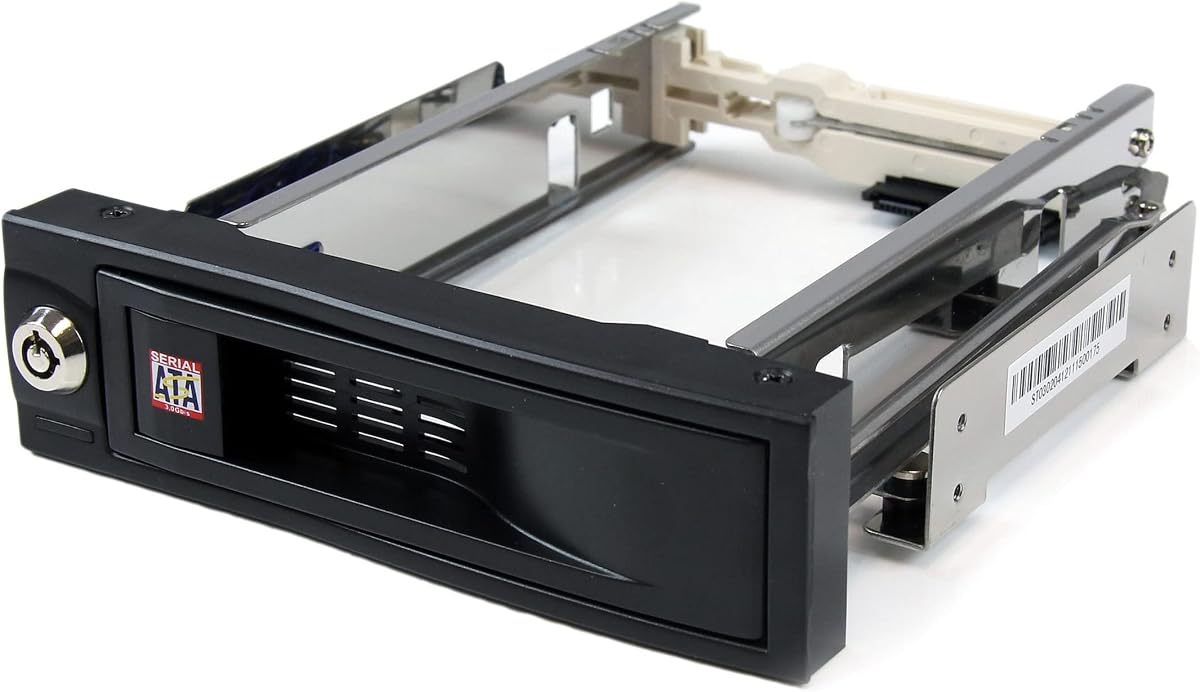
StarTech HSB100SATBK
4.4Editor score
Single 3.5-inch drive
Front-accessible trayless design
Lockable drive bay
Hot swappable drive bays make it easier to install, replace, and expand storage without powering down an entire workstation or enclosure. The right model depends on drive size, interface support, bay density, cooling, security, and whether the enclosure operates inside a computer case or as external direct-attached storage.
We compared ten options across internal backplanes and external direct-attached enclosures, focusing on the specifications and features stated in their product information. The list covers SATA and SAS compatibility, drive capacity, tray design, cooling provisions, host connectivity, expansion options, and practical maintenance features.
Each review identifies the product's strongest use case and any limitations worth considering before purchase. Ratings, specifications, and availability can change over time, and prices fluctuate, so readers should confirm current details and compare the enclosure with their computer, operating system, and storage setup.
4.4Editor score

5.0Editor score

4.2Editor score
As an Amazon Associate we earn from qualifying purchases.
The table below compares all ten enclosures by form factor, drive support, bay count, and primary interface, making it easier to identify the right option for an internal workstation, data server, or external storage setup.


The ICY DOCK MB326SP-1B is a six-bay internal enclosure designed to hold 2.5-inch SATA or SAS hard drives and SSDs in one 5.25-inch bay. Its 5.0 rating and combination of dense capacity, tool-less ExpressTray mounting, active cooling, and per-bay status lighting make it the strongest all-around option in this guide.
We may earn a commission when you buy through this link, at no additional cost to you.
Its standout feature is the balance between density and serviceability. Each bay accepts 5mm, 7mm, or 9.5mm drives, while the ExpressTray system removes the need for tools when installing or replacing a drive. Optional bottom screw holes provide an extra stabilization option. Two user-upgradeable 40mm fans and three control settings—High, Low, and Off—give users a practical way to manage airflow and noise.
The backplane supports SATA at up to 6Gbps and SAS 3.0 at up to 12Gbps through a single channel, so it is flexible across common enterprise drive types but not intended to provide multi-lane aggregation. Active Power Technology prevents unused bays from powering up, and two 15-pin SATA power connectors supply all six drives. These are useful operational details, although buyers should ensure the host SATA power and data connectors are available.
This is the best choice for a workstation or server that needs many compact drives in a single internal bay. It is particularly attractive for storage pools, scratch arrays, or backup workflows where quick drive replacement matters more than the ability to use full-size 3.5-inch disks. Buyers needing larger disks or multi-lane performance should look elsewhere, but for dense 2.5-inch hot-swap storage, this model leads the list.
Six 2.5-inch drives fit into one 5.25-inch footprint, conserving valuable internal space. The enclosure is particularly useful in systems where every open drive bay matters.
Tool-less ExpressTray access simplifies drive changes, while dual 40mm fans and selectable fan speeds help maintain airflow around densely packed storage.
We may earn a commission when you buy through this link, at no additional cost to you.
The StarTech HSB3SATSASBA converts two 5.25-inch bays into a hot-swappable interface for three full-size 3.5-inch SATA or SAS drives. Its 4.3 rating reflects a well-rounded enterprise design that combines trayless installation, keyed removal controls, per-bay lighting, and active cooling.
We may earn a commission when you buy through this link, at no additional cost to you.
A major strength is the attention to maintenance. Individual ejection levers provide a controlled way to install and remove drives, and the key-lock mechanism adds optional security with two included keys. Power and status LEDs show the condition of each bay, making it easier for an administrator to identify an occupied, active, or problematic slot during routine service.
The enclosure supports SATA I, II, and III plus SAS I and II drives. A vented aluminum body helps dissipate heat, and its built-in fan includes speed control for tuning airflow. The trade-off is age and density: this model does not advertise SAS 3.0 or SAS 12Gbps support, and fitting three 3.5-inch drives into two external-facing 5.25-inch positions uses more space than a compact 2.5-inch solution.
The HSB3SATSASBA is a sensible choice for IT professionals building or maintaining a traditional server or workstation that uses full-size hot-swap drives. It makes sense when security, visible drive status, and controlled removal outweigh the benefits of newer SAS generations or higher drive density. Users should verify their controller and drive requirements before installation.
Keyed ejection levers make each bay easier to manage while adding a layer of physical control. The two included keys suit installations where accidental drive removal is a concern.
The vented aluminum shell works with a built-in fan whose speed can be adjusted. This combination helps manage heat around 3.5-inch hard drives.
We may earn a commission when you buy through this link, at no additional cost to you.
The Rosewill RSV-SATA-Cage-34 converts three 5.25-inch optical-drive positions into four hot-swappable bays for 3.5-inch or 2.5-inch drives. With a 4.3 rating, it offers an appealing combination of capacity and space efficiency for compatible systems.
We may earn a commission when you buy through this link, at no additional cost to you.
Its main advantage is the conversion of three external drive-bay spaces into four hard-drive positions. The cage supports SATA I, SATA II, SATA III, and SAS drives, although hot-swapping is specifically stated for SATA I through SATA III. A single 120mm rear exhaust fan provides the primary cooling system, which is a straightforward approach for a cage built around full-size drives.
The product uses steel and ABS materials for its rugged enclosure and is designed for compatibility with the Rosewill L4000U, L4500U, and R4000U models. That declared chassis compatibility is important because installers should confirm case dimensions, connector placement, and mounting provisions before ordering. SAS compatibility is also restricted to 6Gbps, so newer SAS installations may require a different backplane.
This cage is best for a compatible Rosewill workstation or server where the goal is to recover storage capacity from unused optical-bay positions. It works well for storage expansion, local backup, or data-handling tasks that benefit from four full-size drive positions. It is less attractive for new SAS-heavy systems or users whose computer does not support the listed chassis models.
The cage efficiently repurposes three 5.25-inch areas for four hard drives. That arrangement can add useful capacity without expanding beyond the case's existing external-bay footprint.
A single 120mm exhaust fan moves air through the enclosure. Users should ensure the host case has an unobstructed intake path for the additional cooling demand.
We may earn a commission when you buy through this link, at no additional cost to you.
The StarTech HSB100SATBK is a straightforward single-bay mobile rack for a 3.5-inch SATA hard drive. It installs in a 5.25-inch bay and can hold a 4.4 rating for its clear trayless design, front access, shock absorption, and ease of use.
We may earn a commission when you buy through this link, at no additional cost to you.
The defining benefit is simplicity. Instead of placing the hard drive in a separate tray, the user slides it directly into the enclosure. This reduces the number of components involved in a drive change and allows removal without opening the computer chassis. Internal rubber shock absorbers help cushion the drive, while solid aluminum construction and a stated insertion rating above 50,000 cycles support regular use.
The bay is also lockable, which helps prevent accidental or unauthorized removal in shared equipment. The main limitation is obvious: it supports only one 3.5-inch SATA drive at a time. It does not list a cooling fan, so users deploying it in a tightly packed or poorly ventilated case should ensure that normal airflow reaches the drive. Its single-drive format also makes it less suitable than a multi-bay cage for large storage arrays.
This enclosure is an appealing choice for a simple workstation that needs one replaceable internal data drive, such as a scratch disk, local backup target, or frequently accessed storage volume. It is also the budget pick in this guide because it delivers the core benefit of front-accessible replacement without the complexity of a larger backplane. For several drives, consider a multi-bay model instead.
The drive slides directly into the bay rather than requiring a separate carrier. That design reduces assembly steps during installation and replacement.
Internal rubber shock absorbers help reduce movement around the hard drive. The lockable front also adds basic protection against unintended removal.
We may earn a commission when you buy through this link, at no additional cost to you.
The RackChoice internal backplane provides five hot-swappable drive positions for 2.5-inch or 3.5-inch SATA and SAS hard drives while occupying three 5.25-inch positions. Its 3.6 rating is lower than most products in the guide, so buyers should examine the listed accessories and compatibility details carefully.
We may earn a commission when you buy through this link, at no additional cost to you.
The enclosure supports SATA up to 6Gbps and can also accept SAS I and SAS II drives. Its stated RAID 0, 1, 5, 6, and 10 capability requires a compatible RAID card, making the backplane potentially useful for builders assembling a more structured storage array. Five SATA cables are included, while an 80mm fan and a full metal body support heat dissipation.
Several practical details require attention. The power supply is not included, and the product requires two Molex connections for power. If a replacement tray is needed, the buyer must request it separately according to the supplied information. These omissions do not make the enclosure unusable, but they add planning and may make it less convenient for first-time builders than a fully packaged alternative.
This backplane is best for an experienced builder who wants a high count of mixed-size hot-swap positions and is prepared to provide the required power and controller hardware. It may suit a home server or data workstation where flexible 2.5-inch and 3.5-inch deployment is important. Buyers should confirm SAS generation, RAID controller support, connector availability, and tray availability before installation.
Users can mix 2.5-inch and 3.5-inch drives across five positions. This flexibility helps adapt the cage to different storage tiers, sizes, and performance requirements.
The enclosure advertises several RAID configurations when paired with a suitable card. That makes it more relevant to builders with an existing storage-controller plan.
We may earn a commission when you buy through this link, at no additional cost to you.
The TERRAMASTER D4-320 is a four-bay external direct-attached storage enclosure with tool-free hot-swap trays and a USB 3.2 Gen2 interface. Its 4.2 rating and strong feature set make it a well-rounded premium option for users who want to add or replace full-size and compact SATA drives outside the computer case.
We may earn a commission when you buy through this link, at no additional cost to you.
The enclosure supports 3.5-inch SATA hard drives, 2.5-inch SATA hard drives, and 2.5-inch SATA SSDs. Its stated maximum is 30TB for a single drive and 120TB in aggregate under the listed four-drive configuration. USB 3.2 Gen2 provides a theoretical 10Gbps host connection, and the product information lists combined read/write performance up to 1,016 MB/s with four SATA III hard drives under specified conditions.
Drive management is convenient. Tool-free trays slide into place, and the Push-lock design secures a tray after insertion. The system can replace disks without powering it off, while an intelligent temperature-controlled fan manages heat. Sound-absorbing panels and vibration damping are also listed, with standby noise below 21 dB(A). Importantly, this is direct-attached storage rather than a NAS, and it has no RAID function.
The D4-320 is a strong choice for photographers, editors, backup users, and small teams needing flexible external storage. It supports Mac, Windows, and Linux and works with USB Type-C plus several USB and Thunderbolt host interfaces. Buyers seeking combined storage pooling, redundancy management, or network access should choose a NAS instead, while those prioritizing hot-swappable capacity will find this enclosure particularly capable.
The USB 3.2 Gen2 interface provides a high-bandwidth connection for external workflows. Actual performance depends on the drives, host, and data-transfer workload.
The Push-lock mechanism secures each tray after insertion. It reduces the need for separate fasteners while helping prevent accidental disconnects.
We may earn a commission when you buy through this link, at no additional cost to you.
The CENMATE 6-Bay USB 3.0 is an external direct-attached storage enclosure with six hot-swappable bays for 2.5-inch and 3.5-inch SATA hard drives and SSDs. It holds a 4.3 rating and offers a generous number of externally accessible drive positions in a compact desktop enclosure.
We may earn a commission when you buy through this link, at no additional cost to you.
The enclosure uses an aluminum-alloy shell and two 2.7-inch fans for cooling. It supports drives up to 20TB each according to the supplied product information. USB 3.0 provides a host connection of up to 5Gbps, and the listed transfer claim describes moving a 1GB file in three to five seconds, though actual performance varies with the drives and computer.
Tool-free trays and hot-swapping make it convenient to add or exchange storage without powering down the unit. A USB host port supports daisy chaining with up to three devices, providing an expansion path beyond the six local bays. The package is described as compatible with Windows 7 and later, Mac 9.1 and later, and Linux, with USB-A and USB-C connectivity. There is no RAID or NAS functionality, however, so the enclosure behaves as a direct-attached storage device.
This is a practical choice for users who need many external drive slots but do not require the newest host interface. It can serve as a desktop archive, a local backup pool, or a media-production drive dock. The trade-off is fan noise of approximately 40 to 50 decibels, which the manufacturer specifically warns may bother noise-sensitive users. Place it accordingly and confirm that host throughput meets your needs.
Six front-accessible bays make it easy to organize several drives without opening the enclosure. Mixed 2.5-inch and 3.5-inch support broadens deployment options.
The USB host port permits daisy-chaining additional compatible devices. This creates a path to expand capacity while keeping the primary enclosure manageable.
We may earn a commission when you buy through this link, at no additional cost to you.
The CENMATE 6-Bay 10Gbps enclosure combines six hot-swappable drive positions with a USB 3.2 Gen2 host interface. Its 4.0 rating reflects a capable modern design for users who need more external bandwidth than a basic USB 3.0 dock can provide.
We may earn a commission when you buy through this link, at no additional cost to you.
The listed interface supports up to 10Gbps and works with USB Type-C, USB 3.0, USB 3.1, USB 3.2, Thunderbolt 3, and Thunderbolt 4 connections. The product information states a combined read/write speed of 500MB/s with two hard drives and a read/write speed of 510MB/s with one SSD, while noting that actual results depend on drive and computer versions.
Storage flexibility includes 2.5-inch and 3.5-inch SATA hard drives and SSDs, with a stated maximum of 20TB per drive. Hot-swapping and tool-free trays support routine maintenance. Two 2.7-inch fans provide active cooling in an aluminum-alloy enclosure, and a USB host port enables daisy chaining across as many as three devices with a stated expansion capacity of 120TB.
The enclosure suits users who want a large external drive pool and a faster host link, such as photographers transferring large files, editors working with media, or power users maintaining several storage volumes. It does not offer RAID or NAS functions, and its two fans may create around 40 to 50 decibels of noise. For shared network access or managed redundancy, a dedicated NAS is the better category.
USB 3.2 Gen2 gives the enclosure a stronger host connection than the earlier USB 3.0 model. That helps when several fast SATA SSDs serve active workloads.
Six mixed-size bays and dual fans provide room for substantial storage while managing heat. The enclosure is better suited to a quiet work area only if its audible fan output is acceptable.
We may earn a commission when you buy through this link, at no additional cost to you.
The SilverStone FS304-V fits four 3.5-inch SAS 12G or SATA 6Gb/s drives into three 5.25-inch device positions. With a 4.1 rating, it stands out for modern SAS support, a space-efficient layout, independent status indicators, and a built-in cooling fan.
We may earn a commission when you buy through this link, at no additional cost to you.
Its trayless hot-swap design allows drives to be installed and removed from the front, which improves maintenance in workstations and servers. Independent LEDs make it easier to monitor the status of each drive position. The enclosure also accommodates a 9.5mm slim optical drive, adding flexibility for systems that need both storage and a physical optical-device slot.
The most important distinction is its SAS 12G capability, which is newer than the SAS support listed for several competing cages. SATA drives running at 6Gb/s are also supported. That makes the cage attractive for storage-oriented systems using contemporary enterprise interfaces. However, the supplied information does not clearly state that SATA drives support the same hot-swap behavior, so buyers relying on SATA hot swap should verify that point directly.
The FS304-V is a good candidate for an internal server or workstation that uses full-size SAS hard drives and values modern interface support. It preserves three external positions while delivering four drive locations and cooling in the same area. Users whose primary requirement is compact 2.5-inch density or external placement should consider the ICY DOCK or external direct-attached alternatives instead.
Support for SAS 12G distinguishes this cage from models limited to older SAS generations. It is a stronger match for contemporary enterprise storage configurations.
Independent status indicators help users associate activity with a specific bay. That visibility is useful during diagnosis and routine administration.
We may earn a commission when you buy through this link, at no additional cost to you.
The Kingwin 5-Bay Mobile Rack installs five hot-swappable drive positions within three 5.25-inch case-bay spaces. Its 4.2 rating and combination of trayless access, mixed drive support, broad interface claims, and aluminum construction make it a practical internal option for workstations and data servers.
We may earn a commission when you buy through this link, at no additional cost to you.
The enclosure supports 3.5-inch hard drives and solid-state drives through a trayless design that permits tool-free insertion and removal. Its stated compatibility includes SATA I, SATA II, SATA III, SAS I, SAS II, and SAS III. The product information also mentions performance up to 12Gbps, although the title separately references 6Gbps, so users should confirm the exact interface behavior of the installed backplane and host controller.
Aluminum construction is the main physical feature, helping with heat dissipation and structural durability. The enclosure is intended to maximize storage within a fixed case footprint, making it relevant to gaming systems, workstations, and servers. The product information mentions integrated power control for operating the drives, but it provides less detail about cooling hardware and specific status indicators than some competing models.
This rack is most appropriate for a builder who values five front-serviceable drive positions and broad stated drive compatibility. It can support local archives, backup workflows, or expandable data-management storage in a compatible case. Before buying, verify the exact drive connector layout, backplane generation, power requirements, and whether the intended SATA SSD form factor fits the listed bays.
The backplane creates five drive slots in the space of three 5.25-inch positions. Trayless front access helps keep routine replacements and expansions manageable.
The aluminum shell provides structural rigidity and assists with passive heat dissipation. Case airflow remains important because no dedicated fan specification is provided.
We may earn a commission when you buy through this link, at no additional cost to you.
A suitable hot-swappable drive bay must fit both the host environment and the intended storage workload. Drive dimensions, interface generation, bay footprint, cooling, security, and management features should be evaluated before purchasing.
An internal backplane mounts directly inside a desktop, workstation, or server case and connects to the motherboard or storage controller. It avoids a separate desktop enclosure and is often favored where the computer already has suitable power and data connectors. External direct-attached storage sits beside the computer and connects through USB, making it easier to move between systems and generally more convenient for backups or temporary storage.
A 2.5-inch enclosure is ideal for dense laptop-style drives and SSDs, while a 3.5-inch enclosure accommodates larger desktop and enterprise hard drives. Some products accept both sizes, often through removable carriers. Compare the number of physical positions with the space consumed inside the case or enclosure; six 2.5-inch drives can fit into one 5.25-inch location, while several 3.5-inch drives require a larger footprint.
SATA is the common choice for desktops and external direct-attached storage, while SAS appears more often in servers and professional storage systems. Interface generation matters: SATA 6Gb/s and SAS 12G differ from older standards. Also check whether hot swapping is supported for every listed interface, because a product may recognize SAS drives without offering identical hot-swap behavior for SATA.
Internal SATA backplanes depend on the motherboard or controller, while external enclosures need a sufficiently fast host connection. USB 3.0 offers up to 5Gbps, and USB 3.2 Gen2 offers up to 10Gbps, though real throughput is limited by the slowest component. Consider whether the computer has USB-A, USB-C, or Thunderbolt, and whether the cable and operating system support the desired transfer mode.
Hot-swappable bays pack multiple spinning disks into a confined area, making airflow important. Look for a built-in fan, a full metal chassis, vents, or a fan with adjustable speed. External enclosures with multiple fans may be heard in a quiet room, while internal cages usually depend more heavily on the host case's airflow. Users should avoid placing a noisy enclosure in a recording studio or other acoustically sensitive location.
Trayless carriers reduce loose components and can make swaps faster, while removable trays may offer better drive handling and clearer organization. ExpressTray, Push-lock, and ejection-lever systems each address secure insertion differently. Pay attention to locking, vibration protection, and whether replacement trays are included or must be requested separately before deciding which maintenance design is easiest for the intended user.
Check both the maximum drive capacity supported by each enclosure and the total capacity allowed by its bay count and advertised configuration. Expansion options differ: some external units expose a USB host port for daisy chaining, while internal cages may offer additional ports but remain limited by case space. Software-managed features such as RAID are separate from hardware capacity and should not be assumed unless explicitly supported.
Direct-attached enclosures are not automatically network storage devices. Products without RAID or NAS functions expose their disks through the host connection and may rely on the operating system's disk-management tools. Check stated compatibility with Windows, macOS, or Linux, along with driver requirements, status indicators, and any included management software. This prevents surprises when the enclosure is intended for cross-platform use.
Begin by confirming that the enclosure's drive dimensions, interface, connector requirements, and mounting footprint are compatible with the host system. Power down the computer for an internal installation, disconnect its power, and follow the chassis manufacturer's guidance for adding storage. External enclosures should be connected to a suitable host port and allowed to initialize before drives are accessed.
Before inserting a drive, protect it with an appropriate anti-static precaution and make sure the tray, carrier, or locking mechanism is properly oriented. For hot swapping, identify the correct bay and follow the enclosure's removal procedure, especially when the host controller supports hot swap. Do not force a drive, and never remove a tray while its activity LED shows that the disk is actively transferring data.
Maintain good airflow by leaving the enclosure's vents unobstructed and orienting the cooling fans according to the installation instructions. Periodically check for unusual noise, vibration, heat, or repeated connection errors, and back up important data before changing drives. Store removed drives in anti-static packaging and consult the operating system or storage-controller documentation before erasing, partitioning, or reconfiguring a bay.
A hot-swappable bay is designed so a supported drive can be removed and replaced without shutting down the entire system. The enclosure includes a backplane and connection mechanism that may support hot-swap protocols, indicators, locking features, or tray retention. Compatibility must exist at the drive, bay, controller, and operating-system levels for the process to work safely.
Not automatically. A SAS backplane may physically accept SATA-style connectors because SAS uses compatible signaling arrangements, but the enclosure must explicitly support SATA operation. Even when drive recognition is possible, hot-swap behavior, power requirements, and controller commands can differ. Check the product specifications and host-controller documentation before mixing interface types.
No. Hot swapping describes how a drive is physically replaced, while RAID describes how a storage controller organizes multiple drives. Some external enclosures support hot swapping without offering RAID at all, while RAID configurations require a compatible controller and suitable drives. The included list includes both direct-attached enclosures and backplanes with stated RAID support when paired with the right card.
Usually not without an adapter or a carrier designed for that purpose. A compact 2.5-inch enclosure is normally limited to 2.5-inch drives, whereas a 3.5-inch cage may also support 2.5-inch drives if the manufacturer states that compatibility. Never force a drive into a bay, and verify both the physical dimensions and the backplane's supported form factors.
They need enough airflow to remove heat from both the drives and the backplane electronics. A built-in fan, vented metal enclosure, or reliable host-case airflow can help, particularly with multiple 3.5-inch hard drives. Place internal cages near an intake path, avoid blocking vents, and consider noise and room temperature when choosing an external enclosure.
Usually, provided the enclosure uses a connection and operating-system combination supported by both computers. USB direct-attached storage is generally portable, but the operating system may assign new drive letters or require a safe-eject procedure before disconnection. Always shut down or stop all activity and eject the enclosure through the host system before unplugging it.
Not necessarily. Many products simply expose each installed drive independently to the host and require software to combine them. A true storage pool, mirrored set, or RAID array depends on a suitable controller, management utility, and operating-system support. Check the enclosure's stated functions carefully rather than assuming that multiple hot-swappable bays will automatically behave as one large volume.
Verify drive size, SATA or SAS generation, host interface, power connectors, physical mounting space, and operating-system support. Also review cooling, noise, locking features, included cables, and whether a power supply or replacement tray is supplied. Those details determine whether the enclosure integrates cleanly and meets your maintenance workflow.
The ICY DOCK MB326SP-1B is the strongest overall choice because it packs six serviceable 2.5-inch SATA or SAS drives into one internal 5.25-inch space and adds tool-less trays, adjustable fans, and individual indicators. The StarTech HSB100SATBK is the straightforward budget option for one full-size drive, while the TERRAMASTER D4-320 is the premium external pick for four drives, fast USB connectivity, and tool-free hot-swapping.
Prioritize interface compatibility and physical fit before considering secondary features. Internal users should check the case footprint, available SATA or SAS connectors, and host-controller behavior; external buyers should compare USB port generation, cable type, drive size, and operating-system support. Cooling and noise deserve equal attention because a densely populated enclosure can produce both heat and noticeable fan sound.
Ratings, specifications, and prices can change, so confirm current product details before purchasing. Comparing the enclosure with the exact drives, controller, case, and workflow will help prevent compatibility problems and produce a hot-swap storage setup that remains practical for long-term maintenance.