
VolenGo H1100 Label Maker Machine
4.3Editor score
Backlit LCD simplifies setup
Three dedicated cable modes
Waterproof laminated tapes
Sixteen fonts and 100 frames
This Label Maker for Network Cables guide compares 10 options for print quality, cable compatibility, durability, portability, and ease of use.
A label maker for network cables helps technicians, installers, and IT teams create consistent identifiers that remain readable around patch panels, racks, desks, and service loops. The right machine balances legible output, compatible media, durable wrapping, manageable sizing, and an interface that supports fast real-world labeling.
We compared all ten products using the supplied specifications, ratings, included features, tape support, connectivity, print capabilities, and intended applications. The list covers compact handheld devices, thermal-transfer industrial models, app-assisted portable printers, and computer-connected systems for professional network documentation.
Each review identifies the product's strongest use case, important technical advantages, and practical limitations. Ratings reflect the supplied customer feedback, while the recommendations consider the feature mix rather than price alone. Product prices and availability can change, so confirm current details before purchasing.
4.3Editor score

4.6Editor score

4.8Editor score
This side-by-side comparison highlights the most important differences in media support, print resolution, screen visibility, connectivity, and workflow flexibility, helping readers identify the label maker that best matches their network-labeling environment.


The VolenGo E1000 is a handheld wire and cable label maker built around fast identification rather than a broad collection of decorative label styles. It carries a 4.4 customer rating, and its strongest attraction is the combination of a familiar QWERTY keyboard, three cable modes, and support for 12mm heat-shrink tube. That makes it especially relevant to technicians who need readable identifiers at a rack, patch panel, workbench, or equipment enclosure.
We may earn a commission when you buy through this link, at no additional cost to you.
Its shortcut-oriented design supports wraps, flags, fixed-length labels, general-purpose labels, and breaker labels. One particularly useful feature is the ability to print 20 labels at a time, while narrower settings are intended to reduce material waste. Users can also power the machine with six AAA batteries or the included USB-C cable, offering flexibility for extended jobs and desk-based work.
The 12mm heat-shrink format uses a 2:1 shrink ratio and is specified for 300V, 125°C, and VW-1 applications. The flexible laminated wire labels are designed to resist water, oil, abrasion, and fading in extreme temperatures. These qualities matter when labels are wrapped around cables that will be moved, handled, or exposed to changing conditions rather than remaining on a clean office shelf.
The principal trade-off is that the supplied information emphasizes 12mm media rather than a wide range of cassette widths. Six AAA dry cells are also not included, although USB-C power is provided for connected use. This is a strong option for network installers who want rapid text entry, batch production, and heat-shrink support in a compact standalone device, but buyers needing larger variable-width labels should examine media compatibility more carefully.
The three cable modes, one-touch shortcuts, and QWERTY keyboard reduce the learning curve for repeat labeling tasks. Batch printing further helps when an installer needs to prepare consistent identifiers for multiple ports or cables.
Heat-shrink tube provides a close fit around wiring, while the flexible laminated labels are specified for resistance to water, oils, abrasion, and temperature extremes. These are useful properties in network rooms and equipment areas.
We may earn a commission when you buy through this link, at no additional cost to you.
The VolenGo H1100 is a compact, approachable label maker for home networks, offices, schools, and light-duty installation work. Its 4.3 rating reflects a practical feature set, while the backlit LCD and 203 DPI output distinguish it from machines that rely on a small, difficult-to-read screen. It is a particularly accessible option for users who need to create clear cable identifiers without navigating a complex industrial interface.
We may earn a commission when you buy through this link, at no additional cost to you.
Three dedicated cable modes streamline the most common network-labeling tasks. The included 12mm laminated tapes are intended to withstand water, oil, abrasion, and extreme temperatures without fading, making the media more useful than a basic temporary sticker. The machine also offers 16 fonts, 100 frames, and 800 symbols, giving users enough range for asset names, room numbers, and descriptive cable tags.
The supplied information highlights a lightweight design, user-friendly menus, and intuitive settings. These qualities matter more for everyday adoption than raw technical specifications: a technician is more likely to use the machine consistently when entering text and previewing results does not require a steep learning process. A backlit display can also be decisive in dim network closets or under a desk where an unlit screen is inconvenient.
The H1100 is less suited to users who require maximum print resolution, extensive barcode support, or a large library of professional media widths. Its 203 DPI output remains useful for standard identifiers, but the 300 DPI Makeid model is better positioned for fine text and technical barcodes. Even so, the H1100 includes four tapes and provides a straightforward, economical starting point for common cable-management tasks.
The illuminated LCD improves visibility when network equipment is located in a closet, cabinet, or other dim area. Its 203 DPI output is designed to make everyday text easy to create and read.
Sixteen fonts, 100 frames, and 800 symbols extend the machine beyond plain functional labels. That flexibility helps users create identifiers that are understandable to the wider household or facilities team.
We may earn a commission when you buy through this link, at no additional cost to you.
The Makeid P31S is the most complete professional option in this guide for technicians who need precise, standards-aware network identification. It carries a 4.6 rating and combines a 300 DPI print head, 30-plus label sizes, up to eight lines of text, and support for barcodes, QR codes, and bulk data imports. It is well suited to structured cable schedules, equipment inventories, and labels containing more information than a short port code.
We may earn a commission when you buy through this link, at no additional cost to you.
Media flexibility is one of the P31S's defining strengths. It supports vinyl, self-laminating wraps, PET, nylon cloth, and heat-shrink tubing, allowing technicians to select a material that matches the cable, environment, and permanence requirement. Thermal-transfer output is specified to produce weather-resistant, oil-proof, and waterproof labels that can withstand harsh temperatures and environments.
The one-inch print head gives it room for denser layouts, while PC software and app support broaden the design workflow. The rechargeable 2600mAh battery is specified for up to 90 days of standby use, which is useful for extended projects. It also meets ANSI and TIA/EIA-606-A labeling standards for electrical, datacom, and IT applications and includes three years of replacement coverage with technical support.
This level of capability carries a trade-off: it is more involved than a basic handheld labeler, and the best results depend on selecting compatible tapes and spending a little time learning the software workflow. For network professionals who value sharp barcodes, complex data, standards compliance, and long-term durability, however, the P31S offers the most convincing combination of capability and portability in this roundup.
The 300 DPI head produces sharp, smudge-proof text and barcodes at speeds of up to 100 labels per minute. Eight lines and a one-inch print area support schedules and asset tags that would be cramped on smaller machines.
ANSI and TIA/EIA-606-A compliance makes the P31S particularly relevant to formal datacom and IT documentation. Barcodes, QR codes, and bulk imports also support repeatable labeling systems rather than isolated tags.
We may earn a commission when you buy through this link, at no additional cost to you.
The Brother P-touch Pro is a dependable handheld choice for electrical panels, network cables, workshop storage, and other organized workspaces. Its 4.6 rating reflects a well-regarded feature set, and the device distinguishes itself through one-touch Cable Wrap, Cable Flag, Faceplate, and Serialize keys. These shortcuts make common electrical-identification tasks faster without requiring manual formatting for every label.
We may earn a commission when you buy through this link, at no additional cost to you.
Its graphical LCD presents a preview of the label before printing, which helps reduce waste and errors when fitting identifiers onto a panel or cable. The machine prints up to two lines and includes three fonts plus more than 300 symbols. For typical network port tags, connection labels, and structured room or rack identifiers, that text capacity is generally sufficient.
Compatibility with genuine Brother TZe tapes is a major practical benefit. The PT-H111 supports tape widths of 3.5, 6.0, 9.0, and 12.0mm across a variety of adhesives and styles, giving users choices suited to electrical work and tougher labeling needs. The lightweight, durable body and detachable wrist strap also make the machine easy to carry between workspaces.
Two limitations deserve attention. First, two-line output is less accommodating than the P31S for densely detailed schedules. Second, the machine operates with six AAA batteries or an AC power adapter, and the adapter requires a separate purchase. Even so, the P-touch Pro is one of the most approachable professional options because its preview, shortcut keys, and familiar tape system balance capability with ease of use.
Dedicated keys for cable wraps, cable flags, faceplates, and serialized labels put common formatting close at hand. The result is a faster workflow for repetitive electrical and network identification tasks.
The graphical display lets users verify text and placement before committing media. This is valuable on small cable surfaces where a misaligned or incorrectly sized label is difficult to apply cleanly.
We may earn a commission when you buy through this link, at no additional cost to you.
The BRADY M210 is a handheld label maker with a 4.6 customer rating and an established professional positioning. Its name identifies it as the M210 model, while the supplied listing centers on the core format: a portable handheld label maker suited to users who need to create labels away from a fixed desk. That makes it a reasonable candidate for field-based network installation and maintenance.
We may earn a commission when you buy through this link, at no additional cost to you.
BRADY is a relevant name in industrial identification, and the M210's handheld form suggests a practical middle ground between simple consumer labelers and larger computer-connected systems. For a technician working across multiple cabinets or racks, portability can be as important as print resolution or media range. The supplied product data does not specify resolution, display characteristics, supported tape widths, connectivity, or included media, so those details should be checked against the current listing.
The high rating is encouraging, but ratings alone do not reveal which workflow the M210 best supports. A network buyer should compare its media compatibility with the actual cables and environments involved, particularly if the work requires heat-shrink tubing, flexible wraps, or very small labels. It is also important to confirm whether labels are designed in standalone fashion or through a phone, application, or computer connection.
Overall, the M210 earns a place in this guide as a compact professional option rather than as the most feature-dense machine. Its strongest visible qualities are portability, professional handheld design, and favorable customer feedback. Buyers who need broad media support, barcodes, or standards-driven documentation may prefer one of the more explicitly specified alternatives, but those prioritizing an easy-to-carry industrial workflow should investigate this model closely.
The handheld format is appropriate for technicians moving between racks, closets, and active work areas. Portability supports labeling at the point where cable identification decisions are made.
The supplied information does not list supported widths or materials. Buyers should confirm those details, especially when a network documentation system depends on heat-shrink, flexible nylon, or a particular label width.
We may earn a commission when you buy through this link, at no additional cost to you.
The Epson LABELWORKS LW-PX700 is a portable industrial label maker designed for flexible network, electrical, and facilities work. It carries a 4.4 rating and stands out for broad tape compatibility, including heat-shrink tube, self-laminating wrap, vinyl, standard industrial tape, and specialty media. This makes it a strong candidate when technicians need to choose the material that best matches each cable rather than forcing every job into one tape type.
We may earn a commission when you buy through this link, at no additional cost to you.
The machine creates custom and compliant labels up to 1 inch, or 24mm, wide. That broader print area makes it more suitable than many compact devices for long descriptions, wrapped identifiers, or labels that must remain readable at a distance. Its large, clear preview screen allows users to inspect the completed layout before printing, reducing the chance of wasting an industrial tape cartridge.
The included kit contains an AC adapter, a cartridge of 212VTBWPX standard industrial tape, and a guide. A useful auto-rewind feature is designed to streamline label handling, while compatibility with named LABELWORKS PX tapes gives buyers several established media options. The product also benefits from Epson's stated full-service lifetime warranty in the United States and Canada.
Its size and industrial positioning may make it less convenient than a pocket-sized label maker for light household tasks. It also does not offer the eight-line density, explicit standards language, or barcode and QR code features listed for the Makeid P31S. Nevertheless, the LW-PX700's wide media support and 24mm capacity are compelling for professional cable labeling, particularly for shops that already use Epson LABELWORKS consumables.
Support for heat-shrink, self-laminating wrap, vinyl, and specialty tapes allows a technician to select the right medium for different cable and environmental conditions.
The ability to print labels up to 24mm wide creates more room for descriptive identifiers. A large preview screen helps users check that longer information will fit before consuming media.
We may earn a commission when you buy through this link, at no additional cost to you.
The Brady M211 Kit takes a distinctly mobile approach to network labeling. Instead of relying on a built-in keyboard, it works with a phone through the Express Labels Mobile App. Its 4.3 rating and rugged accessory set make it appealing to field technicians who already manage schedules, photos, and asset details on a mobile device.
We may earn a commission when you buy through this link, at no additional cost to you.
Bluetooth eliminates a cable between the phone and printer, while the attachable magnet supports hands-free label creation. That configuration can be useful on a ladder, in a crowded cabinet, or near a rack where holding a phone and a separate label maker at the same time is inconvenient. The included belt clip and hard case also make the kit more suitable for transport between job sites.
Ruggedness is another defining feature. The listed package is resistant to 250-pound crushes, six-foot drops, and military-grade shocks under MIL-STD-810G. The power brick can charge the label printer, phone, or tablet, reducing the need to carry separate charging solutions during mobile work. A phone-based design also means label designs can be prepared as part of a broader digital workflow rather than entered one character at a time on the device.
The main limitation is dependence on a phone and app-based workflow. Buyers who need a conventional keyboard, a large built-in display, or confirmed high-resolution industrial output may find this approach less direct. The supplied information also does not state print resolution or tape-width limits, so those specifications should be reviewed before purchasing. For mobile-first technicians, though, the M211 Kit offers an unusually complete and travel-ready package.
The Express Labels Mobile App turns a phone into the design interface, and Bluetooth sends the finished label to the printer. This can simplify access to information already stored in mobile workflows.
A hard case, belt clip, and magnet support storage and hands-free placement. The listed crush, drop, and shock resistance adds confidence for use outside a controlled office environment.
We may earn a commission when you buy through this link, at no additional cost to you.
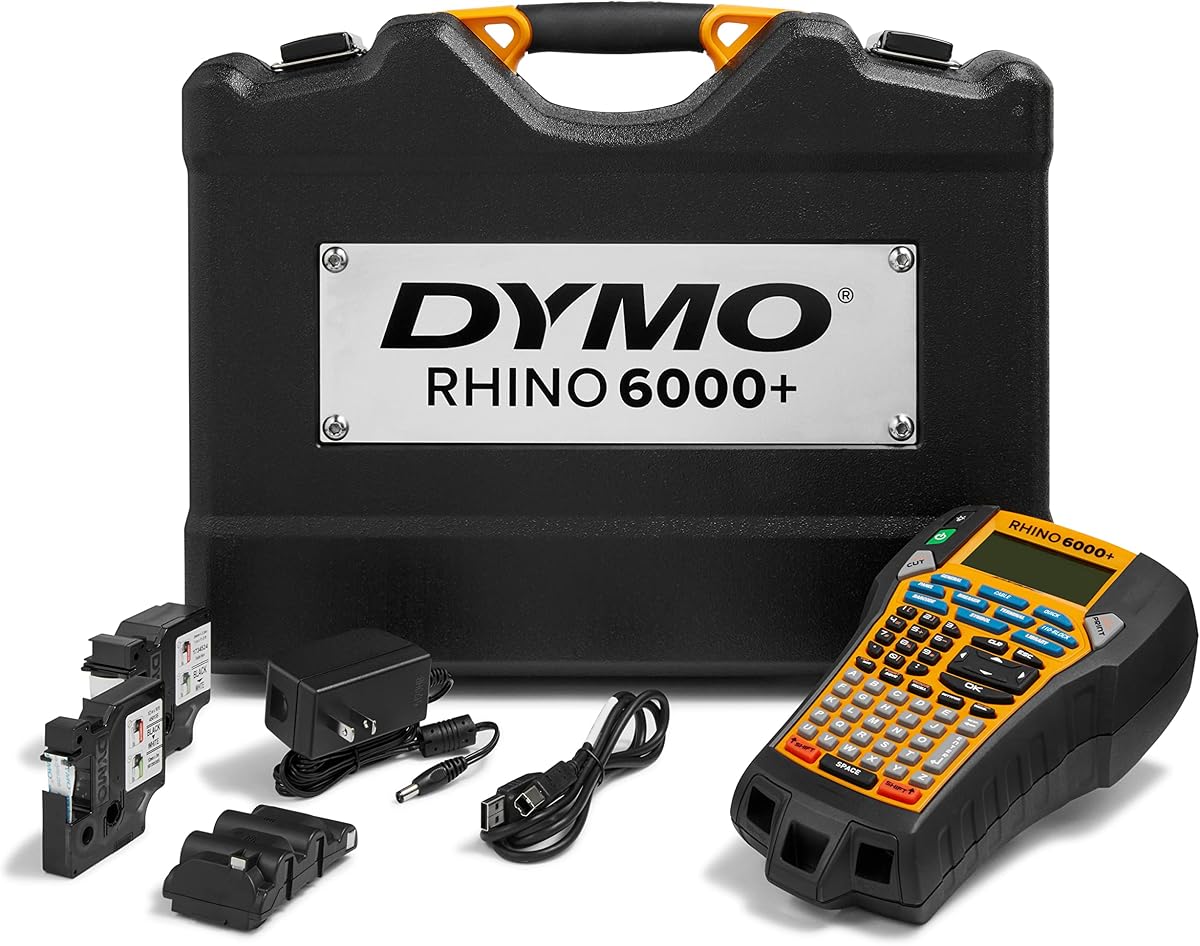
The DYMO Rhino 6000 is aimed at users who need a label maker to integrate with a computer-based documentation system. It has a 4.3 rating and supports the creation of barcodes and complex layouts in DYMO ID software before printing. That makes it a natural fit for network teams maintaining equipment inventories, asset tags, and repeatable cable schedules rather than printing occasional short labels.
We may earn a commission when you buy through this link, at no additional cost to you.
One-touch Hot Keys automatically size, space, and format label text. While the machine remains portable, these controls simplify common formatting tasks after a design is prepared in software. The Rhino 6000 also meets key ANSI and TIA/EIA-606-B industry labeling standards, giving technical users an important reference point for network and electrical identification practices.
The package is unusually complete for a professional system. It includes a hard carry case, one vinyl tape cassette, one flexible nylon tape cassette, and a rechargeable lithium-ion battery. Offering both vinyl and flexible nylon media from the outset helps buyers create different kinds of labels, with flexible nylon particularly relevant to cables that require durable wrapping.
Its computer-connected nature is both its defining benefit and its main constraint. The software and learning curve add complexity compared with a self-contained handheld model. However, for organizations that already manage labeling data on a PC, that integration can provide greater consistency and design flexibility. The Rhino 6000 is best suited to professional documentation systems where barcodes, structured layouts, and reusable media workflows matter more than a minimal standalone device.
DYMO ID software provides the controls needed for barcodes and complex layouts, while the printer itself remains suitable for jobsite use. This is useful when a single label set is generated from shared network data.
Key ANSI and TIA/EIA-606-B support provides relevant industrial context. The hard case, rechargeable battery, and two distinct tape types create a ready-to-use field package.
We may earn a commission when you buy through this link, at no additional cost to you.
The DYMO Rhino 5200 stands out in this roundup with a 4.8 customer rating, the highest among the listed products. Its five-line label capacity and support for Code 39 and Code 128 barcodes make it particularly attractive for technicians who need more information or machine-readable identification on a single network label.
We may earn a commission when you buy through this link, at no additional cost to you.
The exclusive hot keys automatically size, space, and format label text for industrial applications. This reduces repetitive formatting work and allows users to concentrate on the content of the identifier. A pre-programmed symbol library supports additional technical characters that may be required for electrical and network documentation, while the large two-line backlit display keeps the editing process visible in difficult lighting.
The five-line output is the machine's most useful feature for detailed cable schedules or asset identifiers. It can hold a source and destination, a port or panel reference, and supplemental service information without forcing the user into multiple small labels. Barcode support adds a different kind of utility, allowing labels to be read by compatible scanning systems rather than serving only as visual references.
The display is only two lines even though the printed output can reach five lines, so users must scroll or edit through a larger label in sections. The supplied information also does not describe computer connectivity, media widths, or included tapes, which means those details warrant confirmation. Even with those caveats, the 4.8 rating, five-line capacity, and barcode support make the Rhino 5200 a premium pick for users who prioritize compact industrial control and information density.
Five-line output makes the Rhino 5200 useful for descriptive port labels, asset tags, and structured cable identifiers. It offers more room than two-line machines without requiring a separate computer workflow.
Code 39 and Code 128 support allows labels to be scanned as part of a larger asset-management process. The hot keys and symbol library reduce the effort involved in producing these more technical identifiers.
We may earn a commission when you buy through this link, at no additional cost to you.
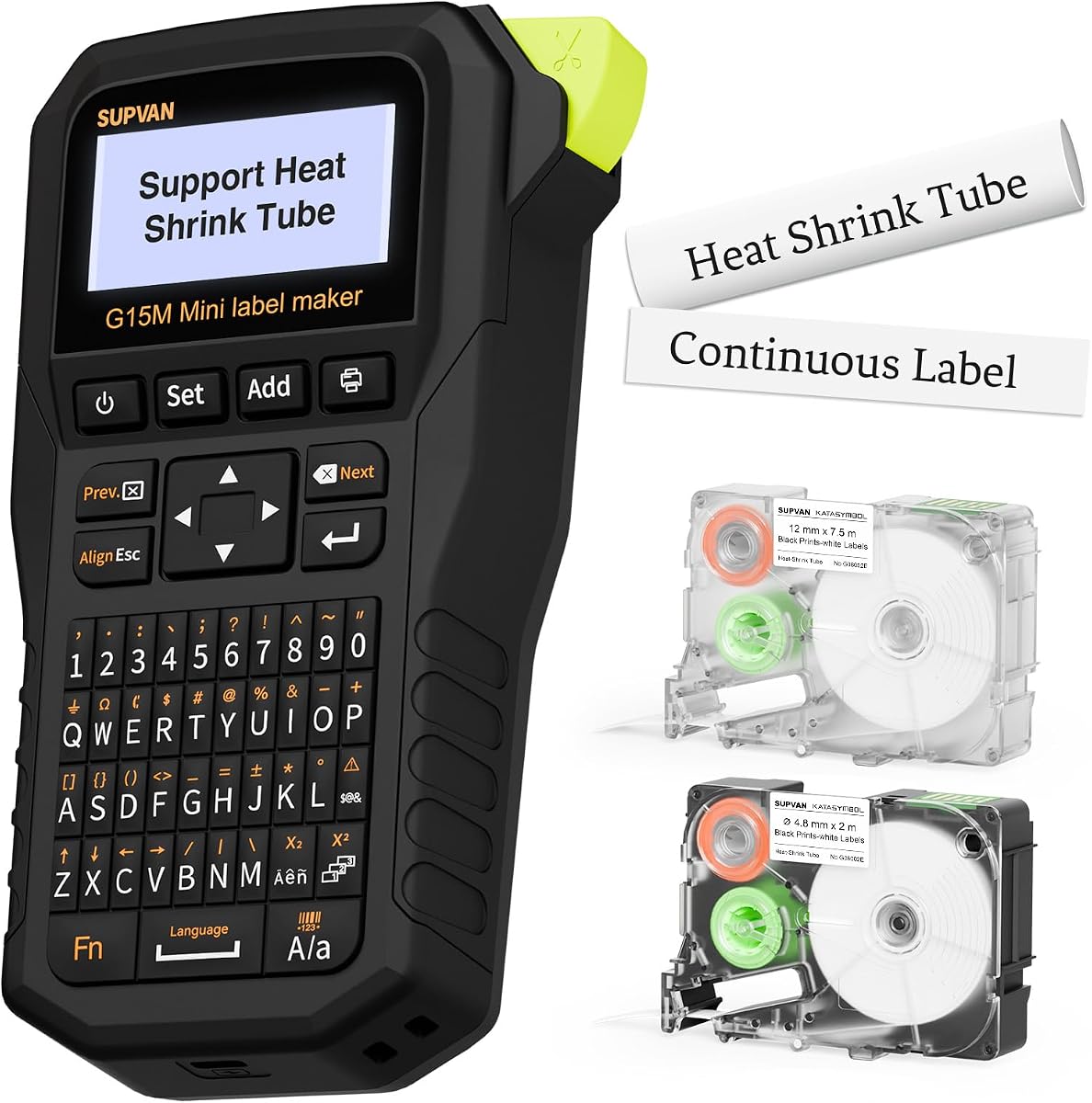
The SUPVAN G15M is a mini portable label maker designed for a broad range of cable and general-purpose tasks. It carries a 4.3 rating and supports heat-shrink tubes, continuous labels, fixed-size labels, and cable labels. That variety makes it a useful option for a technician or homeowner who works with different media rather than committing to a single tape format.
We may earn a commission when you buy through this link, at no additional cost to you.
Its physical design is notably compact at 3.35 by 6.7 by 1.7 inches and weighs 0.88 pounds. A built-in 1200mAh rechargeable battery is specified to provide up to three months of use on a single charge, offering convenient portability for a tool bag, mobile workstation, or home organization project. Users are not dependent on disposable batteries during ordinary intermittent use.
The minimal-margin feature is another useful detail. Labels can be printed with a 0.19-inch margin, which reduces material consumption and helps labels fit more closely to a cable or equipment surface. Thermal-transfer output is specified to provide 10 years of durability against UV, heat, and water for indoor and outdoor use. Customization includes nine font sizes, six font styles, five frames, and more than 400 icons, with multicolor output up to four lines.
The four-line limit is less generous than the five-line DYMO Rhino 5200 or eight-line Makeid P31S, and the G15M does not advertise the same high-resolution technical output. Nevertheless, it offers an unusually balanced combination of compact size, rechargeable power, heat-shrink support, low waste, and colorful customization. It is especially appealing for users who want a versatile personal cable identifier rather than a large industrial documentation platform.
A 0.19-inch margin helps reduce unused label material, while the small body and low weight make the machine easy to carry. These qualities suit mobile technicians and space-conscious home offices.
Nine font sizes, six styles, five frames, and more than 400 icons allow users to create expressive labels beyond basic alphanumeric codes. Multicolor output across up to four lines adds another layer of visual distinction.
We may earn a commission when you buy through this link, at no additional cost to you.
The most useful network-cable label maker is not necessarily the one with the longest feature list. Media support, print clarity, workflow speed, power design, and the kinds of identifiers your team maintains should guide the decision.
Begin by identifying the cable surfaces and environments you need to label. Heat-shrink tubing is useful for direct wire identification, while self-laminating wraps suit network cables, vinyl offers economical general-purpose tags, and flexible nylon is durable for demanding or movable applications. The Makeid P31S supports vinyl, self-laminating wraps, PET, nylon cloth, and heat-shrink tubing, whereas the Epson LW-PX700 supports heat-shrink tube, self-laminating wrap, vinyl, standard industrial tape, and specialty media.
Match the material to the job and do not assume every machine can use every tape family. Narrow media may suit compact desktop devices, while broad compatibility gives professional teams more freedom to standardize. Verify width limits and the exact cassette or roll format before purchasing.
Print resolution affects the clarity of small text, symbols, and barcodes. The Makeid P31S offers 300 DPI and is designed for sharp, smudge-proof text, making it a logical choice for dense technical labels. The VolenGo H1100 uses 203 DPI, which is suitable for standard identifiers but offers less margin for highly detailed information. The Rhino 5200 offers five lines and Code 39 and Code 128 support, while the P31S can create barcodes, QR codes, and bulk data imports.
Choose the level of detail your labels genuinely require. Very high output is unnecessary for a simple house network, but it can be essential for a datacenter, cross-building backbone, or asset system with detailed connection schedules.
Formal network environments may require labels that follow recognized conventions. The Makeid P31S is specified as ANSI and TIA/EIA-606-A compliant for electrical, datacom, and IT use, while the DYMO Rhino 6000 meets key ANSI and TIA/EIA-606-B requirements. These statements are especially relevant when labels are intended to communicate standardized source, destination, or panel information.
Standards support does not mean every workflow is identical, so confirm that your preferred identifier format fits the machine's available characters, symbols, and code options. For informal personal networks, standard compliance may matter less than convenience and media durability.
The interface affects how quickly a technician can move through a labeling session. The Brother P-touch Pro provides a graphical preview and one-touch keys for cable wraps, cable flags, faceplates, and serialized labels. The VolenGo E1000 uses a computer-style QWERTY keyboard, while the H1100 uses a backlit LCD and intuitive menus. The Brady M211 shifts label creation to a phone through its mobile app.
Standalone keyboards can be efficient for repeated typing, while app-based design may be better for teams that already manage information on a phone. A backlit screen is especially useful in dim closets and rack environments, where a small reflective display is inconvenient.
Some label makers are designed for quick standalone operation, while others are strongest when connected to a computer or phone. The DYMO Rhino 6000 creates barcodes and complex layouts in DYMO ID software on a PC. The Brady M211 uses Bluetooth and the Express Labels Mobile App, and the Makeid P31S supports app or PC software, bulk data import, barcodes, and QR codes.
Standalone operation is convenient for isolated repairs and field calls. Connected workflows are more valuable when producing large batches from shared schedules, generating consistent asset records, or requiring advanced layouts that are cumbersome to build manually on a handheld device.
Network labels are often created wherever the cable is located, so portability can determine whether a tool gets used consistently. The SUPVAN G15M weighs 0.88 pounds and uses a rechargeable 1200mAh battery, while the Makeid P31S has a 2600mAh rechargeable battery specified for up to 90 days of standby. The Brother P-touch Pro is lightweight and includes a detachable wrist strap, while the DYMO Rhino 6000 includes a rechargeable lithium-ion battery.
Consider battery life, charging method, wrist straps, magnetic mounts, hard cases, and included power accessories together. A wired machine may be ideal for a bench, but a field technician may value a compact body, belt clip, or magnetic attachment more than maximum feature density.
Large labeling jobs can consume time and tape if every label is designed manually. The Makeid P31S supports bulk data imports and can print up to 100 labels per minute. The DYMO Rhino 6000 and Rhino 5200 use automatic hot keys to size, space, and format text. The VolenGo E1000 can print 20 labels at a time, while its narrower settings are designed to reduce waste.
Batch features are particularly valuable for new office deployments, rack rebuilds, and large patch-panel projects. For occasional work on one or two cables, however, a simpler machine may be more convenient and less likely to create unnecessary setup overhead.
A complete package can reduce the need for immediate additional purchases. The Epson LW-PX700 includes an AC adapter, a cartridge of 212VTBWPX standard industrial tape, and a guide. The Brady M211 Kit includes a hard case, belt clip, magnet, and power brick. The DYMO Rhino 6000 includes a hard carry case, vinyl and flexible nylon tape cassettes, and a rechargeable battery. By contrast, the E1000's six AAA batteries are not included, and the Brother's AC adapter requires separate purchase.
Inventory the consumables, chargers, cases, and media already in your workflow. If you already use a specific tape ecosystem, a compatible machine may offer greater value than a different system with superior headline specifications but inconvenient media requirements.
Start by installing the appropriate tape or heat-shrink tube and confirming that the media is mounted squarely. Power the machine according to its instructions, then use cable wrap, cable flag, fixed-length, or cable-specific modes to set the label length. Enter the identifier, add any source, destination, panel, or port information, and use the preview screen to confirm that the text will fit before printing.
Apply the printed label only after the cable surface is clean and dry. Remove the backing from a self-laminating or adhesive label, align it with the cable, and wrap it evenly without covering the connector or creating strain. For heat-shrink tubing, position the tube over the intended section and shrink it according to its instructions. Consistent placement makes cables easier to scan and prevents labels from migrating toward connectors.
Store the device in a dry area, keep the media compartment clean, and avoid pulling labels sideways out of a cassette. Replace batteries or recharge the unit according to its power guidance, and protect handheld models from drops, moisture, and excessive heat. Before a major labeling project, print one test label to confirm media width, font size, contrast, and wrapping fit.
The best type depends on whether the labels are temporary, standardized, or exposed to demanding conditions. A wrap-style model with self-laminating media is convenient for everyday network cables, while a thermal-transfer industrial model with heat-shrink support offers greater flexibility for wiring systems and harsh environments. Formal IT documentation also benefits from barcodes, data imports, and standards support.
Heat-shrink tubes are useful when a permanent, close-fitting identifier is needed, particularly around individual conductors or in installations where adhesive labels may not suit the surface. They require the correct tube diameter and a compatible machine, and the tube must be positioned before the cable is terminated when that is practical. Self-laminating wraps are often more convenient for patch and jump cables.
Not for every job. A 300 DPI machine is advantageous when labels contain small text, dense symbols, QR codes, or barcodes that must scan reliably. Basic port identifiers and room-to-room cable tags can be produced adequately on lower-resolution machines. The important point is to match print quality to the complexity of your labeling system.
A wrap label encircles the cable, making it visible from nearly any angle and often the better choice for a permanent network identifier. A flag label extends away from the cable, allowing text to remain readable when the cable is viewed from a rack or connection panel. Dedicated shortcut keys on models such as the Brother P-touch Pro can speed up both formats.
They can be, particularly when the phone-based design matches the technician's existing workflow. The Brady M211 supports label creation through its mobile app and includes a magnetic mount for hands-free operation. For teams requiring formal barcodes, bulk imports, complex layouts, or a desktop-centered system, a PC-connected or more fully featured industrial model may be preferable.
Look for explicit ANSI or TIA/EIA-606 support, appropriate symbol libraries, and reliable barcode or QR code creation. The Makeid P31S is specified for ANSI and TIA/EIA-606-A compliance, while the DYMO Rhino 6000 meets key ANSI and TIA/EIA-606-B requirements. Standards support should be combined with a label layout that fits your actual naming and documentation system.
Yes, several models support both dedicated cable formats and general labels. The VolenGo E1000 includes modes for wire wraps, flags, fixed-length labels, general labels, and breaker labels, while the SUPVAN G15M supports cable labels, continuous labels, fixed-size labels, and heat-shrink tubes. A general-purpose machine can be useful for both network closets and home organization.
Use the smallest supported media width that still leaves room for readable text, and choose a machine with adjustable margins or batch controls. The VolenGo E1000 can narrow settings to reduce waste, while the SUPVAN G15M offers a 0.19-inch margin. Previewing before printing and using fixed-length modes also helps avoid labels that are longer than necessary.
The Makeid P31S is the strongest all-around professional recommendation because it combines 300 DPI output, broad media support, eight-line capacity, rechargeable power, standards-oriented features, and barcode and QR code creation. The VolenGo H1100 is the practical budget-oriented choice for standard cable tags, while the DYMO Rhino 5200 stands out for five-line output, barcode support, and the highest supplied customer rating.
Prioritize compatibility with the labels you already use, the detail your identifiers require, and the environment where labeling will happen. A simple backlit handheld may be enough for a home network, but a technical team should examine thermal-transfer durability, standards support, data import, barcode creation, and batch speed. Portability matters just as much when labels must be created inside crowded racks or remote cabinets.
Before ordering, verify the current listing, supported media, consumables, power requirements, and included accessories. Ratings, availability, and product details can change, and the same machine may fit one labeling system better than another. Use that final check to ensure the selected label maker supports both your present cables and the level of documentation you expect to maintain.