
Reatan X8 Ryzen AI 9
4.3Editor score
Ryzen AI 9 processor
48GB upgradeable DDR5
OCuLink GPU expansion
Quad 8K display support
Explore the best Mini PC for Data Analysis, comparing processors, memory, storage, displays, connectivity, expandability, and value for every workflow.
A Mini PC for data analysis needs to balance processing power, usable memory, fast storage, and a practical workspace. The best systems handle spreadsheets, databases, statistical tools, notebooks, dashboards, and multiple applications without taking over the desk. This guide compares ten compact computers across those essential performance and usability criteria.
The comparison considers each processor, memory configuration, storage type, display support, networking, ports, upgrade potential, operating system, and included accessories. It also weighs the needs of students, business analysts, engineers, developers, and researchers. The list includes renewed business systems, affordable compact models, and more advanced mini workstations for demanding datasets.
Each review explains where a particular Mini PC fits best and where it may fall short. You will find distinct options for general analysis, multi-monitor work, AI-assisted workflows, virtual machines, and large local datasets. Product listings and configuration details can change, so confirm the current specifications before purchasing.
4.3Editor score
4.7Editor score

4.4Editor score
The table below compares the core hardware and workspace features that matter most for data analysis, from processor class and memory capacity to storage, displays, networking, and operating-system support.


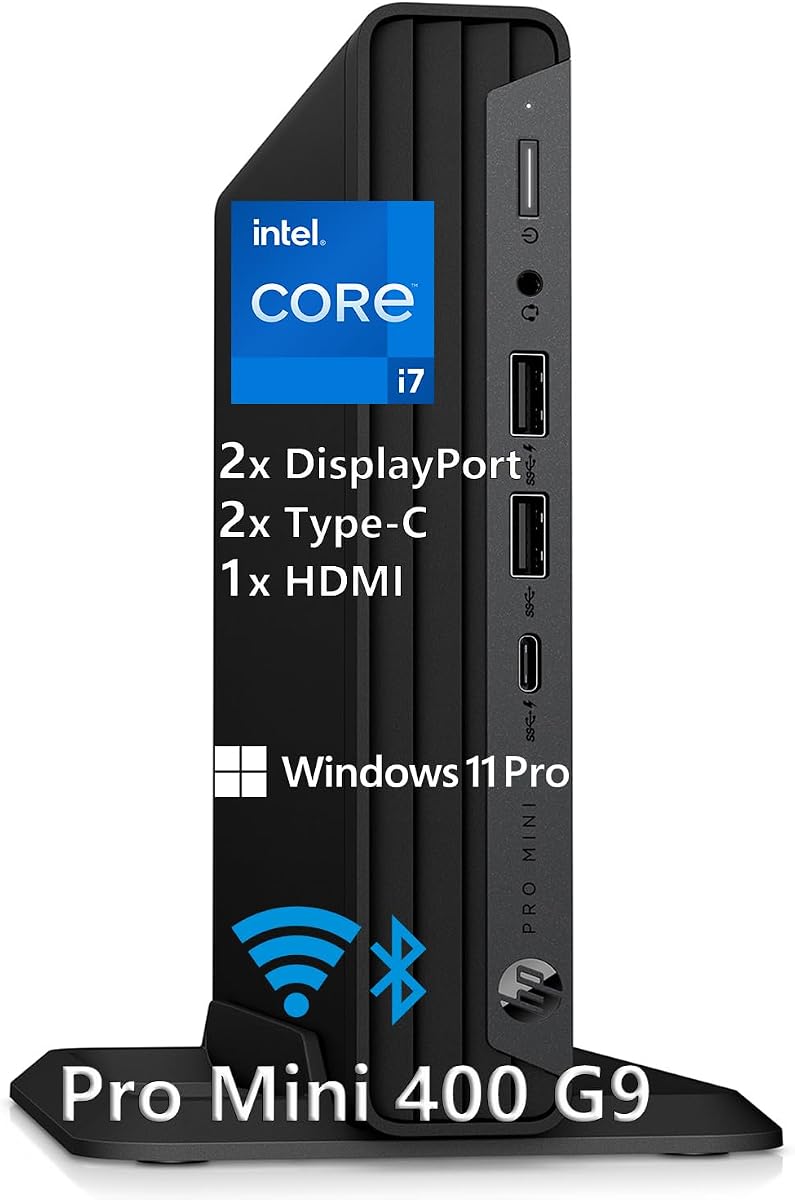
The HP Mini Desktop PC with Intel i7-12700T is a strong all-around choice for data analysis because it combines a 12-core processor, 16GB of DDR4 memory, and a fast 512GB NVMe SSD in a compact enclosure. Its 4.7 rating reflects a favorable balance of performance, expandability, and convenience, while the included Windows 11 Pro, wired keyboard, mouse, and stand make it ready for a productive desk setup.
We may earn a commission when you buy through this link, at no additional cost to you.
The processor's 12 cores and boost speed up to 4.7GHz provide a useful foundation for spreadsheet calculations, SQL work, Python scripts, browser-based analytics, and simultaneous communication applications. NVMe storage improves boot and application-loading times, while 16GB of RAM is enough for many typical analysis workflows. The mini footprint also makes it practical to position beside a monitor or beneath a desk without occupying the space of a conventional tower.
Display support is the standout feature. Dual DisplayPort 1.4 and HDMI 2.1 outputs allow three 4K monitors at 60Hz, which is especially useful when separating raw data, analysis code, dashboards, and reports. Connectivity is also comprehensive, with seven high-speed USB ports, USB-C, Gigabit Ethernet, WiFi 5, and Bluetooth. The main limitation is that 16GB of memory can become restrictive when a dataset, browser, notebook, and visualization tool all compete for resources.
This is the most balanced recommendation for analysts who want capable multi-core performance, a multi-screen workspace, and a straightforward complete package. It is less suitable for users who routinely analyze datasets too large for 16GB or require accelerated GPU computing. Even so, its processor, three-display capability, and included peripherals make it the strongest general-purpose option in this guide.
Using three 4K screens can reduce context switching by keeping source files, SQL results, notebooks, and reporting dashboards visible at the same time. The HP's mix of DisplayPort and HDMI outputs makes it straightforward to assign separate screens to different stages of an analysis workflow.
Seven high-speed USB ports reduce the need for an elaborate hub when connecting external storage, keyboards, scanners, and other peripherals. USB-C, Gigabit Ethernet, WiFi 5, and Bluetooth also cover most common desk and network configurations.
We may earn a commission when you buy through this link, at no additional cost to you.
The HP EliteDesk 800 stands out for business-oriented data analysis because it combines 32GB of DDR4 memory, a 1TB PCIe NVMe SSD, and a six-core, 12-thread Intel Core i5 processor. Its 4.8 rating is the highest among the listed systems, and the generous memory capacity gives analysts room to run databases, reporting tools, office applications, and browser sessions together.
We may earn a commission when you buy through this link, at no additional cost to you.
Compared with many compact PCs in the guide, the EliteDesk 800 places particular emphasis on practical capacity. Thirty-two gigabytes of RAM benefits pandas or R workflows, large Excel models, multiple virtual desktops, and data preparation tasks. The 1TB NVMe drive also provides comfortable space for local datasets, project files, software environments, and container images, while supporting fast application launches and file access.
Its display configuration supports two 4K monitors directly through DisplayPort 1.4, with a rear USB-C port offering DisplayPort Alt Mode as a possible third-display option. Connectivity is excellent for an office: front USB-C, multiple front and rear USB-A ports, USB-C power delivery, Gigabit Ethernet with an Intel I219LM controller, WiFi 6, Bluetooth, and audio connections are all listed.
This Mini PC is a strong choice for corporate analysts who need memory and storage more than a fourth display. The Intel UHD Graphics 630 is not intended for demanding GPU-accelerated modeling, and the system is less compact in height than some alternatives. Nevertheless, its combination of capacity, connectivity, and business stability makes it one of the most compelling choices here.
Analysis software rarely works on a spreadsheet alone. Thirty-two gigabytes allows users to combine large tables, browser dashboards, notebooks, databases, and communication tools without immediately exhausting available memory.
The unusually broad port selection supports external drives, docking stations, wired networks, and multiple peripherals. WiFi 6 and Bluetooth provide convenient wireless alternatives when cabling a compact workstation is impractical.
We may earn a commission when you buy through this link, at no additional cost to you.
The Reatan X8 is the most advanced miniature workstation in this roundup, combining the Ryzen AI 9 HX 470, 48GB of Crucial DDR5 memory, and a 1TB Crucial PCIe 4.0 NVMe SSD. Its 12 cores, 24 threads, boost capability up to 5.2GHz, Radeon 890M graphics, and integrated neural processing unit target advanced computing rather than basic office use.
We may earn a commission when you buy through this link, at no additional cost to you.
For data analysis, the standout feature is OCuLink. Its PCIe 4.0 x4 interface provides substantially more bandwidth for an external graphics card than conventional USB or Thunderbolt connections. That makes the X8 relevant to users exploring accelerated machine learning, GPU rendering, large parallel workloads, or specialized visualization. The 48GB memory configuration also gives data-intensive applications more room than most systems in the guide.
The system is designed to grow. Two DDR5 SODIMM slots support up to 96GB of memory, and dual M.2 SSD positions can accommodate as much as 8TB. Display connections include HDMI 2.1, DisplayPort 2.0, and dual USB4 ports, with support for up to four displays and resolutions up to 8K at 60Hz. WiFi 7, Bluetooth 5.4, and 2.5Gbps Ethernet reinforce its workstation positioning.
This is the best choice for technically experienced users who need local AI tools, memory headroom, and a path to dedicated GPU acceleration. It is not the simplest choice for ordinary spreadsheet analysis, and external graphics installation requires compatible hardware, power, and cooling. Within this category, however, it delivers the most ambitious expansion path.
OCuLink enables a desktop graphics card to supplement the integrated Radeon 890M. For users working with accelerated machine learning, rendering, or visualization, this can provide a major performance advantage over systems limited to integrated graphics.
Removable DDR5 memory and dual M.2 slots prevent the initial 48GB-and-1TB configuration from becoming a permanent ceiling. The listed maximums support heavier local datasets, virtual machines, development environments, and large project libraries.
We may earn a commission when you buy through this link, at no additional cost to you.
The Glorlin Mini PC with Ryzen 7 8845HS is built for users who want to see more information at once. Its eight cores, 16 threads, boost speeds up to 5.1GHz, and 16GB of DDR5 memory create a capable platform for daily analysis, while support for up to four 4K displays is among the best in this guide.
We may earn a commission when you buy through this link, at no additional cost to you.
The integrated AI NPU is listed at up to 38 TOPS, giving the system hardware support for compatible AI-assisted applications. That feature should not be confused with a dedicated GPU, but it can complement modern productivity and automation tools. The Radeon 780M graphics are also suitable for smooth 4K playback, media work, and light gaming, although compute-heavy analysis remains outside the core focus.
Expandability is unusually flexible for a small system. Memory can be expanded up to 256GB, and dual M.2 slots support up to 4TB. Connectivity includes USB4, USB 3.2, HDMI, DisplayPort, dual 2.5G LAN, WiFi 6, and Bluetooth 5.3. The dual wired network interfaces may be useful for specialized segmentation, lab networks, or redundant network connections.
The Glorlin is a compelling choice for analysts who want four displays, a modern Ryzen platform, and extensive room for later expansion. Its included 16GB and 500GB are modest for serious large-scale work, so buyers should consider the eventual upgrade path. Otherwise, the multi-screen support and networking make it one of the most versatile compact workstations here.
A four-monitor arrangement can separate preparation, exploration, visualization, and reporting without hiding applications behind virtual desktops. HDMI, DisplayPort, and dual USB-C connections provide several ways to build that workspace.
The system's large listed memory ceiling and dual M.2 storage positions make it possible to start with a modest configuration and add capacity as datasets and software environments grow. That is useful for analysts who do not want to replace the entire mini PC later.
We may earn a commission when you buy through this link, at no additional cost to you.
The ACEMAGICIAN S3A combines a Ryzen 7 H 255 with 16GB of LPDDR5 memory, Radeon 780M graphics, and a 512GB PCIe 4.0 NVMe SSD. Its adjustable power modes make it especially interesting for analysts who alternate between quiet spreadsheet work, communication-heavy multitasking, and more demanding processing tasks.
We may earn a commission when you buy through this link, at no additional cost to you.
The processor provides eight cores, 16 threads, and boost speeds up to 4.9GHz. That is suitable for Python scripting, business intelligence tools, SQL clients, statistical packages, and several productivity applications running together. Radeon 780M graphics add useful capability for visual work, and the system supports three 4K displays through HDMI 2.0, DisplayPort 2.0, and USB4 Type-C.
Its three performance modes deserve attention. Silent Mode operates at 20–35W and is intended to minimize fan noise, Auto Mode balances performance and efficiency, and Performance Mode uses 40–54W for demanding applications. A dual-fan cooling system and tool-free removable storage design support the system's compact construction. Connectivity includes full-function USB-C, LAN, and USB 3.2 ports.
This S3A is a good all-round choice for a home or hybrid office where power consumption and noise may matter as much as raw performance. The main limitation is that 16GB of LPDDR5 is not user-upgradable, making the initial memory ceiling more consequential. It is also less appropriate than the Reatan X8 for users who require a dedicated external GPU path or extensive memory expansion.
Silent Mode suits meetings and routine spreadsheet tasks, while Performance Mode is better for heavy compilation, model processing, and sustained calculations. Auto Mode provides a convenient middle ground for users who do not want to manage operating settings manually.
Radeon 780M graphics and support for three 4K displays create a capable foundation for dashboards, visualization, and mixed productivity tasks. Full-function USB-C also improves docking flexibility when a multi-monitor arrangement is used.
We may earn a commission when you buy through this link, at no additional cost to you.
The Lenovo ThinkCentre M75Q G2 is a compact business micro PC built around the AMD Ryzen 5 PRO 5650GE, 16GB of DDR4 memory, and a 256GB NVMe SSD. It has a perfect 5.0 rating in the supplied data and is renewed by a Microsoft Authorized Refurbisher, with free U.S.-based technical support included.
We may earn a commission when you buy through this link, at no additional cost to you.
The Ryzen 5 PRO 5650GE provides robust performance for multitasking, business applications, database work, reporting, and typical data analysis. Sixteen gigabytes of memory is sufficient for many office-based workflows, although intensive machine-learning models and very large in-memory tables will benefit from more capacity. Windows 11 Pro provides a business-oriented environment with familiar management and security features.
NVMe storage gives the compact system quick boot and application response times, but 256GB is its most obvious limitation. Analysts who retain large local datasets may need external storage or a capacity upgrade. The renewed status should also be considered carefully, although the refurbisher and listed technical support provide added assurance compared with an unknown used system.
This ThinkCentre is a good choice for an office analyst who values a recognized business platform, Windows 11 Pro, and a compact footprint. It is not the strongest choice for locally stored research data or memory-heavy computation, but it offers an efficient way to perform everyday analysis on a professional desktop platform.
The Ryzen 5 PRO 5650GE is appropriate for office productivity, reporting, databases, and analysis software in a managed business environment. Its six-core design provides useful multitasking capacity without requiring a full-size tower.
Renewal by a Microsoft Authorized Refurbisher and included U.S.-based support are meaningful advantages for buyers who want a business mini PC without choosing an entirely new system. Review the specific condition and included accessories before ordering.
We may earn a commission when you buy through this link, at no additional cost to you.
The Dell OptiPlex 3080 Micro is a compact renewed business computer with a 10th-generation Intel Core i5-10500T, 16GB of RAM, a 512GB SSD, and Windows 11 Pro. Its 3.7 rating is the lowest in the list, so it requires a more measured assessment than the highly rated systems, but the underlying configuration remains relevant for everyday analysis.
We may earn a commission when you buy through this link, at no additional cost to you.
The six-core processor handles office applications, web-based reporting, spreadsheets, database clients, and several communication or development tools at once. The 512GB SSD offers twice the capacity of the renewed Lenovo M75Q G2 configuration and enough room for a substantial working directory, although it remains modest for large raw-data collections. WiFi and Bluetooth allow the system to be placed without a wired network connection.
The OptiPlex 3080 platform is recognizable for its restrained office design and emphasis on a small physical footprint. Windows 11 Pro gives users the operating system and business features they may need without a separate installation. As a renewed product renewed by a Microsoft Authorized Refurbisher, it also comes with the listed free U.S.-based technical support.
Choose this system if you want a straightforward Dell micro PC for routine business analysis and need more storage than the smallest renewed alternatives. Its older processor and lower rating make it less attractive for intensive computation, large virtual machines, or demanding AI workflows. For those uses, one of the newer Ryzen systems offers a stronger performance foundation.
The combination of 16GB of memory and a 512GB SSD is well suited to daily reports, structured datasets, business dashboards, and general statistical work. It provides more local storage than many similarly compact office systems without taking up tower-sized desk space.
Dell's OptiPlex 3080 is designed for conventional office deployment, making it a practical choice for users who recognize the brand or already use related accessories and management practices. Its renewed status should be checked for condition and included components.
We may earn a commission when you buy through this link, at no additional cost to you.
The BOSGAME P6 combines a Ryzen 9 6900HX, 24GB of LPDDR5X memory, and a 1TB PCIe 4.0 NVMe SSD in a highly portable mini PC. Its eight cores and 16 threads reach up to 4.9GHz, giving it enough capability for multitasking, development, content workflows, and substantial everyday data analysis.
We may earn a commission when you buy through this link, at no additional cost to you.
Twenty-four gigabytes of memory is a useful middle ground between a standard 16GB configuration and a workstation with 32GB or 48GB. It gives analysts room for larger spreadsheets, multiple browser sessions, notebooks, and reporting applications. The one-terabyte PCIe 4.0 drive provides generous room for projects and helps keep the system responsive when accessing large files.
The P6 supports three 4K displays at 60Hz through HDMI, DisplayPort, and USB-C. It also includes dual one-gigabit Ethernet interfaces, which can support advanced network arrangements such as a soft router, home server, hardware firewall, or lab network. WiFi 6E and Bluetooth 5.3 provide modern wireless connectivity, and the full-function USB-C port supports data, power delivery, and display output.
This system is best for users who need more memory and storage than a conventional office mini PC but still value portability. Its integrated Radeon 680M graphics can support light gaming and visual applications, although it is not a substitute for the OCuLink graphics expansion offered by the Reatan X8. The onboard LPDDR5X memory also cannot be upgraded, so users should be comfortable with 24GB as the final memory capacity.
The uncommon 24GB configuration provides useful headroom for data preparation and mixed application loading, while the 1TB PCIe 4.0 drive accommodates active datasets, project folders, and development environments without immediate pressure on capacity.
Two wired Ethernet interfaces distinguish the P6 from simpler office mini PCs. That makes it useful for network experiments, segmentation, server projects, and other configurations requiring more than one physical network connection.
We may earn a commission when you buy through this link, at no additional cost to you.
The Lenovo ThinkCentre neo 50q Gen 5 is the best budget-oriented selection in this guide because it combines a modern eight-core Intel Core 5 210H processor, a 512GB PCIe 4.0 SSD, and Windows 11 Pro in a compact one-liter chassis. Its 4.4 rating is solid, and the system's focus on business features makes it useful for students and everyday analysts.
We may earn a commission when you buy through this link, at no additional cost to you.
The processor uses four performance and four efficiency cores, providing 12 threads and performance speeds up to 4.8GHz. That architecture is well suited to mixed workloads, including spreadsheets, browser-based dashboards, SQL clients, document processing, and communication applications. The primary limitation is the included 8GB of DDR5 memory, which is light for modern data analysis and can be restrictive even for several demanding applications at once.
The system is nevertheless well equipped in other areas. It supports dual 4K displays through HDMI 2.1 and DisplayPort 1.4b, includes WiFi 6E, Bluetooth 5.3, and Gigabit Ethernet, and offers several front and rear USB ports. A discrete TPM 2.0, Windows 11 Pro, and a Kensington Security Slot are particularly relevant for business and institutional environments.
The neo 50q is best for users who prioritize a modern processor, fast storage, compactness, and a complete Windows business environment over maximum memory. If the 8GB configuration can be expanded, it becomes considerably more useful for analysis. Buyers should verify memory availability and upgrade options for the exact listing before completing the purchase.
Windows 11 Pro, a discrete TPM 2.0, and a physical security slot provide features that are often missing from entry-level compact computers. These make the system relevant for offices, shared workspaces, and institutional deployments.
Eight cores and 12 threads provide more parallel capability than a basic four-core mini PC. That helps when a user runs a browser, spreadsheet, reporting tool, and messaging application simultaneously, although 8GB of memory is the component most likely to need attention.
We may earn a commission when you buy through this link, at no additional cost to you.
The BOSGAME E5 11 Pro offers a practical combination of 16GB DDR4 memory and 1TB of NVMe storage, specifications that remain well suited to everyday data analysis. Its Ryzen 5300U processor provides four cores and eight threads up to 3.8GHz, while the 4.3 rating indicates a generally favorable user reception.
We may earn a commission when you buy through this link, at no additional cost to you.
The main strength is storage capacity. A 1TB M.2 2280 PCIe SSD gives users room to keep local datasets, project files, reports, and software environments without relying immediately on external storage. The listed system can also scale to 4TB. Sixteen gigabytes of memory is enough for many spreadsheet, reporting, and browser-based workflows, although it is not ideal for very large in-memory models.
The E5 supports three 4K displays at 60Hz through one HDMI 2.0 output, one DisplayPort output, and a Type-C display connection. Its port selection includes three USB 3.2 Type-A ports, one USB 2.0 Type-A port, a 3.5mm combo jack, and two 1000Mbps RJ45 LAN interfaces. The dual wired networking is a useful feature for specialized configurations.
Choose this mini PC when storage capacity, display flexibility, and compactness matter more than maximum processor throughput. The four-core Ryzen 5300U is the least advanced CPU in the roundup and will be less responsive in heavily parallel workloads. For typical analysis, however, the combination of memory, storage, networking, and triple-display support makes it a capable value-focused option.
A one-terabyte NVMe drive is especially useful for users who repeatedly work with local files, exported reports, database extracts, and analysis projects. Fast PCIe storage also reduces delays when opening large documents and loading applications.
Three display outputs allow source data, visualizations, and reports to remain visible at once. Two Gigabit Ethernet ports also provide greater network flexibility than a typical single-port compact system, making the E5 useful for selected office and lab setups.
We may earn a commission when you buy through this link, at no additional cost to you.
The right Mini PC for data analysis depends on the size of your datasets, the software you use, the number of simultaneous applications, and whether you need local AI, virtual machines, or multiple displays. Use the following factors to narrow the field before comparing the final configurations.
A modern processor with at least six cores is preferable for data analysis because spreadsheet recalculation, Python, R, SQL transformations, and reporting tools all benefit from additional parallel capacity. Cores help when several independent tasks run together, while strong single-thread speed improves responsiveness in office applications, browser interfaces, and code execution. The Ryzen 7 8845HS, Ryzen 7 H 255, and Ryzen 9 6900HX offer eight cores, while the Ryzen AI 9 HX 470 in the Reatan X8 provides 12 cores and 24 threads for heavier parallel workloads.
Memory determines how many large datasets and applications can remain active without slowing down. Sixteen gigabytes is a reasonable starting point for spreadsheets and moderate analysis, 24GB provides useful headroom, and 32GB or 48GB suits larger tables, multiple virtual machines, and more advanced local development. Upgradability matters as much as the initial figure: the HP EliteDesk 800 already includes 32GB, the Reatan X8 supports up to 96GB, and the Glorlin lists a high memory ceiling, while LPDDR5 systems such as the ACEMAGICIAN S3A and BOSGAME P6 have fixed onboard memory.
NVMe storage is important for fast startup, application loading, database access, and large project files. A 512GB drive can work well when datasets remain remote or temporary, but local analysis often benefits from 1TB or more. The BOSGAME E5, BOSGAME P6, and Reatan X8 include 1TB, while several dual-M.2 systems allow additional storage. Editing data on an external drive may be convenient, but frequent reads and writes are better served by internal NVMe capacity.
Integrated graphics are usually sufficient for spreadsheets, dashboards, statistical graphics, and standard office software. Analysts should focus on the number of display outputs and supported resolution, particularly when comparing source tables, notebooks, charts, and reports. Several systems support three 4K displays, the Glorlin supports four, and the Reatan can drive up to four displays with high-resolution output. GPU-accelerated workloads require more: the Reatan's OCuLink interface is the clearest path to adding a desktop graphics card.
A reliable Ethernet connection is valuable when working with cloud-hosted databases, shared files, and remote development environments. Gigabit Ethernet is standard across the guide, while the Reatan offers 2.5Gbps networking and the Glorlin includes dual 2.5G LAN. USB port selection is equally important: count the devices you need to connect, including external storage, a full-size keyboard, a mouse, a webcam, and a security key. USB4 and full-function USB-C improve docking and display flexibility.
Windows 11 Pro is included with the HP Mini Desktop, HP EliteDesk, Lenovo ThinkCentre M75Q G2, renewed Dell OptiPlex 3080, and Lenovo ThinkCentre neo 50q. It is a familiar environment for Office applications, Power BI, SQL Server tooling, Python, R, Tableau, and many enterprise systems. The BOSGAME P6 is described as compatible with Ubuntu, which may be useful for developers and Linux-oriented workflows. Confirm the exact operating-system version, licensing, and included software before buying.
A compact system must move heat away from the processor and memory while remaining quiet. The ACEMAGICIAN S3A addresses this directly with selectable Silent, Auto, and Performance modes, while the BOSGAME P6 emphasizes low-noise operation and active memory cooling. The Reatan X8 uses an all-metal chassis, copper heat pipes, dedicated cooling fans, and adjustable fan modes for more demanding configurations. Continuous calculations and compressed data workloads generate more heat than routine office use, so thermal design deserves as much attention as the processor label.
A system used for years of daily analysis should have dependable support and clear warranty terms. The renewed Lenovo and Dell systems include technical support from their stated refurbisher, while the HP and Glorlin configurations include accessories and support provisions described in their listings. The Reatan, ACEMAGICIAN, and BOSGAME products list different combinations of hardware warranty, parts coverage, and technical assistance. Review these details carefully because they can materially affect the long-term ownership experience.
Begin by planning the workspace around the way you analyze information. Connect the desired monitors, network, keyboard, mouse, and storage before moving the mini PC into its final position. Use the VESA-compatible placement options where available, but maintain access to front ports and ventilation openings. If several screens are involved, assign each one a consistent role such as source data, exploratory analysis, visualization, and reporting.
Organize large projects across appropriately named folders and keep active datasets on the internal NVMe drive when possible. Back up important files to separate storage or a trusted cloud service, and avoid treating the mini PC as the only copy of critical research. For Python or R work, use isolated environments and document package versions so an analysis can be reproduced later. Periodically remove unneeded files, but keep sufficient free storage for temporary exports and system updates.
Allow the system to cool naturally and use its performance or quiet modes according to the task. Do not block vents with papers or place the chassis inside a tightly enclosed cabinet without airflow. Update the operating system, chipset, graphics, and network drivers from appropriate vendor sources, especially when configuring display or wireless functions. Clean the exterior with a soft dry cloth, avoid liquids near the vents, and back up important settings before major hardware changes.
At least 16GB is a sensible starting point for spreadsheets, SQL clients, browser-based reporting, and moderate Python or R work. An analyst who regularly handles large tables, multiple virtual environments, or several memory-heavy applications should consider 32GB or more. Fixed-memory models require extra attention because the initial capacity cannot be upgraded later.
A Mini PC can handle large datasets, but capacity depends on the processor, memory, storage, and software workflow. Data that must fit entirely in memory benefits from 32GB or 48GB, while storage-intensive processing needs fast NVMe capacity. For models requiring GPU acceleration, a system with a high-bandwidth external graphics interface is more appropriate than one limited to integrated graphics.
Not for ordinary spreadsheets, SQL, descriptive statistics, dashboards, and many Python or R workflows. Integrated Radeon or Intel graphics are adequate for most business analysis and visualization tasks. Dedicated graphics become valuable for deep learning, GPU-based simulation, intensive rendering, or specialized machine-learning libraries, with the Reatan X8 standing out because its OCuLink interface supports an external desktop GPU.
A four-core processor can work well for lightweight analysis and one or two demanding applications, especially when paired with 16GB of memory. It will feel less responsive during heavy parallel processing, development, virtualization, or several simultaneous workloads. The Ryzen 5300U in the BOSGAME E5 is the entry point in this guide, while the eight- and twelve-core options offer more parallel capacity.
A renewed Mini PC can be suitable when it has been professionally refurbished, includes an appropriate warranty or support, and meets the user's performance needs. The renewed Lenovo ThinkCentre and Dell OptiPlex options provide modern business platforms with Windows 11 Pro. Buyers should still review the condition, included accessories, support terms, and storage health expectations.
It depends on the specific outputs and the operating system's display support. Several systems in this guide support three 4K displays, while the Glorlin lists four 4K displays and the Reatan supports up to four displays through HDMI, DisplayPort, and USB4. Check whether a third or fourth connection uses DisplayPort Alt Mode over USB-C and confirm the supported resolution and refresh rate for every screen.
WiFi can be perfectly adequate for cloud dashboards, shared documents, and many online analytical services, but wired Ethernet generally offers more consistent throughput and latency. Large imports, database queries, remote model training, and continuous synchronization can benefit from Gigabit or faster Ethernet. Consider both the speed of your network service and the stability of the connection.
Windows 11 Pro is the safer choice for Microsoft-heavy environments, including Excel, Power BI, SQL Server tools, and corporate management requirements. Ubuntu may fit developers and researchers who prefer a Linux-oriented workflow or need particular open-source packages and command-line tools. The operating system should match the applications, drivers, and support environment you already use.
The HP Mini Desktop with the Intel i7-12700T is the strongest overall recommendation because it combines a capable 12-core processor, 16GB of memory, fast NVMe storage, three 4K displays, extensive connectivity, and a complete Windows 11 Pro package. It is especially well suited to analysts who want a capable multi-screen workstation without occupying much desk space.
The Reatan X8 is the premium choice for technically advanced users who need 48GB of memory, local AI capabilities, extensive display support, and the option to attach a powerful external GPU through OCuLink. The Lenovo ThinkCentre neo 50q is the best budget-oriented option, offering a modern eight-core processor, fast storage, Windows 11 Pro, and useful business security features, although its 8GB memory should be considered carefully.
Whichever mini PC you choose, prioritize the components that match your workload: memory for active datasets and concurrency, NVMe capacity for local files, processor cores for parallel work, and display or GPU options for complex visualization. Product listings, configurations, included software, and availability can change, so confirm the current specifications and accessories on the retailer's page before ordering.
