
AHGEIIY Switch 2 Travel Dock
4.3Editor score
Broad device compatibility
Four-pole USB-C hub
Portable 39g design
Our Nintendo Switch Replacement Dock guide compares ten options for compatibility, video output, charging, portability, included accessories, and overall value
A Nintendo Switch replacement dock can restore TV gaming, add charging and USB connectivity, or provide a lighter alternative to the original dock. The right model depends on console generation, display output, power requirements, case fit, and whether you want a complete travel kit or a dock only.
We compared all ten listed products using their stated compatibility, ports, resolution claims, charging approach, dimensions, included components, and customer ratings. The guide covers dedicated Switch and OLED docks, Switch 2 models, compact travel adapters, the official dock set, and one repair component that is not a complete docking station.
Each review explains what stands out, what the shopper must verify, and where the product may be inconvenient. Ratings and availability can change, and prices fluctuate over time, so check the current listing and all compatibility notes before making a final purchase.
4.3Editor score

4.1Editor score

4.2Editor score
This side-by-side comparison highlights console compatibility, video modes, charging needs, port selection, portability, and what arrives in the box, helping distinguish a full replacement from a travel adapter or repair part.


This three-in-one TV Dock Station has a 4.0 rating and is built for shoppers who want a functional replacement package without assembling a list of separate accessories. Its standout advantage is the included 39W charger and high-speed HDMI cable, while the dock itself provides 1080p TV output and keeps the console powered during play.
We may earn a commission when you buy through this link, at no additional cost to you.
The connectivity is more useful than that of many basic replacements. One USB 3.0 port and two USB 2.0 ports can support accessories or storage, and the built-in cable channels help keep a temporary TV station neat. The stated 39W power delivery, thermal monitoring, and protection against over-current, over-voltage, and overheating make charging behavior a central selling point.
There are clear limitations. The dock has no Ethernet or LAN port, and its description specifically excludes Switch 2 compatibility. It also claims 1080p rather than 4K output. Buyers with a protective case may need to check fit, and anyone expecting a full home media hub should not mistake the three USB ports for a broader networking solution.
This is a strong choice for an original Switch or Switch OLED owner who wants the core TV-docking experience in one box. Choose it when a bundled charger, matching cable, USB access, and play-while-charging convenience matter more than Ethernet or next-generation console support.
The included 39W power adapter and HDMI cable reduce the chance of discovering that a replacement dock needs additional essentials. The integrated design also makes the station easier to move between the original Switch and OLED versions.
The combination of USB 3.0 and two USB 2.0 ports gives the dock more flexibility than a simple video adapter. The upper data port is better suited to higher-speed accessories, while the additional ports cover basic controller or storage needs.
We may earn a commission when you buy through this link, at no additional cost to you.
The SIWIQU TV Dock Station is a compact original Switch and OLED docking solution with a 4.1 rating. Its defining strength is straightforward operation: the rear TV and Tabletop Mode button lets the user move between screen arrangements without navigating a complicated setup, and the dock can charge the console while it is in use.
We may earn a commission when you buy through this link, at no additional cost to you.
Its 109-gram weight and stated dimensions make it markedly easier to pack than a full-size official dock. A spring-buffer guide notch is designed to reduce stress on the console port, while the anti-skid pad helps prevent the dock from sliding. Built-in protection covers short circuits, excessive power, recovery situations, and overheating.
The most important caveat is compatibility with accessories rather than the console itself. The listing says the dock does not work with protective cases, which may frustrate owners whose cases cannot be removed easily. A charger and HDMI cable are not included, so the purchase is less convenient for a new setup.
This dock is most appropriate for a Switch or OLED owner who already has suitable cables and a charger and values portability. It is a particularly compelling second-TV or travel dock, provided the shopper can accommodate the no-case requirement and wants a lightweight, simple alternative to the original station.
A dedicated rear control changes between TV output and tabletop presentation. This makes the dock approachable for visitors, children, and anyone who wants a dock that does not require repeated menu changes.
At 109 grams and just over seven inches long, the SIWIQU is designed to fit into travel storage more easily. It also retains the physical stability and charging convenience expected from a desktop dock.
We may earn a commission when you buy through this link, at no additional cost to you.
The pdobq travel dock has a 4.2 rating and is unusual for combining support for the original Switch, Switch OLED, Switch 2, and Steam Deck in one compact USB-C adapter. That broad device support makes it useful for a household with different Nintendo hardware or for a traveler who also uses a USB-C device with DisplayPort Alternate Mode.
We may earn a commission when you buy through this link, at no additional cost to you.
It offers HDMI 2.0, USB 3.0, and USB-C power input. Nintendo Switch output is listed at 1080p and 60Hz, which is the practical ceiling for that hardware. The product description also explains that 4K at 60Hz for a Steam Deck requires both a suitable television and an HDMI 2.0 cable, preventing an overly broad assumption about the adapter's capabilities.
The setup is less convenient than a self-contained desktop kit. The buyer must provide an appropriate wall charger and HDMI cable, and the listed instructions call for a specific connection sequence. Switch Lite is not supported, so the model name should not be interpreted as compatibility with every member of the Switch family.
This is a strong pick for a traveler who wants one small adapter to cover multiple supported devices. It is less suitable for someone seeking a plug-in-and-play stationary dock or a package that includes every cable and charger needed for immediate use.
Support for Switch, Switch OLED, Switch 2, and Steam Deck broadens the product's appeal. The important limitation remains that each connected device must meet the adapter's physical and power requirements.
The travel-dock design depends on compatible USB-C video output. That makes it valuable for modern laptops, tablets, and handhelds, but it should not be purchased as a universal adapter for every USB-C product.
We may earn a commission when you buy through this link, at no additional cost to you.
This three-in-one replacement dock set is a straightforward option for an original Nintendo Switch owner. It has a 4.0 rating and includes the dock, a charger, and a high-speed HDMI cable, reducing the need to search for the extra components required by a dock-only product.
We may earn a commission when you buy through this link, at no additional cost to you.
The listing describes the station as functionally similar to the dock bundled with the original Switch system. Its upgraded IC module is the principal technical feature highlighted, and the product is intended for households that want to keep more than one dock available for different televisions.
The supplied information is less detailed than that of many competing docks. It does not outline the exact USB port configuration, charging wattage, or supported video mode in the product data. It also explicitly excludes Switch 2, so buyers should verify the console model rather than relying on the general phrase Nintendo Switch.
This set is best for an original Switch owner who wants a complete, familiar replacement package and may move between rooms or televisions. It is less compelling for OLED or Switch 2 users, or for anyone who needs a detailed port specification before purchasing.
Bundling the dock, charger, and HDMI cable creates a cleaner starting point for a new or replacement setup. It also makes the product easier to gift because the main required accessories are already present.
A second full-size-style dock can be useful when the console is regularly moved between a living room television and a bedroom setup. The bundle reduces the inconvenience of relocating every cable and charger each time.
We may earn a commission when you buy through this link, at no additional cost to you.
The Nintendo of America Nintendo Switch Dock Set is the premium official option in this guide, carrying a 4.2 rating. It is designed specifically for the Nintendo Switch system and includes the dock, AC adapter, and HDMI cable, giving buyers a complete official package without the need to assemble third-party components.
We may earn a commission when you buy through this link, at no additional cost to you.
The principal benefit is confidence in platform integration. An official accessory is the most direct choice for an original Switch owner who values familiar placement, established compatibility, and a complete box. It can also be a sensible option for restoring a console setup after a dock or accessory failure.
Compatibility is limited to the original Nintendo Switch, according to the supplied data. It is not presented as a Switch OLED, Switch 2, or Switch Lite solution. It also lacks the USB hub found in several third-party alternatives, so buyers seeking multiple accessory connections or a broader device ecosystem may prefer another model.
This dock is the premium recommendation for an original Switch owner who wants the official design and a complete set of core accessories. For any other console generation or for a buyer seeking extra ports, a more specialized third-party dock is the better choice.
The primary appeal is the confidence that comes from an official Nintendo accessory intended for the original Switch. It avoids uncertainty about unofficial device protocols and preserves a familiar setup.
The inclusion of both the AC adapter and HDMI cable makes the package convenient for a first installation, a move, or a replacement after damage. No separate accessory hunt is necessary for basic television use.
We may earn a commission when you buy through this link, at no additional cost to you.
This Switch 2 TV Dock Station is a dedicated replacement for owners of the newer console, with a 4.2 rating. Its defining advantage is unambiguous Switch 2 compatibility, while the claimed output options include a stable 4K at 60Hz or 1080p at 60Hz depending on the game and display mode.
We may earn a commission when you buy through this link, at no additional cost to you.
The dock includes a USB-C power input, HDMI 2.0, and USB 3.0. It supports charging while playing and connections for external controllers. The listing also highlights over-voltage, over-current, and short-circuit protection, adding useful reassurance for a component that remains connected to both the console and television.
Compatibility is the critical limitation: the product is designed for Switch 2 only. The supplied data does not establish support for the original Switch or Switch OLED, so it should not be selected as a universal family dock. The product also does not state that a charger or HDMI cable is included, which may add setup requirements.
Choose this model when the console is specifically Switch 2 and the priority is a dedicated desktop connection with modern video output and charging. It is not the appropriate purchase for someone who still uses an original Switch or OLED and wants a single dock for both generations.
The USB-C power arrangement and Switch 2-specific positioning make this a purpose-built solution rather than a generic adapter. That specialization can be advantageous for a household committed to the newer console.
The advertised 4K at 60Hz capability is a major step above the 1080p ceiling of original Switch hardware. Actual resolution still depends on game, console mode, display, and cable requirements.
We may earn a commission when you buy through this link, at no additional cost to you.
The RuntoGOL TV Docking Station combines original Switch and OLED compatibility with an unusually generous port layout. It has a 4.2 rating and provides one HDMI output, one USB-C power input, one USB 3.0 port, and two USB 2.0 ports. It also includes both an HDMI cable and a USB-C cable.
We may earn a commission when you buy through this link, at no additional cost to you.
Its portability is another distinguishing feature. The listed dimensions are 6.8 by 2.5 by 1.5 inches, smaller than the original-style dock, and the angled design is intended to provide a comfortable handheld viewing angle while reducing the chance of the screen contacting the base.
The resolution language needs careful interpretation. Although the product title mentions 4K HD output, the description clarifies that Nintendo Switch remains limited to 1080p, with 720p and 1080p compatibility listed. The console must also be connected to an appropriate power source for play-while-charging, and the original power adapter is not listed as included.
RuntoGOL is a good fit for a Switch or OLED owner who wants more USB connectivity than a simple dock and appreciates a compact footprint. The included cables help, but buyers should still confirm they have a compatible charger and should not expect original Switch games to render in 4K.
Three USB data ports make this dock useful for external devices and accessories that many compact travel adapters cannot accommodate. The higher-speed USB 3.0 port also supports faster data tasks when the attached equipment is compatible.
The smaller body and viewing angle make it more suitable for temporary tabletop use. Cooling holes are included to improve heat dissipation, a helpful feature for longer sessions.
We may earn a commission when you buy through this link, at no additional cost to you.
The AHGEIIY travel dock is the budget standout in this roundup, combining a 4.3 rating with an exceptionally light 39-gram design. It functions as a Switch 2 dock, a broader USB-C hub, and a DisplayPort Alternate Mode adapter, making it appealing to owners who want one small accessory for several devices.
We may earn a commission when you buy through this link, at no additional cost to you.
Its three main interfaces support HDMI output up to a claimed 4K at 60Hz, USB 3.0, and USB-C power delivery rated as high as 100W. The original Switch and OLED are listed as compatible, although original Switch output remains limited to 1080p by the console itself. Steam Deck, iPad Pro, and compatible Mac or MacBook models are also included in the stated device list.
The product does not include a wall charger, HDMI cable, or USB-C charging cable. It also relies on the connected device supporting DisplayPort Alternate Mode, and a separate power source is recommended for Switch and Samsung DeX operation. Switch Lite is expressly unsupported. These requirements reduce the convenience of the low-cost package.
This is the best budget choice for a tech-focused shopper who wants a tiny, multi-purpose hub and already owns suitable cables. It is less suitable as the first dock for a casual owner because the initial shopping list still requires a charger, video cable, and some setup care.
At 39 grams, the AHGEIIY is among the most travel-friendly options listed. Its ability to serve supported Switch consoles and USB-C devices reduces the number of adapters needed in a bag.
The stated 100W capability separates this compact adapter from basic video-only travel docks. It can serve as a more capable hub for compatible laptops and tablets while still handling display output.
We may earn a commission when you buy through this link, at no additional cost to you.
The KEKUCULL TV Docking Station is a compact alternative to the original Switch dock, carrying a 4.2 rating. It supports the original Switch and Switch OLED and offers HDMI output, USB-C power, and three USB data ports. Its listed weight of 95 grams and 6.7-inch length make it smaller than the standard official dock.
We may earn a commission when you buy through this link, at no additional cost to you.
Play-while-charging is supported, and the built-in smart chip is described as providing short-circuit, overcharge, recovery, and overheating protection. A one-button control handles the change to TV mode, while the angled body is designed to offer a comfortable view and reduce the chance of the console screen being scratched.
The dock requires a genuine original 15V, 2.6A charger, and neither the charger nor an HDMI cable is included. The protective console case must also be removed. Resolution language is somewhat mixed because the product is called out for 4K support, but its stated Switch modes are 1080p and 720p, and it is not compatible with Switch 2.
KEKUCULL works best for a Switch or OLED owner who already owns the proper charger and cables and wants a smaller station with multiple USB ports. It is less convenient for a new buyer or for anyone who needs an all-in-one package.
Unlike a simple travel adapter, this product provides a stable angled base and multiple USB ports. It offers a desktop-style experience while taking up less space than the original dock.
The stated protection suite is designed to manage prolonged charging sessions. Together with the dock's open construction, it offers reassurance for owners who regularly play on a television.
We may earn a commission when you buy through this link, at no additional cost to you.
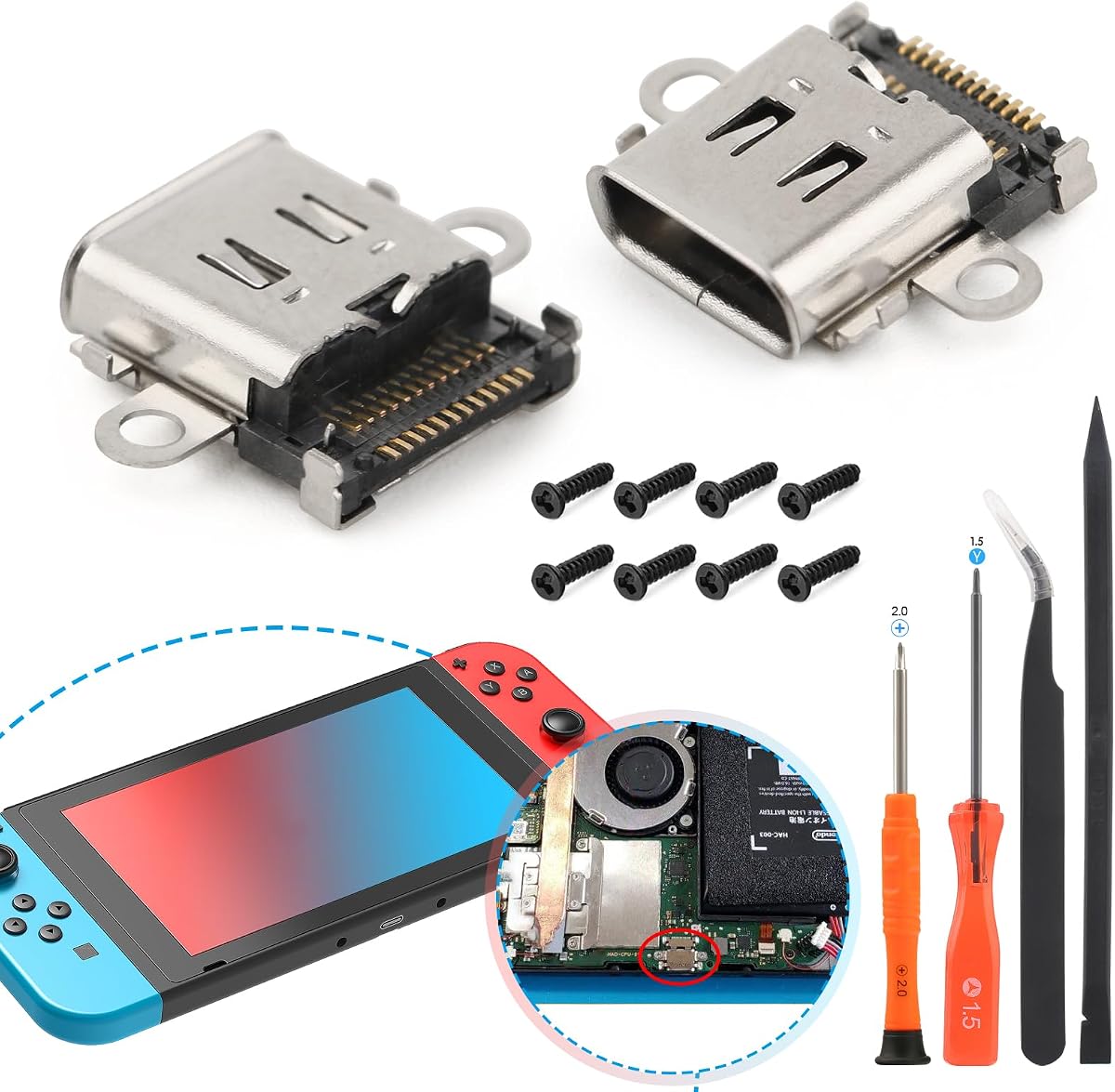
The two-pack charging port replacement is not a complete Nintendo Switch replacement dock, and it should be understood in its proper category. It is a repair component for an original Switch whose USB-C charging connector is loose, unresponsive, damaged, or no longer charges correctly.
We may earn a commission when you buy through this link, at no additional cost to you.
The package includes two replacement charging port boards, console back-cover screws, and repair tools. The product data says the parts were accuracy-produced and quality checked, and the replacement is intended to restore the size and function of the original charging port when installed correctly.
This is a technically demanding option. The console must be disassembled, and the instructions warn that installation involves soldering. Buyers without installation experience are advised to use a professional repair service. The kit is not compatible with Switch Lite or Switch OLED, and the existing connector must be transferred from the console.
Choose this repair kit only when the console's charging port is the specific problem and the original Switch dock itself remains functional. For anyone seeking television output, charging through a dock, and a stable tabletop base, a complete dock from the list above is the appropriate solution.
A loose, damaged, or touch-sensitive connector can prevent a dock from charging the console even when the dock itself works. Replacing that specific part may restore normal operation without replacing the entire station.
The included tools and screws help with disassembly, but soldering remains the critical step. A professional technician is the safer choice for owners without soldering experience.
We may earn a commission when you buy through this link, at no additional cost to you.
The best replacement dock is the one that matches the exact console generation, intended use, display needs, power requirements, and accessory preferences. Compatibility should be checked before considering ports, size, or extra features.
The original Switch, Switch OLED, Switch Lite, and Switch 2 do not share every dock requirement. Some products support only the original Switch and OLED, the Switch 2 dock is designed exclusively for the newer system, and compact travel adapters may support several generations while excluding Switch Lite. Read the compatibility statement and look for the exact model rather than relying on a general Nintendo Switch label.
A complete replacement dock supports a physical console-and-screen arrangement, video output, and often play-while-charging. A travel dock may operate as a small USB-C hub but can place the console in a different physical position. The charging port repair kit does not provide TV output at all, so it only solves a specific hardware fault rather than replacing a dock.
Original Switch and OLED hardware is generally associated with 1080p output, while some newer Switch 2 products and USB-C devices advertise 4K at 60Hz. A dock label mentioning 4K does not mean the Switch game will render in 4K. Check the display, source device, cable, and game mode, and distinguish between the adapter capability and the console's native limits.
Some docks include a 39W-class charger, while others require the original 15V, 2.6A Switch power adapter or another compatible source. USB-C power input does not guarantee that an arbitrary wall charger will work reliably. Pay attention to wattage, connector type, and the maker's setup order, especially for travel docks that advertise high power delivery for other devices.
Video output is the core need, but USB ports can support controllers, storage, adapters, or other peripherals. Basic docks may offer one data port, while the RuntoGOL has three and the three-in-one model pairs USB 3.0 with two USB 2.0 ports. Avoid paying for extra ports that will never be used, but do not choose a dock with no way to connect expected accessories.
A complete bundle may include a dock, HDMI cable, and AC adapter, while dock-only models require the buyer to supply both cables and possibly a charger. Bundles are convenient for first-time setup, moving to another television, or gifting. Dock-only products can be less expensive and more flexible if the shopper already owns compatible accessories.
Official-style docks take more room but provide a stable, familiar base. Compact models can weigh around 95 to 109 grams, while the smallest multi-device travel dock is listed at 39 grams. Smaller does not automatically mean better: a stable base, anti-skid surface, useful viewing angle, and room for cables can matter more during long sessions.
Some docks require the console's protective case to be removed, and others may place the screen closer to the base. Charging safeguards such as thermal monitoring, over-current protection, and short-circuit protection are valuable for extended use. Review both mechanical fit and electrical protection, especially for a product intended to power the console continuously.
Begin by confirming the dock is compatible with the exact console, removing any case if the product requires it, and placing the station on a stable, level surface. Read the dock's own instructions because connection order can vary. For many models, the safe sequence is to connect the power source first, attach HDMI to the chosen display, seat the console correctly, and then select TV output using the dock button or console menu.
After power-up, select the correct HDMI input on the television and allow a few seconds for the display signal to appear. If the screen remains black, reseat the console connector, verify the cable connections, confirm that the display is on the intended input, and check the required power source. The product may need a brief delay to negotiate the display, and some travel adapters explicitly instruct users to connect power before HDMI.
For care, keep the dock's ventilation openings clear and avoid placing it on soft fabric that can block heat dissipation. Route cables through the base or secure them loosely to prevent strain on the console port. Do not use visibly damaged cables, avoid charging with a mismatched adapter, and let the station cool if it becomes unusually warm. Periodically clean the ports with dry, nonabrasive methods, and keep liquids away from the dock.
Many of the listed docks are explicitly compatible with the original Switch and Switch OLED, including the SIWIQU, RuntoGOL, KEKUCULL, and three-in-one options. The Switch 2 TV Dock is designed only for Switch 2, while the repair kit is limited to the original Switch. Always check whether the dock requires removal of a protective case and whether the console model is named in the listing.
Most complete TV docks in the guide support charging during play, but they still need a compatible power source. Some products include a 39W charger or 39W power supply, while others require the original 15V, 2.6A adapter. A travel adapter that supports high-wattage power delivery still needs a suitable wall charger and cable, neither of which may be included.
Support depends on both the dock and the console. Products marketed for Switch 2 or broader USB-C use may claim 4K at 60Hz, but the original Switch and OLED remain limited to 1080p output. The display, source game, selected mode, and HDMI cable also matter. Treat a 4K label on a Switch accessory as a capability claim rather than proof of 4K game rendering.
The official set offers the strongest confidence in original-system compatibility and includes the dock, AC adapter, and HDMI cable. Third-party options may be smaller, less expensive, or provide more USB ports, but they can have model restrictions, case-fit issues, or missing accessories. The best choice depends on console generation and whether portability or extra connectivity is more important.
Most dock-only products require an HDMI cable and a compatible power supply that are not included. Some travel docks also need a USB-C cable capable of carrying video and power, while the Switch 2 and original Switch docks may use their respective console power arrangements. Check the port labels and package contents before ordering so the dock can be used immediately.
That depends on the dock's fit. The SIWIQU listing explicitly says protective cases are unsupported, while the KEKUCULL requires the original Switch case to be removed. Other docks may accommodate a case, but this should not be assumed. Compare the dock's connector depth and case clearance with the maker's compatibility notes before placing the console.
A black screen can result from an incorrect television input, a loose HDMI connection, an incomplete power connection, an incompatible cable, or a dock that requires power to be connected before HDMI. Reseat the console, switch the display to the proper input, wait several seconds, and follow the dock's stated startup sequence. A dock designed only for a different console generation will not work as intended.
No. The two-pack is a repair component containing replacement USB-C charging port boards, screws, and basic tools for an original Switch. It does not provide HDMI output, a tabletop base, or a complete docking station. It is intended for a damaged console connector and involves disassembly and soldering, so buyers without repair experience should seek professional installation.
The AHGEIIY travel dock stands out for its 39-gram design, broad device support, high-speed USB connectivity, and 100W power-delivery capability. The SIWIQU is a particularly clean dedicated option for Switch and OLED owners, while the official Nintendo Switch Dock Set is the premium choice for anyone seeking the original accessory and a complete bundle.
Prioritize exact console compatibility before every other feature. Next, confirm whether the product includes the charger and HDMI cable you need, whether your protective case fits, and whether the power requirements are realistic. Travelers should weigh size and multi-device use, while stationary users may prefer more USB ports, a stable base, cooling, and bundled accessories.
Finally, check the current listing before purchasing because ratings, product details, availability, and prices can change. A dock that appears inexpensive may require additional hardware, while a complete bundle may offer better long-term convenience. Match the station to the console and setup you actually use rather than choosing solely by the largest resolution or port claim.