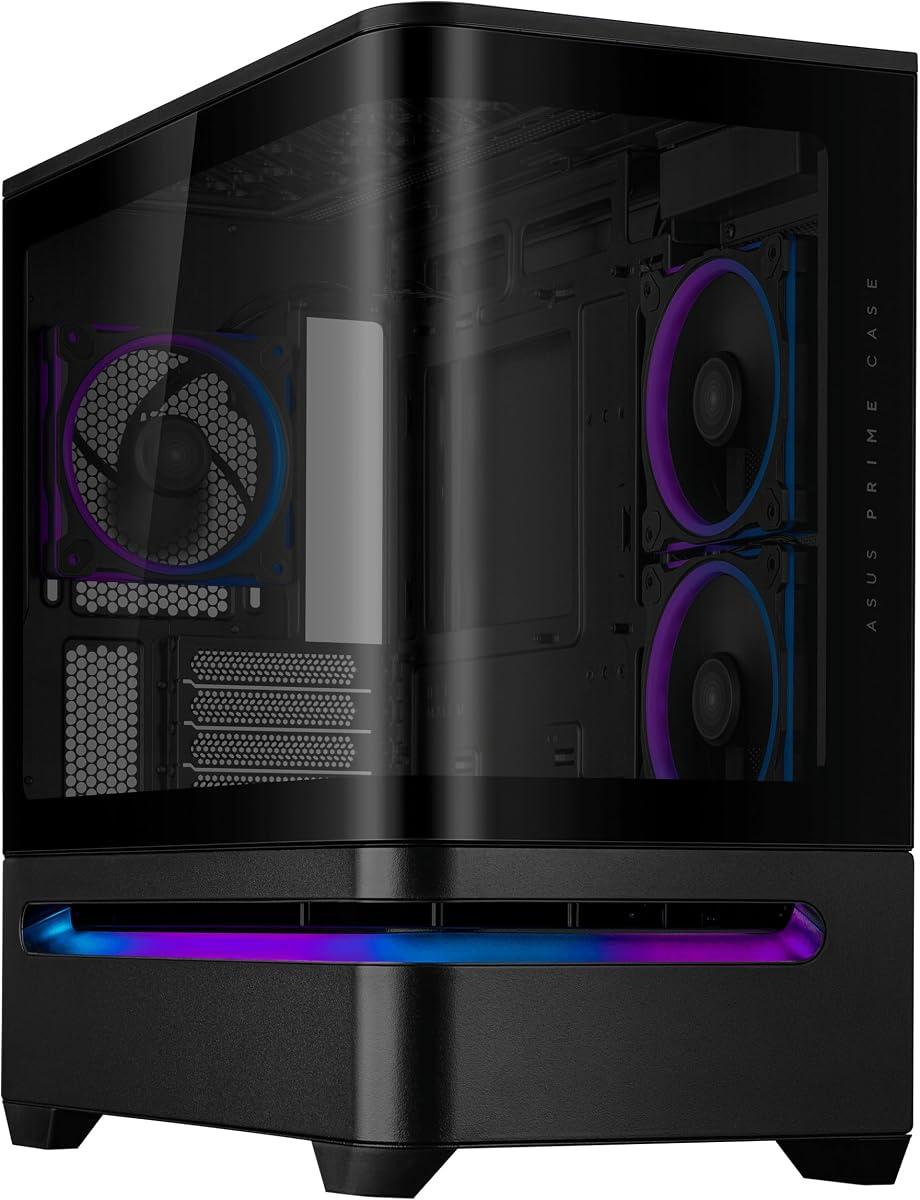
ASUS Prime AP202 Black
4.7Editor score
Panoramic curved tempered glass
Safe easy-detach rail
Aura Sync light band
Our PC Case with Curved Glass guide compares 10 enclosures for viewing angles, cooling support, clearance, build convenience, and display features.
A PC case with curved glass turns a functional enclosure into a visual centerpiece, but the best examples must also handle airflow, cables, components, and routine maintenance. Curved panels can create a seamless hardware display while spanning more than one side of the chassis, making them especially attractive for builds with coordinated lighting.
This guide compares ten curved-glass cases using their stated specifications, compatibility, cooling arrangements, display functions, and installation features. It covers compact micro-ATX models, ATX mid towers, a full-tower enclosure, and premium designs that include screens, modular layouts, or extensive fan support, so the list serves a wide range of builders.
The selections reveal which cases prioritize panoramic viewing, generous radiator clearance, hidden-connector support, digital monitoring, or a polished modular design. Ratings and product details reflect the supplied information, while availability and prices change frequently, so readers should confirm current listings and component limits before purchasing.
4.7Editor score

4.6Editor score

4.8Editor score
The table below compares all ten cases by form factor, viewing design, cooling support, and practical feature set, making it easier to identify the enclosure that best fits your components and preferred build style.


The JONSBO TK-3 Black earns a 4.6 rating and stands out for its unusually broad 270-degree view, created by a one-piece curved glass presentation without a central support column. It is designed to make the motherboard, graphics card, cooling hardware, and lighting the focus of the build rather than treating the enclosure as a plain box.
We may earn a commission when you buy through this link, at no additional cost to you.
Its separated cabinet layout supports backplane, or BTF, motherboards as well as ATX, micro-ATX, and ITX boards. Cooling is a major strength: the chassis offers ten fan positions and can accommodate dual 360mm AIO radiators, with separate top and bottom options for 120mm or 140mm fans. Maximum CPU cooler height is 165mm, while GPU clearance reaches 420mm.
The power supply and storage provisions are also generous. It supports ATX power supplies up to 220mm and offers either two 2.5-inch SSDs with one 3.5-inch hard drive or two hard drives with one SSD. The trade-offs are its substantial 288mm width and 438mm depth, plus the need to account for motherboard and GPU dimensions before ordering.
This is an excellent recommendation for builders who want a dramatic panoramic display, a high cooling ceiling, and a clean internal layout. It suits performance-oriented ATX systems particularly well, although buyers with compact desks or smaller micro-ATX builds should verify that the large chassis is appropriate for their space.
The column-free design keeps important components visible from multiple angles, including the side-mounted graphics card. The one-piece glass also makes the enclosure look visually continuous, which is especially effective when internal lighting is coordinated.
Ten fan positions and dual 360mm AIO support provide multiple ways to shape intake and exhaust airflow. The stated 165mm CPU-cooler and 420mm GPU limits also leave considerable room for substantial performance hardware.
We may earn a commission when you buy through this link, at no additional cost to you.
The darkFlash L280 combines a three-glass layout with a curved full-view side, giving the build visibility from more directions than a conventional single-window mid tower. Its 4.3 rating reflects an attractive presentation, but the main practical attraction is the digital display that reports CPU and GPU temperature and usage.
We may earn a commission when you buy through this link, at no additional cost to you.
The interior accommodates GPUs up to 410mm and radiators up to 360mm, making it suitably spacious for current gaming hardware. Four PWM ARGB fans arrive preinstalled, and the snap-on chassis design is intended to simplify assembly. Cable-management provisions, precise rear mounting holes, and a bottom dust filter round out the practical feature set.
Storage support extends to three SSDs and two hard drives, while the front connectivity includes USB-C. One important caveat is that the RGB hub controller is not included, even though the case includes four ARGB fans. Builders wanting coordinated lighting should verify how the fans connect and whether a separate hub or controller is needed.
The L280 is best for enthusiasts who value a multi-angle glass display and want live operating information visible outside the case. It is less suitable for anyone wanting a completely self-contained ARGB control system in the box, but for its core visual and monitoring features, it remains a compelling option.
The integrated display tracks CPU and GPU temperature and utilization, reducing the need to open software windows or check a display mounted inside the chassis. It adds practical information to a case that already emphasizes visual presentation.
The combination of three side glass panels and a curved viewing area allows illuminated components to remain visible from more angles. The dark finish also provides a restrained backdrop for RGB hardware.
We may earn a commission when you buy through this link, at no additional cost to you.
The CORSAIR Frame 4500X RS-R combines a single-piece curved front-and-side glass panel with one of the most flexible interior systems in this roundup. Its 4.6 rating reflects a balanced package of visual design, airflow features, and room for future configuration changes.
We may earn a commission when you buy through this link, at no additional cost to you.
The FRAME modular system allows builders to upgrade the motherboard tray, replace side-mounted fans with a cable cover, or swap the power-supply shroud for a form-fitting design with vertical GPU mounting points. Three included 120mm reverse-rotor RGB fans pull air inward while keeping their illuminated faces visible through the glass.
Above the case, the InfiniRail steel fan system lets 120mm or 140mm fans slide into different positions. That flexibility is valuable because a fixed roof arrangement can be less effective with unusual radiators, tall memory, or changing component layouts. The case's cascading industrial styling and broad openings support both its appearance and airflow goals.
This is a strong match for builders who enjoy customizing their enclosure over time rather than treating it as a fixed frame. The only notable limitation is that the package includes three fans, so a complete multi-zone cooling arrangement may require additional components and careful planning.
The modular FRAME ecosystem lets several core elements be changed as the system or the builder's priorities evolve. Vertical GPU support and a replaceable cable-cover option make the platform especially relevant to showcase builds.
Reverse-rotor fans provide an intake-oriented airflow pattern while directing their lighting toward the side panel. This lets the lighting remain part of the visual design rather than appearing as a blocked fan face.
We may earn a commission when you buy through this link, at no additional cost to you.
The ASUS Prime AP202 Black is a compact micro-ATX mid tower with a 4.7 rating, giving it one of the strongest customer reception figures in the group. Its curved tempered-glass panel extends continuously from the front toward the side, creating a broad view of the components from nearly any angle.
We may earn a commission when you buy through this link, at no additional cost to you.
The safe, easy-detach rail is a particularly useful feature for a glass-heavy enclosure. Instead of relying on a more fragile point fastener, the panel can be removed and reattached through a dedicated rail. A patented slot vent focuses airflow around the graphics card, while the integrated ARGB light band supports synchronization through Aura Sync.
The main limitation is the case's micro-ATX positioning. Builders should not purchase it based on appearance alone, because the smaller motherboard category may rule out boards and accessories intended for full-size ATX systems. The supplied information also provides less detail about storage and maximum radiator sizing than some competing entries.
Despite that caveat, the AP202 Black is a compelling choice for a compact build that needs a polished panoramic panel, convenient glass removal, and coordinated lighting. Its high rating and focused feature set make it a practical recommendation for micro-ATX builders who value clean design and straightforward maintenance.
The dedicated rail supports repeated panel removal and reattachment, which is useful during initial assembly and later maintenance. A secure removal method is especially valuable on a case where the glass is central to the design.
The patented slot vent is positioned to support graphics-card cooling, a practical concern in systems where the card is a major source of heat and a central visual component beneath the panoramic panel.
We may earn a commission when you buy through this link, at no additional cost to you.
The Antec C8 Curve Wood stands apart from the conventional black and white cases in this guide with a wide curved tempered-glass panel paired with an exotic wood front. Its 4.4 rating suggests broad appeal among builders seeking a more natural or furniture-like finish for a full-tower system.
We may earn a commission when you buy through this link, at no additional cost to you.
A dual-chamber layout separates different areas of the build, while the full E-ATX format creates room for substantial components. Cooling is highly flexible: the case can hold three 140mm or two 160mm fans at both the top and bottom, and thick 360mm radiators can be installed at the top, bottom, and side simultaneously.
Support for back-connect motherboards helps reduce visible cable clutter, and the full bottom cutout with interchangeable 120mm and 140mm fan brackets improves flexibility beneath the power-supply area. However, the enclosure is sold without fans, so a complete build will require a separately assembled cooling solution.
The C8 Curve Wood is best for builders who want a roomy, distinctive showcase chassis and already plan a substantial cooling setup. Its natural wood treatment may not complement every component theme, but it offers a more decorative alternative to the metallic or minimalist designs common in this category.
The wood front panel and sweeping curved glass create a distinctive contrast that can work well in a living room, office, or display cabinet. It appeals to builders who want the enclosure to blend with furniture rather than resemble a conventional gaming tower.
The ability to place thick 360mm radiators at the top, bottom, and side is unusually flexible. Buyers can plan an advanced airflow arrangement, although they must source suitable fans and confirm the final component layout.
We may earn a commission when you buy through this link, at no additional cost to you.
The white JONSBO TK-3 carries a 4.8 rating, the highest figure among the ten products, and its defining feature is a column-free, 270-degree curved-glass presentation. The white finish gives the hardware a bright, clean backdrop and makes the one-piece glass especially effective as a display surface.
We may earn a commission when you buy through this link, at no additional cost to you.
Like the black TK-3, this chassis uses a separated cabinet layout that supports BTF motherboards along with ATX, micro-ATX, and ITX boards. Ten fan positions and support for dual 360mm AIO radiators provide exceptional cooling flexibility, with options across the top, bottom, motherboard side, and rear.
Component limits include a 165mm CPU cooler, 420mm GPU length, and 220mm ATX power supply. Storage can be arranged as two 2.5-inch SSDs with one 3.5-inch hard drive or two hard drives with one SSD. The front I/O includes a USB 3.2 Gen 2 Type-C port and two USB 3.0 ports.
This is our premium recommendation for a visually ambitious ATX build that needs both panoramic glass and extensive cooling options. Its white finish may be the deciding factor for a coordinated build, while the sizeable enclosure and separate RGB controller requirement are the main issues to consider.
The white chassis reflects light in a way that can make internal components appear more vivid. A column-free 270-degree view also improves sightlines around the main hardware cluster.
Support for long GPUs, tall air coolers, multiple fan zones, and two large AIO radiators makes the enclosure practical for a high-performance system rather than a display-only design.
We may earn a commission when you buy through this link, at no additional cost to you.
The Iota C70 BK Curve combines a wide 270-degree glass presentation with digital temperature monitoring and four included Gamma F12 Elite fans. Its 4.3 rating reflects a well-rounded package for gaming and showcase builds, especially for those who want useful information displayed outside the chassis.
We may earn a commission when you buy through this link, at no additional cost to you.
The Ocypus digital display reports CPU and GPU operating temperatures and allows the unit to be selected, while a USB 2.0 connection is required for that function. The case is constructed from 0.7mm SPCC metal panels and includes magnetic dust filters at the top and bottom, rear micro-mesh perforations, and a front-to-rear chamber layout.
Motherboard support covers ATX, micro-ATX, and ITX, with limits of 160mm for CPU coolers, 445mm for GPUs, and 240mm for power supplies. It supports 360mm AIO radiators along with 120mm and 140mm fans. Tool-free installation and a snap-on front-glass release add convenience, while dedicated routing positions help organize cables.
The C70 is a strong recommendation for builders who want a panoramic case, useful temperature monitoring, and a generous set of preinstalled fans. The display's USB requirement should be considered during installation, and the snap-on glass should still be handled carefully to avoid damaging its edges or protective film.
The built-in display gives quick access to CPU and GPU temperatures from outside the system. Selectable temperature units improve readability, although a working USB 2.0 connection is required.
Magnetic filters at the top and bottom make periodic dust maintenance more convenient. Tool-free installation and a quick-release front glass also reduce the effort involved when arranging components.
We may earn a commission when you buy through this link, at no additional cost to you.
The Thermaltake Vision 330 CR ARGB is a complete-looking lighting package, with six 120mm Infinity ARGB PWM fans included inside a white mid tower. Its one-piece curved tempered-glass front and side panel creates open viewing angles, while the hinged design makes the display area more convenient to access.
We may earn a commission when you buy through this link, at no additional cost to you.
The included fans are installed at the bottom and side for intake, with another at the rear for exhaust. In total, the case can accommodate up to nine 120mm fans, leaving room for a top-mounted 360mm AIO. This arrangement is convenient for builders who want substantial lighting and airflow immediately after assembly.
Radiators up to 360mm, GPUs up to 420mm, CPU coolers up to 175mm, and power supplies up to 250mm are supported. Cutouts also allow hidden-connector motherboards such as ASUS BTF, MSI PROJECT ZERO, and GIGABYTE PROJECT STEALTH, which can produce a cleaner internal appearance.
Its 4.0 rating is the lowest among the selected cases, but the product still offers a strong feature-to-inclusion combination. The best candidate is a builder who wants a coordinated white showcase system, already understands the included fan layout, and values tool-free access to the large glass panel.
Six Infinity ARGB PWM fans provide both visible illumination and a defined initial airflow arrangement. Builders do not need to install a complete lighting package before the case looks finished.
Support for several hidden-connector motherboard standards helps reduce cable clutter behind the tray. The wide curved viewing panel makes those cleaner internal routes more noticeable.
We may earn a commission when you buy through this link, at no additional cost to you.
The white edition of the ASUS Prime AP202 brings the same panoramic concept as the black version to a brighter micro-ATX build. It earns a 4.4 rating and is aimed at builders who want a clean white enclosure without giving up the curved front-to-side glass presentation.
We may earn a commission when you buy through this link, at no additional cost to you.
Tempered glass extends seamlessly from the front to the side, offering a wide view of internal components. The easy-detach rail supports safe panel removal and reattachment, while the patented slot vent provides airflow for the graphics card. An integrated ARGB light band works with Aura Sync for coordination with compatible components.
As a micro-ATX enclosure, it is most appropriate for smaller motherboards and systems where a full-size ATX board would be unnecessary. The supplied information does not list detailed storage, radiator, GPU, or cooler limits, so buyers should compare those dimensions with their planned hardware before finalizing the purchase.
The white AP202 is a strong option for a compact, light-themed build that emphasizes a wide viewing area and tidy illuminated appearance. Its main appeal is straightforward visual consistency, while the detachable panel and graphics vent add practical benefits that go beyond the finish.
The white exterior and curved glass can complement pale motherboards, white graphics cards, and neutral cable-management choices. The ARGB band provides a lighting accent without requiring a separate visible controller.
The easy-detach rail is useful during assembly and whenever the interior needs attention. It reduces reliance on a single fastening point and supports more repeatable panel handling.
We may earn a commission when you buy through this link, at no additional cost to you.
The ASUS ROG Cronox White is the most feature-forward case in the roundup, carrying a perfect 5.0 rating. Curved tempered glass in an aluminum-trimmed frame provides the panoramic showcase, but the most distinctive addition is the hinged 9.2-inch LCD module mounted outside the enclosure.
We may earn a commission when you buy through this link, at no additional cost to you.
The screen can display system statistics, notifications, a digital clock mode, or custom visuals. That turns the case into a multifunction desktop display, making it especially attractive for builders who want system information visible without opening a monitoring application or placing a separate display beside the PC.
The case supports E-ATX motherboards, including ATX hidden-connector models, and accepts graphics cards up to 400mm long. A robust graphics-card holder and patented slot clamps assist with stability. Cooling capacity extends to fourteen 120mm fans and up to two 360mm radiators, with a patented rotatable side fan bracket for flexible airflow channels.
The ROG Cronox is the premium recommendation for a large gaming build where the enclosure itself should function as an information display. It is overkill for a simple office system, but builders investing in an elaborate desk setup can gain meaningful functionality from the integrated screen and extensive cooling support.
The hinged 9.2-inch panel can surface system statistics, alerts, a clock, or custom content. That makes it more than a decorative glass feature and can reduce the need for a separate utility display.
Support for fourteen 120mm fans and two 360mm radiators provides exceptional thermal configuration room. The rotatable side bracket further improves the builder's ability to direct airflow around a particular component.
We may earn a commission when you buy through this link, at no additional cost to you.
The most useful curved-glass case is the one that combines an appealing view with adequate space, practical cooling, and an installation process suited to your experience. Comparing these factors before buying helps prevent a visually exciting enclosure from becoming a compromised build.
Start with the motherboard standard because it determines which cases are physically compatible. The JONSBO TK-3, darkFlash L280, CORSAIR Frame 4500X RS-R, Iota C70, Thermaltake Vision 330 CR, and ASUS ROG Cronox support ATX-class boards, while the two ASUS Prime AP202 models are micro-ATX cases. The Antec C8 Curve Wood is a full E-ATX tower. Backplane, or BTF, motherboard support appears in the JONSBO TK-3, Thermaltake Vision 330 CR, and ASUS ROG Cronox, but it should not be confused with support for every ATX board.
Curved glass varies considerably in scope. The JONSBO TK-3 and Iota C70 use a 270-degree panoramic approach, while the ASUS Prime AP202 extends curved tempered glass from the front toward the side. The Thermaltake Vision 330 CR uses a hinged one-piece front-and-side panel, the CORSAIR Frame 4500X RS-R uses a single-piece wraparound panel, and the ROG Cronox combines curved tempered glass with an aluminum-trimmed frame. The darkFlash L280 stands apart with three side glass surfaces.
Cooling support should be evaluated by fan positions, radiators, and component clearance rather than appearance alone. The JONSBO TK-3 offers ten fan positions and dual 360mm AIO support. The Iota C70 and Thermaltake Vision 330 CR include multiple fans, while the ASUS ROG Cronox supports up to fourteen 120mm fans. The Antec C8 Curve Wood supports thick 360mm radiators simultaneously at the top, bottom, and side, although it comes without fans.
Long graphics cards and tall coolers can prevent an otherwise attractive case from fitting the intended build. Stated limits include 445mm for the Iota C70, 420mm for both JONSBO TK-3 versions and the Thermaltake Vision 330 CR, 410mm for the darkFlash L280, and 400mm for the ROG Cronox. CPU-cooler limits range from 160mm in the Iota C70 to 175mm in the Thermaltake and 165mm in the JONSBO cases. Always check the exact dimensions of the hardware rather than relying on a category label.
A case-mounted display can be genuinely useful instead of purely ornamental. The darkFlash L280 reports CPU and GPU temperature and usage, the Iota C70 shows CPU and GPU temperatures, and the ROG Cronox includes a larger hinged 9.2-inch screen that can also show notifications, a clock, or custom visuals. Displays add value when placed where they remain readable, but they may also require a USB connection or additional configuration.
Curved glass exposes cable routing more prominently than a solid-sided enclosure, so tidy internal management matters. The JONSBO TK-3 uses a separated cabinet layout, the Iota C70 includes dedicated routing positions, and the Thermaltake Vision 330 CR supports ASUS BTF, MSI PROJECT ZERO, and GIGABYTE PROJECT STEALTH hidden-connector motherboards. The ROG Cronox also supports ATX hidden-connector models. Other cases still need careful routing to maintain the clean appearance promised by their glass panels.
Consider how often you will need to open the case and whether the panels can be handled safely. The ASUS Prime AP202 uses an easy-detach rail, the Thermaltake Vision 330 CR uses a hinged curved panel and tool-free push clips, and the Iota C70 offers tool-free installation with a snap-on front glass. The ROG Cronox includes a hinged screen and patented slot clamps, which can help with repeated access. Magnetic dust filters on the Iota C70 and a bottom filter on the darkFlash L280 simplify cleaning.
A curved-glass enclosure becomes part of the room's visual design, so color and included hardware deserve consideration. The JONSBO TK-3 and ASUS Prime AP202 are available in black and white, the Thermaltake Vision 330 CR and ROG Cronox emphasize a white finish, and the Antec C8 Curve Wood introduces a natural wood front. Some cases arrive with no fans, while the Iota C70 includes four, the Thermaltake includes six, the darkFlash includes four, and the CORSAIR includes three.
Begin by assembling the system with the case lying on a protected surface, install internal components, and connect cables before fitting the curved glass. Keep protective films on during construction when the manufacturer recommends them, and never press against the center of a large glass panel while attaching fasteners. Use the supplied rail, hinges, clips, or quick-release mechanisms rather than pulling the panel by an exposed edge.
Plan airflow before closing the enclosure. Place intake and exhaust fans in directions that move air through the main heat-producing components, check that every fan can spin freely, and verify that radiators or thick coolers do not block the case's dedicated vents. After the system is running, confirm that the display reports expected temperatures and that the glass panel does not interfere with any mounted hardware.
For routine care, power down and disconnect the system before opening the case. Clean removable filters according to the manufacturer's instructions, use a soft dry cloth on the exterior, and avoid liquid cleaners unless they are explicitly approved. Treat the glass carefully, keep cables clear of the panel edges, and periodically check that the fasteners, hinges, and dust filters remain secure.
Curved glass can provide a wider, more continuous view of internal components and often makes a showcase build appear less boxy. It does not automatically improve cooling or performance, however, because airflow depends on the chassis layout, vents, fans, and radiator placement. Choose curvature primarily for appearance, then confirm that the case supports your hardware and cooling plan.
The most common options in this roundup are ATX and micro-ATX, with the ASUS ROG Cronox offering full E-ATX capacity. Some cases also support backplane motherboards, but hidden-connector support is an additional feature rather than a replacement for checking board format. Confirm both the board size and the connector arrangement before purchasing.
They can be more fiddly because a large glass panel takes up working space and must be protected from pressure and fingerprints. Cases with hinged panels, quick-release front sections, or dedicated removal rails make the process easier. Install internal components first, route all cables, and fit the glass only when the interior is complete.
Yes, but the exact position and number of radiators depend on the model. The JONSBO TK-3 supports dual 360mm AIO configurations, while the Iota C70, Thermaltake Vision 330 CR, and Antec C8 Curve Wood also list 360mm support. Always verify the required mounting points, fan thickness, tubing space, and any included-fan conflicts.
Not necessarily. The darkFlash L280 includes four PWM ARGB fans but does not include an RGB hub controller. Other cases integrate an ARGB light band, include illuminated fans, or provide chassis controls. Check the contents and the case's control connections to determine whether an additional controller is needed.
Turn off and disconnect the PC, then use a soft microfiber cloth with a small amount of suitable glass cleaner if the manufacturer permits it. Avoid spraying liquid directly onto the panel, using ammonia-based products, or resting tools on the glass. Never clean the enclosure while it is powered or connected to a wall outlet.
A built-in display can provide visible system information without occupying a separate monitor or requiring a software window. The darkFlash and Iota C70 focus on operating temperatures, while the ROG Cronox can also show notifications, a digital clock, or custom visuals. The Iota C70 display requires a USB 2.0 connection, so that requirement should be planned for.
Many of the selected cases support lengthy GPUs, but the limits vary. The Iota C70 lists a 445mm limit, both JONSBO TK-3 versions and the Thermaltake Vision 330 CR list 420mm, the darkFlash L280 lists 410mm, and the ROG Cronox supports up to 400mm. Check the exact model of card, including any cooler or power-cable clearance, against the case specification.
The JONSBO TK-3 Black stands out for its expansive 270-degree view, separated cabinet layout, and broad cooling options, while the ASUS Prime AP202 Black offers a compact micro-ATX alternative with a strong rating and easy-detach panel. The white JONSBO TK-3 is the premium-style choice for a bright, column-free showcase with dual AIO support.
Your decision should be driven by component fit before visual details. Confirm motherboard format, GPU length, CPU-cooler height, power-supply length, radiator placement, controller requirements, and the location of any digital display. A case that looks spectacular but forces awkward cable routes or restricts airflow is less valuable than one that supports a balanced, serviceable build.
Ratings, product configurations, and prices can change, so check the current listing before ordering. Compare the latest manufacturer specifications with the exact motherboard and components in your planned system, and make sure any included fans or accessories satisfy the lighting and cooling arrangement you intend to use.