
SABRENT USB External Stereo Sound Card Adapter
4.3Editor score
Driverless USB audio operation
Separate headphone and microphone jacks
Windows, Mac, and Linux support
Compact bus-powered adapter
Our guide compares the 10 best PC sound cards for audio recording, covering inputs, outputs, resolution, latency, portability, and creator features.
A PC sound card can transform the way you capture voices, instruments, game audio, and streaming commentary. The right model should offer clean conversion, dependable connections, manageable latency, and compatibility with your computer and recording setup rather than simply providing more ports.
We compared all ten products by examining their recording inputs, monitoring options, channel support, resolution, installation needs, portability, and creator-oriented functions. The list covers internal PCIe cards, external USB interfaces, mobile-oriented adapters, and all-in-one audio mixers for podcasters, musicians, and streamers.
Each review explains where the product stands out, where its limitations matter, and which kind of recorder it best serves. Ratings reflect the supplied customer feedback, while features and specifications are based on the available product information; current prices and availability can change over time.
4.3Editor score
4.6Editor score

4.4Editor score
The comparison below highlights the connection types, intended recording scenarios, key technical capabilities, and major trade-offs of each sound card, helping you narrow the field before choosing a device for your PC.


The Creative Sound Blaster Audigy Fx Pro is an internal PCIe sound card aimed at builders who want to bypass onboard audio and build a more capable desktop recording or gaming system. Its supplied rating is 4.2, and its standout combination is high-resolution playback, extensive analog connections, surround support, and a remarkably compact footprint.
We may earn a commission when you buy through this link, at no additional cost to you.
The card supports 32-bit/384kHz playback with a stated signal-to-noise ratio of up to 120dB. For a multi-speaker recording or gaming setup, discrete 7.1-channel analog output is a meaningful advantage. Connectivity includes multi-channel speaker connections, SPDIF output, headset outputs, microphone input, and line-in sources, giving it more flexibility than a basic two-port USB adapter.
Creative Nexus adds AutoEq customization for simulating the response of different headphones, which can make the card more useful for critical listening. The trade-off is that this is primarily a playback-focused internal card rather than a dedicated microphone preamp interface. It also requires opening a compatible desktop case, installing the PCIe card, and arranging its external connections, so it is not the most convenient choice for a laptop or a temporary recording session.
This is a strong option for a desktop creator who already has a quality microphone and wants excellent headphone playback, line-level sources, and flexible outputs. Choose it when internal expandability, surround sound, and high-resolution listening matter more than a simple plug-and-play workflow.
The combination of 32-bit/384kHz support and 120dB stated signal-to-noise makes the Audigy Fx Pro well suited to high-fidelity headphone listening and multi-channel desktop audio. Its flexible output layout also makes it easier to connect powered speakers, gaming headsets, and line-level studio equipment.
Creative Nexus and AutoEq provide room for listener-specific tuning without requiring constant system-level adjustments. Meanwhile, line-in, mic-in, SPDIF, and headset connections make the internal card less restrictive than a minimal external adapter.
We may earn a commission when you buy through this link, at no additional cost to you.
The PUPGSIS Gaming Audio Mixer is designed around a specific creator need: combining a microphone signal with live sound effects, voice processing, and background audio for streaming. It carries a 4.4 rating and distinguishes itself with a 1/4-inch TRS XLR microphone input, four programmable pads, a voice changer, noise reduction, and adjustable reverb.
We may earn a commission when you buy through this link, at no additional cost to you.
Its all-in-one approach can simplify a streaming setup. A compatible XLR microphone can feed the mixer, while custom clips can be assigned to the four pads for instant activation. The voice changer can alter pitch, and the noise-reduction function is intended to filter hum, fan noise, and other unwanted background sounds before they reach the stream.
There are important constraints. The mixer does not support 48V condenser microphones or USB microphones, and using an XLR microphone requires a 1/4-inch TRS-to-XLR cable that is not automatically included. Bluetooth is input-only, so it can receive music or sound effects from a phone but cannot send audio to wireless headphones or a microphone. Zero-latency monitoring still requires a wired connection.
This product is a compelling fit for streamers who prioritize live effects and voice control over a conventional studio recording workflow. It is less suitable for musicians who need instrument inputs, multiple analog channels, or a general-purpose interface for microphones and line-level gear.
Four programmable sound pads let creators trigger laughter, claps, alarms, or custom clips without hunting through software. That immediacy makes the mixer particularly useful for gaming commentary, entertainment streams, and interactive podcast sessions.
The Bluetooth limitation is worth considering before purchase. It handles incoming background audio but not wireless headphone monitoring, so a wired headset or headphone connection remains necessary for dependable, low-latency listening.
We may earn a commission when you buy through this link, at no additional cost to you.
The Optimal Shop 6-Channel USB Sound Card is an older-style external USB adapter focused on adding both analog multichannel playback and optical digital recording to a PC or laptop. Its 3.7 rating is the lowest in this group, but the device remains relevant for users whose specific priority is S/PDIF capture or 5.1-channel output.
We may earn a commission when you buy through this link, at no additional cost to you.
The unit supports six-channel 5.1 analog playback and digital recording through USB. Optical S/PDIF input can carry compatible digital audio from sources such as a player or external device, while the advertised sampling options include 32kHz, 44.1kHz, and 48kHz depending on the input mode and software.
The important limitation is that the optical output cannot automatically create a 5.1 experience. The source must contain a compatible DTS 5.1 stream, the player must use the appropriate passthrough setting, and the receiving amplifier or decoder must be able to process the signal. Ordinary stereo MP3 files remain two-channel, and some applications or high-resolution rates may need compatible drivers or software support.
Choose this adapter if you specifically need optical digital input, legacy Windows support, and analog surround playback from an older desktop or laptop. For straightforward modern podcast recording, a dedicated USB interface with clearly documented microphone preamps will usually be easier to configure and maintain.
S/PDIF input is valuable when you want to capture a digital source without relying on the computer's onboard audio controller. It is particularly relevant to legacy media systems, external playback equipment, and multi-channel sources that remain in their original digital form.
Multichannel optical playback depends on the source file, player passthrough configuration, and downstream decoder. The adapter transports the signal, but it does not manufacture surround channels from ordinary stereo material.
We may earn a commission when you buy through this link, at no additional cost to you.
The Guitar Audio Interface Pocket is a compact 24-bit/48kHz interface intended for recording an electric guitar or bass while moving between a phone, tablet, laptop, and streaming setup. Its 4.1 rating reflects a focused design that prioritizes portability, direct instrument capture, and synchronized monitoring.
We may earn a commission when you buy through this link, at no additional cost to you.
A Type-C connection handles compatible Android devices, laptops, and PCs, while an included Lightning-to-Type-C adapter expands support for compatible iPhones and iPads. The 1/4-inch instrument jack accepts a guitar or bass, and a 3.5mm headphone jack supports direct monitoring. Volume buttons and an indicator light help prevent the monitor level from reaching an obviously distorted range.
This is a simple capture device rather than a full production mixer. It records without providing edit or mix functions, and the listed input is designed around electric instruments. Users seeking multiple microphone preamps, XLR connections, phantom power, or a complete podcast workflow should look elsewhere.
Choose it for mobile performances, livestreaming with an instrument, or quick guitar recordings where a full rack-style interface would be cumbersome. It is especially useful for a creator who wants one pocket-sized device to move between rehearsal spaces, live streams, and a laptop session.
Supporting Type-C and Lightning via the included adapter makes the interface usable across several mobile ecosystems. Its battery-free design also removes charging from the setup process, allowing a straightforward connection for recording or streaming.
The interface handles direct guitar or bass input, synchronized digital audio, and headphone monitoring without trying to become a mixer or editing application. That simplicity makes it approachable, provided its single instrument input matches the user's needs.
We may earn a commission when you buy through this link, at no additional cost to you.
The SABRENT USB External Stereo Sound Card Adapter is a straightforward way to add working headphone and microphone connections to a computer without installing internal hardware. It has a 4.3 rating and is especially appealing for basic voice recording, online meetings, headset use, and reviving a laptop or desktop with missing or unreliable analog jacks.
We may earn a commission when you buy through this link, at no additional cost to you.
The adapter uses a USB Type-A connector and is powered by the USB bus. Its green 3.5mm jack handles stereo output for headphones or powered speakers, while the pink 3.5mm jack accepts a mono microphone. It is recognized as a standard USB audio device, requires no driver, and works with Windows, Mac, and Linux systems that support class-compliant USB audio.
The trade-offs are clear: it cannot pass stereo through a single four-pole combination headset plug, cannot power passive speakers, and does not add surround or multichannel recording. The separate microphone jack is also limited to mono, so this is not a high-end podcast interface for two independent microphones.
For a user who needs a dependable, inexpensive way to record one voice or restore basic audio connectivity, this adapter is a strong choice. Choose it for simplicity and portability, but move to a multi-input interface when you need better microphones, balanced connections, instrument inputs, or professional preamps.
When a laptop's headphone jack is damaged or a compact computer lacks analog audio, the adapter provides an immediate external alternative. Its broad system support and standard USB audio profile make it useful across mixed personal and office environments.
The pink input is mono, which is sufficient for a single voice but does not support independent left and right microphone capture. Users with a single combination headset may need an appropriate splitter or a different adapter.
We may earn a commission when you buy through this link, at no additional cost to you.
The USB Audio Adapter for PC is a compact USB-to-audio solution for adding a speaker or headphone output and a microphone input to a device with missing or unreliable ports. It has a 4.6 rating, tying for the highest supplied rating in the group, and offers a straightforward alternative to replacing an entire sound card.
We may earn a commission when you buy through this link, at no additional cost to you.
Its built-in DAC supports audio up to 16-bit/48kHz with noise reduction, while the dual-function interface handles both listening and speaking. The 3.5mm connections support a headphone or speaker output and a mono microphone input, including CTIA-style Android earphones. Compatibility is listed across Windows, Mac OS X, Linux, Chromebook, Surface, Raspberry Pi, PS4, and PS5.
Installation requires no drivers or external power, and the product includes practical troubleshooting steps for cases where the USB Audio device is not immediately selected in system settings. However, 16-bit/48kHz is modest compared with the dedicated interfaces in this list, and the mono mic input cannot capture two independent voices.
This adapter is best for call-center work, gaming, classes, streaming, and straightforward voice recording on a system that needs a quick audio reset. It is less appropriate for a professional multi-microphone studio or lossless project that benefits from higher conversion rates and balanced inputs.
The adapter can restore usable headphone and microphone connections without an internal installation. Its driverless design also makes it convenient to carry between a desktop, laptop, and compatible console or embedded device.
The supplied instructions explain how to select USB Audio as the output device and update an older system if necessary. That practical guidance helps when the hardware is connected correctly but the operating system has not yet recognized it.
We may earn a commission when you buy through this link, at no additional cost to you.
The Creative Sound Blaster AE-X is the most technically ambitious internal card in this roundup, pairing an ESS ES9039Q2M DAC with high-resolution playback, low-latency support, and a substantial headphone amplifier. Its 4.4 rating reflects its appeal to serious PC listeners who want a more advanced internal audio path than a typical motherboard provides.
We may earn a commission when you buy through this link, at no additional cost to you.
The DAC supports up to 32-bit/384kHz playback and a stated signal-to-noise ratio of up to 130dB. Its built-in headphone amplifier can deliver up to 350mW at 32 ohms, giving it more authority with demanding headphones. DSD256 and ASIO 2.3 support make it relevant to high-resolution playback and latency-sensitive creative workflows.
Creative Nexus adds a 10-band parametric equalizer and AutoEq for detailed sound personalization. Coaxial output and optical input improve integration with a desktop audio system. As an internal PCIe card, however, it requires a compatible case and installation, and its feature set leans more toward high-quality playback than multichannel microphone recording.
Choose the AE-X when your PC serves as a serious listening or headphone-driven workstation and you want a premium internal DAC. It is less suitable for someone who needs a portable USB interface, balanced microphone preamps, or a simple laptop recording solution.
The 350mW output at 32 ohms is designed to drive more demanding headphones with greater authority than a basic onboard or adapter-based amplifier. Pairing that output with the ESS DAC gives users a reason to build a dedicated high-fidelity PC listening system.
The 10-band parametric EQ and AutoEq extend the card beyond basic volume control. These tools can help shape a headphone response or approximate familiar curves, although users should make careful comparisons and avoid extreme settings that introduce unintended coloration.
We may earn a commission when you buy through this link, at no additional cost to you.
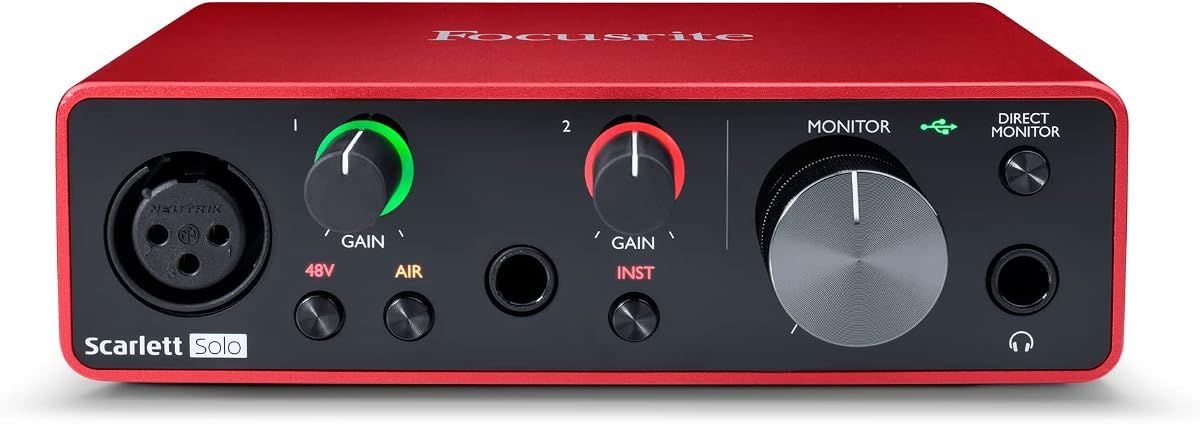
The Focusrite Scarlett Solo 3rd Gen is the most purpose-built recording interface in the group, combining high-performance preamps, two instrument inputs, balanced monitoring, and broad software support. Its 4.6 rating makes it a particularly attractive choice for a singer, guitarist, bassist, or beginner producer recording directly to a PC.
We may earn a commission when you buy through this link, at no additional cost to you.
Its switchable Air mode adds brightness to acoustic instrument recordings, while Gain Halos help users set levels without clipping. The advertised conversion capability reaches 24-bit/192kHz, and two low-noise balanced outputs support clean playback. The included software bundle contains Pro Tools Intro+, Ableton Live Lite, Cubase LE, and Hitmaker Expansion to help new users begin recording and mixing.
The product name says Solo, and the practical distinction is that the two high-headroom inputs are intended for instruments rather than two independent microphone preamps. A microphone can be captured through an appropriate input approach, but this is not a two-microphone podcast console. It also requires a USB-C port and room for a desktop-sized interface.
For a solo creator who wants a direct path from instrument or vocal performance into a DAW, the Scarlett Solo 3rd Gen is a particularly compelling recommendation. Choose it for recording quality and easy operation; choose a dedicated podcast mixer instead when simultaneous mic handling, pads, and live effects are the priority.
Two instrument inputs, Gain Halos, and the Air mode cover the core needs of a singer-guitarist or solo instrumentalist. The interface keeps signal capture approachable while preserving options for careful level control and higher-resolution recording.
Low-noise balanced outputs provide a cleaner reference for editing and mixing. The included recording and production software reduces the barrier to starting a project, helping users move from setup to a usable editing environment.
We may earn a commission when you buy through this link, at no additional cost to you.
The UGREEN USB Sound Card Adapter is a compact DAC-equipped adapter for improving or restoring 3.5mm audio on a laptop, desktop, or compatible device. Its 4.4 rating indicates strong user satisfaction, and it offers a practical route to separate headphone and microphone connections without internal installation.
We may earn a commission when you buy through this link, at no additional cost to you.
The built-in DAC supports output up to 16-bit/48kHz and includes noise reduction. Its USB connection requires no separate power or driver, while the adapter's compact ABS construction makes it easy to carry. Listed compatibility includes numerous Windows versions, Linux, Mac OS X, PS5, PS4, Google Chromebook, Surface Pro 3, and Raspberry Pi, with PS3 specifically excluded.
For serious studio recording, its 16-bit/48kHz ceiling and basic analog connections are less advanced than those found on dedicated audio interfaces. It does not provide balanced inputs, multiple microphone channels, instrument-specific preamps, or the deeper monitoring controls expected in a professional recording environment.
This adapter suits everyday voice recording, headset use, remote meetings, and improving the sound from a computer's existing 3.5mm output. It is an especially good portable option for users who do not need studio-grade conversion but want a clearer and more convenient audio path.
The internal DAC gives a PC a dedicated digital-to-analog path without requiring a full desktop sound card. That can be useful when onboard audio is compromised, limited, or inconvenient, particularly for frequent travelers and remote workers.
The product's platform list is broad, but physical and operating-system support can vary by device. Confirm that the computer has the appropriate USB port and that any 3.5mm headset uses a compatible connector standard before relying on it for a critical session.
We may earn a commission when you buy through this link, at no additional cost to you.
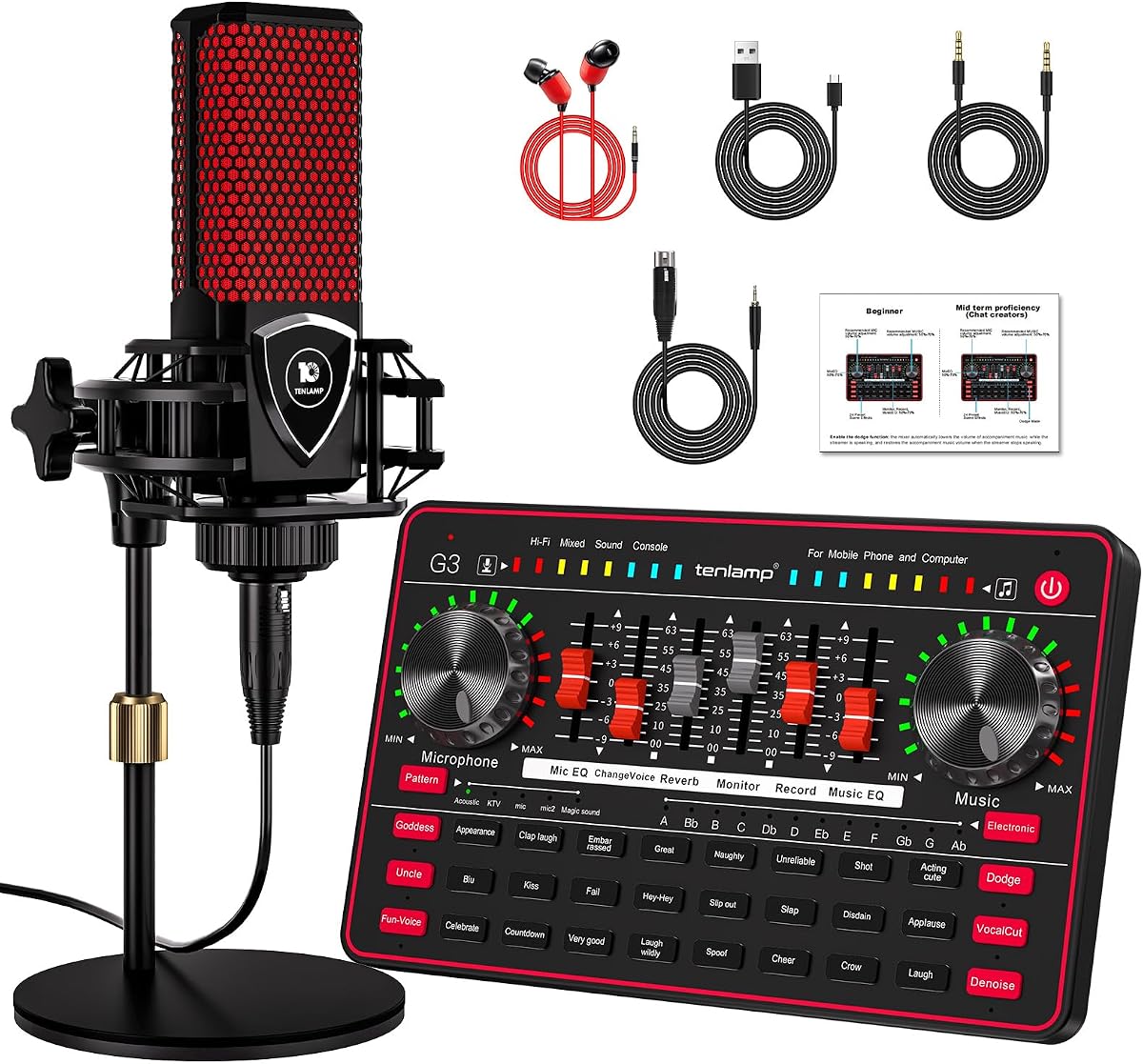
The TENLAMP G3 Creator Audio Mixer Bundle is an all-in-one package for podcasters, gamers, streamers, and casual content creators. Its 4.1 rating reflects an approachable combination of a sound board, included 3.5mm condenser microphone, round base stand, voice effects, and battery-powered portability.
We may earn a commission when you buy through this link, at no additional cost to you.
The mixer supports customizable bass, treble, reverb, and pitch, along with a voice changer offering female, deep, baby, and magical character variations. Twenty-four built-in effects and five reverb modes give live creators more material than a plain USB adapter. The built-in 1000mAh battery also allows use away from a wall outlet, and the sound board can connect to a PC, Mac, or mobile device.
As a bundle, it is convenient, but the included 3.5mm condenser microphone and integrated mixer are more oriented toward speech and entertainment content than high-fidelity music production. The product data also frames it as a sound board for a 3.5mm dynamic microphone, while the bundle description identifies the included microphone as a 3.5mm condenser, so buyers should verify connector and microphone requirements carefully.
Choose the G3 when an accessible, portable podcast or streaming package is the goal. It can provide a complete starting setup with less assembly than buying a mixer, microphone, stand, and effects library separately; advanced musicians should instead consider a dedicated interface with balanced instrument inputs.
The included microphone, round base stand, and sound board provide a connected starting point for a first podcast or stream. The bundle reduces the number of separate components a beginner needs to assemble for basic voice content.
The internal battery, sound effects, voice changer, and five reverb modes make the mixer adaptable to live or mobile work. These features favor entertainment and accessibility over the neutral signal capture and professional preamp control found on dedicated music interfaces.
We may earn a commission when you buy through this link, at no additional cost to you.
The right PC sound card depends on what you record, how many sources you need, the hardware you already own, and the level of control you want. Use the following factors to distinguish a simple port adapter from a dedicated recording interface, a streamer mixer, and a premium internal DAC.
An internal PCIe card can provide a direct connection to the motherboard, multiple analog outputs, and a polished desktop installation, but it requires a compatible case and physical setup. External USB devices are more portable and work with laptops, desktops, and some mobile platforms. A USB-C audio interface is generally the most convenient choice for a new recording setup, while a USB-A adapter can revive older systems.
Choose based on portability first. Use an internal card for a permanent high-end desktop and an external interface for a laptop, mobile workflow, or changing recording location.
A solo musician may be well served by two instrument inputs, while a podcaster might need a dedicated microphone input, and a live streamer may prioritize an XLR connection and effect pads. Determine whether the card accepts microphones, instruments, line-level equipment, or only a combined analog connector. Count the independent sources you need rather than focusing solely on the total number of sockets.
Match the inputs to the actual source. One mono mic, a guitar, and a two-person podcast each require very different connection capabilities, and extra sockets are useful only if they support the intended signal.
Resolution describes how many bits are available in each digital sample, while sample rate indicates how many samples represent each second of audio. Products in this guide range from 16-bit/48kHz adapters to interfaces offering 24-bit/192kHz recording and internal cards supporting 32-bit/384kHz playback. Higher figures can provide additional headroom, but equipment and software support must be considered too.
For basic voice recording, 16-bit/48kHz may be sufficient. For instruments, editing, or release-quality projects, a 24-bit interface offers more flexibility, and high-resolution playback specifications are most relevant to critical listening.
Latency is the delay between an input signal and what you hear while performing or recording. It matters most to musicians because excessive delay can make playing feel disconnected from the performance. A product advertising low-latency digital processing, wired monitoring, or ASIO support may suit real-time work better than one designed only for general playback.
Use wired headphones whenever dependable monitoring matters. Bluetooth convenience is useful for incoming background audio, but it should not be mistaken for a low-latency headphone monitoring solution.
The output design determines how easily the card can work with headphones, powered speakers, line-level equipment, optical devices, or surround systems. A headphone amplifier with sufficient power is particularly useful for high-impedance or demanding models. For multichannel work, verify whether the card supports discrete surround output and whether the source and decoder are also compatible.
Match outputs to the equipment in the room. More output formats are useful only when you have the speakers, amplifiers, cables, and source material needed to take advantage of them.
Basic USB adapters often operate as plug-and-play devices, while internal cards and dedicated recording interfaces may rely on control software, drivers, or equalization tools. Creative Nexus on the Audigy Fx Pro and AE-X supports AutoEq and parametric adjustment, while the Focusrite includes recording and production software. Consider whether a device offers the setup assistance and tone controls you want without creating unnecessary complexity.
Simple setups should favor broad compatibility and automatic recognition. Advanced users can benefit from deeper equalization and software control, provided they are comfortable configuring and maintaining those tools.
Live streamers may place more value on programmable sound pads, voice changing, reverb, and noise reduction than on conventional studio specifications. Mobile creators may prioritize Type-C or Lightning support, compact dimensions, and battery operation. A desktop musician may instead prioritize balanced inputs, instrument-level preamps, and low-noise monitoring. These use cases should be separated clearly before comparing devices.
Extra effects are valuable when they support a specific performance style, but they do not replace clean preamps or reliable recording. Prioritize signal quality first and treat effects as workflow enhancements.
Check the computer's port type, operating system, audio policies, and application requirements. Some products list broad legacy support, while others are designed for modern USB-C systems. Managed work computers may block new USB audio devices, and console or mobile compatibility may depend on connector standards and device policies. A device that promises plug-and-play operation should still be tested with the intended application before a critical session.
Verify compatibility at the project level. Hardware support, operating-system support, and software support must all align for a reliable recording workflow.
Begin by identifying the source you want to capture and the connection it requires. Install an internal card with the computer powered off, or connect the external device directly to the appropriate USB port. For a microphone, instrument, or headset, use the specified input and output rather than assuming every 3.5mm socket has the same purpose.
After connecting the hardware, select it as the default recording and playback device in the operating system's sound settings. Open the recording application, create an input track, and perform a short test recording. Set the gain carefully, watch for clipping, and listen through the designated monitoring output. The included troubleshooting guidance suggests checking the selected output device and updating the audio driver if the device is not initially recognized.
For portable and streamer-oriented products, test Bluetooth background audio separately from wired monitoring, keep mobile connections secure, and charge the TENLAMP bundle before leaving for a session. Store internal cards in their original packaging, avoid force-plugging adapters, and keep connectors clean. Periodically back up recordings, review gain settings, and confirm that the device still works with the operating system and applications used for each project.
A PC sound card generally provides basic playback and recording or restores missing analog ports, while a USB audio interface is designed more deliberately for signal capture. Dedicated interfaces commonly offer better preamps, balanced connections, instrument inputs, lower-latency monitoring, and higher-resolution conversion. A simple adapter is best for convenience, whereas a recording interface is better for instruments, voice-over work, or multi-source sessions.
The Focusrite Scarlett Solo 3rd Gen is the most directly aligned with that need because it offers two high-headroom instrument inputs, switchable Air mode, balanced monitoring, and 24-bit/192kHz conversion. A microphone may require an appropriate connection method because the listed inputs focus on instruments. A creator who also needs simultaneous independent microphones should consider a larger dedicated interface instead.
Usually not. Most modern Windows, Mac, and Linux systems can use a class-compliant USB audio interface without an internal installation. An internal PCIe card becomes more relevant when you want extensive analog outputs, high-end headphone amplification, a premium DAC, or a permanent desktop setup integrated with multiple speakers.
It depends on the number and type of independent inputs. The products in this guide range from a single mono microphone adapter to a sound board with dedicated creator controls, and the Focusrite Solo emphasizes two instrument inputs rather than two microphone preamps. Check input count, connector type, signal level, and preamp quality before assuming a product can handle a two-person podcast.
Bluetooth is not the best choice for dependable low-latency monitoring. The PUPGSIS mixer specifically uses Bluetooth only for incoming background audio and requires wired headphones for zero-latency listening. Wired monitoring remains preferable for musicians, podcasters, and anyone who needs to hear timing and performance cues without delay.
A 16-bit/48kHz adapter can handle basic voice recording, while 24-bit options provide more headroom and editing flexibility. The sample rate and resolution are only useful if the computer, application, and recording workflow support them. For most straightforward spoken-word projects, microphone placement, room treatment, and a clean signal matter more than the highest advertised specification.
They can be, particularly when a gamer wants a direct internal audio path, multiple analog outputs, surround playback, or a more capable headphone amplifier. A USB adapter remains adequate for ordinary headset audio, voice chat, and basic capture. The best choice depends on whether the computer needs better playback, more recording flexibility, or simply a working connection.
First, confirm that the correct USB or audio device is selected in the operating system's sound settings. Then check the input and output cables, test another application, and listen directly to the connected headphones or speakers. On Windows systems, updating the device driver and completing pending system updates can resolve recognition issues on older installations.
The Focusrite Scarlett Solo 3rd Gen stands out as the most complete choice for solo vocal and instrumental recording, while the SABRENT USB adapter offers the simplest way to add basic stereo output and mono microphone input. The Creative Sound Blaster AE-X takes the premium route with a high-end internal DAC, substantial headphone power, and detailed EQ control.
Prioritize the connection format and recording needs before features. A single-voice workflow may need nothing more than a compact USB adapter, a solo performer benefits from dedicated instrument inputs, and a streamer may value XLR support, sound pads, and voice effects. Musicians who need multiple microphones or instruments should avoid choosing a simple adapter that cannot provide the required channels.
Finally, confirm the current price, availability, connector requirements, and operating-system compatibility before buying. Prices can change, limited-time offers may expire, and hardware revisions or package contents can vary. Checking the product listing against the intended microphone, instrument, headphones, computer, and recording software ensures the selected sound card fits the complete workflow.