
Lamicall Gooseneck Tablet Holder for Bed
4.4Editor score
Flexible tapered aluminum arm
360-degree rotating clamp
Fits 4.7 to 13-inch devices
Mounts on 0.2 to 3.15-inch surfaces
A tablet arm mount for bed can make bedside reading, streaming, video calls, and entertainment much more comfortable by keeping the screen within easy reach. The best model combines a secure attachment, smooth positioning, dependable stability, and enough reach to work from different sleeping positions.
We compared all ten products by their mounting method, supported device sizes, arm reach, adjustment range, material construction, load capacity, and suitability for viewing versus active touchscreen use. The list covers clamp-mounted, floor-standing, and tabletop designs for different bedside spaces and budgets.
Each review explains the stand’s strongest features, practical limitations, and ideal user, while the comparison table highlights the differences at a glance. Product availability, configurations, and seller details can change, so confirm the latest listing information before making a final choice.
4.4Editor score

4.4Editor score
4.6Editor score
As an Amazon Associate we earn from qualifying purchases.
The table below compares the ten mounts by attachment style, supported size range, reach, and intended use, making it easier to identify the right design for a headboard, bedside table, desk, or floor-based setup.


The Urmust Tablet Stand is a versatile desktop-anchored mount with a 4.4 rating, flexible height and angle adjustment, and support for devices ranging from compact phones to 15.6-inch screens. Its aircraft-grade aluminum alloy construction and scientific base design make it a stable choice for viewing, reading, calls, recipes, and entertainment around the bed.
We may earn a commission when you buy through this link, at no additional cost to you.
The included wrench allows users to tighten the joint screws, which is particularly useful when a heavier tablet or a device in a case would otherwise create sag. A fully rotating base and foldable arm make it possible to change orientation without relocating the base, while the integrated cable clips help prevent charging cables from becoming tangled or pulled out of reach.
Its main limitation is equally important: this is a tabletop model, not a clamp-on headboard mount. The instructions specifically advise against using it on headboards because the flat base may wobble or slip. It is therefore most appropriate when a sturdy bedside table, desk, or other stable horizontal surface sits close enough to the sleeping position.
This is the strongest all-around recommendation for readers who want broad compatibility and precise positioning without the softness associated with a basic gooseneck. It is especially good for users who primarily watch or read rather than continually type, draw, or swipe. Buyers with a compatible flat surface should also appreciate the broad device range and tidy cable-management design.
The broad base and rigid aluminum frame provide a more settled platform for a large tablet than many lightweight arm designs. Tightening the supplied wrench helps remove play from the joint, allowing the screen to remain at a consistent angle for extended viewing sessions.
Compatibility with screens from 4.7 to 15.6 inches makes this stand useful for phones, small tablets, full-size tablets, and larger portable displays. That range also gives households more flexibility when upgrading or when different family members use separate devices.
We may earn a commission when you buy through this link, at no additional cost to you.
The Lamicall Gooseneck Tablet Holder is a compact clamp-on option with a 4.4 rating and a reinforced tapered aluminum arm. It can attach to beds, desks, and tables with surfaces measuring 0.2 to 3.15 inches thick, making it a practical choice for headboards, bedside furniture, and compact work areas.
We may earn a commission when you buy through this link, at no additional cost to you.
The rotating clamp supports both portrait and landscape viewing, and the flexible arm can be shaped into an S, Z, or loop configuration for improved support. Its larger clamp base grips more firmly than many narrow holders, while non-slip TPE pads help protect both the device and the furniture from scratches and scuffs.
There is a physical trade-off between rigidity and easy repositioning. The stand requires a moderate amount of force to bend, and the manufacturer warns that some movement is normal when touching the screen. It is better suited to passive viewing, reading, and video calls than to continuous typing, drawing, or gaming with frequent inputs.
The stand is an appealing option for anyone who wants to attach directly to a bed frame or headboard without using floor space. The broad surface-thickness range makes installation flexible, while the 4.7-to-13-inch compatibility covers most common tablets and phones. For steady hands-free viewing, its reinforced design and shaped-arm guidance are especially valuable.
The unique tapered profile reinforces the arm where bending stress tends to concentrate. It supports up to 800 grams and can be curved into a compact shape that resists sagging better than a long, fully extended arm.
Non-slip pads at the clamp and device cradle help reduce scratches and unwanted movement. The mount also keeps the device partly wrapped by the holder, adding protection against an accidental drop when the screen faces downward.
We may earn a commission when you buy through this link, at no additional cost to you.
The SAMHOUSING Tablet Stand is a mechanical aluminum-arm mount rated 4.1, built around four adjustable joints and a 360-degree rotating holder. It accommodates 4.7-to-12.9-inch devices and can be installed on a headboard, cabinet, table, bookcase, or another surface up to 52 millimeters thick.
We may earn a commission when you buy through this link, at no additional cost to you.
A spring-assisted arm supports up to 1000 grams, while a weighted base and double-support structure improve resistance to tipping. The multiple joints allow the display to be positioned for standing, sitting, or lying in bed, and the installation process does not require tools. It can also be oriented on a horizontal desk rather than only a vertical headboard.
As with many articulated bedside arms, repeated screen interaction may produce some movement even though the steel components and weighted base are intended to improve reliability. The 4.1 rating suggests that buyers should focus on the included structural features rather than expecting a perfectly rigid desktop experience from a flexible arm.
This model makes sense for users who value multiple joints and broad placement options more than minimalist design. It is a practical choice for watching videos, reading, making calls, or using a tablet from several positions around the bed. Buyers who mount it on a headboard should ensure the surface is solid and within the stated thickness limit.
The articulated structure can be bent and rotated to bring the screen toward the user from different bed positions. This flexibility is valuable for shared rooms, adjustable beds, and users who alternate between sitting up and reclining.
The heavier base helps resist movement when the arm is extended. Combined with the spring mechanism and steel structural pieces, it creates a practical support system for steady viewing rather than light-duty decoration.
We may earn a commission when you buy through this link, at no additional cost to you.
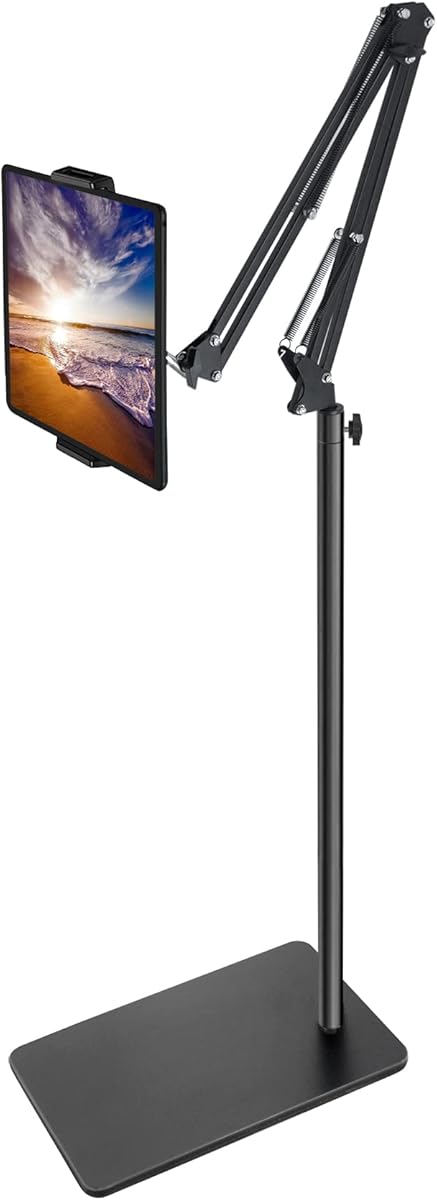
The BluuSuuk Tablet Floor Stand has the highest rating in this comparison at 4.6 and offers a distinctive floor-based alternative to bedside clamps. Its arm can place a phone or tablet between 12 and 57 inches above the floor, while the ball joint rotates through 360 degrees for flexible portrait, landscape, and overhead positioning.
We may earn a commission when you buy through this link, at no additional cost to you.
The stand uses a double-weight base that the manufacturer increased from 3.3 pounds to 6.6 pounds to improve stability. Steel components support the double-support structure, helping the extended arm remain useful for reclining, reading, entertainment, calls, cooking, exercise tutorials, and content creation. The grip is designed to accommodate both phones and tablets.
Its premium feature is reach, but that same feature creates practical limitations. A floor stand takes up more room than a compact clamp, and the maximum supported device weight is under 1.5 pounds. It is therefore better suited to phones, small tablets, and lighter full-size tablets than to unusually heavy professional equipment.
This is the most versatile option for users who do not want to attach anything to the bed. The extended reach makes it useful for king-size beds, recliners, desks, and other areas where a clamped headboard would be inconvenient. It is especially attractive for overhead viewing, video calls, workouts, and bedside entertainment, provided the user has enough floor space and stays within the weight limit.
Because the stand does not clamp to furniture, it can be placed beside or over a bed even when the headboard is rounded, upholstered, too thick, or otherwise unsuitable for attachment. The heavy base supplies the counterweight needed for the longer extension.
The 12-to-57-inch adjustment range allows the screen to be lowered close to the mattress for relaxed viewing or raised for seated use. A 360-degree ball head then fine-tunes the final angle around the user.
We may earn a commission when you buy through this link, at no additional cost to you.
The Foldable Four-Joint Tablet Stand is a 4.1-rated mount designed for beds, bedside tables, headboards, desks, cabinets, and bookcases. Its four joints rotate through 360 degrees, allowing the screen to move between portrait, landscape, horizontal-surface, and vertical-surface positions for different activities.
We may earn a commission when you buy through this link, at no additional cost to you.
A metal frame is intended to provide steadier support than curved holders, particularly when a user touches the screen while reclining. The arm folds down for storage and can extend as far as one meter, giving the device substantial reach from a clamped edge. Installation is tool-free, and the clamp accommodates surfaces up to 62 millimeters thick.
The product’s rating and specifications indicate that this is a flexible support system rather than an immovable display arm. Its metal lower clip is intended for wooden headboards or metal bed boards within the stated thickness, and users may still notice vibration during direct interaction. Those are important constraints for anyone planning to type, draw, or game on the mounted tablet.
The foldable design is the main attraction for users with limited bedside space. It can be attached, extended for viewing, and folded away when not needed, making it convenient for apartments and shared rooms. It is a sensible choice for watching videos, reading, and video calls, with active touchscreen work kept to a minimum.
The multi-joint arm can collapse to a much smaller form for storage beside a bed or on a desk. This makes the stand practical in rooms where a permanently extended arm would interfere with bedding, cleaning, or bedside movement.
Four independent joints let the device reach over a user and rotate without repositioning the clamp. The result is useful for switching from lying down to sitting up or moving between portrait reading and landscape entertainment.
We may earn a commission when you buy through this link, at no additional cost to you.
The MAGIPEA Gooseneck Tablet Holder is a 4.2-rated clamp stand designed primarily for hands-free viewing. Its reinforced aluminum arm is intentionally firm, helping reduce the sagging and wobbling often associated with soft gooseneck mounts while holding the screen at a comfortable reading or video-call position.
We may earn a commission when you buy through this link, at no additional cost to you.
The clamp fits solid headboards, desks, and table edges measuring 0.2 to 3 inches thick. EVA pads improve grip and protect furniture, while TPE pads cushion the device. The arm reaches about 30 inches when extended, and the holder rotates 360 degrees for switching between portrait and landscape orientations.
The manufacturer recommends forming the arm into an S or loop shape for better stability and notes that movement during tapping is inherent to this style. It is therefore not the ideal choice for intensive typing, drawing, or action-heavy games. Devices with protective cases may also need to be removed because the supported thickness should not exceed 0.78 inches.
This stand is a sensible pick for users who mostly read, stream, or join calls while resting in bed. Its reinforced construction and generous reach reduce the need to hold the device, while the protective pads add reassurance for a bedroom environment. Active interaction remains the main limitation, so viewing should guide the purchase decision.
The reinforced construction supports the screen without relying on a very soft spring. Forming the arm into a compact curve distributes the load and can create a steadier viewing position for movies, books, and video calls.
Furniture-facing EVA pads help the clamp grip a headboard or tabletop while reducing scuffing. Device-facing TPE pads provide a softer contact surface and help keep the tablet from shifting during light interaction.
We may earn a commission when you buy through this link, at no additional cost to you.
The CACENCAN 33.5 Inch Tablet Stand is a 4.3-rated, extended-reach mount built with thickened carbon steel alloy, a triangular support structure, and dual adjustable load-bearing spring mechanisms. Its arm reaches up to 33.5 inches, making it particularly useful for larger beds, wide sofas, and desks where the display must bridge a substantial distance.
We may earn a commission when you buy through this link, at no additional cost to you.
The dual-purpose clamp can attach horizontally or vertically to desks, bed frames, headboards, kitchen counters, and shelves up to 1.97 inches thick. A frosted silicone pad improves grip and protects the furniture. Four joints offer different rotation ranges, and the ball connection adds 360-degree movement, 180-degree flipping, and plus-or-minus 25-degree tilt.
The main compromise is device size. Although the stand is called universal, its adjustable holder is listed for 4-to-9.5-inch tablets and 4-to-7-inch phones, so it will not serve larger tablets or portable monitors. Its reinforced construction also makes it less minimalist than a basic flexible arm, and the long arm must be positioned carefully around a sleeping area.
The stand offers useful refinements for a bedroom, including a dedicated charging window and a clamp design intended not to cover device buttons. It also uses damped joints to adjust more quietly. For users with a smaller tablet who need a long reach and frequent angle changes, it is a feature-rich choice, but larger-device buyers should consider a wider-size model.
The 33.5-inch extension is longer than that of most conventional bedside arms. It can place the display over a wider bed or farther from a desk edge, reducing the need to sit very close to the mounted device.
Damped, precision-style joints are designed to reduce creaking during adjustment. This is useful in a bedroom where noise can disturb a sleeping partner and in a video call where repositioning should not create distracting sound.
We may earn a commission when you buy through this link, at no additional cost to you.
The LISEN Two-Clamp Tablet Arm is a 4.3-rated desktop mount featuring separate holders for a tablet and a phone. It supports devices from 4 to 13 inches and is designed for desks, dining tables, kitchen counters, offices, and other surfaces up to 2.83 inches thick.
We may earn a commission when you buy through this link, at no additional cost to you.
Its four main joints rotate 360 degrees, while six adjustable nodes provide additional positioning control. A carbon steel body, anti-shock spring, and thickened joints are intended to resist vibration and sagging. The stated load capacity of 7 kilograms is notably high among the products in this guide and offers a sense of structural support for larger compatible devices.
One clear installation limitation is that the product is not recommended for metallic surfaces. Users also need to confirm that the base has enough edge space to attach securely. The included clamp is a desktop accessory rather than a headboard mount, so it works best when a bedside table or nearby surface is within reach.
This is an attractive choice for people who want to mount more than one small device at once, perhaps keeping a phone beside a tablet during a call. It is also useful for study, cooking, meetings, streaming, and exercise instruction. The multiple adjustment points make it adaptable, while the separate clamps simplify device changes.
Separate tablet and phone clamps allow both devices to be held without forcing a single grip to accommodate different sizes. This is useful during video meetings, messaging, online lessons, or recipe-guided activities.
Carbon steel components, a reinforced spring, and thicker joints form a rigid support structure. The seven-kilogram stated limit also allows the mount to remain within range for compatible 10- to 13-inch tablets.
We may earn a commission when you buy through this link, at no additional cost to you.
The Portable Monitor Tablet Arm is a 4.5-rated heavy-duty clamp mount that accommodates screens from 4.7 to 18.5 inches. That upper range allows it to handle full-size tablets and larger portable monitors, giving it broader appeal than most tablet-specific bedside arms.
We may earn a commission when you buy through this link, at no additional cost to you.
Its three-section arm extends up to 30.3 inches and reaches a maximum height of 31.1 inches. The mount combines 360-degree rotation, 80-degree tilt, and a one-inch ball joint for smooth 90-degree swiveling. Included Allen keys allow each joint to be tightened for a sag-free position, and the arm supports up to 2.2 pounds.
Because it is designed as a heavy-duty desktop monitor arm, it is best used on a desk, sturdy table, or another suitable edge rather than directly on a headboard. The grip depth is 0.91 inches, allowing many protective cases to fit, but the load limit still applies. Users should not infer that its larger size range means it can support every large display.
For an over-bed or bedside setup with a substantial desk, this is one of the strongest options in the list. It offers quiet, controlled positioning, a broad fit range, and a fold-flat profile that reduces the vertical footprint when not in use. Integrated cable channels also help keep charging lines organized.
The rigid arm and adjustable joint tension are closer in design to a desktop monitor mount than a soft bedside gooseneck. That structure is useful for larger screens and makes it easier to return the display to a consistent position after moving it.
The three-fold structure reduces the arm’s vertical profile to 10.24 inches for storage. Integrated cable channels along the arm help route charging cords and reduce tangling around the mounted device.
We may earn a commission when you buy through this link, at no additional cost to you.
The Lamicall Classic Gooseneck is a 4.1-rated flexible arm mount designed for reading, viewing, video calls, and recipe guidance. It attaches to a bed headboard, desk, or table and can raise the device to a comfortable height, reducing the need to hold a phone or tablet for long periods.
We may earn a commission when you buy through this link, at no additional cost to you.
The holder supports devices from 4.7 to 10.5 inches, including common iPad, Galaxy Tab, Kindle, Switch, and phone models. Its flexible arm can be bent to a preferred position, making the mount simple to adapt to different beds and seating arrangements without an elaborate joint system.
The manufacturer is candid that this type of holder wobbles when tapped because of its flexible construction. Looping the gooseneck into an S shape can reduce the movement, and holding the device with one hand while interacting is recommended. That limitation makes it much less suitable for drawing, typing, or games than a rigid monitor-style arm.
The stand is best suited to passive use such as reading an e-book, watching a film, following a recipe, or joining a FaceTime call. Its straightforward design and broad device list make it a practical bedside option, especially for users who prioritize a simple clamp over a heavily articulated mechanism.
The flexible arm can be curved around furniture and brought toward the user without tools or complex joint controls. Bending it into an S shape also creates a more compact support profile that can reduce movement.
Raising the device to a suitable height can help users maintain a more natural viewing angle while reading or watching. The stand’s value comes from consistent placement rather than an elaborate display system.
We may earn a commission when you buy through this link, at no additional cost to you.
The most useful bedside mount is one that matches the furniture, device size, viewing habits, and available space. Stability and reach matter most for entertainment, while active touchscreen use demands a stiffer arm and a more secure connection.
Choose according to the furniture you actually have, not just the product category. Measure the intended mounting area before purchasing and verify both its thickness and structural strength.
Prioritize a fit range that includes your current device and leaves room for a future upgrade. Verify case thickness as well as screen size before ordering.
Measure from the mounting point to the intended viewing position. Prefer a stand whose arm can form a compact curve when fully extended, because a shaped or shorter configuration is usually steadier.
If your use involves constant taps or swipes, choose a rigid arm and a spring or joint designed to resist drooping. For passive viewing, a flexible gooseneck can be perfectly sufficient.
Choose a support capacity comfortably above the weight of your device and case. Tighten adjustable joints as directed, and avoid extending a lightweight arm farther than its design allows.
Prioritize a rotating holder for mixed entertainment and reading. Check that portrait and landscape positions can both lock securely rather than relying on friction alone.
Confirm that the clamp is compatible with the furniture’s material and thickness. Protective pads are useful, but correct placement and a firm mounting point matter more than padding alone.
Choose a folding design if unused space is important. Check the folded dimensions and removal process before choosing a model intended to move between rooms.
Begin by choosing a solid mounting point and confirming that its thickness, shape, and material fall within the product instructions. Clean and dry the surface, then attach the clamp or base with moderate pressure. Position the arm before inserting the device, tightening the joints only enough to remove play while avoiding unnecessary strain on the structure.
Place the device into the holder with the correct edge facing the grip, then adjust the viewing height, distance, and orientation. A small tilt often feels more comfortable than placing the screen directly in front of the face. For flexible gooseneck models, form the arm into a compact S, Z, or loop shape to reduce movement, and avoid forcing it beyond its intended range.
Check the mount periodically for looseness, wobbling, pad wear, or marks on the furniture. Use both hands when repositioning articulated arms, and keep the device supported when installing or removing it. Wipe the grip and base with a soft dry or lightly damp cloth, avoid abrasive cleaners, and retighten the joints if repeated use has loosened them.
No. A clamp works best on a firm, straight headboard, desk, shelf, or table edge within the stated thickness range. Rounded, heavily upholstered, springy, or unusually thick headboards may not clamp securely. A tabletop or floor stand can be a better choice when the bed frame cannot provide a reliable attachment point.
A flexible arm may still move when tapped, particularly when fully extended or holding a larger device. Forming the arm into an S, Z, or loop configuration can improve stability. For frequent typing, drawing, or gaming, choose a rigid articulated mount with strong joint tension rather than a basic gooseneck.
Choose a model whose grip range includes the diagonal size of your tablet and its protective case. Many stands cover approximately 4.7 to 13 inches, while specialized designs support larger tablets or portable monitors. Also check maximum device thickness and weight, since screen dimensions alone do not guarantee a secure fit.
A floor stand is useful when the headboard is unsuitable for clamping, when a long overhead reach is wanted, or when the stand must serve several users. It requires open floor space and a stable location. A clamp saves space and usually keeps the device closer to the mattress, making it more convenient for casual bedside viewing.
It depends on the arm design. Rigid, metal, monitor-style mounts with adjustable joint tension handle active input better, while flexible goosenecks may bounce or droop. If you type frequently, hold the device with one hand or choose a mount explicitly designed for heavier equipment and repeated touch interaction.
First, make sure the clamp is fully seated on a solid surface and the screw or knob is tightened. Then tighten arm joints and shape any flexible gooseneck into a compact curve rather than leaving it straight. If movement continues, move the device closer to the base and avoid heavy touch input.
A secure holder can reduce the risk of dropping a device onto a bed or floor, especially during viewing or calls. It does not guarantee protection from every fall, and a loosely adjusted flexible mount may still allow the device to slip. Always check the grip and joints before leaving a device unattended.
Yes. Most clamp models can also attach to a desk, kitchen counter, cabinet, or shelf, making them useful for recipes, online lessons, video meetings, workouts, and content creation. Check the surface restrictions and reach requirements before moving a mount to a new location.
The Urmust Tablet Stand is the best overall choice for users with a stable bedside table because it combines broad device compatibility, rigid construction, smooth adjustment, and useful cable clips. The Lamicall Tapered Gooseneck is the best budget-style clamp for a solid headboard, while the BluuSuuk Tablet Floor Stand is the premium pick when exceptional reach and heavy-base stability are worth the added floor space.
Prioritize the way you will actually use the device. Choose a rigid articulated or monitor-style arm for frequent typing, drawing, or swiping; choose a flexible gooseneck for passive reading and viewing; and choose a floor stand when furniture attachment is inconvenient or long overhead positioning is needed. Always verify device dimensions, case thickness, weight limits, and mounting-surface requirements before purchasing.
The best mount is the one that holds your device securely, reaches a comfortable viewing position, fits your room, and does not interfere with sleep or daily movement. Confirm the current listing details and included components before ordering, since configurations and seller information can change over time.