
gianotter Dual Monitor Stand Riser
4.5Editor score
No assembly required
Built-in drawer storage
Dual magnetic pen holders
A monitor holder for desk can transform a crowded workstation by lifting your display, recovering valuable surface area, and making it easier to position a screen at a comfortable viewing height. The right holder should suit your monitor’s size, weight, and VESA pattern while fitting the construction and thickness of your desk.
This guide compares ten monitor, laptop, tablet, riser, and dual-screen holders based on their documented specifications, installation methods, adjustment ranges, load limits, cable-management features, and customer ratings. It also distinguishes between clamp-mounted arms, grommet-mounted arms, storage risers, and portable holders so each option can be matched to a specific workspace.
The list reveals how each product approaches a different need, from a single articulating arm to a dual-screen setup or a laptop and monitor combination. Ratings and specifications can change, and current pricing and availability should be checked on the retailer’s listing before making a final purchase decision.
4.5Editor score

4.5Editor score

4.4Editor score
As an Amazon Associate we earn from qualifying purchases.
The comparison below covers ten distinct approaches to holding a monitor or other screen above a desk. Screen support, adjustment range, mounting method, and storage features help distinguish articulating arms, laptop stands, risers, and tablet mounts.




The WALI Adjustable Single Monitor Arm is a versatile option for users who want one substantial screen to float above the desk. It carries a 4.3 customer rating and stands out for its unusually broad size range, supporting regular displays up to 32 inches and curved displays up to 34 inches, subject to the appropriate weight limit. Its maximum flat-screen capacity is 26.4 pounds.
We may earn a commission when you buy through this link, at no additional cost to you.
Adjustment is the strongest part of this holder’s feature set. The arm can extend 19.3 inches, rise 17.3 inches above the desktop, swivel through 180 degrees in either direction, tilt from plus 70 to minus 45 degrees, and rotate a full 360 degrees. Those ranges make it easier to bring a display closer, move it aside, or switch the screen between portrait and landscape orientations.
The mount supports standard 75-by-75-millimeter and 100-by-100-millimeter VESA patterns. Installation can use either a C-clamp or grommet base on wooden desks between 0.39 and 2.76 inches thick. The main trade-offs are a lower 19.8-pound capacity for curved screens, the recommendation to use a wooden surface, and the need to ensure no crossbeam obstructs the underside.
This is a strong recommendation for a single large, flat monitor that needs frequent repositioning and substantial extension. It is less suitable for a curved display near the stated limit or a desk with a metal frame, beam, or other obstruction. Buyers should confirm the monitor’s VESA holes and weight before ordering.
The combination of long extension, broad swivel, generous tilt, and full rotation gives this arm more flexibility than a basic fixed stand. It can accommodate a seated workstation, shared desk, or screen-positioning changes without forcing the whole display unit to move.
Lifting the monitor creates usable space for a keyboard, notebook, docking station, or other daily tools. Built-in cable guides help route wires along the arm, improving the appearance of the workstation while keeping cords away from moving parts.
We may earn a commission when you buy through this link, at no additional cost to you.
The HUANUO Adjustable Monitor Arm with Laptop Tray is designed for hybrid setups that need more than one usable screen position. It has a 4.5 customer rating and combines support for a 13- to 32-inch VESA monitor with a ventilated 14-by-12-inch laptop tray. The monitor arm accommodates displays weighing as much as 22 pounds.
We may earn a commission when you buy through this link, at no additional cost to you.
The arm offers plus or minus 45 degrees of tilt, plus or minus 90 degrees of swivel, and 360-degree rotation. Its height can be adjusted through a 17-inch range, while the laptop arm can extend up to 16 inches. This makes the holder particularly useful when the laptop is used for communication, notes, or document reference beside a primary monitor.
Installation uses an included C-clamp for wooden desks between 0.39 and 3.07 inches thick or a grommet base for wooden desks between 0.39 and 2.36 inches thick. The laptop platform includes ventilation openings and a 0.8-inch bottom lip. These are sensible practical details, although the product is limited to wooden desktops and requires careful tightening of the angle screws.
The holder is best for users who regularly alternate between a laptop and an external monitor or want both devices elevated. It is less appropriate for a metal desk, a glass top without compatible hardware, or a setup that needs to support more than one monitor. Confirm device weight, VESA compatibility, and desktop thickness before installation.
The detachable laptop tray and adjustable monitor arm provide more flexibility than a fixed laptop riser. Users can raise either device, bring the screens closer, and rotate the arrangement as the workday changes.
Ventilation in the tray helps preserve airflow around a laptop, while the projecting lower lip helps keep the device from sliding. The platform is sized for common full-size notebooks without claiming support for every possible workstation.
We may earn a commission when you buy through this link, at no additional cost to you.
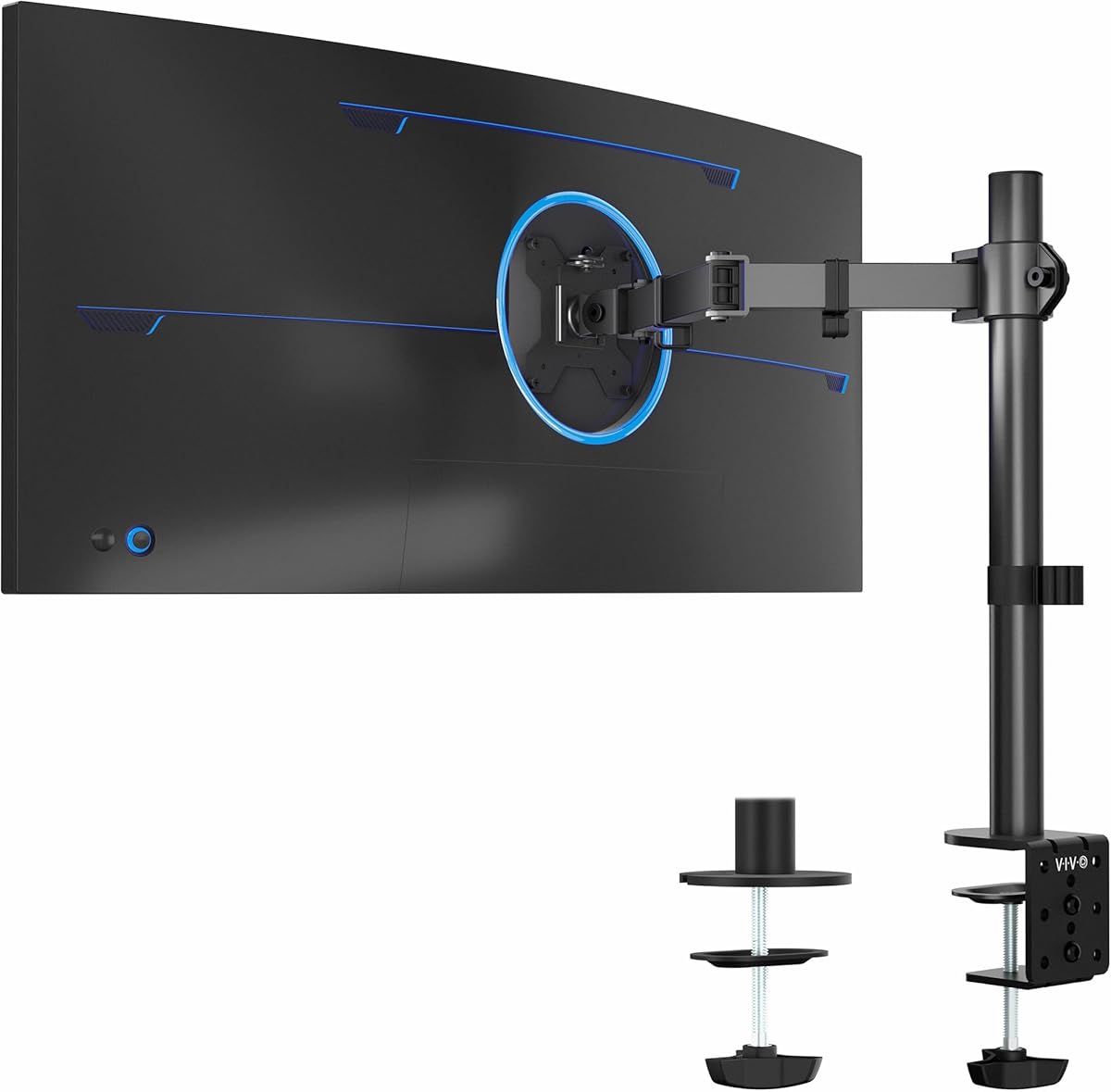
The VIVO Single Ultrawide Monitor Arm is a practical choice for a conventional single-display desk, particularly for owners of an ultrawide monitor. It has a 4.5 rating and supports screens from 13 to 32 inches in the regular format and up to 38 inches when using an ultrawide panel. Maximum supported weight is 22 pounds.
We may earn a commission when you buy through this link, at no additional cost to you.
Its motion controls include plus or minus 90-degree tilt, 360-degree swivel, and 360-degree rotation. The center pole offers up to 16 inches of height adjustment, and the display can be placed in portrait or landscape orientation. These controls suit users who switch among focused work, media viewing, and narrow workspace layouts.
The heavy-duty C-clamp attaches to desks up to 3.25 inches thick using hand-tightened installation without a drill. An optional grommet base is also included. Detachable cable clips on the arms and pole help organize power and audiovisual leads, while the detachable VESA plate simplifies monitor attachment.
This arm is well suited to buyers with an ultrawide screen who want meaningful height, swivel, and rotation control. The hand-tightened clamp and 22-pound limit make it less appropriate for displays that are both exceptionally large and heavy. Users should verify VESA pattern, screen weight, and the available space beneath the desk.
The 38-inch ultrawide allowance gives this arm a clear advantage for wide productivity displays and panoramic entertainment setups. It also accommodates ordinary monitors, so buyers do not need to sacrifice flexibility if the hardware later changes.
The C-clamp can be tightened by hand and reaches desks up to 3.25 inches thick. That makes it less disruptive than a permanently drilled mounting option, provided the desktop structure offers a secure and unobstructed clamping area.
We may earn a commission when you buy through this link, at no additional cost to you.
The HUANUO FlowLift Pro Monitor Arm combines thoughtful calibration features with straightforward assembly. It carries a 4.5 rating and supports 13- to 32-inch screens weighing between 4.4 and 15.4 pounds. The stated load limit is lower than that of several competing single arms, but the holder is built around precise tension control and durable internal components.
We may earn a commission when you buy through this link, at no additional cost to you.
The MechaSpring system is designed to resist the pressure loss associated with some gas-spring mounts. A visible PrecisionView window shows tension movement during adjustment, helping users avoid relying entirely on feel. The LockSteady system is intended to limit droop and allow smooth one-finger repositioning, while the arm includes tilt, swivel, and rotation adjustments for different working positions.
Installation is simplified by a tool-free VESA plate that snaps onto the back of a compatible display. The product supports 75-by-75-millimeter and 100-by-100-millimeter patterns, with a C-clamp or grommet base for wooden desks between 0.59 and 3.54 inches thick. It uses 90 percent professional-grade metal construction and is TÜV Rheinland certified and tested at three times its load.
This is the strongest overall recommendation for someone who values repeatable positioning, easy screen attachment, and stable support over a broad range of light-to-medium-weight monitors. It is less suitable for a heavy professional display above 15.4 pounds, an irregular desk edge, or a non-wooden desk that the manufacturer does not recommend.
The PrecisionView window turns arm tension into a visible adjustment instead of a purely tactile process. This can be especially helpful for users who change monitors, alter the arm’s position, or want the display to remain stable once placed.
The tool-free VESA plate reduces the number of screws that must be aligned while handling a monitor. Once the plate is secured, the display can be attached or removed more quickly, making it convenient for shared or reconfigurable workspaces.
We may earn a commission when you buy through this link, at no additional cost to you.
The COOPER FlexArm Tablet Holder is designed for iPads, portable monitors, and other lightweight portable screens rather than desktop monitors. It has a 4.4 customer rating, and its two-segment aluminum-alloy arm can be positioned as a second screen, hands-free stand, or eye-level support for calls, reading, recipes, and creative work.
We may earn a commission when you buy through this link, at no additional cost to you.
Silicone-padded jaws open between 4.7 and 10 inches, allowing the holder to grip devices from an iPad mini through a larger tablet with a case. The support can hold up to 3.3 pounds. Three re-tightenable tension joints and a 360-degree swivel base make it possible to reposition the device and rotate it between portrait and landscape orientations.
A steel U-clamp accommodates desktop thicknesses up to 3.5 inches, and built-in cable-holder clips help keep a connected device’s cord more orderly. The stated load limit and jaw range are the main constraints. The product is also explicitly unsuitable for bed frames and round posts, so it should be considered a desk product rather than a universal tablet mount.
This holder is best for a home office that wants a flexible second display without installing a standard VESA arm. It is appropriate for iPads and similarly sized portable monitors that fall within the weight and grip specifications. Buyers should not treat it as a full-size monitor arm or assume it can support every tablet accessory.
Raising a tablet to eye level can add a reference screen without occupying the main display position. The arm’s segmented construction makes it possible to bring the device close, push it away, or move it out of the way as tasks change.
Silicone padding helps protect the device from scratches while the jaws expand across a broad range of widths. Re-tightenable joints allow the user to establish a stable position without relying on a single friction point alone.
We may earn a commission when you buy through this link, at no additional cost to you.
The MOUNTUP Dual Monitor Stand is the premium option in this guide for users who want two displays to float above a desk and move independently. It has a 4.4 customer rating and supports flat or curved 17- to 32-inch screens weighing between 4.4 and 17.6 pounds per arm. Each display must use a supported 75-by-75-millimeter or 100-by-100-millimeter VESA pattern.
We may earn a commission when you buy through this link, at no additional cost to you.
Independent positioning is the central advantage. Each connection can be adjusted through 135 degrees of tilt, 180 degrees of swivel, and 360-degree rotation, allowing one screen to face directly forward while the other is angled for collaboration or placed in portrait orientation. The pneumatic system supports smooth movement, while 17.3 inches of extension and 9.4 inches of height adjustment provide useful range.
Installation includes the required hardware, instructions, and a choice of C-clamp or grommet base. The clamp accommodates desktops from 0.39 to 2.76 inches thick. Cables can be concealed within the arms, improving the appearance of a dual-screen workspace. As with other pneumatic systems, the tension must be adjusted correctly for the weight of each monitor.
This is the most fitting recommendation for a productivity desk with two VESA-compatible displays. It is less appropriate for someone who only needs one screen because the assembly is larger and more involved. It may also be unsuitable for extremely heavy displays above 17.6 pounds or desks whose structure does not permit secure clamping.
Each arm can be tuned without changing the position of the other display. That independence is valuable for asymmetric workflows, such as keeping reference material vertical beside a wide document, or angling a secondary screen toward a collaborator.
The pneumatic arms are designed to glide smoothly through their range when tension is properly set. Routing cables through the arms reduces visual clutter and keeps cords closer to the arms rather than hanging behind the screens.
We may earn a commission when you buy through this link, at no additional cost to you.
The WALI Adjustable Laptop Desk Mount is a flexible choice for users who may work with either a notebook or a standard VESA monitor. It has a 4.5 customer rating, supports one laptop up to 17 inches, and can accommodate a monitor with 75-by-75-millimeter or 100-by-100-millimeter mounting holes. The maximum supported weight is 22 pounds.
We may earn a commission when you buy through this link, at no additional cost to you.
The arm can extend, retract, and move through 16 inches of height adjustment. It also offers plus or minus 15 degrees of tilt, plus or minus 90 degrees of swivel, and 360-degree rotation. The detachable mounting plate allows the same basic system to shift between a laptop platform and a VESA display mount.
A ventilated 14-by-11-inch tray includes cooling holes and a 0.6-inch lower lip to help keep a notebook in place. Installation can use a C-clamp for desks between 0.4 and 4 inches thick or a grommet mount for desks between 0.4 and 2.2 inches thick. The larger tray may occupy more surface area than a small laptop riser, even though the arm itself frees desk space.
This mount is recommended for users who want a single mechanism to support different screen types over time. It is well suited to docking-station work, presentations, and laptop-focused offices. It is less suitable for users seeking a compact permanent laptop perch or a dual-monitor arrangement.
Detaching the mounting plate gives the holder flexibility that a dedicated laptop riser cannot offer. A user can move from a notebook to a desktop monitor without replacing the entire clamp or grommet assembly.
The tray’s vent openings allow cooling air from a laptop fan to pass through the platform. The raised bottom lip adds retention without turning the tray into a closed enclosure.
We may earn a commission when you buy through this link, at no additional cost to you.
The gianotter Dual Monitor Stand Riser is the easiest option in the guide to set up because it requires no assembly. It has a 4.5 customer rating and provides a raised platform for two monitors while adding a drawer and two magnetic pen holders. Rather than providing an articulating arm, it focuses on height improvement, storage, and immediate usability.
We may earn a commission when you buy through this link, at no additional cost to you.
The riser’s adjustable monitor height is intended to bring displays closer to eye level, supporting better posture and more comfortable viewing. The area underneath the platform can hold a mouse, keyboard, accessories, or other desktop items that previously occupied the main work surface. The drawer provides additional organization for smaller office supplies.
Construction uses high-strength metal materials, and the patent notice appears in the supplied product information. Since the riser is designed as a freestanding desk accessory, it does not offer the swivel, tilt, rotation, or extension of a clamp-mounted arm. The main limitation is flexibility: the displays cannot be brought toward the user or moved aside as freely.
This is the best budget-oriented recommendation for a straightforward dual-monitor desk, especially for a user who values storage more than elaborate articulation. It is also a good fit for anyone who wants an easy visual upgrade without installing hardware beneath a desktop. Buyers should confirm that the platform is wide and sturdy enough for their two displays.
The under-platform area and integrated drawer turn the riser into both a display support and an organizer. Pen holders add convenient access to frequently used writing tools while helping reduce small-item clutter.
The riser is ready to use after it is unboxed. This makes it convenient for a new workstation, a temporary setup, or anyone who does not want to install a clamp or modify a desktop with a grommet hole.
We may earn a commission when you buy through this link, at no additional cost to you.
The Ergear Single Monitor Mount is a well-rounded articulating arm for standard 13- to 32-inch screens. It carries a 4.5 customer rating, supports displays up to 17.6 pounds, and accepts the common 75-by-75-millimeter and 100-by-100-millimeter VESA patterns. Its design focuses on practical adjustment, easy attachment, and cable organization.
We may earn a commission when you buy through this link, at no additional cost to you.
The steel support pole stands 15.75 inches tall and provides multiple height positions. The arm offers 360-degree monitor rotation, plus or minus 45-degree tilt, and plus or minus 90-degree swivel. These controls allow the display to be raised, angled, or turned when the user needs a different view. A detachable VESA plate and included hardware simplify initial assembly.
Users can choose a C-clamp or grommet installation. The clamp provides a drill-free method on a wooden table whose underside is clear of beams or panels, with a compatible thickness between 0.39 and 3.54 inches. Detachable clips along the center pole route power and audiovisual cables and help keep them out of sight.
This mount is a strong option for a home office, study area, or shared desk with one conventional monitor. It suits users who want meaningful adjustment but do not need the longer extension or higher capacity of heavier-duty arms. Verify the monitor’s weight, VESA pattern, and the space beneath the desk before installation.
Tilt, swivel, rotation, and adjustable pole height cover the most common positioning needs. The result is a screen that can be brought closer for detailed work, turned for collaboration, or returned to a comfortable central view.
Both clamp and grommet bases are included, giving users flexibility based on desk construction. The clamp avoids drilling, while the grommet option can be useful where a permanent opening already exists.
We may earn a commission when you buy through this link, at no additional cost to you.
The MOUNTUP Dual Monitor Desk Mount offers a practical way to place two displays above one desk. It has a 4.4 customer rating and supports flat or curved LCD and LED screens up to 32 inches, with a maximum load of 17.6 pounds per arm. Both monitors must use a supported 75-by-75-millimeter or 100-by-100-millimeter VESA pattern.
We may earn a commission when you buy through this link, at no additional cost to you.
Each arm adjusts independently through 360-degree rotation, plus or minus 90-degree tilt, and 180-degree swivel. Height can be changed along the center pole, and the displays can be moved between landscape and portrait positions. This range accommodates side-by-side productivity, asymmetric reference screens, and setups in which one display is temporarily turned toward another person.
Interchangeable C-clamp and grommet bases are included. The clamp fits desktops between 0.39 and 1.97 inches thick, while the grommet base is compatible with a stated hole diameter range of 0.39 to 2.36 inches. Detachable VESA plates and cable clips make installation and cable routing more manageable.
This is a capable dual-screen holder for users who want more positioning freedom than a fixed riser but do not need the more elaborate pneumatic system of the premium dual-arm option. Its main limitations are the stated desk thickness range and the fact that it is designed specifically for two VESA-compatible monitors.
Independent height, tilt, swivel, and rotation controls make it possible to build an asymmetric screen layout. Each display can be oriented for its own task while sharing a single base and vertical support.
Cable clips help organize and protect the wiring around the shared structure. Keeping leads gathered at the arms reduces clutter behind the monitors and makes the dual-screen setup easier to maintain.
We may earn a commission when you buy through this link, at no additional cost to you.
The right monitor holder depends on the device being supported, the available mounting space, the required adjustments, and the user’s tolerance for installation. Compatibility should be checked before considering any other feature, because a holder that cannot safely support the screen or fit the desk will not improve the workspace.
Begin by comparing the display’s diagonal size and weight with the holder’s documented limits. The products in this guide cover screens ranging from lightweight tablets to conventional monitors and larger panels, with individual capacities extending from 3.3 pounds for the COOPER tablet arm to 26.4 pounds for the WALI single arm’s flat-screen configuration. Size alone does not determine fit, because an ultrawide panel can be wide but remain within the weight limit of an appropriately rated arm.
Most full-size monitor arms connect through a square group of holes on the rear of the display. The common patterns in this selection are 75 by 75 millimeters and 100 by 100 millimeters. A laptop tray and tablet holder do not use the same system; they grip the device or attach to a VESA-equipped portable screen. Buyers should inspect the back of the monitor and confirm that its pattern, weight, and dimensions are explicitly supported.
Desk structure can determine whether a clamp, grommet, or freestanding riser is appropriate. A C-clamp needs a firm edge and an unobstructed area beneath the desktop, while a grommet requires a suitable opening and room around it. Most articulated models in this guide recommend wooden desks, and several specify thickness limits. Crossbeams, panels, frames, and rounded edges can interfere with mounting or reduce stability.
Height adjustment helps bring a screen nearer eye level, while tilt, swivel, rotation, and extension determine how easily it can be shared or repositioned. A user who works alone may need only moderate height movement, whereas a shared desk, gaming setup, or multi-window workflow benefits from a wide swivel and rotation range. Laptop stands should also be assessed for the ability to move the screen close enough for comfortable viewing.
A monitor arm should remain where it is positioned without drifting or sagging. Some models use gas springs, while the HUANUO FlowLift Pro uses a MechaSpring system and a visible tension indicator. Pneumatic models may also require tension tuning according to monitor weight. Stability matters most when the display is large, extended toward the edge of the desk, or touched frequently.
A floating monitor can recover a meaningful portion of the work surface for a keyboard, notebook, docking station, or writing area. Cable clips, internal routing, and guide channels help keep power and display leads controlled. Riser models may create storage beneath the platform instead, but they generally do not offer the same degree of movement as an articulated arm.
A single articulating arm is appropriate for one VESA-equipped monitor, while dual-arm products require two compatible displays. Hybrid laptop-and-monitor mounts can be useful for portable workstations, and risers provide a fixed elevated platform for one or two screens. Tablet holders serve a different category and should not be evaluated against the weight capacity of a full desktop monitor mount.
Clamp and grommet arms usually require assembly, but they save desktop space after installation. Freestanding risers need little or no assembly and can move between workspaces, although they occupy part of the desk. The COOPER tablet arm offers a portable arrangement for lightweight devices but is limited to compatible clamp surfaces. Consider how often the setup will move and how much permanent modification the desk can accept.
Before installation, confirm the display’s weight and VESA pattern, measure the desktop thickness, and inspect the underside for beams, braces, panels, or rounded edges that could obstruct the mount. Decide between a C-clamp and grommet base based on the desk construction. Follow the included instructions, and avoid forcing a clamp into an incompatible surface.
Attach the VESA plate to the monitor while the display is safely supported on a flat surface. Once the arm is secured to the desk, connect the display and set the arm’s tension or resistance before lifting it into place. Adjust the height, swivel, tilt, and rotation gradually, tightening locking screws after reaching the desired position. For laptop trays, confirm that the device is centered and retained by the lower lip.
Periodically check the clamp, grommet screws, pivot bolts, and VESA fasteners, especially after moving the arm or changing displays. Route cables without creating sharp bends or leaving excess length around moving joints. Clean the mount with a soft, dry cloth, avoid harsh chemicals, and keep liquids away from electrical connections. Follow the manufacturer’s cleaning and care instructions for any specialized spring or tension mechanism.
Measure the desktop thickness and inspect the area beneath the edge where a clamp would sit. Most of the articulating arms in this guide recommend wooden desks, while grommet mounts need a suitable hole and unobstructed surrounding space. Check the manufacturer’s limits for thickness, crossbeams, and edge shape before making a selection.
A monitor arm supports a VESA-compatible display above the desk and usually provides tilt, swivel, rotation, and height adjustment. A riser is a fixed shelf that elevates a display and may add storage underneath. Arms generally offer more positioning flexibility, while risers are simpler and can be moved without installation.
VESA compatibility refers to the spacing of the four mounting holes on the back of a screen. Most of the monitor arms listed support both 75-by-75-millimeter and 100-by-100-millimeter patterns. A screen without a compatible rear mounting pattern cannot be attached to those arms, although it may still work with a tray or a freestanding riser.
Some products explicitly support curved screens, but the size and weight limits may differ from those for flat displays. The WALI single arm allows larger curved screens but gives them a lower maximum capacity than flat screens. Always follow the exact product specifications rather than assuming that all displays within the maximum size are interchangeable.
Only a dual-monitor model designed for two independent arms or two supported platforms should be used for that purpose. The MOUNTUP dual stands are built around two displays, while the gianotter riser provides a fixed platform for two screens. Single-arm products generally require the addition of a compatible second mount rather than automatically supporting another display.
A properly sized clamp should sit on a firm, compatible surface without requiring a drilled hole. However, excessive tightening, a thin or irregular edge, or a desk with hidden structural supports can cause damage or instability. Use the specified thickness range, tighten only as needed, and follow the included installation instructions.
Correct tension or resistance calibration is essential, especially with pneumatic and spring-based systems. Set the arm’s adjustment while it is unloaded, install the display, and fine-tune the control according to the manufacturer’s instructions. A monitor outside the supported weight range may also sag, so compatibility is the first step.
A tablet holder is best suited to lightweight tablets and compatible portable monitors, not full-size desktop displays. The COOPER FlexArm supports up to 3.3 pounds and grips devices between 4.7 and 10 inches, so its limits are substantially different from those of the VESA monitor arms reviewed here.
The HUANUO FlowLift Pro stands out as the most complete single-monitor recommendation because it combines visible tension calibration, a tool-free VESA plate, and a stability-focused mechanical design. The gianotter riser is the most straightforward and budget-conscious choice when a dual-display platform, storage drawer, and no-assembly setup matter more than articulation.
For two fully adjustable VESA monitors, the MOUNTUP dual options provide independent positioning, with the pneumatic dual stand serving as the premium choice and the standard dual mount offering a simpler alternative. Users with a laptop should consider the WALI or HUANUO convertible mounts, while anyone using a tablet as a secondary screen can look to the COOPER FlexArm.
Before ordering, verify the holder’s load rating, VESA pattern, desk thickness, and mounting requirements against your exact equipment. Product specifications, ratings, promotions, and availability can change, so check the current retailer listing and current pricing before making the final decision.