
AboveTEK Security iPad Kiosk Floor Stand
4.2Editor score
Fits 9.7-inch to 13-inch tablets
Height adjusts from 29.5 inches
360-degree swivel rotation
Anti-theft screw included
A self service kiosk POS stand turns a compatible display into an organized customer-facing station for ordering, check-in, payments, or information. The right model balances screen support, device security, peripheral access, stability, cable routing, and easy installation while fitting the available counter or floor space.
We compared ten stands using the supplied product specifications, with particular attention to display and tablet compatibility, locking mechanisms, printer or card-reader accommodation, height adjustment, mounting options, and construction. The list covers floor stands, countertop mounts, and dedicated monitor kiosks for different deployment needs.
Each review identifies the product's strongest use case and important limitations, while the comparison table makes the main differences easier to scan. Product details, ratings, availability, and pricing can change, so buyers should confirm the latest specifications and current offer directly before purchasing.
4.2Editor score

5.0Editor score

4.2Editor score
As an Amazon Associate we earn from qualifying purchases.
The table below compares each stand by device compatibility, security, adjustability, and integrated hardware support, helping distinguish dedicated monitor kiosks from flexible tablet-based and countertop solutions.
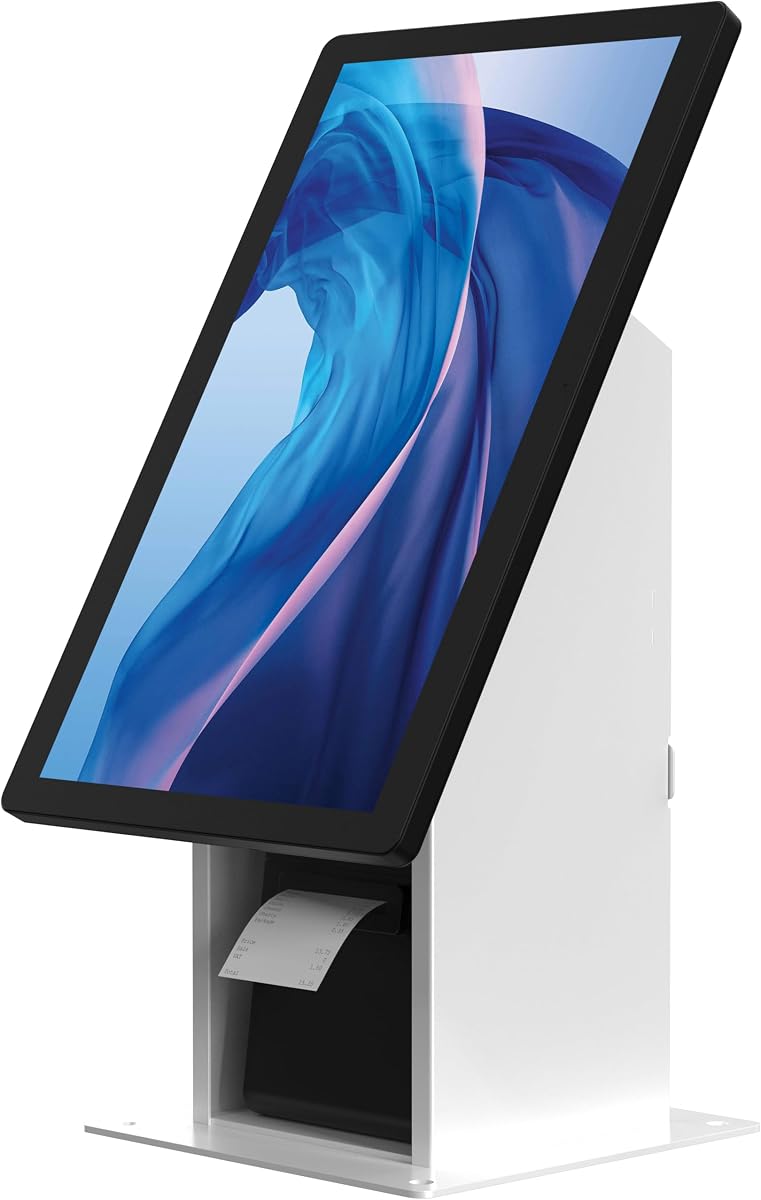



The CTA Self Service Kiosk White is a floor-standing display solution designed to bring a monitor, compact computer, and receipt printer together in a customer-facing POS station. Its 2.5 rating is notably lower than the ratings of the leading options, so buyers should weigh its practical organization features carefully against limited customer feedback.
We may earn a commission when you buy through this link, at no additional cost to you.
Its main attraction is the integrated equipment layout. The stand accepts displays up to 33 pounds using either 75mm or 100mm VESA mounting patterns. A dedicated mini-CPU holder accommodates equipment up to 7.2 inches wide, 7 inches deep, and 1.45 inches high, while the universal printer holder supports receipt printers within specified dimensions.
The heavy-duty metal base includes pre-drilled holes for permanent mounting, which is useful where a freestanding pedestal could be moved or tipped. The enclosure is not supplied, however, and its narrow stated CPU and printer limits mean that compatibility with existing equipment must be confirmed before purchase. The 2.5 rating may also warrant additional reviews or direct manufacturer questions.
This white model is best for a business that already owns a suitably sized display and compact peripherals and values a unified, permanent kiosk footprint. It is less convincing for buyers seeking adjustable tablet positioning, broad model compatibility, or a stronger established rating record. Verify every equipment dimension, then favor a more highly rated stand if flexibility is essential.
Keeping the display, mini-PC, and receipt printer on one metal structure reduces visual clutter and makes the checkout or ordering station easier to present. It is especially relevant where separate shelves and device stands would otherwise occupy substantial counter space.
The pre-drilled base holes offer a stronger commitment to a fixed deployment than a lightweight portable pedestal. This makes the stand better suited to unattended or semi-attended installations where stability and consistent positioning are priorities.
We may earn a commission when you buy through this link, at no additional cost to you.
The CTA Self Service Kiosk Black offers the same core equipment-management concept as the white version, with a darker finish designed to blend into many restaurant, retail, and business environments. It supports compatible displays and compact peripherals, but its 2.5 rating is the clearest reason to compare it carefully with higher-rated alternatives.
We may earn a commission when you buy through this link, at no additional cost to you.
Displays may weigh up to 33 pounds and use 75mm or 100mm VESA mounting. The stand separates the display, mini-CPU, and receipt printer into defined areas, helping create a more professional appearance than devices placed on separate surfaces. Its heavy-duty metal base and pre-drilled holes are useful for creating a permanent customer-facing station.
Compatibility is not entirely open-ended. The CPU compartment has defined maximum dimensions, the printer holder has its own size limitations, and neither the monitor nor the peripheral hardware is included. The stand may also require additional work for cable concealment and device positioning because the supplied description does not identify a height-adjustment mechanism.
Choose the black CTA when a discreet, permanent monitor pedestal is the goal and your existing equipment matches the stated limits. For a flexible iPad setup, a stand with a stronger rating and broader adjustment range will be easier to justify. A careful dimensional check is essential, and buyers who need tablet security should choose a purpose-built locking enclosure.
The black finish is practical for hospitality environments, modern retail interiors, and other locations where a conspicuous white pedestal could feel visually intrusive. Integrated component storage helps the station look more deliberate and finished.
Dedicated CPU and printer spaces are more useful than a simple display pole when the goal is a complete workstation. The arrangement helps prevent peripherals from becoming loose obstacles around the customer interaction area.
We may earn a commission when you buy through this link, at no additional cost to you.
The CTA VESA Floor Stand BSF-2205 is a robust display-based kiosk stand for 21.5-inch or 27-inch screens. It carries a 5.0 rating and stands out for its all-metal construction, generous overall dimensions, printer storage compartment, and built-in card reader bracket, making it a strong candidate for permanent service environments.
We may earn a commission when you buy through this link, at no additional cost to you.
Its display support uses a 100mm by 100mm VESA pattern. The complete stand measures 21.3 by 14.6 by 53.7 inches and weighs 28.7 kilograms, indicating a substantial structure intended to resist movement in busy locations. The printer storage area measures 5.9 by 5.9 by 7.87 inches, while a dedicated card reader bracket simplifies payment-oriented layouts.
The heavy construction comes with trade-offs. A large metal floor stand requires adequate installation space and careful handling, and its weight may be inconvenient if the kiosk must be relocated. The screen, enclosure, and printer are not included, and businesses with different VESA requirements may need an alternative. Buyers should also confirm the printer's dimensions before ordering.
This is our Editor's Choice because it combines a strong supplied rating with the most complete infrastructure for a conventional display kiosk. It suits restaurants, retail environments, and service points that want a stable station for ordering or payment. Choose it when the specified display size, VESA pattern, footprint, and printer bay match the planned equipment.
The 28.7-kilogram all-metal structure gives the kiosk a substantial, stable appearance. That stability is valuable where users repeatedly tap the screen, approach the station closely, or where a lightweight pedestal would be easier to displace.
The integrated card reader bracket and enclosed printer area address two common self-service requirements directly. This reduces the need to add separate accessory mounts and helps concentrate the payment workflow around the display.
We may earn a commission when you buy through this link, at no additional cost to you.
The Mount-It! POS Kiosk Floor Stand converts a standard commercial monitor into a self-service check-in or point-of-sale station. It supports 15-inch to 22-inch screens up to 22 pounds, accepts two common VESA sizes, and includes a printer bay and payment terminal bracket. Its supplied rating is 2.0, so it should be considered alongside more strongly reviewed products.
We may earn a commission when you buy through this link, at no additional cost to you.
The standout design choice is a fixed 30-degree tilt intended to make touch interaction comfortable for standing customers and staff. A fixed 49.1-inch height targets standard standing interaction at counters or in open-floor areas. Heavy-gauge steel, a weighted base, an integrated printer bay, and a bracket for common payment terminal families create a focused commercial package.
The stand is not as universally accommodating as some tablet models. It is limited to 22-inch screens and 22 pounds, making it unsuitable for larger displays. The printer bay and terminal bracket also work best when peripherals fall within the stated compatibility, and the fixed height and angle may not suit seated, lower, or unusually tall users.
This model makes sense for restaurants, clinics, reception areas, and retail shops using a smaller commercial touchscreen and seeking integrated payment and printer support. However, the 2.0 rating is the biggest concern and should prompt buyers to seek more customer feedback. If a broader size range or adjustable viewing angle is needed, a higher-rated alternative may be wiser.
The 30-degree display position is tailored for touch use rather than passive viewing. It may reduce awkward wrist angles and keeps controls closer to the natural interaction position for customers standing at the station.
A dedicated printer bay and payment terminal bracket keep essential transaction equipment within one footprint. This is more useful for a complete POS station than a basic tablet mount that leaves accessories scattered across a counter.
We may earn a commission when you buy through this link, at no additional cost to you.
The Square Stand for iPad is a compact mounting solution centered on self-service ordering and Square payments. It can be affixed to a wall, countertop, or another 100mm by 100mm VESA-compatible surface, making it unusually flexible compared with most products in this list. Its 4.4 rating reflects a generally favorable supplied customer score.
We may earn a commission when you buy through this link, at no additional cost to you.
Guiding LED lights help direct customers through checkout, while the iPad-based design can support ordering, customization, and payment workflows. The included mounting hardware and step-by-step instructions are intended to simplify setup without an installation visit. Businesses can place the station where it best serves their floor plan rather than relying on a fixed floor pedestal.
The stand is tightly connected to the Square Kiosk ecosystem. Using its full payment and guided-checkout functions requires downloading the app and subscribing to the appropriate service. It is therefore less suitable for a business committed to a different payment platform or requiring a fully integrated printer compartment and a broader range of supported tablets.
This is a strong pick for small restaurants, cafés, and retail counters that already use or are comfortable adopting Square for ordering and payment. Its mounting flexibility makes it particularly attractive when floor space is limited. Confirm the payment platform and recurring service requirements before purchase, and verify that the intended mounting surface is appropriate.
Wall, countertop, and VESA-compatible mounting options make this stand unusually adaptable. A business can position the ordering screen close to service areas or in a customer queue without committing to a large floor structure.
The LED guidance system helps users understand where to focus and proceed during checkout. Combined with the Square Kiosk app, it can create a more structured experience for customers ordering without immediate staff assistance.
We may earn a commission when you buy through this link, at no additional cost to you.
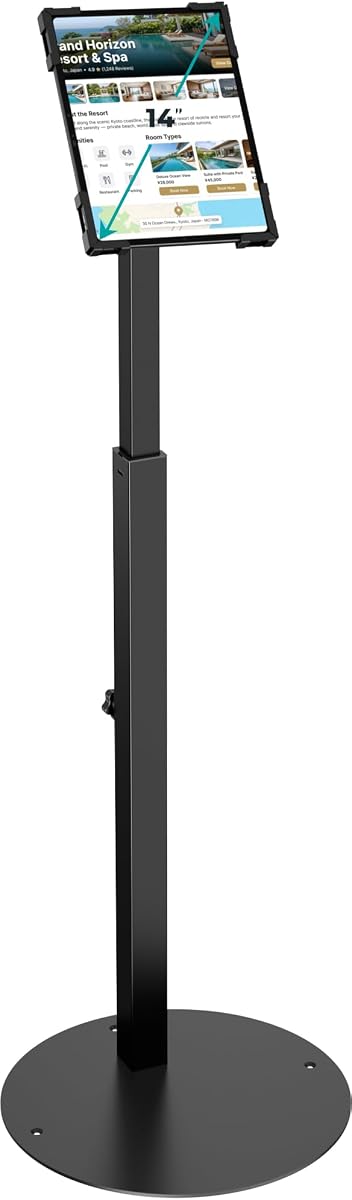
The AboveTEK Security iPad Kiosk Floor Stand offers a practical combination of tablet security, adjustability, and cable management. It fits tablets from 9.7 to 13 inches, including specified iPad, iPad Pro, and iPad Air models, and carries a 4.2 rating. The included anti-theft screw and specialized wrench help protect a device in public environments.
We may earn a commission when you buy through this link, at no additional cost to you.
The pole height adjusts from 29.5 to 45.3 inches, allowing the display to suit different counters, users, and installation heights. The holder rotates 360 degrees and tilts from minus 90 to 90 degrees, giving operators considerable freedom to switch between customer interaction and staff use. A heavy-duty steel frame, 5.3-pound base, and hidden cable management round out the physical design.
The security mechanism is not equivalent to a full lock-and-key enclosure, and the broad size range should not be mistaken for universal support for every tablet or case. Buyers should verify device thickness, dimensions, mounting fit, and app requirements. The stand is optimized for tablets rather than standard monitor VESA patterns, and it does not provide a dedicated printer bay.
This is our Best Budget pick because it covers the core needs of a modern tablet kiosk at a focused, entry-level level: locking, height adjustment, broad rotation, and tidier cables. It is appropriate for retail stores, offices, public information points, and service counters. Choose a lock-and-key model instead when stronger physical deterrence is essential.
The anti-theft screw deters casual removal while retaining an open tablet design. This can simplify app access and maintenance compared with a fully enclosed security stand, although it is not the same level of restraint as a keyed enclosure.
A 29.5-to-45.3-inch adjustment range and 360-degree swivel give operators much more control than fixed-angle stands. This makes the unit useful across counters, reception points, and shared environments where users of different heights need access.
We may earn a commission when you buy through this link, at no additional cost to you.
The AboveTEK Anti-Theft iPad Stand is designed for businesses that need stronger physical protection than a simple tablet clamp. It uses a lock-and-key mechanism within an aluminum and steel frame, carries a 4.4 rating, and provides a 27.6-to-45.3-inch height adjustment for varied customer and staff use.
We may earn a commission when you buy through this link, at no additional cost to you.
The holder supports a defined group of 9.7-inch and 10.2-inch iPad, iPad Air, and iPad Pro models, with a tilt range of minus 90 to 90 degrees. Its attachable base includes screw holes for added anchoring, while an anti-slip pad supports everyday stability. Integrated cable management keeps charging cords organized and less exposed.
The model list is narrower than the headline tablet size might imply, so buyers must confirm the exact device generation before ordering. Even with a strong frame, stability depends partly on whether the base is properly anchored. It also lacks a built-in printer compartment and payment-terminal bracket, which may require separate accessories if the POS setup includes them.
This stand is best for retail environments, restaurants, trade shows, and other public areas where a locked tablet is important. It offers a better balance of security, adjustment, and professional appearance than an unsecured pedestal. Confirm device fit and decide whether fixed floor anchoring is necessary for the intended traffic level and location.
A lock-and-key enclosure is better suited to unattended customer-facing hardware than a screw-secured open clamp. It reduces the likelihood of casual device removal and supports a more permanent kiosk presentation.
The broad tilt and height adjustment preserve usability despite the protective enclosure. Users can change the display angle for interaction, demonstrations, or staff workflows without removing the tablet from its protected setting.
We may earn a commission when you buy through this link, at no additional cost to you.
The Mount-It! Anti-Theft Universal Tablet Floor Stand is a premium, multi-purpose kiosk option for retail POS, check-in, digital menus, and shared interaction points. Its 4.2 rating is supported by a wide range of thoughtful features, including keyed device security, broad tablet compatibility, open peripheral access, and permanent floor-mounting provision.
We may earn a commission when you buy through this link, at no additional cost to you.
The adjustable clamp is designed for bare tablets from 7.9 to 11 inches and does not support devices while they remain inside a case. Unlike fully enclosed kiosks, the open design leaves the audio jack accessible for Square, PayPal Here, and other audio-jack card readers. The stand rotates 360 degrees, tilts plus or minus 90 degrees, and moves between portrait and landscape without tools.
Cable alignment clips route charging and data cords along the pole while keeping the charging port accessible. The 9.4-pound steel stand rests on a 13.6-by-17.4-inch triangular base, or it can be bolted down through pre-drilled holes for demanding installations. The base is substantial, so footprint and placement around customer traffic should be considered before assembly.
This is our Best Premium pick for buyers willing to prioritize lifetime backing, broad compatibility, and flexible orientation. It is particularly valuable when audio-jack readers, shared usage, and permanent stability matter. Make sure the tablet is bare, check its physical dimensions, and use floor bolting in high-interaction locations where maximum stability is required.
Keeping the audio jack accessible gives the open clamp a meaningful advantage over enclosed tablet kiosks. Businesses using Square, PayPal Here, and compatible audio-jack readers can retain a secure mount without sacrificing that connection.
The weighted triangular base supports freestanding use, while pre-drilled holes allow permanent anchoring. This gives the stand a useful balance between mobility and the stability required in busy customer environments.
We may earn a commission when you buy through this link, at no additional cost to you.
The Anti-Theft iPad Kiosk Stand is built for larger tablets and demanding checkout environments. It supports most 10- to 14-inch devices up to 0.39 inches thick, covers 12.9-inch and 11-inch iPad Pro sizes as well as Galaxy Tab and Surface Pro devices, and holds a 4.4 rating.
We may earn a commission when you buy through this link, at no additional cost to you.
Security relies on specialized screws and a custom wrench that make unauthorized removal more difficult. The thick 13.78-inch solid steel base has pre-drilled holes for optional floor mounting, providing a stronger anti-tipping foundation than many lighter tablet pedestals. The pole adjusts from 29.53 to 45.28 inches and supports 360-degree rotation with 180-degree tilt.
Cables can pass through the hollow center pole and exit at the base, reducing exposed wiring and trip hazards. The large base and adjustment hardware make the stand less convenient to move after installation, while the maximum device thickness must be respected to avoid improper clamping. The product also has a newer listing profile than several established alternatives.
This is a compelling choice for stores using a larger iPad Pro, Galaxy Tab, or Surface Pro for checkout, registration, or self-service information. Its hidden cable routing and optional bolting are particularly valuable in polished commercial spaces. Confirm the tablet's width, height, and thickness before ordering, and consider anchoring if customers will interact forcefully.
The ability to hold larger 12.9-inch and 14-inch-class devices makes this stand useful for interfaces that need more visible information. It also gives businesses room to standardize on a larger screen for product catalogs, registration, or ordering.
Internal pole routing keeps charging cables away from the walking area and the visible face of the stand. This is especially helpful in retail and corporate environments where a tidy installation affects the perceived quality of the service.
We may earn a commission when you buy through this link, at no additional cost to you.
The CTA Anti-Theft Kiosk Stand is a locked tablet POS station that combines device security with dedicated spaces for a card reader and receipt printer. It carries a 5.0 rating and supports a broad list of iPad generations, selected Galaxy Tab models, and Surface Go devices, making it one of the most complete tablet kiosks in this comparison.
We may earn a commission when you buy through this link, at no additional cost to you.
The lock-and-key mechanism secures the tablet inside the enclosure. A width-adjustable card reader holder accommodates readers of different sizes, while a dedicated front area is reserved for a receipt printer. The metal accessory bracket can attach on either the left or right side, allowing the final layout to suit operator and customer flow.
The long compatibility list covers numerous iPad Air, iPad Pro, and standard iPad generations along with specified Samsung and Surface models. That breadth is helpful, but exact generation and dimensions should still be checked before purchase. Buyers must also confirm that their preferred card reader and printer fit the available spaces and that the software workflow supports the enclosed arrangement.
This stand is best for a complete tablet-based checkout where security, payment hardware, and printing all need a dedicated home. Its 5.0 rating and integrated accessory design make it particularly attractive for retail and warehouse environments. It is a strong alternative to simpler tablet pedestals when a secure, organized, full-station presentation matters more than maximum position adjustment.
The adjustable reader holder and printer space are integrated into the same structure as the secured tablet. This creates a cohesive station and reduces the need to improvise separate mounts for transaction hardware.
A physical lock-and-key system is well suited to kiosks in public business environments. It limits casual removal while presenting a more finished customer-facing appearance than an exposed tablet clamp.
We may earn a commission when you buy through this link, at no additional cost to you.
The best self service kiosk POS stand is the one that securely supports your chosen display, accommodates the required peripherals, suits the installation site, and remains comfortable for customers to operate.
Choose a stand that explicitly supports your device and intended orientation.
Match the locking system to the value of the device and level of public access.
Verify printer and reader dimensions before assuming the station is complete.
Prioritize adjustment when users, counters, or applications will change.
Use floor anchoring when stability matters more than portability.
Plan cable routing before final positioning to avoid exposed trip hazards.
Choose the mounting format that fits the available floor and counter space.
Confirm the included hardware, instructions, and support before ordering.
Unpack the stand over a protected surface, inventory the included hardware, and read the assembly instructions before attaching the display or tablet. Assemble the base and pole at the intended location, then confirm that the footprint will not obstruct customers, staff, cleaning routes, or emergency access. Connect power and data cables only after the mount is secure and the device is correctly oriented.
Install the display or tablet according to the specified VESA pattern or clamp procedure without over-tightening fasteners. Attach a compatible card reader, receipt printer, and other accessories within their stated size limits. Route cables through the provided clips, channels, or pole openings, leaving enough slack for rotation and tilt but avoiding loose loops near the floor.
For daily care, wipe the metal surfaces and tablet or screen with a soft, lint-free cloth appropriate for the display finish. Avoid abrasive cleaners and excessive moisture around openings, locks, and cable passages. Periodically check fasteners, base stability, cable connections, and security screws, especially in high-traffic locations where repeated tapping may gradually loosen an adjustment.
A tablet kiosk stand clamps a specific tablet size or model, while a monitor POS stand uses a VESA mounting pattern and supports a stated display size and weight. Tablet stands often emphasize device security and rotation, whereas monitor kiosks commonly provide larger bases and dedicated printer or card-reader compartments. Choose according to the equipment already in use and the peripherals required.
It depends on the locking design. A screw-secured open clamp is usually easy to release, while a keyed enclosure may require a specific key and more careful removal of covers or accessory brackets. If technicians need frequent access, compare the removal process and cable arrangement before buying. Regular cleaning and power maintenance should always be performed with the device safely supported.
Some models are designed with dedicated printer storage and payment-terminal brackets, while others require separate accessories. The included compartment may support only particular printer dimensions, and card readers vary in width and mounting style. Compare the measurements of every device against the stand's specifications before assuming it can serve as a complete POS station.
Permanent anchoring is generally advisable in busy, unattended, or high-interaction locations because it reduces movement and tipping. A weighted base may be sufficient for lower-traffic or temporary installations. Use the manufacturer's designated holes and appropriate fasteners, and confirm that anchoring will not interfere with flooring, cleaning, or relocation plans.
VESA patterns are expressed in millimeters and refer to the distance between the four mounting holes on the display. The two patterns listed for the CTA and Mount-It monitor stands are 75mm by 75mm and 100mm by 100mm, while the CTA BSF-2205 uses 100mm by 100mm. Measure the monitor's mounting holes rather than relying only on screen size.
No. Universal tablet stands may cover a broad dimensional range while still excluding certain cases, ports, or model generations. The Mount-It! anti-theft stand requires a bare tablet, and the AboveTEK keyed model lists specific compatible iPad versions. Check the exact width, height, thickness, camera access, and charging-port location before purchasing.
The correct height depends on whether customers stand, the height of the surrounding counter, and whether staff also operate the screen. A fixed 49.1-inch model targets standing use, while adjustable tablet stands can accommodate a wider range of users. Choose a position that keeps content easy to see and touch without encouraging users to lean into the stand.
Most products in this guide are stands rather than complete POS systems, so the display, tablet, computer, printer, and reader are generally separate. Always read the included-items information and product description carefully. The CTA and Mount-It models specify compatibility for particular devices, and some explicitly state that the monitor, enclosure, or printer is not included.
The CTA VESA Floor Stand BSF-2205 is the strongest overall choice for a conventional display kiosk because it combines a 5.0 rating, all-metal construction, printer storage, and a card reader bracket. The AboveTEK Security iPad Kiosk Floor Stand is a capable budget-oriented tablet option, while the Mount-It! Anti-Theft Universal Tablet Floor Stand offers the most premium mix of compatibility, security, positioning control, and lifetime backing.
Most buyers should prioritize exact device compatibility, required peripheral access, and stability before appearance. A monitor-based deployment needs the correct VESA pattern and sufficient screen weight, while a tablet deployment must account for model generation, thickness, case fit, security, and charging access. Installation space and anchor requirements are just as important as the stand's listed features.
Ratings, configurations, availability, and prices can change, so check the current listing and manufacturer details before ordering. Measure the display or tablet, printer, card reader, and available installation area, then confirm the stand's current specification and warranty terms. Those checks will help ensure that the selected self service kiosk POS stand fits the complete point-of-sale setup as planned.