
ARESGAME AGV Series 500W
4.4Editor score
500W continuous power output
80 Plus Bronze efficiency
Five-year warranty coverage
Quiet 120mm cooling fan
Our guide compares the best cheap power supply for gaming PC options, covering wattage, efficiency, modularity, connectors, protection, fan noise, and case fit.
A gaming PC power supply must deliver stable electricity to the graphics card, processor, motherboard, and every other connected component. Good value depends on more than wattage: efficiency, connector support, electrical protections, thermal behavior, and case compatibility all influence whether a budget-friendly unit is genuinely suitable for a modern gaming system.
We compared ten power supplies using the specifications and feature details supplied for each model. The list covers 500W through 1000W units, fixed and modular cabling, Bronze and Gold efficiency levels, conventional ATX designs, and newer ATX 3.1 or PCIe 5.1 platforms so readers can match equipment to their build.
Each review identifies the product's strongest use case and the compromises worth considering. Three standout selections represent an affordable entry point, a versatile high-performance option, and a more premium ATX 3.1 choice, while the remaining models cover compact, RGB, non-modular, and high-wattage alternatives. Availability and market conditions can change.
4.4Editor score

4.7Editor score

4.6Editor score
The comparison table highlights the most important differences among wattage, efficiency, cabling, connector standards, and protective features, making it easier to narrow the field before reading the detailed reviews.



The Thermaltake SMART 600W is a conventional ATX power supply rated for 600 watts and carries a 4.5 customer rating. It is aimed at builders who want established 12V performance without paying for a modular design or the newest connector standard. Its strongest qualities are a clearly specified 600W capacity, active power factor correction, and a dedicated focus on reliable 12V delivery under varying system loads.
We may earn a commission when you buy through this link, at no additional cost to you.
This model complies with Intel ATX 12V 2.31 and EPS 12V 2.92 standards. Its 80 Plus Certified rating indicates about 80 percent efficiency under typical loading, which helps limit waste heat inside the case. Two PCIe 6+2-pin connectors are enough for many midrange graphics cards, while a minimum 16-millisecond hold-up time within 60 percent load gives it a useful margin for stable power delivery.
Protection is a meaningful strength. Overpower, overvoltage, and short-circuit protection help guard against electrical faults, while active PFC improves the relationship between input current and voltage. The limitation is its older ATX 2.3 foundation. It does not advertise ATX 3.1 transient handling or a native 12V-2×6 cable, making it less appropriate for a build centered on a very new high-power graphics card.
It remains a sensible option for a gaming system with a moderately powerful CPU and GPU that use conventional PCIe power connectors. Buyers should verify their exact graphics-card cable requirements and leave reasonable capacity above expected component draw. For such a build, the Thermaltake provides a straightforward, well-protected 600W option with a five-year warranty and proven rating.
The powerful 12V rail is designed to handle changing loads while maintaining stable delivery. This focus makes the unit more relevant to a gaming build than a general-purpose supply with less emphasis on high-current output.
Overpower, overvoltage, and short-circuit protection add an important layer of system safety. The stated 100,000-hour MTBF figure further supports its positioning as a durable conventional option.
We may earn a commission when you buy through this link, at no additional cost to you.
This 1000W fully modular power supply is the most future-focused model in the guide, with a 4.6 rating and support for ATX 3.1 and PCIe 5.1. It is designed for ambitious gaming systems that need generous capacity, modern graphics-card connectivity, tidy internal wiring, and useful features for easier installation. The native dual-color 12V-2×6 cable is especially important for current high-end GPUs.
We may earn a commission when you buy through this link, at no additional cost to you.
Its 80 Plus Gold certification is stated at 92 percent efficiency, helping reduce the amount of heat generated during typical operation. A fully modular design means unused cables can remain out of the chassis, improving airflow and making the build easier to manage. The standard 150-by-150-by-86-millimeter enclosure is intended to fit most mainstream ATX cases without requiring an unusually compact enclosure.
The power platform is designed around the increased electrical demands of contemporary components. ATX 3.1 compliance provides support for power spikes and transient excursions, while the 12V-2×6 connection can deliver up to 600W to compatible PCIe 5.1 graphics cards. A yellow section on the connector helps make correct seating easier to identify, reducing the risk of an incomplete connection.
This is not the logical choice for a modest gaming PC, where its 1000W rating and advanced features would be unnecessary. It makes the most sense for a high-end processor and graphics-card combination, a heavily upgraded system, or a builder who expects to expand later. The included tester, cable comb, and ties further improve the ownership experience.
The native 12V-2×6 cable and ATX 3.1 design target contemporary GPUs directly. This reduces reliance on older adapters and provides a more appropriate platform for high transient loads.
Full modularity removes unnecessary cables from the case, while 80 Plus Gold efficiency helps limit waste heat. The result is a cleaner interior and potentially better airflow around sensitive components.
We may earn a commission when you buy through this link, at no additional cost to you.
The ARESGAME AGV Series 500W is a straightforward budget-conscious ATX power supply with a 4.4 customer rating. It supplies 500 watts of continuous power and carries 80 Plus Bronze certification, making it a practical fit for entry-level and mainstream gaming builds that do not need the transient handling or high capacity expected from a modern premium platform.
We may earn a commission when you buy through this link, at no additional cost to you.
Bronze certification provides 85 percent efficiency or better under typical loads. That efficiency helps reduce heat and energy use without requiring the more advanced platform found in higher-tier models. The 120mm ultra-quiet fan provides cooling, while black cables avoid the visually distracting mixed-color wire bundles associated with many entry-level units.
The main compromises are capacity and cabling. A non-modular design means every supplied cable must be routed into the case, even when it is not needed. Five hundred watts can work well with a mainstream CPU and suitable graphics card, but it leaves less margin for a power-hungry GPU, extensive expansion, or future upgrades. Buyers should calculate expected component demand and avoid stretching the unit to its limit.
Despite those limitations, the included overvoltage, undervoltage, overpower, and short-circuit protections make it a reassuring option for a first gaming PC. The five-year warranty is also meaningful. It is best suited to a sensible, balanced build where quiet operation, efficiency, and essential protection matter more than modularity or support for the newest graphics-card power standard.
The 80 Plus Bronze certification confirms at least 85 percent efficiency under typical loads. This helps contain heat and running costs while remaining appropriate for a cost-conscious gaming system.
OVP, UVP, OPP, and SCP protections cover several common electrical fault categories. These safeguards make the 500W model more convincing as a long-term component in a first build.
We may earn a commission when you buy through this link, at no additional cost to you.
The CORSAIR RM750e combines 750 watts of capacity with modern ATX 3.1 support, giving it a 4.6 rating and a broad appeal for performance gaming systems. It occupies a useful middle ground: substantially more headroom than a 500W or 600W unit, but without the extreme size or unnecessary reserve of a 1000W design.
We may earn a commission when you buy through this link, at no additional cost to you.
Its ATX 3.1 certification is particularly valuable because it supports PCIe 5.1 platforms through handling of twice-transient GPU power excursions. Fully modular cabling lets builders route only the leads they need, improving airflow and reducing clutter. The design also includes 105-degree-rated capacitors and modern standby support for fast wake-from-sleep operation and better low-load efficiency.
Noise is addressed with a 120mm rifle bearing fan and a calculated fan curve intended to remain quiet even at full load. This is useful for gaming systems that run long sessions and for builds where the power supply is visible through a side panel. As with every highly rated fan, actual noise will depend on case placement, load, and the rest of the system.
The RM750e is a strong recommendation for a modern gaming PC using a powerful processor and graphics card, particularly when ATX 3.1 readiness matters. It may be more than a modest build requires, but its capacity is easier to justify than 1000 watts. Buyers should still confirm which cables their graphics card requires before finalizing the purchase.
Seven hundred fifty watts offers meaningful upgrade headroom without reaching the extremes of a 1000W supply. It is a sensible target for a modern high-performance gaming configuration.
Modern standby support is designed to improve wake-from-sleep behavior and low-load efficiency. These details can matter in a PC that spends substantial time idle, gaming menus, or downloading.
We may earn a commission when you buy through this link, at no additional cost to you.
The Segotep 650W is a Gold-certified ATX power supply with a 4.6 rating and a notably generous set of four PCIe 6+2-pin connectors. It is aimed at mainstream gaming PCs that may use a powerful single graphics card, multiple supported cards, or additional expansion hardware. Its single 12V output design emphasizes high-amperage delivery.
We may earn a commission when you buy through this link, at no additional cost to you.
The 80 Plus Gold certification improves efficiency and reduces the amount of heat entering the case compared with a less efficient design. Four 12V 6+2-pin cables can support compatible 40-series graphics cards according to the supplied specifications. This is a meaningful advantage over models that provide only two PCIe connectors, particularly for builds with multiple expansion cards.
Global voltage adaptation makes the unit suitable for use in different regions, which is a helpful feature for travelers or buyers relocating a computer. The non-modular design is the chief inconvenience, although the detachable ends of the PCIe cables can improve routing around the rest of the fixed wiring. It does not advertise ATX 3.1 transient support or a native modern GPU connector.
This Segotep is a good match for a 650W gaming build that values efficiency and connector availability over the newest platform. It is less suitable for a brand-new high-end GPU requiring a 12V-2×6 or 12VHPWR connection. For supported conventional hardware, it provides an effective blend of capacity, efficiency, and flexible graphics-card wiring.
Four PCIe 6+2-pin cables give builders more options than a typical two-connector budget unit. Detachable two-pin sections also allow the leads to fit a wider range of older and newer graphics cards.
The Gold rating and single 12V emphasis are useful for gaming systems that draw uneven loads. Global voltage adaptation adds flexibility for owners who move their equipment between regions.
We may earn a commission when you buy through this link, at no additional cost to you.
The GAMEMAX RGB-850-SE combines 850 watts of capacity with fully modular wiring and coordinated lighting, earning a 4.4 customer rating. It is a strong aesthetic option for a colorful gaming system that wants a modern power platform without moving to a 1000W enclosure. Its ATX 3.0 and PCIe 5.0 readiness also make it more relevant to recent graphics hardware than older ATX designs.
We may earn a commission when you buy through this link, at no additional cost to you.
Its power-excursion claims are substantial: up to 200 percent total system excursion and 300 percent GPU power excursion. The stated goal is compatibility with high-performance NVIDIA 40-series graphics cards. Its 80 Plus Gold rating provides 90 percent efficiency or higher under typical loads, helping reduce internal heat as the system operates.
The RGB lighting can synchronize with software from most mainstream motherboards, allowing the power supply to participate in a broader lighting theme. A 140mm ultra-quiet fan handles cooling, while Japanese capacitors and DC-DC conversion support stable output. The fully modular design removes unused cables and helps maintain a clean interior. The five-year warranty adds confidence to the package.
This is a compelling recommendation for builders who want substantial capacity and visual customization in one unit. It may be excessive for a modest system, and RGB is not essential to performance. A traditional case or a restrained build might prefer a simpler model. For a coordinated gaming rig with a demanding GPU and modern motherboard, however, the RGB-850-SE offers an attractive combination of features.
Synchronized RGB lets the power supply blend into an existing motherboard lighting scheme. The effect is cosmetic, but it can make an otherwise functional internal layout feel more cohesive.
ATX 3.0 and PCIe 5.0 readiness improve compatibility with recent graphics hardware. The advertised excursion allowances provide a more relevant foundation for power-hungry components.
We may earn a commission when you buy through this link, at no additional cost to you.
The MSI MAG A650BN is a compact 650W power supply with a 4.7 customer rating, the highest among the products in this guide. It offers a practical middle ground for mainstream gaming builds: more capacity than an entry-level 500W model, a compact format for smaller cases, and a feature set centered on stable electrical performance rather than lighting or modular convenience.
We may earn a commission when you buy through this link, at no additional cost to you.
Active PFC improves power factor, while DC-DC circuit design supports cleaner regulation of lower-voltage rails. The industrial-level protection suite includes overvoltage, overcurrent, overpower, over-temperature, and short-circuit protection. These safeguards cover several ways a power supply can encounter abnormal conditions, making the unit an appealing choice for a dependable everyday gaming system.
Its low-noise fan is designed to keep sound down during normal operation. That advantage is tempered by the fixed cable arrangement, which can complicate routing in a compact chassis. The A650BN also does not advertise ATX 3.1 support or a native modern graphics-card connector, so buyers with very new hardware should verify the required connection method before committing.
It is our Editor's Choice because it balances capacity, compactness, protection, and customer satisfaction without unnecessary styling. The five-year warranty strengthens the proposition for a long-term build. The MSI MAG A650BN is best suited to a conventional 650W gaming PC with a suitably supported GPU, particularly when case space and dependable core features matter most.
The compact enclosure is useful for builders working with limited PSU bays. It offers 650 watts without requiring the larger dimensions associated with some high-capacity modular models.
Active PFC, DC-DC conversion, and five categories of protection form a practical foundation. These features prioritize stable output and fault handling rather than decorative extras.
We may earn a commission when you buy through this link, at no additional cost to you.
The MSI MAG A650BE is a compact semi-modular PSU with 650 watts of capacity, Bronze efficiency, and a 4.7 customer rating. It offers a useful middle ground between a fully fixed-cable budget unit and a premium fully modular design. Builders can detach selected cables where practical while retaining a straightforward installation process.
We may earn a commission when you buy through this link, at no additional cost to you.
The 120mm low-noise fan is intended to provide cooling with minimal distraction. Active PFC supports the power conversion process, and DC-DC circuitry is included for improved regulation. Its protection suite covers overvoltage, overcurrent, overpower, over-temperature, and short-circuit faults, giving the unit a solid set of safeguards for a mainstream gaming computer.
Bronze certification confirms efficient operation under typical loads, although it is less efficient than the Gold models in the guide. Semi-modularity also does not provide the cleanest possible result because some permanent wiring remains. As with the closely related A650BN, the platform lacks an advertised ATX 3.1 designation, making connector compatibility with a very new GPU an important pre-purchase check.
The A650BE is best recommended for a builder who wants more routing flexibility than a non-modular supply but does not need a fully modular premium unit. Its compact size, 650W rating, and strong rating make it particularly appealing for balanced gaming systems. It combines the essentials without distracting styling or an oversized enclosure.
Semi-modular construction reduces permanent cable clutter compared with a fully fixed design. It is a helpful compromise for builders who want a cleaner case without paying for complete modularity.
A 120mm low-noise fan supports gaming sessions without making cooling the main focus. Five categories of electrical protection support dependable system operation.
We may earn a commission when you buy through this link, at no additional cost to you.
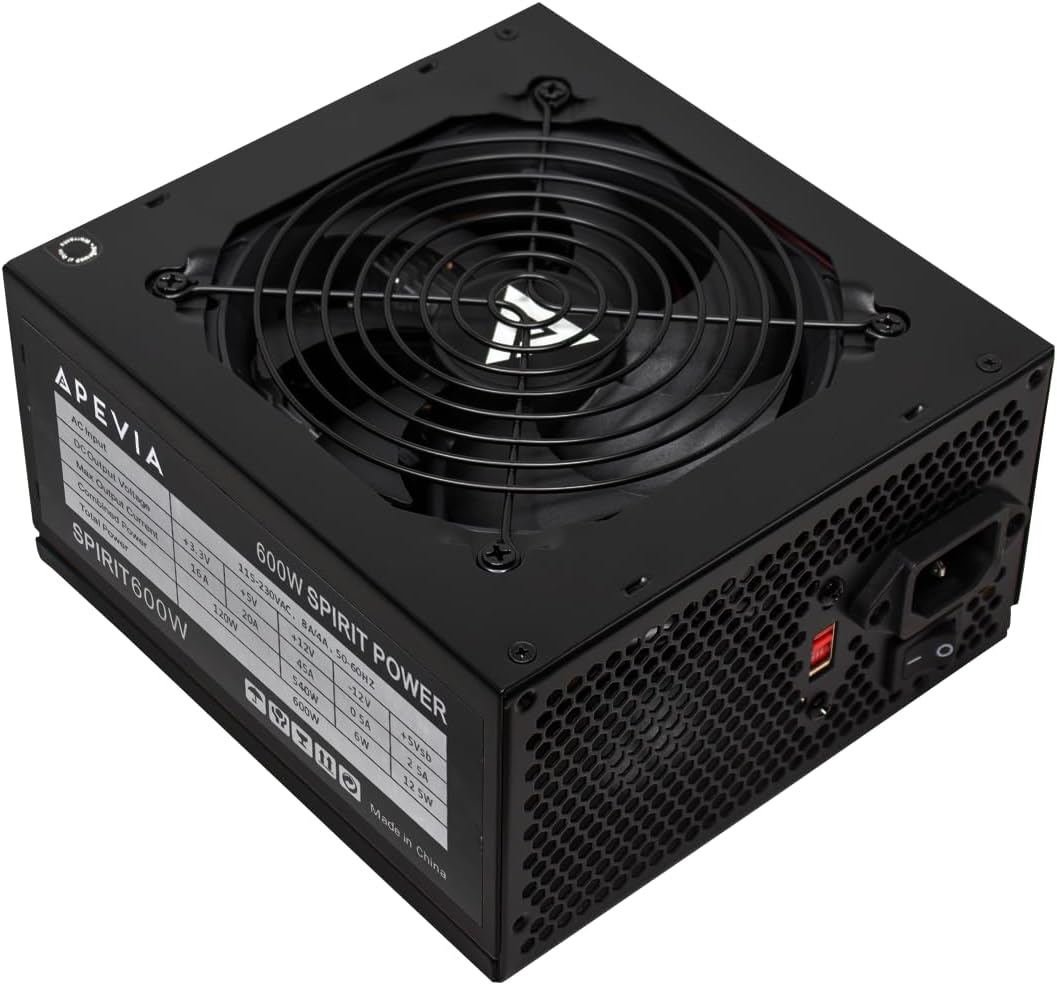
The Apevia SPIRIT600W is a straightforward 600W ATX gaming power supply with a 4.3 customer rating. It is designed for conventional gaming configurations and emphasizes core hardware support, a broad connector set, and a wide range of safety protections. It lacks the newest ATX and PCIe designations, so it is best viewed as a practical option for established components rather than a platform built around a brand-new flagship GPU.
We may earn a commission when you buy through this link, at no additional cost to you.
Its black sandblasted casing gives the enclosure a restrained gaming appearance. An automatically thermally controlled 120mm fan adjusts cooling to operating conditions, while the single 12V output is designed for high-amperage use. The connector set includes a 20+4-pin motherboard plug, a 4+4-pin CPU connector, two PCIe 6+2 connectors, four SATA connectors, and four Molex connectors.
Its strongest selling point is the extensive protection list. Short-circuit, overcurrent, overvoltage, overpower, undervoltage, and over-temperature protections cover a broad range of common electrical issues. The supplied documentation also clearly explains how the 24-pin, 8-pin CPU, and 8-pin PCIe connectors can be separated into smaller formats for compatible older hardware.
The 600W rating suits a gaming PC with a mainstream-to-upper-midrange CPU and a graphics card using one or two conventional PCIe power plugs. Two PCIe connectors and the absence of a native 12V-2×6 or 12VHPWR lead limit its usefulness for some current high-end configurations. For appropriately matched hardware, it remains a simple and protective choice.
Six protection categories cover short circuits, current overload, voltage faults, excess power, undervoltage, and overheating. This extensive coverage is the model defining feature.
Splitable 24-pin, CPU, and PCIe connectors allow the unit to support a range of motherboards and graphics cards. Four SATA and four Molex connections also serve storage-heavy configurations.
We may earn a commission when you buy through this link, at no additional cost to you.
The Segotep GM850 is an 850W Gold-certified power supply with a 4.5 rating, ATX 3.1 compliance, and PCIe 5.1 support. It combines substantial capacity with a native 12VHPWR cable, making it a relevant option for modern gaming PCs using recent high-end graphics cards. Fully modular flat white cables distinguish it from conventional black-and-gray designs.
We may earn a commission when you buy through this link, at no additional cost to you.
The unit advertises support for up to 200 percent total power excursion and 300 percent GPU power excursion, allowing it to handle the abrupt power changes associated with demanding components. Its native cable can supply up to 600W to compatible PCIe 5.1 graphics cards, reducing the need to depend on a multi-cable adapter for supported hardware.
Electrical performance is supported by a DC-DC structure, full-bridge LLC resonance assist, and 12V synchronous rectification. These technologies are intended to provide a stable and safe output. Gold certification also improves efficiency, while full modularity reduces unused wiring and helps preserve airflow inside the chassis.
The GM850 is a good fit for a high-power CPU and GPU system, a creator workstation that doubles as a gaming platform, or a builder planning future expansion. Its 850W capacity is more than most mainstream gaming PCs require, so careful component matching is important. The white cable set is also a deliberate aesthetic choice that may not suit every case or component color scheme.
The 12VHPWR cable is designed to deliver up to 600W to compatible PCIe 5.1 graphics cards. For supported builds, it offers a direct connection without relying on a multi-cable adapter.
DC-DC conversion, full-bridge LLC assistance, and synchronous rectification support stable output. These technologies are paired with modern excursion handling for contemporary components.
We may earn a commission when you buy through this link, at no additional cost to you.
The right budget gaming power supply depends on your components, case, connector needs, and tolerance for fixed wiring. These factors help narrow the options before comparing fan behavior, protection, and efficiency.
Start with the recommended power requirements for the graphics card and processor, then add the motherboard, memory, storage, fans, and accessories. Do not treat the number printed on the side of the box as a target; a responsible build should retain comfortable headroom for short-term peaks, efficiency at moderate load, and possible future upgrades. A 500W unit can suit a balanced system, while 650W covers more mainstream combinations. A 750W to 850W model offers greater flexibility for a powerful GPU, and 1000W is appropriate only when component demands or expansion plans justify it.
Check the exact power connection required by the graphics card before choosing a PSU. Traditional cards often use one or more 6+2-pin PCIe connectors, while current high-end models may require a 12VHPWR or 12V-2×6 connection. The modern ATX 3.1 and PCIe 5.1 products in this guide provide native cables or explicitly support transient excursions. If a card uses a proprietary connection, verify the adapter requirements and whether the PSU's supported standards match the manufacturer's guidance. Never assume every 16-pin-shaped connector is interchangeable.
80 Plus certifications estimate how effectively a power supply converts wall power into usable DC power. The Thermaltake and ARESGAME models use the baseline 80 Plus Certified designation, while the MSI MAG A650BE is 80 Plus Bronze. Bronze is specified at 85 percent efficiency or better under typical loads. Gold models such as the Segotep GM850 and CORSAIR RM750e are designed to reach higher efficiency levels, which can reduce waste heat and improve behavior during lighter loads. Certification is a useful guide, but wattage and compatibility remain the decisive considerations.
A non-modular PSU keeps all cables permanently attached, which is simpler but can leave unused wiring inside the case. Semi-modular models detach selected leads and offer a middle ground. Fully modular units remove every unnecessary cable, improving airflow and producing the cleanest installation. The ARESGAME 500W and MSI MAG A650BN favor simplicity, while the CORSAIR RM750e, Segotep GM850, and 1000W ATX 3.1 model offer full modularity. In a small or visually open case, modular wiring can be particularly valuable, but it requires correct connector selection during assembly.
A power supply that operates quietly can be more noticeable than its specifications suggest, particularly in a quiet room. Models such as the MSI MAG A650BN and A650BE use low-noise fan positioning, while the GAMEMAX RGB-850-SE uses a larger 140mm fan. Thermally controlled or calculated fan curves can reduce unnecessary sound during lighter workloads. Actual acoustics also depend on case acoustics, load, surrounding components, and the orientation of the enclosure, so fan design should be considered alongside—not instead of—efficiency and electrical protections.
Look for protection against overvoltage, undervoltage, overcurrent, overpower, short circuits, and excessive temperature. The Apevia SPIRIT600W lists all six categories, while the ARESGAME and MSI MAG models cover most major fault types. A suitable power supply should also provide stable rails and sound voltage regulation, with DC-DC conversion appearing among the specifications of several models. Protection does not excuse a poorly matched unit, but it gives important confidence that the supply can shut down safely when a fault occurs.
A wattage rating does not guarantee physical compatibility. The MSI MAG A650BN and A650BE are explicitly compact, which can help in smaller cases. The 1000W fully modular model measures 150 by 150 by 86 millimeters and is stated to fit most mainstream ATX cases. Check the power-supply bay dimensions, connector clearance, and the space required for modular plugs, especially near large GPUs or hard-drive cages. Cables bend tightly behind the PSU, so adequate clearance improves both installation and airflow.
A meaningful warranty can provide protection against manufacturing defects and make an otherwise unfamiliar model easier to consider. The Thermaltake SMART 600W, ARESGAME AGV Series, and both MSI MAG models each have five-year coverage, while the 1000W ATX 3.1 model includes a ten-year limited warranty. Warranty length is not the only quality measure, but it indicates how the manufacturer stands behind the product. Buyers should also consider component quality, protection design, documentation, and compatibility with the planned system.
Before installation, switch off the computer, unplug the AC cord, and use the motherboard's power-switch or disconnect method where appropriate. Mount the power supply in its designated bay with the fan facing downward or toward a ventilated position. Connect the 24-pin motherboard plug, the required CPU power cable, and the exact graphics-card cable specified by the GPU manufacturer. On modular models, attach only the cables needed and avoid mixing similar-looking connectors.
Route the cables behind the motherboard tray when possible, using the supplied ties or a cable-management comb. Keep power cables clear of sharp case edges and separate them from high-speed data cables where practical. Do not leave unused modular cables draped across fans, and do not use an incompatible adapter as a substitute for the required native GPU connector. Follow the manual for any 16-pin connector and ensure it is fully seated without excessive bending.
After connecting everything, inspect the PSU for loose plugs and verify that the PSU switch is set correctly. Connect the AC power cord, turn on the system, and confirm that the motherboard and fans start normally. Keep the intake area clear of dust, and do not open a sealed power supply for cleaning. If unusual buzzing, odor, discoloration, repeated shutdowns, or abnormal fan behavior occurs, disconnect the system and have the unit inspected by a qualified technician.
The correct wattage depends on the graphics card, processor, and other components. A 500W model can suit a balanced mainstream build, while 650W offers more flexibility and 750W to 1000W is more appropriate for high-end systems. Add up the components' power requirements and leave headroom for peaks, efficiency, and possible upgrades rather than choosing only by the current graphics card.
Gold certification is beneficial because it indicates higher efficiency under typical loads, which can reduce waste heat inside the case. It does not automatically make one PSU better than another, and the power supply's protections, modularity, noise, standards, and fit still matter. Bronze can be sufficient for a cost-conscious build, while Gold is attractive for higher-power or thermally constrained systems.
A non-modular power supply has all cables permanently attached, so unused leads must remain in the case. A fully modular unit lets the builder connect only the needed cables, making routing cleaner and potentially improving airflow. Semi-modular designs sit between the two by allowing selected cables to be removed. The electrical performance still depends on the model and its internal design.
It depends on the exact graphics card and its power requirements. A card using conventional PCIe 6+2-pin connectors may work with a suitable older platform, while recent high-end cards may benefit from ATX 3.1 transient handling and a native 12VHPWR or 12V-2×6 cable. Check the card manufacturer's connector and power guidance rather than relying on connector appearance alone.
It may be sufficient if the processor and graphics card are matched appropriately and the total system demand leaves enough margin. A power-hungry GPU with a large processor could push a 600W unit beyond a sensible operating range. Review the component recommendations, check the PSU connectors, and choose a higher capacity model if the system draws a substantial and potentially variable load.
It does not directly increase gaming performance, but efficiency can reduce waste heat and electricity use. A cooler and more efficient supply may operate its fan less aggressively under certain conditions, and good headroom can help the system handle power spikes comfortably. The most important factors remain adequate wattage, stable output, correct connectors, and compatibility with the graphics card.
Modularity is convenient for cable management and can improve airflow in a cramped case. It is not essential to performance, however, and a well-routed non-modular unit can work perfectly well. Choose modularity based on case size, cable routing, and your preferred installation process rather than assuming it is automatically better.
Look for unusually loud or continuous fan activity, a hot power-supply enclosure, repeated system shutdowns, or instability under load. Blocked airflow, accumulated dust, restricted case ventilation, and operation close to the unit's thermal limits can contribute to the problem. Do not open the sealed PSU; disconnect the system and seek qualified assistance if overheating symptoms persist.
The ARESGAME AGV Series 500W is the clearest value-oriented choice for a balanced entry-level gaming PC, offering Bronze efficiency, protection, quiet cooling, and a five-year warranty. The MSI MAG A650BN stands out as the most versatile mainstream pick because its compact 650W design, active PFC, DC-DC circuitry, broad protections, and strong customer rating cover the essentials without unnecessary extras. The 1000W fully modular ATX 3.1 PSU is the advanced option for a high-end system needing modern transient support and a native dual-color 12V-2×6 cable.
For most gamers, capacity should match the graphics card and processor rather than follow a fixed rule. Consider connector type first, then ensure enough wattage and headroom. Efficiency, protections, acoustic behavior, warranty, modularity, and physical fit determine which of the remaining qualities matter most. A 650W or 750W unit is a common sweet spot for modern performance builds, while 500W remains viable for carefully balanced components and 850W to 1000W is generally reserved for more demanding configurations.
Finally, check the current listing details, compatibility information, included accessories, and warranty terms before ordering. Component requirements and available products can change, and a connector that appears equivalent may not be approved for a particular card. Confirm the exact GPU, CPU, case dimensions, and modular cable requirements so the selected power supply remains a suitable long-term foundation for the gaming build.