
StarTech SATAEXT30CM
4.5Editor score
Supports SATA 150/300/600
Thirty-centimeter data extension
Male-to-female connector design
Compact internal installation
A SATA male to female cable can solve an awkward connection problem inside a desktop, server, drive bay, or repair setup. The useful distinction is whether you need a seven-pin data extension, a 15-pin power extension, or a 22-pin combination cable. Length, conductor construction, shielding, connector fit, and package quantity also affect how a cable performs in practice.
This guide compares ten SATA extension cables using the supplied product specifications. It separates basic data cables from power-only and 22-pin combo designs, evaluates supported SATA generations, and considers practical factors such as cable length, shielding, heat resistance, locking behavior, and the number of cables included. The list covers options for hard drives, SSDs, optical drives, and compatible expansion cards.
Each review explains who benefits from the cable and where its trade-offs matter. The top recommendations distinguish a budget-friendly data extension, a feature-rich combo cable, and a longer power-focused option. Product availability, ratings, and pricing can change over time, so readers should confirm the current listing, connector type, and device requirements before making a purchase.
4.5Editor score

4.6Editor score

4.8Editor score
As an Amazon Associate we earn from qualifying purchases.
The comparison highlights the connector format, supported SATA generation, stated length, and practical advantage of every cable, making it easier to distinguish data-only, power-only, and combo extensions.


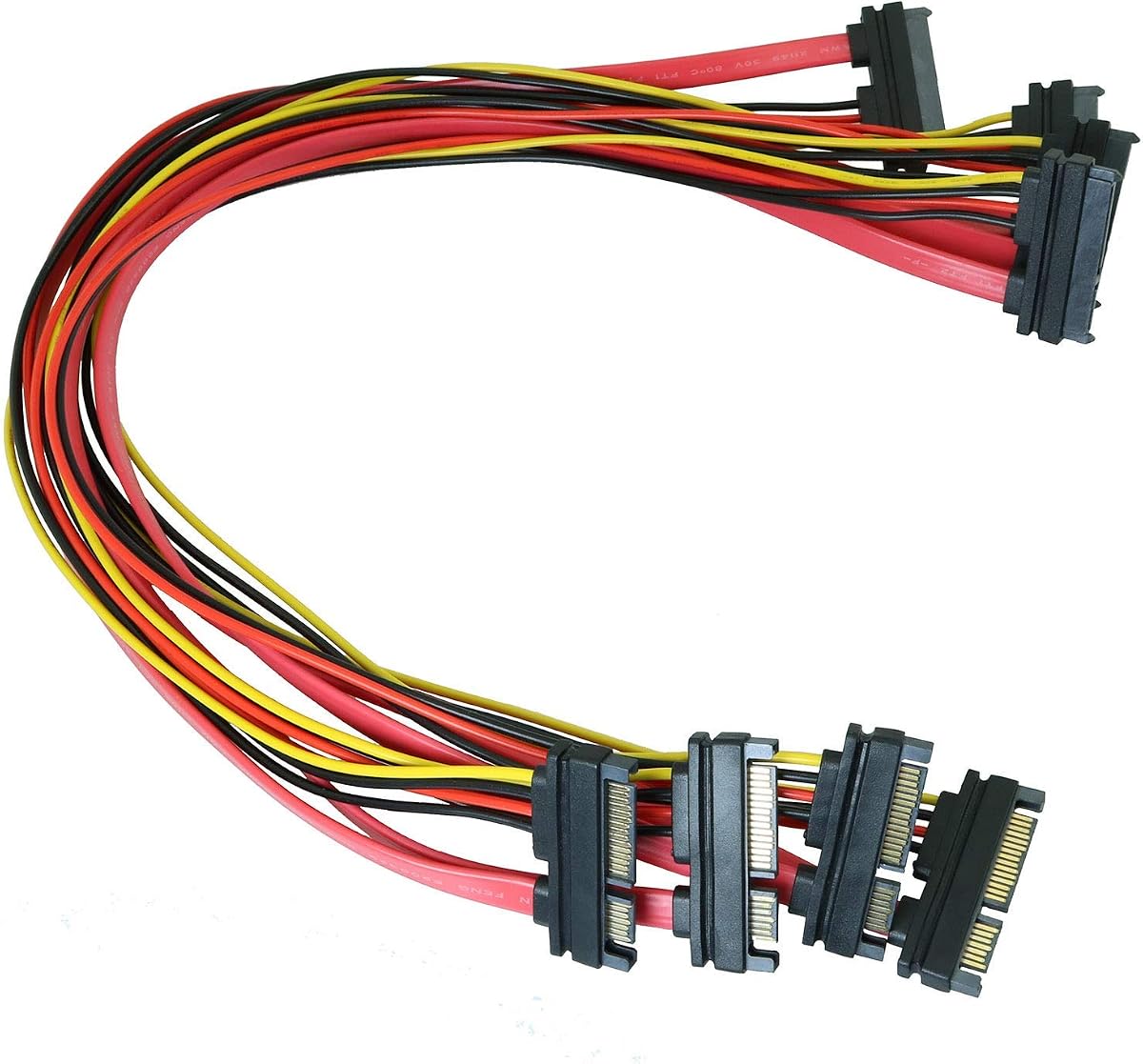


The MEIRIYFA 22Pin SATA Power Extension Cable combines a seven-pin data segment and a 15-pin power segment in one male-to-female cable. It carries a 4.6 rating and stands out for offering two 50cm extensions in the pack. That combination makes it useful when a drive needs both signal and power but the available SATA connection is not positioned conveniently.
We may earn a commission when you buy through this link, at no additional cost to you.
The stated construction includes an oxygen-free thick copper core, aluminum foil, and multi-layer shielding intended to reduce interference and transmission loss. Its flat profile is particularly useful inside a computer case because it can be routed along a drive bay or tucked behind other components. Because data and power travel together, one cable can handle the complete SATA connection instead of requiring separate extension runs.
The main trade-off is connector specificity. A 22-pin combo plug is intended for SATA-style devices and cannot be substituted for a standalone seven-pin data cable or a 15-pin power lead. The 50cm length also calls for reasonable routing rather than unnecessarily stretching it across a large chassis. Subject to those constraints, the two-pack offers good flexibility for a drive migration, backplane connection, or compact desktop rebuild.
This is a strong general recommendation for someone who needs combined SATA data and power extension rather than a narrowly specialized lead. The shielding, flat construction, and inclusion of two cables make it especially useful for installers maintaining multiple drives. Confirm that the target device accepts a 22-pin SATA male connector before ordering, and route the cable without creating a tight bend.
Combining the seven data conductors and 15 power conductors into a single 22-pin connector simplifies drive hookups. It is especially convenient when space or cable-management constraints make routing separate SATA leads difficult.
Aluminum foil and multi-layer shielding are specified to reduce interference, while the flat sheath supports compact routing. These features are useful in systems with several nearby drives and power sources.
We may earn a commission when you buy through this link, at no additional cost to you.
This four-pack of 50cm SATA extensions focuses on the seven-pin internal SATA data interface. It provides a practical way to move a hard drive, optical drive, or other SATA-interface device farther from its controller or motherboard connection. The 4.4 rating reflects a broadly useful product that emphasizes quantity and straightforward extension.
We may earn a commission when you buy through this link, at no additional cost to you.
The included length gives enough room for common routing tasks, while the four-cable pack supports installations involving several drives, spare connections, or frequent drive swapping. The stated features mention reduced crosstalk, improved signal integrity, reduced overheating, and less internal space usage when drives are added or removed. The male-to-female configuration allows an existing SATA data lead to connect directly to the extension.
This is a data cable, so buyers should not expect it to carry drive power. The product title identifies it as a seven-pin data extension even though some of the supplied description refers more broadly to SATA power and data uses. That distinction matters when planning a new installation, because the device will still need an appropriate 15-pin SATA power connection or another power source.
The cable is a good fit for system builders, technicians, and anyone who regularly changes SATA storage hardware. Its generous pack count and 50cm length make it especially useful in a multi-drive chassis. For combined power and data routing, select a 22-pin option instead; for this cable, verify that a standard seven-pin SATA data connection is what the equipment requires.
The four-cable quantity gives technicians and multi-drive builders immediate options. Spare leads are also handy for service benches where cables are moved between systems regularly.
At 50cm, the extension is suited to repositioning SATA equipment within a case. It provides more placement freedom without introducing an unnecessarily long data run.
We may earn a commission when you buy through this link, at no additional cost to you.
The Coolgear 12-inch cable is a seven-pin internal SATA data extension designed for SATA I and SATA II equipment, with support stated for 150 and 300 data standards. Its 4.3 rating comes with a more deliberate construction specification, including shielding, 26AWG solid tinned copper, and gold-plated contacts.
We may earn a commission when you buy through this link, at no additional cost to you.
Signal-focused features include low attenuation, reduced crosstalk, and a hot-melt aluminum mylar shielding layer. The 80C PVC jacket and robust connector housing are specified for heat resistance and durability. These details make the cable appropriate for repair benches, drive service centers, and systems where a dependable connection matters more than minimizing the number of individual components.
The important limitation is the stated generation support. It is described as a SATA I and SATA II extension rather than a cable explicitly advertising SATA 600 support, so buyers with modern SATA III equipment should verify compatibility before relying on it. It also carries only the seven-pin data portion and cannot replace a 15-pin SATA power cable.
For technicians working with legacy SATA I or II drives, or anyone who values a specified conductor and shielding design, this is a focused and credible choice. Its 12-inch length is easier to manage than a much longer extension. Modern high-speed builders may prefer a model that explicitly supports the SATA generation used by their equipment.
The specified 26AWG solid tinned copper and aluminum mylar shielding give buyers more information than a generic extension offers. These features support lower crosstalk and more consistent signal transmission.
The heat-resistant jacket and sturdy housing suit repair benches and maintenance work. A shorter cable can also simplify storage inside a crowded service case.
We may earn a commission when you buy through this link, at no additional cost to you.
The Coolgear 20-inch model expands the same seven-pin SATA data-extension concept by providing more cable length. It is suited to hard drives, optical drives, and other SATA devices that need to be positioned farther from the controller, with a 4.3 rating and specifications centered on shielding and conductor quality.
We may earn a commission when you buy through this link, at no additional cost to you.
The cable includes a 26AWG solid tinned copper conductor, an 80C PVC jacket, robust connector housing, and gold-plated contacts. Hot-melt aluminum mylar shielding is specified to help maintain a stable, interference-resistant link. Those details align well with the stated use cases of technical benches, hard-drive service centers, and maintenance professionals.
The additional length provides placement freedom but requires more thoughtful routing than the 12-inch version. SATA data signals are sensitive to poor connections and unnecessarily long or sharply bent runs, so the cable should be kept organized and fully seated. Compatibility is also limited to the stated SATA I and SATA II context, with 150 and 300 support identified in the product information.
This cable is best for service environments or older SATA installations that cannot position a drive near the original port. It is a better fit for legacy-supported equipment than a user seeking a clearly documented modern SATA III option. For new systems, check the drive and controller specifications and ensure the longer cable is routed cleanly.
The twenty-inch reach makes it easier to connect a drive placed deeper in a chassis or farther along a service bench. It solves reach constraints that a short data extension may not accommodate.
Gold-plated contacts and a solid tinned copper conductor support stable data transmission. The shielding specification also helps limit crosstalk in crowded internal environments.
We may earn a commission when you buy through this link, at no additional cost to you.
The Four-Pack 50cm SATA Combo provides 22-pin male-to-female extensions that carry SATA data and power together. Its 4.9 rating is the highest among the listed products, while the four-cable pack and relatively compact length make it a practical choice for multiple drives or future expansion.
We may earn a commission when you buy through this link, at no additional cost to you.
Its key construction details are straightforward: the cable is made from copper, measures 50cm, and uses a thin form factor. The thin profile is intended to reduce clutter inside computer and server chassis, potentially improving airflow compared with several loose conventional leads. Because the data and power wires are combined, the extension can connect a compatible SATA device in one route.
The product information provides fewer details about shielding and conductor gauge than some competing reviews. That means buyers should pay close attention to the total cable length, installation conditions, and device requirements rather than assuming advanced interference protection. The 22-pin format also requires a matching SATA connection and cannot be used as a generic USB or peripheral cable.
This is an attractive budget recommendation for builders who want several complete SATA extensions in one purchase. It suits compact desktop and server cases where cable clutter is a concern, and it can provide ready-made connections for a storage expansion. The strong rating and generous quantity support the recommendation, while careful port matching remains essential.
Four complete extensions make it easy to connect several drives or retain spares for future storage work. The pack is particularly useful during initial assembly or a drive migration.
The thin combined-cable design can reduce clutter inside a computer or server chassis. That may create room for better airflow around components than separate, loosely routed data and power leads.
We may earn a commission when you buy through this link, at no additional cost to you.
The J&D 10-Inch SATA Power Extension is a 15-pin male-to-female lead intended to extend power from a host power supply to SATA-equipped devices. Its 4.8 rating and two-cable pack make it a strong choice for installations with more than one hard drive, SSD, optical drive, or compatible PCIe device.
We may earn a commission when you buy through this link, at no additional cost to you.
The construction is described as 18AWG oxygen-free copper with bare copper braided shielding. A secure locking connector mechanism is intended to prevent accidental disconnections during operation, an important consideration in systems that may be moved or serviced. The stated compatibility includes SSDs, hard drives, optical drives, and PCIe Express devices with a 15-pin SATA power connector.
This cable does not transfer data, so it should be paired with an appropriate seven-pin or 22-pin data connection. Its ten-inch length is useful for a modest amount of repositioning inside a case without creating excessive excess cable. As with every 15-pin SATA lead, it must be installed with the correct orientation and fully seated in a compatible socket.
This is a good recommendation for a builder who needs a short, secure power extension and values a two-pack. It works especially well for additional drives placed near existing power routing. Shoppers seeking a combined solution should choose a 22-pin cable, while those solving only a data-routing problem should look to a seven-pin extension.
The locking connector mechanism is designed to reduce accidental disconnections. That is useful during routine maintenance or in a chassis that may be handled while components are installed.
The listed use cases include hard drives, SSDs, optical drives, and compatible PCIe Express devices. Buyers should still verify the physical 15-pin socket on the target component.
We may earn a commission when you buy through this link, at no additional cost to you.
The ChenYang 30cm SATA Combo is a compact 22-pin male-to-female extension that carries both power and data. It is explicitly described for SATA III 3.0 use, supports 2.5-inch and 3.5-inch disks, and states a transfer capability of 6Gbps alongside 12V and 5V power.
We may earn a commission when you buy through this link, at no additional cost to you.
Its approximately 30cm length is a meaningful distinction in a category where many extensions measure 50cm or more. A short lead can be useful in a tightly arranged enclosure, server bay, or compact desktop where a longer cable would create excess clutter. The combined 22-pin format also simplifies the number of connections that must be routed to each drive.
The cable is wired for 5V on red and 12V on yellow, with two black ground conductors, as described in the supplied information. Because it is only one cable, users needing several extensions must purchase additional units. Its short length is also a limitation when the existing drive bay or backplane is farther away than approximately 30cm from the source connection.
This is a focused choice for a modern SATA III installation with a small amount of extra reach. It works well when cable management and compactness matter more than maximum distance. For longer routing or multiple drives, a multi-pack 50cm combo option may be more efficient.
The approximately 30cm length is useful when the source and device are already close together. It minimizes excess cable and can simplify assembly inside compact enclosures.
The stated 6Gbps data capability and SATA III designation suit compatible modern equipment. The cable also identifies support for both 2.5-inch and 3.5-inch SATA disks.
We may earn a commission when you buy through this link, at no additional cost to you.
The COMeap 24-Inch SATA Power Extension provides a 15-pin male-to-female connection across roughly 60cm, making it the longest power-focused lead in this group. Its 4.8 rating, braided exterior, and detailed electrical specifications give it a premium position for installers who want more reach and a durable cable jacket.
We may earn a commission when you buy through this link, at no additional cost to you.
The conductor is specified as 1007-18AWG tin-coated copper wire, with compatibility stated for 3.3V, 5V, and 12V power between SATA drives and a power supply. The package includes one cable and a piece of self-adhesive tape, allowing the lead to be secured along a chassis wall or support surface for a neater installation.
As a power-only cable, it cannot replace a seven-pin data lead or a 22-pin combination cable. The warning in the product information is important: it is designed only for devices with SATA power ports, and connecting incompatible ports can damage components. Its 24-inch length also needs sensible routing to avoid creating excess slack in compact systems.
This is a strong premium choice when the SATA device sits significantly farther from the power supply than a short extension allows. Braided construction and the inclusion of mounting tape make it especially attractive for tidy multi-drive or workstation installations. Users who need data as well should plan for a separate data cable or choose a 22-pin combo extension.
The 24-inch length gives system builders more freedom to position a drive relative to the power supply. It is particularly useful in larger cases or equipment with uneven internal layouts.
The braided exterior adds a durable visual finish, while the included adhesive tape helps keep the cable secured. Together they support cleaner routing around multi-drive systems.
We may earn a commission when you buy through this link, at no additional cost to you.
The StarTech SATAEXT30CM is a 30cm, seven-pin SATA extension with a straightforward male-to-female configuration. It is listed for Serial ATA 150, 300, and 600, allowing it to cover several common SATA standards while remaining small enough for compact installations.
We may earn a commission when you buy through this link, at no additional cost to you.
The 0.3m specification places it between very short patch-style leads and longer workshop extensions. That balance works well when a drive is only slightly too far from its motherboard port. The dedicated data design avoids unnecessary power wiring, which can make routing simpler in systems that already have adequate SATA power leads.
The key limitation is reach. At roughly one foot, it will not solve a large gap between a controller and drive, and it cannot supply the separate power needed by a hard drive or optical drive. Buyers should also keep the short cable fully seated and avoid sharply folding it, particularly when routing around case fittings.
This is a sensible budget pick for a basic data extension, especially when supported SATA 150, 300, and 600 operation is the priority. It suits modern and legacy-compatible SATA equipment better than a cable that only lists older standards. For more distance, examine a 50cm option, and for combined signal and power needs, choose a 22-pin cable.
Support for SATA 150, 300, and 600 makes the compact extension relevant to a wider range of equipment. It provides a simple way to add a small amount of data-cable reach.
The 0.3m length and dedicated data-only format reduce the amount of cable inside a case. That makes it convenient for compact builds and tightly packed storage arrangements.
We may earn a commission when you buy through this link, at no additional cost to you.
The Slimline 20-Inch SATA Combo combines 7+15-pin SATA data and power in a male-to-female extension measuring approximately 49.5cm. It is especially relevant to backplane adapters and internal-to-external SATA arrangements, where one combined connection can simplify the path between a drive and its controller.
We may earn a commission when you buy through this link, at no additional cost to you.
Its stated uses include desktop and server environments that contain multiple drives. The 22-pin male and female ends match devices and adapters designed for combined SATA connections, while the roughly 20-inch length gives useful repositioning room inside a chassis or enclosure.
The supplied information does not provide the same level of detail about shielding, conductor gauge, or temperature resistance found in some competing listings. Consequently, the cable should be evaluated primarily on connector fit, physical length, and intended use. It also cannot substitute for a standard seven-pin data cable or a 15-pin power lead when the connected port requires a separate interface.
This is a worthwhile choice for a builder working with a compatible backplane or an internal-to-external SATA configuration. The combined format and moderate length provide useful flexibility without the complexity of several separate leads. Verify the backplane's connector arrangement carefully, and make sure the extension can be routed without exceeding the usable distance appropriate for the equipment.
The cable is specifically described as useful with backplane adapters. Its combined connectors allow a compatible drive and backplane to be linked through one extension.
The approximately 49.5cm lead can bridge internal and external SATA arrangements. That makes it useful when a drive position does not align closely with the available adapter.
We may earn a commission when you buy through this link, at no additional cost to you.
The correct SATA extension begins with the connector your equipment actually requires. Beyond that, buyers should compare cable function, length, signal construction, mechanical fit, and the number of leads needed for the installation.
SATA equipment uses several connector shapes, and they are not interchangeable. A seven-pin internal connector carries data, a 15-pin connector carries power, and a 22-pin 7+15 connector combines both functions. A seven-pin extension cannot replace a power lead, a 15-pin extension cannot carry data, and a 22-pin cable requires a device or adapter with the matching combined interface. Inspect the existing motherboard, power supply, drive, backplane, or adapter before selecting a cable.
Choose a seven-pin cable for a pure data-routing problem, a 15-pin cable when the power source is too far away, and a 22-pin cable when both signals and power need to travel together. The male end should connect to the source, while the female end accepts the existing male plug or device lead.
SATA generation requirements vary by device. The products in this guide include cables stated for SATA I, SATA II, SATA III, or a combination of Serial ATA 150, 300, and 600. Check the specifications of the hard drive, solid-state drive, optical drive, controller, and motherboard rather than assuming every SATA extension performs identically.
A cable listing SATA 150 and 300 support is primarily presented for SATA I and SATA II use. Cables explicitly describing SATA III or SATA 600 are more appropriate when modern equipment is central to the installation. In every case, the final connection must also be supported by the attached equipment.
Length should solve the routing problem without adding unnecessary slack. Short extensions around 30cm work well in compact cases, while 50cm options provide more freedom to reposition a drive. Longer power leads can help when a SATA device is far from the power supply, but extra cable should be secured rather than left in a large loop.
Measure the actual distance after accounting for the connector housings and the bends required to route around drives, fans, and chassis edges. If a cable must cross a substantial distance or sit near heat-producing components, choose a model with a specified heat-resistant jacket and suitable conductor construction.
For data cables, conductor gauge, shielding, and contact plating can influence signal integrity. Specifications in this group include 26AWG solid tinned copper, aluminum mylar shielding, multi-layer shielding, and gold-plated contacts. These details are especially relevant in crowded systems, service benches, and installations with several nearby electrical sources.
A cable with clearly specified shielding and conductor construction is generally easier to assess than one with vague claims. Look for reduced crosstalk, low signal loss, solid connectors, and a protective jacket. Power cables should likewise be checked for appropriate wire gauge, voltage compatibility, and durable insulation.
A secure fit helps prevent accidental disconnections and intermittent transfer problems. The J&D power extension includes a locking mechanism, while other cables use robust connector housings. SATA connectors also have a defined orientation, so forcing or misaligning a plug can damage the socket or contacts.
Look for keyed or clearly defined connector geometry, a solid housing, and contacts that seat fully without force. After installation, check that the latch or retention feature is engaged where applicable. Never rely on cable tension to keep a connection in place.
Pack quantity can be more useful than a minor difference in cable length for a multi-drive system. Four-cable packs provide enough extensions for a storage build, a backplane project, or a service kit, while two-packs offer a balance of spare capacity and compact storage. Single cables work well for one targeted routing adjustment.
Count every connection that needs extra reach before choosing. It is also useful to keep one spare matching cable on hand for maintenance, since a failed or damaged extension can otherwise interrupt a system upgrade. Multi-packs are especially convenient when the same connector and length will be required repeatedly.
Cable design affects airflow and serviceability as well as electrical performance. Flat 22-pin leads and thin combo cables can reduce clutter, while braided power cables offer a durable exterior for visible or frequently handled installations. The COMeap cable also includes adhesive tape, which can help keep the lead secured along a chassis surface.
Plan the route before installation and avoid placing SATA data cables directly beside noisy power sources when a cleaner path exists. Secure excess length, preserve bend radius, and keep connectors accessible. Good routing reduces strain on the connection and makes future drive swaps easier.
Begin by identifying the source and destination connectors. Disconnect the computer or drive system before changing SATA wiring, then compare the cable's male and female ends with the ports. The male end normally connects to the motherboard, controller, power supply, or adapter, while the female end receives the device's existing SATA plug. Confirm that a seven-pin, 15-pin, or 22-pin arrangement matches the hardware.
Connect each end with the correct orientation and press until the connector is fully seated. Do not force a misaligned plug, and do not route the cable through a sharp fold or under a component that could pinch it. Once connected, use a short length of tape or a proper cable guide to secure excess cable without covering the connector release or locking mechanism.
For routine care, keep the cable away from moisture, extreme heat, and moving fans. Inspect the jacket and connectors when changing storage hardware, looking for crushed insulation, discoloration, or bent contacts. If a connection becomes intermittent, reseat it and check for tight bends or interference before considering the cable faulty. For a powered device, also investigate its power connection, since symptoms can resemble a data-cable failure.
A 7-pin SATA cable carries data only and connects storage or optical devices to a data controller. A 15-pin SATA cable carries power only and extends the connection from a power supply. A 22-pin SATA cable combines the seven-pin data interface and 15-pin power interface in one connector. These three formats are not interchangeable, so the cable must match the existing port or device.
Only a 22-pin 7+15 combo extension is designed to carry both data and power together. A dedicated seven-pin extension carries data but not drive power, while a 15-pin extension carries power but not data. Confirm that the connected device uses the matching combined interface before installing a 22-pin cable.
No. Length should solve a physical routing problem while keeping the installation tidy. Excessive length creates extra slack, and very long data runs can be more susceptible to interference or signal degradation. For most internal cases, a cable only slightly longer than needed provides better routing and easier servicing.
A cable that supports SATA III is generally designed to accommodate lower SATA generations, but compatibility also depends on the connectors and the attached equipment. The supplied listings vary in their stated generation support, so check whether the cable lists SATA I, SATA II, SATA III, or Serial ATA 150, 300, and 600 before purchasing.
It depends on the device and connection. Some 22-pin combo cables are described for internal-to-external SATA use, while ordinary seven-pin internal extensions are intended primarily for connections inside a chassis. The external equipment must provide the correct SATA data and power interfaces, and the cable should not be exposed to moisture or physical damage.
The male end plugs into a female SATA port, while the female end receives an existing male SATA connector. This arrangement makes it possible to extend a cable rather than replace the entire connection. The user must confirm both the connector format and the direction of the source connection before installation.
Insert the connector fully and check any retention latch or locking feature. Some power extensions include a secure locking mechanism specifically for this purpose. You can also route the cable so it does not pull against the plug, and use the included adhesive tape or a separate cable guide where appropriate.
A single extension normally serves one connection, so each hard drive needs its own suitable data and power path. A multi-pack is more convenient for several drives, a backplane, or a service bench because it provides multiple matching extensions. A 22-pin combo lead can handle both functions for one compatible device, but it should not be treated as a multi-device splitter.
The StarTech SATAEXT30CM is a straightforward budget choice for basic seven-pin data extension, with support stated for SATA 150, 300, and 600. The MEIRIYFA 22Pin SATA Combo is the most versatile top pick because it carries data and power together, uses shielding, and includes two flat 50cm cables. For longer power routing, the braided COMeap 24-Inch SATA Power lead provides 60cm of reach and includes mounting tape.
The most important buying decision is connector compatibility, not simply the longest or most feature-filled option. Confirm whether the system needs data only, power only, or a 22-pin combination, then match the cable to the drive, controller, backplane, and power supply. After that, choose a length that solves the reach issue without creating unnecessary clutter, and consider shielding, conductor specifications, and locking features.
Ratings and product details can change as manufacturers update listings, and current pricing should be checked before ordering. Review the connector diagram, stated SATA generation, dimensions, and package contents on the current product page to ensure the selected SATA male to female cable still meets the installation's exact requirements.