
Cubilux Professional 5-Way AUX Splitter
4.5Editor score
Five independent audio outputs
Aluminum shielding enclosure
Compact multi-port hub design
A 3.5mm audio splitter can turn one headphone jack into several outputs, making it easier to share music, movies, games, calls, or presentation audio. The right model depends on connector direction, number of outputs, headset standards, shielding, portability, and whether microphone support is required.
We compared all ten products by their connector layouts, intended uses, construction, supported devices, portability, and practical limitations. The list covers conventional two-way audio splitters, three-output cables, multi-port hubs, and headset adapters for computers with separate microphone and headphone sockets.
Each review highlights the most suitable use for the product rather than treating every splitter as interchangeable. Ratings and specifications reflect the supplied product information, while prices and availability can change, so readers should confirm the current listing and connector layout before purchasing.
4.5Editor score

4.5Editor score

4.3Editor score
As an Amazon Associate we earn from qualifying purchases.
The comparison below organizes every splitter by its connector direction, primary function, output count, and notable compatibility or construction features, making it easier to identify the correct type before buying.



The SYNCWIRE Headphone Splitter is a general-purpose male-to-two-female Y cable rated 4.6 out of 5. It is designed for connecting two headphones, earbuds, speakers, or other stereo audio outputs to a single 3.5mm source, making it a balanced choice for everyday sharing.
We may earn a commission when you buy through this link, at no additional cost to you.
Its strongest features include a nylon-braided jacket, double shielding, and a polished 24K gold-plated connector. The supplied information also states that the cable can withstand at least 15,000 90-degree bend tests, offering useful evidence of durability for a portable accessory. The slim connector is designed to fit many cases, although it is not compatible with LifeProof cases.
The principal limitation is its scope. The two female ends are intended for audio output rather than microphone input, so this is not the appropriate adapter for a TRRS gaming headset that must carry both sound and voice. It also provides only two listening positions and no controls, making it less flexible than the three-output and five-output alternatives in the roundup.
This splitter is best for travelers, students, families, and everyday listeners who want to share music or video from a compatible 3.5mm device. It offers sturdy construction, broad source compatibility, and uncomplicated operation, making it the strongest all-around recommendation for standard stereo sharing.
The nylon braid and stated bend-test endurance make this option a practical choice for cables that move between bags, desks, and travel cases. Gold plating, shielding, and strain relief work together to protect the connection during routine handling.
The single male plug and dual female outputs create a straightforward one-to-two arrangement. It works with many phones, tablets, laptops, portable players, game consoles, and other equipped with a compatible 3.5mm socket.
We may earn a commission when you buy through this link, at no additional cost to you.
The UGREEN Headphone Splitter for Computer is a specialized female-to-dual-male adapter rated 4.5 out of 5. It connects a four-pole 3.5mm TRRS headset to a computer or laptop with separate headphone and microphone jacks, making it especially useful for gaming and voice communication.
We may earn a commission when you buy through this link, at no additional cost to you.
The adapter uses polished 24K gold-plated connectors and oxygen-free copper wire to support clean stereo transmission and communication. Its aluminum alloy casing and nylon-braided jacket are designed for durability, with the jacket reported to pass more than 10,000 bending tests. The supplied compatibility list includes several popular gaming headset families and legacy computers with separate 3.5mm sockets.
Compatibility depends on the CTIA standard. A CTIA-compliant TRRS cable is required for microphone output, while OMTP or other standards may not function. The product information also notes incompatibility with CTIA-standard Apple Earbuds and Beats headphones, so checking the headset's plug standard is essential.
Buy this adapter when a single-combination headset plug must reach a PC with separate audio and microphone ports. It is less appropriate for conventional music sharing because its direction and TRRS layout differ from a male-to-two-female Y cable, but for its intended gaming and communications role, it is focused and practical.
The four-pole female end receives a combined headset cable and divides that connection into separate microphone and headphone plugs. This arrangement is designed for VOIP applications, online classes, meetings, and gaming on computers with legacy-style dual sockets.
CTIA compatibility is essential for microphone function. Consumers should verify both the headset standard and the physical inputs on the computer before buying, particularly if the equipment uses a nonstandard Apple or Beats arrangement.
We may earn a commission when you buy through this link, at no additional cost to you.
The UGREEN Headphone Splitter 3.5mm Audio Y Cable is a dual-output adapter rated 4.6 out of 5. It is built for sharing music, movies, and games from one 3.5mm AUX source, offering a direct way to connect two sets of headphones or speakers.
We may earn a commission when you buy through this link, at no additional cost to you.
Polished 24K gold-plated connectors and oxygen-free copper wiring support stable stereo transmission. The aluminum alloy housing, strain-relief rings, and evolved TPE outer jacket are intended to resist twisting, tugging, tangling, and repeated bending. A compact length of 20 centimeters makes the adapter easy to carry for road trips and flights.
This is an audio-output splitter rather than a microphone adapter. It also does not support inline headphone volume controls, which may matter when using cables with physical volume adjustment. Only two female endpoints are provided, so it cannot replace a three-output cable or a five-port hub.
This is a strong pick for friends or family members who want to listen together from a phone, tablet, laptop, or another AUX-equipped device. Its simple connector layout, broad listed compatibility, and protective construction make it one of the most approachable standard audio-sharing options.
The passive Y design divides the stereo source between two outputs without requiring power. It is a convenient way to create a shared listening session whenever the source device includes a 3.5mm auxiliary connection.
At 20 centimeters, the cable is short enough to fit in a laptop sleeve, small carry bag, or travel pouch. Its light construction reduces bulk while the metal housings provide a more durable connection point than an unsupported plug.
We may earn a commission when you buy through this link, at no additional cost to you.
The Three-Way Stereo Audio Splitter is rated 4.7 out of 5, the highest listed rating among the products reviewed. Its one-male-to-three-female TRS configuration allows three stereo headphones or compatible outputs to connect to a single source such as a music player, PC, CD player, or MD device.
We may earn a commission when you buy through this link, at no additional cost to you.
The product uses 24K corrosion-resistant gold-plated connectors to support a strong, durable connection and stable signal transmission. Its standard three-pole design is focused on left and right stereo audio, and the multi-output cable offers a convenient alternative to a larger hub when only a few listening positions are needed.
The direction matters. This cable distributes one input to three outputs and cannot be reversed to combine three source inputs into one output. The supplied information does not indicate microphone support, and adding passive outputs can affect how the source manages its audio level.
Choose this splitter for group listening, classroom activities, gaming sessions, or travel situations where three people need wired headphones from one source. It is less suitable for users who require a microphone, a more protective hub housing, or the ability to vary the number of connected outputs.
Three female TRS sockets provide enough capacity for a small group without requiring a desktop-sized adapter. The compact cable format is useful when listeners are seated close to the same audio source.
Because the connectors are three-pole TRS, the product is intended for standard stereo output. It should not be confused with a four-pole TRRS headset adapter that separates a combined headphone and microphone connection.
We may earn a commission when you buy through this link, at no additional cost to you.
The D & K Exclusives Headphone Splitter for Computer is rated 4.3 out of 5. It provides a female TRRS connection for a combined headset and two male plugs for a computer's separate microphone and headphone inputs.
We may earn a commission when you buy through this link, at no additional cost to you.
The stated use cases include Skype, chat programs, MSN Messenger, Yahoo, Google Voice, and other VOIP applications. Gold-plated 3.5mm connectors and oxygen-free copper are intended to support conductivity and durability, while the compact body makes it convenient to keep in a laptop bag.
The product information also describes a dual three-position jack for connecting two headsets to one source, but its defining feature is headset-to-PC adaptation. It remains dependent on the physical and electrical standards of the connected equipment, and the broader and less specific listing warrants careful attention to compatibility details.
This splitter is best for users with a combined audio-and-microphone headset and a PC or laptop with separate 3.5mm microphone and headphone sockets. It is a practical adapter for communication and gaming, although buyers should compare the newer UGREEN and DuKabel options when connector standards and construction details are especially important.
The adapter reorganizes a four-pole headset connection into dedicated headphone and microphone plugs. That makes it useful when the computer offers two separate sockets rather than one combined headset port.
The compact adapter is small and portable enough to serve as a backup for offices, classrooms, or travel. Its gold-plated contacts are intended to maintain a reliable connection across repeated use.
We may earn a commission when you buy through this link, at no additional cost to you.
The Belkin AUX Audio Cable Splitter is a basic one-to-two adapter rated 4.3 out of 5. It connects two headphones or two small speakers to one 3.5mm audio jack, making it a familiar solution for shared listening and stereo-speaker setups.
We may earn a commission when you buy through this link, at no additional cost to you.
Its value lies in the uncomplicated arrangement: one male plug enters the source device and two female ports accept compatible audio outputs. The product information highlights use with iPods, smartphones, laptops, tablets, video calls, presentations, and portable audio players, although actual device support depends on the presence and type of 3.5mm connection.
There are no advanced controls, microphone routing, or multi-port expansion. The fixed two-output design cannot accommodate a larger group without a separate hub, and users who need in-line volume adjustment should verify whether their chosen headphone cable uses one.
Belkin is a sensible selection for consumers who want an uncomplicated splitter for a pair of headphones or speakers, value the brand's lifetime product protection, and do not need a more specialized TRRS or multi-output configuration.
The two female outputs are well suited to connecting a matched pair of mini-stereo speakers to a compatible source. This can provide a more distributed listening experience than a single built-in speaker.
The product focuses on a familiar function without unnecessary controls. Belkin's lifetime product protection adds reassurance for buyers who want a straightforward accessory for long-term use.
We may earn a commission when you buy through this link, at no additional cost to you.
The PC Headset Y-Splitter Adapter is rated 4.4 out of 5. It accepts a four-pole CTIA TRRS gaming headset and provides separate male connections for microphone and audio on compatible systems.
We may earn a commission when you buy through this link, at no additional cost to you.
The listed compatibility covers headset families from Turtle Beach, BENGOO, HyperX, SteelSeries, Razer, Sennheiser, and Sades. The information also identifies compatibility with PlayStation 4, Xbox One, Nintendo Switch, and smartphone headsets when they use a single CTIA-style 3.5mm TRRS plug.
The product is not a general male-to-two-female sharing cable. Its female end must receive the combined headset plug, while the two male ends connect to separate microphone and headphone sockets. Devices with a single combined port may not need this adapter, and compatibility depends on matching the correct standard.
It is a good match for gamers or communicators who regularly move between a modern combined-headset connection and equipment with legacy separate jacks. Its broad headset and console list adds usefulness, provided the buyer confirms CTIA configuration and the available ports.
The adapter's four-pole female end is intended for a combined CTIA headset connection. It then presents dedicated microphone and headphone plugs for computers and compatible gaming systems.
The stated device coverage makes this relevant to users who own more than one console or who alternate between gaming and computer communication. It can reduce the need to carry a separate adapter for each platform.
We may earn a commission when you buy through this link, at no additional cost to you.
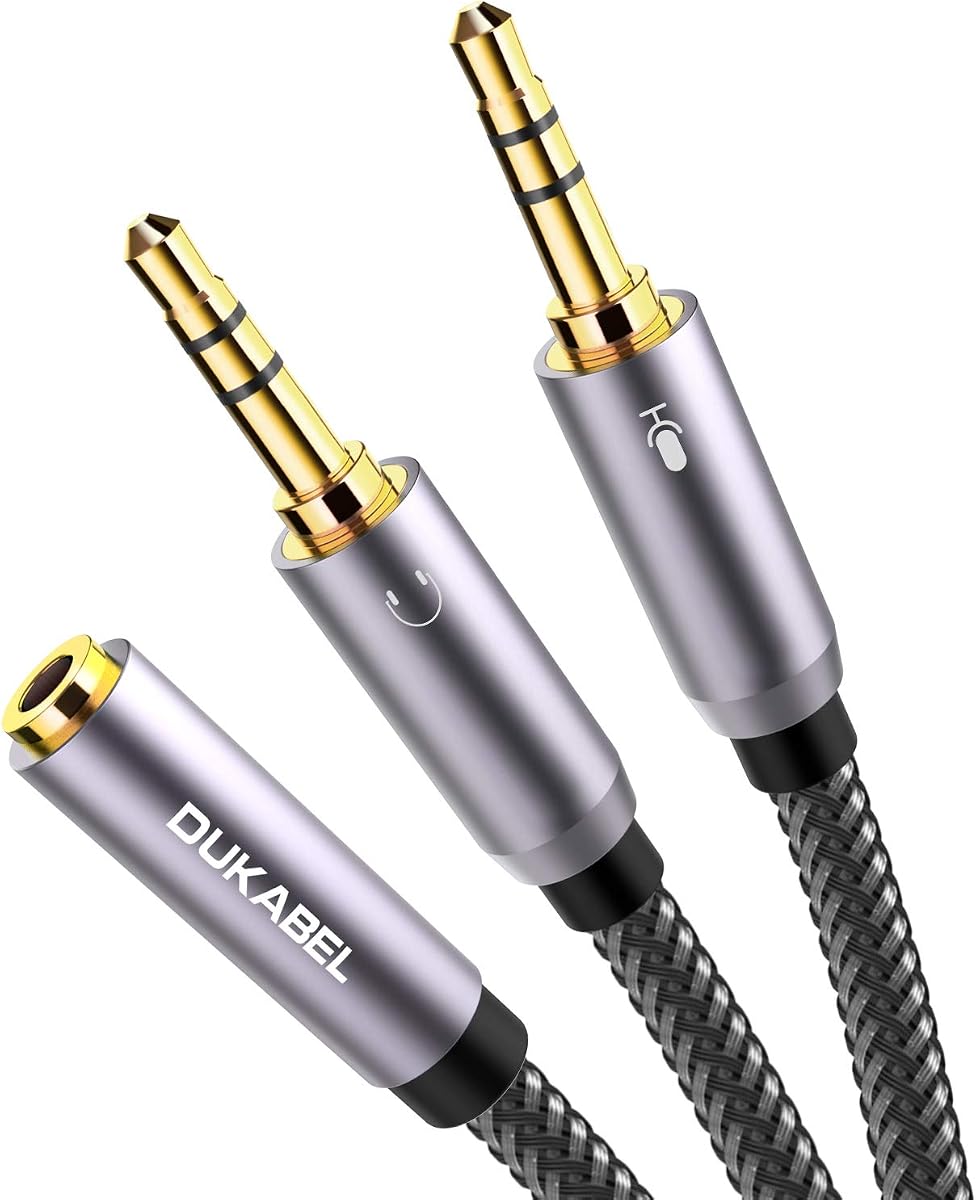
The DuKabel Headphone Mic Splitter is rated 4.6 out of 5. It combines a four-position 3.5mm female connector with two male plugs, allowing a compatible gaming headset to connect to a PC or laptop with separate audio and microphone inputs.
We may earn a commission when you buy through this link, at no additional cost to you.
Construction details are a major attraction: 24K gold-plated contacts, metal housings, triple shielding, oxygen-free copper wiring, and a strong nylon-braided exterior. The supplied information describes a step-down connector design intended to fit securely with phones and tablets, while the 30-centimeter length provides slightly more reach than many short adapters.
Important limitations remain. The product information says it is not for iOS Earphones or BEATS headsets, and microphone operation requires a compatible four-position headset. It does not perform the conventional one-source-to-two-headphones job of a male-to-female audio Y cable.
Buyers should choose the DuKabel adapter when they need a CTIA-style gaming headset on a computer with separate ports and value a heavily insulated, braided cable. It is particularly attractive for users who prefer a durable adapter that can tolerate frequent carrying and plugging.
Triple shielding, metal housings, and gold-plated contacts are intended to limit interference and maintain stable transmission. These details are especially relevant in computers and vehicles where nearby electronics can introduce unwanted noise.
The nylon braid and anti-slip design give the adapter a durable feel while remaining suitable for storage in a carry bag. Its 30-centimeter length offers practical flexibility without becoming cumbersome.
We may earn a commission when you buy through this link, at no additional cost to you.
The Cubilux Professional 5-Way AUX Splitter is rated 4.5 out of 5. Unlike a compact Y cable, it is a multi-port hub that distributes one 3.5mm source to as many as five headphones or speaker systems.
We may earn a commission when you buy through this link, at no additional cost to you.
Its full aluminum housing is designed to isolate electrical interference and support low-noise transmission. The hub works with phones, tablets, PCs, and laptops without extra power, making setup as simple as plugging in the source and connected outputs. Its dimensions of approximately 3.1 by 0.8 by 0.4 inches support portable use.
The design is entirely for output distribution. It cannot combine five separate inputs into one, and microphones are not supported. Because the hub is passive, the supplied guidance recommends turning up the source volume when connecting multiple outputs to achieve the intended result.
This is the leading option for group learning, audio monitoring, shared listening sessions, and users who regularly need more than two or three connections. Its enclosed hub format also differentiates it from exposed Y cables, while its five-port capacity makes it the most expandable product in the roundup.
Five outputs allow a classroom, production team, gaming group, or family to connect multiple wired listeners to one source. The hub removes the need to replace cables whenever the group size changes.
The aluminum case provides enclosure and interference isolation while keeping the unit compact. At roughly eight centimeters long, it can fit into a laptop sleeve or small travel organizer without much added bulk.
We may earn a commission when you buy through this link, at no additional cost to you.
The MOSWAG Headphone Splitter is rated 4.5 out of 5. It uses a conventional male-to-dual-female Y configuration, making it suitable for connecting two sets of headphones or earphones to one compatible 3.5mm source.
We may earn a commission when you buy through this link, at no additional cost to you.
The listed compatible equipment includes iPhones, Samsung devices, iPads, tablets, and laptops with a 3.5mm headphone connection. Its robust materials and compact, lightweight construction are intended for daily use and travel, while the Y-shaped body makes the two-output arrangement easy to understand.
It does not support microphone input, and it cannot accommodate more than two female outputs. Users who require inline volume control on their headphones should also account for the fact that many simple passive splitters do not preserve that control's behavior.
The MOSWAG splitter is best for travelers and everyday users who need a small, uncomplicated way to share audio from a phone or tablet. It is especially straightforward for listeners who know they need only two wired outputs and do not require computer headset routing.
The single male input and two female outputs provide a familiar arrangement for listening together. It can be used with many devices that expose a standard 3.5mm headphone or auxiliary socket.
The lightweight design and minimal footprint make the splitter convenient to carry between home, office, and trips. It offers a simple way to keep a shared-listening adapter available without much added weight.
We may earn a commission when you buy through this link, at no additional cost to you.
The most important choice is the connector direction and intended function. Once that is clear, output count, headset standard, construction, and portability can narrow the field.
A standard sharing splitter usually has one male plug that enters the source and two female sockets that accept headphones or speakers. A computer headset adapter reverses that arrangement, with a female TRRS end for a combined headset plug and two male ends for separate microphone and headphone ports. The three-output cable follows the standard one-input direction but adds a third female socket. Confirm the source, destination, and desired signal direction before buying.
In short: choose male to dual female for ordinary audio sharing, and choose female to dual male for a PC headset adapter.
Two outputs cover the common case of sharing with one other listener. A three-way cable suits a small group without adding a desktop hub, while the five-way Cubilux model is intended for larger listening sessions, monitoring, or remote group learning. More outputs increase convenience but also mean more passive signal loading, so source volume may need adjustment.
Choose two outputs for occasional sharing, three for a small group, and five for a larger, frequently changing group.
TRS is the standard three-pole configuration used for ordinary left and right stereo audio. TRRS adds a fourth pole for a combined microphone signal, which is common on gaming headsets. A splitter must match that distinction. Connecting a stereo headphone splitter to a microphone-equipped headset will not automatically create microphone support, and headset adapters need the correct CTIA or OMTP arrangement.
Use TRS for music and speakers; use TRRS with a matching headset standard when voice communication is required.
The splitter still needs a suitable connection on the source device. Some newer phones and tablets omit the physical 3.5mm jack, while many laptops now use a single combined headset socket rather than separate headphone and microphone inputs. Check whether the source is a single 3.5mm AUX port, a combined TRRS port, or a pair of legacy-style TRS sockets before choosing an adapter.
Always verify both the source port and destination equipment; a connector that looks similar may serve a completely different purpose.
Gold-plated contacts can support corrosion resistance and stable connections, while double or triple shielding is intended to reduce electromagnetic interference. Metal housings add rigidity around frequently handled points. Braided jackets are useful for portable cables because they resist the twisting and tugging associated with daily transport. These features do not guarantee a particular perceived sound, but they indicate attention to connection durability.
Prioritize shielded wiring, solid housings, and a flexible jacket for regular portable use.
Short adapters of roughly eight inches are easy to carry but may not reach comfortably between a source and distant listeners. The longer 12-inch DuKabel model offers a little more positioning flexibility, while the Cubilux hub is compact but distributes connections around a central box. Consider where the equipment will be used, whether listeners will sit far from the source, and whether the adapter must fit in a small bag.
Choose a compact short cable for travel, a slightly longer lead for flexible placement, or a hub when the connection count matters most.
The strongest listings distinguish TRS from TRRS, CTIA from OMTP, male from female ends, and one input from multiple outputs. They also identify exclusions such as Apple Earbuds, Beats headsets, microphones, inline volume controls, or reverse signal flow. These details are more useful than a broad claim of universal compatibility because a physical connector can fit while the underlying audio function remains incompatible.
Read the exclusions carefully and favor products that state exactly where they work and where they do not.
A lightweight Y cable is appropriate for occasional travel and two-person sharing. A braided cable or aluminum enclosure is helpful when the splitter remains in a laptop bag or is handled frequently. For a permanent group-listening station, an enclosed multi-port hub may be easier to organize and less likely to lose individual female connections. Choose the simplest construction that meets the required output count and portability needs.
Match the build to frequency of use, not to appearance alone; a simple cable is enough for occasional sharing.
Before connecting anything, inspect both the splitter and the source device for bent pins, dirt, or debris. Confirm that the male plug or female socket matches the intended connection, then connect the source first. For a conventional audio-sharing splitter, insert the single male plug into the source's 3.5mm headphone or auxiliary socket and attach headphones to the female outputs.
For a PC headset adapter, plug the combined TRRS headset into the female end, then connect the male headphone and microphone plugs to their matching computer jacks. Start with the source volume low, attach the output devices, and raise the volume gradually. For a multi-output hub, turn the source volume sufficiently high because a passive splitter divides the available signal among connected outputs.
To care for the splitter, pull it straight from the socket rather than tugging on the cable. Coil the cable loosely, avoid sharp bends, and keep the connectors away from moisture. Do not use unsupported microphone inputs or reverse a one-input cable into a combiner. If audio is distorted, check the connection, reduce the source volume, disconnect unused outputs, and confirm that every device uses the expected connector standard.
Yes, provided the phone has a compatible physical 3.5mm headphone or auxiliary output and the splitter is designed as one male input to female outputs. Both headphones will receive the source audio. The splitter cannot create a microphone connection, and some inline headphone volume controls may not work correctly through it.
A male-to-female splitter normally takes a male plug from a source and provides female sockets for headphones or speakers. A female-to-male splitter is commonly a TRRS headset adapter that accepts a combined headset plug and provides separate male plugs for a computer's microphone and headphone inputs. Connector direction is essential because the products are not interchangeable.
Only with a splitter specifically designed for microphone routing. Standard one-to-two and one-to-three TRS audio splitters generally cannot carry a microphone signal. A compatible female-to-dual-male TRRS headset adapter can separate audio and microphone for a computer, but the headset must use the same standard, such as CTIA, and the computer must provide the appropriate ports.
CTIA and OMTP are two standards for arranging left audio, right audio, microphone, and ground contacts on a four-pole 3.5mm TRRS plug. They are not electrically interchangeable for microphone use. The supplied UGREEN computer adapter requires CTIA, and the listed PC Y-splitters also emphasize CTIA compatibility, so buyers should check the headset specification.
A passive splitter divides the available audio signal among its outputs, and additional headphones also load the source. This can lower the perceived volume or alter the level seen by each listener. Turning up the source, disconnecting unused outputs, using powered speakers, or choosing a purpose-built multi-port system can improve the result.
The three-output stereo cable in this roundup is designed for one input and three outputs, not three inputs and one output. It also cannot combine microphone signals. A conventional Y cable is a signal distributor, while mixing multiple microphones generally requires a mixer with appropriate gain controls and connections.
Most standard stereo headphones with a three-pole 3.5mm plug can use a conventional TRS audio splitter. Headphones with four-pole TRRS connectors, Apple-specific arrangements, Beats-compatible plugs, or microphones may require a different adapter. Buyers should confirm both the number of contacts and the intended audio function before connecting equipment.
A standard male-to-female sharing splitter usually works with a laptop that has one combined 3.5mm audio jack, provided the device provides stereo audio output. A female-to-dual-male computer headset adapter is intended for older or equipped computers with separate headphone and microphone jacks. It may not be needed if the laptop already accepts a combined headset plug.
The SYNCWIRE Headphone Splitter stands out as the best general recommendation because it combines a familiar one-to-two layout, broad source compatibility, double shielding, gold plating, and a durable nylon-braided jacket. The UGREEN computer adapter is the stronger choice for CTIA gaming headsets on PCs with separate ports, while the Cubilux five-way hub offers the greatest listening capacity.
For most buyers, begin with the function rather than the connector appearance. Choose a male-to-dual-female model for sharing headphones, a female-to-dual-male TRRS adapter for separate computer microphone and headphone sockets, and a three- or five-output device for group listening. Construction, portability, and verified compatibility should refine the decision within that category.
Prices and availability can change, and device configurations vary considerably. Before ordering, confirm that the source device has the expected port, the destination headphones use the correct TRS or TRRS standard, and the splitter's listed exclusions do not affect your equipment.