
3DMakerpro Fox
3.2Editor score
Entry-level handheld scanning
0.07mm stated accuracy
Markerless AI visual tracking
Integrated JMStudio software
A useful 3D scanner turns real objects into editable digital geometry for printing, modeling, inspection, preservation, and visualization. The best model balances dimensional accuracy, surface detail, capture speed, software usability, and the ability to handle difficult materials without disrupting your workflow.
This guide compares ten handheld and desktop-oriented scanners using their published specifications, scanning modes, supported object sizes, lighting limits, software ecosystems, color capture, and export formats. It covers models aimed at hobbyists, makers, creative professionals, and industrial users without assuming that every scanner suits the same project.
Each review identifies the strongest reason to choose a scanner, along with relevant limitations and ideal users. Published accuracy figures describe different operating modes and should not be treated as interchangeable, while ratings reflect only the available customer feedback. Product availability, bundles, and prices can change, so confirm current details before purchasing.
3.2Editor score

5.0Editor score

As an Amazon Associate we earn from qualifying purchases.
The comparison below highlights each scanner's stated accuracy, capture speed, lighting tolerance, and core operating approach. These figures provide a quick overview, but actual results depend on surface finish, distance, calibration, mode, and post-processing.


The Creality Pika Portable 3D Scanner combines seven-line blue laser scanning with near-infrared structured light in an unusually compact 260-gram body. It carries a customer rating of 5.0, and its published specifications make it a strong all-around choice for users who want more than a basic hobby scanner. The built-in 3-inch HD touchscreen, Wi-Fi 6 support, and two swappable batteries reinforce its portable design.
We may earn a commission when you buy through this link, at no additional cost to you.
Its dual-mode approach is the defining advantage. Blue laser mode targets fine details on miniatures, mechanical parts, and collectibles, while the NIR mode supports full-body work and 24-bit true-color capture. The stated accuracy reaches 0.03mm with 0.1mm resolution, and scanning can proceed at up to 110 frames per second. AI features add body completion, retexturing, and automatic hole filling, reducing manual work after acquisition.
The scanner also claims marker-free operation in wired PC mode and direct capture of dark and metallic surfaces without scanning spray. Exports include STL, OBJ, PLY, and ASC, while the CrealityScan app supports Windows, macOS, iOS, and Android. These are meaningful advantages for users who move between printing, CAD, and color-content workflows, although the best results still depend on calibration and careful surface coverage.
This is the most complete recommendation for makers, educators, creators, and mobile professionals because it balances precision, speed, portability, and software assistance. It is less compelling for buyers whose only requirement is the lowest entry cost, and body-specific AI tools may be unnecessary for a conventional small-object workflow. Even so, its combination of specialized laser modes, color capture, and field-friendly design is unusually versatile.
The mode-switching design lets users move between precision object capture and full-body scanning without changing devices. That flexibility is especially useful for creators who alternate between figurines, props, garments, and digital human models.
The touchscreen, Wi-Fi 6, swappable batteries, and AI repair tools make the Pika practical away from a desk. Broad export support also helps captured geometry move into popular printing and modeling applications.
We may earn a commission when you buy through this link, at no additional cost to you.
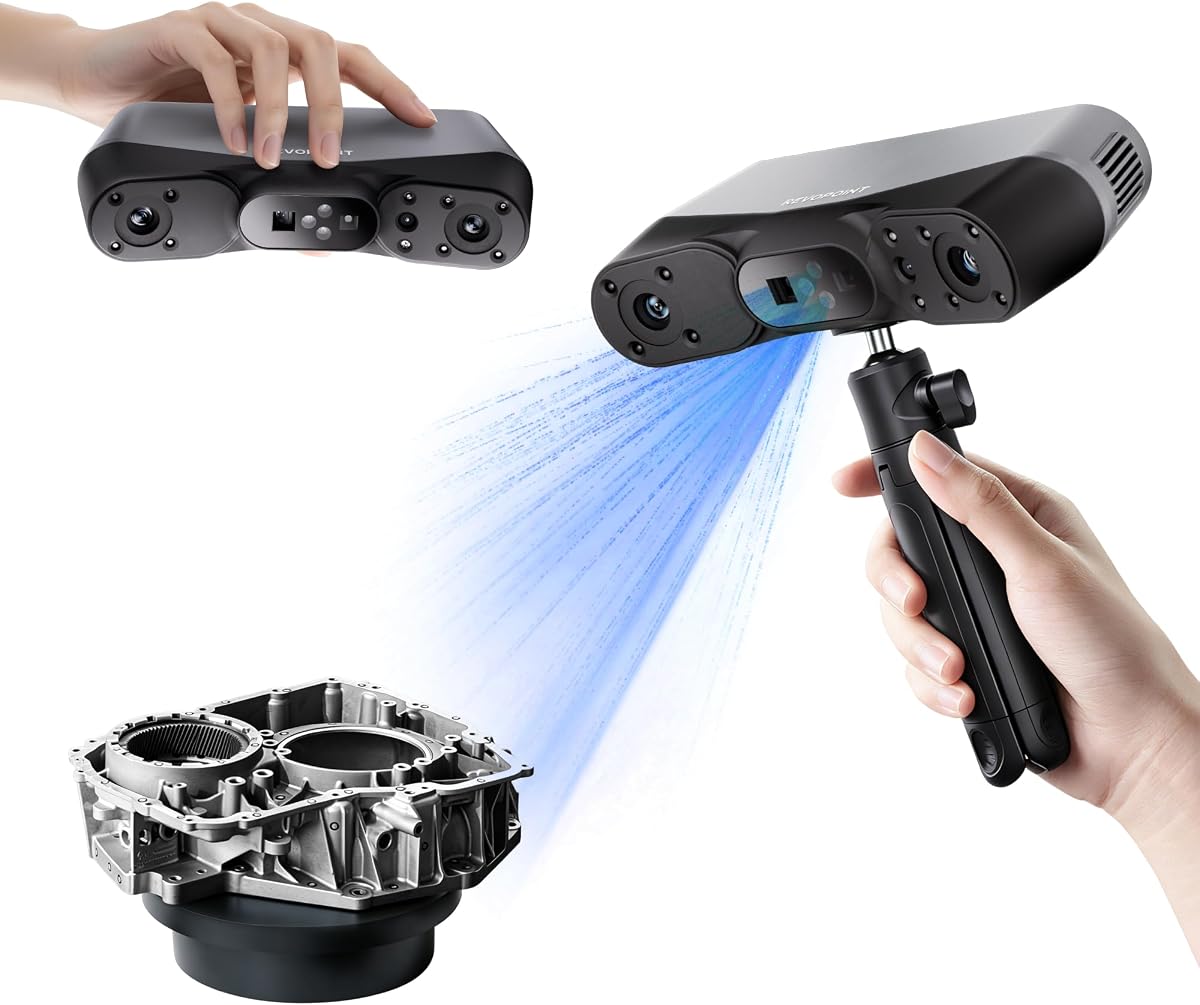
The Revopoint POP 4 is a feature-dense scanner for professional users who need more than one optical approach. Its published single-frame accuracy reaches 0.03mm, while five modes cover full-field structured light, hybrid scanning, VCSEL capture, 30-cross blue laser lines, and single-line deep-hole work. This makes it suited to small components, large objects, dark materials, reflective metals, cavities, and outdoor documentation.
We may earn a commission when you buy through this link, at no additional cost to you.
Performance is a major attraction. Multi-line laser mode reaches up to 105fps with NVIDIA GPU acceleration, and full-field structured light can collect up to 5,000,000 points per second. The scanner can work outdoors at 50,000 lux in multi-line mode, 100,000 lux with its filter, and 100,000 lux in VCSEL mode. Its stated scan volume stretches from 10 millimeters on each side to two meters, which is unusually broad.
AI object segmentation filters the background and tracks the target in one click on Windows. The device also supports 3D Gaussian Splatting, which converts point-cloud and RGB information into photorealistic splat output for gaming, animation, and virtual reality. Revo Scan 6 provides the main processing environment, while Revo Measure and Revo Design extend the workflow into measurement and reverse engineering.
The POP 4 is a compelling choice for design studios, inspection teams, game-content creators, and technical users who value mode flexibility. The trade-off is software complexity and additional cost for some professional modules. Windows users can take full advantage of the ecosystem, while users seeking a simpler free bundle may find the Creality Pika or Fox easier to manage.
The ability to alternate between full-field, hybrid, VCSEL, cross-laser, and single-line capture is the POP 4's most useful differentiator. It reduces the need for separate tools when a project includes reflective metal, dark surfaces, fine details, or recessed geometry.
Segmentation, point-cloud processing, photorealistic splatting, and links to measurement and CAD tools create a deeper workflow than a simple print-ready scan. The result is especially relevant to reverse engineering, industrial modeling, and immersive content.
We may earn a commission when you buy through this link, at no additional cost to you.
The Revopoint INSPIRE 2 is a lightweight, wireless scanner designed for makers who need accurate data away from a fixed workstation. At 190 grams, with an aluminum-alloy front panel, it is among the most portable models in this guide. Its published accuracy reaches 0.05mm, and its calibration system is stated to improve point-cloud accuracy by 75%.
We may earn a commission when you buy through this link, at no additional cost to you.
The scanner combines infrared structured light with 11 infrared laser lines, allowing it to address dark and reflective surfaces without scanning spray. It operates outdoors in lighting up to 20,000 lux, a lower limit than several industrial rivals but still suitable for shaded sites and semi-bright fieldwork. Wi-Fi 6 enables mobile structured-light scanning and real-time PC-to-phone streaming.
Color capture is handled by a built-in RGB camera that synchronizes texture with geometry. Adjustable 1.5x and 2x optical zoom helps users focus projected light on mixed-size objects, while Revo Metro provides scanning settings, editing tools, and one-click import into Revo Design. The included turntable, markers, filters, calibration board, tripod, and cables create a ready-to-use package.
The INSPIRE 2 is best for education, heritage collection, prop-making, and mobile design work where low weight and wireless operation matter. It may not be the right choice for severe direct sunlight or for teams that need the most advanced measurement package without additional software. For its core category, however, it balances precision, portability, color, and outdoor usability effectively.
A 190-gram chassis makes long handheld sessions more manageable, while the RGB camera adds synchronized color to captured surfaces. These traits suit field documentation where equipment must be carried between locations.
The high-precision calibration board, multiple alignment options, optical zoom, and Revo Metro controls give users several ways to improve capture quality. The accessories support repeatable indoor and outdoor workflows.
We may earn a commission when you buy through this link, at no additional cost to you.
The Revopoint MetroY Ultra targets demanding reverse engineering, inspection, and precision-modeling work. It advertises 0.01mm single-frame precision and volumetric accuracy of 0.015 + 0.04 millimeters times the measured length. Those figures position it as one of the most technically ambitious models here, particularly when paired with a controlled calibration and capture process.
We may earn a commission when you buy through this link, at no additional cost to you.
Five blue-laser modes cover 34 cross-lines for rapid area capture, 15 parallel lines for detail, a single line for deep holes, full-field blue structured light for marker-free work, and automated turntable scanning. The cross-line mode reaches up to 90fps with an NVIDIA GPU or 60fps with a CPU. It can scan black, glossy, and metallic components without spray and operate outdoors in up to 100,000 lux.
Revo Metro provides point-cloud editing, model processing, and multi-mode alignment, with exports including PLY, OBJ, STL, ASC, 3MF, GLTF, and FBX. Wi-Fi 6 allows monitoring through Revo Mirror on a PC, tablet, or mobile device, while the included 5,500mAh battery grip provides around 2.5 hours of operation for sites without reliable power.
This scanner is a strong recommendation for metrology-minded users, manufacturers, and advanced design studios that need high fidelity and specialized scanning modes. It may be excessive for casual hobby projects, and the included battery is not intended for unlimited mobile use. Buyers with serious inspection or reverse-engineering requirements will find its capability more convincing than its convenience-oriented rivals.
The combination of very fine single-frame precision, volumetric accuracy, and dedicated deep-hole modes makes the MetroY Ultra useful for parts where small deviations matter. Calibration discipline remains essential for achieving consistent results.
Blue laser technology is designed to cope with dark, glossy, and metallic surfaces without preparation spray. Rapid cross-line acquisition can also reduce the time required to cover larger components.
We may earn a commission when you buy through this link, at no additional cost to you.
The Revopoint MetroX Pro combines 0.02mm single-frame accuracy with a broad selection of blue-laser scanning modes. It is especially attractive for professional modeling teams that want precise data, flexible alignment, and automated object capture without relying on a separate desktop setup. Its four main modes include 30 cross lines, 15 parallel lines, 62-line full-field structured light, and automatic turntable scanning.
We may earn a commission when you buy through this link, at no additional cost to you.
The full-field mode can produce up to 7 million points per second, while cross-line and parallel-line modes can reach 2 million points per second. The dual-axis turntable automates complex-object capture with one click, and the HD RGB camera supports color-accurate output in that mode. Users can choose feature, marker, or global-marker tracking depending on the geometry and available references.
Revo Mirror streams the scan to a phone, tablet, or display, helping users inspect the emerging model and identify gaps while moving around the subject. Revo Metro handles scanning, editing, merging, and export, with transfer paths to Revo Measure, Revo Design, and other 3D applications. That integration makes the scanner a practical bridge between physical measurement and editable CAD workflows.
The MetroX Pro is a good recommendation for industrial designers, product teams, and inspection users who value automated capture and professional data handling. Revo Design and Revo Measure are optional paid software, which increases the total cost of a complete professional setup. Its capabilities are probably excessive for a user who only needs a simple decorative figurine, but well matched to repeatable technical workflows.
The dual-axis turntable reduces manual movement and helps maintain consistent coverage. A color camera in automatic mode also simplifies the production of realistic scan assets for visualization and presentation.
Three tracking approaches allow users to adapt to detailed, flat, or geometrically complex subjects. This flexibility is valuable in studios where different components require different reference strategies.
We may earn a commission when you buy through this link, at no additional cost to you.
The 3DMakerpro Fox is designed as an approachable handheld scanner for beginners, hobbyists, and makers testing whether digital capture fits their workflow. Its stated accuracy is 0.07mm with 0.10mm resolution, specifications that make it more useful for practical 3D-printing and modeling than many basic scanners in a similar market position. It carries a customer rating of 3.2, so buyer expectations should be set accordingly.
We may earn a commission when you buy through this link, at no additional cost to you.
Its standout feature is markerless AI visual tracking. If the operator moves too quickly or loses alignment, the software can recognize the previously scanned area and relock rather than requiring an entire restart. This recovery feature may be particularly helpful for beginners. JMStudio combines scanning, editing, and optimization in one environment, reducing the need to manage a fragmented collection of utilities.
As a medium-format scanner, the Fox targets objects that are larger than tiny precision parts but generally more approachable than industrial equipment. It can support print preparation, basic modeling, dimensional reference, and quality inspection, although its specifications do not promise the sub-0.02mm performance of the premium Revopoint models.
The Fox is the most sensible choice for a first scanner when cost control and ease of use matter more than industrial tolerance or extensive export choices. It is not ideal for users whose work depends on certified measurement, extremely fine surface detail, or a large professional software ecosystem. Within the entry-level category, its AI relocking and integrated software make it a more interesting choice than a bare-bones device.
AI visual recognition can reacquire a previously scanned region after a sudden movement. This recovery behavior may reduce wasted capture sessions for new users still learning scanning speed and angle.
JMStudio places capture, editing, and optimization together. That integrated approach keeps the initial learning curve manageable while still allowing users to prepare models for printing and basic modeling.
We may earn a commission when you buy through this link, at no additional cost to you.
The Creality Otter Lite Basic stands out for its quad-camera design, broad working range, and strong 4.8 customer rating. It combines stereo matching with DOE structured light to deliver stated accuracy up to 0.05mm at capture speeds of 30fps. The scanner accommodates objects listed from 0.8 to 78 inches, with a single-frame area of 1,460 by 1,017 millimeters at a distance of 1,200 millimeters.
We may earn a commission when you buy through this link, at no additional cost to you.
Dual long-focal lenses support fine details, while dual short-focal lenses cover larger surfaces. The DOE system is designed to capture dark, shiny, and metallic objects without powder or spray. A megapixel RGB camera and two white LED fill lights support 24-bit color texture, making the scanner relevant for figurines, artwork, heritage items, and product presentations.
The device also supports outdoor operation in up to 30,000 lux, marker, geometry, and texture alignment, and class one near-infrared scanning suitable for face and full-body work. CrealityScan 4 operates across Windows, macOS, iOS, and Android, includes AI-powered head-mesh repair, and exports PLY, OBJ, STL, ASC, 3MF, GLTF, and FBX. Wi-Fi 6 support improves wireless operation.
The Otter Lite Basic is a strong all-around option for users who need one scanner for both small details and large objects, as well as color-rich digital copies. Its 30fps rate is less impressive than the 90 to 110fps offered by some laser scanners, and the optional Scan Bridge is not included. Even so, its range, color system, and favorable rating make it a compelling general-purpose choice.
The four-camera arrangement balances close detail with broad coverage, reducing the need to switch equipment between very small and very large objects. This makes the model especially useful for mixed-project studios.
The RGB camera and fill lights make full-color capture more practical in dim conditions. At the same time, concentrated DOE light reduces reliance on spray when encountering dark or metallic surfaces.
We may earn a commission when you buy through this link, at no additional cost to you.
The Creality CR-Ferret SE is a straightforward desktop scanner built around 30fps capture, a two-megapixel color camera, and anti-shake tracking. Its published accuracy is 0.1mm and resolution is 0.16mm. It carries a 3.0 customer rating, which is the lowest among the products with available ratings, making clear expectations important for prospective buyers.
We may earn a commission when you buy through this link, at no additional cost to you.
One-shot 3D imaging is used to improve tracking when the operator's hands move or the object shifts. The scanner's range runs from 150 to 2,000 millimeters, and a single capture can cover up to 560 by 820 millimeters. This gives it useful flexibility for medium and relatively large subjects while keeping the process approachable for desktop-based work.
The integrated color camera captures colored geometry, and the scanner is optimized to handle black, metallic, and non-reflective objects without spraying powder or coating. Those features make it convenient for rapid visualization, 3D-printing preparation, and general model capture, especially when powder would be messy, undesirable, or inappropriate for the object.
The Ferret SE makes sense for a user who prioritizes simplicity, color, and quick setup over premium precision. It is less suitable for professional inspection, delicate reverse engineering, and applications where sub-0.05mm accuracy is required. Its appeal lies in delivering a capable desktop capture experience without the complexity of the higher-end Revopoint systems, provided the buyer accepts the more modest specification set.
One-shot imaging and anti-shake tracking are intended to keep data aligned when the scanner or subject moves unexpectedly. This makes the device less sensitive to minor handling errors during quick passes.
The integrated camera records color while the optical system addresses dark and metallic materials without powder. Users can therefore work more quickly and avoid residue on the scanned object.
We may earn a commission when you buy through this link, at no additional cost to you.
The Creality CR-Scan Ferret Pro adds wireless operation to the familiar Ferret formula of compact handheld scanning, full-color capture, and anti-shake tracking. It holds a 3.7 customer rating and retains 0.1mm stated accuracy, 0.16mm resolution, and 30fps capture. The dedicated Wi-Fi 6 bridge enables wireless scanning with compatible Android devices and iPhone 11 or newer, while USB remains available for computer workflows.
We may earn a commission when you buy through this link, at no additional cost to you.
Upgraded optics and algorithms support outdoor capture in ambient light up to 30,000 lux. Models export as OBJ, STL, or PLY, covering common requirements for printing, design, and reverse-engineering workflows. The anti-shake system uses one-shot 3D imaging to improve tracking success when the operator or object moves, which is useful for users who are still developing smooth scanning technique.
Platform requirements are detailed and should be checked before purchase. Windows systems need an i5 Gen 8 or later processor with Windows 10 or 11, more than 8GB RAM, and the specified software version. Mac support covers M1 through M4 chips or qualifying Intel configurations, while Android 10 or later and iOS 15 or later are supported with appropriate memory and connectivity.
The Ferret Pro is a good recommendation for users who want wireless capture on a phone or tablet without giving up desktop connectivity. It is not the best option for highly reflective, transparent, or extremely dark subjects, which the manufacturer specifically advises avoiding for optimal results. Its main advantage over the standard Ferret is mobility rather than a dramatic increase in stated accuracy.
The included Wi-Fi 6 bridge separates the scanner from the computer and allows compatible phones or tablets to control the workflow. USB alternatives preserve support for users who prefer a wired, higher-bandwidth connection.
Detailed processor, operating-system, memory, and app requirements help buyers avoid compatibility surprises. Checking the intended device before ordering is especially important for the wireless bridge workflow.
We may earn a commission when you buy through this link, at no additional cost to you.
The Revopoint MIRACO Plus is an all-in-one scanning workstation with a large touchscreen, integrated cameras, substantial onboard processing, and support for both depth scanning and photogrammetric metrology. Its stated point-cloud accuracy reaches 0.04mm, and the quad depth-camera system offers near and far modes for objects ranging from tiny screws to large machinery. It weighs 750 grams and includes a two-hour battery claim.
We may earn a commission when you buy through this link, at no additional cost to you.
The photogrammetric kit adds four carbon-fiber scale bars and two sets of 208 coded targets, with a stated length accuracy of 0.02 + 0.05 millimeters times the measured distance. Optical infrared zoom at 1.5x and 2x helps capture small details, while a 48MP RGB camera and flash LEDs create detailed color models. The flip-mounted 6-inch 2K AMOLED display provides an intuitive on-device interface.
Internally, an eight-core 2.4GHz processor, 32GB RAM, and 256GB storage support projects of up to 10,000 frames. Users can choose single-shot point-cloud capture for accuracy or continuous capture at up to 20fps. Wi-Fi 6 and USB Type-C transfer options connect the device to MacOS and Windows systems, and exports include PLY, OBJ, STL, ASC, 3MF, GLTF, and FBX.
The MIRACO Plus is best for users who want a dedicated, screen-equipped capture station and photogrammetry in one package. It can be especially useful for product design, heritage work, and controlled measurement tasks. Revo Design is a separate purchase, and the supplied software requires x86_64 architecture, so buyers should confirm their computer environment and broader software budget before committing.
The large flip screen, onboard storage, processing hardware, and internal camera system reduce dependence on a separate computer during acquisition. This makes the device convenient for dedicated studio or mobile workstations.
The photogrammetric kit, scale bars, coded targets, and high-resolution RGB camera support measured and visually rich models. Optical zoom and selectable near or far modes help match the capture configuration to the subject.
We may earn a commission when you buy through this link, at no additional cost to you.
Choosing a 3D scanner means matching the optical system, resolution, software, and workflow to the objects and decisions you need to make. Accuracy headlines are useful, but mode-specific performance, surface behavior, coverage, and post-processing requirements usually determine whether a scanner is truly suitable.
Accuracy describes how closely a captured dimension matches the real object, while resolution indicates the spacing of recorded detail. The products in this guide publish values ranging from 0.01mm precision on premium industrial models to 0.1mm accuracy on more approachable scanners. These figures are not perfectly comparable because manufacturers define them differently and evaluate different distances, modes, and test objects.
Choose based on the tolerance your application can tolerate. Fine mechanical models, inspection, and reverse engineering justify tighter specifications, while decorative prints, character assets, and educational models can often use a more modest scanner. Always evaluate the published figure for the specific mode you intend to use rather than treating the largest number on the listing as universal performance.
Blue lasers, infrared structured light, VCSEL patterns, full-field projection, photogrammetry, and feature tracking each have strengths. Laser-oriented modes are often useful for dark, shiny, or metallic subjects, while full-field and photogrammetric approaches can create detailed color-rich models. Deep cavities, narrow grooves, flat surfaces, and small parts may also require different modes.
A scanner with several modes is more adaptable, provided its software makes switching understandable. Buyers should check whether the difficult surfaces in their workflow are explicitly supported and whether a spray-based workaround is acceptable when a mode cannot handle them.
The usable volume determines whether a scanner can frame a complete object without stitching, distortion, or loss of detail. Small models benefit from close-range optics and fine resolution, whereas furniture, vehicles, machinery, and human bodies require broader coverage and stable tracking. The list covers devices claiming minimum dimensions as small as 10 millimeters and maximum volumes as large as two meters on each side.
Consider the dimensions of your largest recurring subject and the smallest detail you expect to preserve. A large capture area alone does not guarantee equal detail across the frame, so camera focal lengths, working distance, optical zoom, and turntable support also matter.
Capture speed can influence productivity, but frames per second alone is not a complete measure of throughput. Point acquisition rate, alignment stability, data transfer, and post-processing all affect the time needed to finish a usable model. The featured scanners range from 20fps continuous capture to published rates of 90, 105, or 110fps in laser-oriented modes.
Slower high-resolution systems may be preferable for static objects, whereas rapid modes help when scanning large assemblies or people. Make sure the advertised speed applies to the mode and resolution you need. Software optimization, GPU acceleration, and tracking recovery can be as important as headline frame rate in everyday use.
The scanner should produce data that can move into the tools already used for printing, modeling, measurement, animation, or archiving. Common outputs in this category include STL, OBJ, PLY, 3MF, GLTF, FBX, ASC, and splat formats. Beyond file formats, buyers should examine hole repair, mesh generation, texture mapping, alignment, and measurement features.
Revo Design and Revo Measure are separate paid tools on several products, while some scanners bundle their main application. Check operating-system restrictions, especially for advanced AI segmentation, CAD integration, or photogrammetry. A polished scanner can still be inconvenient if its software does not run on your primary computer.
Wireless control, compact construction, swappable batteries, and field-ready lighting support can make a scanner much more useful outside a permanent studio. Weights in the guide range from 190 grams for the INSPIRE 2 to 750 grams for the MIRACO Plus, with several models falling between those figures. Battery claims range from around two hours to four hours of continuous use, depending on the device and mode.
Choose based on the size and weight you can comfortably control for an entire session. A lighter scanner may still be tiring when used on large objects, while a desktop-style workstation may be too heavy for field collection. Outdoor lighting limits are another important portability factor because direct sunlight can overwhelm optical systems.
Color capture matters for figurines, heritage objects, products, garments, and immersive content. RGB camera resolution, fill lighting, synchronization between texture and geometry, and the depth system used to align color can affect the final result. Some products also offer photo-based retexturing or Gaussian splatting for a more photorealistic appearance.
Color is more than a camera specification. Stable tracking, suitable lighting, and software that aligns images without smearing are equally important. Users primarily creating print-ready monochrome geometry may not need to prioritize texture quality as heavily.
A complete package can include a turntable, tripod, calibration board, scale bars, coded targets, markers, filters, and charging or connection cables. Calibration tools are particularly important because they help maintain consistent dimensional results, while a turntable improves coverage of complex objects and reduces manual effort.
Check the package carefully rather than assuming every listed accessory is included. Warranty length, customer support, software updates, replacement parts, and the availability of regional service can also affect long-term ownership. The supplied bundle should align with the scanning environment rather than merely adding inexpensive accessories.
Begin by reading the scanner's calibration instructions and identifying the correct mode for the subject. Work in a stable, evenly lit space, clean the lenses, and test a small area before beginning a long scan. Keep the recommended distance and angle consistent, move the scanner smoothly, and make sure the software has enough storage and processing capacity for the intended project.
For a turntable-based object, center the item securely, verify that every relevant surface is visible, and avoid placing reflective markers where they could interfere with color capture. For human or large-object scans, maintain safe distances and use the recommended tracking markers where the device expects them. Watch the live preview for gaps, drift, and missing geometry, then rescan those regions from another angle before ending the session.
After capture, review alignment, remove floating noise, fill holes, crop the model, and generate the appropriate mesh format. Keep the raw point cloud or color data as a backup because cleanup can alter fine detail. Store the scanner in its case, protect optical elements from dust and impact, charge batteries according to the manufacturer's guidance, and recalibrate whenever the device is moved, dropped, exposed to substantial temperature changes, or produces inconsistent results.
For most hobby prints, figurines, and decorative objects, a scanner around 0.05mm to 0.1mm accuracy is more than sufficient when the data is clean and the model is properly scaled. Tighter industrial inspection or reverse-engineering work may call for scanners advertising 0.01mm to 0.03mm precision. Consider resolution, calibration, tracking, and mesh quality alongside the accuracy number.
Many modern scanners use blue lasers, infrared lasers, or concentrated structured light to capture dark, shiny, and metallic surfaces without spray. Results still depend on the exact model, mode, and finish, while transparent, highly polished, and deeply reflective materials can remain difficult. Test a representative area and review the manufacturer's surface limitations before beginning a critical project.
Handheld scanners are convenient for large objects, irregular shapes, and flexible positioning, while desktop-style systems can provide a more controlled workflow. Neither category is universally more accurate because performance depends on the optical design and software. Choose based on the subject size, required precision, available workspace, and how frequently you need to move between locations.
Some products explicitly support face or full-body capture, including the Pika, Otter Lite Basic, and MIRACO Plus. The relevant features include NIR or infrared operation, body-completion tools, color synchronization, and sufficient working range. A successful body scan still needs controlled movement, suitable lighting, adequate coverage, and careful post-processing to produce a usable mesh.
Several featured scanners are designed for outdoor use, with published ambient-light limits ranging from 20,000 to 100,000 lux. Higher limits generally indicate better tolerance of bright conditions, but direct sunlight, moving shadows, and reflective surfaces can still affect data. Use the specified outdoor mode, apply any required filter, and avoid conditions that exceed the manufacturer's stated limit.
Common formats include STL, OBJ, PLY, 3MF, ASC, GLTF, and FBX, although the exact set varies by model. STL is widely used for printing, while OBJ, PLY, GLTF, and FBX can better preserve color or broader scene information. Confirm the required format and software workflow before purchasing, especially if you plan to use photogrammetric or splat-based output.
It depends on the scanner and the depth of the workflow. Several Revopoint products bundle a main scanning application but offer Revo Design and Revo Measure separately for CAD conversion and professional measurement. Other scanners include integrated editing tools. Compare the entire software cost, operating-system support, and whether the basic application can export geometry into your preferred design environment.
Real-world results may differ from headline specifications because of calibration, working distance, motion, surface reflectivity, ambient light, and software settings. A well-calibrated system used within its intended conditions can be consistent, while unsuitable surfaces and poor technique can introduce obvious errors. Capture a test object, inspect the result, and complete calibration checks before relying on measurements for a critical decision.
The Creality Pika Portable 3D Scanner is the strongest all-around recommendation because it combines dual optical modes, strong stated accuracy, rapid capture, full-color potential, AI tools, and a genuinely portable design. The Revopoint MetroY Ultra stands apart for premium industrial precision and specialized blue-laser modes, while the 3DMakerpro Fox offers the most approachable way to begin scanning without investing in a professional system.
Prioritize the requirements of your actual objects rather than choosing solely by the smallest published accuracy figure. Dark or metallic surfaces call for suitable laser modes, large subjects need adequate working volume, and full-body work benefits from infrared or photogrammetric capture. Software, operating-system compatibility, calibration supplies, and export formats should be evaluated before the optical specifications.
Product configurations, included accessories, ratings, software versions, and prices can change over time. Review the current Amazon listing and manufacturer documentation before ordering, and confirm that your computer or mobile device meets the scanner's stated requirements. Those checks can prevent a technically capable scanner from becoming an awkward or incompatible part of your workflow.