
Cudy R700
4.4Editor score
Five Gigabit Ethernet ports
OpenWRT-ready network control
WireGuard and OpenVPN support
This Dual Wan Router guide compares failover, VPN, multi-gigabit, Wi-Fi, security, and management features to help you choose the right model.
A dual WAN router gives a business or advanced home network a valuable second path to the internet. The best model should switch connections smoothly when a primary service fails, balance traffic when appropriate, and provide the VPN, firewall, and management controls required by its users.
This guide compares ten dual WAN routers by examining WAN port speed and flexibility, failover capabilities, VPN support, wired throughput, wireless features, security tools, remote management, and deployment scale. The list covers affordable multi-WAN models, business routers, and premium multi-gigabit systems.
Each review identifies the feature that makes a particular model distinctive, along with its most important limitations. The top picks include a budget-friendly OpenWRT option, a resilient enterprise branch router, and a premium multi-gigabit model. Product availability and pricing can change.
4.4Editor score

4.4Editor score

4.2Editor score
The comparison below highlights each router's most important hardware and connectivity differences, including dual WAN design, wired speed, wireless support, VPN capabilities, and management options.



The TP-Link ER605 is a wired Gigabit VPN router that combines three physical WAN options with extensive VPN support. Its 4.4 rating reflects a capable package for small offices, remote workspaces, and home labs that need more than a single internet connection without moving into high-end multi-gigabit hardware.
We may earn a commission when you buy through this link, at no additional cost to you.
Its standout strength is port flexibility. The router includes one dedicated Gigabit WAN port, two Gigabit WAN/LAN ports, and two Gigabit LAN ports, allowing up to three services to act as WAN connections while remaining useful for wired clients. A USB port can host a compatible 4G or 3G modem as an additional backup path when the primary broadband connection fails.
The security feature set is broader than a typical entry-level consumer router. It includes an SPI firewall, DoS defense, IP, MAC, and URL filtering, VPN pass-through, and access control. The router supports 20 LAN-to-LAN IPsec connections alongside 16 OpenVPN, 16 L2TP, and 16 PPTP connections, giving administrators several ways to connect remote offices or travelers.
There are two important trade-offs. It has no integrated Wi-Fi, so it works best as the central router in a wired deployment or alongside separate access points. All Ethernet interfaces are Gigabit rather than multi-gigabit, which is less important for ordinary business traffic but may limit users moving very large files or operating demanding local services.
Overall, the ER605 is a compelling choice for buyers who want several WAN options, mobile-broadband backup, and robust VPN features in a straightforward wired appliance. It is especially suitable for a small branch that values resilience and network controls more than wireless convenience or ultra-fast internal backhaul.
The three configurable WAN connections make it possible to combine services from different providers and retain more than one failover path. This is more adaptable than the typical two-WAN arrangement without requiring a large enterprise chassis.
Support for IPsec, OpenVPN, L2TP, and PPTP gives administrators practical choices for site-to-site links and remote client access. Firewall policies and traffic filtering add useful control around those services.
We may earn a commission when you buy through this link, at no additional cost to you.
The Peplink B One is a Gigabit dual WAN wireless router designed for enterprise branches and other locations where an interrupted broadband connection can disrupt business operations. It earns a 4.4 rating through a combination of dual WAN resilience, SpeedFusion link smoothing, integrated Wi-Fi 6, and straightforward support for several access technologies.
We may earn a commission when you buy through this link, at no additional cost to you.
The most distinctive feature is SpeedFusion. Instead of leaving an active session exposed to the rough edge of an abrupt ISP outage, the router can combine available connections to create a smoother experience for demanding applications such as video calls. That makes the B One more than a basic automatic failover router, particularly for branches with variable connection quality.
Its physical design supports a broad range of services. Two Gigabit WAN ports can be assigned to cable, DSL, fiber, or another available connection, while four Gigabit LAN ports serve wired devices. The USB WAN interface adds another route, and the product can integrate Starlink systems for backup or load balancing. Dual-band 2×2 MIMO Wi-Fi 6 provides local wireless access without requiring a separate access point.
The main limitation is that its Ethernet interfaces top out at Gigabit speeds. Buyers with 2.5G or 10G internal networks may need a more advanced multi-gigabit model. It is also a focused branch-connectivity device rather than a general-purpose high-capacity enterprise switch, although the listed configuration is well matched to a typical branch office.
For organizations prioritizing uninterrupted communication, smooth network behavior, and an all-in-one wired and wireless package, the B One is the strongest general recommendation in this guide. It is particularly appropriate where cellular or satellite connectivity serves as a dependable secondary service.
SpeedFusion is the feature that distinguishes this model from a conventional dual WAN appliance. It is designed to preserve connection quality during an interruption, reducing disruption for calls and other sensitive real-time traffic.
Two Gigabit WAN ports, four Gigabit LAN ports, and a USB WAN interface allow administrators to mix traditional broadband with cellular or satellite service. This makes the router adaptable as access networks evolve.
We may earn a commission when you buy through this link, at no additional cost to you.
The NETGEAR PR60X is a cloud-managed dual WAN router for organizations that need a faster internal network and more sophisticated management than a conventional Gigabit router provides. Its 4.2 rating reflects strong enterprise features, including 10G and multi-gigabit connectivity, VLAN support, multiple VPN types, and remote administration through NETGEAR Insight.
We may earn a commission when you buy through this link, at no additional cost to you.
Hardware is the primary reason to consider this model. It offers one configurable 10G or multi-gigabit LAN/WAN port, a dedicated 2.5G WAN port, three 2.5G LAN ports, and a 10G SFP+ port for long-distance backhaul. That range of interfaces allows a network designer to build around faster switches and storage devices while retaining a separate failover path.
Its remote access capabilities are particularly relevant to distributed teams. IPSec site-to-site and client-to-site VPN, OpenVPN, and WireGuard are supported, with capacity for up to 100 connected client devices and 30 VPN tunnels. Up to 32 VLANs provide segmentation for departments, guest services, devices, or applications, while NETGEAR Insight centralizes monitoring and configuration.
The PR60X does not include integrated Wi-Fi, so it needs access points for wireless coverage. The bundled Insight subscription is listed for one year, which means buyers should check the included management terms before planning a longer deployment. Its advanced hardware and enterprise feature set also place it in a different class from simpler dual WAN routers.
Despite those considerations, this is the best premium pick for small and medium enterprises that need multi-gigabit local performance, strong VPN support, VLAN segmentation, and cloud management. It is a particularly strong fit for professional offices, distributed organizations, and installations already using NETGEAR Pro access points or compatible Smart switches.
The combination of 2.5G LAN ports, a configurable high-speed port, and a 10G SFP+ uplink supports modern switches, servers, and storage. It offers room for growth where a basic Gigabit-only router would become the constraint.
NETGEAR Insight allows administrators to monitor and manage the router remotely. Integration with NETGEAR Pro access points and select Smart switches makes it easier to operate a consistent small-business network.
We may earn a commission when you buy through this link, at no additional cost to you.
The Cudy R700 is a five-port Gigabit multi-WAN router aimed at small businesses, remote offices, and technically capable home labs. It combines automatic failover and load balancing with OpenWRT support, a broad VPN gateway suite, VLAN segmentation, and cloud management access, earning a 4.4 rating.
We may earn a commission when you buy through this link, at no additional cost to you.
Its affordability combined with five Gigabit ports makes it a practical choice for connecting several ISP services. The product description states that as many as five ISPs can participate in failover and load-balancing arrangements, giving users a degree of flexibility that exceeds the standard dual WAN layout without moving to a large enterprise appliance.
OpenWRT readiness adds considerable long-term value for administrators who need granular control. VLAN segmentation, advanced firewall rules, custom QoS policies, and community-developed packages can turn the router into a flexible network platform. Built-in WireGuard, OpenVPN, IPsec, PPTP, and L2TP support covers server, client, and site-to-site VPN use cases.
The router also includes a SPI firewall, DoS protection, IP and MAC binding, domain filtering, and DMZ hosting. Diagnostic functions such as ping, traceroute, NSLookup, and system logs help identify connectivity problems, while a web interface, Cudy app, and TR-069 support provide several management paths.
The main trade-off is complexity. Users who need simple automatic switching may prefer an appliance with a more opinionated interface, while those seeking custom network functions will find the OpenWRT-ready architecture useful. There is also no integrated Wi-Fi, so separate access points may be necessary. Overall, it is an excellent value-oriented choice for buyers who want control and multi-WAN capability in a compact wired router.
Five Gigabit interfaces support several service providers and leave additional ports available for local equipment. Automatic failover and load balancing can improve availability without requiring a large enterprise router.
OpenWRT readiness unlocks advanced firewall, QoS, and VLAN configuration. Built-in diagnostics help administrators isolate routing, name-resolution, and connectivity issues without relying on separate monitoring hardware.
We may earn a commission when you buy through this link, at no additional cost to you.
The TP-Link Omada ER707-M2 is a multi-gigabit VPN router designed for growing branch networks and centralized business deployments. It combines two 2.5G WAN-capable interfaces, a Gigabit SFP port, LTE backup through USB, broad VPN support, and cloud access through the Omada ecosystem.
We may earn a commission when you buy through this link, at no additional cost to you.
Its port configuration gives administrators room to build a faster network without immediately moving to 10G. One 2.5G port serves as a WAN connection, another 2.5G port can operate as WAN or LAN, and four Gigabit ports can be assigned as WAN or LAN. A Gigabit SFP slot adds another flexible WAN/LAN option, while USB 2.0 can support storage or a compatible LTE dongle.
The listed capacity is substantial for a compact business router: as many as 500,000 concurrent sessions and more than 1,000 clients. VPN capacity includes 100 LAN-to-LAN IPsec connections, 66 OpenVPN, 60 L2TP, and 60 PPTP connections. Those limits are especially relevant to organizations connecting many sites or maintaining a large remote-user population.
Centralized cloud access and the Omada app make the router easier to manage across separate locations. Administrators can control a distributed network through one interface, while the hardware is designed to pair with the broader Omada equipment ecosystem. A five-year warranty and free technical support add reassurance for long-term business deployments.
The principal limitation is the absence of built-in Wi-Fi. The ER707-M2 is a wired routing platform, so a complete installation will require suitable access points and switches. For organizations that already use Omada or want a scalable, centrally managed multi-gigabit router, it is a strong and well-balanced choice.
Two 2.5G-capable interfaces provide useful headroom for fiber, business broadband, and modern local networks. The SFP slot expands uplink options and makes the router easier to adapt to different physical infrastructure.
Remote cloud access and the Omada app centralize control for distributed networks. This is useful for operators who want consistent policies without visiting every branch or small office.
We may earn a commission when you buy through this link, at no additional cost to you.
The ASUS RT-BE88U is a Wi-Fi 7 router with two 10G ports and a strong emphasis on high-speed local networking, flexible internet connections, and integrated security. Its 4.3 rating makes it an attractive option for modern homes and small offices seeking current wireless performance alongside premium wired capabilities.
We may earn a commission when you buy through this link, at no additional cost to you.
The headline wireless capability is Wi-Fi 7 throughput of up to 7.2 Gbps using Multi-Link Operation and 4096-QAM. A quad-core 2.6GHz 64-bit processor provides the processing foundation for demanding wireless clients. The wired side includes one 10G SFP+ port and one 10G WAN/LAN port, creating a high-speed path between compatible devices and the wider network.
Internet connection flexibility is another strength. AI WAN detection, versatile WAN configuration, and a USB port ready for 4G LTE or 5G mobile tethering offer several ways to establish and maintain service. The router can support up to five SSIDs, while Guest Network Pro helps separate IoT devices and visitors from more sensitive systems.
Security features include AiProtection Pro powered by Trend Micro, one-tap security scanning, comprehensive VPN support, site-to-site VPN, parental controls, and instant VPN connections. AiMesh compatibility allows the router to serve as part of a broader mesh network, which is helpful when one unit cannot provide sufficient coverage.
The important trade-off is that the supplied information emphasizes AI WAN detection and flexible WAN configuration rather than explicitly promising the same multi-WAN failover and load-balancing behavior of the business-focused routers in this list. Buyers whose primary requirement is a formal second WAN should verify the exact operating mode they need. It is otherwise an excellent high-performance option for Wi-Fi 7 users who also need 10G local connectivity.
Wi-Fi 7 features such as Multi-Link Operation and 4096-QAM position the RT-BE88U for compatible high-speed clients. The benefit is most meaningful when nearby devices and the internet service can support those higher throughput levels.
A 10G SFP+ port and a 10G WAN/LAN port support high-bandwidth local infrastructure. They are useful for fast wired clients, modern switches, or storage systems that would overwhelm ordinary Gigabit ports.
We may earn a commission when you buy through this link, at no additional cost to you.
The ASUS ExpertWiFi EBG15 is a wired business router that combines up to three Ethernet WAN connections with USB backup, VLAN support, intrusion prevention, and application-aware firewall controls. Its 3.8 rating is the second-lowest in this group, but the product remains relevant for organizations that prioritize security and flexible internet entry points.
We may earn a commission when you buy through this link, at no additional cost to you.
One Gigabit port is dedicated to WAN, while two additional Gigabit ports can be configured as WAN or LAN. That arrangement allows multiple broadband services and retains the possibility of load balancing. The USB port can connect a mobile phone hotspot as a backup WAN, providing a practical emergency path when conventional services are unavailable.
Security is the most compelling feature. The Layer 7 firewall can make decisions based on application traffic rather than only addresses and ports. The intrusion prevention system uses deep packet inspection and virtual patching to help block malicious traffic. VLAN assignment for each Ethernet port adds separation between departments, guest access, servers, and other network groups.
Administration can occur through a web browser or the ASUS ExpertWiFi mobile app, and Bluetooth-assisted setup is designed to simplify initial configuration. The router also provides safe browsing, VPN features, and a free subscription to ASUS AiProtection Pro according to the supplied product information.
The limitations are worth considering. Its Ethernet ports are limited to Gigabit speeds, and the lower 3.8 rating suggests that some buyers may have encountered issues not captured by the feature summary. There is also no integrated Wi-Fi, so ASUS access points or another wireless system will be needed. Buyers who prioritize intrusion prevention, VLAN isolation, and three physical WAN choices will find that the security benefits outweigh the rating difference.
Layer 7 inspection adds visibility into the applications using the connection. Combined with IPS, deep packet inspection, and virtual patching, it offers more detailed control than a basic port-and-address firewall.
Per-port VLAN assignment helps isolate network functions without moving every device to separate hardware. Three WAN choices and USB hotspot support create several routes to maintain connectivity.
We may earn a commission when you buy through this link, at no additional cost to you.
The D-Link DSR-250V2 is a dual WAN VPN router aimed at businesses supporting remote and hybrid workers, particularly organizations that value regulatory compliance and hardware-based network security. It offers 2.9 Gbps firewall throughput, extensive VPN support, VLAN segmentation, dynamic routing, and TAA and NDAA compliance.
We may earn a commission when you buy through this link, at no additional cost to you.
Its remote-access capabilities are the core attraction. The router can extend a corporate network to home or remote offices using IPsec, PPTP, L2TP, OpenVPN, and SSL, with encryption methods including DES, 3DES, and AES. It can be deployed as a dedicated hardware VPN gateway or configured to support client-based connections for traveling users.
Dual WAN failover automatically moves to a backup source if the primary service fails, while load balancing can distribute traffic across available connections. The hardware includes one Gigabit WAN, three Gigabit LAN ports, one configurable Gigabit LAN/WAN port, support for as many as 75 VPN tunnels, 50 IPsec tunnels, 16 VLANs, 300 policies, and 50,000 sessions.
Dynamic routing support includes RIPv1, RIPv2, and OSPF, which can be useful in multi-site networks. Web-based and SNMP management provide familiar administration options, while a limited lifetime warranty and 39 years of stated brand expertise support long-term deployment confidence.
The principal concern is its 2.9 rating, the lowest among the ten products, which may indicate inconsistent buyer experiences. Its firewall throughput is also below the multi-gigabit options, and every Ethernet interface is Gigabit. Organizations in regulated sectors may value its TAA and NDAA posture enough to accept those trade-offs, but buyers with demanding performance needs should consider newer multi-gigabit alternatives.
The DSR-250V2 can act as an always-on gateway for remote offices or home workers. Its broad tunnel and protocol support provides administrators with several options for connecting sites and traveling users.
Manufacture in Taiwan and adherence to TAA and NDAA standards make the router relevant for agencies and regulated businesses. These requirements may matter more than maximum throughput in procurement environments.
We may earn a commission when you buy through this link, at no additional cost to you.
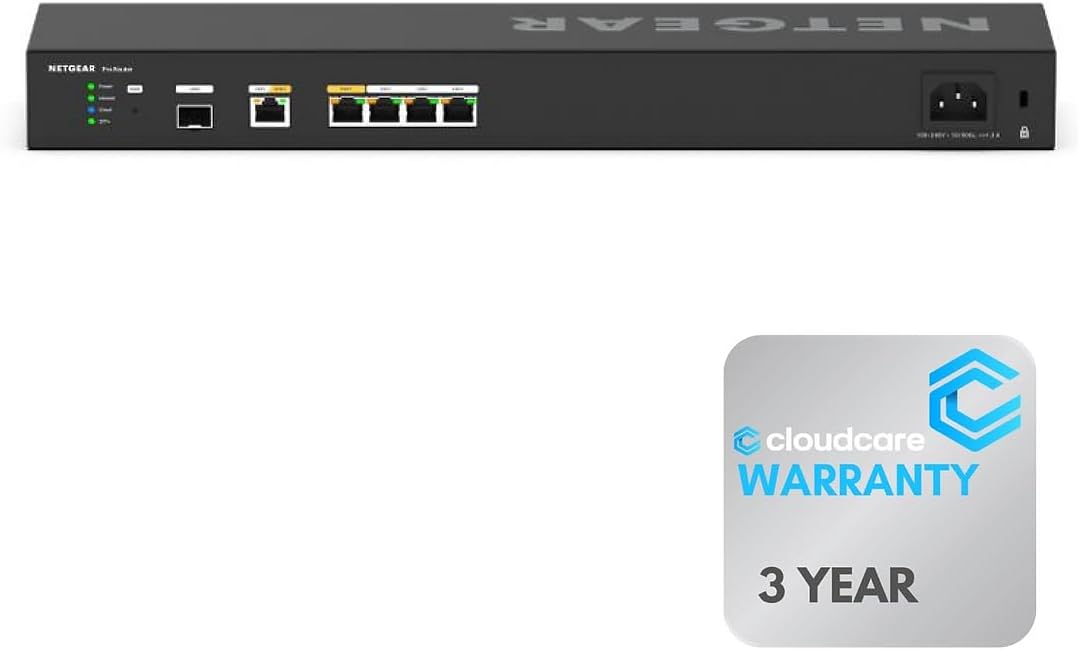
The Cloud Care NETGEAR PR60X combines the PR60X hardware platform with a listing focused on rack mounting, multi-gigabit connectivity, and cloud support. Its 4.6 rating is the highest in the comparison, reflecting strong buyer reception for a high-speed business router with dual WAN redundancy and flexible deployment options.
We may earn a commission when you buy through this link, at no additional cost to you.
The router provides six 10G and Multi-Gigabit ports, giving connected devices more bandwidth than ordinary Gigabit interfaces can deliver. Two ports can be used as WAN connections, supporting automatic failover and load balancing when availability is more important than a single fastest link. The remaining high-speed ports support local wired devices and infrastructure.
Its physical design is notable for a business router. It can be rack-mounted for a professional network cabinet or wall-mounted where a compact installation is needed. This gives the device more deployment flexibility than a typical desktop-only router and makes it a better fit for managed workspaces, studios, and small enterprise environments.
Remote operation is handled through NETGEAR Insight, which provides cloud-based setup, monitoring, and maintenance. The Cloud Care listing also references an all-in-one warranty support option for products purchased through the associated listings, although buyers should verify the exact coverage terms and participating manufacturers before relying on the program.
There are no integrated Wi-Fi radios, so separate access points remain necessary. Remote management also depends on a continuing cloud service relationship, which should be evaluated for long-term operational requirements. Even with those considerations, the high rating, six high-speed ports, and mounting flexibility make this listing a strong choice for professional networks that want both resilient internet access and modern wired performance.
Six 10G and Multi-Gigabit ports create a large amount of flexible local bandwidth. The platform is suitable for modern switches, high-speed storage, and business PCs that would be constrained by a purely Gigabit topology.
Desktop, wall-mount, and rack-mount options let administrators place the router according to the available space. This is a practical advantage over consumer-style units intended for a shelf.
We may earn a commission when you buy through this link, at no additional cost to you.
The Linksys LRT224 is a business dual WAN Gigabit VPN router built around straightforward failover, load balancing, and secure remote connections. It has a 4.0 rating and offers a focused feature set for small organizations that need two internet paths without the complexity of a larger enterprise platform.
We may earn a commission when you buy through this link, at no additional cost to you.
Its two WAN connections can automatically move traffic to a backup source when the primary service becomes unavailable. Load balancing offers another way to use both connections, helping distribute traffic and maintain continuity during common access failures. These are the core functions buyers should prioritize when considering a dual WAN router.
VPN support includes up to 50 IPsec tunnels for site-to-site and client-to-site use, plus five OpenVPN tunnels for users on iOS and Android. The listed firewall throughput is 900 Mbps, while IPsec throughput is 110 Mbps. These figures make the router appropriate for conventional business traffic, though they do not suit workloads requiring multi-gigabit encryption or local backhaul.
The product information is concise, with a troubleshooting reference and an emphasis on meeting standard business network requirements. Compared with newer models, it offers less information about VLAN segmentation, cloud management, Wi-Fi, and multi-gigabit expansion. Those omissions are not flaws for a narrowly defined use, but they narrow the router's appeal for growing or more complex organizations.
The LRT224 remains a practical option for small businesses that value reliable WAN failover and classic site-to-site VPN without requiring contemporary wireless integration. It is best for straightforward wired deployments with moderate throughput demands. Buyers who anticipate substantial growth, centralized multi-site administration, or high-speed storage should compare it with one of the multi-gigabit models in this guide.
Automatic failover and load balancing cover two common needs: maintaining access after an outage and distributing traffic across services. These core functions make the router straightforward for a small business network.
IPsec provides broad site-to-site and client-to-site tunnel capacity, while OpenVPN adds a convenient option for mobile users. It covers common remote-access needs without requiring a larger routing platform.
We may earn a commission when you buy through this link, at no additional cost to you.
The right dual WAN router depends on the number of internet services, expected throughput, wireless requirements, remote-access method, management environment, and how quickly the network must recover from an outage.
A dual WAN router normally provides at least two internet-facing ports, but the flexibility of those ports matters as much as the count. Some models have one fixed WAN and one configurable WAN/LAN port, while others provide three physical WAN choices, multiple additional Ethernet ports, or an SFP uplink. A business with a primary fiber service and cellular backup should confirm that both services can operate at the intended speed and that the backup path has a usable failover policy.
Basic failover preserves availability, but the response to a failed or degraded link differs between products. Some models simply move traffic to the backup connection, while others balance traffic between services or use link smoothing to reduce disruption during a transition. Users running video calls, remote desktops, or transaction systems should understand whether a healthy but slow secondary service is preferable to remaining on a failing primary link.
Gigabit ports suit most small offices and ordinary internet plans, but they can become a bottleneck when local traffic moves among servers, storage systems, creative workstations, or high-speed access points. Multi-gigabit routers support 2.5G and faster connections, while 10G or SFP+ ports provide a path for advanced switches and long-distance backbone links. Match the router to the speed of the devices and uplinks it will serve rather than judging only by the internet connection.
Several strong business routers in this category are wired-only. That design is useful when the organization already operates access points, but it requires an additional purchase for wireless coverage. Models with integrated Wi-Fi, such as the Peplink B One and ASUS RT-BE88U, can simplify smaller installations. Wireless standards, antenna design, client capacity, and mesh expansion should all be considered because a fast Wi-Fi generation cannot compensate for poor placement or insufficient coverage.
A dual WAN router often becomes the gateway for company resources and remote workers. IPsec is common for site-to-site connectivity, while OpenVPN and WireGuard are useful for client access, and L2TP or PPTP may support specific legacy requirements. The number of concurrent tunnels matters as much as protocol support. Confirm compatibility with the remote applications, operating systems, and existing firewall rules before choosing a model.
A firewall is only one layer of a secure small-business network. VLANs can separate guests, employees, servers, cameras, and IoT equipment, reducing unnecessary access between network zones. Intrusion prevention, deep packet inspection, domain filtering, DoS defense, and application-aware controls offer additional visibility. The right combination depends on administrative experience: a web interface with guided options may suit a general small business, while OpenWRT-ready controls reward technically capable operators.
Local web interfaces remain important, especially for initial setup and recovery. Cloud management, mobile applications, remote administration, and APIs can simplify support for distributed networks, but they introduce a service relationship and potential dependence on vendor infrastructure. A hybrid approach is often best: retain local access for troubleshooting while using centralized tools for routine monitoring across offices. Also consider log visibility, diagnostic commands, configuration backup, and integration with existing switches or access points.
Compare session limits, client capacity, VPN tunnel totals, firewall throughput, and the possibility of adding storage, LTE modems, access points, or faster uplinks. A router that meets today's needs but cannot accommodate growth may become a hidden bottleneck. Larger organizations should also consider mounting options, power resilience, thermal conditions, and whether the management platform can operate across several locations from one interface.
Begin by inventorying the internet services, wired clients, wireless coverage, remote users, and internal services that must operate during an outage. Connect the primary and backup WAN services to the correct ports, then access the local administration interface from a trusted device. Update the firmware, change default administrator credentials, and create secure wireless or remote-access credentials before connecting critical systems.
Configure failover deliberately rather than assuming every WAN behaves like the others. Test what happens when the primary service disconnects, when the secondary service becomes unavailable, and when both links carry traffic. If the router supports load balancing, start with conservative policies, observe real application performance, and adjust only after confirming that the secondary service can handle the extra demand. Document which ports serve WAN and LAN functions so future changes do not interrupt the backup path.
For ongoing care, review VPN tunnels, active sessions, firewall logs, and available storage at regular intervals. Keep firmware and management subscriptions current, back up configurations, and test the backup WAN periodically rather than waiting for a real failure. When adding a new service, verify its address assignment, DNS behavior, firewall policy, and effect on load balancing. Physical care is equally important: leave the router unobstructed, use the enclosure for proper cooling, and ensure that rack or wall mounting does not strain the power or network connections.
A dual WAN router can maintain internet connectivity when the primary service fails by switching to a secondary connection. It may also distribute traffic across both services to improve throughput or resilience. The exact behavior depends on the router's failover and load-balancing implementation, so users should test it under realistic network conditions.
Not automatically. Two WAN ports provide two possible paths, but speed depends on the services, ISP capacity, routing policy, and local hardware. Load balancing can increase aggregate throughput in suitable situations, while failover is primarily an availability feature. Encryption and internal network bottlenecks can also reduce practical performance.
Many models can, because they include hardware-based VPN servers and support for remote client or site-to-site connections. The most suitable choice depends on protocol compatibility, tunnel capacity, throughput, and whether the router can also meet its routing duties. Organizations should also confirm that their chosen method works with every remote device and operating system.
Choose a wired model when reliable access points are already installed or when the network primarily serves Ethernet devices. Choose an integrated wireless model for a smaller deployment that needs convenient Wi-Fi without extra hardware. High-performance offices may benefit from both: a capable wired router plus separately managed access points placed where coverage is needed.
Failover normally keeps the secondary connection unused until the primary fails, after which traffic moves to the backup. Load balancing distributes selected traffic across both connections during normal operation. Some routers combine both behaviors, while others offer different policies for each WAN, so the configuration should match the priority of each service.
Only if the network includes devices or uplinks that can benefit from more than Gigabit performance. Fiber plans, fast switches, NAS devices, workstations, and large file transfers may justify 2.5G or 10G ports. For standard office browsing and modest file sharing, a capable Gigabit multi-WAN model can be more practical.
Several routers can use a compatible USB LTE modem, 4G device, or 5G tethering connection as an emergency path. The backup service should be tested for upload speed, latency, data allowances, carrier coverage, and VPN performance. It is most valuable for preserving communications rather than replacing a full-speed primary broadband connection.
Test it after installation, whenever either internet service or router configuration changes, and on a routine schedule thereafter. A controlled test can confirm that the backup link activates, DNS continues working, and essential applications remain reachable. Keeping the test procedure documented makes troubleshooting easier and prevents a backup path from failing unnoticed.
The Cudy R700 is the best budget pick for buyers who want multiple WAN connections, OpenWRT control, and broad VPN support without focusing on premium multi-gigabit hardware. The Peplink B One is the editor's choice for resilient branch connectivity because SpeedFusion, dual Gigabit WANs, Starlink support, and integrated Wi-Fi 6 create a well-rounded package. The NETGEAR PR60X takes the premium position for networks that need faster local links, VLANs, remote management, and enterprise VPN capacity.
The most important decision is to define the required outcome before comparing models. A small office may need only two Gigabit WANs and automatic switching, while a growing branch may need 2.5G ports, LTE backup, centralized management, and a high VPN limit. Security-conscious organizations should place VLAN segmentation, intrusion prevention, and protocol support near the top of the buying list rather than choosing only by port speed.
Finally, check current specifications, management terms, compatibility, and pricing before ordering. Port configurations and firmware capabilities can evolve, while service subscriptions may change. A router that supports the necessary access methods, offers an appropriate failover policy, and fits the expected number of users will provide the most useful long-term value.