
OBDLink EX FORScan OBD Adapter
4.7Editor score
Purpose-built FORScan hardware
Electronic multi-bus switching
High-throughput USB connection
Explore the best Forscan USB OBD2 adapters, comparing Ford compatibility, CAN switching, speed, programming support, reliability, and ease of use for your
A FORScan USB OBD2 adapter is the physical bridge between a Windows computer and a vehicle’s diagnostic network. A worthwhile unit should provide dependable USB communication, access to the required HS-CAN and MS-CAN buses, and enough protocol support for the vehicle you own. These qualities matter because a basic code reader can fall short when advanced diagnostics or module configuration are required.
This guide compares ten FORScan-oriented USB adapters using their supplied specifications, compatibility claims, connection methods, supported software, and customer ratings. The list covers manually switched ELM327 designs, automatic-switch vLinker models, and the purpose-built OBDLink EX, with particular attention to Ford, Lincoln, Mercury, and Mazda compatibility, data handling, programming support, driver requirements, and cable practicality.
Each review explains where the adapter stands out, what limitations to consider, and which type of user is most likely to benefit. The top selections highlight a premium purpose-built option, a feature-rich automatic-switch model, and a value-oriented manual-switch alternative. Product details and market conditions can change, so readers should verify current specifications and vehicle compatibility before buying.
4.7Editor score

4.8Editor score

4.3Editor score
The comparison below highlights the connection style, bus-switching method, protocol breadth, and practical limitations of each adapter. Use it to narrow the field before checking the detailed reviews and confirming compatibility with your exact vehicle.



The Vgate vLinker FS USB combines automatic bus switching with high data throughput and broad vehicle coverage, earning it a 4.7 rating. It is designed primarily around FORScan but can also serve users of AlfaOBD, VCTool, and other ELM327-compatible applications. Its most useful feature is the ability to identify and connect to supported CAN buses without requiring the user to operate a physical selector during each diagnostic step.
We may earn a commission when you buy through this link, at no additional cost to you.
Data handling is a major strength. The adapter supports transfer speeds of up to 3 Mbps, full 4095-byte packets, and USB 2.0 or 3.0 connections. Those characteristics suit extended diagnostic sessions, live-data streaming, and ECU programming tasks where interrupted packets or truncated responses can be frustrating. It also offers up to approximately 18V of output for programming supported older US-market vehicles, adding a capability that many simpler ELM327-style cables do not provide.
The trade-offs are important but manageable. FORScan and any other applications must be installed separately, and the adapter cannot guarantee access to every module simply because a vehicle has a standard OBD2 port. Module availability depends on the vehicle’s network architecture, while compatibility varies by model year, market, and configuration. The 12V and 24V specification is also broader than that of many Ford-focused competitors, making this a practical option for mixed fleets.
This is a strong choice for owners who want an adapter that can handle routine diagnostics, live data, and programming-related workflows without constant manual switching. It is particularly attractive for users with compatible Ford-family vehicles but also relevant to selected gasoline, diesel, and flow-controlled electric vehicles using standard OBD2 protocols. For those seeking a balanced, flexible FORScan interface, the vLinker FS USB is one of the most complete options in this guide.
Automatically identifying supported CAN buses reduces the chance of selecting the wrong network during a complex session. That convenience is particularly valuable when moving between diagnostic routines or accessing several modules through FORScan.
Support for 3 Mbps transfers and full 4095-byte packets helps reduce the likelihood of incomplete data during live streaming, code retrieval, and programming-related operations. Actual results still depend on the computer, software, and vehicle.
We may earn a commission when you buy through this link, at no additional cost to you.
The OBDLink EX is the clear specialist choice in this roundup, carrying a 4.7 rating and a design explicitly created for FORScan. It is reportedly recommended by the FORScan team and supports Ford protocols, modules, and advanced software features. Rather than functioning as a general-purpose ELM327 clone, it is engineered around the communication demands of FORScan and its electronic bus-switching architecture.
We may earn a commission when you buy through this link, at no additional cost to you.
Its electronic switch allows FORScan to access all CAN buses simultaneously. This eliminates much of the manual selection associated with toggle-switch adapters and makes it easier to move between modules or perform workflows that rely on more than one network. The stated maximum throughput is up to 20 times faster than toggle-switch products, while the solid USB connection is designed to resist data corruption and dropped packets.
The premium designation reflects a focused approach rather than unnecessary extras. OBDLink EX is intended for users who prioritize FORScan performance, stable long-duration communication, and advanced Ford functionality. It may offer less value for someone who only needs occasional basic code reading or uses software outside the FORScan ecosystem, but it remains the most purpose-built option here for committed FORScan users.
Owners of compatible Ford vehicles who perform frequent diagnostics, configuration work, or module-level tasks should give this adapter priority. The simultaneous bus access, strong throughput, and stable connection can reduce workflow friction that often accompanies inexpensive cables. For users seeking the highest level of FORScan-specific integration in this list, OBDLink EX is the premium recommendation.
Because the adapter is developed specifically around FORScan, its electronic switching and throughput are aimed at the software’s advanced workflows. It is a more focused choice than a generic ELM327 cable.
Electronic switching lets FORScan work with all relevant CAN buses at once. Users can spend less time manually changing modes and more time reviewing live data, codes, and configuration options.
We may earn a commission when you buy through this link, at no additional cost to you.
The OHP FORScan ELM327 is a practical entry point for owners who need dependable Ford-oriented diagnostics without moving to an automatic-switch or purpose-built premium interface. It has a 4.3 rating and supports connection speeds from 19,200 baud to 500,000 baud, with 38,400 baud listed as the default ELM327 setting. The physical USB connection provides a more consistent link than a wireless adapter.
We may earn a commission when you buy through this link, at no additional cost to you.
Its core strengths are broad model coverage and straightforward access to Diagnostic Trouble Codes. The stated vehicle list includes many Ford cars and light pickups, plus selected Lincoln and Mercury models. Users can read, interpret, and clear codes associated with the engine, transmission, ABS, and other systems, making the cable useful for both basic troubleshooting and more involved FORScan sessions.
The limitations deserve attention. It is designed for 12V vehicles only and requires a Windows environment, with support stated for Windows XP, Vista, 7, 8, and 10. It does not support macOS, mobile devices, or Chromebooks without a full Windows environment. It also explicitly excludes several newer Mazda platforms and joint-venture vehicles using non-Ford protocols, so the exact model should be checked before purchase.
This adapter suits Ford, Lincoln, and Mercury owners who primarily need code reading, clearing, live data, and careful configuration work through FORScan. Manual HS-CAN and MS-CAN switching is less convenient than the electronic approach used by premium models, but it can still provide a solid, economical bridge for routine jobs. Buyers should also confirm whether their planned programming features require an extended FORScan license.
The adapter can retrieve and clear DTCs across several vehicle systems, with fault descriptions that help users narrow down the source of a warning. It remains a diagnostic tool and does not modify emissions systems.
Windows support is broad across older and newer listed releases, but Mac and mobile users need a separate Windows environment. Checking the computer before buying avoids an otherwise avoidable compatibility problem.
We may earn a commission when you buy through this link, at no additional cost to you.
This VGATE vLinker FS USB combines a 4.6 rating with one of the most detailed specification sets in the roundup. It is designed for FORScan and promoted for Ford, Lincoln, Mazda, and Mercury vehicles. The adapter automatically switches among HS-CAN, MS-CAN, and Ford-specific car networks, allowing software to move between them while reducing the risk of accidentally transmitting on the wrong network.
We may earn a commission when you buy through this link, at no additional cost to you.
Its communication specifications are particularly useful for advanced work. The stated transfer rate reaches 3 Mbps, with a maximum baud rate of 3 MHz. An 8192-byte serial buffer and request capacity of up to 4128 bytes help accommodate longer communication frames. FORScan programming sessions can also use the adapter’s FEPS 18V output, while USB 2.0 and 3.0 support provides flexibility across common computers.
Protection features add practical value. Automatic sleep and wake behavior, over-voltage, over-current, over-temperature, and battery-drain protection are listed, along with an operating current of 51 mA and an idle sleep current as low as 3 mA. These protections make prolonged connection less concerning, although users should still follow software instructions and avoid programming operations without proper vehicle knowledge.
This is an excellent all-around choice for owners who want automatic switching, high-speed data handling, and programming-oriented capabilities in one package. FORScan, ELMconfig, ELM FF2, and FoCCCus compatibility expands its usefulness, but the applications are not included and may be free or paid. The listed one-year warranty and firmware update support also add reassurance. It is a comprehensive adapter for compatible vehicles and experienced users.
An 8192-byte serial buffer and support for long request frames help the adapter handle communication that may exceed the practical limits of simpler cable designs. This is particularly relevant during programming and configuration workflows.
Automatic sleep, wake-up behavior, and electrical protection features reduce the risk of leaving the adapter connected without supervision. They supplement, rather than replace, careful vehicle-specific procedures.
We may earn a commission when you buy through this link, at no additional cost to you.
The ELM327 USB OBD2 Scanner is a versatile manual-switch option for users who work with more than one ELM327-based application. Its 4.4 rating reflects a generally useful design that combines ELM327 V1.5 hardware, physical HS-CAN and MS-CAN selectors, and support for FORScan, ELMconfig, FF2, FoCCCus, Scanmaster, and other compatible software.
We may earn a commission when you buy through this link, at no additional cost to you.
The adapter supports J1850PWM, HS-CAN, MS-CAN, HS-CAN2, and HS-CAN3 protocols. Its listed vehicle coverage includes Ford, Lincoln, Mazda, and Mercury cars and light trucks, with adaptations for several 2017, 2018, and 2019 model years. FORScan users can access common configuration features such as Bambi mode, global window operation, mirror tilt, tire-size calibration, and horn or chime adjustments when the relevant factory equipment is present.
The important caveat is setup. This is explicitly not a plug-and-play product: the user must download the appropriate software, install the CH340T USB driver, and configure the selected ELM327 program. The physical switches also mean the user must confirm the correct bus before a task. These steps are familiar to experienced FORScan users but can discourage buyers expecting a fully automatic adapter.
This scanner is best for owners who want broad software choice and Ford-family coverage without moving to an automatic-switch design. It works across 32-bit and 64-bit Windows XP, Vista, 7, 8, and 10 systems. It is not intended for trailers or semitrailers. For a flexible, driver-based setup supporting familiar third-party tools, it remains a useful entry-level workshop adapter.
Dedicated HS-CAN and MS-CAN switches give users direct control over network selection. The trade-off is that the process is less streamlined than automatic electronic switching.
Compatibility with FORScan, ELMconfig, FF2, FoCCCus, and Scanmaster makes this useful for both ordinary diagnostics and more specialized configuration workflows. Software must still be installed independently.
We may earn a commission when you buy through this link, at no additional cost to you.
The ELM327 FORScan USB Adapter is a relatively simple USB-to-OBD2 interface aimed at common Ford-family diagnostic and configuration tasks. It carries a 4.0 rating and provides manual MS-CAN and HS-CAN switching, along with support for J1850PWM, HS-CAN, MS-CAN, HS-CAN2, and HS-CAN3 protocols. It can also function as a normal OBD-II, EOBD, or CAN code reader.
We may earn a commission when you buy through this link, at no additional cost to you.
Its listed compatibility includes Ford F-150 and F-250 models, Ranger, S-Max, C-Max, Transit, Mondeo, Fusion, Kuga, Mustang, Explorer, Edge, and selected Lincoln, Mercury, and Mazda vehicles. The stated coverage reaches approximately 92% of models from 1996 onward and 99% of models after 2000. Newer 2019-and-later Mazda 3 and CX-30 platforms are specifically called out as unsupported.
Supported functions include global window control, Bambi mode, mirror tilt, tire-size correction, perpendicular parking, secure idle, turn-signal flashing, heated steering wheel configuration, and horn or chime adjustments. These features depend on the vehicle’s actual modules, wiring, software, and configuration files. The adapter itself is only the communication bridge, so possessing the cable does not guarantee that every listed function will operate.
This product is best for a Windows user who primarily needs conventional code reading and selected configuration routines and is comfortable installing both the USB driver and FORScan. Its lower rating suggests fewer reasons to choose it over better-specified automatic adapters, but the broad protocol list and straightforward design still make it a functional choice for compatible vehicles.
Support for PWM and several CAN variants allows the adapter to cover a wide collection of standard OBD2 vehicles. Exact access still depends on how each manufacturer implements its network.
Functions such as mirror tilt, secure idle, and lighting options only apply when the vehicle contains the corresponding factory modules. FORScan configuration files and vehicle wiring remain essential parts of the process.
We may earn a commission when you buy through this link, at no additional cost to you.
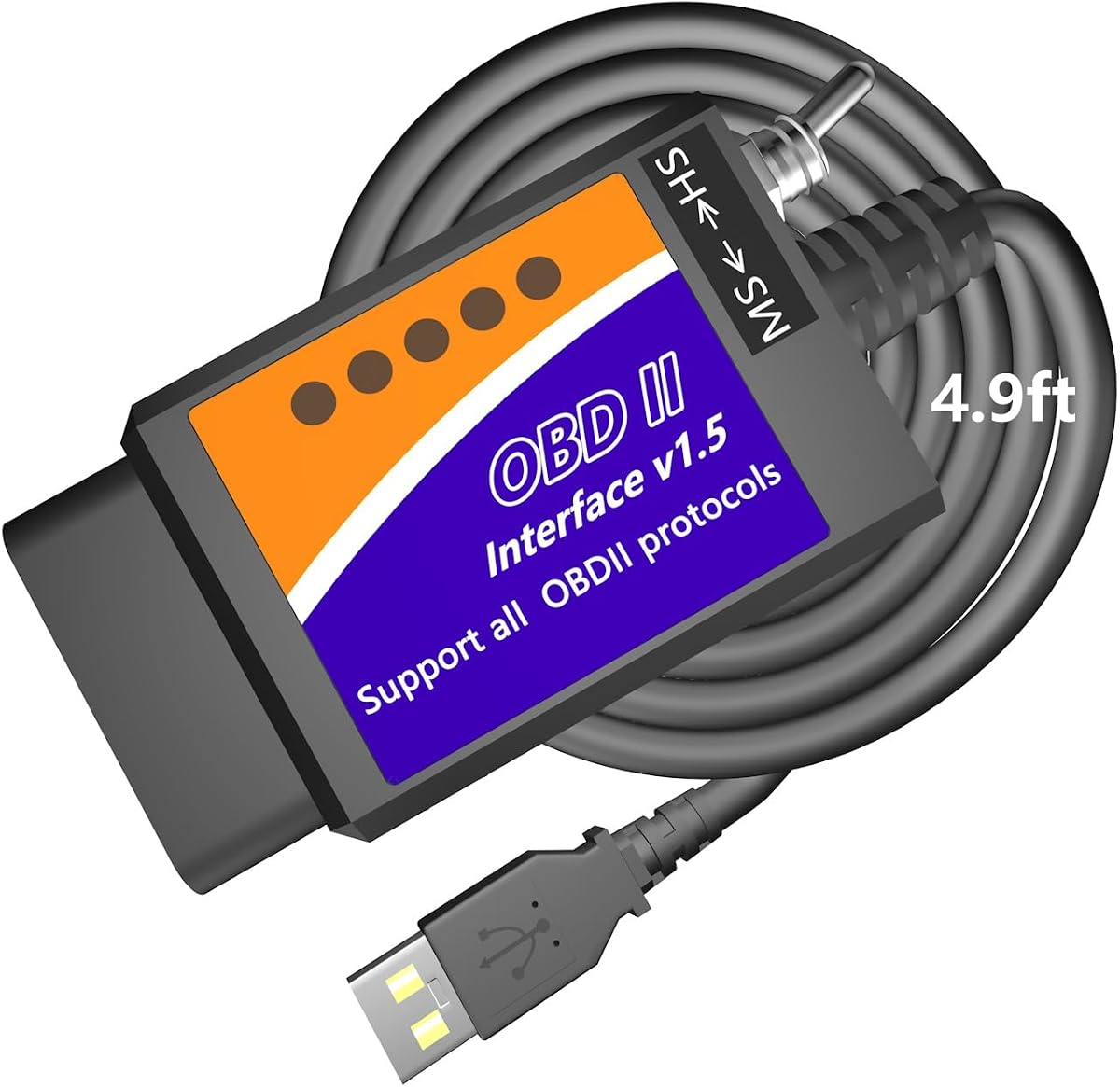
The MOCATEC USB OBD Adapter differentiates itself through a 4.9-foot cable that gives users more room to work inside the vehicle. It has a 4.3 rating and is designed as an ELM327 USB bridge for FORScan, with Ford, Lincoln, and Mercury support. A manual HS-CAN and MS-CAN switch provides the network selection needed for many vehicle modules.
We may earn a commission when you buy through this link, at no additional cost to you.
The cable length is more than a minor convenience. It can reach the passenger side of the cabin, allowing a laptop to rest in a more comfortable position while a user reviews live data or changes a physical switch. The product is also supported by supplied graphic and video tutorials and programming spreadsheets, which can help first-time users understand the broader configuration process.
Its listed feature set is extensive, covering digital speedometer data, transmission-temperature displays, daytime running lights, speedometer calibration, trailer brake controllers, Sync menu changes, traffic-sign recognition, global windows, remote starting, mirror folding, heated steering wheel settings, and warning-chime adjustments. These functions depend on the factory equipment fitted to the specific vehicle. The adapter does not create missing modules or guarantee that every modification is appropriate for a given model.
Compatibility is centered on Ford, Lincoln, and Mercury vehicles from 1996 through 2025, with limited coverage for 2025–2026 models. Mazda support runs from 1996 through 2022 for sixth-generation platforms, while seventh-generation platforms have partial support. The adapter requires a standard x86 or x64 Windows PC and does not work directly with macOS, iOS, or Android. It is best for users who value workspace flexibility and guided configuration resources.
A 4.9-foot cable makes it easier to reach the OBD2 port from the passenger side or place a laptop comfortably on the user’s knees. That physical flexibility can make live-data monitoring less awkward.
Tutorials and programming spreadsheets help users understand when a configuration is supported and how vehicle modules affect available functions. They supplement the adapter but do not replace careful vehicle research.
We may earn a commission when you buy through this link, at no additional cost to you.
The AntiBreak ELM327 FORScan Adapter is a value-focused manual-switch solution with a 4.3 rating. Its FTDI chip and ELM327 V1.5 hardware are presented as a dependable alternative to wireless links, with the wired USB connection intended to reduce data corruption and dropped packets. A physical HS-CAN and MS-CAN switch gives users control over the active vehicle network.
We may earn a commission when you buy through this link, at no additional cost to you.
The advertised compatibility covers Ford F-150, F-250, F-350, and F-450 trucks, Ranger, S-Max, C-Max, Transit, Mondeo, Fusion, Kuga, Mustang, Explorer, Edge, and selected Mazda, Lincoln, and Mercury vehicles. It supports J1850PWM, HS-CAN, MS-CAN, HS-CAN2, and HS-CAN3, running at speeds up to 500 kbit per second. FORScan, Elmconfig, FF2, and FoCCCus are among the compatible applications.
For routine work, the adapter can read and clear codes, monitor sensor data, and access modules such as the engine, transmission, ABS, airbag system, and climate controls. Configuration functions include mirror auto-fold, Bambi mode, daytime-running-light reset, brake-controller programming, double-horn disabling, and other options when supported by the vehicle. As with every bridge-based tool, the software, adapter, and vehicle configuration must all align.
The setup requires the CH340T USB driver and compatible software before connection, and Windows XP through 10 is listed. Its 500 kbit/s rate and manual switch are not as advanced as an automatic premium adapter, but the wired design remains dependable for regular diagnostics. It is a sensible budget option for Ford owners who want multiple software choices and clear HS/MS-CAN control.
A physical USB link avoids Wi-Fi pairing, signal loss, and wireless latency. For a stationary laptop-based diagnostic session, that consistency is often more important than wireless convenience.
The FTDI chip is a recognized USB interface component, and its inclusion is central to the adapter’s stability claim. Drivers and the chosen diagnostic application must still be installed correctly.
We may earn a commission when you buy through this link, at no additional cost to you.
The Vgate vLinker FS FORScan Adapter is the highest-rated product in this guide at 4.8. It is custom-designed for FORScan and recommended by the FORScan team. Its electronic switching allows the software to access CAN buses simultaneously, while the manufacturer emphasizes a fast, rock-solid USB connection without dropped packets, data corruption, or network interference.
We may earn a commission when you buy through this link, at no additional cost to you.
The adapter reaches a stated transmission rate of 3 Mbps and a maximum baud rate of 3 MHz. Those figures support smoother FORScan graphics and real-time meters. It can also provide FEPS 18V programming voltage for relevant workflows, an important capability when a supported older vehicle requires a higher output during an ECU-related operation.
Its strengths are concentrated around communication quality and convenience. Automatic switching reduces manual intervention, while USB 2.0 and 3.0 support accommodates different computer interfaces. The supplied information also mentions access to a free two-month FORScan extended-license trial, but the precise terms should be confirmed directly with the FORScan team because the cable itself does not grant permanent license access.
This vLinker model is well suited to Ford-family owners who want a compact, high-speed adapter that can support both diagnostics and configuration without operating a physical CAN selector. It is not limited to basic code reading, although its strongest benefits appear in advanced workflows. Its top rating, automatic switching, and programming support make it a particularly attractive recommendation for dedicated FORScan users.
Electronic bus control allows FORScan to reach multiple CAN networks at once. This makes the adapter less demanding to operate during module access, live-data monitoring, and configuration tasks.
FEPS 18V output supports programming use cases on eligible vehicles. Users should still consult service information and ensure that the software, vehicle, and adapter are appropriate for the operation.
We may earn a commission when you buy through this link, at no additional cost to you.
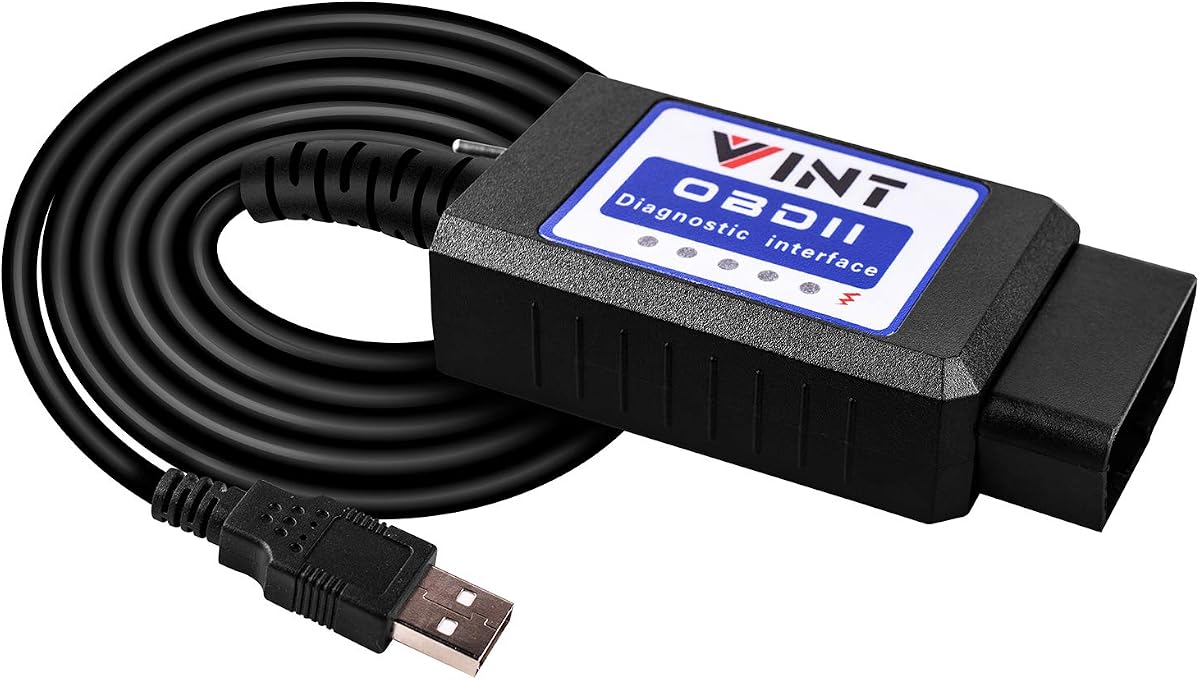
The VINT-TT55502 ELM327 Adapter follows the familiar FORScan cable format and carries a 4.5 rating. It is designed for Ford cars and light pickup trucks from 1996 onward, including F-150, F-250, F-350, F-450, Ranger, Transit, Mondeo, Fusion, Kuga, Mustang, Explorer, and Edge models. A physical MS-CAN and HS-CAN toggle provides direct control over vehicle-network selection.
We may earn a commission when you buy through this link, at no additional cost to you.
Running at a constant 500 kbit/s, the adapter is intended for scanning, programming, and module configuration through FORScan. It also works with FoCCCus, ELMconfig, and FF2. Users can retrieve both generic and manufacturer-specific Diagnostic Trouble Codes, while configuration options include global windows, Bambi mode, mirror tilt, tire-size correction, perpendicular parking, secure idle, flash patterns, heated steering wheel settings, and horn or chime adjustments.
Operation requires a Windows computer, an internet connection for driver updates, and the appropriate diagnostic application. The adapter is not intended for non-Windows systems, and the available functions depend on the vehicle’s modules and configuration files. Manual switching also creates more opportunities for user error than the automatic electronic switching found in higher-end alternatives.
This adapter is a recognizable choice for Ford owners already accustomed to ELM327-based tools and comfortable with Windows setup. It provides a broad function set without requiring a more specialized workflow. While it may not offer the same switching convenience or throughput as the vLinker and OBDLink models, its 4.5 rating and extensive Ford focus make it a solid conventional option for routine diagnostics and supported configuration work.
The adapter follows a format familiar to many FORScan users, making it approachable for anyone comfortable with ELM327 hardware and third-party diagnostic software.
Retrieval of both generic and manufacturer-specific Diagnostic Trouble Codes can provide a more useful starting point for repair research than a generic scanner alone.
We may earn a commission when you buy through this link, at no additional cost to you.
The right FORScan USB adapter depends on vehicle age, diagnostic goals, computer setup, and tolerance for manual configuration. Review these factors before choosing a cable so the hardware matches both the software workflow and the modules in your vehicle.
Start with the exact year, make, model, engine, and market version of the vehicle. FORScan is strongly associated with Ford, Lincoln, Mercury, and some Mazda vehicles, but specific platforms and joint-venture models can use protocols that are not supported. Several products in this guide explicitly mention excluded newer Mazda platforms or non-Ford joint-venture vehicles. A vehicle having an OBD2 port does not prove that every diagnostic module or advanced feature is accessible.
Check manufacturer documentation, the adapter listing, and the applicable FORScan vehicle information before buying. Also verify whether the car is 12V or 24V, because some options are restricted to 12V vehicles. The most important compatibility question is not simply whether the connector fits, but whether the adapter can communicate with the buses and modules the intended software task requires.
Automatic electronic switching allows FORScan to access relevant CAN buses simultaneously and reduces the need to move a physical selector between HS-CAN, MS-CAN, and other networks. This is particularly convenient for long configuration sessions or users who are still learning which module belongs to which network. OBDLink EX and the vLinker FS USB options provide this more streamlined approach.
Manual switches are less expensive designs and can still work correctly, but the user must confirm the bus before each relevant operation. They work best for owners who already understand FORScan workflows. If the goal includes frequent programming, configuration, or module comparison, automatic switching usually reduces friction and the chance of selecting the wrong network.
Basic code reading may not require extreme throughput, but live-data streaming, large ECU transfers, and programming benefit from fast, stable packet handling. Adapters listed at 500 kbit/s can perform standard ELM327-based work, while 3 Mbps models provide more headroom for demanding FORScan operations. Actual results depend on the computer, software configuration, vehicle, and length of the diagnostic session.
Look for reliable USB communication and avoidance of dropped packets or data corruption. A wired connection remains preferable to wireless for stationary diagnostic use because it removes pairing issues and radio interference. Fast advertising specifications do not guarantee better results if drivers, firmware, or software are poorly configured.
Some FORScan workflows may require the adapter to supply FEPS 18V output. The vLinker options explicitly include this capability, making them more relevant for compatible vehicles that need the higher programming voltage. Even with that support, programming should only be attempted when the exact vehicle, module, software, and documented procedure are understood.
Configuration options are easier to obtain than full ECU programming because many features rely on supported modules already present in the vehicle. Buyers should distinguish between reading and clearing codes, changing configuration values, and flashing firmware. Each stage carries different risk and should be approached only with reliable instructions and, where appropriate, guidance from a qualified technician.
These products are designed for a Windows environment because FORScan and related ELM327 applications commonly run on Windows. Some listings include older releases through Windows 10, but a buyer using a newer or specialized operating system should confirm current driver support. FTDI and CH340T adapters may require separate driver installation, and manual COM-port selection may be necessary in Device Manager.
MacBook and Chromebook users should not assume compatibility from the USB connector alone. macOS, mobile systems, and some ARM-based Windows machines may require a full virtual or emulated Windows environment and compatible drivers. Ensure that the computer has a usable USB port and enough processing capacity for live-data graphing and long diagnostic sessions.
The adapter is the hardware interface, not the diagnostic application itself. FORScan must be obtained separately, and some functions may require a FORScan Extended License. Other compatible applications such as ELMconfig, FoCCCus, FF2, ELM FF2, AlfaOBD, VCTool, or Scanmaster may have their own availability and license terms. One listing mentions a temporary extended-license trial, but the current details should be confirmed with the FORScan team.
A broader software ecosystem can be valuable if you work with different vehicle systems or need specialized configuration files. However, more software does not make every cable more capable. The adapter’s protocol support, switching method, and driver behavior must still align with the programs you intend to run.
A longer cable can make a meaningful difference while the vehicle is running and the laptop remains inside the cabin. The MOCATEC adapter’s 4.9-foot lead is designed to reach farther toward the passenger seat or a comfortable laptop position. Shorter cables can make physical switch access and live-data viewing inconvenient.
Protection features are also worth comparing. Some vLinker models list automatic sleep, wake-up behavior, and protection against over-voltage, over-current, over-temperature, and battery drain. These safeguards help, but they do not make careless programming safe. Users should still follow the application’s instructions and avoid leaving the vehicle running in an enclosed area.
Technical support, warranty coverage, and firmware updates can add meaningful value even when the adapter appears simple. A manufacturer that provides driver guidance, connection troubleshooting, and firmware maintenance is more helpful when a vehicle or software update changes communication behavior. Longer-term support may matter to workshop users who rely on the same setup repeatedly.
Before purchase, check whether instructions and support are available for the exact adapter and operating system. Keep a record of the driver version and firmware used for each vehicle job. Reliable documentation is especially valuable when working with advanced modules, because connection problems can otherwise be difficult to distinguish from vehicle-level communication faults.
Begin by confirming that the adapter supports your vehicle and that the computer meets the diagnostic software’s requirements. Install the appropriate USB driver, such as FTDI or CH340T as applicable, and then install FORScan or the intended ELM327-based application. Connect the adapter to the computer before plugging it into the vehicle if the software or driver instructions call for that sequence. Open Device Manager after connection and verify that a COM port appears.
Start the vehicle, locate the OBD2 port, and plug in the connector firmly. Select the correct vehicle profile in the diagnostic application, verify the communication protocol, and confirm that the adapter reports the expected HS-CAN or MS-CAN network. With a manual-switch model, make sure the physical selector matches the task. With an automatic-switch model, allow the software time to identify and open the relevant buses.
Begin with a harmless read-only operation such as retrieving stored trouble codes or viewing supported live data. Clear codes only after recording them and understanding the underlying condition. Configuration changes and programming are more consequential: use the exact documented procedure for the vehicle, confirm that the necessary factory modules are present, and never interrupt power or disconnect the adapter during a write or flash. When finished, close the software, remove the vehicle plug, and shut down the computer before disconnecting USB if the manufacturer recommends that sequence.
No. The adapter must support the vehicle’s voltage, OBD2 connector, and communication protocols, and the installed FORScan version must include compatible vehicle information. Some newer Mazda platforms and joint-venture models use protocols that certain adapters do not support. Always check the exact year, model, engine, and market version before purchasing.
An automatic adapter electronically lets the software access supported CAN buses without requiring the user to change a physical selector. A manual adapter uses HS-CAN and MS-CAN switches, giving direct control but adding a step to each workflow. Automatic switching is generally more convenient for programming and module access, while manual designs may suit users who already know their vehicle’s network layout.
No. The adapters in this guide are hardware interfaces, while FORScan and other diagnostic applications are obtained separately. Some FORScan features may also require an Extended License. Verify current licensing terms directly with the FORScan team, and install only the software and drivers needed for your vehicle and operating system.
The listed products are primarily designed for Windows PCs, and the compatibility notes do not directly support macOS, Chromebooks, mobile phones, or tablets. A Mac may work if it runs a genuine full Windows environment and compatible drivers, but this depends on the computer’s architecture and current software support. Confirm compatibility before buying rather than relying on the USB connector alone.
The usual causes are a missing or incorrect USB driver, an assigned COM port that the diagnostic application does not recognize, an outdated application, or an incomplete installation. Install the specified FTDI or CH340T driver, reconnect the adapter, and check Device Manager for the assigned port. Some OHP devices specifically recommend assigning a lower COM number when FORScan cannot find the cable.
It depends on the exact vehicle and FORScan operation. Some programming workflows on eligible older vehicles require or benefit from FEPS 18V output, so an adapter with that capability gives you more options. It is not necessary for every reading or configuration task, and 18V support does not make unsupported programming safe or appropriate for every module.
A supported adapter cannot add a feature that the vehicle’s factory modules and wiring do not provide. Configuration availability also depends on model year, market, hardware, software support, and the correct configuration file. Review the vehicle-specific instructions before attempting a change, and seek qualified help when programming or module behavior is unclear.
Higher speed is useful for demanding live-data, ECU-transfer, and programming sessions, but it is only one part of a reliable setup. Stable packet delivery, correct drivers, compatible software, and access to the needed CAN bus are equally important. For basic code reading, many manual ELM327 adapters can perform adequately if the connection is stable and the vehicle is supported.
The strongest overall choice in this guide is the Vgate vLinker FS USB because it combines automatic switching, high data throughput, broad vehicle coverage, and programming-oriented voltage support. OBDLink EX is the premium specialist for users who want hardware designed specifically around FORScan, while the AntiBreak ELM327 FORScan Adapter provides a budget-oriented manual-switch option with FTDI hardware and broad software compatibility.
Choose based on the work you actually plan to perform. Advanced configuration and programming sessions favor automatic switching, adequate packet handling, and correct 18V capability when required. Basic troubleshooting can work well with a conventional ELM327 cable, provided you install the right driver, understand the bus selection, and confirm that the vehicle is supported. The cable is only one part of a safe diagnostic workflow.
Before making a final selection, verify the exact vehicle, year, engine, operating system, and required FORScan functions. Check that the adapter supports both the connector and communication network involved in your task, and review the software and driver requirements. Product specifications, availability, and licensing terms can change, so confirm current details before purchasing.