
OIVO PS5 Controller Charger Station
4.7Editor score
Charges two controllers simultaneously
Nine touch-controlled RGB modes
Clear red and green indicators
Explore the best PS5 accessories for kids, comparing charging docks, cooling stands, controller grips, skins, stickers, and headsets for comfort and setup at
The right PS5 accessories can make a child’s gaming setup more comfortable, organized, and easier to use, whether they play alone or with friends. Useful choices include charging stations, cooling stands, comfortable headsets, personalized skins, and controller extensions designed to improve grip and access. The best accessories also feel age-appropriate without limiting the PlayStation 5 experience.
This guide compares ten PS5 accessories for kids using the supplied product information, customer ratings, stated compatibility, design features, and practical use cases. It covers console cooling and charging stations, dual controller docks, trigger extenders, console and controller skins, thumb grips, decorative stickers, and a gaming headset, with particular attention to ease of use and compatibility.
Each review explains what the accessory does, highlights its most useful qualities, and identifies sensible trade-offs for families. The top three picks emphasize station organization, efficient controller charging, and personalized console style, while the remaining options cover comfort, grip, audio, and more focused upgrades. Product availability and pricing can change, so confirm current details before purchasing.
4.7Editor score

4.7Editor score

4.5Editor score
The table below compares all ten recommendations by their primary function, compatibility, and standout features, helping families distinguish charging solutions, cooling stations, personalization items, grip accessories, and headsets at a glance.



This PS5 cooling and charging station has a 4.4 customer rating and stands out as one of the most capable all-in-one console accessories in the list. It is designed for PS5, PS5 Slim, and PS5 Pro consoles, including disc and digital configurations. Rather than merely holding the console upright, it combines cooling, controller charging, USB connectivity, lighting, and accessory organization.
We may earn a commission when you buy through this link, at no additional cost to you.
Its most valuable feature is the intelligent cooling system, which offers three fan levels and an automatic setting intended to maintain airflow during extended play. The adjustable controller charging port accommodates both original DualSense and Edge controllers, with stated charging times of about 3.5 and 2.5 hours respectively. Three side-mounted USB hubs also provide practical connectivity for supported devices and accessories.
The trade-off is complexity. This is not simply a compact controller cradle; it is a full console station that takes more room and requires careful alignment and securing. Buyers must also connect it to an appropriate power source and allow room around the console for airflow. Families should confirm that their particular console model and preferred power arrangement are compatible before buying.
This is a strong recommendation for a family that wants a central gaming hub rather than a collection of small accessories. It can reduce visible cable clutter, keep controllers ready, and make the PS5 look deliberately organized. For a child who plays frequently, the combination of cooling and charging is especially practical.
Automatic fan adjustment takes some of the guesswork out of console cooling. The system can respond to changing operating temperatures, while manual controls provide flexibility for different room conditions and play habits.
The adjustable controller charging connection and three USB hub ports reduce the need for separate accessories. This makes the station a convenient central point for the controller, media remote, and compatible USB devices.
We may earn a commission when you buy through this link, at no additional cost to you.
The OIVO PS5 Controller Charger Station earns a 4.7 rating, making it one of the strongest-rated products featured here. Its role is focused and clear: charge and organize two compatible PS5 controllers at once. It supports both DualSense and Edge controllers, which makes it a practical choice for a child who regularly plays with a friend or family member.
We may earn a commission when you buy through this link, at no additional cost to you.
The dock uses a 34.8-inch USB cable that can connect to a PS5 console, original AC adapter, laptop, or another USB power source. Its stated two-hour charging time suits short gaps between gaming sessions, while red and green LEDs communicate charging and completed status. A long press turns the lighting off for families who prefer a quieter visual setup.
Its main limitation is that it does not cool the console or store game cards. It is a controller dock rather than a complete entertainment station. The lighting is also intentionally prominent, which may be exciting for a child but less suitable for a minimalist room. Nevertheless, the core charging function is direct and easy to understand.
This is an excellent pick when the priority is affordable, attractive controller organization without adding a large accessory to the entertainment center. It is also among the simplest recommendations to explain to a child: place a compatible controller in a slot, check the light, and start the next game.
Charging two controllers together is particularly useful when siblings or friends alternate turns. The roughly two-hour cycle keeps downtime short without requiring a separate charger for every controller.
Nine dynamic RGB modes let the setup change with the gaming mood. Touch controls and a long-press power function make the lighting adjustment simple for younger players.
We may earn a commission when you buy through this link, at no additional cost to you.
This NEWDERY charging station also carries a 4.7 rating and focuses on a clean, easy-to-understand charging experience. It supports standard DualSense and Edge controllers, including simultaneous charging, while its four-slot design helps keep controllers upright and separated. Blue lighting indicates active charging and remains illuminated when the controller is fully charged or in standby.
We may earn a commission when you buy through this link, at no additional cost to you.
The stated full-charge time is within 2.5 hours when a suitable 5V/3A adapter is used. A 3.3-foot Type-C cable and user manual are included. Four anti-slip mats help prevent controllers from shifting as they are placed into the dock, making the product convenient for both adults and children.
There is one important setup restriction: controller skins or cases must be removed before charging. A suitable adapter must also be supplied separately if the family does not already have one. These points make the dock slightly less convenient than a model that includes everything needed, but they are clearly stated in the product information.
This is a strong recommendation for families seeking a balance of attractive organization, broad controller compatibility, and straightforward operation. It offers more stable placement than many lightweight docks while avoiding the bulk of a full console-cooling station.
The anti-slip mats and dedicated slots help controllers settle into the correct charging position. This reduces the chance that a child will repeatedly reposition a controller after placing it on the dock.
Blue illumination gives families an immediate visual cue that a controller is charging or ready. The simple indicator is easier for children to interpret than a complicated control panel.
We may earn a commission when you buy through this link, at no additional cost to you.
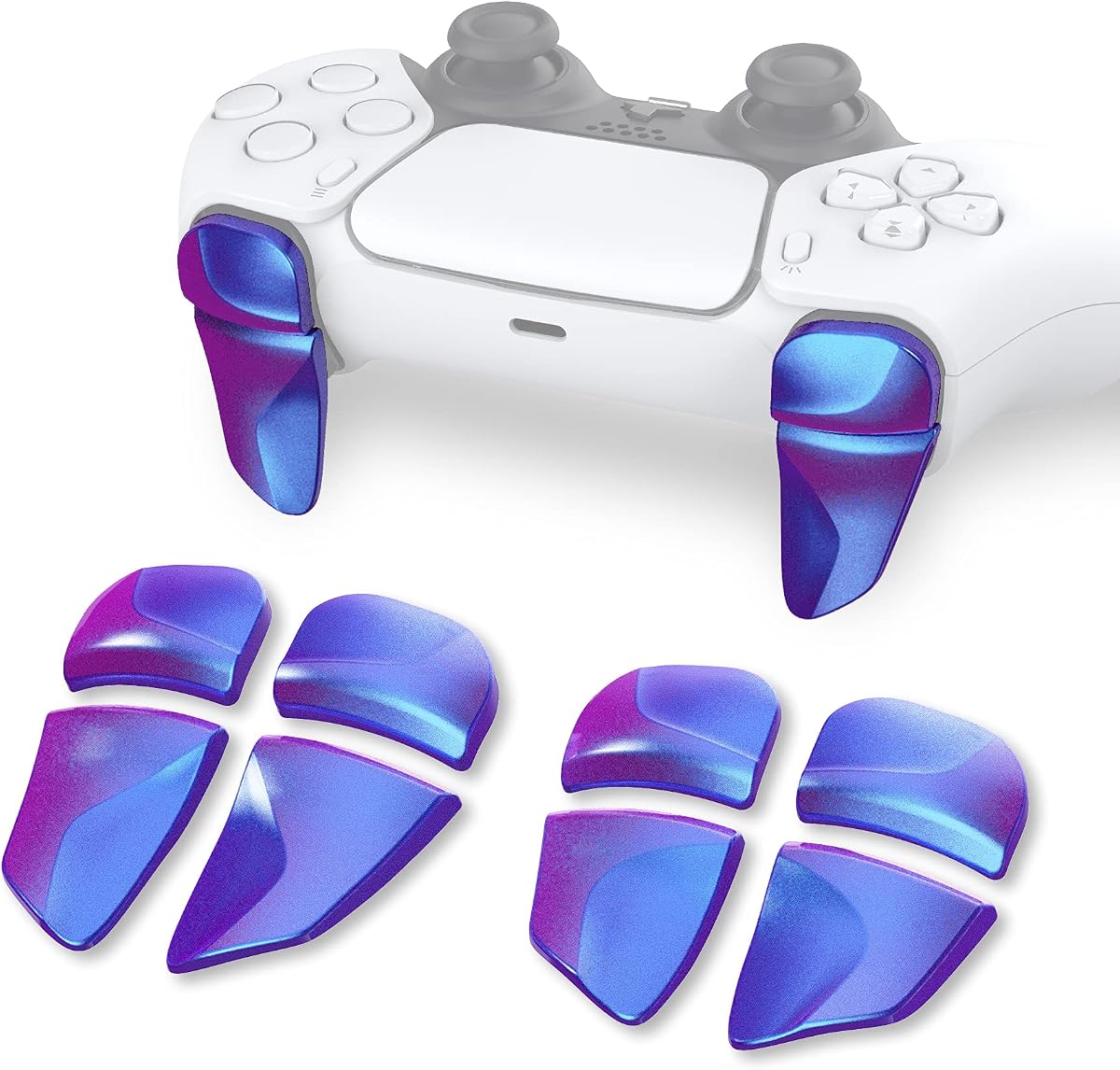
The PlayVital Blade 2 extenders carry a 4.4 rating and offer a focused ergonomic improvement for the PS5 controller. Designed for standard PS5 controllers, Edge controllers, and the PS Portal Remote Player, they extend the shoulder and trigger buttons to make them easier to reach. That can be valuable for children with larger hands or those who struggle to operate the original buttons.
We may earn a commission when you buy through this link, at no additional cost to you.
The package includes two pairs of L1/R1 and L2/R2 extenders. The L1/R1 pieces come in two thicknesses, while the L2/R2 pieces offer two lengths, allowing users to select a configuration that suits their grip and preferred level of extension. Adhesive stickers help secure the pieces during installation.
This is an add-on rather than a universal fix. Children with smaller hands may find the extended shapes less comfortable, and the adhesive installation adds a step that must be performed carefully. The colorful chameleon purple and blue design may appeal to younger players who want their controller to look more distinctive.
The extenders are best for a child who has difficulty pressing the standard shoulder controls or who benefits from a more prominent trigger shape. They should be introduced gradually, because the altered feel may take a short adjustment period during the first few games.
Extending L1, R1, L2, and R2 changes the geometry of the controller. Children who press toward the edge of the original buttons may find the add-ons easier to locate and operate.
Different thicknesses and lengths allow a more individualized fit. Trying the options in a comfortable sequence can help identify the configuration that feels natural rather than simply appearing larger.
We may earn a commission when you buy through this link, at no additional cost to you.
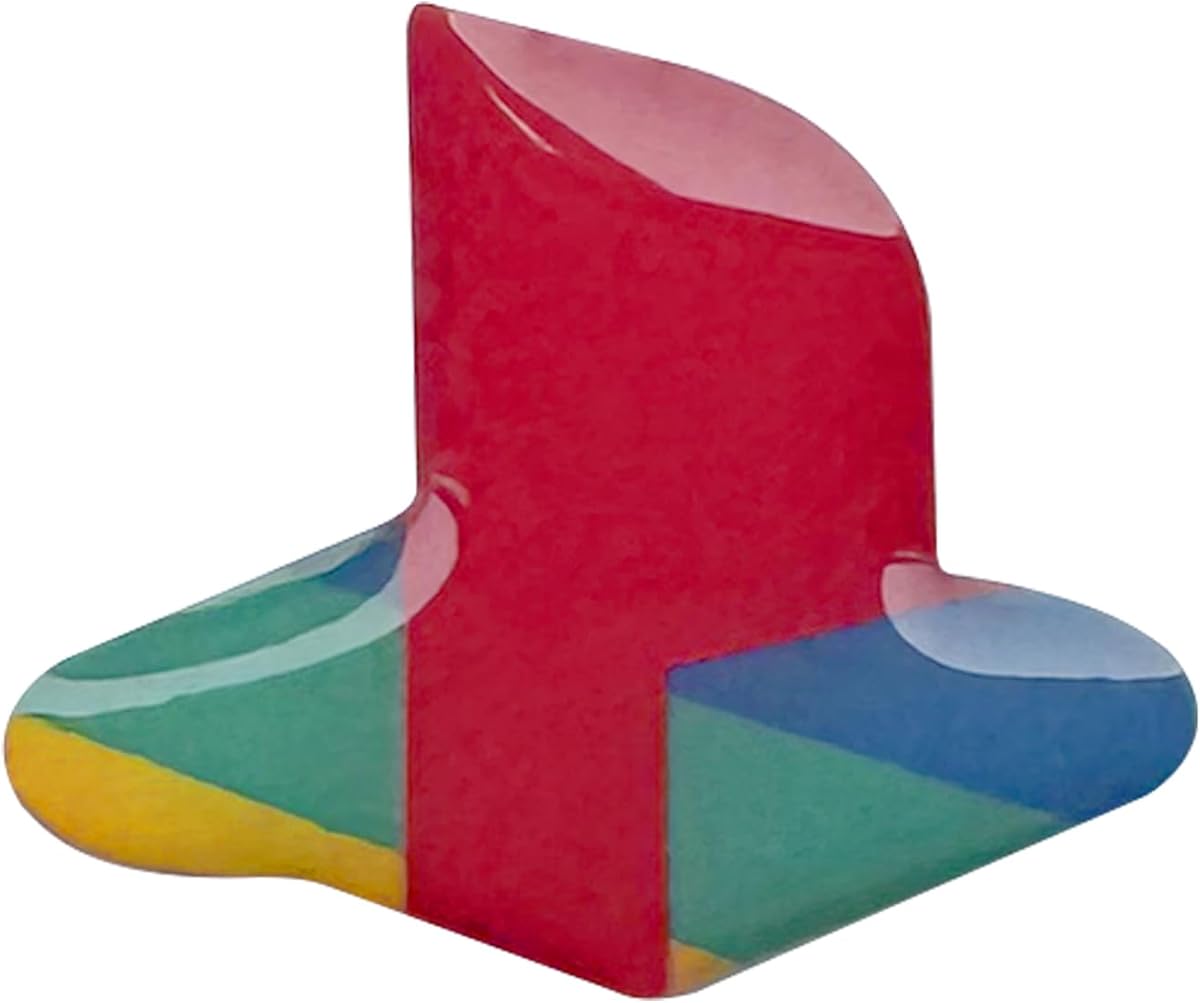
This retro-logo sticker set has a 4.7 rating and offers a light-touch way to personalize a newer PS5. It is intended for the PS5 Slim and PS5 Pro, with two packs for the console and a separate logo decal for a DualSense controller. The classic color treatment changes the appearance without covering the entire device.
We may earn a commission when you buy through this link, at no additional cost to you.
The domed shape gives the printed logo an appearance similar to a raised button. The stickers are made to adhere securely while remaining removable without leaving sticky residue, which is helpful for families who like changing the look of the console or may move the system to a different room.
The major limitation is model compatibility. The supplied information specifically lists PS5 Slim and PS5 Pro, not the original PS5. It also provides a narrower visual transformation than a full-body skin, so buyers looking for complete color coverage will need a different type of accessory.
This set is a good choice for a child who wants the console to feel more personal but prefers to preserve the PS5's original industrial appearance. It is simple to use, visually distinctive, and easy to reverse.
The decal approach adds personality while leaving most of the console surfaces visible. It works well for children who want a custom look without the visual impact of a complete skin.
The stated removable material makes the stickers more approachable than a permanent modification. Families can update the look as preferences change while avoiding residue according to the product information.
We may earn a commission when you buy through this link, at no additional cost to you.
The Blue Fire full-body vinyl skin has a 3.8 rating, placing it below the other selections, but it offers a distinct visual option for compatible PS5 Digital Edition consoles. The high-resolution blue fire design transforms the standard black finish and includes matching controller decals, allowing the entire gaming setup to feel coordinated.
We may earn a commission when you buy through this link, at no additional cost to you.
Beyond appearance, the vinyl layer is described as helping protect against scratches and dust. Installation is straightforward: clean the intended surfaces, align the pieces, and press them into place. The product information also states that the material can be removed without leaving sticky residue.
Compatibility is the main consideration. The skin is specified for the Sony PlayStation 5 Digital Edition and two DualShock controllers, meaning it will not suit owners of the disc version. Its 3.8 rating is also lower than the rest of the field, so families should examine recent customer feedback before making a final decision.
This product is most appropriate for a child who wants a dramatic, colorful console and has the Digital Edition. It offers more visual impact than logo stickers, but buyers should verify the model and carefully follow the installation instructions.
Full-console coverage changes the PS5 more dramatically than a logo decal. Including controller decals helps avoid a mismatch between the console and the most frequently handled part of the setup.
A clean surface and careful alignment are the main requirements for a neat result. The stated removable design gives families more flexibility than a permanent coating.
We may earn a commission when you buy through this link, at no additional cost to you.
The Red Black anti-slip skin has a 4.2 rating and is tailored specifically to the PS5 Edge wireless controller. Its red-and-black studded silicone surface is designed to improve grip, reduce slipping, and provide more comfort during longer or more active gaming sessions. It also adds a distinctive look to a controller that normally uses a classic two-tone finish.
We may earn a commission when you buy through this link, at no additional cost to you.
The package includes one controller skin and three pairs of thumb grip caps. The grips are intended to improve analog-stick control and comfort, while precise cutouts preserve access to the controller's buttons. The silicone is described as sweat-resistant, making the set potentially useful for children who tend to play enthusiastically or have warm hands.
This skin should be removed before using the NEWDERY charging dock, because that dock's instructions specify removing controller skins or cases before charging. The product is also specific to the Edge controller rather than the standard DualSense, so compatibility must be confirmed. Some children may prefer the original texture after trying the studded surface.
This is a useful recommendation for an Edge-controller owner who prioritizes grip and a sportier appearance. The included thumb grips make it more of a complete control accessory than a cosmetic skin alone.
The studded surface adds texture where a child's hands rest most often. That extra friction can help maintain steady control when the controller is being used quickly or for longer periods.
Three pairs of caps give users several pieces in the package and provide an additional way to refine stick feel. They are especially relevant for players who notice analog-stick movement under fast or angled inputs.
We may earn a commission when you buy through this link, at no additional cost to you.
The Tatybo gaming headset has a 4.4 rating and focuses on lightweight audio with broad compatibility. It supports PS5, PC, Switch, and other devices that use a 3.5mm connection. High-precision 50mm neodymium drivers are included, along with a flexible microphone designed for clear team communication during multiplayer games.
We may earn a commission when you buy through this link, at no additional cost to you.
Comfort is a major selling point for younger users. The headset weighs less than eight ounces and uses memory-protein earmuffs with an elastic head pad, while the lightweight frame helps prevent the fatigue associated with heavier gaming headsets. A braided cord, aluminum headband, and reinforced construction add durability for regular use.
The cable-based design is straightforward, but the included USB connector supplies power only for the LED lighting. It does not carry audio or provide a USB headset connection. It is also not compatible with Xbox 360, and older PlayStation systems require an appropriate 3.5mm adapter.
The headset is a good fit for a child who plays with friends, uses voice chat, or wants a more personal audio experience than television speakers provide. Its low weight and included microphone make it especially approachable for younger players.
The lightweight frame and cushioned ear materials reduce the burden of long sessions. Adjusting the headband for a secure but gentle fit helps keep the headset in place without relying on excessive clamping pressure.
The 3.5mm connection allows the same headset to serve a PS5, compatible PC, Switch, or other console setup. That flexibility is useful for children whose gaming time spans more than one device.
We may earn a commission when you buy through this link, at no additional cost to you.
This white anti-slip controller skin has a 4.6 rating and is designed for the standard PS5 wireless controller. The soft, thickened, studded silicone construction provides a different texture from the console's standard controller. Its stated sweat-resistant and anti-slip properties can help a child maintain control during energetic or extended play.
We may earn a commission when you buy through this link, at no additional cost to you.
The package includes one skin and four pairs of thumb grip caps, offering more replacement pieces than the comparable Edge-specific set. The cutouts are designed to preserve access to the controller buttons. Visually, the white-and-black combination also provides a noticeable personalization option for a standard DualSense.
As with many silicone controller covers, the skin must be taken off before charging in compatible docks, including the NEWDERY model in this guide. The additional texture may also take some time to get used to, and children who already have a comfortable grip may find the original controller preferable.
This is a strong choice for a child who wants a brighter controller and values a softer, more secure grip. Its 4.6 rating and generous set of thumb grips make it a compelling accessory within the category.
The thickened silicone changes how the controller feels during long sessions. It can provide a more cushioned surface around common grip areas without changing the underlying controls.
Four pairs of caps provide several pieces within the set. They can be replaced as needed or used to find a stick texture that feels comfortable and controlled.
We may earn a commission when you buy through this link, at no additional cost to you.
The PS5 Auto Cooling Station has a 4.5 rating and combines console cooling, charging, storage, and display functions in one unit. It supports the original PS5, PS5 Slim, and PS5 Pro, in both disc and digital editions. That broad compatibility makes it a practical central station for a family with different console generations or for a buyer unsure about future hardware.
We may earn a commission when you buy through this link, at no additional cost to you.
The upgraded turbo fan can operate automatically or through three manual speeds. A built-in sensor monitors console temperature and adjusts airflow according to stated thresholds, keeping the fan quieter at lower loads and increasing power as temperatures rise. The stand also includes dual controller charging, LED status indicators, a headset holder, a media remote slot, and storage for up to 14 game cards.
The station is large and involves a more involved setup than a simple charging dock. It also requires the included Type-C cable and a suitable power arrangement. Families should ensure the entertainment area has enough vertical clearance and that the console can be secured properly according to the instructions.
This is the best recommendation for a child whose PS5 is the center of a shared family gaming area. The organized storage and automatic cooling justify the larger footprint for users who want one visible hub rather than several separate accessories.
Temperature-based fan adjustment provides a convenient default for regular play. Touch controls and three manual speeds remain available when a family wants to manage airflow directly.
Dedicated areas for game cards, a media remote, and a headset reduce clutter around the console. Keeping frequently used items together can also make independent setup and cleanup easier for children.
We may earn a commission when you buy through this link, at no additional cost to you.
The most useful PS5 accessory is the one that matches the child's controller, console model, play habits, and available space. Consider function, fit, ease of use, and long-term organization rather than choosing solely by appearance.
PS5 accessories are not automatically compatible across every console generation and edition. The original PS5, PS5 Slim, and PS5 Pro can have different dimensions, while disc and digital editions also affect some skins and stands. Check the exact product description against the model printed on the child's console before ordering. For controller accessories, verify whether the item supports the standard DualSense, the Edge controller, or both.
In short, match the accessory to the precise hardware rather than assuming every PS5 product fits every console.
A child who plays alone may need only one charging position, while siblings and frequent friends generally benefit from a dual-controller dock. Compare stated charging times, power requirements, cable length, and supported power sources. Some stations can draw power from the console, while others require a suitable wall adapter. Look for clear status indicators that show whether a controller is actively charging or fully charged.
In short, prioritize dual-controller capacity when gaming is shared and verify that the required power source is already available.
A cooling stand can help maintain airflow around a vertically positioned console, especially during lengthy sessions. Automatic temperature adjustment is convenient because it reduces the need to monitor fan settings manually. Manual speed controls are also useful when the room is particularly warm or the family wants finer control. Regardless of the control method, adequate space around the console remains important for effective heat dissipation.
In short, choose automatic or manual cooling based on the family's preference, and ensure the station does not restrict necessary airflow.
Young players may struggle with small shoulder buttons, slippery surfaces, or a controller that feels unfamiliar after using another device. Trigger extenders can change the reach of L1, R1, L2, and R2, while silicone skins and thumb grips alter grip and analog-stick feel. These products should improve comfort rather than create pressure points, so hands-on comparison and a gradual adjustment period are valuable.
In short, select ergonomic add-ons based on hand size, grip needs, and comfort rather than assuming every modification improves the experience.
Kids' gaming equipment experiences frequent handling, cables get pulled, and controller skins encounter sweat and repeated installation. Look for reinforced cables, stable bases, non-slip surfaces, and materials described as resistant to wear. For removable vinyl, clean and dry the target surface before application. For docking a skin-covered controller, confirm whether the cover must be removed first.
In short, choose sturdy materials and simple care routines that can withstand regular use without complicated maintenance.
A full console-cooling station occupies more space than a controller-only dock. It may also provide headset storage, a media remote slot, USB connections, and game-card storage. Measure the available entertainment-center area before choosing a large model. If space is limited, a dedicated charging dock or compact grip accessory may create a more organized result without crowding the console.
In short, compare footprint with organization benefits, especially when the PS5 shares a small cabinet with other devices.
Young children benefit from products that explain themselves visually. Drop-to-charge docks, straightforward LED indicators, and simple adhesive or peel-and-stick installations are easy to understand. RGB controls can add enjoyment, but families who want a calmer setup should confirm that the lighting can be turned off. Installation instructions should always be handled by an adult when screws, adhesives, or powered accessories are involved.
In short, favor clear indicators, simple routines, and controls that a child can operate with minimal help.
Controller skins, thumb grips, trigger extenders, and console decals can make a shared gaming setup feel more personal. A bold blue design may appeal to one child, while a white skin or retro logo may suit another. Consider whether the child wants a subtle accent or full coverage, and whether the accessory will be used regularly enough to justify adding another item. Removable products offer a practical way to experiment.
In short, let color and style reflect the child's preference while keeping comfort and compatibility at the center.
Begin by confirming compatibility and reading the included instructions before attaching anything to the console or controller. Place console stands on a level surface, install any required security screws with care, and route cables so they do not create a trip hazard. For charging docks, connect the power cable first, place the controller in the correct slot, and use the status light to verify that charging has begun.
Keep controller skins, cases, and grips clear of charging contacts when the manufacturer instructs users to remove them. Clean vinyl stickers and silicone covers with a soft, lightly damp cloth, and avoid abrasive cleaners that could damage printed or rubberized surfaces. Thumb grips and trigger extenders should be removed before cleaning the underlying controller.
Introduce altered controller shapes gradually and allow the child to adjust. A new skin, grip set, or trigger extender may feel unfamiliar during the first game, so short practice sessions are often more comfortable than an immediate long session. Periodically inspect connectors, adhesive attachments, fan openings, and charging contacts, and unplug any station that becomes unusually hot, noisy, or physically unstable.
A controller charging dock, a comfortable grip accessory, and a headset for clearer personal audio can be especially useful for a solo player. A full cooling and storage station is valuable when the console is used frequently or when the entertainment area needs better organization. The best combination depends on whether the child's main concern is charging, comfort, personalization, or setup cleanliness.
Several featured docks support both standard DualSense and Edge controllers, including the OIVO and NEWDERY models. Always verify the compatibility statement and connector design for the exact dock you are considering. Some accessories support only one controller type, so the model name alone is not enough to confirm a fit.
It depends on the charging product and the fit of the skin. The NEWDERY dock specifically instructs users to remove controller skins or cases before charging because they may interfere with the charging connection. Other docks may accommodate certain covers, but checking both product instructions is the safest approach.
They are not necessarily required for every household, but they can provide organized vertical placement, active airflow, charging, and storage in one unit. The benefit is greatest when the console receives long sessions and the surrounding area has enough space for proper ventilation. Families should follow the manufacturer's clearances and installation guidance.
No. The Blue Fire full-body skin in this guide is listed specifically for the Digital Edition console and two DualShock controllers. Other skins may support only the Slim or Pro. Always compare the model and edition listed in the product description with the hardware before applying a cover.
The featured silicone skins are specifically described as anti-slip and sweat-resistant, which can make them useful for children who experience slippery hands during play. The grip texture may feel different from the standard controller, so it is best to try the skin during a short session and check that the cutouts do not interfere with the buttons.
No. The product information states that the USB connector supplies power only for the LED lighting, while actual audio uses the 3.5mm connection. The headset is also not suitable for Xbox 360, and older PlayStation systems may require a suitable adapter.
Trigger extenders are intended to improve access to the shoulder and trigger buttons, particularly for children with larger hands or difficulty pressing the original controls. Thumb grips focus on analog-stick feel and can help with grip or control precision. A child who struggles to reach triggers needs extenders, while one who wants a stick-texture change may benefit more from grip caps.
The strongest overall choice is the PS5 Cooling Charging Station because it combines active cooling, original and Edge controller charging, USB connectivity, and tidy console placement. The OIVO RGB Charging Station is a focused and budget-friendly way to charge two controllers, while the NEWDERY Dual Charging Dock offers a balanced alternative with stable placement and broad controller compatibility.
For the remaining needs, prioritize the accessory that solves a specific problem: choose trigger extenders for shoulder-button access, a silicone skin for grip, a headset for focused audio and communication, and stickers or a full-body skin for personalization. Confirm the child's exact controller and console model before ordering, and consider whether an adult will supervise setup.
Product availability, compatibility details, and pricing can change over time, so review the current listing before making a final purchase. The right PS5 accessory for kids should work with the existing hardware, suit the child's comfort level, and make the gaming area easier to enjoy without creating extra clutter.