
Zobirez 420W 10-Port Charging Station
4.5Editor score
Ten mixed USB ports
Two 65W laptop outputs
Eight short cables included
Tablet Charging Station buying guide comparing ten multi-device charging docks for capacity, power, tablet fit, safety, included cables, and organization
A tablet charging station does more than recharge a single device. It combines charging power, cable routing, upright storage, and device organization in a format that can suit a busy family, shared office, classroom, or home nightstand. The best model depends on device size, port mix, total power, and how many people will use it.
We compared ten charging stations on shared criteria including USB-A and USB-C port counts, total output, laptop and tablet support, slot design, included accessories, and built-in safety features. The list covers compact six-port organizers, high-capacity 20-port stations, dedicated laptop racks, and models capable of serving several device ecosystems at once.
Each pick below highlights the most useful balance for a particular type of buyer, from high-output charging to budget-conscious organization. Product details and availability can change over time, and prices fluctuate, so readers should verify the current listing, compatibility, included accessories, and output requirements before making a purchase.
4.5Editor score

4.6Editor score

4.7Editor score
This side-by-side comparison evaluates charging capacity, port flexibility, tablet accommodation, included accessories, and practical features such as adjustable dividers, laptop bays, and built-in cable management.



The Zobirez 750W Charging Station is our Editor's Choice because it combines unusually high aggregate output with a genuinely versatile port arrangement. It offers five USB-C ports rated at up to 120W each and five USB-A ports rated at up to 30W each, giving the station enough flexibility for tablets, phones, accessories, and compatible USB-C laptops.
We may earn a commission when you buy through this link, at no additional cost to you.
Its most useful tablet-oriented feature is the one-piece organizer with two broad center bays. These spaces can accommodate a laptop or a tablet with a thick protective case, allowing the device to remain upright while connected. Unlike stations that rely entirely on small adjustable dividers, the fixed bays are intended to stay stable over time.
The package also includes a power cord and ten charging cables, covering USB-C to USB-C, USB-C, iPhone, and Micro USB connection types. This reduces the setup required for a mixed household. Protection features cover over-current, over-voltage, overload, overheating, overcharging, and short circuits, adding reassurance for unattended charging.
The principal trade-off is that this is a high-output model with a more substantial footprint than a basic six- or ten-port USB-A dock. Maximum speeds also depend on each connected device, its cable, and its charging protocol. Even so, the combination of 750W total output, five powerful USB-C ports, and case-friendly tablet storage makes this the most versatile pick for users who want one station to cover many device classes.
The five 120W USB-C ports are the station's defining advantage. They give compatible laptops, tablets, phones, and other high-power devices dedicated charging paths, while the five 30W USB-A ports serve more conventional accessories without eliminating the modern connector option.
Two wide center bays accommodate devices that may not sit comfortably in narrow slots. This one-piece design is especially useful for a family iPad, a tablet in a thick case, or a compatible USB-C laptop that needs a broader upright position.
We may earn a commission when you buy through this link, at no additional cost to you.
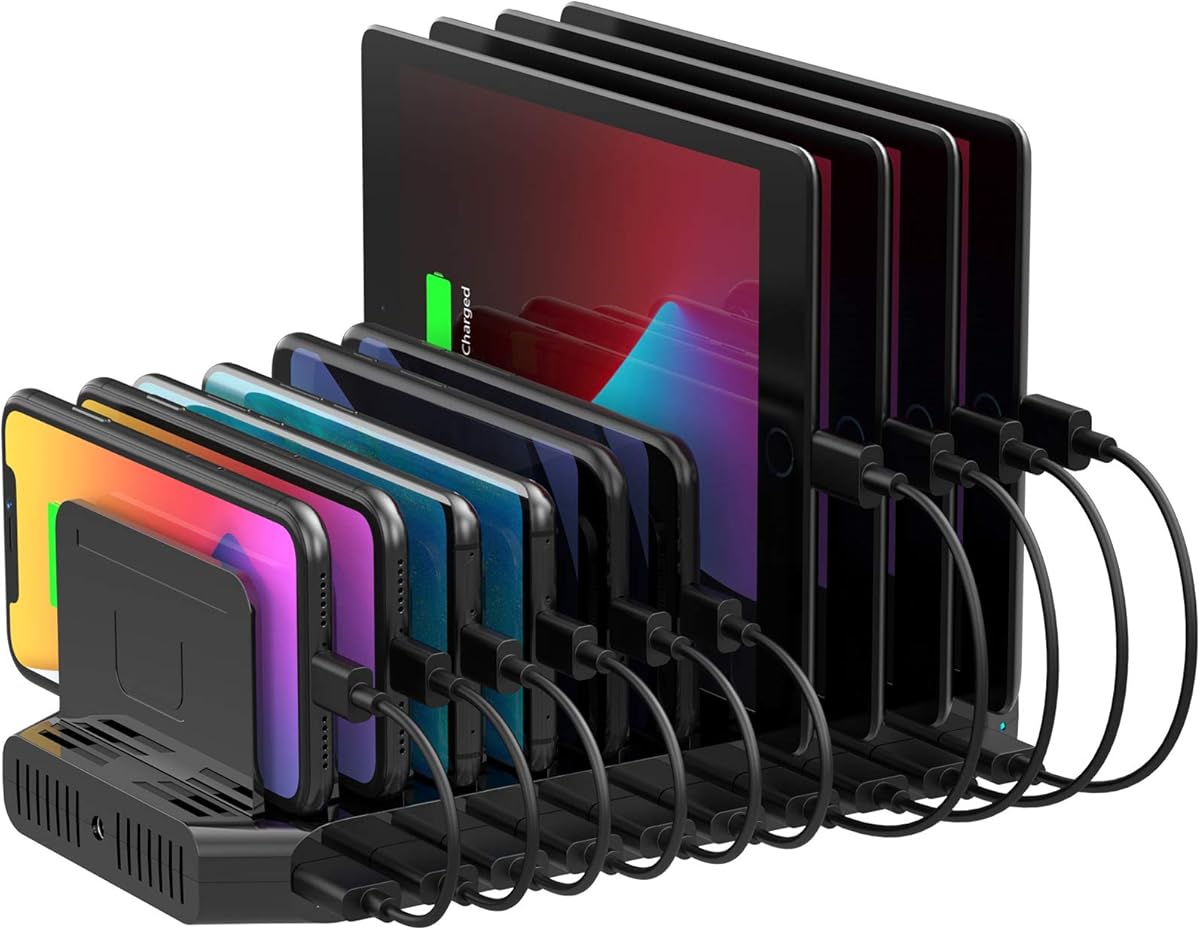
The black Zobirez 420W Charging Station delivers a balanced set of features for buyers who want substantial charging capability without moving to the largest 20-port designs. It has a 4.5 rating and combines five USB-C ports with five USB-A ports for up to ten connected devices.
We may earn a commission when you buy through this link, at no additional cost to you.
Power is distributed across two 65W PD ports, three 45W ports, and five 30W ports. That arrangement makes the dock useful for compatible laptops, iPhones, Galaxy devices, headphones, Kindles, watches, and game controllers. The product information also describes GaN technology for efficient multi-device power delivery.
Its two wider center slots measure 1.57 inches wide and 1.77 inches high, providing useful clearance for a tablet with a protective case. The one-piece flame-retardant ABS construction avoids the looseness that removable dividers can develop, while four non-slip pads help protect the surface and keep the dock steady.
The package includes the dock, a power cord, and eight short mixed cables. That makes the station a practical choice for a shared household or office desk, though buyers who need many extra cables may prefer a model with a larger included collection. Overall, it provides the strongest budget-oriented balance of charging flexibility, tablet accommodation, and organization.
Rather than giving every USB-C port the same maximum output, this dock uses a tiered arrangement. The two 65W ports suit higher-demand compatible devices, while the 45W and 30W options cover tablets, phones, earbuds, watches, and other everyday accessories.
Eight short mixed cables help replace long leads that spread across a work surface. The one-piece bays also give phones and tablets defined places to stand, reducing the visual disorder associated with a row of individual wall adapters.
We may earn a commission when you buy through this link, at no additional cost to you.
The 20-Port 270W Charging Station is built for buyers who need to organize more individual devices than a standard ten-port dock can hold. Its 4.5 rating reflects a balanced approach: 10 USB-C ports, 10 USB-A ports, and enough total output to cover a busy household or shared workspace.
We may earn a commission when you buy through this link, at no additional cost to you.
Unlike the high-output picks, this station assigns up to 5V/3A to USB-C and 5V/2.4A to USB-A connections. Auto-Detect Technology is designed to identify connected devices and provide optimized charging. The stated capability of replenishing a phone to 50% in under 30 minutes depends on the device, cable, and operating conditions.
Eleven high-strength removable dividers can be rearranged for slim phones, thick cases, and tablets. That flexibility is useful when device sizes change frequently. Ten mixed cables are included, spanning USB-C, USB-A, and Micro USB combinations for iOS, Android, tablets, wearables, and legacy devices.
Safety features include temperature control, over-voltage protection, overload prevention, short-circuit mitigation, and overcurrent regulation, while the on/off switch provides straightforward control. The station is less powerful overall than the 420W, 600W, and 750W models, but its 20-port capacity and adjustable organization make it a natural fit for offices, libraries, classrooms, and busy common rooms.
Twenty ports allow users to connect a broad range of devices without replacing one cable with another throughout the day. The equal USB-A and USB-C arrangement is particularly useful for environments where older accessories remain in circulation alongside newer tablets and phones.
The removable divider system is most valuable when the dock serves different device sizes. Users can reposition or remove the dividers so a thick tablet can stand securely without forcing every smartphone into an unnecessarily narrow slot.
We may earn a commission when you buy through this link, at no additional cost to you.
The Unitek 10 USB Charging Station is a focused option for users whose devices still rely primarily on USB-A. It has a 4.4 rating, ten built-in USB-A ports, and a 60W total output, offering a straightforward way to consolidate several phones, tablets, and accessories on one desk.
We may earn a commission when you buy through this link, at no additional cost to you.
Each port supports up to 5V/1.5A, while compatible Apple devices can receive up to 5V/2.4A under fast charging. Smart IC detection is designed to recognize connected electronics and distribute suitable charging current, with automatic overcharging prevention that stops output when a battery reaches full capacity.
Eleven removable baffles can be arranged according to device thickness. The dock is suitable for phones and tablets under 11 inches, but the manufacturer advises against placing laptops in it. The weight of each device should be supported by the station rather than by the dividers, and all connected-device demands must remain within the 60W aggregate limit.
This is less versatile than the mixed-port stations because it has no USB-C ports and does not include charging cables. However, for a collection of established USB-A accessories, it delivers a clean, adjustable organizer with ten ports and a certified 60W adapter. It is best viewed as a focused legacy-friendly dock rather than a universal modern charging hub.
For households or offices that still rely on USB-A leads, ten dedicated ports remove the need for a collection of basic adapters. The approach is simple and immediately recognizable, especially for accessories that predate widespread USB-C charging.
The built-in smart chip is intended to recognize different electronics and provide an appropriate charge. Automatic overcharge control, a certified adapter, and the 60W limit make the operating rules clear when several devices are connected at once.
We may earn a commission when you buy through this link, at no additional cost to you.
The 100W 10-Port Charging Station offers a balanced mix of modern USB-C and familiar USB-A connections in a more compact ten-port format. Its 4.2 rating reflects useful everyday versatility, although its output is lower than the high-capacity 320W, 420W, 600W, and 750W alternatives.
We may earn a commission when you buy through this link, at no additional cost to you.
USB-C connections support up to 5V/3A, while USB-A connections support up to 5V/2.4A. Auto-Detect Technology identifies connected devices and supplies suitable current, and the listing states that a compatible phone may reach 50% in under 30 minutes. Actual results depend on the device, its battery condition, and the cable used.
Eleven removable dividers accommodate slim phones through thick tablets and allow the layout to change as needed. A selection of ten short mixed cables is included, along with the station and its power cable. The package is therefore practical for a family, classroom, or office that wants a complete starting setup.
The station includes temperature, voltage, overload, short-circuit, and overcurrent protection, plus a convenient power button. It is not intended to serve as a high-output laptop charger, and the manufacturer does not claim 100W on every individual port. Users should consider it best for a mix of tablets, phones, headphones, e-readers, Kindles, flashlights, and power banks.
Five USB-C and five USB-A ports make this a practical middle ground between legacy-only docks and large 20-port models. It supports newer tablets while retaining enough USB-A connections for accessories that still use established cables.
Eleven removable dividers let users adapt the organizer to different phone and tablet dimensions. This is useful in a shared space where a dock may alternate between slim handsets, supported tablets, and devices wearing protective cases.
We may earn a commission when you buy through this link, at no additional cost to you.
The 10-Device Laptop & Tablet Charging Station is the premium choice for shared device management because it combines six AC outlets, four USB charging ports, an open vertical rack, and integrated cable routing. It can organize and charge up to ten devices, including laptops, Chromebooks, tablets, iPads, e-readers, and phones.
We may earn a commission when you buy through this link, at no additional cost to you.
Unlike a conventional USB charging dock, its AC outlets accept standard wall plugs. This makes it more suitable for environments where laptops or other devices need their normal power adapters rather than only a USB cable. The open rack keeps equipment accessible for quick insertion and removal without doors or complicated compartments.
Integrated cable management is a major practical advantage for classrooms, offices, libraries, reception areas, and training rooms. Routing charging cords through the structure reduces the loose cable clutter that develops when several full-size adapters share a counter or workstation.
The rack includes a pre-installed surge-protected power strip rated for 110V/10A operation. Its 4.5 rating and premium feature set make it a strong choice for institutional or office use. The trade-off is footprint and the fact that only four ports are USB charging ports, so buyers should confirm their device and plug mix before choosing it.
This rack is designed around stored equipment, not merely charging leads. Its vertical slots keep laptops and tablets visible, upright, and easy to retrieve, which is valuable when devices must be returned and collected repeatedly throughout the day.
Integrated routing helps keep cords closer to the rack and reduces the tangle of separate leads. Combined with six AC outlets, it offers a more complete infrastructure for offices and classrooms where normal-size power adapters are still in use.
We may earn a commission when you buy through this link, at no additional cost to you.
The 50W Six-Port Charging Dock is the most compact option in this guide, designed for users who want an organized tablet and phone charging area without carrying a 10- or 20-port station. It has a 4.4 rating and can charge up to six devices simultaneously.
We may earn a commission when you buy through this link, at no additional cost to you.
Each port provides up to 2.4A, with a smart chip designed to detect connected devices and deliver suitable current. A UL-tested adapter supplies multilayer protection against overvoltage, overcharge, and short circuits. These features make it a sensible choice for a bedside table, small office, hotel room, or travel setup.
The one-piece slots measure 1 inch wide and 1.3 inches high, allowing phones and larger tablets to stand upright even with thick cases. Anti-slip rubber pads protect the desk and keep the dock from moving. The fixed-slot design also avoids the wobbling associated with flimsy removable dividers.
The package is unusually complete for a compact dock: six mixed cables, a built-in watch holder, and a USB-A to USB-C adapter are included. The watch charging cable itself is not included, so buyers who want the holder to provide active watch charging must already have the appropriate cable.
The fixed slots turn a modest six-port dock into an upright organizer for several devices. Their 1-inch width and 1.3-inch height accommodate larger phones and tablets without requiring a large frame or a collection of separate stands.
Six mixed charging cables and a USB-A to USB-C adapter make the station easier to deploy immediately. The integrated watch holder adds another storage point, although the appropriate watch charging cable remains a separate requirement.
We may earn a commission when you buy through this link, at no additional cost to you.
The 320W 10-Port Charging Station occupies a useful middle position between compact docks and the highest-output models. It has a 4.4 rating, a 320W total output, and a balanced selection of five USB-C and five USB-A ports for up to ten devices.
We may earn a commission when you buy through this link, at no additional cost to you.
The USB-C side is especially useful for tablets and compatible laptops. Two ports provide up to 65W, while three provide up to 30W. The product information states that a compatible phone can move from 20% to 80% in 30 minutes. The five USB-A ports support conventional accessories and devices still using older cable formats.
Wide and raised integrated slots accommodate thicker devices, and anti-slip material in the center helps prevent sliding. Eight rubber pads underneath protect the desktop and keep the organizer stable. An Apple Watch charging holder is built into the design, although its watch charging cable is not included.
Smart chips detect connected devices and supply appropriate current while helping avoid overcharging. The manufacturer recommends using the original included cables for optimal performance and safety because damaged or uncertified cables may cause charging failures or device damage. Overall, it is a strong option for a family that wants laptop-class USB-C power without moving to a 20-port station.
Two 65W ports and three 30W USB-C ports provide more useful high-power options than a typical all-USB-A organizer. This makes the station suitable for compatible tablets and laptops alongside the ordinary accessories found in a busy household.
Raised, widened slots keep devices upright and allow protective cases to remain on. The anti-slip center treatment and eight bottom pads improve stability and help protect both the connected devices and the surface beneath the dock.
We may earn a commission when you buy through this link, at no additional cost to you.
The white Zobirez 420W Charging Station shares the core capability of the black version while suiting a lighter desk or interior. It carries a 4.5 rating, provides 420W of total output, and includes ten ports divided evenly between USB-C and USB-A.
We may earn a commission when you buy through this link, at no additional cost to you.
Its output arrangement includes two 65W ports, three 45W ports, and five 30W ports. These options cover compatible laptops, tablets, iPhones, Galaxy phones, headphones, Kindles, Apple Watches, and Nintendo Switch units. The product description identifies the use of PD and GaN technology for efficient charging.
Two central slots are 1.57 inches wide and 1.77 inches high, making them suitable for a tablet with a protective case or a compatible laptop. One-piece flame-retardant ABS construction gives the organizer a stable foundation, while four non-slip pads help prevent movement and surface scratches.
The bundle contains the charging station, a power cord, and eight short mixed cables. Flame-retardant material and protection against over-current, over-voltage, overcharge, overload, overheating, and short circuits are listed. Buyers choosing between the black and white versions should focus on desk aesthetics and room layout, since the charging specifications are essentially the same.
The wider and taller middle positions are the most relevant tablet feature. They allow a cased device to stand securely without removing its case, while the surrounding slots organize compatible phones and smaller accessories.
The combination of 65W, 45W, and 30W outputs gives different connected devices an appropriate path. Eight short cables help keep the station visually tidy, and four bottom pads help it remain stable during repeated insertion and removal.
We may earn a commission when you buy through this link, at no additional cost to you.
The Moezuti 600W 20-Port Charging Station combines the highest user rating in this guide, 4.7, with one of its strongest charging specifications. It provides 600W total output across 20 ports, allowing up to 20 devices to be connected and charged simultaneously.
We may earn a commission when you buy through this link, at no additional cost to you.
The port arrangement includes two 65W PD USB-C ports, ten 30W PD USB-C ports, and eight 20W QC USB-A ports. The two highest-output USB-C positions are intended for compatible MacBook Air, MacBook Pro, and other USB-C laptops, while the remaining ports serve tablets, phones, Kindles, Android devices, AirPods, and earbuds.
A pair of wider center bays can hold a laptop or a tablet with a thick case. The one-piece flame-retardant ABS slots are designed to remain stable over time, avoiding the breakage associated with removable dividers. This makes the station especially attractive for a family that expects to keep several cased tablets connected.
The package includes the dock, a five-foot power cord, and ten 11-inch short cables in Type-C, iPhone, USB-C, and Micro USB configurations. GaN V Chip technology provides real-time temperature monitoring and protection against overcharging, overheating, short circuits, and overcurrent or overvoltage. Its scale and output are the main trade-offs, but for a large household, office, or classroom, few alternatives offer the same combination of capacity and flexibility.
The station is designed for environments where many devices need to remain connected over extended periods. Twenty mixed ports reduce the need for wall-adapter swapping and create a single visual charging zone for a large family, shared office, or classroom.
Two 65W ports provide dedicated headroom for compatible laptops and demanding tablets. The remaining tiered USB-C and USB-A outputs support phones and accessories, while the GaN V Chip monitors temperature and applies multiple forms of electrical protection.
We may earn a commission when you buy through this link, at no additional cost to you.
The right tablet charging station depends on more than port count. Consider total output, connector types, physical device fit, cable requirements, safety features, and the environment where the dock will be used.
Total wattage indicates the charging capacity available across the entire station, while individual port ratings show what a single device can receive. A station with 750W aggregate output and five 120W USB-C ports can serve demanding compatible devices, whereas a 50W or 60W dock is better suited to phones, tablets, and smaller accessories. Never assume every port can deliver the maximum advertised wattage simultaneously.
Choose aggregate and per-port output that match your device mix. High-output laptops need strong dedicated USB-C connections, while a collection of phones and earbuds can usually be served by a lower-capacity multi-port dock.
A mixed-port design provides the most practical flexibility. USB-C serves modern tablets, phones, and compatible laptops, while USB-A remains relevant for older accessories, power banks, and devices that have not moved to newer cables. The products in this guide range from ten USB-A-only ports to balanced ten-port arrangements and 20-port designs containing both connector types.
Match the dock to the connectors you already own and expect to use. A USB-A-only model can still be effective, but a mixed station will usually serve a broader and longer-lasting device collection.
A useful charging station must hold the tablet upright without forcing the device to lean against a divider. Look for wide or tall bays, especially if the tablet has a thick protective case. Fixed one-piece slots can be more stable, while removable dividers offer greater flexibility when phone and tablet sizes change frequently.
Check the stated slot dimensions and manufacturer limits before buying. Some stations accommodate cased tablets, while others are intended only for smaller devices. Laptops should be placed only where the product specifically supports them.
Count the devices that realistically need charging at the same time, not merely every device you own. A six-port dock suits a couple, a family, or a small bedside setup, while ten ports cover a larger shared desk. Twenty-port stations suit busy households, offices, libraries, and classrooms where maintaining an open connection for each device is important.
Also consider how often devices are added and removed. A station with too few ports creates constant disruption, while an oversized dock may occupy more counter space than a small household needs.
A complete cable package can make a charging station much easier to deploy. The selections here include short mixed leads for USB-C, iPhone, and Micro USB connections, as well as power cords. The Unitek model is the notable exception because charging cables are not included. Some stations also include USB-C adapters or watch holders, although a watch holder does not necessarily include the compatible watch charging cable.
Consider both quantity and length. Short cables help control clutter, while longer or higher-rated cables may be needed for laptop placement, unusual device positions, or newer USB-C standards.
Look for protection against over-current, over-voltage, overload, overcharge, overheating, and short circuits. Several products also use flame-retardant materials, and the Moezuti model adds real-time temperature monitoring. These features help manage the risks associated with charging many connected electronics through one hub, especially in unattended locations.
Protections are only one part of safe use. Connect only undamaged cables, follow the station's output limits, and avoid using it in wet or excessively hot environments.
The best station removes more than wall-adapter clutter. Upright bays keep screens visible and prevent devices from lying flat, while short leads prevent cables from spreading across a work area. Removable dividers support more varied device sizes, and integrated routing in the laptop rack helps contain full-size power cords.
Think about how the station will be used each day. A bedside dock needs small slots for phones and a watch, a family dock needs broad tablet bays, and a classroom rack must keep larger equipment upright and accessible.
The best environment depends on power infrastructure and device turnover. A home nightstand generally needs modest output and compact storage, a family desk may need several USB-C ports, and a classroom or office may require dozens of connections, AC outlets, and surge protection. Frequent travelers may prioritize a lightweight six-port model with an included accessory bundle.
Choose the smallest station that comfortably handles the intended number of devices and connectors. High output is valuable, but it should correspond to devices that can actually use the available power.
Place the station on a stable, dry, level surface with enough clearance for connected devices and cables. Before connecting anything, read the station's power limits and confirm that each device uses a compatible cable. Configure removable dividers, where applicable, so devices stand upright and do not place excessive sideways force on a divider.
Connect the supplied power cord to a suitable wall outlet, then attach devices to the appropriate USB-C or USB-A ports. Avoid exceeding the station's aggregate output. For stations with laptop-capable USB-C ports, use a suitable USB-C cable and check the device's charging requirements; a port with a high maximum rating will not make a device charge faster than its own design permits.
Unplug the station before moving it, reorganizing dividers, or inspecting it. Keep the base and slots free of dust and liquid, and replace any cable that is frayed, pinched, or damaged. If a port stops working or a device behaves unusually, disconnect it and consult the product instructions or customer support rather than continuing to use the station.
Yes, provided the station has enough aggregate power and compatible connections. Models such as the Zobirez 750W station and Moezuti 600W station include USB-C ports with high maximum outputs for compatible laptops. The actual charging rate still depends on the laptop, tablet, cables, and the station's power-sharing behavior.
USB-C is the newer connector used by many current tablets, phones, and laptops, while USB-A serves many older accessories and power banks. A mixed dock offers better flexibility, but every device still requires a cable with the correct connector. A USB-C port cannot charge a device that requires a USB-A connection without an appropriate adapter or cable.
It depends on the slot width and the thickness of the case. The Zobirez, Moezuti, Unitek, and compact six-port models describe slots or bays designed to accommodate cased devices. Buyers should still check the stated dimensions and compare them with the tablet and case before ordering.
Count the devices that are usually connected at the same time and add some flexibility for guests or accessories. A six- or ten-port station is appropriate for many homes, while a 20-port model is better suited to large families, offices, libraries, and classrooms where many devices remain connected throughout the day.
That depends on the cable and laptop requirements. Some bundles include only short charging leads for phones, tablets, and accessories, while a few include USB-C to USB-C cables. For a laptop, confirm that the included cable supports the required charging power and connection, and follow the manufacturer's recommendation to use the original supplied cable where applicable.
The featured stations include charging-management and overcharge protections, but safe operation still depends on following the product instructions and using undamaged cables. Place the dock on a stable, dry, ventilated surface and disconnect it if it becomes unusually hot, smells abnormal, or shows a problem. Unattended charging should never override the manufacturer's warnings.
A classroom generally benefits from many ports, clear device separation, cable management, and surge protection. The 20-port models offer the most connection capacity, while the dedicated 10-device rack is particularly useful when students or staff use laptops, Chromebooks, and tablets with standard power adapters. Device security and local electrical requirements should also be considered.
Removable dividers are useful when the dock must accommodate a changing mix of phone sizes, tablets, and cases. One-piece fixed slots are often simpler and more durable, but they offer less layout flexibility. The best choice depends on whether the same device sizes are used every day or the station serves a varied collection.
The Zobirez 750W station is the strongest all-around choice because it combines five high-output USB-C ports, five USB-A ports, wide tablet bays, ten included cables, and extensive protection. The Zobirez 420W models offer a more economical route to laptop-capable charging, while the Moezuti 600W model provides the most capacity and holds the highest user rating.
Prioritize aggregate power, port compatibility, slot dimensions, and cable needs rather than choosing solely by the number of ports. High-output stations make the most sense when compatible tablets or laptops are central to the device mix. Smaller six-port models suit limited spaces, and dedicated racks are valuable where full-size AC adapters and organized device storage matter most.
Before ordering, confirm the current listing details, included accessories, safety information, and device compatibility. Ratings, product configurations, and prices can change, so checking the current product page helps ensure that the selected tablet charging station still meets your needs.