
Basic ESP32 WiFi Development Kit
5.0Editor score
ESP32 Wi-Fi development board
Arduino IDE compatible
Sensors and essential modules
Discover the best ESP32 Starter Kit options in this guide comparing boards, sensors, tutorials, components, Wi-Fi features, and learning paths.
An ESP32 Starter Kit combines a Wi-Fi and Bluetooth-capable microcontroller with the sensors, displays, motors, wires, and supporting parts needed to learn embedded electronics through practical projects. A well-balanced kit makes it easier to move from simple blinking LEDs to connected environmental monitors, automated controls, robotics experiments, and camera-based creations.
This guide compares ten ESP32 kits according to the breadth of their components, board capabilities, programming options, tutorial depth, project count, organization, and suitability for beginners or more experienced learners. The list covers basic classroom sets, broad all-in-one bundles, ESP32-S3 systems, and camera-equipped kits for users seeking advanced possibilities.
Each selection highlights the strongest use case, practical advantages, and visible limitations so readers can match a kit to their experience and interests. Product configurations and availability can change, and current prices should be checked before buying, so use the comparison as a feature-focused starting point rather than a substitute for current listings.
5.0Editor score

4.3Editor score

4.6Editor score
The table below compares every kit by board type, included component scale, learning materials, and programming flexibility. These distinctions help reveal whether a bundle is better for first projects, broad IoT experimentation, camera work, or advanced ESP32-S3 development.




The ELEGOO ESP-32 Super Starter Kit is a broad, approachable bundle centered on an ESP32 board with a dual-core processor, integrated Wi-Fi, and Bluetooth 4.2. Its strongest quality is the balance between introductory electronics and more advanced connected-device work, allowing learners to begin with simple inputs and outputs before exploring IoT applications.
We may earn a commission when you buy through this link, at no additional cost to you.
The kit contains more than 35 modules and electronic components, including LEDs, buttons, an OLED display, a servo motor, and a keypad. Its online learning material provides more than 30 projects with code, circuit diagrams, and step-by-step instructions. This combination is especially useful because learners can move from fundamental circuit construction to projects such as weather stations, smart-home controllers, and remotely controlled devices without changing the core platform.
The main limitation is that it does not include a camera, so it is less suited to users whose main interest is image capture, video streaming, or visual recognition. It also offers fewer guided projects than the largest Freenove bundles. Those trade-offs are reasonable for a kit that emphasizes breadth, accessibility, and a gradual learning path rather than specialized camera functionality.
This is the strongest all-around recommendation for students, new makers, educators, and hobbyists who want one platform for foundational electronics and practical IoT projects. The combination of a capable board, numerous components, and a substantial beginner tutorial makes it easier to stay engaged and gradually develop skills without immediately taking on a more complicated development board.
The supplied project collection moves beyond a single blinking-light exercise. Its range supports practical lessons involving environmental sensing, connected controls, automation, and interactive devices, helping users see how software and physical components work together.
Displays, input controls, sensors, a keypad, and a servo motor give learners multiple ways to make a project respond to the real world. That variety is valuable for experimenting with displays, automation, and human-controlled outputs.
We may earn a commission when you buy through this link, at no additional cost to you.
The LAFVIN Basic Starter Kit is designed around an ESP32-S Wi-Fi IoT development board and is aimed at learners who want an uncomplicated introduction to electronics and programming. Its defining advantage is clarity: the package description emphasizes a straightforward setup, introductory lessons, and a tutorial that guides users through assembling the kit.
We may earn a commission when you buy through this link, at no additional cost to you.
The included modules can be used to control components such as LEDs, a DHT11 sensor, and an OLED display. This gives users a useful mix of input, output, environmental sensing, and display capabilities without the enormous inventory found in an ultimate bundle. The combination is particularly helpful for understanding how a microcontroller reads sensor information and presents it through connected software.
Compared with larger kits, the less comprehensive component inventory may eventually require separate purchases for specialized projects. The supplied description also provides fewer details about the number of lessons or projects than some alternatives. As a result, buyers seeking a specific sensor, display, motor, or advanced camera module should verify the included list before committing.
Choose this kit when the priority is a manageable first step with a Wi-Fi-capable ESP32 board, sample code, and introductory assembly guidance. It suits students, teachers, and self-learners who value a simpler kit structure and want to understand basic module control before investing in a larger collection of electronics.
The tutorial-oriented approach reduces the initial barrier to getting a board connected, code uploaded, and modules controlled. It is a practical starting point for learners who want instructions to accompany each stage of assembly.
An LED, DHT11, and OLED represent three distinct roles: output, environmental input, and visual feedback. Together they support compact demonstrations of how data moves through an embedded system.
We may earn a commission when you buy through this link, at no additional cost to you.
The Freenove ESP32 Camera Board Ultimate Starter Kit is the most expansive conventional-learning package in this list. Its ESP32 camera board combines a dual-core 32-bit processor running up to 240 MHz, 4 MB of flash, 8 MB of PSRAM, 2.4 GHz Wi-Fi, Bluetooth 4.2, USB code uploading, a camera, and a memory-card slot.
We may earn a commission when you buy through this link, at no additional cost to you.
The kit includes a 1 GB memory card and reader, 122 projects progressing from simple to complex, and an extensive downloadable or browser-viewable tutorial. Every project is described as including schematics, wiring diagrams, complete code, and explanations. The 795-page English tutorial and total inventory of 242 items make this a strong choice for users who want a deep course rather than a minimal introduction.
Supporting the board in MicroPython, C, and Processing adds meaningful flexibility. Python lowers the barrier for many beginners, C supports a more traditional embedded-development route, and Processing can create graphical interfaces on a connected computer. The camera and included storage also create opportunities that ordinary sensor kits cannot cover, although the size and complexity of the bundle can feel excessive for someone who only wants to flash an LED.
This premium kit best suits committed learners, engineering students, educators, and makers interested in a structured path through ESP32 development, networking, and camera applications. Buyers should treat the physical size and broad project list as long-term resources rather than something every user will explore immediately.
The 122-project structure provides a visible progression from introductory electronics to more involved systems. Schematics and wiring diagrams make it easier to understand both the physical build and the relationship between each component and the code.
MicroPython, C, and Processing let users approach the same hardware through different paradigms. This is especially valuable for learners who want to compare languages and understand how a microcontroller can serve both embedded and desktop-connected workflows.
We may earn a commission when you buy through this link, at no additional cost to you.
The Freenove ESP32-S3 Camera Board Ultimate Starter Kit is built around the more capable ESP32-S3, adding an 8 MB flash configuration, Bluetooth 5 Low Energy, and USB-OTG to a camera-focused development platform. It retains the dual-core 240 MHz processor and 8 MB of PSRAM, making it a compelling option for connected projects involving wireless data, imaging, and computer interaction.
We may earn a commission when you buy through this link, at no additional cost to you.
The package includes 121 guided projects and a detailed 828-page English tutorial available as a download or through an online viewer. MicroPython, C, and Processing examples are supplied, while the box includes a camera, a 1 GB memory card, and a card reader. With 243 items in total, it offers a large inventory of components, modules, sensors, wires, and compatible accessories.
Its sophistication can be a disadvantage for absolute beginners. The ESP32-S3 platform offers more potential than a basic learning kit, but the large collection, advanced board features, and three programming routes may initially feel more demanding. Users who only need a few fundamental exercises may find a smaller set easier to manage. The camera also adds setup considerations that do not apply to standard sensor-based kits.
This kit is best for learners who want more than basic IoT demonstrations and are interested in wireless development, camera applications, or modern ESP32-S3 hardware. It is also a strong long-term platform for a maker who values a structured tutorial and intends to work through a wide range of increasingly complex examples.
Bluetooth 5 Low Energy and USB-OTG broaden the ways the board can interact with peripherals, networks, and development computers. These features are useful for users planning projects that extend beyond conventional Arduino examples.
The 828-page tutorial and 121 projects create a substantial curriculum. Users can rely on the supplied schematics, wiring diagrams, code, and explanations instead of improvising every circuit from basic component descriptions.
We may earn a commission when you buy through this link, at no additional cost to you.
The Basic Starter Kit for ESP32 ESP-32S WiFi Development Board is a focused option for students, hobbyists, and makers who want to learn electronics, programming, and IoT concepts without starting with a huge component collection. It centers on an ESP32-S microcontroller with integrated Wi-Fi and adds sensors and modules for hands-on experimentation.
We may earn a commission when you buy through this link, at no additional cost to you.
Its instructional positioning is particularly clear. The kit supports Arduino IDE programming so users can write, upload, and test programs in a familiar environment. The included electronic modules support experiments involving sensor readings, digital control, and basic circuit behavior, allowing beginners to connect physical inputs and outputs to their own code.
The main compromise is scale. A basic kit naturally offers less variety than an ultimate bundle, and there is no camera or similarly specialized hardware in the supplied description. Learners with a specific project in mind should check the current contents carefully. Users who want dozens of ready-to-build projects may find a more extensive tutorial package more suitable.
For an affordable-style starting point, this is a straightforward and practical choice. It works especially well for STEM education, classroom activities, home electronics practice, and foundational programming. Its value comes from giving learners the core tools required for useful experiments without requiring them to navigate the full breadth of a professional-size electronics inventory.
Arduino IDE support reduces setup friction for many first-time microcontroller users. Familiar tools, straightforward uploads, and a manageable collection of modules let the focus remain on learning how code controls physical hardware.
Integrated Wi-Fi makes connected demonstrations a natural part of the learning path. Learners can progressively explore how sensor data and control signals move between a microcontroller and a network-connected device.
We may earn a commission when you buy through this link, at no additional cost to you.
The Freenove ESP32 Camera Board Basic Starter Kit offers a middle ground between a conventional starter set and an expansive ultimate bundle. It uses an ESP32 camera board with a dual-core 32-bit processor up to 240 MHz, 4 MB of flash, 8 MB of PSRAM, 2.4 GHz Wi-Fi, Bluetooth 4.2 Low Energy, and a USB code uploader.
We may earn a commission when you buy through this link, at no additional cost to you.
Its learning resources include a 400-page downloadable or online tutorial and 58 projects progressing from simple to complex. Each project includes step-by-step guidance, schematics, wiring diagrams, complete code, and detailed explanations. The 143-item inventory covers commonly used components, wires, and other compatible items, while a camera, 1 GB memory card, and card reader are included.
Compared with the ultimate Freenove kit, this version contains fewer items, projects, and pages of documentation, and it offers only MicroPython and C rather than adding Processing. That narrower focus may be preferable for users who want camera capability without a massive learning library. It nevertheless represents a substantial commitment compared with a basic sensor kit.
Choose it when camera development is important but the user wants a more focused curriculum than the ultimate package. It suits learners ready to work with a memory card, imaging hardware, and embedded code while still benefiting from guided electronics explanations and wiring references.
The camera board, storage, and 58-project curriculum create a coherent route into embedded imaging. Each example is supported by wiring and code information, reducing the gap between copying a build and understanding its operation.
Supporting both MicroPython and C gives users a choice between an approachable scripting environment and a classic embedded-language route. That dual-language support is useful for comparing how similar tasks are expressed in each.
We may earn a commission when you buy through this link, at no additional cost to you.
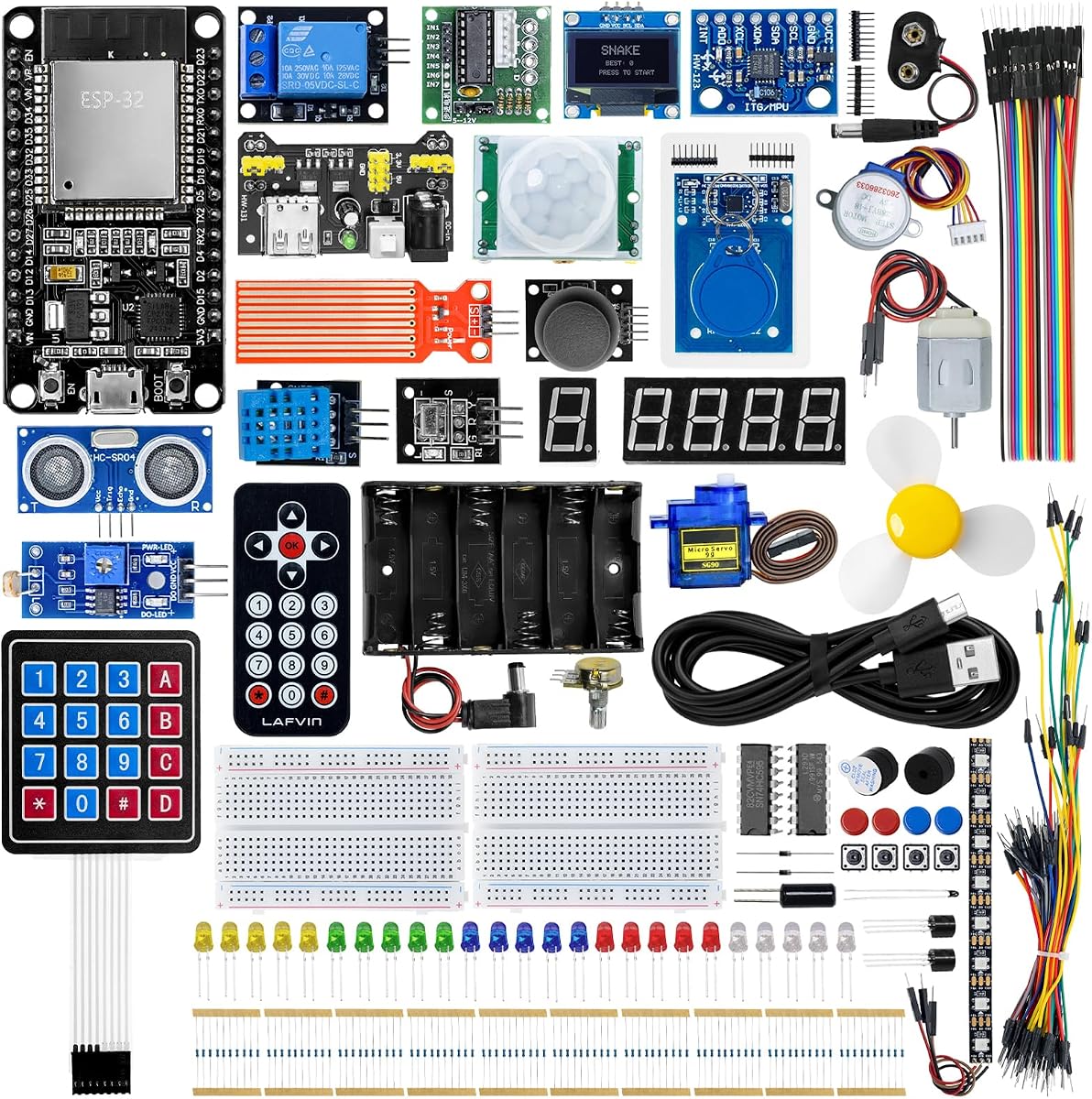
The LAFVIN ESP32 Ultimate Starter Kit distinguishes itself through a strong focus on Wi-Fi control and monitoring. Its tutorials, wiring diagrams, sample code, and project courses are designed to help users create web-based control systems and display sensor information in real time through a browser on a smartphone, tablet, or computer.
We may earn a commission when you buy through this link, at no additional cost to you.
The component collection includes ultrasonic and PIR motion sensors, RFID, an MPU6050 angle sensor, an OLED display, temperature and humidity sensors, a servo motor, and many other modules. This supports more than 20 project types, including access control, motor control, environmental monitoring, three-dimensional motion visualization, a Snake game, and motion-detection alarms.
The main constraint is that the supplied learning path centers on Arduino IDE, and no camera system is listed. Users interested in imaging, native USB workflows, or a second programming language may need additional hardware or separate resources. The number of components can also make initial inventory and storage more demanding than a basic kit.
This is a persuasive option for makers whose main interest is connected control, browser-based monitoring, or smart-home prototypes. It works well for self-study and school courses, especially when wireless interaction is more important than camera-based development.
Browser-based control turns IoT concepts into visible results. Learners can see outputs respond from a phone or computer and watch environmental or motion data update in real time.
Ultrasonic, PIR, RFID, MPU6050, temperature, and humidity modules support varied interactions. Their range makes it possible to build access systems, alarms, environmental tools, and motion-responsive inventions.
We may earn a commission when you buy through this link, at no additional cost to you.
ESP32 Starter Kit V2 is a versatile hardware package built around a 38-pin ESP32 development board and a separate expansion board. Its 21-in-one collection covers sensors, modules, wires, a display, and supporting components, making it useful for users who want to assemble varied circuits without sourcing every standard part individually.
We may earn a commission when you buy through this link, at no additional cost to you.
The included half-size breadboard and male-to-female and female-to-female jumper wires support immediate prototyping. The component set includes an HC-SR501 motion sensor, HC-SR04 ultrasonic sensor, LDR, potentiometer, DS18B20 temperature sensor, piezo buzzer, keypad, 16-by-2 I2C LCD, SG90 servo motor, tactile button, LEDs, resistors, and a breakout expansion board.
Online tutorials are offered for both Arduino IDE using C/C++ and MicroPython, but users must search for the DIYables ESP32 Starter Kit guides. That requirement adds a small step compared with bundles that place tutorial links directly on the product packaging. The hardware also lacks a camera and focuses on conventional sensors, displays, and actuators.
Choose this kit for hands-on prototyping with a strong mix of input, output, display, and motion-control hardware. It is a good fit for users who want both C/C++ and MicroPython options and appreciate having a breadboard and expansion interface prepared from the outset.
The included breadboard and two jumper-wire types remove a common source of early friction. Learners can build temporary circuits quickly while experimenting with sensors and outputs.
An I2C LCD, SG90 servo, keypad, and several measurement sensors create a varied component set. The package supports projects that combine reading conditions, displaying information, and producing physical movement.
We may earn a commission when you buy through this link, at no additional cost to you.
The ACEBOTT ESP32 STEM Learning Kit is designed to make electronics and IoT accessible across different ages and experience levels. Its 96-piece collection includes an ESP32 board, breadboard, RGB lights, buttons, motors, an ultrasonic sensor, a PIR motion sensor, and other components, while its ESP32 platform supplies built-in Wi-Fi and Bluetooth.
We may earn a commission when you buy through this link, at no additional cost to you.
More than 40 step-by-step lessons establish a clear progression from electronic components and basic circuits to practical projects and advanced IoT applications. The instructional approach is notable because it connects each stage conceptually rather than presenting isolated examples. Three programming methods are supported: beginner-friendly graphical coding, Arduino IDE, and Python, giving young learners a visual entry point while older students can advance toward conventional source code.
The selection of three environments can be a double-edged feature. It offers flexibility but may also make it less obvious where to begin, particularly for a new learner working independently. There is also no camera in the supplied component description. Prospective buyers with a specific advanced imaging goal should not assume that this general STEM bundle covers it.
This kit is a strong option for families, classrooms, STEM clubs, and home learning programs where a structured progression and portable organization matter. Individually labeled components and anti-static packaging improve handling, while the range of parts and lessons supports repeated use across different skill levels.
The lessons move logically from component recognition and circuit building to complete projects. That continuity helps learners understand why each part is used and how the pieces function as a system.
Graphical coding lowers the first barrier, while Arduino IDE and Python support more traditional development. A teacher or parent can therefore introduce block-style logic first and transition toward text-based programming as skills grow.
We may earn a commission when you buy through this link, at no additional cost to you.
The Lonely Binary TinkerBlock ESP32-S3 Starter Kit is built for quick, organized experimentation. Its flagship ESP32-S3 board has a dual-core 240 MHz processor, 16 MB of flash, Wi-Fi, Bluetooth 5.0, native USB, and secure boot, offering a modern foundation for IoT and robotics projects.
We may earn a commission when you buy through this link, at no additional cost to you.
The dedicated S3 expansion board provides dedicated plug-in ports for each sensor. A standardized cable system lets users connect 12 modular sensors without assembling extensive breadboard wiring. The included modules cover a Jumbo LED, push button, microphone, active and passive buzzers, potentiometer, WS2812 RGB LED bar, thermistor, optical sensor, infrared transmitter and receiver, and ambient light sensor.
Compared with bundles containing dozens of general-purpose components, this kit concentrates on a smaller but neatly integrated sensor suite. It does not include a camera or the wider range of displays, keypads, RFID modules, and servo systems found in many ultimate collections. Buyers must also accept a focus on C++, MicroPython, and ESP-IDF rather than a graphical coding environment.
Choose the TinkerBlock kit for users who value fast setup, standardized connections, and current ESP32-S3 hardware. It is especially suitable for robotics, audio, infrared communication, optical sensing, and colorful indicator experiments, as well as developers who prefer expansion-board connections over a large inventory of loose modules.
Dedicated ports and standardized cables remove much of the uncertainty associated with breadboard layouts. Users can connect a module, upload code, and observe the result with less repetitive wiring work.
Audio, light, infrared, temperature, and visual-output modules create a well-rounded experimentation set. The breadth is narrower than a universal kit, but the included parts are closely tied to robotics and interactive IoT tasks.
We may earn a commission when you buy through this link, at no additional cost to you.
The right ESP32 Starter Kit depends on your experience, preferred programming environment, and the type of projects you want to build. Consider board capabilities, component selection, documentation, connectivity, and expansion potential rather than judging a kit by its advertised item count alone.
Standard ESP32 boards offer a dual-core processor, Wi-Fi, and Bluetooth, making them ideal for general IoT and sensor projects. The ESP32-S3 models add more modern capabilities such as Bluetooth 5, native USB, and, in the Freenove example, larger flash storage. A standard board is usually easier to begin with, while an S3 kit makes more sense when USB, advanced wireless work, or future expansion matters.
In short, match the board generation to your intended project rather than choosing solely on the newest hardware.
Arduino IDE support is the most common entry point because it provides a familiar editor, examples, and a straightforward upload process. Python or MicroPython can make first experiments more approachable, while C and ESP-IDF support users who want closer control over embedded development. Some bundles combine several options, which is valuable for progression but can also make the initial learning path less obvious.
Choose at least one environment that matches your current skills, and treat additional language support as a benefit rather than a requirement.
A useful starter kit normally includes a development board, breadboard, jumper wires, LEDs, buttons, resistors, and several sensors. Larger kits may add displays, servos, keypads, RFID modules, and motor controls. A more extensive inventory is useful only when it matches your interests, so list the projects you want to build and check for their required modules.
In short, prioritize relevant components over a larger headline item count.
A strong tutorial should explain component functions, show wiring, provide complete code, and define a progression from simple exercises to integrated projects. The Freenove kits emphasize extensive written lessons, while some other products use online guides that must be located separately. Check whether instructions are downloadable, browser-based, printed, or video-based, and confirm that the language matches your comfort level.
In short, choose clear, well-structured guidance that teaches concepts rather than merely offering isolated code snippets.
Wi-Fi is one of the ESP32 platform's major attractions because it supports remote monitoring, browser-based controls, cloud communication, and connected sensors. Bluetooth adds another route for local communication and mobile interaction. Confirm that the included tutorials actually explain the relevant networking features, since a board may possess wireless hardware while the supplied lessons focus mainly on basic input and output.
In short, verify that wireless capabilities are taught and demonstrated, not merely listed on the board.
Camera-equipped ESP32 boards open a distinct category of projects involving image capture, stored media, streaming, and computer-connected visual interfaces. The Freenove camera kits include a board, camera, memory card, and card reader, along with large project libraries. A standard sensor kit is usually simpler and less expensive, but it cannot provide the same imaging opportunities without separate hardware.
In short, choose a camera kit only when visual projects are a genuine goal, not because the larger component list looks more advanced.
Expansion boards, standard connectors, and labeled parts can make a kit much easier to extend. The Lonely Binary TinkerBlock uses dedicated sensor ports, while the ESP32 Starter Kit V2 includes an expansion board and breadboard. Breadboard-based systems offer flexibility but require more careful wiring. For children, classroom groups, or frequent project changes, organized connections may reduce setup errors and lost time.
In short, prefer connection systems that match your skill level and the amount of circuit rearrangement you expect.
A 200-plus-item bundle can resemble a small electronics lab, but more components are not automatically more useful. Large kits may challenge beginners with inventory, storage, and unclear choices. A focused kit can be easier to master if it includes the modules required for a coherent sequence of lessons. Consider how much room you have, whether several people will share the kit, and how often you intend to change projects.
In short, buy the broadest collection you will actively use, not simply the largest one available.
Begin by organizing the board, sensors, cables, display components, and documentation before connecting power. Identify the pin labels and component types, then follow the first tutorial exactly. Many beginner mistakes involve incorrect power connections, loose jumper wires, or a sensor attached to a pin that the sample code does not use, so making the supplied circuit accurately is the best first exercise.
Install the board support package required by the selected development environment, select the correct serial connection, and upload a simple program before attempting a larger project. Change one element at a time and watch the output after each modification. Keep the circuit disconnected while rearranging components, and avoid using a breadboard rail as a substitute for a proper power distribution solution when the instructions call for one.
Store parts in labeled containers, protect the development board and camera from static discharge, and keep moisture, conductive debris, and dust away from exposed contacts. Wires and sensor modules can wear with repeated bending, so inspect connectors and leads between projects. For firmware updates or major experiments, preserve the current code and circuit diagram, making it easier to restore a known working state.
Start with the development board, programming environment, included components, and tutorial structure. A good beginner kit combines Wi-Fi, Arduino IDE support, a breadboard, jumper wires, basic inputs and outputs, and several sensors. More advanced users should also consider Bluetooth version, native USB, camera support, memory, expansion connectors, and whether they need C, Python, or graphical programming options.
Yes, provided the kit includes approachable instructions and familiar development tools. A beginner should look for circuit diagrams, complete sample code, clearly identified parts, and projects that begin with simple operations. Kits such as the LAFVIN Basic, ELEGOO Super, and ACEBOTT STEM sets explicitly target introductory electronics, programming, and IoT learning.
Usually not. Every kit reviewed here includes an ESP32 development board as the central component. You may eventually want a second board for parallel projects, a more advanced model, or a specific form factor, but the included board should support the kit's stated lessons and projects without requiring an immediate extra purchase.
Arduino IDE is a practical starting point for many learners because it offers a familiar workflow and C/C++ programming. MicroPython is useful for quicker scripting and experimentation, while ESP-IDF and C provide deeper control for advanced development. Several kits support multiple environments, allowing users to begin with the option that feels most approachable and then advance.
They are valuable if image capture, visual interfaces, media storage, or camera-based IoT projects are central to your interests. The Freenove camera kits include the camera board, memory card, reader, schematics, code, and extensive lessons. They are less convenient for someone who only wants basic sensor exercises, so the imaging capability should justify the greater setup and learning complexity.
Yes. Integrated Wi-Fi allows an ESP32 to serve browser interfaces, send sensor readings, receive remote commands, and communicate with network-connected services. Bluetooth is also available on the listed boards, with standard ESP32 models offering Bluetooth 4.2 and ESP32-S3 models offering Bluetooth 5 Low Energy. Actual project complexity depends on the kit's included tutorials and components.
Use separate labeled compartments for sensors, displays, actuators, input components, and output components. Keep jumper wires sorted by connector type and length, and store microcontrollers and camera modules in anti-static materials or suitable protective cases. A printed or digital inventory matching the kit contents helps identify missing parts and makes setup faster.
The ACEBOTT STEM Learning Kit is particularly structured for education because it provides more than 40 lessons and supports graphical coding, Arduino IDE, and Python. The ELEGOO Super Starter Kit also offers a broad beginner path with more than 30 projects. For a smaller group, choose the option whose component count and tutorial format are easiest for the intended learners to manage.
The ELEGOO ESP-32 Super Starter Kit stands out as the most balanced general recommendation, combining a capable Wi-Fi and Bluetooth board, more than 35 components, and over 30 guided projects. The Freenove ESP32 Camera Ultimate Kit is the strongest premium option for users seeking a deep curriculum and camera development, while the Basic ESP32 WiFi Development Kit offers a focused, approachable beginning.
Prioritize compatibility with your preferred programming environment, the components needed for your intended projects, and the quality of the learning path. A smaller kit can be more effective than a larger one if its instructions are clear and its parts are relevant. Advanced users should also evaluate memory, Bluetooth generation, USB support, camera hardware, and expansion methods before making a final selection.
Product bundles, included accessories, availability, and current pricing can change over time. Review the latest listing and component inventory when you shop, verify that the board and tutorials match your needs, and compare the complete package rather than relying on the item count alone.